Discover the ultimate comparison of Airtable vs Notion in 2025. We analyze features, pricing, AI, automation, collaboration, and use cases to help you decide which tool is right for your business.
Table of Contents
-
Airtable vs Notion at a Glance
-
What is Notion?
-
What is Airtable?
-
Airtable vs Notion: Key Feature Comparison
-
Text & Documentation
-
Databases & Data Management
-
Automations & Integrations
-
AI Features
-
Custom App Building
-
Collaboration
-
Pricing
-
-
Pros and Cons of Notion
-
Pros and Cons of Airtable
-
Airtable vs Notion: Use Cases
-
Final Verdict: Airtable vs Notion, Which Should You Choose?
1. Airtable vs Notion at a Glance
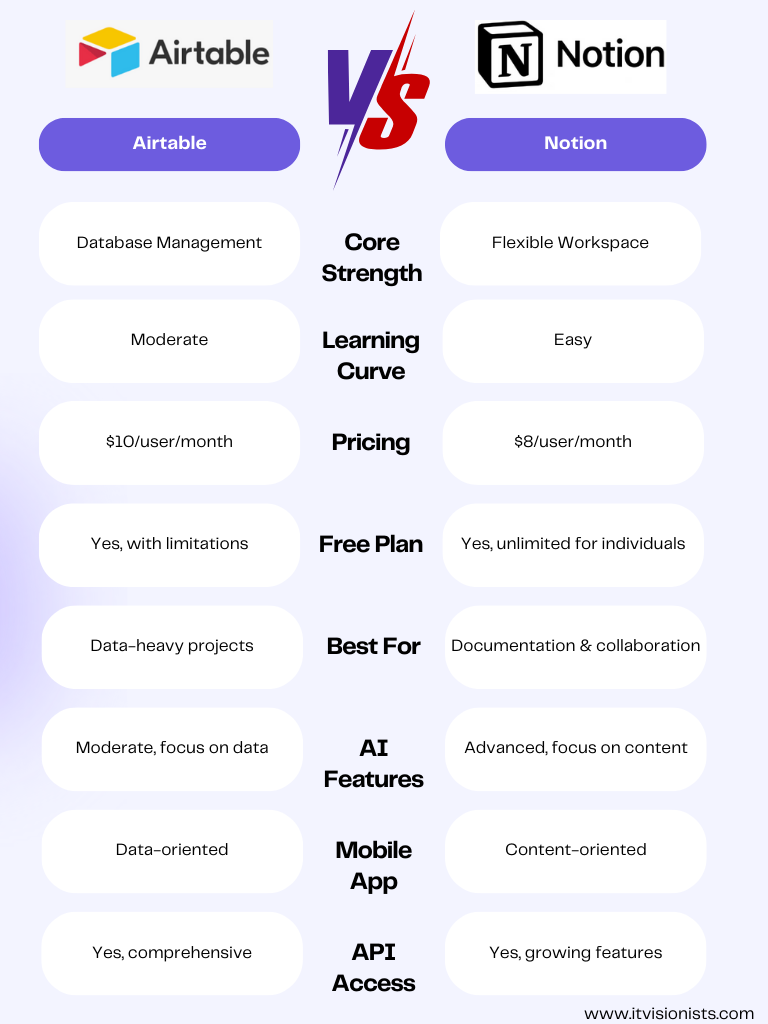
Here’s a quick Airtable vs Notion comparison table to highlight their core strengths:
| Feature | Notion | Airtable |
|---|---|---|
| Ease of Use | ⭐⭐⭐⭐ | ⭐⭐⭐ |
| Text & Docs | Excellent (pages, wikis, notes) | Basic (not its focus) |
| Database Power | Moderate (table-like properties) | Strong (relational database) |
| Automation | Limited | Advanced (triggers, workflows, APIs) |
| Integrations | Zapier, Slack, Google Drive, more | Zapier, API, wide enterprise apps |
| AI Features | Notion AI (content generation, Q&A) | Airtable AI & Cobuilder (data + app building) |
| Collaboration | Great for content teams | Great for data-driven teams |
| Pricing | Free + $8/user/month | Free + $20/user/month |
2. What is Notion?
Notion is an all-in-one productivity tool that combines note-taking, wikis, project management, and lightweight databases.
-
Pages & Blocks: Build content using blocks (text, lists, media, embeds).
-
Templates: Prebuilt templates for wikis, project roadmaps, content calendars.
-
Databases: Tables of pages with properties like tags, due dates, and formulas.
-
Flexibility: Every team uses Notion differently, from personal notes to enterprise knowledge hubs.
Notion is text-first. It’s ideal for documentation, team collaboration, and project planning—but not as strong for heavy data management.
3. What is Airtable?
Airtable is a no-code relational database platform disguised as a spreadsheet. It powers structured data, workflows, and custom app building.
-
Bases, Records, Fields: Organize data with field types (email, phone, dates).
-
Views & Interfaces: Kanban, calendar, gallery, forms, dashboards.
-
Relational Data: Link tables for advanced data models.
-
Cobuilder (2025): AI-powered app builder that creates custom apps instantly.
Airtable is database-first. Perfect for CRM, project tracking, marketing campaigns, inventory management, and internal tools.
4. Airtable vs Notion: Key Feature Comparison
Text & Documentation
-
Notion wins. It’s built for text, wikis, and notes.
-
Airtable handles short text, but it’s clunky for long-form documentation.
Databases & Data Management
-
Airtable wins. Its relational database is powerful, structured, and error-resistant.
-
Notion’s databases work for task lists or directories but lack scalability for large datasets.
Automations & Integrations
-
Airtable wins. Built-in automations, conditional workflows, API support.
-
Notion supports reminders, light automation, but relies heavily on Zapier.
AI Features
-
Notion AI: Best for content creation (summarization, drafting, Q&A). Affordable add-on.
-
Airtable AI: Best for data analysis, workflows, and AI-powered app creation. Higher price.
Custom App Building
-
Airtable wins. Cobuilder allows app creation via natural language.
-
Notion can’t build apps, but third-party integrations help extend its capabilities.
Collaboration
-
Both win. Both tools support real-time collaboration, mentions, permissions, and comments.
-
Notion excels in document collaboration.
-
Airtable excels in data-driven teamwork.
Pricing
-
Notion: Free plan, $8/user/month for Plus, $15/user/month for Business.
-
Airtable: Free plan, $20/seat/month for Team, $45/seat/month for Business.
5. Pros and Cons of Notion
Pros:
-
Flexible all-in-one tool for notes, docs, projects.
-
Easy onboarding for teams.
-
Affordable pricing.
-
Rich template library.
Cons:
-
Limited automation.
-
Databases lack power for complex use cases.
-
Can get messy if not organized.
-
Performance issues on large workspaces.
6. Pros and Cons of Airtable
Pros:
-
Powerful relational database.
-
Automations and workflows built-in.
-
AI app builder (Cobuilder).
-
Customizable views and interfaces.
Cons:
-
Steeper learning curve for non-technical users.
-
Higher cost for AI and premium features.
-
Weak text handling compared to Notion.
7. Airtable vs Notion: Use Cases
-
Choose Notion if:
-
You need a knowledge base or team wiki.
-
You want project planning with text + tasks.
-
You prioritize affordability and simplicity.
-
-
Choose Airtable if:
-
You manage structured data (CRM, marketing campaigns, operations).
-
You want powerful automations and workflows.
-
You need to build internal apps without code.
-
8. Final Verdict: Airtable vs Notion, Which Should You Choose?

It’s not about which is universally better—it’s about fit for purpose.
-
Notion is the best choice if you want a collaborative workspace for text, docs, and lightweight data.
-
Airtable is the best choice if you need structured databases, automation, and custom app-building power.
👉 Many companies use both tools together: Notion for content/documentation, Airtable for data/workflows. Combined, they cover nearly every productivity need.
✅ Bottom line:
-
Notion = Text-first, versatile, affordable
-
Airtable = Database-first, powerful, automation-heavy
📢 CTA Version 1 – Professional & SEO-Friendly
👉 If you found this Airtable vs Notion comparison helpful, don’t forget to visit esapplication.com.
There, you’ll discover more in-depth, unbiased, and up-to-date comparisons of SaaS tools, AI platforms, hosting services, and business growth software.