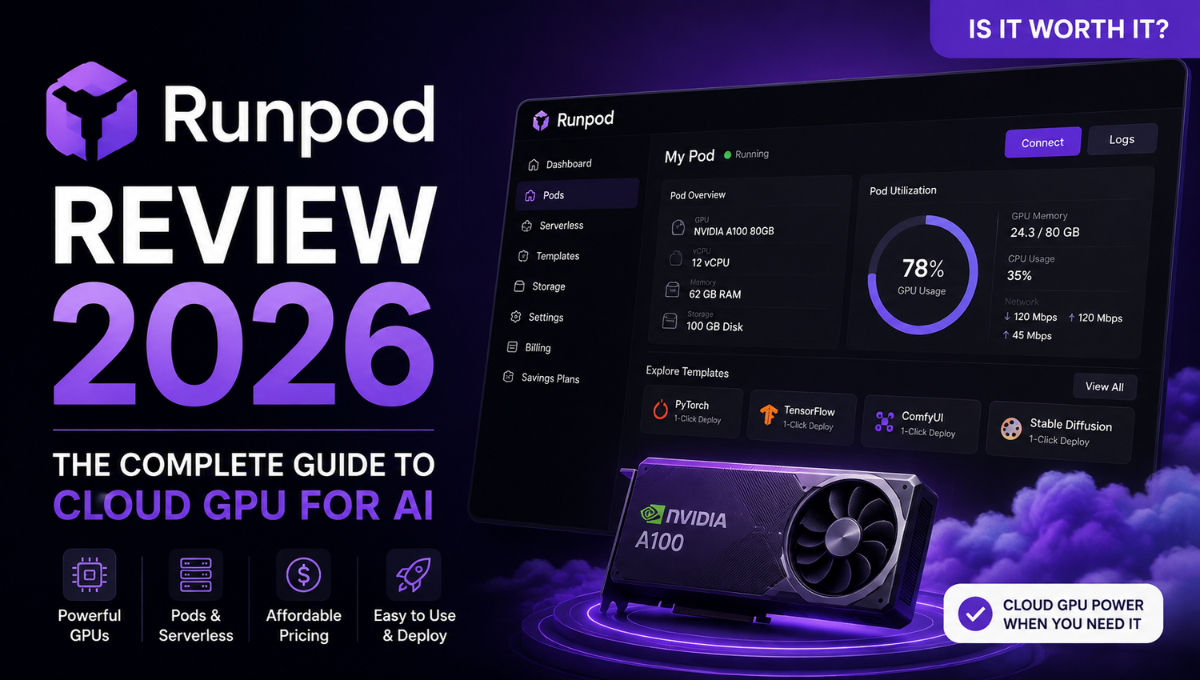
Read our Runpod Review 2026 to explore GPU pricing, Pods, Serverless, performance, pros and cons, and see if Runpod is worth it for AI.
Cloud GPUs have become essential infrastructure for AI developers, but getting access to powerful hardware is still surprisingly complicated.
Buying an NVIDIA GPU locally can require a significant upfront investment. Traditional cloud platforms give developers almost unlimited infrastructure options, but pricing and configuration can quickly become overwhelming. At the other end of the spectrum, cheap GPU marketplaces may offer attractive hourly rates while sacrificing consistency or ease of use.
RunPod sits somewhere in the middle.
It is an AI-focused cloud computing platform built around straightforward access to GPUs. Developers can launch GPU Pods for interactive development and training, deploy models through Serverless endpoints, or scale larger workloads across GPU Clusters.
That combination makes RunPod considerably more interesting in 2026 than a simple “rent a GPU by the hour” service.
But attractive GPU prices alone do not make a good AI cloud.
Storage costs, GPU availability, deployment workflow, cold starts, developer tooling, scalability, and reliability all matter once you move beyond experimentation.
In this RunPod review, we’ll examine how the platform works, its major features, current pricing, Serverless offering, storage model, advantages and limitations, and how it compares with alternatives such as Vast.ai, Lambda, and traditional hyperscalers.
Most importantly, we’ll answer one question:
Is RunPod actually worth using in 2026?
RunPod Review 2026: Quick Verdict
Rating: 4.6/5
RunPod is one of the most compelling GPU cloud platforms for AI developers who want powerful hardware without committing to expensive local GPUs or navigating the complexity of a traditional hyperscaler.
Its biggest strength is flexibility.
For development, experimentation, fine-tuning, rendering, and long-running workloads, you can launch a dedicated GPU Pod and control the container, GPU, storage, and development environment.
For production inference, RunPod Serverless lets developers package applications into containers and expose them through scalable API endpoints while paying for compute as it is consumed.
And for workloads that have outgrown a single machine, RunPod now offers multi-node GPU Clusters.
RunPod is particularly attractive to developers working with generative AI, LLM inference, fine-tuning, ComfyUI, image/video generation, and other GPU-heavy applications.
It isn’t completely beginner-proof, however.
Understanding Docker, storage persistence, VRAM requirements, deployment configuration, and GPU selection will make the experience significantly easier. Developers also need to look beyond the advertised GPU hourly rate when calculating their actual costs.
Best for: AI developers, ML engineers, generative AI developers, researchers and startups.
Biggest advantage: Flexible access to a very broad range of GPUs without long-term commitments.
Biggest drawback: The number of GPU, storage, and deployment options can initially be confusing.
Verdict: If you want substantially more control than a managed AI API but less infrastructure overhead than building an equivalent GPU environment on a hyperscaler, RunPod deserves serious consideration.
What Is RunPod?
RunPod is a cloud computing platform designed specifically around AI and GPU-intensive workloads.
Instead of buying an expensive workstation or configuring generic cloud infrastructure, developers can rent GPU compute and deploy their own applications, containers and models.
RunPod currently organizes its compute offering around three major products:
GPU Pods
Pods are dedicated GPU instances.
They are best suited to development, experimentation, training, fine-tuning, batch processing and other workloads where you want direct access to a persistent computing environment.
A Pod can be accessed through tools such as SSH, JupyterLab or VS Code.
RunPod also provides templates that package commonly used environments and dependencies, reducing the amount of manual configuration required before you can start working.
Serverless
RunPod Serverless targets AI inference and event-driven GPU workloads.
Instead of maintaining an always-running GPU instance, developers deploy containerized workers behind an endpoint. Workers can scale according to demand, including scaling to zero when appropriate.
This model can make considerably more sense for applications with unpredictable or intermittent traffic.
Clusters
Clusters address larger workloads requiring multiple GPU nodes.
They are designed for distributed training, large batch workloads and other jobs that cannot efficiently fit onto a single machine.
Together, these products give developers a path from experimentation to production without necessarily moving to another cloud provider.
How RunPod Works
The basic RunPod workflow is relatively straightforward.
For a traditional GPU Pod, you select the GPU configuration appropriate for your workload, choose a template or container image, configure storage and launch the instance.
Once provisioned, the Pod behaves much like a remote GPU development machine.
Developers can connect using SSH, work inside JupyterLab, integrate their development environment or run containerized applications directly.
RunPod’s templates are particularly useful here.
Rather than starting with an empty Linux machine and manually installing NVIDIA drivers, CUDA libraries, frameworks and dependencies, a developer can start from a preconfigured environment.
The Serverless workflow is different.
You package your inference application as a container, create a Serverless endpoint and configure worker behavior. Applications then submit requests to the endpoint instead of communicating with a permanently running VM.
RunPod supports both queue-based endpoints and load-balanced configurations, giving developers options for asynchronous jobs as well as applications requiring direct HTTP access.
That distinction is important because RunPod is not simply selling remote desktops with GPUs attached.
The platform can cover both the experimentation stage and the infrastructure required to expose AI workloads as production services.
GPU Selection: One of RunPod’s Biggest Strengths
Hardware selection is one of the strongest reasons to consider RunPod.
As of 2026, the platform offers GPUs ranging from relatively affordable cards for smaller inference workloads to high-end accelerators designed for demanding AI training and inference.
The available catalog includes hardware across NVIDIA’s RTX, A-series, L-series, H-series and newer data-center GPU families.
That flexibility matters because the most powerful GPU isn’t automatically the best GPU for every AI workload.
For example, developers experimenting with Stable Diffusion, ComfyUI or smaller inference workloads may find a high-end consumer/prosumer GPU more economical than renting an H100.
LLMs and larger inference workloads can require substantially more VRAM.
Training or fine-tuning large models may justify A100, H100, H200 or newer accelerators depending on memory requirements, framework support and workload scale.
The important advantage is choice.
Instead of designing your application around one or two available GPU types, RunPod gives you room to balance:
- VRAM
- GPU performance
- availability
- workload duration
- and hourly cost.
For developers who understand their workload, that can produce substantial efficiency gains.
RunPod Pods Review
Pods are probably the easiest place to start with RunPod.
Think of a Pod as a configurable remote GPU machine built specifically for compute-intensive development.
You choose the hardware, deploy an environment and then work with it much as you would a remote development server.
This makes Pods particularly useful for:
- AI model experimentation
- fine-tuning
- training
- ComfyUI
- Stable Diffusion and Flux workflows
- LLM inference
- rendering
- notebooks
- batch processing
- custom Docker workloads.
One particularly useful feature is the ability to connect through familiar developer tools rather than being forced into a proprietary interface.
RunPod supports SSH, JupyterLab and VS Code-oriented workflows.
Templates also make common AI environments significantly easier to deploy.
For example, a PyTorch template can eliminate much of the initial environment setup required on a generic cloud VM.
This is where RunPod feels considerably more developer-focused than traditional infrastructure platforms.
You still retain substantial control over your environment, but much of the tedious GPU provisioning work has already been handled.
The Catch
That flexibility still requires some technical knowledge.
If concepts such as Docker images, ports, persistent volumes, CUDA versions and VRAM requirements are completely unfamiliar, RunPod can initially feel more complicated than a fully managed AI service.
It is easier than manually constructing comparable GPU infrastructure from scratch, but it isn’t intended to hide every infrastructure decision from you.
For AI developers, that is usually a reasonable trade-off.
RunPod Serverless Review
Serverless may be the most important part of RunPod for developers building production AI applications.
Running a GPU continuously is easy to understand:
Launch GPU → run application → pay while GPU remains active.
But that model becomes inefficient when an application receives sporadic requests.
Imagine an AI application that receives heavy traffic for ten minutes and then almost nothing for the next hour.
Keeping an expensive GPU active throughout that idle period wastes money.
RunPod Serverless addresses this by running containerized GPU workers that can scale according to incoming demand.
Flex workers can scale down when they aren’t needed, while active workers can remain warm for applications where latency matters more than minimizing idle compute.
RunPod bills Serverless compute per second.
The platform also advertises its FlashBoot technology for reducing cold-start times.
For developers, the attraction is clear:
You maintain control over your container and model stack without having to manually manage every GPU server behind the application.
Where Serverless Makes Sense
Serverless is particularly attractive for:
- AI APIs
- image generation services
- asynchronous inference jobs
- LLM applications
- variable-traffic applications
- background AI processing
- SaaS products using GPU inference.
It is less obviously beneficial when your GPU is going to remain busy almost continuously.
In that scenario, comparing Serverless costs against a dedicated Pod becomes important.
This is one of the key principles when evaluating RunPod:
Choose infrastructure based on workload behavior, not simply the cheapest advertised GPU price.
RunPod Pricing 2026: How Much Does RunPod Really Cost?
RunPod uses a flexible pricing model designed for everything from individual AI developers renting a single GPU to teams deploying serverless inference and enterprises running large multi-node clusters.
Instead of having one simple pricing table, RunPod currently divides its pricing into six main categories: Pods, Serverless, Clusters, Reserved Clusters, Storage, and Public Endpoints.
Here is how each option works.
1. RunPod Pods Pricing
GPU Pods are dedicated GPU instances and will probably be the most relevant option for individual AI developers.
They are designed for workloads such as model development, training, fine-tuning, ComfyUI, Stable Diffusion, LLM inference, notebooks, and other GPU-intensive applications.
RunPod offers a large selection of NVIDIA GPUs at different price and performance levels.
| GPU | VRAM | Pod Price |
|---|---|---|
| RTX A5000 | 24 GB | $0.27/hr |
| L4 | 24 GB | $0.39/hr |
| A40 | 48 GB | $0.44/hr |
| RTX 3090 | 24 GB | $0.50/hr |
| RTX A6000 | 48 GB | $0.53/hr |
| RTX 4090 | 24 GB | $0.69/hr |
| RTX 6000 Ada | 48 GB | $0.84/hr |
| RTX 5090 | 32 GB | $0.99/hr |
| L40S | 48 GB | $0.99/hr |
| A100 PCIe | 80 GB | $1.39/hr |
| A100 SXM | 80 GB | $1.49/hr |
| RTX Pro 6000 | 96 GB | $1.99/hr |
| H100 PCIe | 80 GB | $2.89/hr |
| H100 SXM | 80 GB | $2.99/hr |
| H200 | 141 GB | $4.39/hr |
| B200 | 180 GB | $5.89/hr |
| B300 | 288 GB | $7.39/hr |
The wide range is important because AI developers don’t always need the most powerful GPU available.
An RTX 4090 or A40 may offer excellent value for image generation and smaller inference workloads, while A100, H100, H200, B200, and B300 configurations target increasingly demanding models and training workloads.
The ability to choose hardware based on VRAM, performance, and budget is one of RunPod’s strongest pricing advantages.
2. RunPod Serverless Pricing
RunPod Serverless is designed primarily for AI inference and applications where GPU demand changes over time.
Instead of maintaining a dedicated GPU instance, developers deploy workers that process incoming requests.
RunPod bills Serverless GPU usage by the second.
| Serverless GPU | VRAM | Price |
|---|---|---|
| A4000/A4500/RTX 4000/RTX 2000 | 16 GB | $0.58/hr |
| L4/A5000/3090/MIG | 24 GB | $0.69/hr |
| RTX 4090 | 24 GB | $1.10/hr |
| RTX PRO 4500 Blackwell | 32 GB | $1.15/hr |
| A6000/A40 | 48 GB | $1.22/hr |
| RTX 5090 | 32 GB | $1.58/hr |
| L40/L40S/6000 Ada/MIG | 48 GB | $1.75/hr |
| A100 | 80 GB | $2.72/hr |
| RTX 6000 Pro | 96 GB | $3.49/hr |
| H100 | 80 GB | $4.55/hr |
| H200 | 140 GB | $5.93/hr |
| B200 | 180 GB | $8.64/hr |
| B300 | 280 GB | $9.98/hr |
Serverless rates can appear higher than Pod rates for similar GPUs, but the comparison isn’t one-to-one.
With Flex workers, compute can scale down when there are no requests. That can make Serverless more economical for APIs and applications with irregular traffic because you don’t necessarily need to pay for an idle GPU.
3. RunPod Clusters Pricing
Clusters are designed for large AI workloads that need multiple interconnected GPUs or nodes.
RunPod currently lists on-demand pricing including:
| GPU | Cluster Price |
|---|---|
| A100 SXM | $1.79/hr |
| H200 SXM | $4.31/hr |
| L40S | Contact RunPod |
| H100 SXM | Contact RunPod |
| B200 | Contact RunPod |
RunPod Clusters can scale to as many as 64 GPUs, making them more relevant to distributed training, large-scale inference, and demanding AI research than typical individual development projects.
4. RunPod Reserved Clusters Pricing
Reserved Clusters target organizations that need dedicated GPU capacity for longer periods rather than purely on-demand infrastructure.
RunPod offers reservation periods including:
1 month, 3 months, 6 months, and 12+ months.
Unlike regular Pods, there isn’t one universal public hourly rate for every Reserved Cluster configuration.
Pricing depends on factors such as:
- GPU model
- number of GPUs
- reservation duration
- infrastructure requirements
- deployment configuration.
Customers therefore need to contact RunPod for a custom quote.
Reserved Clusters are primarily relevant to enterprises and AI teams with predictable, sustained GPU demand. The longer-term commitment can provide more predictable capacity than relying entirely on on-demand availability.
5. RunPod Storage Pricing
Storage is easy to overlook when comparing GPU providers, but it contributes to the real cost of running AI workloads.
RunPod currently lists several storage options:
| Storage | Price |
|---|---|
| Container Disk | $0.10/GB/month |
| Volume Disk – Running | $0.10/GB/month |
| Volume Disk – Idle | $0.20/GB/month |
| Standard Network Storage – under 1 TB | $0.07/GB/month |
| Standard Network Storage – over 1 TB | $0.05/GB/month |
| High-Performance Network Storage | $0.14/GB/month |
Persistent storage becomes particularly important when working with large models and datasets.
Instead of repeatedly downloading model weights whenever compute is recreated, developers can keep important files in persistent storage and attach them to compute when needed.
For this reason, the true cost of RunPod should be calculated as:
GPU compute + storage + runtime + workload architecture = total cost.
6. RunPod Public Endpoints Pricing
Public Endpoints are different from renting a GPU directly.
Instead of provisioning infrastructure yourself, developers can call pre-deployed AI models through an API and pay according to usage.
RunPod’s Public Endpoints catalog includes models for workloads such as text generation, image generation, speech, embeddings, and other AI tasks.
Pricing depends on the individual model and may be calculated using units such as:
- input tokens
- output tokens
- generated images
- characters
- or API requests.
This makes Public Endpoints useful when you simply want access to an AI model without managing the underlying GPU infrastructure yourself.
For developers, the decision is essentially:
Pods → maximum control over a dedicated GPU environment.
Serverless → deploy your own scalable inference workloads.
Clusters → scale across multiple GPUs/nodes.
Reserved Clusters → dedicated long-term GPU capacity.
Storage → persist models, datasets, and application data.
Public Endpoints → call ready-to-use AI models without managing GPUs.
Is RunPod Expensive?
RunPod can offer very good value, but there is no single answer to whether it is “cheap.”
The right comparison depends on what you’re building.
A developer experimenting with ComfyUI for a few hours may get excellent value from an RTX-class Pod.
A production AI API with unpredictable traffic may benefit more from Serverless because workers can scale according to demand.
A research team training very large models may need Clusters or Reserved Clusters.
And a developer who simply wants to call an existing model may not need to rent a GPU at all—Public Endpoints could be more convenient.
That flexibility is one of the biggest strengths of RunPod’s pricing model.
Rather than forcing every AI workload into the same infrastructure model, RunPod lets developers choose how much control, scalability, and dedicated compute they actually need.
Our verdict on RunPod pricing: RunPod offers one of the more flexible GPU pricing structures available to AI developers. However, don’t judge the platform by GPU hourly rates alone. The best value comes from matching the right GPU, compute model, and storage configuration to your actual workload.
Storage: Don’t Ignore This Part
Storage is one of the areas new RunPod users should understand before deploying serious workloads.
Not all storage behaves the same way.
In Serverless environments, container disk storage is temporary. Data stored there disappears when the worker stops or scales down.
That makes it suitable for temporary files and processing but not for information that must survive across worker sessions.
For persistent data, RunPod provides Network Volumes.
These exist independently of compute resources and can therefore retain models, datasets and other files even when the associated compute instance is terminated or scales down.
At the time of writing, RunPod prices Network Volumes at $0.07/GB/month for the first 1 TB and $0.05/GB/month beyond that.
RunPod also provides S3-compatible access for supported Network Volumes.
For developers working with models that may consume tens or hundreds of gigabytes, understanding storage architecture before deployment is essential.
The GPU’s hourly rate is only one component of total infrastructure cost.
Developer Experience: API, CLI and Automation
RunPod becomes more interesting when you move beyond its web dashboard.
Its REST API provides programmatic management of infrastructure including:
- Pods
- Serverless endpoints
- Network Volumes
- Templates
- container registry authentication
- billing information.
There is also a command-line interface, runpodctl, for managing resources directly from a local development environment.
This matters for teams that want infrastructure to become part of their application workflow rather than something manually configured through a dashboard.
For example, development teams can programmatically create GPU resources, deploy predefined configurations, manage storage and integrate RunPod infrastructure into automated systems.
Combined with Docker support, this gives developers considerably more freedom than platforms that only provide access to a fixed catalog of hosted models.
You’re renting infrastructure for your AI stack, rather than simply calling somebody else’s model API.
RunPod for ComfyUI and Generative AI
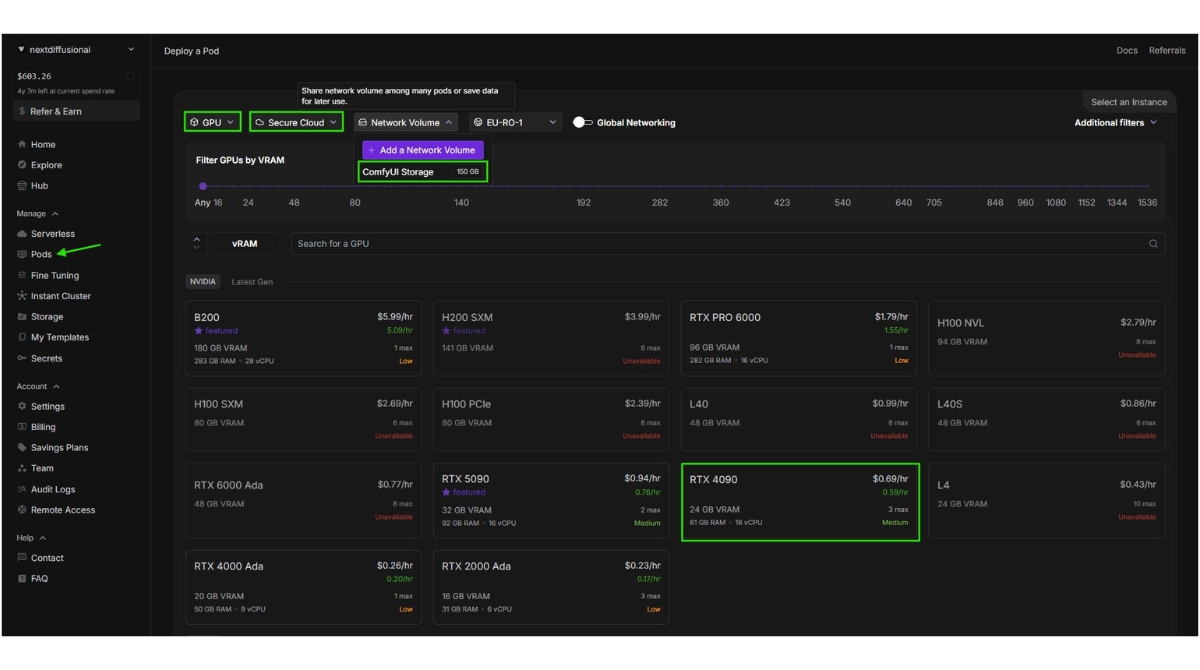
RunPod has become particularly popular for GPU-intensive generative AI workflows.
ComfyUI is a good example of why.
Complex image and video generation workflows can quickly exceed the capabilities of laptops or lower-end local GPUs. Buying a powerful GPU workstation just to experiment with those workflows may not make economic sense.
A cloud GPU allows developers and creators to access significantly more compute only when they need it.
RunPod’s Pod model fits this use case well because you can deploy a GPU environment, configure your workflow, perform generations and terminate compute afterward.
Serverless can also be interesting when a ComfyUI workflow needs to become part of an application rather than remain an interactive development environment.
RunPod’s documentation includes a dedicated Serverless ComfyUI workflow, reflecting how important generative AI has become to the platform.
The key advantage is therefore not simply “RunPod runs ComfyUI.”
Many GPU clouds can do that.
The advantage is the ability to move from interactive experimentation toward API-based deployment while remaining inside the same infrastructure ecosystem.
Performance and Reliability
GPU specifications tell only part of the story.
For development workloads, deployment time, storage performance, networking, GPU availability and environment consistency can all affect productivity.
RunPod advertises rapid Pod provisioning and currently operates GPU infrastructure across numerous global regions.
Its architecture also provides options such as private networking between Pods, while higher-scale workloads can move into Clusters.
However, developers should still treat availability as an infrastructure consideration.
A particular GPU configuration may not always be equally available in every region, especially when demand for high-end AI accelerators is strong.
For mission-critical production systems, infrastructure planning should therefore include redundancy, capacity requirements and the consequences of a particular GPU type becoming temporarily unavailable.
RunPod gives developers considerable flexibility, but flexibility does not eliminate the need for production architecture.
RunPod Pros and Cons
Pros
Excellent GPU selection
Developers can choose hardware based on workload requirements instead of overpaying for unnecessarily powerful GPUs.
Flexible deployment models
Pods, Serverless and Clusters cover development, inference and larger distributed workloads.
Developer-focused experience
Docker, SSH, JupyterLab, VS Code workflows, API access and CLI tooling make RunPod suitable for technical users.
Per-second billing
Fine-grained billing is particularly useful for short-running workloads.
Serverless scale-to-zero
Applications with intermittent demand can avoid paying for idle Flex workers.
Persistent storage options
Network Volumes make it possible to separate persistent data from temporary compute.
Cons
Learning curve
RunPod is approachable for developers but can still be intimidating to users without cloud or container experience.
Cost requires more than looking at GPU rates
Storage, runtime and architecture influence the final bill.
GPU availability can vary
Specific GPUs and locations may not always have identical capacity.
Infrastructure knowledge still matters
RunPod simplifies GPU infrastructure; it doesn’t completely abstract it away.
RunPod vs Vast.ai vs Lambda vs AWS
Choosing a GPU provider depends heavily on what you value.
RunPod vs Vast.ai
Vast.ai is attractive to users whose highest priority is finding inexpensive marketplace GPU capacity.
RunPod generally provides a more streamlined developer experience and a clearer path from interactive GPU instances to Serverless deployment.
Choose RunPod: when developer experience, deployment flexibility and production inference matter.
Consider Vast.ai: when marketplace pricing is your dominant concern and you’re comfortable managing more variability.
RunPod vs Lambda
Lambda has a strong reputation in AI infrastructure and is particularly relevant to teams interested in dedicated GPU cloud environments.
RunPod’s appeal is its combination of accessible Pods, broad GPU selection and Serverless infrastructure.
The better choice depends on workload, required hardware and availability rather than brand alone.
RunPod vs AWS
AWS offers an enormous ecosystem that extends far beyond GPUs.
That makes it powerful for organizations already deeply integrated with AWS services.
The downside is complexity.
For an AI developer whose primary goal is simply to deploy a GPU workload quickly, RunPod can offer a much more focused experience.
AWS makes sense when you need the wider AWS ecosystem, enterprise integrations and sophisticated cloud architecture.
RunPod makes sense when GPU compute itself is the center of the project.
Who Should Use RunPod?
RunPod is particularly well suited to:
AI developers who need temporary or scalable GPU resources.
ML engineers working on inference, training and fine-tuning.
Generative AI developers running ComfyUI, Stable Diffusion, Flux or similar GPU-heavy workflows.
Startups that need GPU infrastructure without purchasing hardware.
Researchers who periodically require powerful accelerators.
SaaS developers who want to deploy custom models behind scalable APIs.
It is also compelling for developers who have outgrown their local GPU but aren’t ready to build a complex hyperscaler infrastructure stack.
Who Should Avoid RunPod?
RunPod isn’t necessarily the right choice for everyone.
Absolute beginners looking for a one-click consumer AI application may find the platform unnecessarily technical.
Companies deeply integrated into AWS, Azure or Google Cloud may also benefit more from keeping their GPU infrastructure within their existing ecosystem.
And if your only requirement is calling a mainstream AI model through an API, renting and managing GPU infrastructure may be unnecessary altogether.
RunPod makes the most sense when you actually need control over the model, runtime or underlying compute.
Is RunPod Worth It in 2026?
For the right developer, yes.
RunPod occupies an attractive position in the AI infrastructure market.
It provides significantly more control than a managed AI API while removing much of the friction involved in obtaining and configuring GPU infrastructure yourself.
Pods make experimentation straightforward.
Serverless provides a logical route toward production inference.
Clusters extend the platform to workloads requiring multi-node compute.
And the broad GPU catalog allows developers to select hardware based on actual requirements rather than being locked into a limited set of instances.
Its biggest weakness is also a consequence of that flexibility: developers still need to make intelligent infrastructure decisions.
You need to understand your model’s VRAM requirements, storage behavior, workload duration and traffic pattern.
But for AI developers, those are usually reasonable responsibilities in exchange for the level of control RunPod provides.
Final Verdict
RunPod has evolved beyond being simply a place to rent an inexpensive GPU.
In 2026, it is better understood as an AI developer cloud covering experimentation, training, fine-tuning, inference and increasingly larger distributed workloads.
The combination of dedicated GPU Pods, autoscaling Serverless infrastructure, persistent storage, APIs, developer tooling and multi-node Clusters gives RunPod a compelling development-to-production story.
It isn’t the only good GPU cloud, and it won’t be the cheapest option for every workload.
But it strikes an unusually strong balance between price, control, hardware choice and developer experience.
For AI developers who need direct access to serious GPU compute without the complexity of a traditional hyperscaler, RunPod is one of the strongest platforms to evaluate in 2026.
Overall Rating: 4.6/5
Recommended for: AI developers, ML engineers, generative AI builders and GPU-intensive startups.
RunPod FAQ
Is RunPod legit?
Yes. RunPod is an established GPU cloud platform providing GPU Pods, Serverless infrastructure and multi-node Clusters for AI workloads. Its services are aimed at developers, researchers and organizations that need on-demand GPU compute.
Is RunPod good for AI developers?
Yes. AI developers are arguably RunPod’s core audience. The platform supports Docker containers, SSH, JupyterLab, APIs, CLI tooling, persistent storage and a wide range of NVIDIA GPUs.
Is RunPod good for ComfyUI?
RunPod is well suited to ComfyUI because developers can run GPU-intensive workflows without purchasing high-end local hardware. RunPod also documents Serverless deployment for ComfyUI workloads.
Does RunPod offer Serverless GPUs?
Yes. RunPod Serverless allows developers to deploy containerized GPU workers behind endpoints and automatically scale compute according to demand.
Does RunPod charge when my Serverless application is idle?
Flex workers can scale to zero, allowing applications to avoid ongoing GPU compute charges when no worker is required. Developers can also configure active workers when keeping capacity warm is important for latency.
Does RunPod provide persistent storage?
Yes. Network Volumes persist independently of compute resources. This is important because temporary Serverless container storage disappears when a worker stops or scales down.
Is RunPod better than Vast.ai?
Neither platform is universally better. Vast.ai can be attractive for price-focused marketplace GPU rentals, while RunPod offers a more integrated developer experience spanning Pods, Serverless and Clusters.
Is RunPod better than AWS for AI?
It depends on the project. RunPod is more focused and can be easier for developers primarily interested in GPU workloads. AWS provides a much larger cloud ecosystem and may be preferable for organizations that need deep integration with other AWS services.
Can I use RunPod for LLMs?
Yes. RunPod GPUs can be used for LLM inference, fine-tuning and other model workloads. The appropriate GPU depends heavily on model size, quantization, context requirements and expected traffic.
Is RunPod worth trying?
If your AI project requires direct access to GPUs, custom containers or scalable inference infrastructure, RunPod is absolutely worth evaluating. Its combination of GPU choice, flexible deployment options and developer tooling makes it one of the more interesting AI-focused cloud platforms in 2026.