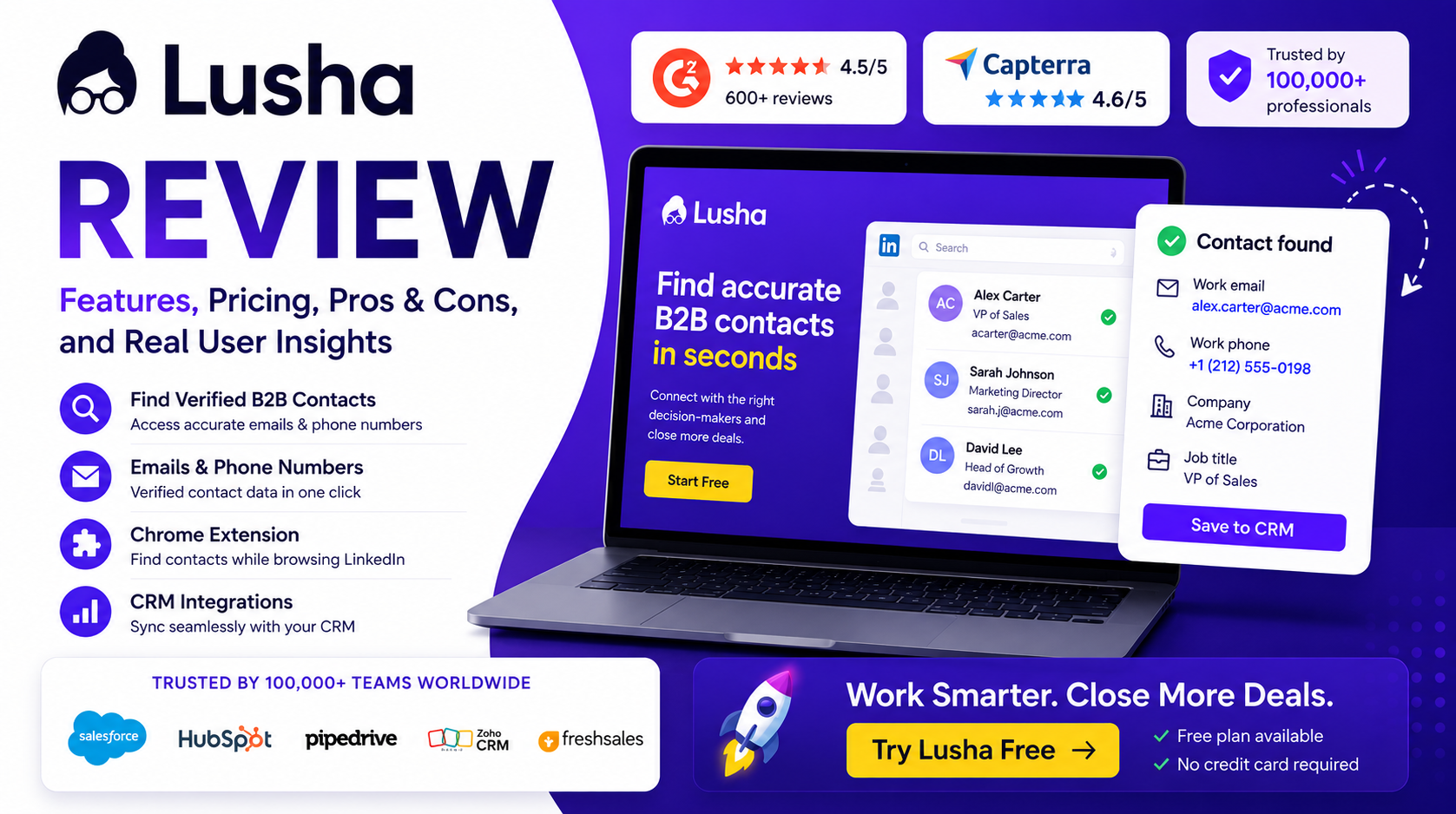
Lusha Review: Looking for a better way to find accurate B2B contacts and improve your sales workflow? This detailed review explores how Lusha helps teams reduce manual prospecting and discover business contacts faster.
Learn about key features, real user experiences, strengths, limitations, and workflow benefits. We also break down Lusha pricing, compare popular alternatives, and explain whether the platform delivers enough value for recruiters, agencies, startups, and sales teams.
Read before making your decision and see whether Lusha is worth your investment in 2026.
https://esapplication.com/lusha-review-2026
Lusha Review 2026: Features, Pricing, Pros, Cons & Alternatives
Finding leads is easy.
Finding accurate leads is where things become difficult.
Sales teams today already have access to LinkedIn, company websites, CRM platforms, and countless databases. Yet many businesses still spend hours searching for decision-makers, verifying contact information, and manually updating prospect lists.
The process usually looks simple at first.
Search for a company. Open a LinkedIn profile. Find an email address. Verify information. Copy details into a CRM system. Then repeat the same process dozens of times every day.
Over time, those small actions create a surprising amount of wasted effort.
Instead of focusing on conversations and closing deals, sales representatives often spend valuable time handling repetitive tasks.
This is where Lusha enters the picture.
Lusha is a B2B sales intelligence and lead generation platform designed to help users discover business contacts, enrich lead information, and simplify prospecting workflows. Rather than forcing users to jump between multiple tools, it attempts to bring contact discovery and prospect research into a faster and more efficient process.
But with competitors such as Apollo, ZoomInfo, and Cognism offering similar solutions, an important question remains:
Is Lusha actually worth using in 2026?
What Is Lusha?
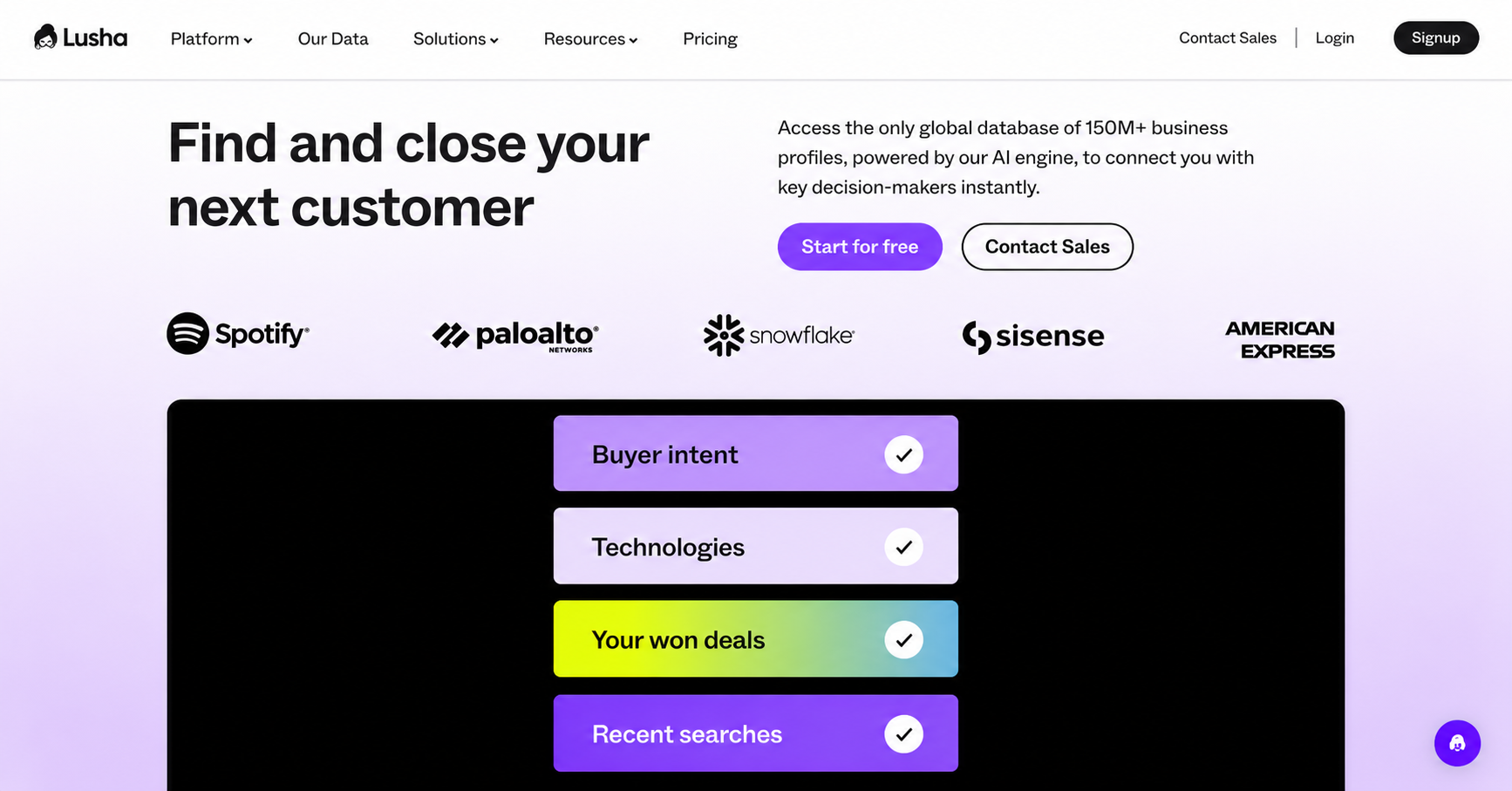

Lusha is a cloud-based B2B sales intelligence and lead generation platform designed to help businesses discover professional contact information and simplify prospecting workflows.
At its core, Lusha helps users find:
• Business email addresses
• Direct phone numbers
• Company information
• Employee details
• Prospect insights
• Lead enrichment data
Many people initially think of Lusha as simply an email finder tool.
However, after looking deeper, that description feels incomplete.
The platform is really designed to reduce the amount of manual work involved in finding and organizing prospect data. Instead of opening multiple tabs, searching company websites, copying information into spreadsheets, and manually updating CRM systems, users can access much of that information from one place.
That efficiency becomes valuable very quickly.
For example, imagine a sales representative researching dozens of potential customers every day. Even if each prospect only requires a few minutes of research, those small tasks gradually become hours of repetitive work every week.
Lusha attempts to reduce that friction.
Rather than replacing existing sales processes, the platform works as an accelerator that helps teams move from prospect discovery to outreach more quickly.
Throughout this Lusha Review, one thing becomes clear: the platform is not necessarily trying to become the largest contact database in the market.
Instead, it focuses heavily on usability and speed.
For many users, especially sales teams, recruiters, agencies, and growing startups, saving time may become more valuable than having endless features.
As this Lusha Review continues, we’ll examine whether that focus on simplicity actually creates enough value to justify the cost.
Key Features
Features are often the section where software reviews become repetitive. Many articles simply copy information directly from a product page and create a list of capabilities without explaining why those features matter in real situations.
The problem with that approach is simple: buyers rarely care about feature lists alone.
Most users are not asking:
“What does this platform include?”
They are asking:
“Will this platform actually help me work faster and generate better results?”
That question becomes much more important when evaluating a prospecting platform like Lusha.
Throughout this Lusha Review, one thing becomes increasingly obvious: Lusha does not appear to focus on becoming the largest or most complicated sales platform in the market. Instead, the platform concentrates heavily on reducing friction during prospecting and making the process of finding, organizing, and managing leads feel faster.
Individually, many of its features may look relatively simple. However, when these features work together inside a workflow, the value becomes easier to understand.
Chrome Extension
The Chrome extension is arguably one of the strongest features inside Lusha because it changes the way prospecting happens in daily work.
On paper, the functionality sounds simple. Users install the extension, open LinkedIn or Sales Navigator, and reveal contact information directly from the page. However, the real benefit goes much further than displaying business emails or phone numbers.
Without browser-based prospecting tools, many sales representatives repeat nearly identical actions every day. They search LinkedIn for decision-makers, visit company websites, verify information manually, copy contact details into spreadsheets, and eventually transfer everything into a CRM system.
None of these actions are difficult by themselves.
The issue appears when those actions are repeated fifty or one hundred times every day.
Lusha attempts to reduce that friction by allowing users to access information without interrupting their workflow. Instead of opening multiple tabs and switching constantly between tools, users can continue prospecting inside their existing environment.
For SDR teams handling large outbound campaigns, even small workflow improvements become valuable over time. Saving one minute per prospect may not sound significant initially, but over weeks and months those savings become noticeable.
Contact Database And Data Quality
Contact databases usually become one of the main selling points for sales intelligence platforms.
Many companies compete using large numbers:
Millions of contacts.
Millions of companies.
Millions of records.
While these statistics sound impressive, database size alone rarely guarantees better results.
Most teams do not actually need millions of contacts.
They need the right contacts.
Lusha combines business contact information with company-level data and enrichment capabilities designed to help users identify decision-makers more efficiently. Users can access business emails, direct phone numbers, company details, job roles, industry information, and other attributes that help create more targeted prospect lists.
However, one reality applies to every contact database:
Perfect accuracy does not exist.
People change jobs regularly. Companies grow and reorganize. Phone numbers become inactive and email addresses eventually change.
Because of this, the practical value of a database should not be measured only by size. A better question becomes:
“Does the platform reduce enough manual research to improve productivity?”
For many users, that answer may matter more than total record count.
Buying Signals And Intent Data
Finding the right contact is only part of the prospecting process.
Timing matters just as much.
Even highly relevant contacts may produce weak results if there is no current need for a product or service.
Lusha attempts to improve this process through intent signals and activity-based indicators designed to help users identify businesses showing stronger levels of interest or growth.
Examples may include hiring activity, funding announcements, company expansion, job changes, and technology shifts.
These signals help users move beyond basic prospect lists.
Instead of asking:
“Who should I contact?”
Users begin asking:
“Who should I contact right now?”
Intent signals should not be viewed as predicting future purchases with certainty. Instead, they improve prioritization and help teams focus attention on accounts that may create stronger opportunities.
CRM Integrations And Workflow Automation
Modern sales teams rarely operate inside a single system.
Most workflows involve multiple tools including CRM systems, email platforms, reporting software, and outreach applications.
Without integrations, manual work slowly returns.
Teams eventually find themselves exporting spreadsheets, importing CSV files, updating records manually, and transferring information repeatedly between systems.
Lusha attempts to reduce these repetitive processes through CRM integrations and enrichment capabilities.
By connecting with platforms such as Salesforce, HubSpot, Outreach, and other systems, users can synchronize contact information and maintain cleaner workflows without repeatedly entering data manually.
Throughout this Lusha Review, a recurring pattern appears repeatedly:
Most individual features inside Lusha may not look revolutionary on their own. However, when combined together, they create a smoother workflow that allows users to spend less time managing data and more time building relationships and generating revenue.
Lusha Pricing
Pricing is usually the point where software starts feeling either like an investment or just another monthly expense.
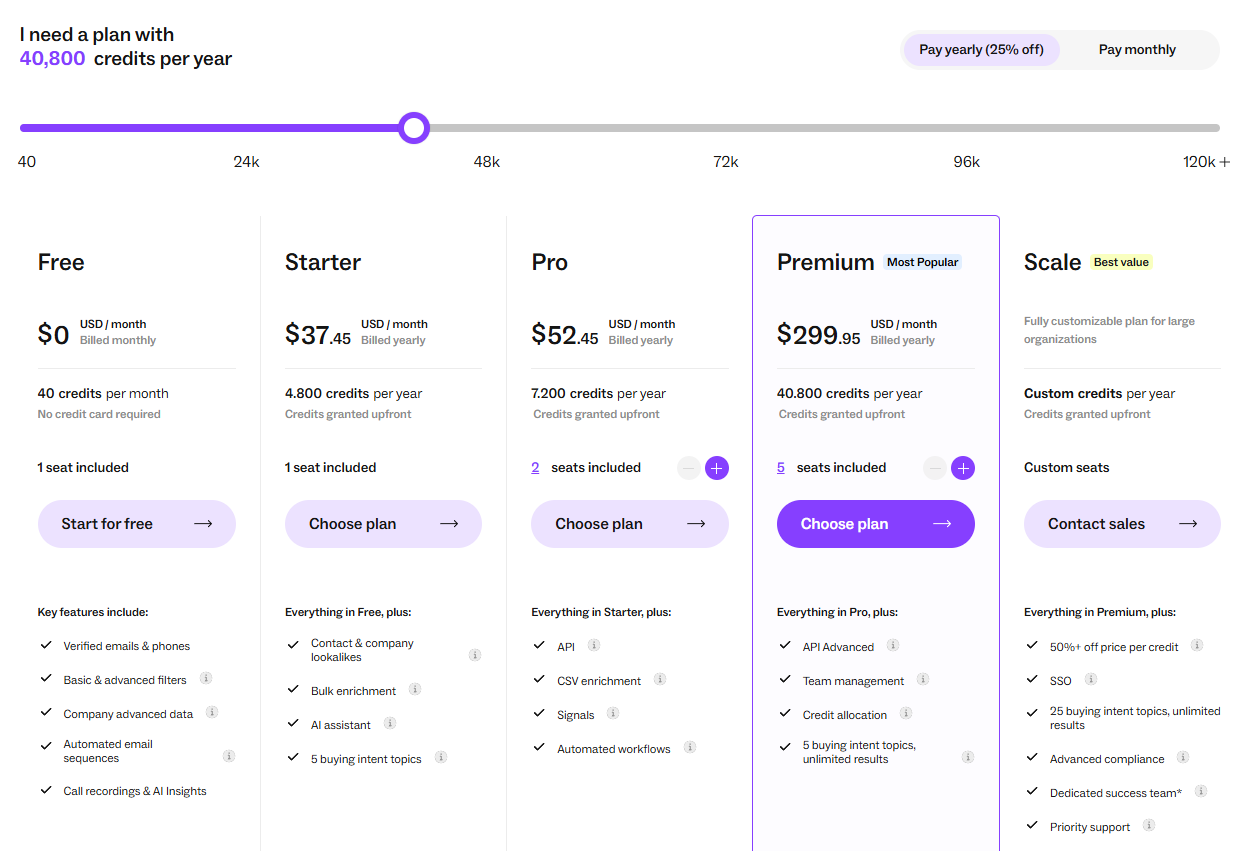
Lusha sits somewhere in the middle because the platform does not work like a traditional subscription tool. Instead of paying only for access, users also need to think about credits. The amount of prospecting activity your team performs can have a noticeable impact on overall value.
Lusha currently offers several pricing tiers designed for different stages of growth, starting with a Free plan and moving toward larger plans intended for teams and enterprise environments. The Free option gives users a chance to test the Chrome extension, evaluate contact quality, and understand how the workflow feels before making a financial commitment. Paid plans expand on that by increasing credits and unlocking additional features. (Lusha)
As plans grow, users generally gain access to:
• Higher credit limits
• Team collaboration features
• Prospecting tools
• CRM enrichment capabilities
• Automation workflows
• Advanced support options
The interesting part is that pricing feels different depending on who is using the platform.
For example, imagine a recruiter looking for a handful of candidates each week. In that situation, the available usage may feel comfortable, and the time saved on manual research could quickly justify the cost.
Now compare that with an outbound sales team researching hundreds of contacts every month. Suddenly the conversation changes. Teams are no longer looking only at subscription cost; they start thinking about usage volume, workflow efficiency, and whether the plan still matches the way they operate.
That is probably where most buying decisions happen.
People rarely purchase tools because of pricing pages alone. They buy them because they believe those tools will save time, reduce repetitive work, and improve productivity.
For users searching for a Lusha Review, pricing should probably be evaluated from that perspective rather than focusing only on monthly numbers.
Mini Verdict:
Lusha pricing can feel reasonable for recruiters, agencies, startups, and smaller sales teams because workflow improvements become visible fairly quickly. Teams handling high-volume prospecting should estimate expected usage before committing to a long-term plan.
Pros and Cons
Every prospecting platform comes with strengths and trade-offs, and Lusha is no different. After analyzing features, workflows, and everyday usability for this Lusha Review, some patterns become easier to identify. The platform appears to create its biggest advantages through simplicity and workflow efficiency rather than through an extensive list of advanced features.
Pros
One of the strongest aspects of Lusha is ease of use. Some sales intelligence tools require users to spend time learning filters, workflows, and different interface sections before they become comfortable using them. Lusha feels more approachable. The interface remains relatively clean, allowing new users to understand the workflow without a steep learning curve.
Another major benefit comes from workflow efficiency. The Chrome extension works directly with LinkedIn and supported environments, allowing users to discover contact information without constantly switching between tabs. Small workflow improvements like these may not sound significant initially, but repeated hundreds of times every month they can create noticeable time savings.
Accessibility is another advantage. Finding business emails, company information, and contact details generally feels straightforward. Recruiters, agencies, and smaller sales teams can often start seeing value quickly because less time is spent on manual research.
Cons
The biggest drawback usually appears when prospecting activity begins increasing.
Lusha uses a credit-based model, which means usage can become difficult to predict over time. Teams handling large prospect volumes may notice credits being consumed faster than expected, especially during heavier outreach periods.
Data quality can also vary depending on location and industry. While Lusha performs well across many common markets, users targeting niche industries or smaller regions may occasionally encounter missing or incomplete information.
Organizations requiring advanced automation, deep account intelligence, or highly customized workflows may also find certain limitations compared with larger enterprise-focused platforms.
Mini Verdict:
Based on findings from this Lusha Review, the platform performs especially well for startups, recruiters, agencies, and growing sales teams. Organizations running large-scale prospecting operations may benefit from comparing additional options before making a final decision.
Lusha User Reviews
Product pages usually show software at its best.
User reviews tend to reveal something different.
People who use a platform daily often notice details that are difficult to understand from feature lists alone. Workflow friction, time savings, hidden limitations, and long-term value normally become clearer only after weeks or months of use.
After reviewing user feedback across multiple platforms and communities, one interesting pattern becomes visible: users rarely question whether Lusha works as a prospecting tool.
The discussion usually shifts toward a different question:
Who benefits from it the most?
G2 Reviews
Feedback on G2 strongly leans toward usability and workflow efficiency.
Many users repeatedly mention that Lusha feels easier to adopt than larger sales intelligence platforms. Instead of spending days learning complex filters and multiple dashboards, users often describe the setup process as relatively fast and straightforward. Ease of use and accurate contact information appear among the most frequently repeated themes in reviews. (G2)
The Chrome extension also receives significant attention.
Many reviewers mention that working directly inside LinkedIn creates a smoother experience because prospecting feels less fragmented. Rather than switching between tabs, copying data manually, and moving records into CRM systems, users can continue working inside a familiar environment.
Another interesting observation is that positive comments rarely focus only on database size.
Users frequently mention speed.
Saving time during repetitive prospect research appears to create stronger satisfaction than simply having access to millions of contacts. (G2)
At the same time, several concerns appear repeatedly. Some users mention that contact information occasionally becomes inconsistent depending on region, industry, or company size. Credit usage also becomes a common topic when prospecting volume begins increasing. (G2)
Review Source:
G2 Lusha Reviews
Capterra Reviews
Capterra reviews often provide more context around practical business use cases rather than focusing only on features.
Recruiters, smaller sales teams, and agencies frequently mention that Lusha reduces the amount of manual work involved in lead generation. Faster contact discovery and simplified workflows appear regularly among positive experiences. (Capterra)
A noticeable pattern appears when comparing company sizes.
Smaller teams often seem more satisfied because they usually prioritize quick implementation and faster productivity. Larger organizations sometimes evaluate software differently. Their focus tends to move toward scalability, deeper intelligence capabilities, and long-term cost efficiency.
Value-for-money discussions also appear more frequently here than on some other platforms. While users generally appreciate workflow improvements, opinions become more mixed when prospecting activity increases significantly. (Capterra)
Review Source:
Capterra Lusha Reviews
Reddit Discussions
Reddit conversations often feel less structured and more practical.
Users usually compare experiences rather than discuss feature lists.
One pattern becomes visible very quickly:
People rarely ask:
“Is Lusha good?”
Instead, discussions usually sound more like:
“Should I choose Lusha or Apollo?”
“Does Lusha still make sense for outbound sales?”
That shift says something important.
Lusha is generally viewed as a legitimate option already. The conversation moves toward fit rather than credibility.
The strongest positive opinions usually focus on simplicity and workflow speed. Common concerns often involve database depth and scaling larger outbound operations. Some users mention that Lusha works very well as a contact discovery tool but may be combined with other platforms for broader sales workflows. (IGLeads)
One useful takeaway from this Lusha Review is that user satisfaction appears closely connected to expectations. Teams looking for cleaner workflows and faster prospecting often report stronger experiences than organizations expecting an all-in-one enterprise sales ecosystem.
How to Use Lusha
Getting started with Lusha is relatively straightforward, especially compared with larger sales intelligence platforms that often require a long setup process.
Most users can begin using the platform within a few minutes.
The first step is creating an account and installing the Chrome extension. The extension becomes important because much of the Lusha experience happens directly inside your existing workflow rather than inside a separate dashboard.
After installation, users can connect supported systems such as CRM platforms or simply begin working through LinkedIn and Sales Navigator.
A typical workflow usually looks like this:
Step 1: Search for a prospect
Start by identifying a target company or decision-maker. This can be done directly through LinkedIn, Sales Navigator, or inside the Lusha dashboard.
Step 2: Reveal contact information
Once a profile is opened, Lusha can display available business information such as:
• Business email addresses
• Phone numbers
• Job titles
• Company details
Instead of manually searching multiple sources, users can access information from one place.
Step 3: Save or organize prospects
After identifying relevant contacts, users can create prospect lists and organize leads for future outreach campaigns.
Step 4: Sync data into CRM
Users can then push records directly into supported systems such as Salesforce or HubSpot without manually copying data.
For recruiters, this process may simplify candidate sourcing.
For sales teams, it reduces repetitive prospecting work and allows more time for outreach activities.
The learning curve remains relatively small, which is one reason many users describe Lusha as easier to adopt than some larger sales intelligence platforms.
Who Should Use Lusha?
Not every sales tool works equally well for every type of user.
Some platforms are built for enterprise organizations managing large outbound systems, while others focus more on speed and workflow simplicity. Lusha appears to sit closer to the second category.
After analyzing its features, prospecting workflow, and overall user experience, certain patterns become easier to identify.
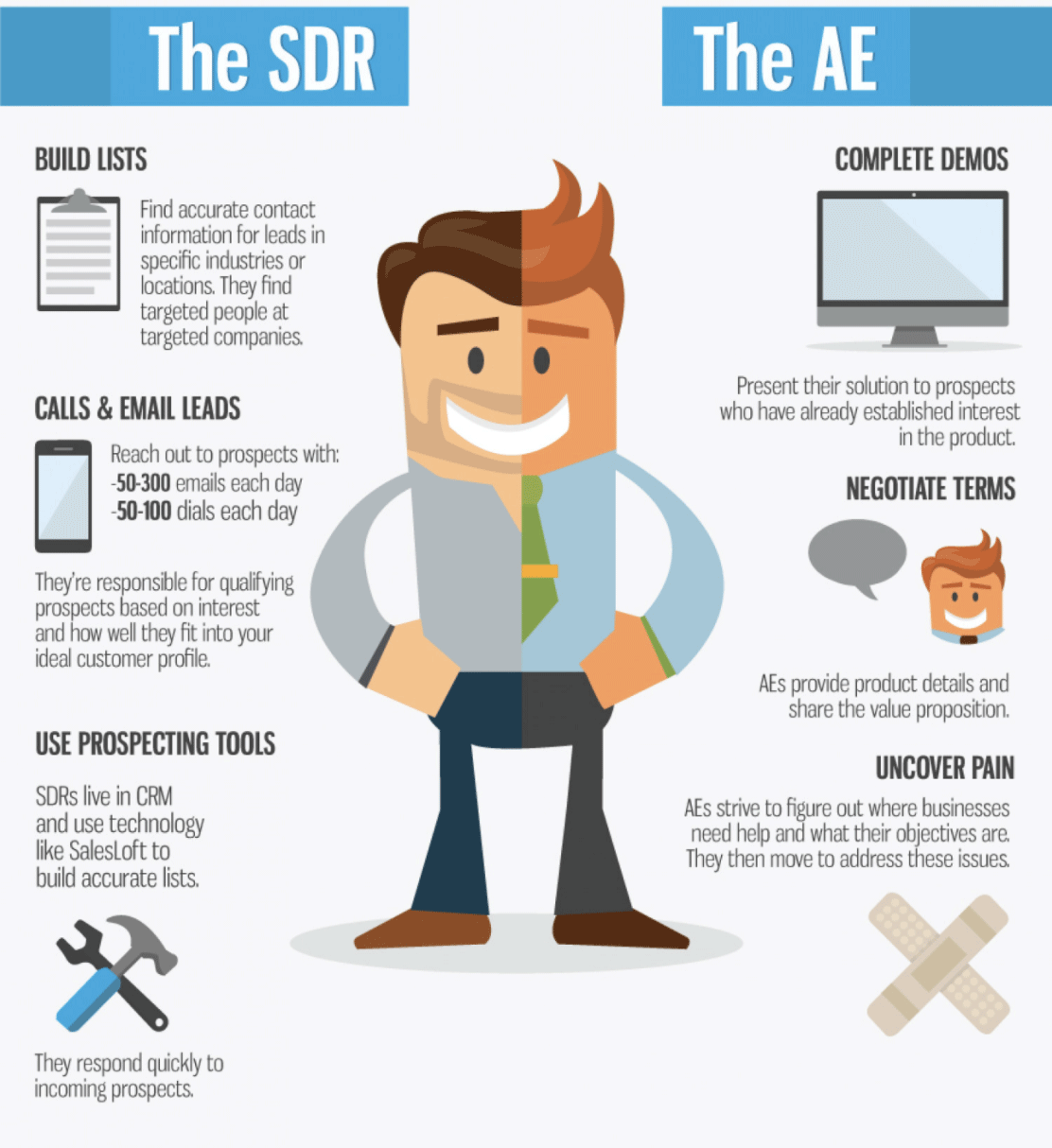
Sales Development Representatives (SDRs)
SDRs are probably among the users who can benefit most from Lusha.
Daily prospecting often involves repetitive tasks such as searching for decision-makers, finding contact details, verifying information, and updating CRM records. These actions may seem small individually, but they quickly consume valuable time when repeated throughout the week.
Lusha helps reduce much of this manual work, allowing SDR teams to spend more time on outreach and relationship building.
Recruiters
Recruiters frequently work across LinkedIn, candidate databases, emails, and internal systems. Moving between different platforms can become time-consuming, especially during large hiring campaigns.
Because Lusha integrates directly into existing workflows, recruiters can often identify and organize potential candidates faster without creating additional complexity.
Agencies And Small Businesses
Agencies and smaller teams often care about speed more than advanced customization.
Instead of investing significant time in training and implementation, these teams usually want tools that provide immediate productivity improvements. Lusha fits naturally into that type of workflow because the learning curve remains relatively small.
Who May Need Alternatives?
Larger enterprise organizations may have different priorities.
Teams requiring deep account intelligence, highly advanced automation, large-scale outbound systems, or extensive customization may eventually need broader functionality.
A clear conclusion from this Lusha Review is that Lusha creates the most value for teams looking to reduce manual prospecting work and improve daily productivity.
Lusha vs Competitors – Strategic Comparison
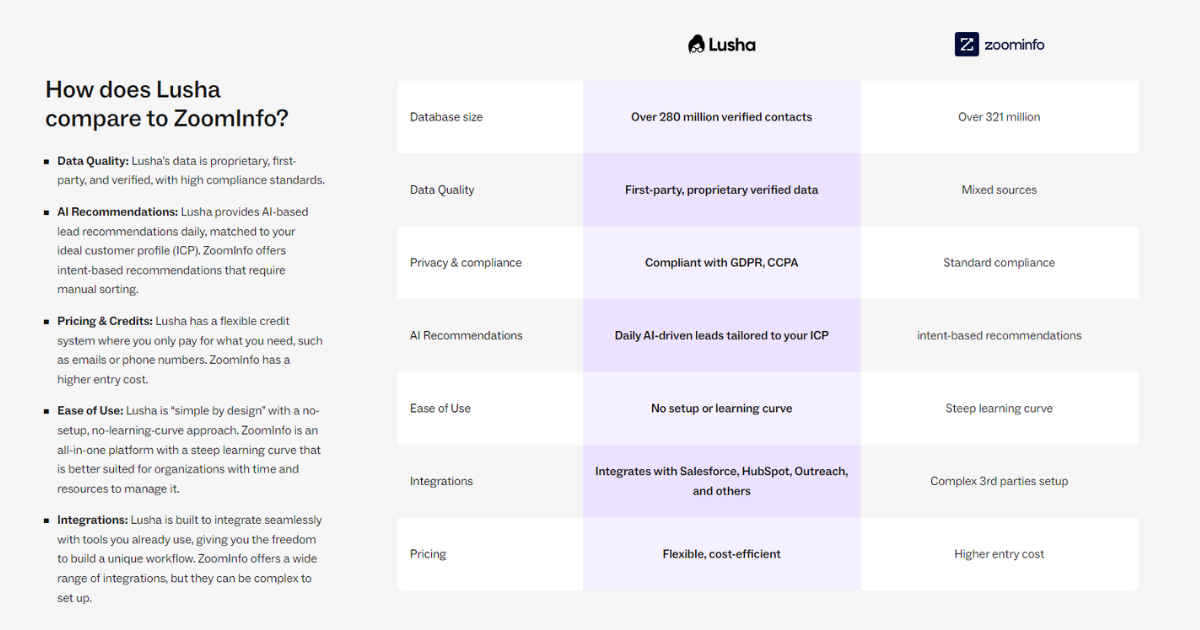
Lusha vs ZoomInfo
-
ZoomInfo: Enterprise-scale data, intent signals, high cost
-
Lusha: Speed, usability, affordability
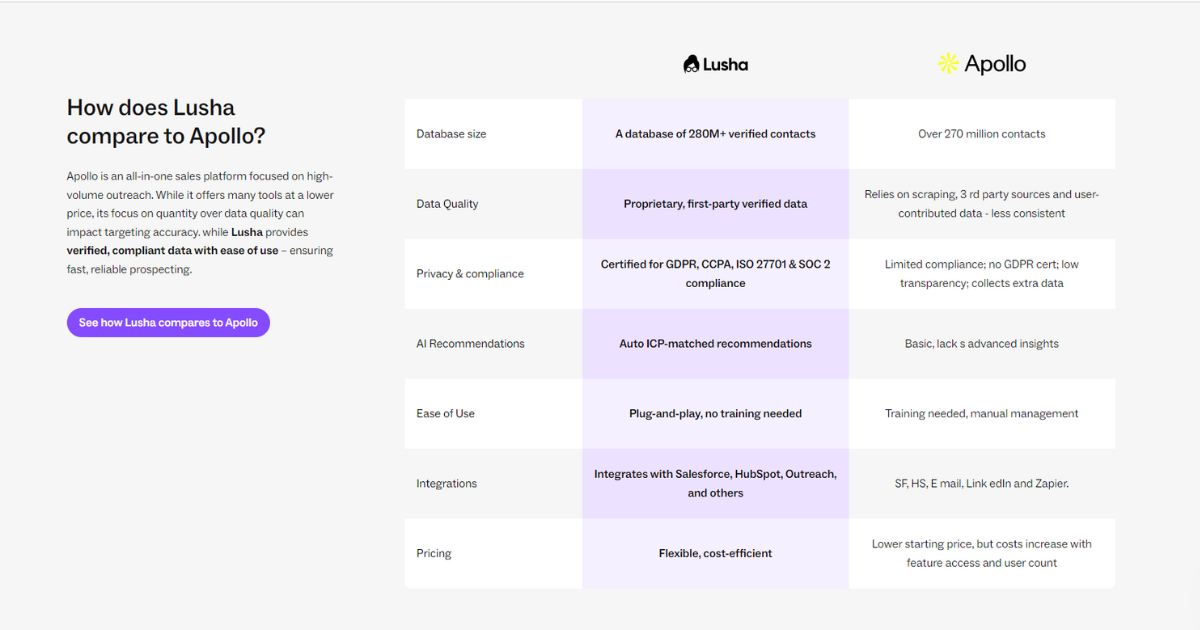
Lusha vs Apollo.io
-
Apollo: Outreach automation + data
-
Lusha: Cleaner data enrichment and LinkedIn workflow
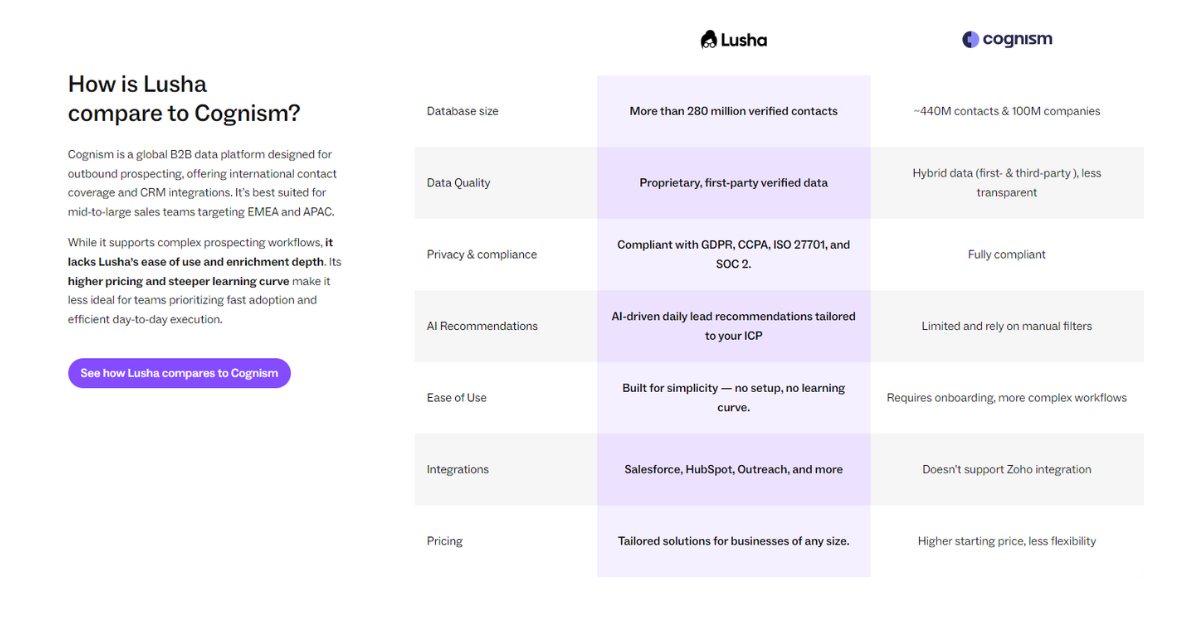
Lusha vs Cognism
-
Cognism: Strong EU mobile data
-
Lusha: Better UX and lower learning curve
This Lusha Review positions Lusha as the most practical option for execution-focused teams.
Final Verdict
After spending time analyzing features, pricing, workflows, user feedback, and overall usability, one thing becomes fairly clear: Lusha is not trying to become the biggest or most feature-heavy sales intelligence platform in the market.
Instead, it focuses on solving a practical problem.
Prospecting often becomes repetitive.
Sales teams spend time switching between LinkedIn profiles, company websites, spreadsheets, CRM systems, and multiple tools just to build a list of potential contacts. Individually, those actions may only take a few seconds, but repeated throughout the week they create a noticeable amount of lost time.
Lusha attempts to remove much of that friction.
The platform performs particularly well when users want faster workflows rather than highly complicated systems. The Chrome extension integrates naturally into prospecting activities, contact discovery feels straightforward, and the overall learning curve remains relatively small compared with some larger competitors.
That does not mean the platform is perfect.
Users handling large-scale prospecting operations may eventually begin paying closer attention to usage volume, credit allocation, and data depth. Organizations looking for advanced automation or highly customized sales ecosystems may also want to compare alternatives before making a decision.
However, software value is rarely determined by feature quantity alone.
A platform can include hundreds of capabilities and still create a poor experience if daily workflows become slow or difficult to manage.
Lusha appears to understand that trade-off well.
For many recruiters, startups, agencies, and growing sales teams, reducing manual work may create more value than adding another layer of complexity.
A key takeaway from this Lusha Review is that Lusha delivers its strongest value when teams want to spend less time managing data and more time building meaningful sales opportunities.
Final Score
Ease of Use: 4.8/5
Features: 4.3/5
Data Quality: 4.2/5
Integrations: 4.5/5
Value for Money: 4.1/5
Overall Rating: 4.4/5
Ready to Try Lusha?
If reducing manual prospecting work and improving workflow efficiency sounds valuable for your team, exploring the free plan may be a good starting point before committing to larger plans.
Try the platform, test the workflow, and see whether it fits the way your team actually works.
Frequently Asked Questions (FAQ)
1. What is Lusha used for?
Lusha is primarily used for B2B lead generation and sales prospecting. The platform helps users discover business contact information such as emails, phone numbers, and company details. Sales teams, recruiters, agencies, and outbound marketing teams often use Lusha to reduce manual research and speed up prospect discovery.
2. Is Lusha free to use?
Yes. Lusha provides a Free plan that allows users to test core functionality before committing to a paid subscription. Free users can explore features such as contact discovery and the Chrome extension, although usage limits and credits are more restricted compared with paid plans.
3. Is Lusha accurate?
Contact accuracy depends on multiple factors including region, industry, and company size. Many users report good experiences with business contact information, especially in larger markets. However, no B2B database remains perfectly accurate because people regularly change companies, positions, and contact details.
4. Is Lusha better than Apollo?
The answer depends on workflow needs. Lusha generally focuses on simplicity and faster prospecting workflows, while Apollo often provides broader automation and outreach functionality. Users prioritizing ease of use may prefer Lusha, while teams requiring more advanced outbound capabilities may compare both platforms carefully.
5. Who should use Lusha?
Lusha usually works well for recruiters, SDR teams, agencies, startups, and growing sales organizations. Teams that want to reduce repetitive prospecting work and improve workflow efficiency often see stronger results.
6. Is Lusha worth the price?
Value depends heavily on usage volume. Smaller teams may find the platform cost-effective because of time savings and productivity improvements. Larger organizations should evaluate expected prospecting activity and credit usage before making a long-term decision.
7. Can Lusha integrate with CRM systems?
Yes. Lusha supports integrations with platforms such as Salesforce, HubSpot, Pipedrive, and other business tools. These integrations help users reduce manual data entry and keep workflows organized.
8. What is the biggest takeaway from this Lusha Review?
One important takeaway from this Lusha Review is that the platform creates the most value when reducing manual prospecting work becomes a priority. Rather than focusing on feature quantity alone, Lusha appears designed to simplify workflows and improve productivity.
Disclosure: My Relationship With Lusha
For transparency, I would like to mention that I am currently a Lusha Partner and may earn a commission if readers sign up through certain links included in this article.
However, this partnership does not influence the opinions shared throughout this review. The goal of this article is to provide practical insights based on feature analysis, pricing research, user feedback, and real-world use cases so readers can make a more informed decision.
Some links within this article are affiliate links, which means I may receive compensation at no additional cost to you. If you decide to try Lusha through those links, it also helps support the time and effort involved in creating detailed content like this Lusha Review.