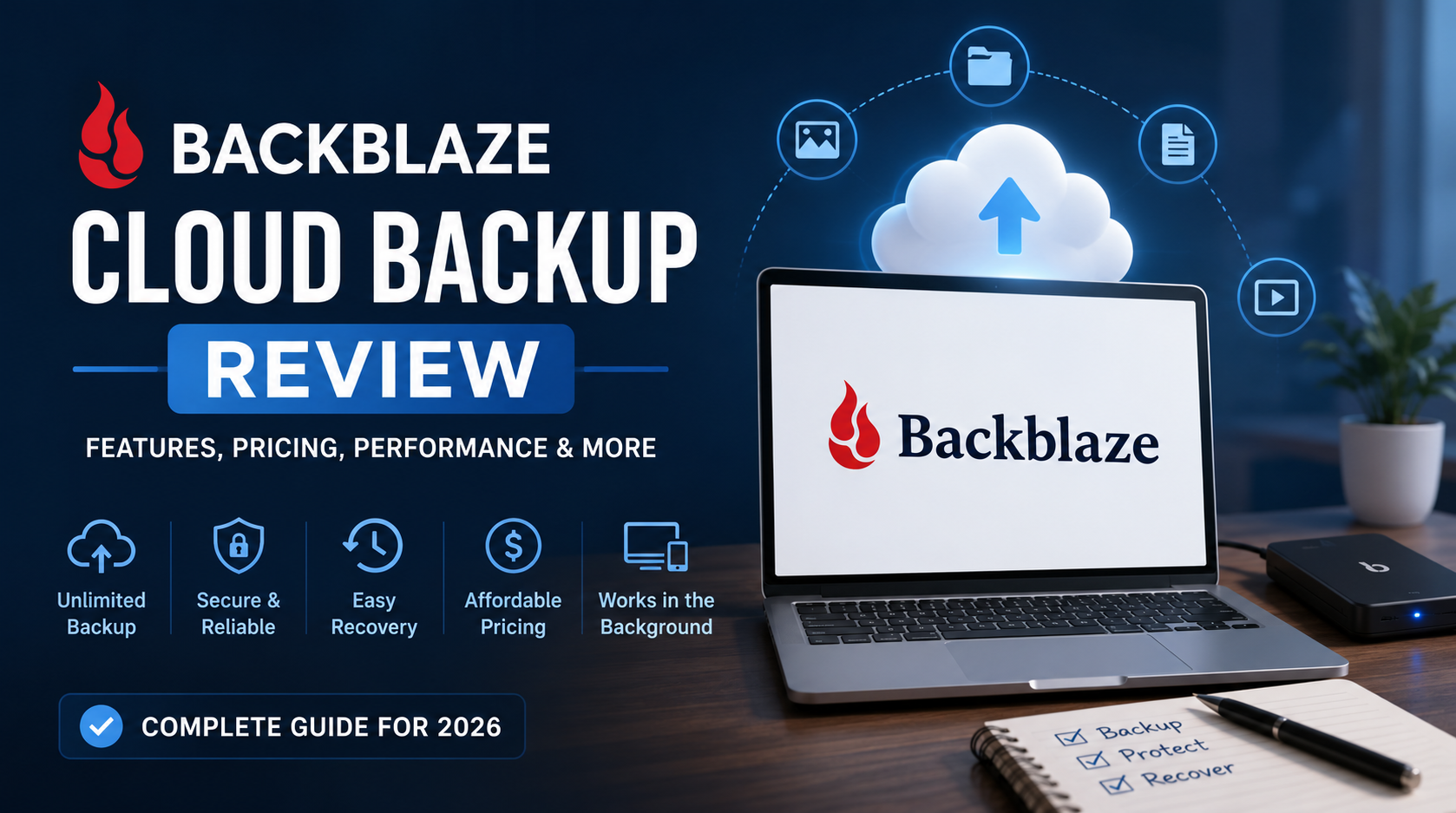
Backblaze Cloud Backup Review 2026: Discover its features, pricing, security, backup performance, pros and cons, and whether it’s the best unlimited cloud backup service for protecting your valuable data.
Introduction & Quick Verdict
Data loss can happen when you least expect it. A failed hard drive, accidental deletion, ransomware attack, or stolen laptop can instantly put years of important files at risk. While many people rely on external drives or cloud storage services such as Google Drive and Dropbox, these solutions are not true backups. If you want automatic, continuous protection for all your files, a dedicated cloud backup service is often the smarter choice.
That is where Backblaze stands out. For years, Backblaze has been one of the most popular cloud backup providers thanks to its simple setup, unlimited backup storage, and affordable pricing. Unlike many competitors that require users to manage complex backup settings, Backblaze focuses on making data protection as easy as possible. Once installed, the software automatically backs up your files in the background, allowing you to focus on your work without worrying about losing valuable data.
In this Backblaze Cloud Backup Review, we take a detailed look at the platform’s features, pricing, security, backup performance, recovery options, and overall value. Whether you are a freelancer, photographer, remote worker, student, or small business owner, understanding how Backblaze performs in real-world scenarios is essential before making a decision.
After extensive research and analysis, Backblaze remains one of the best unlimited cloud backup solutions available today. Its combination of affordability, ease of use, reliable backup performance, and strong security features makes it an excellent choice for users who want a hassle-free backup experience. While advanced users may find some customization options limited compared to competitors like IDrive, most people will appreciate the simplicity and reliability that Backblaze delivers.
Quick Verdict
Overall Rating: 9.3/10
Pros
- Unlimited cloud backup for one computer
- Extremely easy setup and management
- Affordable pricing compared to many competitors
- Supports external drive backups
- Multiple data recovery options
Cons
- Limited advanced backup controls
- No full disk image backup
- License covers only one computer
Overall, this Backblaze Cloud Backup Review finds that Backblaze is an excellent solution for anyone seeking affordable, automatic, and reliable cloud backup without the complexity often associated with traditional backup software.
What Is Backblaze Cloud Backup?
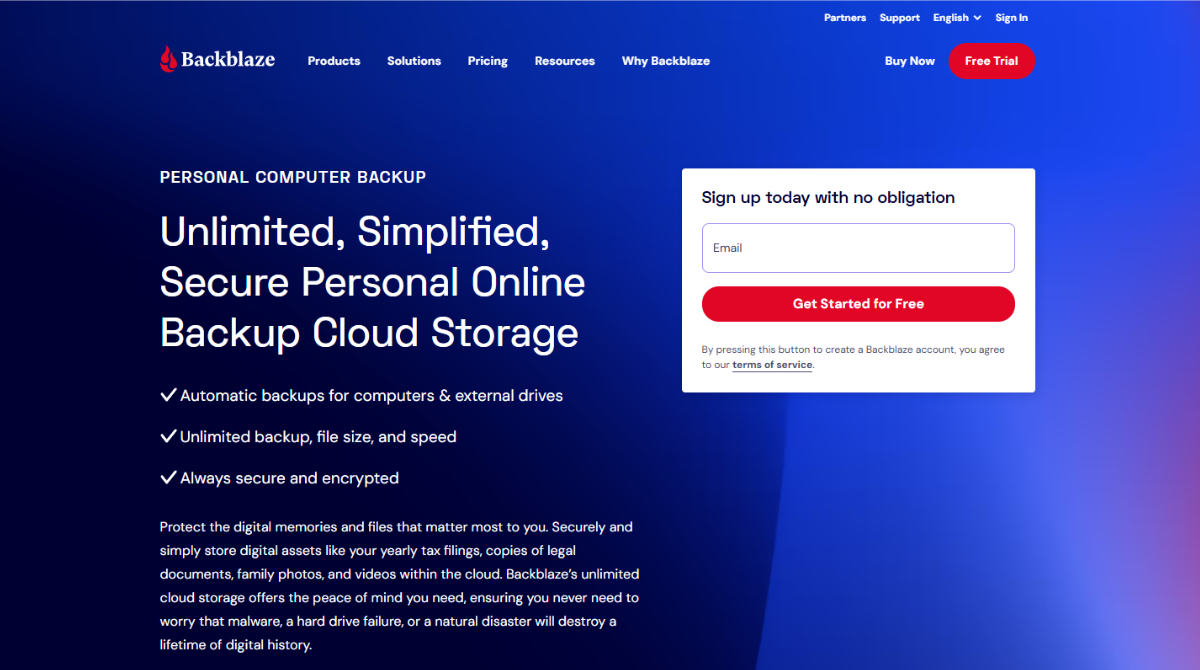

Backblaze Cloud Backup is a cloud-based data protection service designed to automatically back up files from Windows and Mac computers. Founded in 2007, Backblaze has built a strong reputation for providing simple, affordable, and reliable backup solutions for individuals, freelancers, remote workers, creative professionals, and small businesses.
Unlike traditional cloud storage services such as Google Drive, Dropbox, or OneDrive, Backblaze is focused primarily on backup rather than file synchronization. Its main purpose is to ensure that your files remain protected in the event of hardware failure, accidental deletion, theft, ransomware attacks, or other unexpected incidents that could result in data loss.
One of the biggest reasons users choose Backblaze is its simplicity. After installing the software, the platform automatically scans your computer and begins backing up eligible files in the background. There is no need to manually select folders or constantly manage backup schedules. This hands-off approach makes it an excellent choice for users who want reliable protection without spending time configuring complicated settings.
In this Backblaze Cloud Backup Review, one of the most attractive features is the unlimited backup storage offered for a single computer. Many competing services limit the amount of data users can store, but Backblaze allows customers to back up large photo libraries, video projects, documents, and other important files without worrying about storage caps. The service also supports external hard drives, which is especially valuable for photographers, videographers, and content creators who work with large amounts of data.
Security is another important component of the platform. Backblaze uses encryption during file transfers and while data is stored on its servers. Users can also enable two-factor authentication for additional account protection. These features help ensure that sensitive files remain secure while still being easily accessible when needed.
Another key advantage is the recovery process. If data loss occurs, users can restore files through a web-based interface, download individual files, recover entire folders, or even request a physical hard drive containing their backup data. This flexibility can significantly reduce downtime and make recovery much easier after a major system failure.
Overall, Backblaze is designed for people who want dependable cloud backup without complexity. It may not offer as many advanced customization options as some enterprise-focused competitors, but its ease of use, unlimited storage model, and affordable pricing make it one of the most appealing backup services on the market. As this Backblaze Cloud Backup Review demonstrates, the platform continues to be a strong choice for users seeking simple and effective data protection.
Key Features
Backblaze has built its reputation around a simple idea: cloud backup should be easy, reliable, and affordable. Instead of overwhelming users with dozens of technical settings, the platform focuses on delivering automatic protection for important files while keeping the user experience straightforward. This approach has helped Backblaze become one of the most popular cloud backup services among individuals, freelancers, remote workers, photographers, and small businesses.
In this Backblaze Cloud Backup Review, we examined the platform’s most important features to determine whether it provides enough value to justify its growing popularity.
Unlimited Cloud Backup
The most notable feature of Backblaze is its unlimited cloud backup storage.
Many backup providers charge based on storage capacity, forcing users to upgrade plans as their data grows. Backblaze takes a different approach by allowing users to back up virtually unlimited amounts of data from a single computer for one fixed price.
This is particularly beneficial for users who work with large files such as high-resolution photos, videos, design projects, and extensive document libraries. Instead of constantly monitoring storage usage, users can focus on their work knowing their files remain protected.
Automatic Backup Protection
One of the biggest reasons people choose Backblaze is its automated backup process.
After installation, the software automatically scans your system and identifies files that should be protected. Users are not required to manually create backup jobs or continuously update backup settings whenever new files are added.
The platform continuously monitors changes and uploads new or modified files in the background. This automation significantly reduces the chance of forgetting to back up important information.
External Drive Backup
Backblaze supports external hard drives connected to your computer.
This feature is extremely valuable for professionals who store data outside their primary device. Photographers, video editors, and creative agencies often rely on external storage devices to manage large projects, making this functionality particularly useful.
As long as the drive is connected periodically, Backblaze can continue protecting its contents alongside files stored on the main computer.
Continuous Background Operation
Unlike traditional backup software that relies on scheduled backup sessions, Backblaze operates continuously.
Whenever a file is created or modified, the software detects the change and prepares it for backup. This means important work receives protection much sooner than with traditional daily or weekly backup schedules.
Because the software runs quietly in the background, users can continue working without interruption. Resource management settings also help minimize any impact on overall system performance.
File Version History
Accidental file changes can be just as damaging as file deletion.
Backblaze includes version history functionality that allows users to restore older versions of files when needed. This can be helpful if a document becomes corrupted, an unwanted edit is made, or malware affects important files.
Having access to previous file versions adds an additional layer of protection beyond simple backup storage.
Strong Security Features
Security remains a critical consideration for any cloud backup provider.
Backblaze protects data using encryption during transfer and storage. Files are encrypted before being transmitted to the company’s servers and remain encrypted while stored in the cloud.
The platform also supports two-factor authentication (2FA), helping prevent unauthorized account access. Users seeking additional security can choose to create a private encryption key, giving them greater control over how their data is protected.
These security features help ensure sensitive personal and business files remain safe throughout the backup process.
Flexible Data Recovery Options
The true value of a backup service becomes apparent when files need to be restored.
Backblaze offers several recovery methods designed to accommodate different situations. Users can restore individual files, entire folders, or complete backups through the web dashboard.
For users with large amounts of data, Backblaze provides an especially useful option: physical recovery drives. Instead of downloading terabytes of information over the internet, users can request a USB drive containing their backup data. This can dramatically reduce recovery times after a major system failure.
Web Access to Backed-Up Files
Backblaze allows users to access backed-up files through a web browser.
This means important documents can be retrieved even if the original computer is unavailable. Whether you’re traveling, working remotely, or dealing with hardware issues, web access provides an additional layer of convenience.
The online dashboard makes it easy to browse backup contents, locate files, and initiate recovery requests from virtually anywhere.
Simple User Interface
One of Backblaze’s strongest advantages is its simplicity.
The dashboard is clean, organized, and easy to understand. Users can quickly check backup status, monitor progress, adjust settings, and restore files without navigating complicated menus.
This user-friendly design makes Backblaze particularly attractive to individuals who want reliable backup protection without spending time learning complex software.
In this Backblaze Cloud Backup Review, the platform’s feature set demonstrates a strong balance between simplicity and functionality. While some competitors offer more advanced customization options, Backblaze excels at providing unlimited storage, automatic protection, strong security, and convenient recovery tools in an easy-to-use package. For most users, these features deliver everything needed to maintain reliable cloud backup protection without unnecessary complexity.
Pricing & Plans
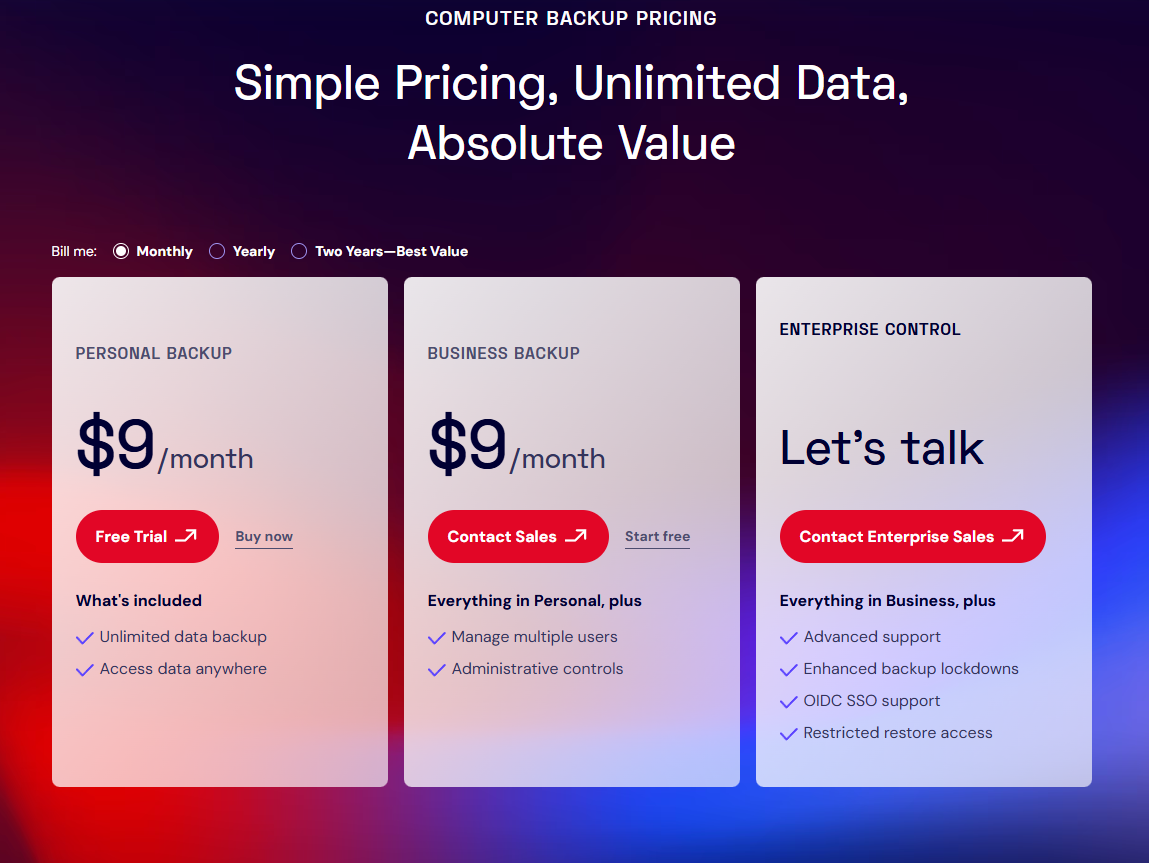
Backblaze keeps its pricing structure refreshingly simple compared to many competing cloud backup services. Instead of offering multiple storage tiers or complicated feature packages, the company provides a single Personal Backup plan that includes unlimited cloud storage for one computer.
Users can choose between monthly, annual, or two-year billing options, with longer subscriptions offering better overall value. All plans include the same core features, such as automatic backups, continuous protection, external drive support, file version history, and multiple recovery options.
In this Backblaze Cloud Backup Review, pricing remains one of the platform’s strongest advantages. The unlimited storage model eliminates concerns about data caps and additional fees, making it especially appealing for users with large photo libraries, videos, or business documents. While some competitors offer more advanced backup features, few can match Backblaze’s combination of affordability, simplicity, and unlimited backup capacity.
For individuals and small businesses seeking reliable cloud backup without overspending, Backblaze delivers excellent value for money.
Ease of Use
Ease of use is one of Backblaze’s biggest strengths and a key reason why it remains popular among both beginners and experienced users. Unlike many backup solutions that require extensive setup and ongoing management, Backblaze is designed to work with minimal user intervention.
The installation process takes only a few minutes. Once installed, the software automatically scans your computer and begins backing up eligible files without requiring you to manually select folders or create backup schedules. This “set it and forget it” approach makes data protection accessible even for users with little technical knowledge.
The desktop application features a clean and intuitive interface that displays essential information such as backup status, last backup time, and storage activity. Users can easily pause backups, restore files, or adjust basic settings without navigating complicated menus.
Another advantage is the platform’s continuous backup system. New and modified files are automatically detected and uploaded in the background, ensuring your data remains protected without disrupting daily work.
In this Backblaze Cloud Backup Review, ease of use stands out as one of the service’s most compelling advantages. The combination of simple setup, automatic operation, and an intuitive interface makes Backblaze an excellent choice for anyone who wants reliable cloud backup without the complexity often associated with traditional backup software.
Backup & Restore Performance
A backup service is only valuable if it can reliably protect your files and restore them when disaster strikes. Fortunately, Backblaze performs well in both areas, offering a streamlined experience that requires very little maintenance from the user.
After installation, the software automatically identifies and backs up eligible files in the background. While the initial upload may take some time—especially for users with large photo libraries, videos, or multiple terabytes of data—the process is largely hands-off. Once the first backup is completed, subsequent backups become much faster because only newly created or modified files need to be uploaded.
Backblaze also includes bandwidth controls that allow users to adjust upload speeds based on their internet connection. This helps minimize disruptions while still ensuring that important files are protected. During everyday use, the software operates quietly and rarely impacts system performance, making it suitable for both personal and professional environments.
File recovery is equally straightforward. Users can access their backups through the online dashboard and restore individual files, folders, or larger datasets. The interface is intuitive, allowing even non-technical users to retrieve lost data without difficulty.
One feature that separates Backblaze from many competitors is its physical recovery drive service. Instead of downloading large amounts of data over the internet, users can request a USB drive containing their backup files. This can significantly reduce recovery time after a major hardware failure.
As highlighted throughout this Backblaze Cloud Backup Review, the platform delivers dependable backup performance and flexible recovery options. Its automated approach, efficient file protection, and convenient restore methods make it a strong choice for users who want reliable protection against unexpected data loss.
Pros & Cons
Backblaze focuses on delivering a simple and reliable cloud backup experience rather than overwhelming users with advanced features. This approach makes it an excellent choice for individuals who want automatic protection without spending time managing complex backup settings.
On the positive side, users benefit from unlimited cloud storage, continuous automatic backups, external drive support, and affordable pricing. The platform is also easy to install and maintain, making it accessible even for those with limited technical knowledge. Flexible recovery options, including downloadable restores and physical recovery drives, further enhance its value.
However, Backblaze is not perfect. The service only covers one computer per subscription, which may be restrictive for users with multiple devices. It also lacks some advanced features offered by competitors, such as full disk image backups and extensive backup customization.
Based on our Backblaze Cloud Backup Review, the platform’s strengths clearly outweigh its limitations. For users seeking a straightforward, affordable, and dependable backup solution, Backblaze remains one of the strongest options currently available.
Backblaze vs IDrive
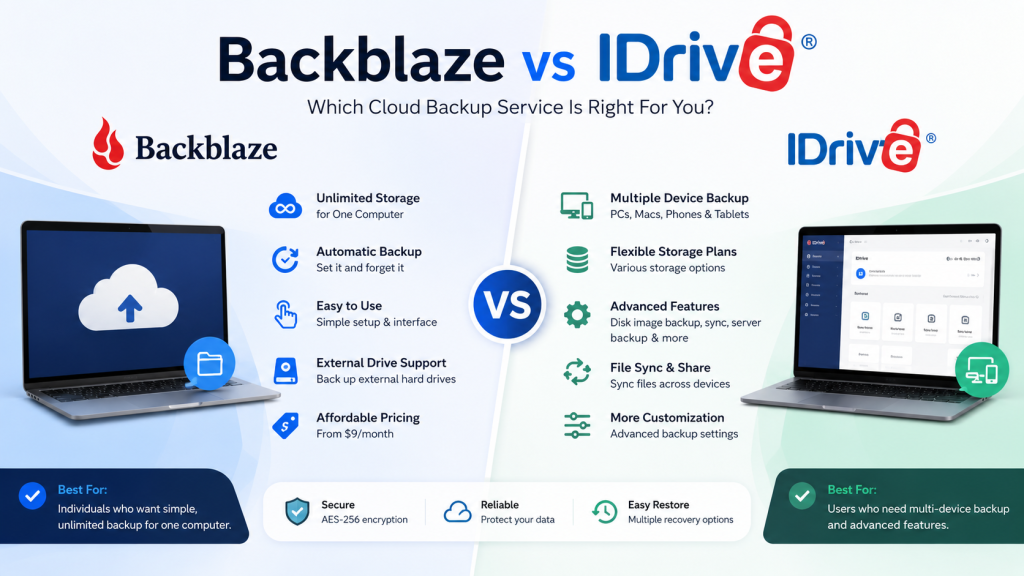
Backblaze and IDrive are often compared because both provide reliable cloud backup services, but they are designed for different types of users.
Backblaze focuses on simplicity and unlimited storage. Its automated backup system requires very little configuration, making it ideal for users who want a “set it and forget it” experience. Once installed, the software continuously protects files in the background, eliminating much of the manual work associated with traditional backup solutions.
IDrive takes a more feature-rich approach. Instead of offering unlimited storage for a single device, it allows users to protect multiple computers, smartphones, tablets, and external drives under one account. It also includes advanced capabilities such as disk image backups, file synchronization, and more detailed backup controls.
For users with large amounts of data stored on one computer, Backblaze often provides better value due to its unlimited storage model. However, families, power users, and small businesses with multiple devices may find IDrive’s flexibility more appealing.
When comparing overall usability, Backblaze has the advantage thanks to its cleaner interface and simpler setup process. As discussed throughout this Backblaze Cloud Backup Review, the service is designed to remove complexity from data protection while still delivering dependable performance.
Ultimately, Backblaze is the better choice for users seeking simplicity and unlimited backup, while IDrive is better suited for those who need advanced features and multi-device support.
Backblaze vs Carbonite
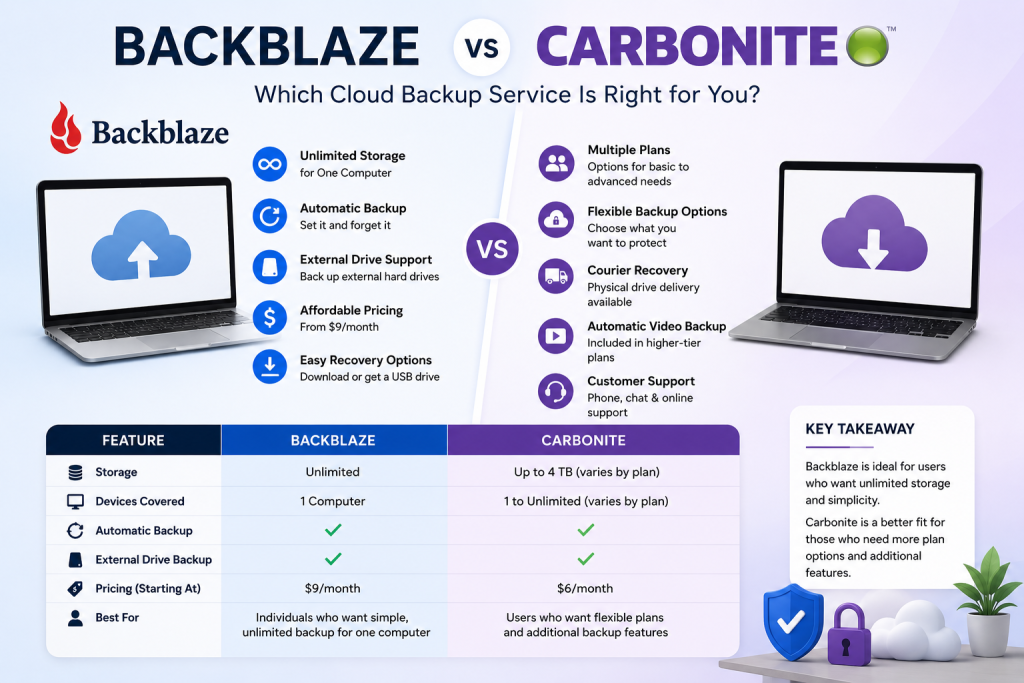
When comparing Backblaze and Carbonite, the decision largely comes down to simplicity versus flexibility. Both services are well-established cloud backup providers with strong reputations, but they take different approaches to protecting user data.
Backblaze is built around a straightforward concept: unlimited backup for one computer at a predictable price. The setup process is quick, the interface is easy to navigate, and backups run automatically with very little user involvement. This makes it particularly attractive for individuals who want reliable protection without spending time managing backup settings.
Carbonite, meanwhile, offers several subscription tiers with varying features. Depending on the plan selected, users may gain access to additional capabilities such as automatic video backup, courier recovery services, and support for multiple backup scenarios. While these options provide more flexibility, they can also make choosing the right plan more complicated.
Another important difference is pricing transparency. Backblaze includes most of its core functionality in a single plan, whereas Carbonite users may need to upgrade to higher-tier packages to unlock certain features. For budget-conscious users, this can make Backblaze the more attractive option.
The comparison in this Backblaze Cloud Backup Review shows that both platforms are capable solutions, but they serve different audiences. Users who value simplicity, unlimited storage, and a hassle-free experience will likely prefer Backblaze. Those who want more plan options and additional backup features may find Carbonite to be a better fit for their needs.
User Reviews & Ratings
Customer feedback plays an important role when evaluating any cloud backup service, and Backblaze generally receives positive reviews across major software review platforms and technology publications. Many users praise the service for its simplicity, affordability, and ability to run quietly in the background without requiring constant attention.
One of the most frequently mentioned advantages is the ease of setup. Customers often report that they were able to install the software and start backing up their files within minutes. This straightforward experience appeals to users who want reliable data protection without learning complicated backup procedures.
Another area where Backblaze earns strong marks is its unlimited storage offering. Users with large collections of photos, videos, and work documents appreciate not having to worry about storage limits or upgrade fees as their data grows. The automatic backup process also receives favorable feedback because it reduces the risk of forgetting to protect important files.
Not all reviews are completely positive. Some users would like to see more advanced backup customization options, while others note that the single-device licensing model may not be ideal for households with multiple computers. However, these concerns are typically outweighed by the platform’s ease of use and overall value.
Across review sites, technology blogs, and user forums, the overall sentiment remains highly favorable. As reflected in this Backblaze Cloud Backup Review, customer satisfaction is largely driven by the platform’s ability to provide dependable backup protection at a reasonable price. For users seeking a straightforward cloud backup solution, Backblaze continues to maintain a strong reputation among both experts and everyday customers.
Is Backblaze Worth It?
For most users, Backblaze is absolutely worth considering if the primary goal is protecting important files without dealing with complicated backup software. The service focuses on delivering a straightforward experience, allowing users to back up their data automatically while requiring very little ongoing management.
One of Backblaze’s biggest advantages is its unlimited storage model. Instead of worrying about storage limits or additional fees as data grows, users can back up large collections of documents, photos, videos, and project files for a predictable subscription cost. This makes the platform particularly attractive to freelancers, remote workers, students, photographers, and content creators.
The service may not be the best fit for everyone. Users who require advanced backup customization, multi-device coverage under a single plan, or full system image backups may find alternatives like IDrive or Acronis more suitable. However, those additional features often come with increased complexity and higher costs.
What makes Backblaze stand out is its balance of affordability, reliability, and ease of use. The platform removes many of the common frustrations associated with backup software while still providing strong security and flexible recovery options.
After evaluating its features, pricing, performance, and customer feedback, this Backblaze Cloud Backup Review concludes that Backblaze offers excellent value for individuals and small businesses. If you want a dependable cloud backup solution that simply works, it remains one of the strongest options available in 2026.
Final Verdict
Backblaze continues to earn its place among the best cloud backup solutions available today. Rather than trying to offer every possible backup feature, the platform focuses on what most users actually need: reliable data protection, unlimited storage, and a simple user experience.
Throughout our evaluation, Backblaze consistently impressed with its automated backup process, affordable pricing, and hassle-free setup. The software requires very little maintenance after installation, making it an excellent option for users who want their files protected without constantly managing backup settings. The inclusion of external drive support and flexible recovery options further strengthens its value proposition.
There are certainly more advanced alternatives on the market. Some competitors provide multi-device plans, disk image backups, and additional customization features. However, those extra capabilities often come at the cost of higher pricing and increased complexity. Backblaze takes the opposite approach by prioritizing simplicity and accessibility.
For individuals, freelancers, remote workers, students, photographers, and small business owners, the service offers an excellent balance of performance and affordability. Most users will find that it provides everything necessary to safeguard important files against hardware failure, accidental deletion, theft, or ransomware attacks.
After considering its features, pricing, security, and real-world usability, this Backblaze Cloud Backup Review finds that Backblaze remains one of the best choices for anyone seeking dependable, unlimited cloud backup. If your priority is reliable protection with minimal effort, Backblaze is a service that deserves serious consideration.
Frequently Asked Questions (FAQ)
1. Is Backblaze good for personal use?
Yes. Backblaze is one of the best cloud backup solutions for personal users because it combines automatic backups, unlimited storage, and affordable pricing. It is particularly useful for people who want to protect documents, photos, videos, and other important files without managing complicated backup settings.
2. Does Backblaze offer unlimited cloud storage?
Yes. One of the platform’s biggest advantages is its unlimited storage policy for a single computer. As highlighted throughout this Backblaze Cloud Backup Review, users can back up large amounts of data without worrying about storage limits or paying additional fees as their backup size grows.
3. Can Backblaze back up external hard drives?
Yes. Backblaze supports external hard drives connected to your computer. This feature is especially valuable for photographers, video editors, and content creators who often store large projects on external storage devices. To maintain protection, the drive should be connected periodically so Backblaze can continue updating the backup.
4. How secure is Backblaze?
Backblaze uses encryption during both data transfer and storage. The platform also supports two-factor authentication and optional private encryption keys for users who want additional control over their data. These security measures help protect files from unauthorized access while maintaining a user-friendly experience.
5. Is Backblaze worth the money?
For most individuals and small businesses, the answer is yes. The service delivers reliable cloud backup, unlimited storage, automatic protection, and flexible recovery options at a competitive price. Based on the overall findings of this Backblaze Cloud Backup Review, Backblaze offers excellent value for users who prioritize simplicity, affordability, and dependable data protection over advanced backup customization features.