· September 21, 2025
Hero image for an app comparison with the logos of Slack and Microsoft Teams (Slack vs Teams)
Slack and Microsoft Teams are the two dominant chat platforms for work. They overlap a lot—channels/teams, DMs, apps, files, search—but the day-to-day experience can feel very different. After reviewing product docs, roadmaps, and common enterprise deployments, the contrast becomes clear: each tool leans into different strengths.
For years, both apps have shipped features at a rapid clip. A capability that debuts on one often shows up on the other within a release cycle. That’s great for users—and tricky for buyers. This guide distills the practical differences so you can decide based on your must-haves.
What we’ll compare
-
Slack vs. Teams interfaces
-
Slack vs. Teams slash commands & shortcuts
-
Slack vs. Teams pricing
-
Slack vs. Teams notifications
-
Slack vs. Teams video calls
-
Slack vs. Teams productivity features
-
Slack vs. Teams remote vs. hybrid use
-
Slack vs. Teams AI features
-
Slack vs. Teams security
-
Slack vs. Teams integrations
The difference between Slack and Teams
At their core, both apps are secure business messengers that keep teams aligned without relying on email. Choosing often comes down to three things:
-
Your tech stack. If you already run on Microsoft 365, Teams is the natural fit. If you’re tool-agnostic or heavy on Google Workspace and third-party SaaS, Slack tends to slot in more flexibly.
-
Your communication style. Heavy meetings and calls → Teams. Predominantly asynchronous chat throughout the day → Slack.
-
Your size and scale. Both scale to large orgs, but Teams’ “suite” approach often resonates with larger enterprises; Slack’s customization resonates with product, tech, and startup teams.
Slack vs Teams at a glance
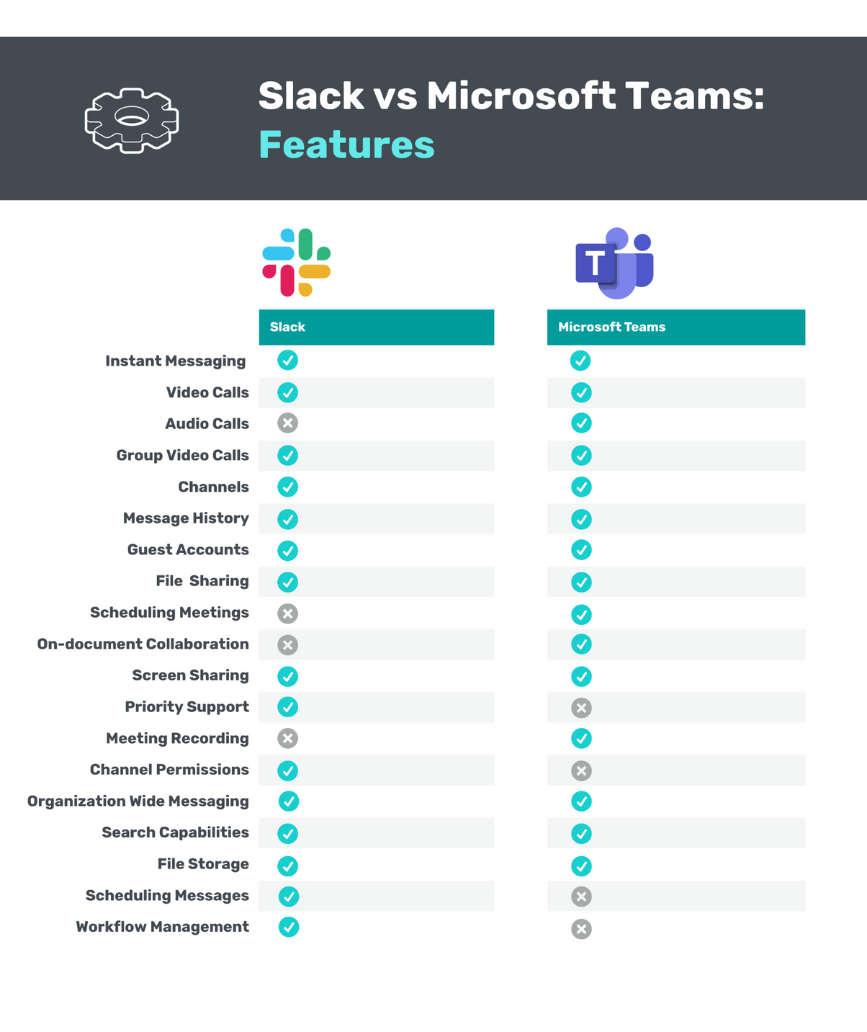
Here’s a quick side-by-side to orient you before we dive into details.
| Slack | Microsoft Teams | |
|---|---|---|
| Participant capacity | Unlimited | Up to 25,000 per org (mentions limited above 10k) |
| Storage | ⭐⭐⭐⭐ Unlimited on paid plans; free: last 90 days of files kept; strong Google Drive/OneDrive/Dropbox ties | ⭐⭐⭐⭐⭐ 1TB/user on Business Basic+; 10GB on Teams Essentials; 5GB free |
| Call features | ⭐⭐⭐ Capable but lightweight | ⭐⭐⭐⭐⭐ Full meeting suite with advanced options |
| App integrations | ⭐⭐⭐⭐⭐ 2,600+ apps; Zapier; free plan capped at 10 active integrations | ⭐⭐⭐⭐⭐ 2,500+ apps; Zapier; deep Microsoft 365 ties |
| Chat history | ⭐⭐⭐⭐ Free: searchable last 90 days; unlimited on paid with advanced search | ⭐⭐⭐⭐ No formal limit; search less granular |
| Customization | ⭐⭐⭐⭐⭐ Highly customizable channels, layouts, automations | ⭐⭐⭐ Fewer UI/UX customization knobs |
| Ease of use | ⭐⭐⭐⭐ Quick once you learn the UI | ⭐⭐⭐⭐ Clean, corporate feel; sometimes more clicks |
| Setup & guest access | ⭐⭐⭐⭐⭐ Fast; join with any email; guest channels | ⭐⭐⭐ Free setup requires Microsoft account; guests need Teams accounts |
| Security | ⭐⭐⭐⭐ Enterprise-grade via native features + integrations | ⭐⭐⭐⭐⭐ Suite-level security built in |
| AI features | ⭐⭐⭐⭐ Slack AI add-on: channel recaps, Q&A, summaries ($10/user/mo) | ⭐⭐⭐⭐ Copilot in Teams: all of Slack AI plus rich meeting intelligence ($30/user/mo, suite-wide) |
Slack vs Teams interfaces
The apps structure conversation differently:
-
Teams mirrors organizational structure: tenants → teams → channels. It keeps the left rail tidy and compartmentalized. New channels nest under an existing team, which reduces clutter but can require extra clicks to navigate.
-
Slack is topic-first: workspaces → channels anyone can create by default. This fosters culture and spontaneity but can lead to channel sprawl. Slack counters this with customizable sidebars (sections, priorities, starred items) so power users tame the noise.
Takeaway: Prefer a streamlined, hierarchical feel? Teams. Want flexible, ad-hoc collaboration by topic? Slack.
Slack vs Teams slash commands and shortcuts
-
Slack popularized slash commands (
/remind,/away, custom app commands) and Quick Switcher shortcuts. Teams, workflow builders, and bots can add their own commands, and internal teams can create bespoke ones. Once learned, commands are a real productivity multiplier. -
Teams supports a smaller command set. It’s improving, but Slack’s ecosystem and habit-forming shortcuts are still ahead.
Takeaway: If fast keyboard-driven actions matter, Slack has the edge.
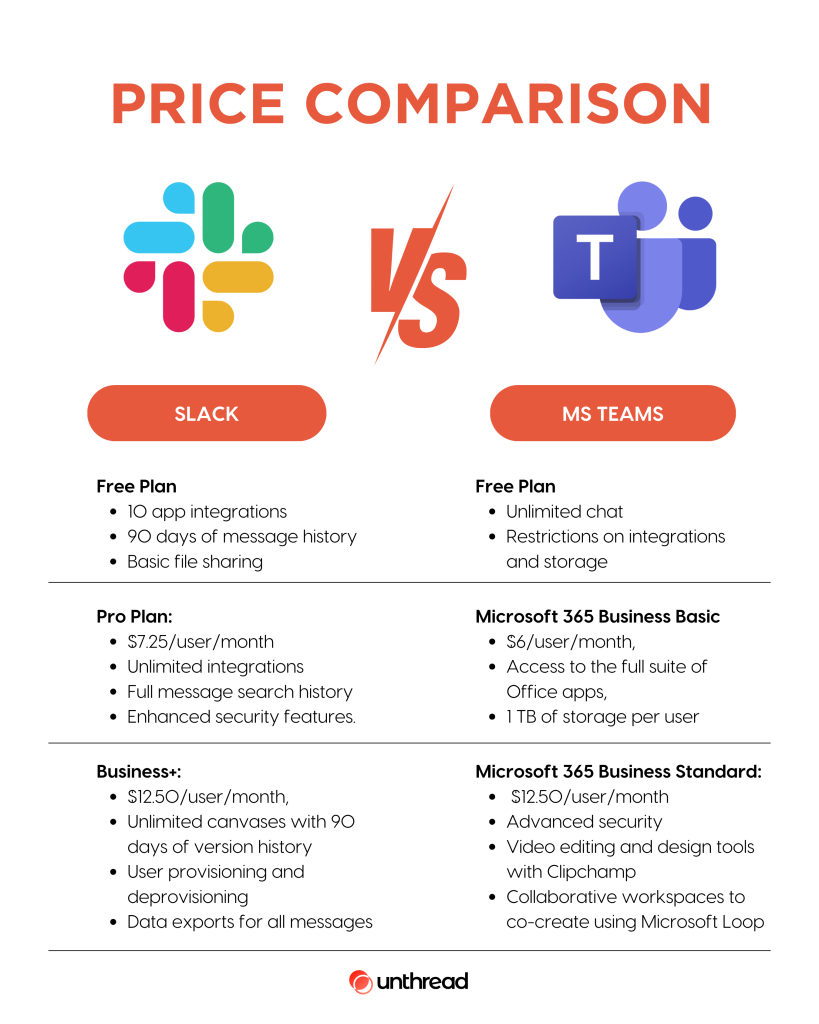
Slack vs Teams pricing
-
Teams can be licensed standalone at low cost, but the real value is in Microsoft 365 bundles (e.g., Business Basic), which add Exchange/Outlook, SharePoint, OneDrive, etc. For organizations already standardizing on Microsoft, per-seat value is hard to beat.
-
Slack pricing starts higher for Pro and focuses on the chat product itself. Many “enterprise governance” features sit on upper tiers. If you want just best-in-class chat—and you already own your office suite elsewhere—Slack’s clarity may suit you better.
Bottom line: If you want the full Microsoft stack, Teams is the best value. If you want best-of-breed chat and choose your own stack, Slack still fits beautifully.
Slack vs Teams notifications
-
Slack offers granular, channel-level controls: follow while muted, keyword alerts, per-device preferences, VIP lists, and truly custom statuses with timers. This helps you stay informed without drowning in pings.
-
Teams provides straightforward notification modes (banner, banner+email, feed, none) applied broadly (all teams/channels/DMs). It’s simpler but less surgical than Slack for power users.
Takeaway: Need fine-grained control over attention? Slack wins.
Slack vs Teams video calls
-
Teams treats meetings as a first-class pillar: large meeting sizes (100+ free, up to 300 on paid), layouts, presenter modes, breakout rooms, recording, transcripts, and hardware ecosystem support. It’s a bona fide Zoom competitor.
-
Slack has Huddles for quick audio/video with screen share. They’re great for spontaneous syncs but aren’t a full meeting platform. Larger calls or complex settings push users to Zoom/Meet/Webex—integrations make that easy.
Takeaway: If video meetings are central, Teams is the stronger native solution.
Slack vs Teams productivity
-
Slack is chat-first productivity: reminders, saved items (Later), lightweight canvases, simple lists/boards, and a visual workflow builder for channel automations.
-
Teams focuses productivity around meeting follow-through (shared notes, tasks from meetings) and deep links to Microsoft 365 files, calendars, and sites.
Takeaway: Async chat-driven teams thrive on Slack; meeting-heavy teams benefit from Teams.
Slack vs Teams: remote vs. hybrid use
-
Remote-first companies often prefer Slack: rich async culture, powerful notifications, and command automation.
-
Hybrid organizations gravitate to Teams: superior meeting experience, presence, and—at premium tiers—adjacent tools like Microsoft Places to coordinate in-office days.
Slack vs Teams AI features
-
Slack AI (add-on) brings channel recaps, thread summaries, semantic Q&A, and file summaries, all inside Slack’s search and sidebar. It’s focused and cost-effective for teams that live in chat.
-
Copilot in Teams (suite add-on) includes comparable chat intelligence plus meeting-centric AI: real-time notes, action extraction, auto recaps for late joiners, and summaries at end of calls. It’s pricier but spans the entire Microsoft suite.
Takeaway: Want affordable AI to tame busy channels? Slack AI. Want meeting intelligence across the Microsoft stack? Copilot in Teams.
Slack vs Teams security
-
Teams benefits from suite-level, default-on security: E2EE options, MFA, link/file scanning, compliance tooling, and broad regulatory frameworks. HIPAA-aligned configurations are available on paid tiers.
-
Slack offers strong native capabilities (enterprise key management, DLP) and pairs deeply with SIEM/SOAR/CASB partners for advanced programs. Certain compliance configurations land on upper tiers.
Takeaway: Both are enterprise-ready; Teams bundles more by default, while Slack integrates with best-in-class security stacks.
Slack vs Teams integrations
-
Slack has a broad, ecosystem-agnostic marketplace and deep third-party adoption, plus robust Zapier support. It’s excellent if you mix vendors (Notion, Asana, GitHub, Google Workspace, etc.).
-
Teams integrates with thousands of apps too but shines when you’re all-in on Microsoft 365: real-time coauthoring, SharePoint/OneDrive, Loop components, Planner/To Do, Power Platform, and more.
Takeaway: Mixed stacks → Slack usually feels more natural. Microsoft-centric stacks → Teams is unmatched.
Slack vs Teams: Which one should you choose?
Choose Microsoft Teams if you:
-
Already license Microsoft 365 and want tight, native integration.
-
Rely heavily on video meetings and want rich meeting features included.
-
Value suite-level governance, security, and predictable per-seat economics.
Choose Slack if you:
-
Prefer flexibility in picking best-of-breed tools and add-ons.
-
Communicate primarily via asynchronous chat and want granular notification control.
-
Want a customizable, culture-friendly environment that scales from startup to enterprise.
It can feel like apples vs. oranges—and that’s ok. Both free plans are solid; the most reliable way to decide is to pilot both with a real team for two weeks and see which one fits your work style and stack.
Looking for more side-by-side software comparisons?
👉 If you found this Airtable vs Notion comparison helpful, don’t forget to visit esapplication.com.
There, you’ll discover more in-depth, unbiased, and up-to-date comparisons of SaaS tools, AI platforms, hosting services, and business growth software.