Why This Comparison Is More Complex Than It Looks
Comparing Crocoblock and Advanced Custom Fields is not a simple “which plugin is better” exercise. It is a comparison between two fundamentally different philosophies of building WordPress websites.
At a glance, both tools are associated with custom content, dynamic data, and advanced WordPress builds. In practice, they exist at different layers of the WordPress value chain, serve different types of teams, and create very different economic outcomes over time.
This article does not simplify the comparison. Instead, it expands it—covering architecture, features, workflows, pricing, total cost of ownership, scalability, performance, risk, governance, and long-term business impact—so the decision can be made with full awareness of trade-offs.
1. Product Identity: What Each Platform Actually Is
Crocoblock: A Dynamic Website System
Crocoblock is best described as a dynamic WordPress system rather than a single plugin. Through its JetPlugins ecosystem—especially JetEngine—it provides a tightly integrated environment for:
-
Defining structured content
-
Querying data visually
-
Rendering dynamic templates and listings
-
Managing filters, relationships, and UI logic
-
Scaling content-heavy websites without constant coding
Its design assumption is that most WordPress sites are business assets, not engineering experiments. Therefore, it prioritizes speed, consistency, and operational simplicity.
Advanced Custom Fields (ACF): A Data Architecture Tool
ACF is a custom fields framework. Its sole mission is to allow developers to create and manage structured metadata attached to WordPress objects.
It does not attempt to:
-
Control layout
-
Render front-end interfaces
-
Provide dynamic listings
-
Simplify non-technical workflows
ACF assumes a developer-controlled environment where structured data is consumed by custom templates, themes, or external systems.
2. Architectural Scope: System vs Component
This is the single most important distinction.
| Layer of a Dynamic Website | Crocoblock | ACF |
|---|---|---|
| Custom fields | ✔️ | ✔️ |
| Custom post/content types | ✔️ | ❌ (external) |
| Data relationships | ✔️ | Limited |
| Query building | ✔️ Visual | ❌ Code-based |
| Dynamic templates | ✔️ Native | ❌ External |
| Listings & loops | ✔️ Built-in | ❌ External |
| Filters & faceted search | ✔️ Built-in | ❌ External |
| Front-end forms | ✔️ | ❌ External |
| Access & visibility logic | ✔️ | ❌ External |
Interpretation:
ACF is a single building block.
Crocoblock is a full construction system.
3. Feature Depth: Breadth vs Precision
ACF offers extreme precision in defining data structures. Developers can control field types, validation, conditional logic, and storage with great accuracy.
Crocoblock offers broad functional coverage. It may not expose every low-level option a developer could code manually, but it covers 95% of real-world dynamic use cases without requiring custom development.
The trade-off is deliberate:
-
ACF optimizes for control
-
Crocoblock optimizes for completeness
4. Dynamic Rendering & Front-End Control
Dynamic rendering is where most WordPress projects succeed or fail.
With ACF, rendering is not included. Data must be manually connected to:
-
PHP templates
-
Page builder widgets
-
Custom loops
-
Third-party dynamic plugins
This introduces:
-
More integration points
-
More maintenance risk
-
More developer dependency
Crocoblock includes native dynamic rendering, allowing data to flow directly into:
-
Templates
-
Cards
-
Lists
-
Tables
-
Filters
-
Search interfaces
From a business standpoint, Crocoblock dramatically reduces the cost of turning data into usable experiences.
5. Workflow Ownership & Team Dynamics
ACF Workflow
-
Developers define fields
-
Developers build templates
-
Developers manage changes
-
Non-technical teams submit requests
This workflow is clean but centralized.
Crocoblock Workflow
-
Developers define architecture (optional)
-
Designers build templates
-
Marketers iterate layouts
-
Operators manage content logic
This workflow is distributed, allowing teams to move faster without breaking systems.
Key difference:
ACF scales technical governance.
Crocoblock scales organizational autonomy.
6. Learning Curve & Adoption
ACF has a low conceptual barrier for developers but a high practical barrier for non-developers. Without PHP or theme knowledge, its value is limited.
Crocoblock has a moderate learning curve, but once learned, it enables a wider range of roles to contribute meaningfully.
For agencies and businesses, time-to-competency across the team often matters more than developer elegance.
7. Performance & Optimization
Both tools can power high-performance websites.
However:
-
ACF performance depends heavily on developer implementation quality.
-
Crocoblock performance is more standardized because common patterns are pre-optimized.
This means:
-
ACF has higher upside but also higher risk
-
Crocoblock has lower variance and more predictable outcomes
In consulting terms, Crocoblock reduces execution risk.
8. Scalability: Technical vs Organizational
Technical Scalability
Both can scale technically if implemented correctly.
Organizational Scalability
-
ACF requires developer involvement for each new feature
-
Crocoblock allows non-developers to expand the system
As content volume and business complexity increase, this difference compounds.
9. Pricing Models (Surface-Level)
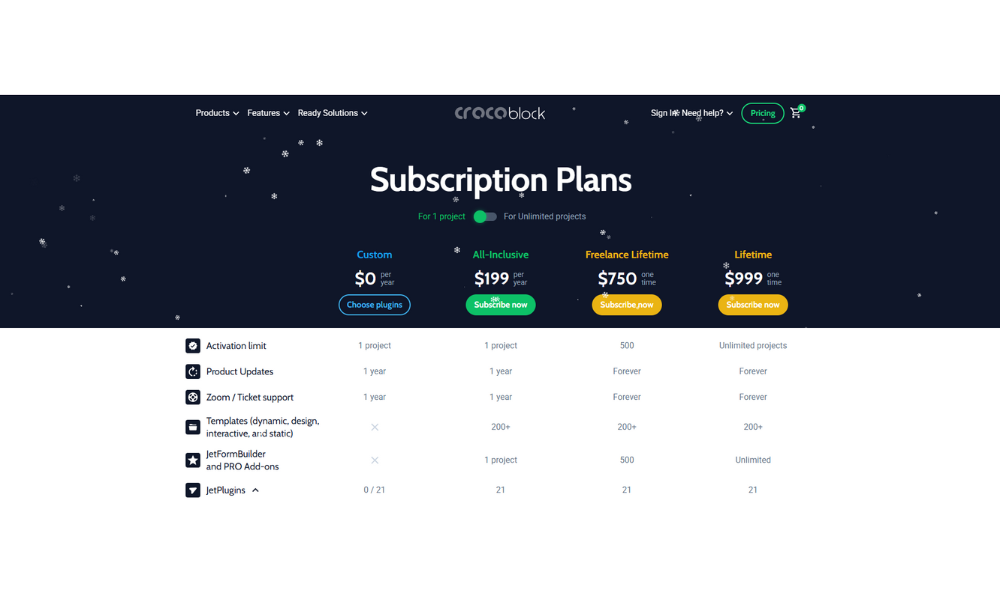
Crocoblock
-
~$199/year (All-Inclusive)
-
~$399/year (Unlimited)
-
~$750–$999 lifetime
ACF
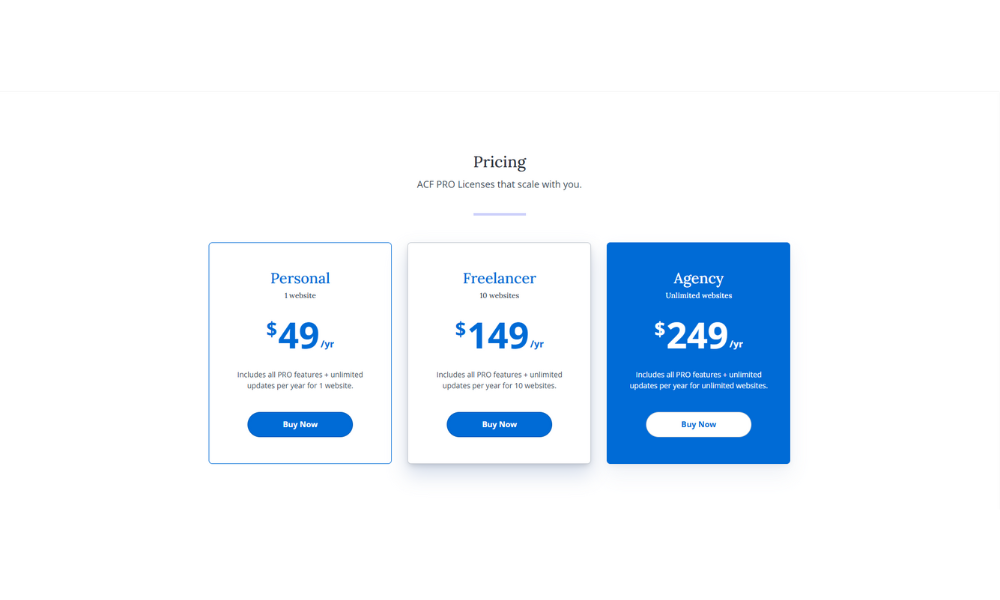
-
Free core
-
~$49/year (Pro, single site)
-
Higher tiers for multiple sites
On paper, ACF is cheaper.
10. Total Cost of Ownership (Reality-Level)
License cost is only a fraction of total cost.
| Cost Category | Crocoblock | ACF Stack |
|---|---|---|
| License | Higher | Lower |
| Build time | Low | High |
| Change cost | Low | High |
| Maintenance | Predictable | Variable |
| Dependency risk | Vendor | Developer |
Conclusion:
ACF shifts cost into labor.
Crocoblock shifts cost into licensing.
For most businesses, labor is more expensive than software.
11. Risk Analysis
Crocoblock Risks ⚠️
-
Ecosystem dependency
-
Abstraction limits for edge cases
-
Requires commitment to JetPlugins philosophy
ACF Risks ⚠️
-
Developer lock-in
-
Cost escalation over time
-
Maintenance complexity
-
Fragmented plugin stack
12. Governance, Compliance & Longevity
ACF is widely adopted in enterprise environments due to its predictability and code-centric model.
Crocoblock is increasingly adopted in commercial, growth-oriented WordPress ecosystems, where speed and adaptability outweigh architectural purity.
Both are actively maintained and stable, but they appeal to different governance philosophies.
13. Use Case Mapping (Clear Guidance)
Crocoblock Is Ideal For:
-
Directories
-
Marketplaces
-
SEO-driven content hubs
-
Affiliate websites
-
SaaS-style WordPress products
-
Agencies managing many dynamic sites
ACF Is Ideal For:
-
Custom themes
-
Headless WordPress
-
Enterprise-controlled architectures
-
Developer-centric workflows
14. Scoring Matrix (Holistic View)
| Dimension | Crocoblock | ACF |
|---|---|---|
| Feature coverage | 9 | 5 |
| Data precision | 8 | 9 |
| Ease of use | 9 | 4 |
| Speed to market | 9 | 3 |
| Long-term ROI | 9 | 6 |
| Operational risk | 8 | 6 |
15. Final Verdict: Which One Should You Choose?
If you are choosing a tool, ACF is excellent.
If you are choosing a system, Crocoblock is superior.
ACF gives you control.
Crocoblock gives you leverage.
For most real-world, revenue-driven WordPress projects, leverage wins.
If your objective is to build, scale, and monetize dynamic WordPress websites efficiently, Crocoblock provides a complete system that replaces fragmented stacks and reduces long-term cost.
👉 Explore in-depth analyses, advanced comparisons, and real implementation strategies at:
https://esapplication.com/