Craftybase Review – Is It Worth It?
Craft businesses rarely fail because the product is bad. They fail because the numbers are unclear. Many makers price based on “what feels right,” or they rely on spreadsheets that become outdated the moment a batch is produced, a supplier raises prices, or orders spike across multiple sales channels. When you don’t know your true costs, you don’t know your real margin—and once margin becomes guesswork, growth turns into risk.
That is the context in which Craftybase exists. Craftybase is not trying to be a generic inventory system for every type of business. It focuses on a narrower, more practical promise: help makers and small-batch manufacturers track materials, production, and true product costs so pricing decisions and inventory planning can be based on reliable data.
In this Craftybase review, I’ll evaluate the platform as a business tool, not a shiny dashboard. We’ll look at what Craftybase does well, where it can frustrate users, what kind of operation gets the strongest ROI, and how it compares with alternatives that appear similar at first glance but solve different problems.

What is Craftybase?
Industry / Niche
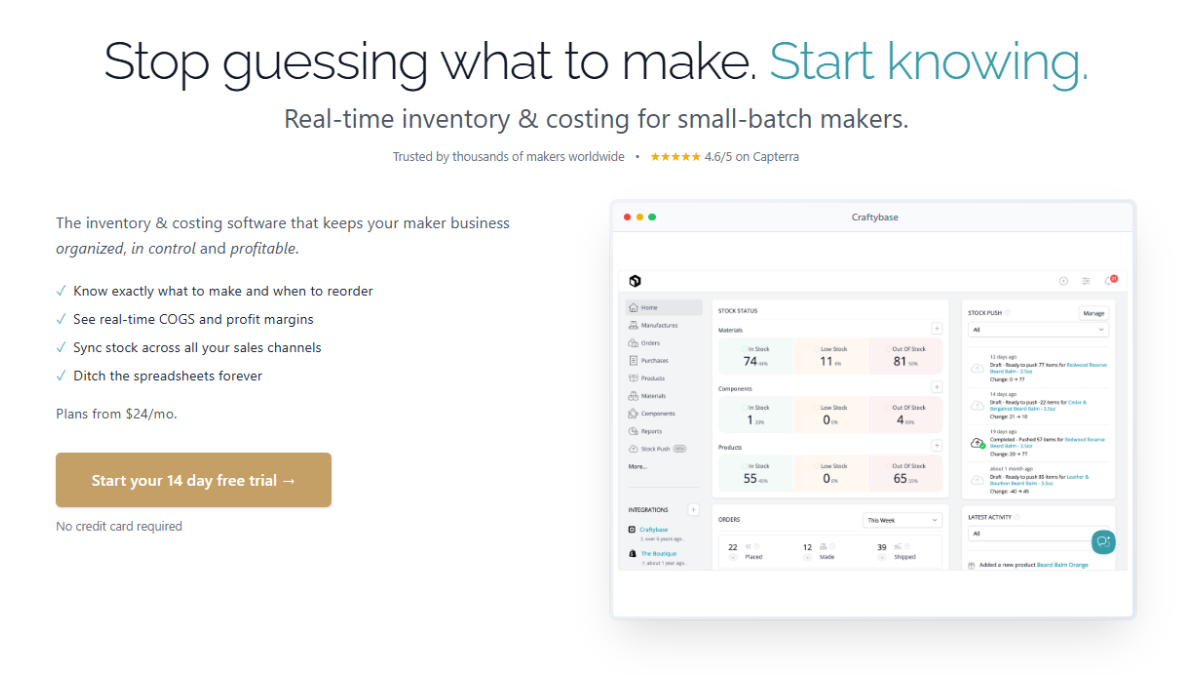
Craftybase is a cloud-based platform in the niche of inventory management + manufacturing costing for makers and small-batch production businesses. It is designed for sellers who have to track raw materials, convert those materials into finished goods, and sell those goods across one or more ecommerce channels.
Core problem it solves
The core problem is simple but expensive: most makers don’t have a dependable system for tracking inventory and true Cost of Goods Sold (COGS).
A spreadsheet can list quantities and costs, but it usually fails in real life because:
-
inventory changes constantly (production, waste, returns, damaged stock)
-
materials are shared across multiple products
-
batch sizes vary
-
supplier costs change
-
sales happen across multiple channels
Craftybase addresses that operational reality by linking materials → recipes (BOM) → production → product inventory → sales → profit reporting, so your numbers stay consistent as the business moves.
Target users
Craftybase is best suited for:
-
makers producing physical goods (candles, soap, cosmetics, jewelry, food products, etc.)
-
small-batch manufacturers with repeatable recipes or bills of materials
-
ecommerce sellers on Shopify/Etsy/WooCommerce who want costing accuracy
-
businesses ready to move beyond manual spreadsheets
Business model / service type
Craftybase is a subscription SaaS product with tiered plans. The logic is typical: more features, more products, more usage capacity → higher tier. The real question isn’t “is it cheap,” but “does it save enough time and prevent enough margin mistakes to justify the cost.”
Quick Overview & Unique Value Proposition
Most inventory tools are built for resellers: buy item A, stock item A, sell item A. That’s not how makers operate. Makers buy materials, then transform those materials into products. In maker businesses, the inventory story is about conversion, not just counting.
Craftybase’s unique value proposition is that it tries to handle the full loop:
-
You purchase raw materials
-
You assign those materials to product recipes (BOM)
-
You produce batches and consume materials
-
You sell products across channels
-
You track COGS, inventory valuation, and profit per product
If you have ever suspected you’re underpricing (or you have no idea which product actually makes money), Craftybase is built to answer that.
Key Features & Functional Strengths
1) Material and product inventory that reflects production reality
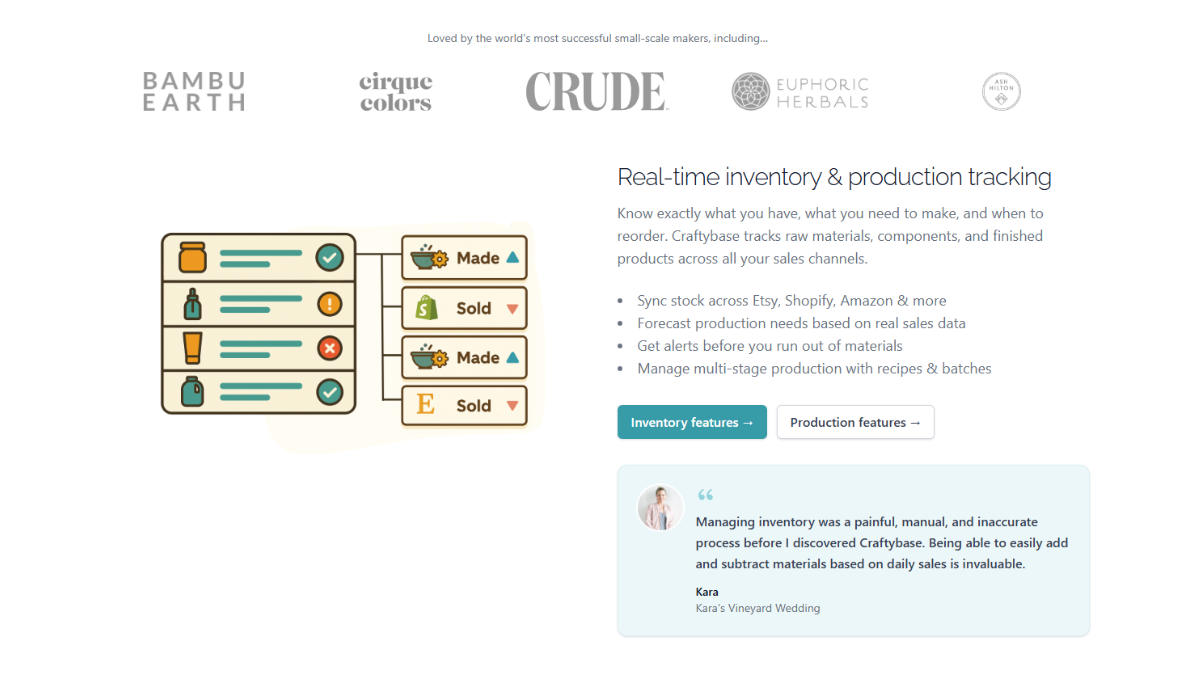
Craftybase can track:
-
raw materials and packaging
-
finished goods
-
inventory adjustments (loss, spoilage, corrections)
Where this matters: if you sell on multiple channels and produce in batches, a basic inventory plugin usually can’t keep accurate counts without constant manual edits. Craftybase’s model is designed so inventory becomes a result of your workflow, not a separate chore.
2) Recipes / Bill of Materials (BOM) for each product
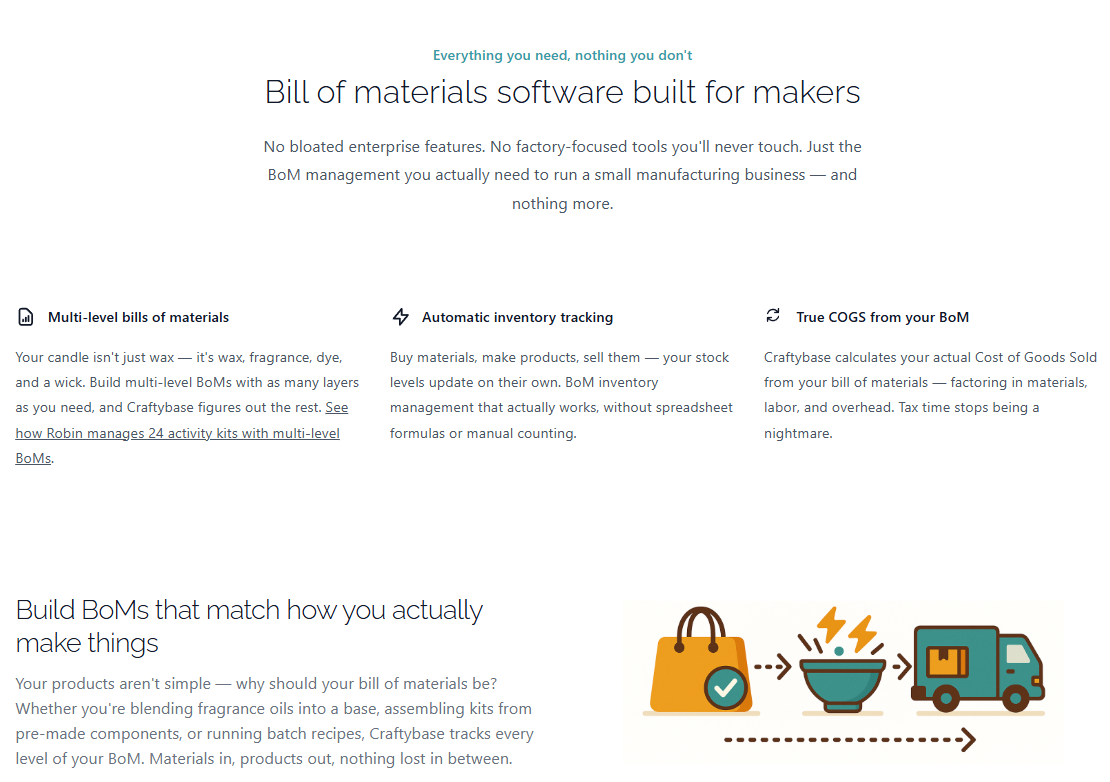
This is the foundation of Craftybase. You define what goes into a product: quantities of wax, fragrance oil, wicks, jars, labels, boxes, etc. That BOM becomes the truth for:
-
how materials are consumed
-
how per-unit costs are calculated
-
how reorder needs can be forecasted
A strong BOM system is the difference between “I think this costs $6 to make” and “it costs $6.83 today based on current supplier costs and actual usage.”
3) Batch production tracking
In small manufacturing, production is the missing link in many tools. Craftybase’s production/batch capability is what turns it from “inventory software” into a practical operations tool.
When production is recorded properly:
-
raw materials decrease
-
finished goods increase
-
costs roll into the product cost basis
-
reporting stays consistent
This is where many businesses recover margin: they finally see how waste, shrinkage, and packaging changes impact cost.
4) Automatic COGS and margin visibility
The biggest reason to pay for Craftybase is not inventory counting. It’s costing truth.
COGS accuracy helps you:
-
price products confidently
-
identify products with hidden margin problems
-
stop scaling the wrong items
-
create smarter bundles
-
justify premium pricing with data
If you only want to track “units on shelf,” Craftybase is probably overkill. But if you want to understand margin at a product level, it becomes much more valuable.
5) Multi-channel integrations and syncing
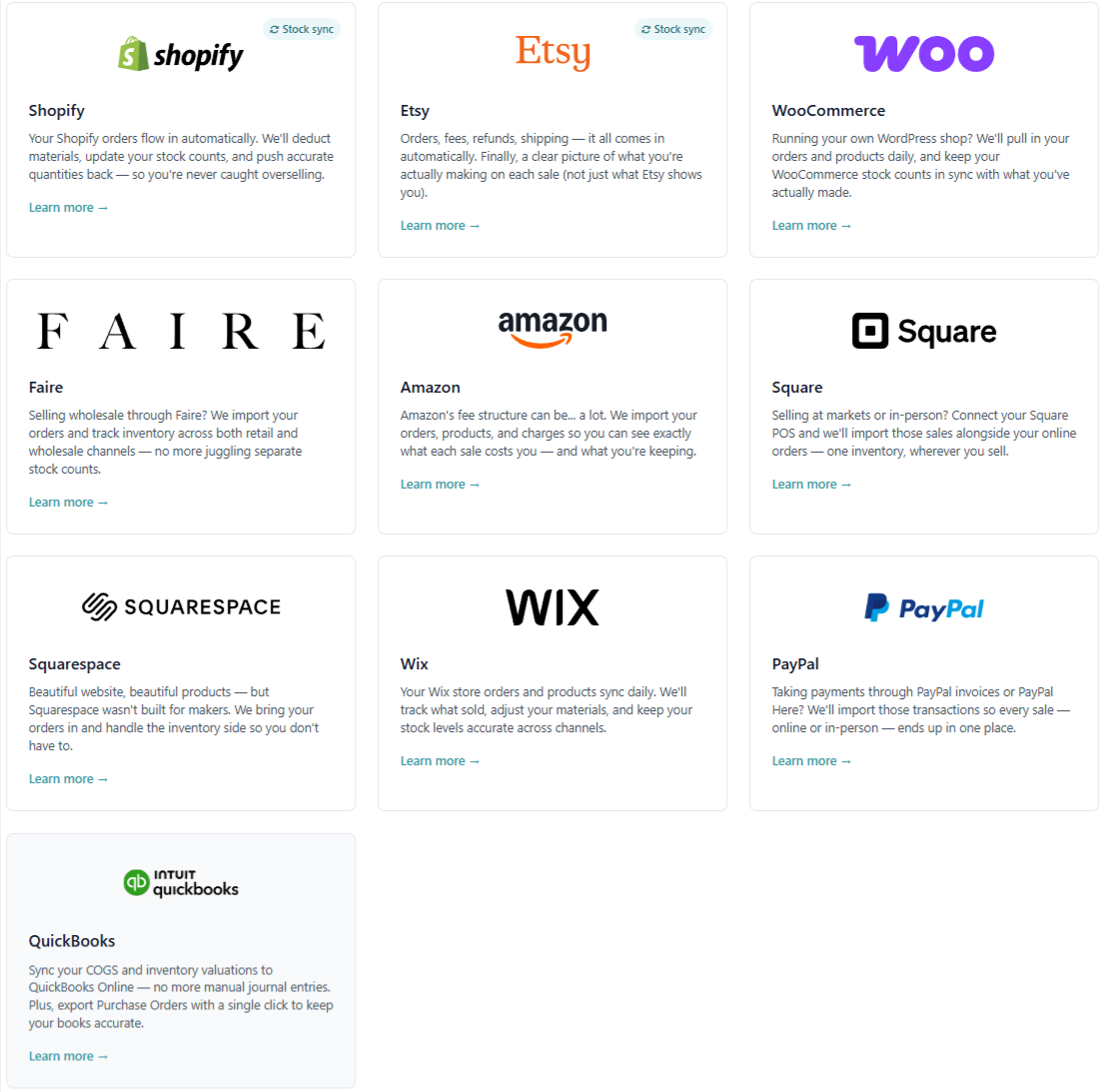
Craftybase is often used by sellers who have:
-
Etsy for marketplace demand
-
Shopify for brand building
-
additional channels like WooCommerce/Square depending on the business
The practical value: inventory is not just tracked in one dashboard. It can reflect sales activity across channels, reducing the “oversell” risk and the manual reconciliation that drains time.
6) Reporting that supports decision-making
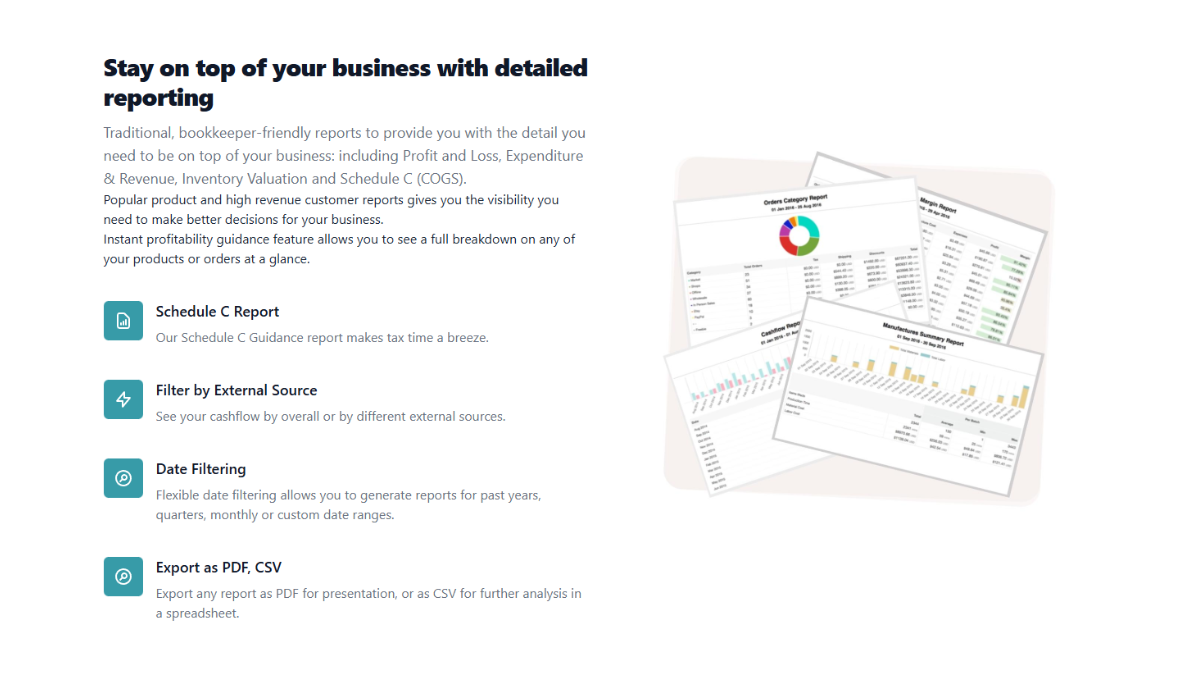
Reports become useful when they answer hard questions:
-
Which products deserve more ad budget?
-
Which products are “busy but unprofitable”?
-
Which product line is winning after packaging and material changes?
-
How much capital is tied up in materials vs finished goods?
Craftybase’s value increases as your SKU count, channel count, and production complexity grow.
Real-World Performance & User Experience
Setup: the real cost is configuration, not subscription
A realistic Craftybase implementation requires discipline:
-
you must enter materials accurately
-
you must build BOMs properly
-
you must update supplier costs when they change
-
you must record production consistently
If you do that, Craftybase becomes a “single source of truth.”
If you don’t, it becomes another tool that “doesn’t match reality.”
This is not a Craftybase-only issue—it’s the nature of inventory and costing systems. The difference is Craftybase is detailed enough to reward accurate setup.
Learning curve: moderate, but justified for the right user
Craftybase is not difficult because it is poorly designed—it’s difficult because costing and inventory are inherently detailed. If you are moving from spreadsheets, expect a ramp-up period. Once your BOMs and materials are built, daily operations become easier.
Day-to-day workflow: where Craftybase saves time
After setup, the most valuable workflow improvements tend to be:
-
fewer stock errors
-
easier reorder planning
-
less time spent reconciling sales vs inventory
-
faster product profitability analysis
You stop “checking everything” and start trusting the system.
Pricing & Cost Analysis
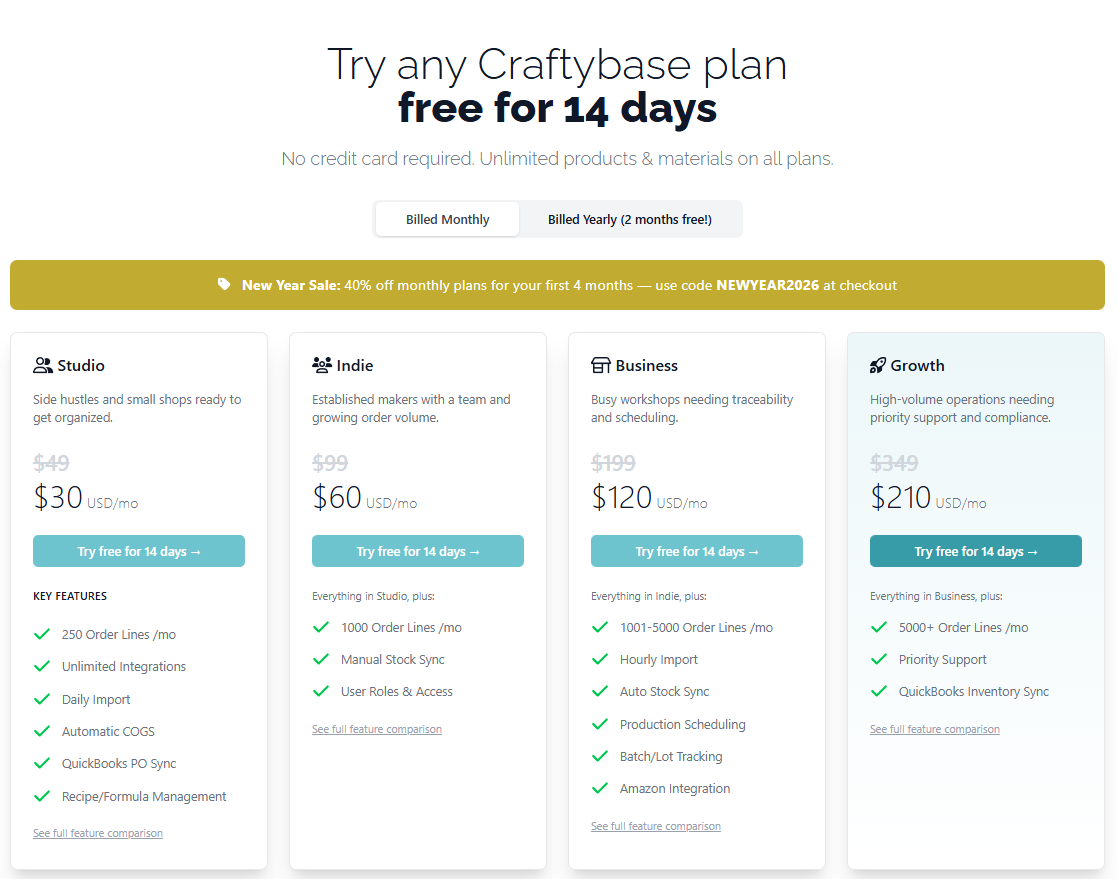
Note: SaaS pricing changes over time. Always check the official pricing page for current rates.
Plan names and billing structure
Craftybase uses tiered plans typically differentiated by:
-
number of products / materials
-
integrations or channel capacity
-
advanced reporting features
What’s included (in practical terms)
A good way to judge value is to translate features into outcomes:
-
BOM + production tracking → accurate cost per unit
-
integrations → fewer oversell mistakes, less manual work
-
reporting → better pricing decisions and product prioritization
Transparency rating
8/10
Generally clear tiering, but like many SaaS tools, limits and included features should be read carefully before committing. The platform is specialized; you should confirm the plan matches your SKU count and channels.
ROI analysis: when Craftybase “pays for itself”
Craftybase makes financial sense when at least one of these is true:
-
you have enough volume that manual tracking costs real time each week
-
you run ads or promotions and need to understand margin impact
-
supplier costs fluctuate, and your pricing must keep up
-
you sell on multiple channels and overselling causes refunds and bad reviews
-
you suspect you are underpricing but can’t prove it
If your monthly production is very low and your product line is tiny, spreadsheets might remain “good enough.” But as soon as you’re making decisions based on guesses, Craftybase becomes a form of risk control.
Comparison With Alternatives
To compare Craftybase fairly, we need to compare it with tools that solve similar problems—not just tools that share the word “inventory.”
Craftybase vs Katana (manufacturing-focused)
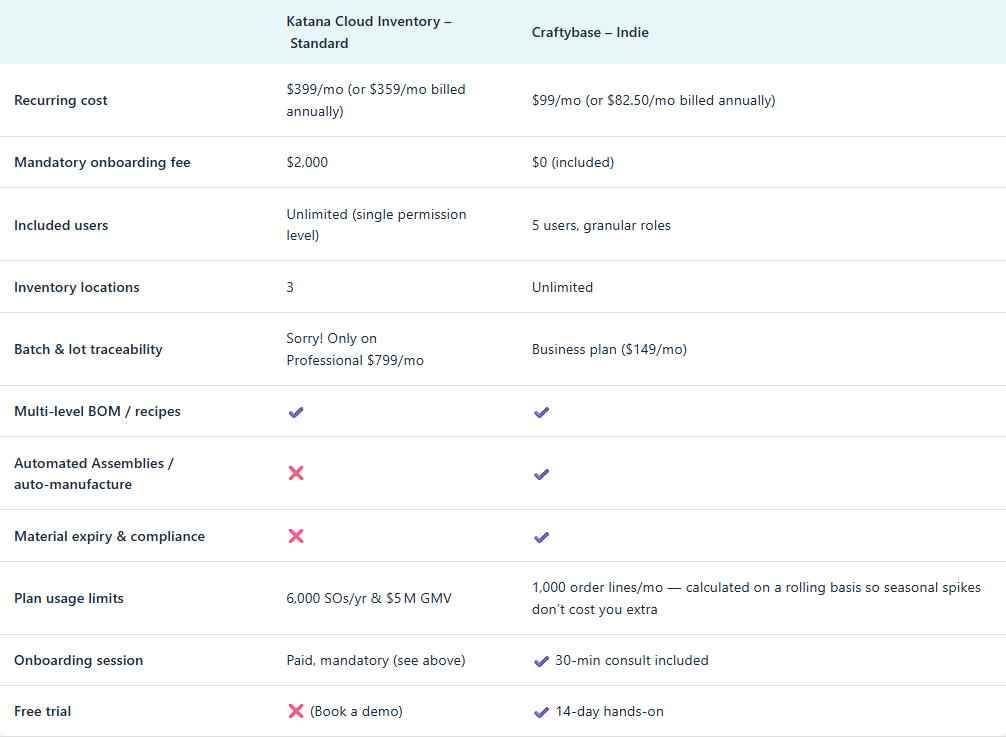
Best difference in one line:
-
Craftybase is tailored for makers/small-batch workflows.
-
Katana is stronger for more complex manufacturing operations and teams.
If you are running a larger production shop with advanced scheduling needs, Katana may fit better. If you are a maker brand that needs costing clarity and manageable production tracking, Craftybase usually feels more aligned.
Craftybase vs Zoho Inventory (general inventory platform)
Best difference in one line:
-
Craftybase is production/costing aware.
-
Zoho Inventory is broader, but less maker-specific in costing workflows.
Zoho can be excellent for businesses that mostly resell products or need broad system integration. Craftybase tends to win when your core challenge is materials → production → cost accuracy.
Pros & Cons
Pros
-
Built for maker manufacturing, not generic inventory
-
BOM + production workflows support real COGS accuracy
-
Helps prevent underpricing and margin blindness
-
Useful multi-channel inventory visibility
-
Reporting supports smarter product decisions
Cons
-
Setup requires time and accuracy
-
Not ideal for businesses that don’t manufacture
-
May feel expensive for hobby-level sellers
-
Not a full accounting replacement (you may still need QuickBooks/Xero)
Who Should Use It – And Who Should Avoid It
Who should use Craftybase
Craftybase is a strong fit if you:
-
produce physical goods with repeatable recipes
-
manage multiple materials per product
-
sell across multiple ecommerce channels
-
need accurate product-level profitability
-
want a system you can grow with
Who should avoid Craftybase
You should consider other options if:
-
you sell mostly digital products or services
-
you resell items without production
-
your SKU count is extremely small and volume is minimal
-
you are unwilling to maintain BOM and production discipline
Real Use Case Examples
Use Case 1: Candle brand scaling from Etsy to Shopify
A candle maker often discovers that the “best-selling scent” is not the “most profitable scent.” Craftybase can reveal:
-
which scents have higher material cost
-
how packaging changes affect margin
-
which products deserve ad budget
This is one of the most valuable shifts: moving from “sales-driven decisions” to “profit-driven decisions.”
Use Case 2: Soap and skincare maker dealing with fluctuating ingredient costs
Ingredient costs can change quickly. A maker who updates supplier costs in Craftybase can:
-
see cost changes reflected in product costing
-
adjust pricing with confidence
-
avoid margin collapse over time
Use Case 3: Jewelry seller tracking metal pricing and packaging
When materials like silver or gold fluctuate, pricing decisions need data. Craftybase can keep the cost basis more accurate than manual spreadsheets, especially as SKU count grows.
Try Craftybase if you need costing accuracy
If your pricing is based on estimates—or you regularly wonder whether you’re truly profitable—Craftybase is worth trying. A short test with a small set of products can quickly show whether the workflow matches your business.
Check the latest Craftybase pricing and plan limits
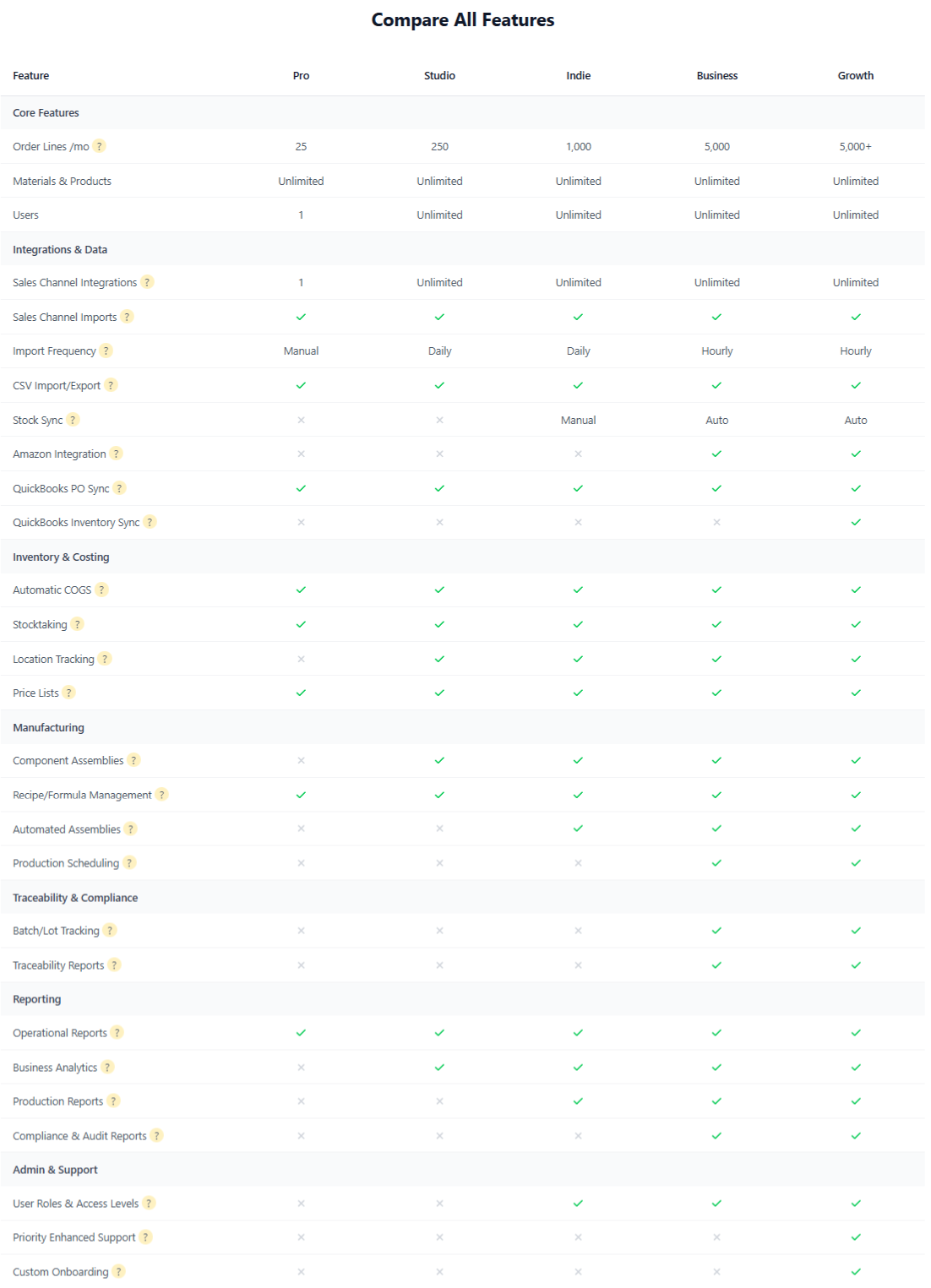
Before committing, review the pricing tiers and plan limits so you don’t outgrow the plan too quickly. The best plan is the one aligned with your SKU count, production complexity, and sales channels.
Final Verdict – Should You Use It or Not?
Here’s the honest conclusion: Craftybase is worth it when you treat it as a profit-protection system, not just an inventory app.
If you are making products from materials, and you want to stop guessing your costs, Craftybase offers meaningful advantages:
-
it forces costing discipline
-
it turns production into trackable data
-
it gives you product-level profitability visibility
However, it is not “set it and forget it.” The businesses that win with Craftybase are the ones that:
-
commit to accurate setup
-
keep BOMs updated
-
record production consistently
Bottom line:
-
Yes, use Craftybase if you are a serious maker business growing beyond spreadsheets.
-
No, skip it if you don’t manufacture or your operation is too small to justify the configuration effort.
Frequently Asked Questions (FAQ)
Is Craftybase good for beginners?
It can be, but it’s best for makers who are ready to track materials and production properly. Expect a learning curve.
Does Craftybase replace accounting software?
No. It supports costing and inventory. Most businesses still use accounting software for bookkeeping and taxes.
Can Craftybase help me price products correctly?
Yes—because accurate BOM and supplier costs can produce much more reliable per-unit costing.
Is Craftybase only for Etsy sellers?
No. Etsy is common, but Craftybase fits Shopify and multi-channel sellers well.
Visit my authority site for more reviews and comparisons
If you want more objective reviews, comparisons, and tool recommendations across SaaS and ecommerce operations, visit:
👉 https://esapplication.com