
Choosing between Vista Social and Buffer is not simply a matter of picking a scheduling tool. It is a decision about how much of your social media workflow you want one platform to handle.
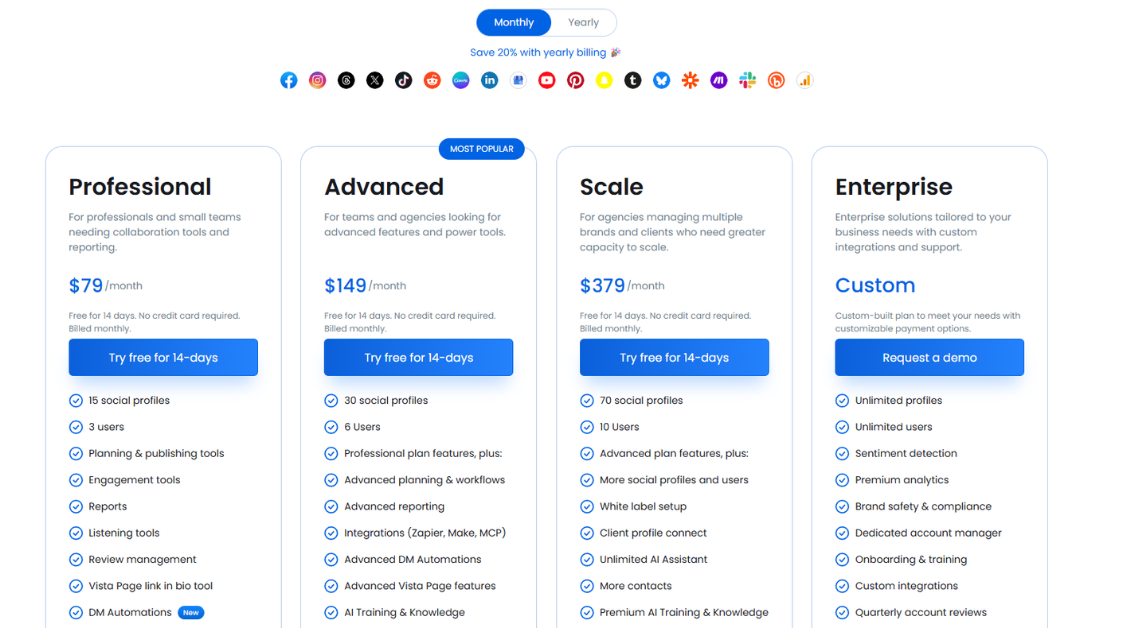
That distinction matters because both tools cover the essentials on paper. The article on Vista Social’s site compares the two across publishing, analytics, social inbox, listening, AI, automation, collaboration, and pricing, and it positions both platforms as capable social media management tools, but not for the same level of operational complexity. Vista Social’s comparison table says both support publishing, analytics, link-in-bio, collaboration, and AI, while Vista Social adds fuller inbox functionality, listening as an add-on, employee advocacy as an add-on, and stronger automation. It also lists Vista Social pricing from $79/month and Buffer with a free plan and paid plans starting at $6 per channel per month.
The real difference is not whether both tools can publish posts. They can. The difference is how far each platform extends beyond publishing.
Buffer is built around simplicity, accessibility, and low-friction execution. Its official pricing and support pages emphasize a free plan, per-channel pricing, 10 scheduled posts per channel on the free plan, unlimited scheduled posts on paid plans, and a structure designed to scale by adding channels as needed. That model makes Buffer especially attractive to solo creators, freelancers, and small businesses that want to move quickly without building a complex workflow.
Vista Social is positioned more like an operating system for social teams. Its pricing page and comparison content highlight bundled plans with multiple profiles and users, optional listening, employee advocacy, review management, DM automations, AI training, and broader workflow depth. That makes it fundamentally more suitable for teams that are not merely posting, but coordinating publishing, engagement, reporting, and customer interaction across many accounts.
So the better framing is this:
- Buffer is a lighter, easier system for straightforward social media execution.
- Vista Social is a broader, more operational system for scaling social media management.
That is the lens through which the rest of the comparison should be read.
Social Media Publishing
Publishing is the first place where both tools appear similar, but once you look at workflow depth, the gap becomes clearer.
Vista Social’s comparison article describes it as built for modern, high-volume publishing, with support for short-form video workflows, visual calendar planning, bulk scheduling, content queues, and an integrated media library. The article specifically emphasizes that its calendar is designed to help users see all scheduled content in one place, identify gaps, and adjust timing more easily. It also highlights bulk scheduling and content queues as core parts of a more repeatable publishing workflow.

That matters because modern publishing is rarely just “write caption, publish post.” For many teams, it includes:
- coordinating multiple campaigns at once
- adapting content across formats and channels
- storing reusable assets
- scheduling at scale
- reducing repetitive manual actions
Vista Social is stronger when publishing is part of a larger content system. It is not just helping you get posts out; it is helping you manage throughput.
Buffer, by contrast, approaches publishing from a simplicity-first perspective. Vista Social’s article notes that Buffer offers a drag-and-drop content calendar, post timing suggestions, bulk scheduling, and mobile reminders for channels that require manual publishing steps. Buffer’s official pricing materials confirm that the free plan includes 3 channels and 10 scheduled posts per channel, while paid plans unlock unlimited scheduling.

That makes Buffer very good for users who want publishing to feel lightweight and intuitive. For example, if you are a creator, consultant, or local business with a manageable posting cadence, Buffer’s publishing experience may actually feel better because it minimizes friction. You do not have to think like an operations manager to use it well.
But there is a tradeoff.
The more complex your publishing needs become, the more likely Buffer’s strengths begin to turn into limitations. A system that feels elegant for one brand and a few weekly posts can become restrictive when you need to manage multiple brands, shared review cycles, evergreen queues, reusable assets, and higher post volume.
So in publishing, the real distinction is not “both tools can schedule.” It is this:
- Buffer is better when publishing needs to stay simple.
- Vista Social is better when publishing has to scale without becoming chaotic.
That is exactly why the sample article concludes that Buffer fits smaller workloads and basic scheduling, while Vista Social is better for teams managing high-volume content.
Social Media Analytics
Analytics is where the difference between a lightweight tool and an operational tool becomes even more visible.
Vista Social’s comparison article says its dashboards show not only account performance and audience response, but also competitor activity and team performance. It also notes that many of these insights are included in regular plans rather than being heavily restricted behind higher tiers. The positioning here is important: Vista Social is not presenting analytics as a side feature. It is presenting analytics as a management layer for both performance and workflow.

That is a major advantage for agencies and multi-user teams because reporting is not just about knowing which post got the most engagement. It is also about answering questions like:
- Which channels are improving over time?
- Which content formats deserve more resources?
- Which team workflows are producing better results?
- How should performance be explained to clients or stakeholders?
Vista Social appears designed to serve those questions more directly. Its broader analytics framing suggests that it is meant for users who need insight that leads to decisions, not just metrics that confirm activity.
Buffer also offers analytics, and its official analytics page says users can track performance across Instagram, Facebook, X, and LinkedIn, compare organic versus boosted posts, and review post and channel analytics from a single dashboard. That gives Buffer meaningful value beyond basic scheduling. It is not fair to describe Buffer as weak on analytics overall.
However, Buffer’s own pricing information and the Vista Social comparison article both indicate that the free plan is limited to basic analytics over the past 30 days, and that more advanced insights are reserved for higher tiers. That means smaller users can certainly get useful feedback, but not always the full reporting depth without upgrading.

This creates a clear analytical divide:
- Buffer is good for understanding post performance and top-level channel metrics.
- Vista Social is better when reporting is central to strategy, client delivery, or team management.
Another way to phrase it is:
- Buffer analytics answers, “How did this content do?”
- Vista Social analytics is closer to answering, “How is the social operation performing, and what should we change next?”
That difference is subtle, but it becomes very important as soon as social media becomes a serious business function rather than a lightweight marketing task.
Social Inbox
The inbox comparison is one of the strongest differentiators in the sample article, and it deserves more attention because engagement is where many social workflows break down.
Vista Social’s Social Inbox is described as a unified stream for comments and messages across connected profiles. The article says users can group messages by profile, label them, sort by type, tag for follow-up, search across conversations, and collaborate internally so teams know who has responded and where follow-up is needed.

That is not just a convenience feature. It fundamentally changes how teams handle engagement.
A real social inbox does several things at once:
- centralizes communication
- preserves context
- supports team coordination
- reduces duplicate or missed responses
- turns engagement into a manageable workflow
That is especially valuable for agencies, franchises, local businesses with inbound traffic, and brands running high-volume community management.
Buffer’s current engagement model is much lighter. The article explains that Buffer sunset Buffer Reply in 2020 and now offers Buffer Community, which is mainly focused on comment management. It supports features such as filtering comments, notifications, saved replies, AI-assisted responses, and reply handling across several platforms. But the article also explicitly says Buffer Community is not a full social inbox and has limited support for private messages, assignments, tagging, and advanced collaboration.

That distinction is extremely important.
Buffer’s engagement tools are probably sufficient when:
- you mainly need to reply to comments
- the message volume is low
- one person or a very small team handles engagement
- inbox management is not business-critical
But once inbox activity becomes a shared responsibility or part of lead management, service response, or reputation control, Buffer’s lightweight structure is more likely to feel incomplete.
So the inbox verdict is not just that Vista Social has “more features.” It is that the two tools are built for different assumptions:
- Buffer assumes engagement is a relatively simple extension of publishing.
- Vista Social assumes engagement is an ongoing operational layer that needs structure.
If engagement is minor in your workflow, Buffer may be enough. If engagement is central to your workflow, Vista Social is meaningfully stronger.
Social Listening
Social listening is one of the clearest category advantages for Vista Social in the sample article.
Vista Social’s article says its listening tools can track keywords, hashtags, and mentions across social media and websites, surface relevant content automatically, and send alerts when something important happens. The article also notes that listening on your own profiles is free, while broader external monitoring is available as a paid add-on. Vista Social’s pricing page similarly says listening across social, web, and news starts at $75/month.

Buffer does not offer social listening, according to the sample comparison.
That absence matters more than many buyers realize.
Without listening, a platform mainly shows you what happens on content you already published or on profiles you already control. With listening, the platform can help you detect what people are saying outside your owned posts. That expands social media from a publishing discipline into an awareness discipline.
Listening is especially valuable when you need to:
- monitor brand mentions in real time
- track campaign response outside your own pages
- watch competitor conversations
- identify sentiment shifts
- discover trend opportunities earlier
In other words, listening changes the scope of what the platform is doing for you. It stops being just a publishing dashboard and starts becoming a visibility system.
This is why the gap here is structural, not cosmetic. Buffer users who need listening would likely have to rely on another tool entirely. Vista Social users can keep that function inside the same broader platform, albeit as an add-on.
So for brands that care about awareness beyond owned media, Vista Social is in a different category.

Pros and Cons
Vista Social
Pros
Vista Social’s biggest advantage is breadth with operational depth. The sample article and pricing materials show that it combines publishing, analytics, a real social inbox, optional social listening, automation, link-in-bio, team collaboration, and add-ons such as employee advocacy in one broader platform. That makes it much better suited for agencies, growing brands, and teams that want one system to absorb more of the social workflow.
It also appears stronger for users who need structure. Bulk scheduling, content queues, media management, message tagging, internal collaboration, reporting depth, and DM automations all point to a tool that is designed not just to help you publish content, but to run a repeatable process around social media management.
Cons
The same breadth that makes Vista Social powerful can also make it less ideal for users who only need basic publishing. If your workflow is simple, the platform’s deeper capabilities may feel like more system than you really need. It is also likely to require more onboarding and more deliberate setup than a lightweight platform like Buffer. And while its bundled approach can be efficient at scale, the entry point can still feel high compared with a free or low-cost per-channel tool.
Buffer
Pros
Buffer’s biggest strength is clarity. Its product and pricing are easy to understand, the free plan lowers adoption risk, and the publishing workflow stays clean and approachable. It is also more than just a bare scheduler: it offers analytics, collaboration features, AI Assistant, Start Page, and community engagement tools in a package that is designed to remain accessible.
For creators, freelancers, consultants, and small businesses, that simplicity is not a weakness. It is one of Buffer’s main strategic advantages.
Cons
Buffer’s limitations emerge when the workflow gets more complex. The sample comparison specifically notes that its inbox is limited, social listening is not included, and automation is more constrained. While Buffer does support useful collaboration and AI-assisted content creation, it is still fundamentally better optimized for lighter workloads than for fully integrated, high-volume social operations.
Final Recommendation (Conclusion / Verdict)
Vista Social and Buffer are both legitimate tools, but they are not trying to win on exactly the same dimension.
Buffer is trying to make social media management approachable. It gives users a clean way to schedule, review performance, collaborate lightly, and stay consistent without overcomplicating the process. Its free plan and per-channel model make it particularly compelling for individuals and smaller teams that want immediate value with minimal setup.
Vista Social is trying to make social media management more complete. Its comparison article and pricing page position it as the stronger choice for teams that need not only publishing, but also inbox coordination, listening, automation, reporting depth, and broader operational control.
So the final recommendation is straightforward:
Choose Buffer if you are a solo creator, freelancer, consultant, or small business that wants an easy, low-friction tool for scheduling, basic analytics, and manageable engagement. Its simplicity is the reason to choose it, not something to overlook.
Choose Vista Social if you are an agency, a marketing team, a multi-location business, or a growing brand that needs one platform to support publishing, inbox management, reporting, automation, and audience visibility at a deeper level. That is where its broader system design becomes a real advantage.
Bottom line:
Buffer is the stronger choice for simplicity.
Vista Social is the stronger choice for capability, coordination, and scale.
If you want a complete breakdown of features, pricing, and real-world performance, you can read our detailed Vista Social review to explore everything you need before making a decision.