Communication plays a crucial role in how businesses operate today. Whether a company is managing customer support, handling sales conversations, or coordinating internal teams, having the right communication system can significantly improve productivity and customer satisfaction.
For many years businesses relied on traditional office phone systems to handle communication. These systems often required expensive hardware, complicated installations, and ongoing maintenance.
However, the modern workplace has changed dramatically. Remote teams, digital collaboration, and cloud technology have transformed how companies communicate with customers.
Instead of relying on physical infrastructure, businesses are now adopting cloud-based phone systems that allow employees to make calls, send messages, and manage conversations through software.
One platform gaining attention in this space is Quo.
In this Quo review, we will explore how the platform works and whether it is a good choice for startups, sales teams, and small businesses.
We will examine:
-
what Quo is
-
how the platform works
-
key features
-
pricing plans
-
advantages and disadvantages
-
how it compares with competitors
By the end of this guide you will have a clear understanding of whether Quo is the right communication platform for your business.
 Ready to transform your business communication? Try Quo for free today!
What is Quo (formerly OpenPhone)?
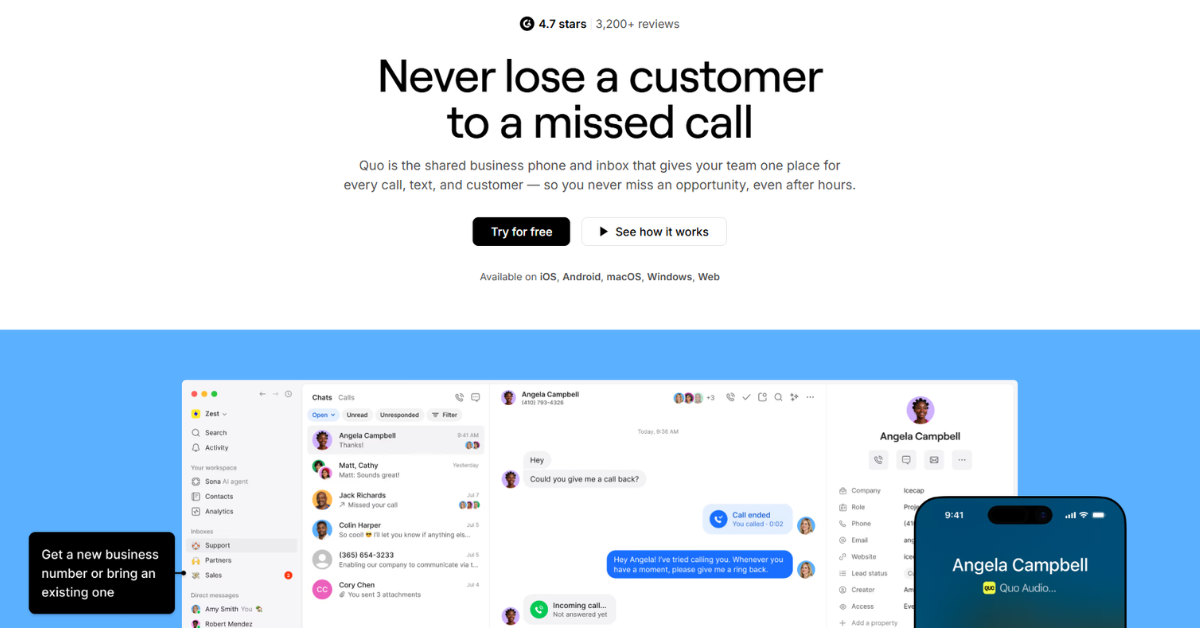
Quo is a modern, cloud-based business phone system (VoIP) specifically built for startups, small to medium-sized businesses (SMBs), and remote teams. Originally launched as OpenPhone, the platform rebranded to Quo to reflect its evolution from a simple virtual phone app to a sophisticated, AI-powered communication ecosystem.
At its core, Quo provides you with a professional business phone number that works on your existing devices—smartphone, tablet, or computer. This allows you to keep your personal and professional lives separate while maintaining a polished image for your brand. However, Quo goes far beyond basic calling and texting. It integrates advanced features like shared inboxes, automated call routing, and a suite of AI tools designed to automate repetitive tasks and provide valuable insights into your customer interactions.
Quo’s mission is to empower businesses to build better relationships with their customers through clear, efficient, and intelligent communication. By centralizing all calls, texts, and voicemails into one intuitive interface, Quo ensures that no lead is ever missed and every customer feels heard.
How Does Quo Work?
Quo operates using Voice over Internet Protocol (VoIP) technology, which means your calls and messages are transmitted over the internet rather than traditional copper wires. This setup offers unparalleled flexibility and scalability.
The Setup Process
Getting started with Quo is remarkably simple, often taking less than five minutes:
- Sign Up: Create an account on the Quo website or through their mobile app.
- Choose Your Number: You can select a new local or toll-free number, or port your existing business number to Quo for free.
- Install the App: Download the Quo app on your iOS or Android device, or use the desktop app for Mac and Windows. There’s also a web-based version for quick access.
- Configure Your Settings: Set up your business hours, voicemail greeting, and call routing rules.
- Start Communicating: You’re now ready to make calls and send texts using your professional business identity.
The User Experience
The Quo interface is clean, modern, and highly intuitive. It feels more like a modern messaging app (like Slack or WhatsApp) than a traditional phone system. All your conversations are organized by contact, making it easy to see the full history of your interactions—including calls, texts, and voicemails—in one place.
For teams, Quo’s shared inbox feature is a game-changer. Multiple team members can access the same phone number, allowing them to collaborate on customer responses, assign tasks, and ensure that every inquiry is handled promptly.
Key Features of Quo
Quo’s feature set is divided into core communication tools and advanced AI-driven automations. Here’s a detailed look at what makes Quo stand out:
1. Professional Business Identity
- Local & Toll-Free Numbers: Get numbers in any US or Canadian area code, or choose a 1-800 number to give your business a national presence.
- International Calling & Texting: Stay connected with clients worldwide with competitive international rates.
- Business Hours: Set specific times when your phone should ring and when it should go straight to voicemail or be handled by the AI agent.
2. AI-Powered Automations (The “Quo AI” Suite)
This is where Quo truly shines in 2026. The platform has doubled down on AI to provide features that were previously only available to large enterprises with massive budgets.
Sona AI Agent
Sona is Quo’s flagship AI feature. It acts as a 24/7 virtual receptionist that can:
- Answer Calls Professionally: Sona greets callers with a natural-sounding voice and can handle basic inquiries.
- Provide Instant Answers: Using your business’s knowledge base, Sona can answer frequently asked questions about your services, pricing, or hours.
- Take Detailed Messages: If a caller needs to speak with a human, Sona captures all the necessary details and forwards them to your team.
- Route Calls: Sona can intelligently route callers to the right department or person based on their needs.
AI Call Summaries & Transcripts
Never take manual notes again. Quo’s AI automatically transcribes every call and provides a concise summary of the key points discussed. This is invaluable for:
- Quick Review: Catch up on a 20-minute call in just 30 seconds.
- Action Items: The AI identifies tasks and follow-ups mentioned during the conversation.
- Searchability: Easily search through your call history for specific keywords or topics.
AI Message Responses
Save time on repetitive texts. Quo’s AI suggests relevant responses based on the context of the conversation. You can also prompt the AI to draft a professional message for you, ensuring your tone is always on-brand.
AI Call Tags
Define your own categories, and Quo’s AI will automatically tag calls based on the content of the conversation. This allows for powerful reporting and helps you identify trends in customer inquiries.
3. Team Collaboration Tools
- Shared Inboxes: Allow multiple team members to manage calls and texts from a single number.
- Internal Comments: Leave private notes for your teammates within a conversation thread to provide context or instructions.
- Call Transfers: Seamlessly move a live call to another team member.
- Ring Groups: Have multiple phones ring simultaneously so the first available person can answer.
4. Seamless Integrations
Quo plays well with the tools you already use:
- CRM Integration: Connect with HubSpot, Salesforce, and Pipedrive to automatically log calls and sync contacts.
- Slack: Get notifications for missed calls and new voicemails directly in your Slack channels.
- Zapier: Create custom workflows with thousands of other apps.
- Webhooks & API: For advanced users, Quo offers a robust API to build custom integrations.
Quo Pricing Plans (2026)
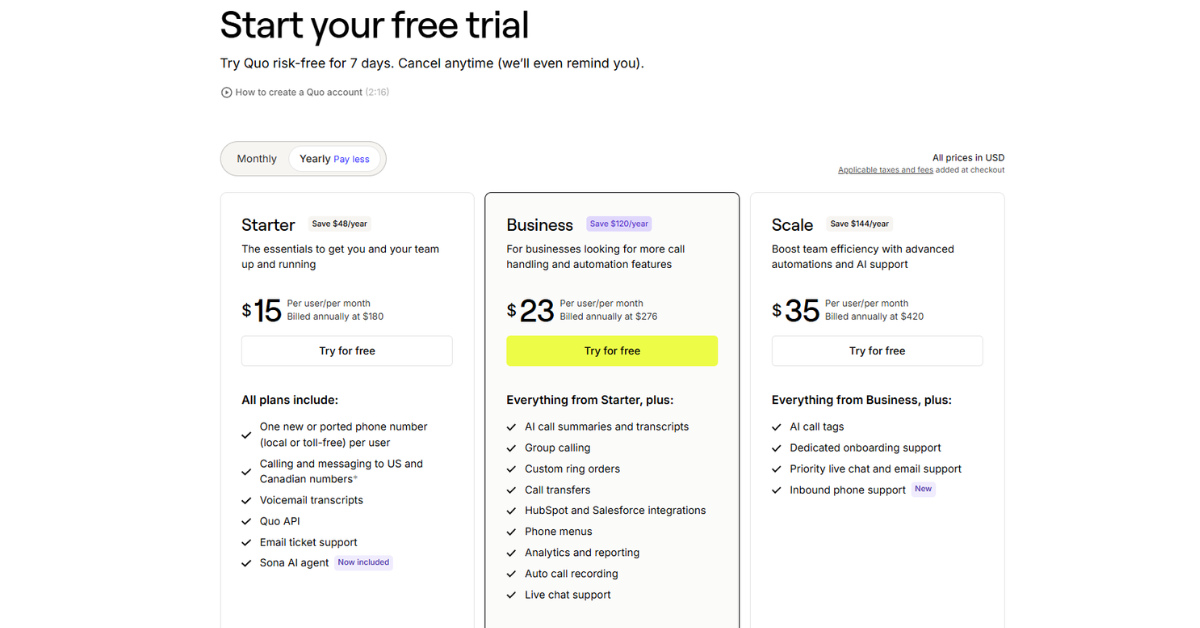
Quo offers a straightforward pricing model designed to grow with your business. All plans include a 7-day free trial.
| Plan | Price (Annual) | Price (Monthly) | Best For | Key Features |
|---|---|---|---|---|
| Starter | $15/user/mo | $20/user/mo | Solopreneurs & Small Teams | 1 number per user, Unlimited US/Canada talk & text, Sona AI Agent (Basic), Voicemail transcripts |
| Business | $23/user/mo | $30/user/mo | Growing Businesses | Everything in Starter + AI Call Summaries/Transcripts for all calls, HubSpot/Salesforce integration, Group calling, Call transfers |
| Scale | $35/user/mo | $45/user/mo | Advanced Teams | Everything in Business + AI Call Tags, Dedicated onboarding, Priority support, Inbound phone support |
Note: Prices are in USD. Additional credits may be required for international calling or high-volume AI usage.
The Benefits of Using Quo
Why should you choose Quo over a traditional carrier or another VoIP provider? Here are the primary benefits:
1. Enhanced Professionalism
Even if you’re a team of one, Quo makes you look like a much larger operation. Features like professional greetings, an AI receptionist, and dedicated business numbers build trust with your customers.
2. Unmatched Efficiency
The AI features in Quo are designed to save you hours every week. By automating call summaries, message drafting, and basic customer inquiries, you can focus on high-value tasks that actually grow your business.
3. Better Customer Experience
Customers hate waiting and they hate being ignored. With Sona AI answering calls 24/7 and shared inboxes ensuring fast response times, your customers will always feel prioritized.
4. Complete Flexibility
Whether you’re in the office, at home, or traveling abroad, your business phone is always with you. The ability to switch between devices seamlessly ensures you’re never out of reach.
5. Data-Driven Insights
With AI call tagging and detailed analytics, you can finally understand why customers are calling. This data is gold for improving your products, services, and marketing strategies.
Pros and Cons of Quo
No tool is perfect. Here’s an honest look at the strengths and weaknesses of Quo:
Pros
- Industry-Leading AI
- Beautiful, Modern Interface
- Excellent Team Collaboration
- Transparent Pricing
- Fast Setup
Cons
- Internet Dependent
- Limited Advanced Desk Phone Support
- AI Credits for High-Volume Users
- US/Canada Focus
Real User Feedback & Market Sentiment
What are people actually saying about Quo in 2026?
The Positives
On platforms like G2 and Trustpilot, Quo consistently receives high marks for its ease of use and customer support. Users frequently mention how much they love the AI summaries, noting that it has completely changed how they handle client follow-ups. The Sona AI Agent is also a major hit among small business owners who previously struggled to manage after-hours calls.
The Negatives
Some users have expressed concerns about the rebranding from OpenPhone, with a few noting that the transition led to temporary support delays. Others have mentioned that while the AI is powerful, it occasionally misinterprets complex technical jargon in transcripts, requiring minor manual corrections.
Overall Sentiment
The general consensus is that Quo is a top-tier solution for modern businesses. It has successfully moved beyond being a “second phone number app” to becoming a legitimate AI-powered communication platform that provides massive value to its users.
Who Should Use Quo?
- Startups: If you need to move fast, look professional, and scale quickly, Quo is built for you.
- Small Business Owners: Perfect for those who want to reclaim their time and ensure every customer call is handled.
- Sales & Support Teams: The CRM integrations and shared inboxes make it a powerhouse for customer-facing teams.
- Freelancers & Solopreneurs: An affordable way to get a professional business line with advanced features.
- Remote & Hybrid Teams: Ensures everyone stays connected regardless of their physical location.
Who Should NOT Use Quo?
- Large Enterprises with Complex Hardware Needs: If your business requires hundreds of physical desk phones with complex on-premise wiring, a traditional enterprise PBX might be better.
- Businesses in Areas with Poor Internet: If you don’t have a stable high-speed internet connection, VoIP will not work reliably for you.
- Users Needing Deep International SMS in Specific Regions: While Quo supports international messaging, some regions have strict regulations that might make other local providers more suitable for high-volume local SMS.
Quo vs. Competitors: How Does It Stack Up?
Quo vs. Dialpad
Dialpad is a strong competitor with its own “Ai” suite. However, Quo tends to win on user interface and simplicity. Dialpad can feel a bit “enterprise-heavy,” whereas Quo feels modern and agile. Quo’s Sona AI Agent is also generally considered more intuitive for small business use cases compared to Dialpad’s more complex IVR systems.
Quo vs. RingCentral
RingCentral is the “old guard” of VoIP. It offers every feature imaginable but can be incredibly complex and expensive. For a startup or small business, RingCentral is often overkill. Quo provides the 20% of features that 80% of businesses actually need, but does them much better and at a lower price point.
Quo vs. Aircall
Aircall is fantastic for call centers and sales teams that need deep analytics. However, it lacks the broader communication features (like robust SMS/MMS) and the cutting-edge AI automations that Quo offers. Quo is a better “all-in-one” solution for the average business.
Quo vs. Google Voice (Business)
Google Voice is the budget option. It’s simple and cheap, but it lacks almost all of the advanced features that make Quo valuable. No AI summaries, no Sona agent, no deep CRM integrations, and very limited team collaboration. If you’re serious about your business, Quo is the clear upgrade.
Comparison Table
| Feature | Quo | Dialpad | RingCentral | Google Voice |
|---|---|---|---|---|
| AI Receptionist | Yes (Sona) | Yes | Yes | No |
| AI Call Summaries | Yes | Yes | Yes | No |
| Shared Inboxes | Excellent | Good | Average | Poor |
| Ease of Use | 5/5 | 4/5 | 3/5 | 5/5 |
| Pricing | Competitive | Moderate | High | Low |
Deep Dive: Mastering the Sona AI Agent
The Sona AI Agent is not just a simple auto-attendant; it is a sophisticated conversational AI designed to handle the nuances of business communication. To truly get the most out of Quo, it’s essential to understand how to configure and optimize Sona for your specific business needs.
Training Your AI Agent
One of the most powerful aspects of Sona is its ability to learn about your business. In the Quo dashboard, you can provide Sona with a “Knowledge Base”—a collection of documents, FAQs, and instructions that the AI uses to answer caller questions.
Real-World Scenarios:
- Real Estate: You can upload your current listings, pricing, and viewing schedules. When a potential buyer calls, Sona can provide details about a specific property and even collect the caller’s contact information for a follow-up.
- E-commerce Support: Sona can be trained on your return policy, shipping times, and common product questions. This allows it to resolve simple support tickets without ever needing to involve a human agent.
- Professional Services: For lawyers or consultants, Sona can explain your consultation fees, areas of expertise, and office hours, ensuring that only qualified leads are passed through to your team.
Customizing the Voice and Tone
Quo allows you to choose from several natural-sounding AI voices, ranging from professional and authoritative to friendly and casual. You can also customize the “Persona” of your AI agent. Do you want Sona to be a helpful assistant named “Alex” or a formal receptionist named “Sarah”? The choice is yours, allowing you to maintain a consistent brand voice across all touchpoints.
Handling Complex Inquiries
While Sona is incredibly capable, there will always be situations that require a human touch. Quo handles this through “Intelligent Hand-offs.” You can set rules for when Sona should stop talking and transfer the call to a live person. For example, if a caller uses words like “emergency,” “complaint,” or “billing issue,” Sona can immediately ring your team or a specific department.
Maximizing Productivity with Quo Integrations
A business phone system shouldn’t exist in a vacuum. Quo’s ability to integrate with your existing tech stack is one of its most significant advantages for growing teams.
HubSpot & Salesforce: The Power of Sync
For sales-driven organizations, the HubSpot and Salesforce integrations are indispensable.
- Automatic Logging: Every call made or received through Quo is automatically logged as an activity in your CRM. This includes the duration of the call and a link to the recording and transcript.
- Contact Syncing: When a contact is updated in your CRM, it’s automatically updated in Quo, and vice versa. This ensures that your team always has the most up-to-date information at their fingertips.
- Contextual Calling: When a customer calls, Quo can pull up their CRM record instantly, showing your team their purchase history, previous support tickets, and current deal status before they even pick up the phone.
Slack: Real-Time Visibility
The Slack integration ensures that your team is always in the loop, even if they aren’t actively looking at the Quo app.
- Missed Call Alerts: Get an instant notification in a dedicated Slack channel whenever a call is missed.
- Voicemail Previews: Listen to voicemails or read their transcripts directly within Slack.
- Team Collaboration: Use Slack threads to discuss a specific Quo interaction, allowing for quick internal alignment before responding to a customer.
Zapier: Unlimited Possibilities
If Quo doesn’t have a native integration for a tool you use, Zapier bridges the gap. You can create “Zaps” to automate almost anything:
- Google Sheets: Automatically add new Quo contacts to a Google Sheet for lead tracking.
- Email Marketing: Add callers to a specific Mailchimp or Klaviyo list based on the tags assigned to their call.
- Project Management: Create a task in Trello or Asana whenever a specific keyword is mentioned in a call transcript.
Step-by-Step Guide: Setting Up Your Quo System for Success
To ensure you hit the ground running, follow this comprehensive setup guide:
Step 1: Define Your Call Flow
Before you even touch the settings, map out how you want calls to be handled. Who should answer first? What happens if they don’t pick up? When should Sona AI take over? Having a clear plan will make the technical setup much smoother.
Step 2: Configure Your Business Hours
Don’t let work bleed into your personal life. Set your business hours in Quo so that calls received after-hours are automatically handled by Sona or sent to a specific “After-Hours” voicemail greeting. You can even set different rules for holidays and weekends.
Step 3: Set Up Your Shared Inboxes
If you have a team, decide which numbers should be shared. For example, you might have a “Sales” number and a “Support” number. Assign the relevant team members to each number so they can collaborate on incoming inquiries.
Step 4: Record Professional Greetings
While Quo offers high-quality text-to-speech options, recording your own greetings (or hiring a professional voice actor) can add an extra layer of polish to your brand. Ensure your greetings are clear, concise, and provide callers with the information they need.
Step 5: Test Your Setup
Before going live, make several test calls to your Quo number. Does the call route to the right person? Does Sona answer correctly? Are the transcripts accurate? Testing ensures a seamless experience for your customers from day one.
The Future of Business Communication: What’s Next for Quo?
As we look toward the rest of 2026 and beyond, Quo is clearly not slowing down. The company has hinted at several upcoming features that will further solidify its position as the leader in AI-powered communication:
- Predictive Analytics: Using AI to predict which leads are most likely to convert based on their tone and the content of their calls.
- Multi-Language Sona: Expanding Sona’s capabilities to handle calls in dozens of different languages fluently.
- Video Integration: While Quo is currently focused on voice and text, there are rumors of a lightweight video conferencing solution designed specifically for quick client check-ins.
- Advanced Sentiment Analysis: Providing deeper insights into customer satisfaction by analyzing the emotional tone of every interaction.
By choosing Quo today, you aren’t just getting a phone system; you’re investing in a platform that is at the forefront of the AI revolution in business.
Final Verdict: Is Quo Worth It?
After an exhaustive review of its features, pricing, and performance in 2026, the answer is a resounding YES.
Quo has successfully positioned itself as the most forward-thinking phone system for the modern era. By integrating powerful AI like the Sona agent directly into the core experience, they have solved the biggest pain point for small businesses: being available without being overwhelmed.
While there are cheaper options like Google Voice and more complex ones like RingCentral, Quo hits the “sweet spot” of power, simplicity, and value. It’s not just a tool for making calls; it’s a tool for growing your business.
If you want a phone system that works as hard as you do, saves you time, and makes your customers love talking to you, Quo is the way to go.
Don’t let another call go unanswered. Start your 7-day free trial with Quo today!