Vista Social Review 2026: Full analysis of features, pricing, real use cases, pros & cons, and comparison with competitors. Is it worth it for agencies and businesses?
Vista Social Review 2026: The Ultimate All-in-One Social Media Management Platform?
The Hidden Cost of Managing Social Media in 2026
Social media management has quietly become one of the most complex and expensive operations in modern marketing.
What used to be simple posting has evolved into a multi-layered system involving:
- Content planning
- Cross-platform scheduling
- Real-time engagement
- Analytics and reporting
- Brand monitoring
- Customer review management
Most businesses today are stuck using multiple tools:
- One for scheduling
- One for analytics
- Another for engagement
This fragmented workflow leads to:
- Increased software costs
- Loss of efficiency
- Poor data synchronization
More importantly, it slows down growth.
This is where Vista Social enters the picture.
Vista Social positions itself as an all-in-one social media management platform designed to replace multiple tools with a single, unified system.
But here is the real question:
Is Vista Social truly capable of replacing your entire social media stack in 2026, or is it just another tool promising more than it delivers?
This review goes far beyond surface-level descriptions. It breaks down:
- Real features and how they work
- Practical use cases
- Strengths and limitations
- Comparisons with leading competitors
The goal is simple: to help you make a real decision, not just read another affiliate article.
Vista Social Review : What Is Vista Social?
Vista Social is a comprehensive social media management platform built for businesses, agencies, and marketing teams that need to manage multiple social channels efficiently.

Unlike basic scheduling tools, Vista Social combines multiple functions into one system:
- Content publishing and scheduling
- Social inbox and engagement management
- Analytics and reporting
- Social listening
- Review management
- AI-powered content assistance
The platform supports major social networks including:
- TikTok
- Twitter (X)
Its positioning in the market is clear:
Vista Social is not just a scheduler. It is designed to be a complete operational hub for social media marketing.
Compared to tools like Buffer or Later, which focus mainly on publishing, Vista Social aims to compete more directly with platforms like Hootsuite and Sprout Social — but at a significantly lower price point.
Vista Social Review : Who Should Use Vista Social?
Understanding whether a tool fits your needs is more important than understanding its features.
Vista Social is not built for everyone. Its value depends heavily on your use case.
Best for Beginners
Beginners who are serious about building a social media presence can benefit from Vista Social because it centralizes everything in one place.
Instead of learning multiple tools, users can:
- Plan content
- Schedule posts
- Analyze performance
However, beginners may face a slight learning curve due to the number of features available.
Best for Marketers
For digital marketers, Vista Social provides a strong advantage in workflow efficiency.
Marketers can:
- Manage multiple campaigns
- Track performance metrics
- Generate reports
The ability to automate repetitive tasks makes it particularly valuable for those handling multiple brands.
Best for Agencies
This is where Vista Social truly shines.
Agencies managing multiple clients need:
- Multi-account management
- White-label reporting
- Team collaboration
Vista Social offers all of these in a structured system, reducing operational complexity.
Best for Business Owners
Small to medium-sized businesses that cannot afford enterprise tools like Sprout Social can use Vista Social as a cost-effective alternative.
It provides:
- Professional-level features
- Manageable pricing
Who Should NOT Use Vista Social
Vista Social may not be ideal for:
- Users who only need simple scheduling
- Individuals who rely heavily on advanced AI content generation
- Large enterprises requiring highly customized workflows
In these cases, either simpler tools or enterprise platforms may be more suitable.
Vista Social Review : Key Features: Deep Analysis
1. Publishing and Scheduling
Publishing is the core function of any social media tool.
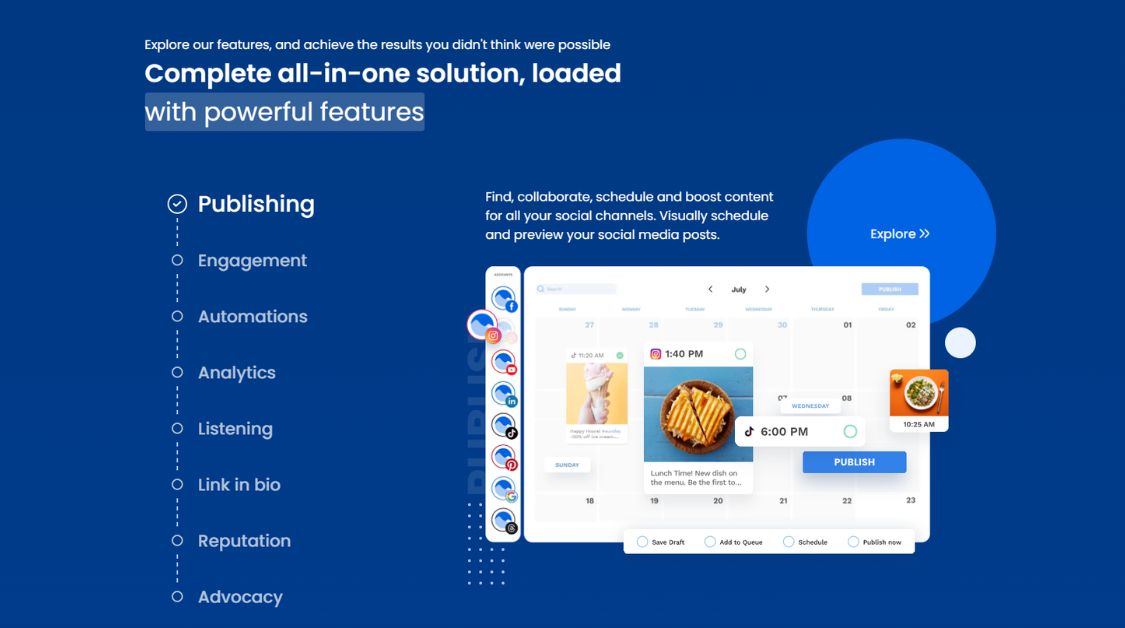
Vista Social provides:
- Multi-platform scheduling
- Bulk scheduling
- Visual content calendar
The system allows users to plan content weeks or months in advance.
Real Benefit
The biggest advantage is time efficiency.
Instead of manually posting content across platforms, users can:
- Create once
- Distribute everywhere
This significantly reduces workload.
Limitation
While powerful, the scheduling system still requires human input for content quality.
It does not automatically guarantee engagement.
Comparison
Compared to Buffer:
- Vista Social offers more advanced scheduling features
Compared to Hootsuite:
- Vista Social is more affordable but slightly less customizable
2. Social Inbox and Engagement
Managing engagement across platforms is one of the most time-consuming tasks.
Vista Social solves this with a unified inbox.
Users can:
- Reply to comments
- Respond to messages
- Manage interactions
All from one dashboard.
Real Benefit
This eliminates the need to switch between platforms.
It improves response time and consistency.
Limitation
For very large volumes of messages, the system can become overwhelming without proper filtering.
3. Analytics and Reporting
Analytics is where Vista Social stands out.
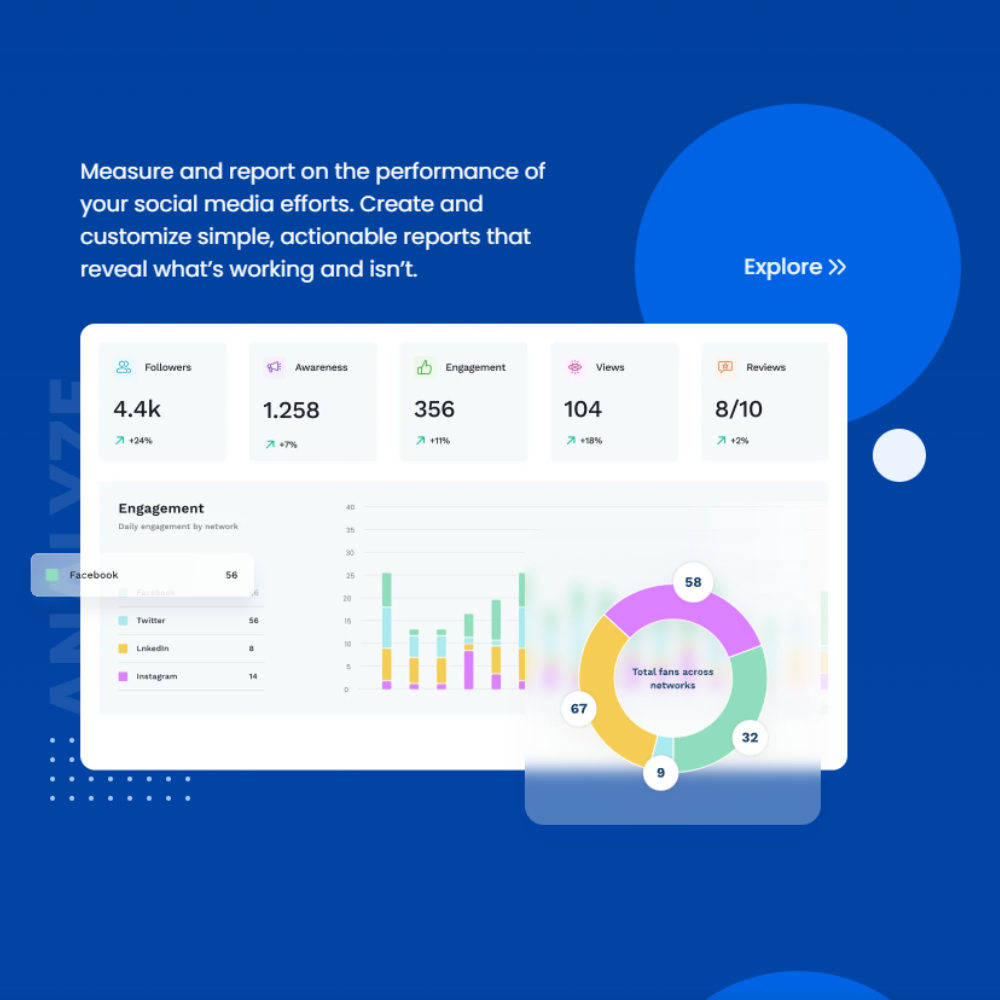
The platform provides:
- Performance tracking
- Custom reports
- Automated reporting
Real Benefit
Agencies can generate client reports quickly without manual data collection.
Marketers can:
- Identify high-performing content
- Adjust strategies
Limitation
Advanced data analysis may still require external tools.
Comparison
Compared to Sprout Social:
- Vista Social is less advanced but far more affordable
4. Social Listening
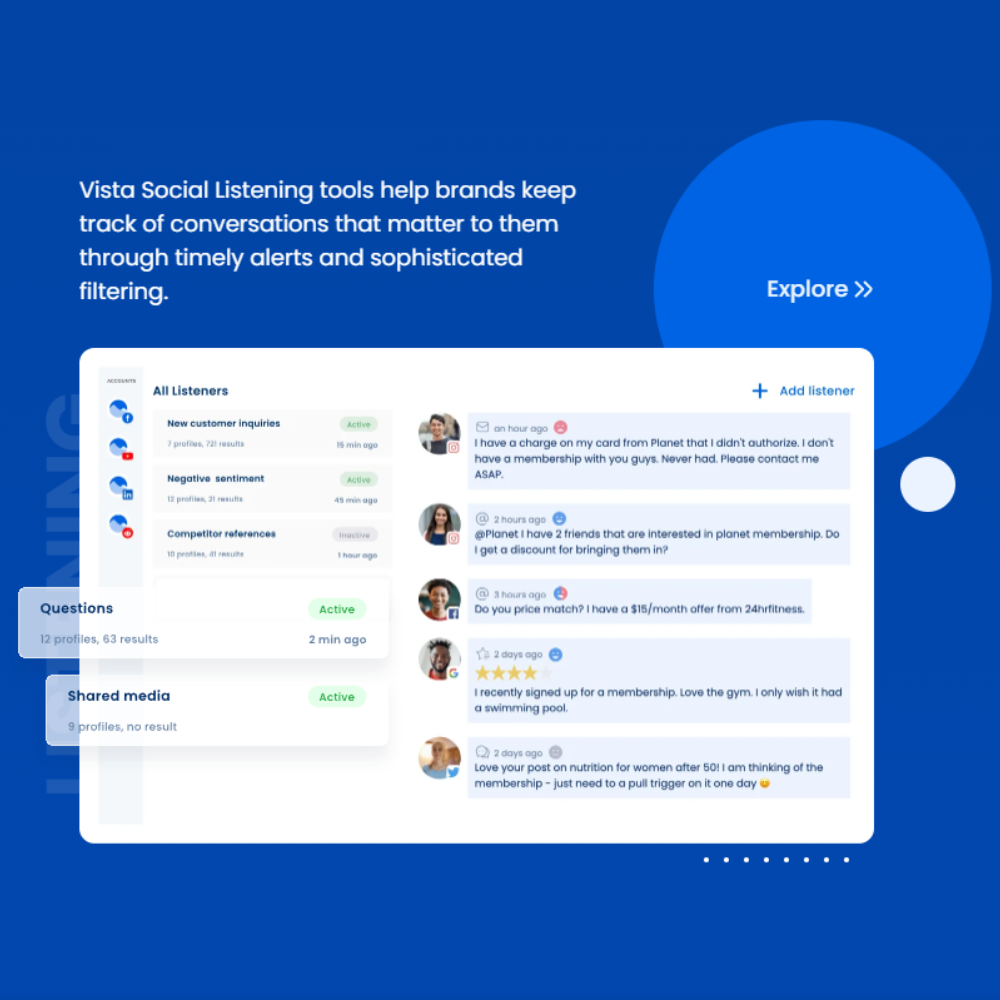
Social listening allows users to monitor:
- Brand mentions
- Keywords
- Industry trends
Real Benefit
This feature helps businesses:
- Track reputation
- Discover opportunities
Insight
Many competitors charge extra for this feature.
Vista Social includes it in standard plans, which adds significant value.
5. AI Content Assistant
Vista Social includes AI tools for:
- Caption generation
- Content ideas
Real Benefit
Helps overcome creative blocks.
Limitation
AI output often requires editing to match brand voice.
It is not a full replacement for human writing.
6. Review Management
Vista Social allows businesses to manage customer reviews across platforms.
Real Benefit
Improves brand reputation management.
Particularly useful for:
- Local businesses
- Service-based companies
Vista Social Review : Real Use Cases
Use Case 1: Agency Managing Multiple Clients
An agency managing 10 clients can use Vista Social to:
- Schedule content
- Track engagement
- Generate reports
This reduces:
- Time spent on manual work
- Tool costs
Use Case 2: Personal Branding
A creator building a LinkedIn presence can:
- Plan content
- Use AI for ideas
- Analyze performance
Consistency becomes easier.
Use Case 3: E-commerce Business
An online store can:
- Manage multiple platforms
- Track customer interactions
- Monitor brand mentions
This creates a centralized marketing system.
Vista Social Review : Performance and User Experience
Vista Social Review shows that this platform is built as a complete social media workflow system, not just a scheduling tool.
Unlike basic tools that focus only on posting, Vista Social integrates:
- Content planning and publishing
- Engagement and inbox management
- Analytics and reporting
- Review monitoring and listening
Real Workflow Experience
In real-world use, Vista Social significantly reduces tool fragmentation.
A typical workflow includes:
- Scheduling posts across platforms
- Managing comments and messages from one inbox
- Tracking performance metrics in real time
- Generating reports without exporting data
This creates a more efficient and scalable system, especially for teams.
Strengths
- Logical dashboard structure
- Unified inbox improves response speed
- Visual calendar for content planning
- Built for collaboration and multi-account management
Limitations
- Requires onboarding time
- Can feel complex for beginners
- Overkill for simple posting needs
Verdict
Vista Social prioritizes efficiency and scalability over simplicity, making it ideal for teams rather than casual users.
Vista Social Review : Pricing and Value
Vista Social’s pricing is structured to support teams at different stages of growth, from small businesses to large agencies.
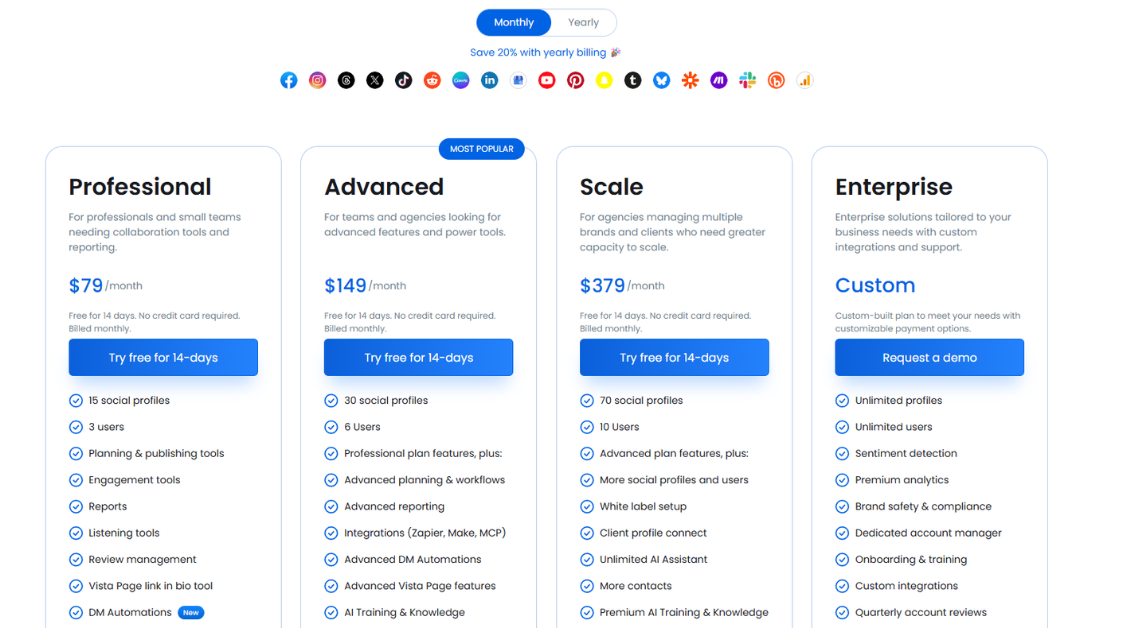
According to the official pricing page, the platform offers multiple tiers starting at:
- $79/month (Professional)
- $149/month (Advanced)
- $349/month (Scale)
- Custom pricing (Enterprise)
Each plan increases in terms of:
- Number of social profiles
- Team members
- Advanced features and automation
Pricing Breakdown
1. Professional Plan – $79/month
This is the entry-level paid plan designed for small teams.
- Up to 15 social profiles
- Basic collaboration features
- Scheduling, analytics, and reporting
- Social inbox and listening included
👉 Best for:
Small businesses or teams starting to scale social media.
2. Advanced Plan – $149/month
This plan is built for growing teams and agencies.
- Up to 30 social profiles
- More users (team collaboration)
- Advanced workflows and reporting
- Integrations (Zapier, Make)
- Expanded automation capabilities
👉 Best for:
Agencies or teams managing multiple brands.
3. Scale Plan – $349/month
Designed for larger operations.
- Up to 70 social profiles
- Higher team capacity
- Full feature access
- Built for scaling multiple clients
👉 Best for:
Agencies handling multiple clients or large campaigns.
4. Enterprise Plan – Custom Pricing
Custom solution for large organizations.
- Unlimited or flexible profiles/users
- Dedicated support and onboarding
- Custom integrations
👉 Best for:
Enterprise-level businesses with complex needs.
Value Analysis
Vista Social is not just priced as a scheduling tool — it is priced as a complete social media system.
Instead of paying separately for:
- Scheduling tools
- Analytics platforms
- Social inbox software
- Review management tools
Vista Social combines everything into one platform.
👉 This can reduce both:
- Total cost
- Operational complexity
Key Value Insight
One of the most important advantages is that social listening and review management are included, while many competitors charge extra for these features.
This significantly increases the platform’s overall value.
Cost vs Value Reality
When Vista Social is worth the price
- You manage multiple social accounts
- You work in a team
- You need reporting + automation
- You want to replace multiple tools
When it’s NOT worth it
- You only need basic scheduling
- You’re a solo creator
- You don’t use advanced features
Final Pricing Verdict
Vista Social sits in the mid-market pricing tier, between simple tools and enterprise platforms.
- Cheaper than tools like Sprout Social
- More powerful than tools like Buffer
👉 Final takeaway:
Vista Social is not the cheapest option,
but it offers strong value for teams that need a complete social media workflow system.
Vista Social Review : Pros and Cons
Pros
- All-in-one social media platform
- Strong team collaboration features
- Reduces need for multiple tools
- Competitive pricing for feature depth
Cons
- Too complex for simple users
- Learning curve for beginners
- Costs increase with scale
- Limited AI capabilities compared to AI-first tools
Vista Social Review : Vista Social vs Competitors
A key part of this Vista Social Review is how it compares to major competitors.
Vista Social vs Buffer
- Buffer → simple, affordable, beginner-friendly
- Vista Social → advanced, feature-rich, team-focused
👉 Best for:
- Buffer = individuals
- Vista Social = teams and agencies
Vista Social vs Hootsuite
- Hootsuite → enterprise-level platform
- Vista Social → more modern and cost-efficient
👉 Vista Social offers similar core functionality with better pricing accessibility.
Vista Social vs Sprout Social
- Sprout Social → premium analytics and enterprise tools
- Vista Social → practical features at a lower cost
👉 Best for:
- Sprout = enterprise
- Vista Social = SMB and agencies
Positioning Insight
Vista Social sits between:
- Simple tools (Buffer)
- Enterprise tools (Hootsuite, Sprout)
👉 This positioning makes it a strong mid-market solution.
Pricing Comparison: Vista Social vs Competitors
| Platform | Starting Price | Key Features Included | Best For | Value Rating |
|---|---|---|---|---|
| Vista Social | $79/month | Scheduling, Inbox, Analytics, Reviews, Listening | Agencies, Teams, SMB | ⭐⭐⭐⭐☆ (4.5/5) |
| Buffer | Free / $6+/mo | Scheduling, basic analytics | Individuals, beginners | ⭐⭐⭐☆☆ (3.5/5) |
| Hootsuite | $99/month | Scheduling, analytics, inbox | Enterprises, large teams | ⭐⭐⭐⭐☆ (4/5) |
| Sprout Social | $249/month | Advanced analytics, CRM, reporting | Enterprise-level businesses | ⭐⭐⭐⭐⭐ (4.5/5) |
Vista Social Review : Key Insights from Pricing Comparison
1. Vista Social vs Buffer
- Buffer is cheaper and simpler
- Vista Social offers significantly more features
👉 Conclusion:
Buffer is better for beginners, but Vista Social provides more long-term value.
2. Vista Social vs Hootsuite
- Hootsuite is more expensive at entry level
- Vista Social includes more features in one plan
👉 Conclusion:
Vista Social is more cost-efficient for small to mid-sized teams.
3. Vista Social vs Sprout Social
- Sprout Social is significantly more expensive
- Vista Social delivers similar core features at a lower cost
👉 Conclusion:
Vista Social offers better ROI for most businesses.
Overall Pricing Positioning
Vista Social sits in a strong middle position:
- More powerful than low-cost tools (Buffer)
- More affordable than enterprise tools (Sprout Social)
👉 This makes it one of the best value-for-money platforms in 2026.
Final Takeaway
If your goal is:
- Simple scheduling → choose Buffer
- Enterprise-level analytics → choose Sprout Social
- Balanced cost + full system → Vista Social is the best choice
Vista Social Review : Is Vista Social Worth It in 2026?
This Vista Social Review confirms that the platform is worth it — but only for the right users.
Worth It If:
- You manage multiple social media accounts
- You work in a team or agency
- You need analytics, reporting, and engagement tools
- You want to scale your workflow
Not Worth It If:
- You only schedule posts
- You prefer a simple tool
- You don’t use advanced features
Key Insight
Vista Social does not improve content quality directly.
👉 It improves how you manage, optimize, and scale social media operations.
FAQ
What is Vista Social?
Vista Social is an all-in-one social media management platform for scheduling, engagement, analytics, and reporting.
Is Vista Social free?
It offers a free trial, with paid plans starting at $39/month.
Who should use Vista Social?
Agencies, marketing teams, and businesses managing multiple social accounts.
Is Vista Social beginner-friendly?
Yes, but it requires some learning due to its advanced features.
Can Vista Social replace multiple tools?
Yes, it is designed to replace several social media tools in one system.
Vista Social Review : Final Verdict
This Vista Social Review shows that the platform is a strong all-in-one solution for modern social media management.
Strengths
- Comprehensive feature set
- Workflow-focused design
- Strong value for teams
Weaknesses
- Not ideal for simple use cases
- Requires onboarding time
Overall Rating
- Features: 9/10
- Value: 8.5/10
- Ease of Use: 7.5/10
- Overall: 8.5/10
Vista Social Review : Conclusion
Vista Social represents a shift from simple scheduling tools to complete social media management systems.
It is not the best choice for beginners or casual users.
However, for teams and businesses looking to scale efficiently, it offers a powerful and practical solution.
In short:
👉 Vista Social is not about posting more content
👉 It is about managing social media more effectively at scale
Managing social media shouldn’t feel complicated.
If you’re currently:
- Using multiple tools
- Wasting time switching between platforms
- Struggling to stay organized
Then it’s time to simplify your workflow.
Vista Social brings everything into one place — from scheduling and engagement to analytics and reporting — so you can focus on growth instead of manual tasks.
If you’re serious about scaling your social media efficiently, try Vista Social today and streamline everything in one platform.
Looking for more detailed insights like this Vista Social Review?
At Esapplication.com, we publish in-depth content to help you choose the best tools for your business — from SaaS platforms to marketing and automation software.
You can explore more valuable resources here:
- 👉 Read our Best Social Media Management Tools 2026 guide
- 👉 Compare tools in our Vista Social vs Hootsuite vs Sprout Social breakdown
- 👉 Discover more SaaS reviews and growth tools
Each article is designed to give you:
- Clear comparisons
- Real use cases
- Honest pros and cons
Visit Esapplication.com to explore more reviews and find the right tools for your workflow.