
https://esapplication.com/
Dex Review 2026: Is This Personal CRM Worth It?
Dex promises to turn a scattered network of LinkedIn connections, email contacts, calendar meetings, messages, and personal notes into one organized relationship system. This review examines how well that promise translates into everyday use, what each plan includes, where the product excels, and who should—or should not—pay for it.
Quick Verdict
Dex is one of the most thoughtfully designed personal CRM platforms for people who want to maintain genuine relationships rather than manage a conventional sales pipeline. It brings contacts and interaction context together, lets you record the details that matter, and uses reminders to turn good intentions into consistent follow-up.
Its strongest advantages are the relationship-first interface, LinkedIn synchronization, email and calendar context, flexible notes and custom fields, mobile and browser access, and a broad set of communication integrations. Dex also now connects relationship data to compatible AI assistants through MCP, which makes the platform more interesting for professionals already using AI in their daily workflow.
The trade-off is that Dex requires commitment. Importing thousands of contacts does not automatically create a useful network; you still need to identify important people, organize them, add context, and act on reminders. The subscription may also be difficult to justify for someone who only needs a basic address book.
Dex Review Score
| Category | Score | Assessment |
|---|---|---|
| Ease of Use | 9.2/10 | Clean, relationship-focused interface with a manageable learning curve. |
| Contact Management | 9.4/10 | Excellent consolidation, notes, groups, custom fields, and timelines. |
| Integrations | 9.1/10 | Strong coverage across email, calendar, social, messaging, Zapier, and AI. |
| Follow-Up Tools | 9.5/10 | Keep-in-touch reminders are simple, useful, and central to the product. |
| Pricing Value | 8.5/10 | Good for active networkers; less compelling for light contact management. |
| Privacy & Security | 9.1/10 | Subscription model, encryption, export/delete controls, and clear policies. |
Build a More Intentional Network with Dex
Start the 7-day trial and see whether Dex can replace scattered notes, spreadsheets, and forgotten follow-ups with one relationship workspace.
Try Dex
What Is Dex?
Dex is a personal CRM designed to help individuals organize, remember, and maintain the relationships in their professional and personal networks. The name is derived from “rolodex,” but the product goes far beyond storing names, phone numbers, and email addresses. It combines contact records with notes, interaction history, important dates, groups, reminders, and data from the tools people already use.
The phrase “personal CRM” matters. Traditional customer relationship management systems such as Salesforce or HubSpot are generally built around leads, companies, deal stages, revenue forecasts, and team processes. Dex approaches the problem from the perspective of one person asking practical questions: Who have I not spoken to recently? What did we discuss last time? Who introduced us? When should I follow up? Which people in my network can help with a particular opportunity?
That makes Dex relevant to founders, investors, recruiters, consultants, creators, job seekers, MBA students, community builders, executives, and anyone whose work depends on long-term relationships. It can also be used for personal connections, although its pricing and feature set make the strongest case for people who derive professional value from their network.
Dex says more than 30,000 people use the platform. It is available through the web, mobile apps, a desktop app, and a browser extension, so contact information does not have to remain trapped in a single dashboard.
How Does Dex Work?
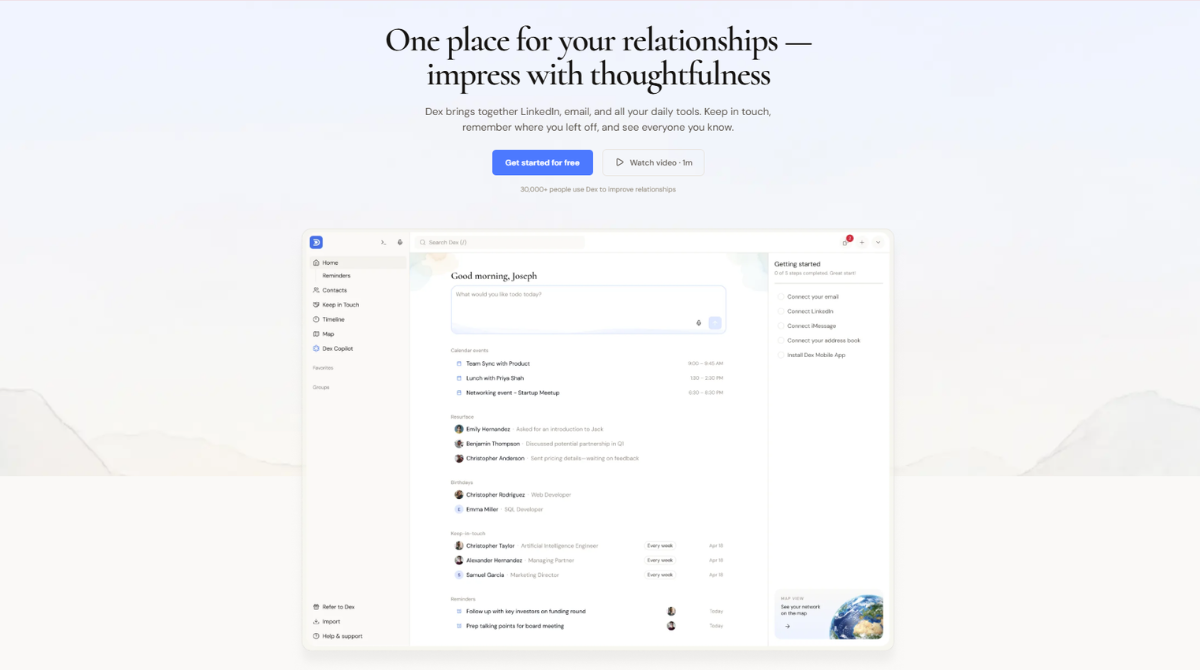
Dex starts by connecting to existing sources rather than forcing you to build a database from zero. Depending on the plan and integration, you can bring in contacts or context from LinkedIn, Gmail, Outlook, Google Calendar, Facebook, Instagram, WhatsApp, iMessage, phone contacts, CSV files, and other services.
Once those people are inside Dex, each contact becomes a living relationship record. You can add notes about how you met, shared interests, family details, professional goals, gift ideas, important dates, or the last conversation. You can place contacts into groups, create custom fields, schedule a one-time follow-up, or set a recurring keep-in-touch frequency.
The timeline is the bridge between contact storage and relationship memory. Instead of seeing only an address-book card, you can review meetings, emails, notes, and other interactions in context. Before a call or event, this can help you remember what was discussed and avoid asking the same questions again.
Dex then turns the information into action through reminders. The system can nudge you when it is time to reconnect or when an important date is approaching. The value is not automation for its own sake; it is reducing the cognitive load of remembering hundreds or thousands of relationships.
Dex works best when treated as a relationship habit, not merely a contact archive. A short daily or weekly review of reminders is more valuable than importing a huge network and never returning.
Dex Key Features: Detailed Analysis
1. Unified Contact Management
Dex’s foundation is a consolidated contact database. Many professionals have one version of a person in their phone, another in Gmail, a LinkedIn profile, meeting history in a calendar, and private notes in a document. Dex brings those fragments closer together.
A consolidated record reduces duplicate work and makes searching easier. More importantly, it creates a single place for relationship-specific context. You can record how you met, the projects someone is working on, mutual interests, relevant introductions, and details you want to remember before the next conversation.
The limitation is familiar to every contact platform: imported data can be messy. Duplicate records, outdated details, and low-value contacts may require cleanup. Dex reduces manual entry, but it cannot decide which relationships matter to you.
2. LinkedIn Synchronization
LinkedIn sync is one of Dex’s most compelling features for professional networkers. Dex can import LinkedIn connections and keep relevant career information updated, including job-title changes. A role change is often a natural reason to congratulate someone or restart a conversation.
Plan limits matter here. Premium supports LinkedIn sync for up to 2,500 connections, while Professional and Enterprise support up to 9,000. Users with a large LinkedIn network should check their connection count before choosing a plan.
LinkedIn data becomes more useful when combined with personal notes and interaction history. A profile tells you where someone works; Dex can also remind you why that person matters and when you last spoke.
3. Keep-in-Touch Reminders
Reminders are the feature most likely to change behavior. You can schedule a specific follow-up or set a recurring cadence for important relationships. Dex then surfaces the people who are due for attention.
This is deliberately simpler than sales automation. The goal is not to place every contact into a high-pressure sequence. It is to provide a gentle prompt so a former colleague, investor, mentor, customer, friend, or professional peer does not disappear from view.
The quality of the system depends on realistic choices. Setting monthly reminders for hundreds of contacts will create notification fatigue. A better approach is to use shorter cadences for a small inner circle, quarterly reminders for valuable professional relationships, and lighter schedules for the wider network.
4. Notes, Important Details, and Custom Fields
Dex lets users save the details that ordinary contact apps ignore: how two people met, education, work history, family information, birthdays, gift ideas, interests, event history, or anything else that helps provide context.
Custom fields make the database adaptable. An investor might track sector and investment stage. A recruiter could track expertise and candidate status. A creator might track collaborators, sponsors, and audience overlap. A consultant could record referral source, client type, and areas of interest.
This flexibility is powerful, but restraint improves usability. Too many custom fields turn a personal CRM into administrative work. The best fields are those that directly support search, segmentation, preparation, or follow-up.
5. Relationship Timeline
The timeline brings notes and interactions into chronological order. This is useful before a meeting because it lets you quickly review the relationship rather than search across multiple inboxes and documents.
For long-term relationships, continuity is often more important than volume. Remembering the last promise made, an upcoming milestone, or a personal detail can make the next interaction more thoughtful. Dex is strongest when it helps users act naturally with better memory, not when it makes networking feel automated.
6. Groups, Filtering, and Network Organization
Groups turn a large contact list into useful segments. Examples include investors, founders, former colleagues, conference contacts, local professionals, mentors, potential partners, customers, or people associated with a particular industry.
Good grouping makes follow-up more intentional. A job seeker could maintain groups for target companies, recruiters, alumni, and recent conversations. A founder could separate current investors, prospective investors, advisors, candidates, and strategic partners.
7. Browser Extension
The browser extension brings Dex into workflows such as LinkedIn, Gmail, and Facebook. This reduces the friction of switching tabs to update a contact. When relationship management is available where conversations already happen, notes are more likely to be recorded while the context is fresh.
The extension is especially important for users who spend much of the day in email or LinkedIn. It helps Dex function as an active companion rather than a database that must be opened separately.
8. Mobile and Desktop Access
Mobile access is essential because many valuable interactions happen away from a desk. After a conference, coffee meeting, or introduction, users can add a contact, review previous context, or record a note before details are forgotten.
Web and desktop access are better for bulk organization, while the mobile app supports quick capture and preparation. The combination gives Dex a more complete workflow than a browser-only contact manager.
9. Dex Research
Dex Research uses credits to prepare a briefing on a contact, including background, current role, and relevant changes since the last conversation. Premium includes 10 research credits per month, Professional includes 20, and Enterprise includes 50.
The feature can save preparation time before an important meeting, but the credit limits mean it should be reserved for higher-value conversations. It is an enhancement to personal notes and verified professional information, not a replacement for human judgment.
10. Mail Merge, Voice Mode, API, and Automation
Professional adds tools for heavier users, including mail merge, Voice Mode, API and Zapier access, multiple email-account synchronization, Outlook integration, and priority support. These additions move Dex beyond individual note-taking toward more advanced relationship workflows.
Mail merge should be used carefully. Dex’s appeal is personal communication; generic mass outreach can undermine that advantage. API and Zapier access, however, can be valuable for connecting forms, event platforms, databases, and other tools without repetitive manual work.
Dex Integrations
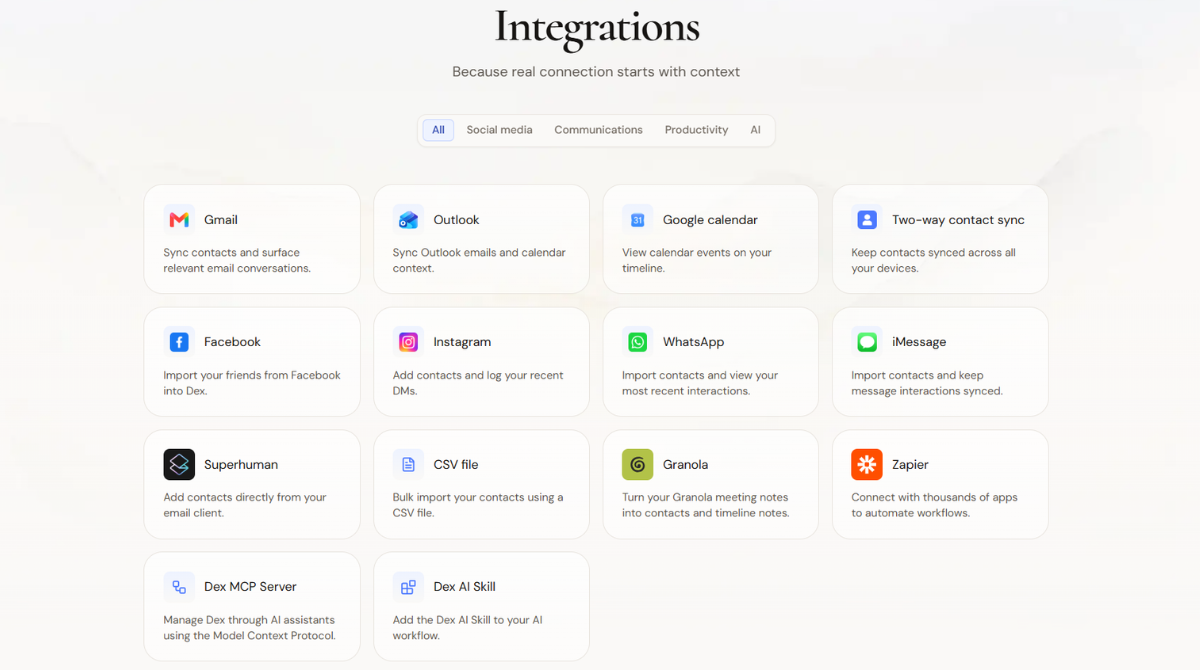
Dex covers the main places where relationship context is created. Its official integrations directory includes Gmail, Outlook, Google Calendar, two-way contact sync, Facebook, Instagram, WhatsApp, iMessage, Superhuman, CSV import, Granola, Zapier, Dex MCP Server, and Dex AI Skill.
| Integration | What It Adds | Why It Matters |
|---|---|---|
| Gmail | Contacts and relevant email conversations | Provides communication context without manual logging. |
| Outlook | Email and calendar context | Useful for Microsoft-centered professional workflows. |
| Google Calendar | Meetings and attendees on the timeline | Helps users prepare for and remember conversations. |
| Connections and professional updates | Reduces stale career data and supports timely outreach. | |
| WhatsApp/iMessage | Contacts and recent messaging activity | Extends context beyond email. |
| Granola | Meeting notes added to contacts and timelines | Connects conversation records with relationship profiles. |
| Zapier/API | Automation with external apps | Supports custom workflows for advanced users. |
| MCP/AI Skill | Relationship context for compatible AI assistants | Allows natural-language access to relevant contact data. |
Integration availability can differ by plan. Outlook, multiple email accounts, API, and Zapier access are specifically listed under Professional, while Enterprise adds CRM and notetaker integrations. Users should compare the exact workflow they need against the plan details rather than assuming every connection is included at the entry price.
Dex for AI Assistants
One of the most notable recent directions is Dex’s support for the Model Context Protocol. MCP is an open way for compatible AI clients to access approved data sources and tools. Dex says its MCP connection can work with assistants such as Claude, ChatGPT, Gemini, and other compatible clients.
In practical terms, an AI assistant could use authorized Dex data to help answer relationship questions, retrieve notes, identify follow-ups, or prepare context for an upcoming conversation. This is more useful than asking a general-purpose AI to reason without access to the user’s actual relationship history.
Users should still treat this capability carefully. Contact notes may contain sensitive personal or professional information. Before connecting any AI client, review permissions, understand what data the client can access, and avoid storing unnecessary sensitive details.
Ease of Use and Everyday Experience
Dex is easier to understand than a conventional sales CRM because it is organized around people and follow-ups rather than deals and pipeline stages. Core tasks—finding a contact, adding a note, setting a reminder, or creating a group—fit naturally with the way individuals think about relationships.
The command palette and keyboard shortcuts help frequent users move quickly. The browser extension reduces context switching, while mobile access makes it possible to capture notes soon after an offline interaction.
The largest usability challenge is not the interface; it is establishing a system. New users may be tempted to perfect every contact record. That creates a heavy setup burden. A better onboarding approach is:
- Connect the most important contact sources.
- Choose 25–50 priority relationships.
- Add groups and only a few useful custom fields.
- Set realistic keep-in-touch schedules.
- Review reminders for five to ten minutes each day.
- Expand the system only after the habit is working.
Following this approach allows Dex to deliver value quickly without turning relationship management into a data-cleaning project.
See How Dex Fits Your Workflow
Use the trial to connect a small group of important contacts, test reminders, and decide whether the system helps you follow up more consistently.
Start the Dex Trial
Dex Pricing 2026
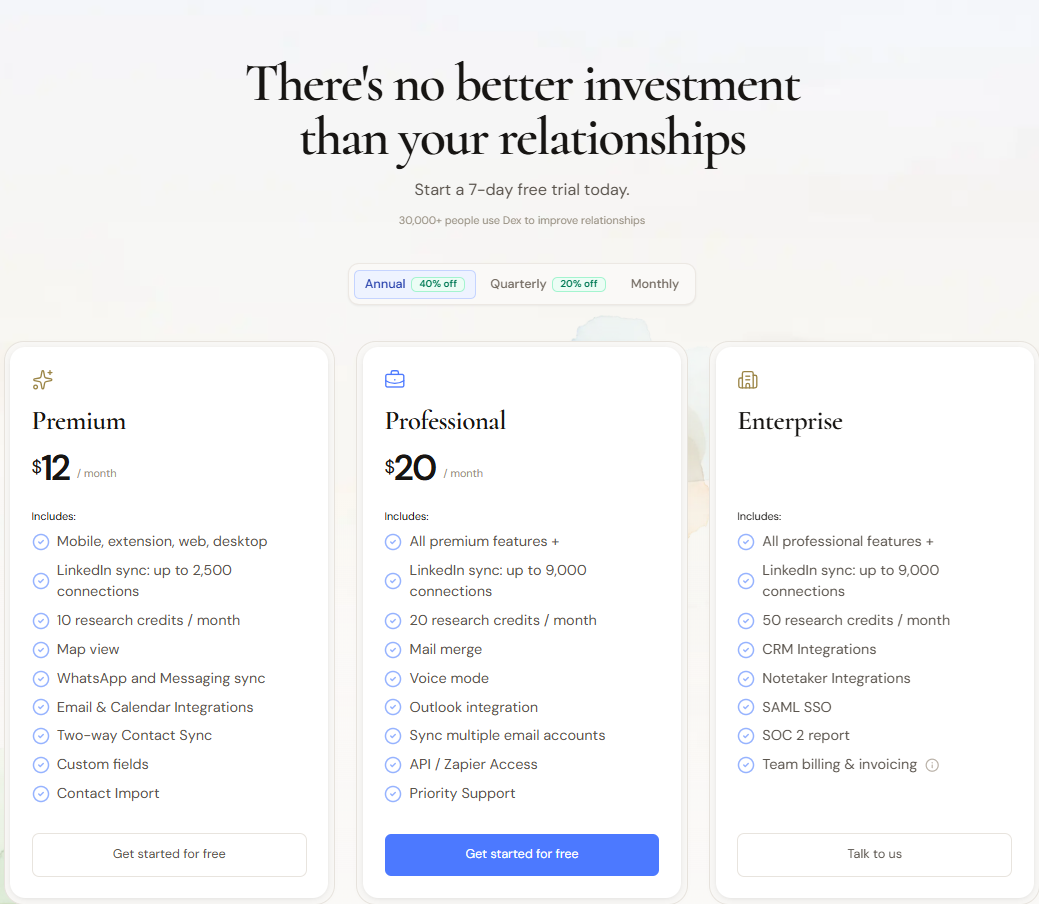
Dex displays three plan levels: Premium, Professional, and Enterprise. The pricing page advertises annual savings of up to 40%, quarterly savings of 20%, and monthly billing. At the time of this review, the displayed starting prices were $12 per month for Premium and $20 per month for Professional. Enterprise requires a custom quote.
| Plan | Displayed Price | Key Inclusions | Best For |
|---|---|---|---|
| Premium | $12/month | Web, desktop, mobile and extension; LinkedIn sync up to 2,500; 10 research credits/month; map view; messaging sync; email/calendar integrations; two-way contact sync; custom fields; imports | Individuals managing a moderate network |
| Professional | $20/month | Everything in Premium; LinkedIn sync up to 9,000; 20 research credits; mail merge; Voice Mode; Outlook; multiple email accounts; API/Zapier; priority support | Power users with larger or more complex networks |
| Enterprise | Custom quote | Everything in Professional; 50 research credits; CRM and notetaker integrations; SAML SSO; SOC 2 report; team billing and invoicing | Organizations requiring security and centralized billing |
Free trial: Premium and Professional include a 7-day trial. A credit card is required, but Dex states that users can cancel before the trial ends to avoid being charged.
Discounts: Dex advertises 50% off for eligible students for one year and 50% off for MBA students for two years. Nonprofits can contact support about discounted pricing.
Pricing note: Billing options, taxes, discounts, and feature allocations may change. Confirm the final amount and renewal period on Dex’s checkout page before purchasing.
Privacy and Security
A personal CRM may contain more sensitive information than a typical productivity app. Dex states that it is supported by subscriptions rather than advertising and that it does not sell user data to third parties. API traffic is protected with HTTPS and TLS, while stored data is encrypted at the storage level with AES-256.
Dex says its servers and databases are hosted in the United States with providers certified for SOC 2 and ISO 27001. Users can export their data, revoke permissions, or delete their account. Account deletion permanently removes associated contacts, events, and data according to the company’s security page.
These are meaningful safeguards, but users should still practice data minimization. Store context that makes relationships better; avoid recording sensitive personal information that is not necessary.
Dex Pros and Cons
Pros
- Designed around relationships rather than sales pipelines
- Excellent keep-in-touch reminders
- Strong LinkedIn, email, calendar, and messaging coverage
- Rich contact notes, timelines, groups, and custom fields
- Browser, mobile, desktop, and web access
- Useful research briefings for important meetings
- Zapier, API, MCP, and AI-assistant options
- Clear subscription-supported privacy position
- Data export and account deletion controls
Cons
- No permanent free plan shown on the current pricing page
- Seven-day trial is relatively short and requires a card
- Best results still require consistent user habits
- Large imports may need cleanup and prioritization
- LinkedIn sync and research credits have plan limits
- Advanced integrations are reserved for higher tiers
- Overkill for users who only need basic contact storage
- Not intended to replace a full team sales CRM
Who Should Use Dex?
Founders and Entrepreneurs
Founders manage investors, candidates, advisors, customers, partners, and peers. Dex can help preserve context across long fundraising and company-building cycles without turning every relationship into a sales opportunity.
Investors
Investors can use groups, notes, reminders, and research to track founders, co-investors, operators, and sector experts. The relationship timeline is valuable when conversations span years.
Job Seekers and Career Changers
A networked job search involves recruiters, alumni, hiring managers, former colleagues, and new introductions. Dex helps track conversations and follow-ups without relying on a fragile spreadsheet.
Consultants, Creators, and Independent Professionals
Independent work often grows through referrals and repeat relationships. Dex can help remember past conversations, identify dormant contacts, and maintain authentic connections between projects.
MBA Students and Community Builders
These users meet many people in a compressed period. Capturing context and setting follow-ups quickly can prevent valuable relationships from becoming anonymous connections.
Who Should Skip Dex?
Dex may not be necessary if you manage only a small number of contacts, rarely network, or are satisfied with Apple Contacts, Google Contacts, and calendar reminders. Sales teams needing shared pipelines, lead scoring, forecasting, permissions, and revenue reporting should use a full CRM. Users unwilling to review reminders or add context will also struggle to justify the subscription.
Dex Alternatives
| Alternative | Best For | How It Differs from Dex |
|---|---|---|
| Folk | Collaborative relationship workflows | More team-oriented and flexible for shared prospecting; Dex feels more personal and reminder-driven. |
| Clay | Beautiful personal relationship context | Strong enrichment and presentation; compare current integrations and pricing for your workflow. |
| Monica | Personal relationship journaling | Often better suited to private life management; Dex has a stronger professional-network emphasis. |
| Notion | Custom DIY systems | Highly flexible but requires manual setup and lacks Dex’s native relationship automation. |
| HubSpot CRM | Sales pipelines and business teams | More powerful for deals and marketing; heavier and less personal for individual relationships. |
| Google Contacts | Free basic contact storage | Simple and convenient but lacks rich timelines, recurring relationship reminders, and research tools. |
Dex is the better choice when the priority is remembering people and staying in touch. Folk may suit collaborative relationship work; HubSpot suits revenue pipelines; Notion suits users who want complete manual control; Google Contacts is sufficient when cost and simplicity matter more than proactive follow-up.
Which Dex Plan Should You Choose?
Choose Premium if you have fewer than 2,500 LinkedIn connections, use a relatively simple email and calendar setup, and mainly want contact consolidation, reminders, notes, messaging sync, custom fields, and two-way contact sync.
Choose Professional if you have a larger LinkedIn network, need Outlook or multiple email accounts, want mail merge or Voice Mode, require API/Zapier automation, or expect priority support. The jump from 10 to 20 monthly research credits also matters for users with frequent high-value meetings.
Choose Enterprise if your organization requires SAML SSO, a SOC 2 report, centralized billing, CRM connections, notetaker integrations, or more research credits. It is not simply a bigger individual plan; it addresses organizational controls and integration requirements.
Is Dex Worth It in 2026?
Dex is worth it when relationships are a meaningful professional asset and missed follow-ups have a real cost. One renewed investor conversation, referral, partnership, client engagement, or job opportunity can outweigh months of subscription fees. The product earns its value by making relationship context easier to retrieve and timely action harder to forget.
However, the return is behavioral. Dex cannot build relationships on your behalf. It can remind you, organize information, and reduce friction, but the user must still reach out thoughtfully. Someone who imports contacts but ignores reminders will receive little benefit.
Premium provides the best balance for most individual users. Professional becomes attractive when network size, multiple accounts, Outlook, mail merge, or automation are genuine requirements. The trial is short, so evaluate it with a focused test: connect primary sources, select important contacts, set follow-ups, and use the daily reminder workflow.
Is Dex the Right Personal CRM for You?
Test Dex with your real contacts and follow-up routine before committing to a paid plan.
Explore Dex Plans
Dex FAQ
What is Dex?
Dex is a personal CRM that consolidates contacts and relationship context from sources such as LinkedIn, email, calendars, social platforms, messages, and imports. It adds notes, timelines, groups, reminders, research, and integrations to help users maintain relationships.
How much does Dex cost?
At the time of this review, Dex displayed Premium at $12 per month and Professional at $20 per month, with Enterprise available by custom quote. Billing frequency and discounts affect the final amount.
Does Dex offer a free plan?
The current pricing page promotes a 7-day trial for Premium and Professional rather than a permanent free plan. A credit card is required to begin the trial.
Can Dex sync LinkedIn contacts?
Yes. Premium supports LinkedIn sync for up to 2,500 connections, while Professional and Enterprise support up to 9,000 connections.
Does Dex integrate with Gmail and Outlook?
Dex supports Gmail as well as Outlook email and calendar context. Outlook and synchronization of multiple email accounts are specifically listed with the Professional plan.
Is Dex a sales CRM?
Dex is primarily a personal CRM. It is built to help an individual maintain relationships, not to replace a full team sales platform with pipelines, forecasting, and complex revenue operations.
Can I use Dex on mobile?
Yes. Dex provides mobile access alongside web, desktop, and browser-extension experiences.
Does Dex sell user data?
Dex states that it is supported by subscriptions and does not sell user data to third parties. Its security page also describes encryption, data export, permission revocation, and account deletion controls.
What are Dex Research credits?
Research credits create contact briefings containing information such as background, current role, and changes since the last conversation. Premium includes 10 credits per month, Professional 20, and Enterprise 50.
Can Dex work with AI assistants?
Dex offers an MCP Server and AI Skill designed to connect approved relationship context with compatible AI assistants. Users should review access permissions before enabling these connections.
Final Verdict: Should You Use Dex?
Dex succeeds because it focuses on a problem that conventional CRMs and basic address books both handle poorly. Sales CRMs tend to make every person look like a deal, while address books store details without helping users act on them. Dex occupies the useful space between those extremes.
Its core workflow is coherent: consolidate people, preserve context, organize the network, set an appropriate follow-up rhythm, and surface the right relationship at the right time. LinkedIn sync, email and calendar context, messaging integrations, timelines, custom fields, research credits, and cross-device access all support that central purpose.
The addition of API, Zapier, MCP, and AI-assistant connectivity gives advanced users more ways to make relationship data useful. At the same time, the product remains approachable enough for someone who simply wants better notes and dependable reminders.
Dex is not the cheapest way to store contacts, and it is not a substitute for the discipline required to maintain genuine relationships. Its value becomes clear for people whose network is too large for memory but too personal for a sales pipeline.
Bottom line: Dex is a strong personal CRM for founders, investors, job seekers, consultants, creators, MBA students, and other relationship-driven professionals. Start with Premium unless a larger LinkedIn network, Outlook, multiple inboxes, mail merge, or automation clearly justifies Professional.
Try Dex for Your Most Important Relationships
Connect your core network, create a realistic follow-up routine, and decide whether Dex helps you become more consistent and thoughtful.
Get Started with Dex
Official sources checked for this review
Affiliate disclosure: This page may contain affiliate links. If you purchase through one of these links, we may earn a commission at no additional cost to you. Pricing and features can change; verify current details directly with Dex before subscribing.