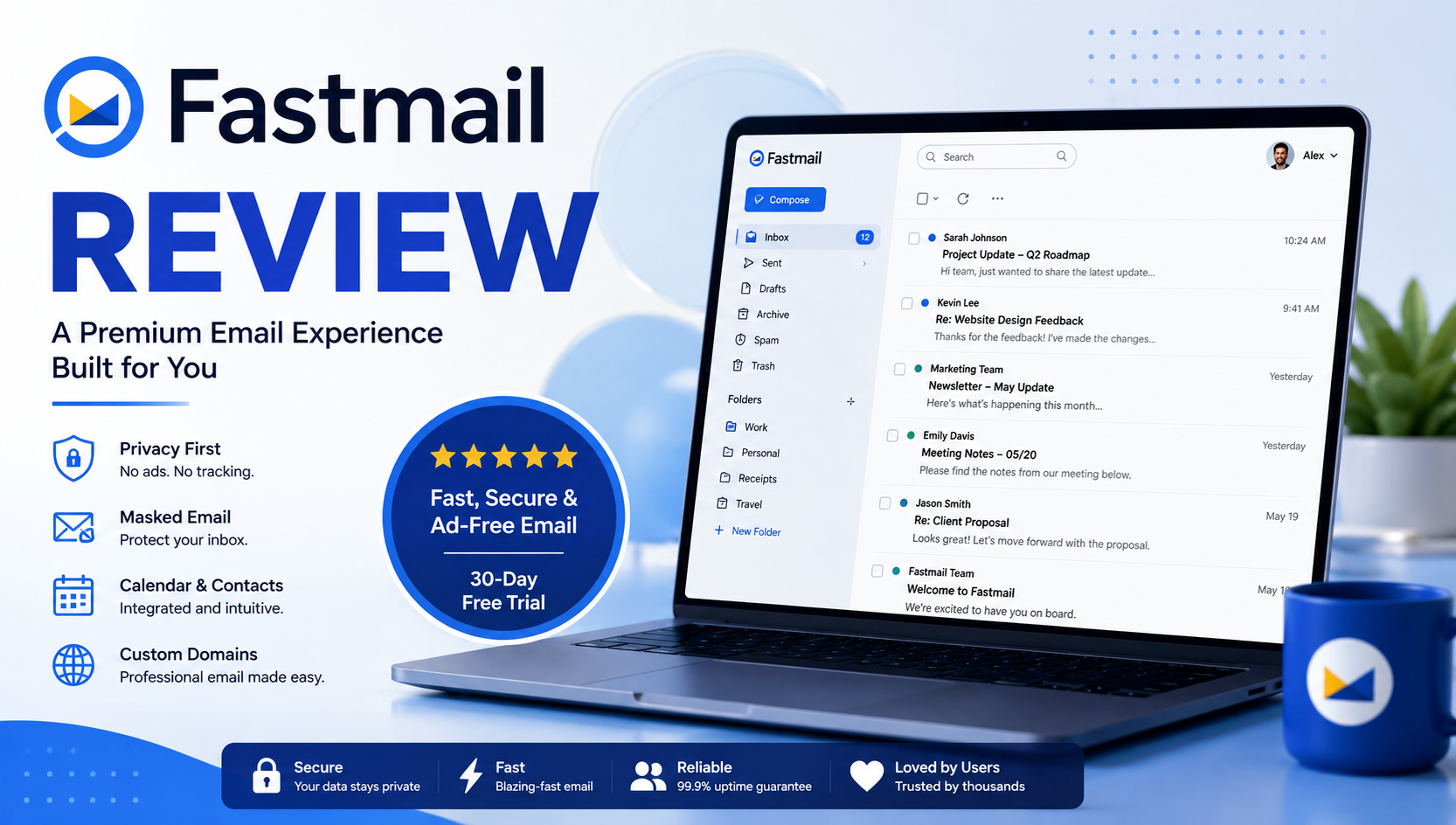
I’d describe Fastmail as a service that knows exactly what it wants to be—and, just as importantly, what it doesn’t. While many email providers compete by expanding into office suites, AI assistants, and dozens of connected apps, Fastmail remains focused on delivering a premium email experience built around speed, privacy, and reliability. After exploring its official website, feature set, pricing, and overall ecosystem for this Fastmail Review, it’s clear that Fastmail prioritizes quality over quantity. Rather than overwhelming users with unnecessary tools, it refines the features people use every day, making email faster, more organized, and easier to manage.
One of Fastmail’s biggest strengths is its thoughtful balance between productivity and privacy. Every subscription includes a private, ad-free inbox, integrated Calendar, Contacts, Files, support for custom domains, Masked Email, advanced search, Scheduled Send, Snooze, offline access, and compatibility with popular email clients. The platform also makes switching from another provider surprisingly simple by offering built-in migration tools that import your emails, calendars, and contacts in just a few steps. Instead of locking users into a closed ecosystem, Fastmail embraces open standards and gives them the flexibility to work the way they prefer.
Privacy is another reason Fastmail stands out in an increasingly crowded email market. Unlike free email services that rely on advertising revenue, Fastmail operates entirely on a subscription model, meaning its customers—not advertisers—are the priority. Combined with robust encryption, two-factor authentication, passkey support, powerful spam filtering, and a strong focus on data security, Fastmail delivers a trustworthy experience without compromising usability. While it doesn’t include built-in end-to-end encryption like Proton Mail, its approach favors practical security, fast search, and seamless everyday performance—an approach that will suit the vast majority of users.
That said, Fastmail isn’t trying to replace Google Workspace or Microsoft 365. If your workflow depends on collaborative document editing, spreadsheets, video meetings, or a complete business productivity suite, those platforms remain stronger choices. However, if your primary goal is a fast, distraction-free email service that respects your privacy and offers exceptional usability, Fastmail is one of the best premium options available today.
Overall Rating: 4.8/5
Best For: Freelancers, professionals, entrepreneurs, small businesses, custom domain owners, and privacy-conscious users who want a fast, secure, and ad-free email service. Based on this Fastmail Review, Fastmail successfully delivers on its promise of providing a premium email experience without unnecessary complexity, making it one of the most compelling alternatives to Gmail and Outlook.
What Is Fastmail?
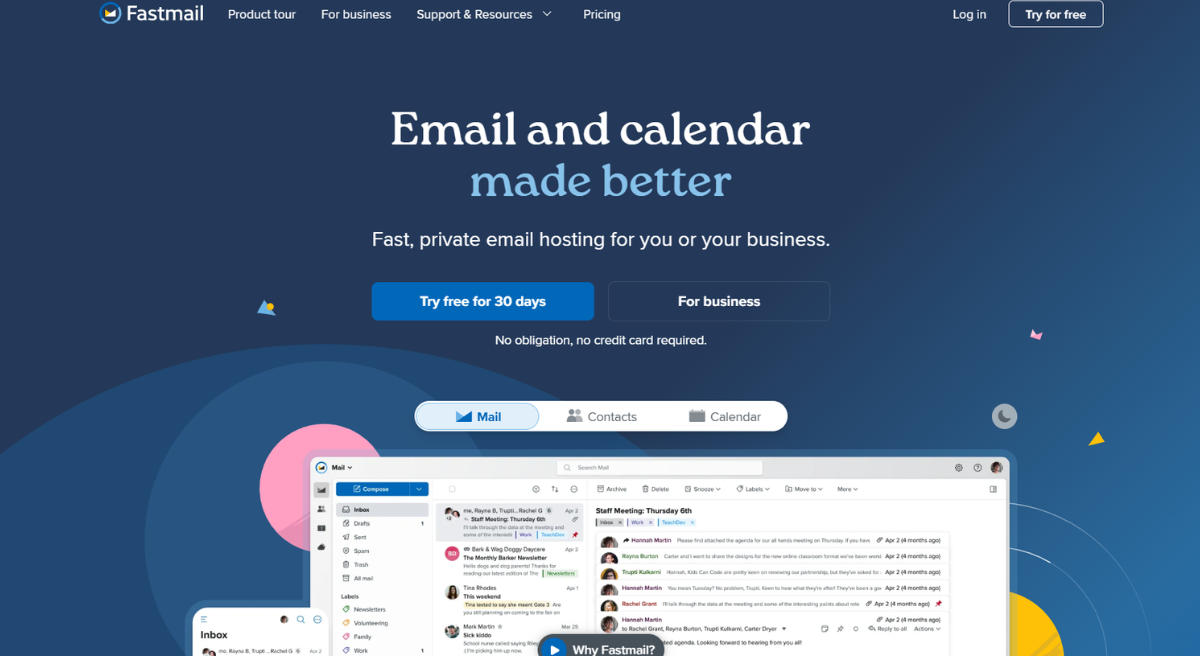

Fastmail is a premium email service designed for individuals, families, and businesses that want a faster, more private alternative to traditional email providers. Founded in 1999, the platform focuses on delivering a clean, distraction-free email experience without relying on advertising or data collection. Instead of building an all-in-one productivity ecosystem, Fastmail concentrates on what it does best—helping users communicate efficiently while keeping their personal information under their control.
One of the biggest takeaways from this Fastmail Review is that the service is much more than just an email client. Every account includes fully integrated Mail, Calendar, Contacts, and Files, along with powerful productivity features such as Masked Email, custom domains, advanced search, Scheduled Send, Snooze, and seamless migration tools. Whether you’re switching from Gmail, Outlook, or another provider, Fastmail makes the transition simple while supporting open standards that let you use your preferred email apps across desktop and mobile devices.
Fastmail’s biggest unique selling proposition (USP) is its commitment to privacy without compromising usability. Because the company operates on a subscription-based model, it doesn’t display ads or monetize user data. Instead, it invests in fast infrastructure, strong security, reliable synchronization, and practical features that improve everyday email management. If you’re looking for an email service that prioritizes speed, privacy, and productivity over a sprawling ecosystem of apps, Fastmail stands out as one of the strongest premium options available today.
Key Features
Throughout this Fastmail Review, one thing became immediately apparent: Fastmail isn’t trying to become another all-in-one productivity platform. Instead, it focuses on refining the core email experience by combining speed, privacy, and practical tools that people actually use every day. Rather than filling the interface with unnecessary features, Fastmail delivers a carefully designed collection of capabilities that work seamlessly together, making it one of the most polished premium email services available today.
Fast, Reliable Email That Stays Out of Your Way
Email remains the heart of Fastmail, and it’s where the platform performs best. The web app is exceptionally responsive, folders open instantly, and searching years of archived messages is remarkably fast. Unlike many modern email services that feel increasingly cluttered, Fastmail keeps the interface lightweight while still offering advanced features such as folders, labels, rules, conversation view, and keyboard shortcuts. The result is an inbox that’s easy to manage whether you’re handling dozens or hundreds of emails every day.
Custom Domains and Email Aliases
One of Fastmail’s standout features is its excellent support for custom domains. Instead of using a generic email address, users can create professional addresses with their own domain while managing everything from a single account. Fastmail also supports hundreds of aliases, making it easy to separate work, personal communication, newsletters, online shopping, and other activities without creating multiple inboxes. This flexibility is particularly valuable for freelancers, consultants, creators, and small businesses that want complete control over their online identity.
Masked Email for Better Privacy
Masked Email is arguably Fastmail’s signature feature. Instead of exposing your primary email address whenever you sign up for a website, Fastmail allows you to generate unique email addresses that forward messages directly to your inbox. If a website begins sending spam or your address appears in a data breach, you can simply disable that Masked Email without affecting your main account.
It’s a practical solution that protects your identity, reduces spam, and minimizes online tracking. Unlike disposable email services, Masked Email integrates naturally into your everyday workflow, making privacy effortless rather than inconvenient.
Calendar, Contacts, and Files in One Place
Fastmail is more than an email provider. Every account includes integrated Calendar, Contacts, and Files, allowing users to manage appointments, address books, and important documents without switching between multiple applications. Calendar invitations sync directly with email conversations, while Contacts automatically help organize communication with the people you interact with most frequently.
Although Fastmail doesn’t aim to replace Google Workspace or Microsoft 365, these integrated apps provide everything many individuals and small businesses need for everyday productivity.
Productivity Tools That Save Time
Rather than relying on flashy AI features, Fastmail improves productivity through thoughtful tools designed around real email habits. Scheduled Send lets you write emails whenever it’s convenient and deliver them later. Snooze temporarily hides messages until you’re ready to deal with them, while Pin keeps important conversations at the top of your inbox. Undo Send gives you a chance to recover emails sent by mistake, and Notes allow you to attach private reminders directly to messages. Combined with powerful rules, filters, spam protection, and Mute for noisy conversations, these features help keep even busy inboxes organized with minimal effort.
Easy Migration and Open Standards
Changing email providers is often the biggest barrier to switching, but Fastmail has made the process surprisingly simple. Its built-in migration tool imports emails, calendars, and contacts from major providers, while it can continue fetching new messages from your previous inbox during the transition to ensure nothing is missed. Once migrated, users are free to access Fastmail through its web interface, official mobile apps, or third-party clients such as Outlook and Apple Mail thanks to support for open standards like IMAP, CalDAV, and CardDAV.
Built Around Privacy
Perhaps the feature that defines Fastmail more than any other is its privacy-first philosophy. Unlike many free email services, Fastmail doesn’t fund its business through advertising or user profiling. Instead, the company operates entirely on paid subscriptions, allowing it to focus on building features that benefit customers rather than advertisers. Combined with strong encryption, spam protection, two-factor authentication, and passkey support, Fastmail offers a secure and trustworthy email experience without sacrificing usability.
Overall, the features highlighted in this Fastmail Review demonstrate that Fastmail succeeds by perfecting the fundamentals instead of chasing trends. From custom domains and Masked Email to integrated productivity tools and effortless migration, every feature serves a practical purpose. The result is an email service that feels fast, reliable, thoughtfully designed, and genuinely enjoyable to use every day.
Pricing
One of the things I appreciate most during this Fastmail Review is how straightforward the pricing model is. Instead of offering countless plans with confusing feature restrictions, Fastmail divides its subscriptions into two clear categories: Individual & Family and Business. More importantly, every plan includes the company’s core experience—private email, Calendar, Contacts, Files, expert support, and essential productivity features—so upgrading is primarily about adding users, storage, or business-focused capabilities rather than unlocking basic functionality.
Individual & Family
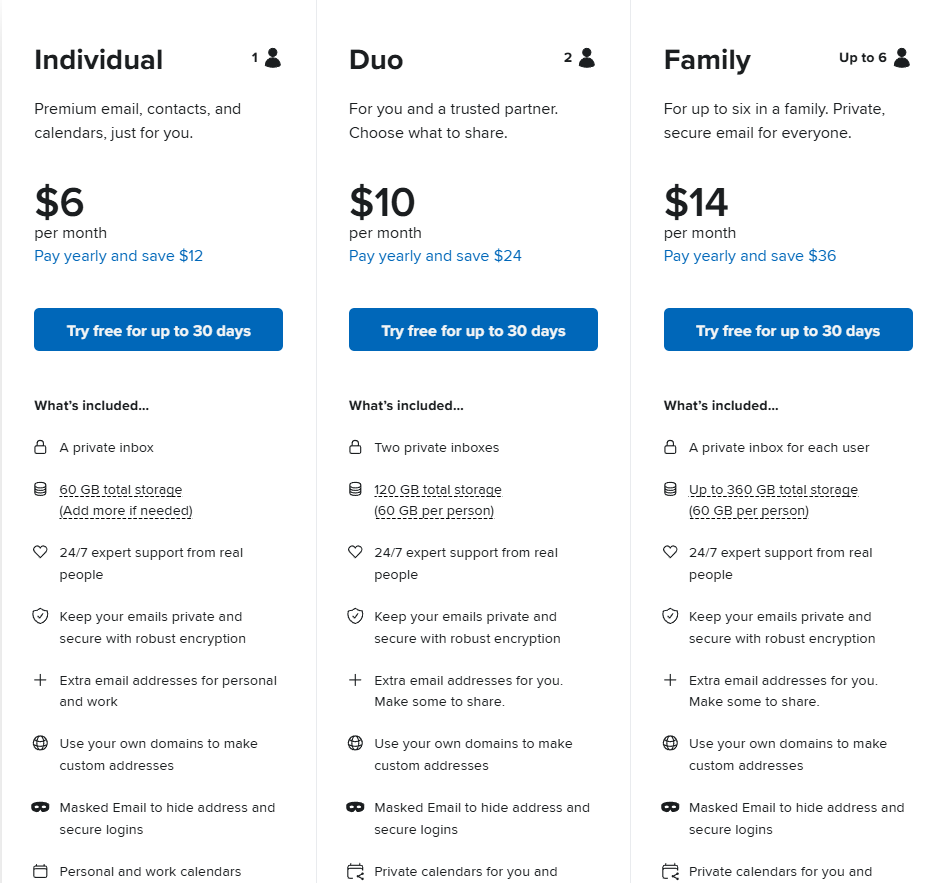
Fastmail offers three personal plans: Individual, Duo, and Family. The Individual plan is perfect for solo users, providing a private inbox, 60 GB of storage, custom domain support, Masked Email, Scheduled Send, Snooze, offline access, and compatibility with popular email clients. The Duo plan expands these benefits to two users while introducing shared calendars and address books, making it an excellent option for couples or business partners. For larger households, the Family plan supports up to six users, with each member receiving a private mailbox while sharing calendars and contacts under one subscription. It’s a practical solution for families looking to replace free email services with something more private and professional.
Business
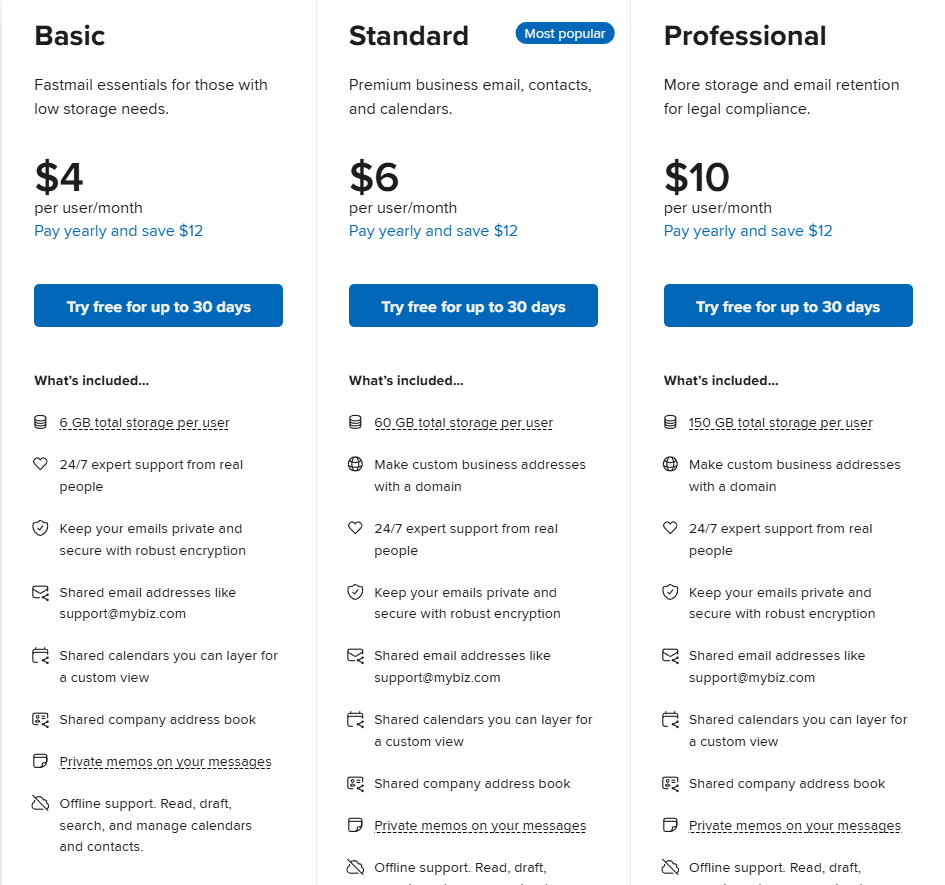
Fastmail also offers three business plans: Business Basic, Business Standard, and Business Professional. Business Basic is aimed at teams with lighter storage requirements, while Business Standard significantly increases mailbox capacity and adds premium productivity features such as Scheduled Send and Snooze. Business Professional is designed for organizations that require larger storage allocations and email retention for compliance purposes. One feature that stands out is Fastmail’s ability to mix different Business plans within the same organization, allowing companies to assign the most appropriate subscription to each employee instead of paying for features they don’t need.
Is Fastmail Worth the Price?
Although Fastmail doesn’t offer a permanent free plan, I believe its pricing is well justified. You’re not simply paying for an email account—you’re paying for an ad-free experience, stronger privacy, reliable performance, custom domain support, expert customer service, and a feature set designed around everyday productivity instead of advertising. Based on this Fastmail Review, Fastmail represents excellent value for freelancers, professionals, families, and businesses that rely on email every day. If privacy, reliability, and long-term usability matter more than getting a free inbox, Fastmail is absolutely worth the investment.
Interface & Ease of Use
Fastmail delivers one of the cleanest and most intuitive interfaces among premium email providers. The desktop experience is fast, uncluttered, and easy to navigate, with Mail, Calendar, Contacts, and Files organized within a single workspace. Users can personalize the layout by choosing folders or labels, enabling a reading pane, switching conversation view on or off, and selecting from light mode, dark mode, or custom themes to match their workflow.
The mobile apps maintain the same polished experience found on desktop. Available for both iOS and Android, they support customizable swipe actions, VIP notifications, offline access, and real-time synchronization, making it easy to manage email wherever you are.
Overall, Fastmail strikes an excellent balance between simplicity and flexibility. The interface is approachable for new users while offering enough customization for those who want greater control over how they organize and manage their inbox.
Customer Support
Fastmail takes a practical approach to customer support by focusing on knowledgeable assistance rather than relying on live chat or automated AI responses. Every paid subscription includes direct email support, giving users access to a dedicated team that can help with account setup, billing, migration, custom domains, security, and troubleshooting. This ensures that both individual users and businesses receive professional assistance whenever it’s needed.
Another strength is Fastmail’s comprehensive Help Center. It offers detailed, step-by-step articles covering everything from importing emails and configuring DNS records to setting up mobile devices, managing calendars, and securing your account. The documentation is well organized, easy to search, and suitable for both beginners and experienced administrators.
Although Fastmail doesn’t provide 24/7 live chat or phone support, its combination of responsive email assistance and extensive documentation is more than sufficient for most users. For a premium email provider, the overall support experience is reliable, informative, and aligned with the needs of professionals and businesses.
Customer Reviews
Fastmail has built a strong reputation across major review platforms, with most users praising its speed, reliability, and privacy-first approach. On G2, reviewers frequently highlight the clean, ad-free interface, lightning-fast performance, and the Masked Email feature, which many consider one of Fastmail’s biggest advantages for reducing spam and protecting personal email addresses.
Feedback on Capterra is similarly positive, where users often commend Fastmail for its ease of use, dependable synchronization, and excellent value for professionals and small businesses. Many reviewers also appreciate the ability to use custom domains without the complexity of enterprise email platforms.
Discussions on Reddit provide additional real-world insight. Long-time users commonly compare Fastmail with Gmail and Proton Mail, praising its fast search, polished interface, open standards, and reliable custom domain support. However, some users note that the service lacks built-in end-to-end encryption and isn’t intended to replace a full productivity suite like Google Workspace.
On Trustpilot, Fastmail receives positive feedback for its reliability, privacy, and overall user experience. The most common criticism relates to customer support response times, particularly in account-related cases. Overall, user sentiment across these platforms suggests that Fastmail is a mature, dependable email service that consistently delivers on its promise of providing a fast, private, and distraction-free email experience.
Pros & Cons
Like any premium email service, Fastmail has clear strengths and a few trade-offs. After reviewing its features, pricing, and overall user experience, here’s where it stands.
Pros
- Excellent privacy-first approach – No ads, no data profiling, and a subscription model that puts users first.
- Clean and fast interface – Lightweight, responsive, and easy to navigate across desktop and mobile.
- Outstanding custom domain support – Easily manage multiple domains, aliases, and professional email addresses.
- Powerful Masked Email feature – Protects your primary email address while reducing spam and online tracking.
- Integrated productivity tools – Built-in Mail, Calendar, Contacts, and Files work seamlessly together.
- Simple migration process – Makes switching from Gmail, Outlook, and other providers quick and straightforward.
Cons
- No permanent free plan – A paid subscription is required after the trial period.
- No built-in office suite – Lacks document editing and collaboration tools found in Google Workspace and Microsoft 365.
- No native end-to-end encryption – Privacy is strong, but users seeking built-in E2EE may prefer Proton Mail.
Overall, Fastmail delivers an excellent balance of speed, privacy, and usability. While it isn’t designed to replace a full productivity ecosystem, it’s one of the best premium email services for users who value a fast, reliable, and distraction-free email experience.
Fastmail vs Gmail
Choosing between Fastmail and Gmail ultimately comes down to your priorities. Gmail is an excellent free email service with deep integration into Google’s ecosystem, while Fastmail focuses on delivering a premium, privacy-first experience without ads or data-driven personalization.
| Feature | Fastmail | Gmail |
|---|---|---|
| Privacy | No ads, subscription-based | Ad-free inbox, but integrated with Google’s ecosystem |
| Custom Domains | Included on paid plans | Available through Google Workspace |
| Masked Email | ✔ Yes | ✖ No |
| Storage | Up to 300 GB (plan dependent) | 15 GB free (shared across Google services) |
| Productivity Apps | Mail, Calendar, Contacts, Files | Gmail, Drive, Docs, Sheets, Meet, Calendar |
| Best For | Privacy-focused users & professionals | General users and Google ecosystem users |
If your workflow revolves around Google Docs, Drive, Meet, and other Google services, Gmail remains the more practical choice. However, if your priority is a clean inbox, stronger privacy, custom domains, and useful features like Masked Email, Fastmail offers a noticeably more focused experience. Rather than trying to be an all-in-one productivity platform, it excels at what it was designed to do—providing a fast, reliable, and distraction-free email service. For users willing to pay for a better email experience, Fastmail is the stronger long-term investment.
Fastmail vs Proton Mail
Fastmail and Proton Mail are both premium email providers that prioritize user privacy, but they take very different approaches. Fastmail focuses on delivering a fast, polished, and productivity-oriented email experience, while Proton Mail places maximum emphasis on end-to-end encryption and security. The better choice depends on whether you value convenience or the highest level of privacy.
| Feature | Fastmail | Proton Mail |
|---|---|---|
| Privacy | Subscription-based, no ads | Subscription-based, no ads |
| End-to-End Encryption | ✖ Not built-in | ✔ Built-in by default |
| Custom Domains | ✔ Yes | ✔ Yes |
| Masked Email / Email Aliases | ✔ Included | ✔ Available with premium plans |
| Productivity | Mail, Calendar, Contacts, Files | Mail, Calendar, Drive, VPN, Pass |
| Best For | Everyday productivity & professionals | Maximum privacy & security |
If you want the most secure email platform with built-in end-to-end encryption, Proton Mail is the better choice. However, if your priority is speed, ease of use, custom domains, and a polished email experience that integrates smoothly into your daily workflow, Fastmail is the stronger option. It offers a better balance between privacy, usability, and productivity, making it the more practical choice for most individuals, freelancers, and small businesses.
Who Should Use Fastmail?
Fastmail isn’t designed for everyone, but it excels for users who value privacy, reliability, and a distraction-free email experience. If your primary goal is managing email efficiently rather than relying on a large productivity ecosystem, Fastmail is an excellent choice.
Fastmail is best suited for:
- Freelancers and consultants who want a professional email address with a custom domain and dependable performance.
- Small businesses looking for secure business email without the complexity or cost of enterprise collaboration platforms.
- Privacy-conscious users who prefer a subscription-based service that doesn’t rely on advertising or data profiling.
- Professionals managing multiple email identities, thanks to support for aliases, custom domains, and Masked Email.
- Families that want a private, ad-free email service with shared billing, calendars, and contacts.
If you spend most of your day in your inbox and want a service that’s fast, reliable, and easy to manage, Fastmail is one of the strongest premium email providers available. It offers an ideal balance of productivity, privacy, and simplicity without overwhelming users with unnecessary features.
Who Should Avoid Fastmail?
While Fastmail is an excellent premium email service, it isn’t the right fit for every user. If your workflow depends heavily on a broader productivity ecosystem, you may find other platforms more suitable.
Fastmail may not be the best choice for:
- Users looking for a free email service, as Fastmail only offers a free trial before requiring a paid subscription.
- Teams that rely on Google Workspace or Microsoft 365, where tools like Docs, Sheets, Office apps, Teams, and Meet are central to daily collaboration.
- Privacy enthusiasts who require built-in end-to-end encryption, as Proton Mail offers stronger encryption by default.
- Large enterprises that need advanced collaboration, communication, and compliance features beyond email management.
Fastmail is purpose-built to deliver an outstanding email experience—not to replace a complete business productivity suite. If your priority is collaboration software or maximum encryption, other providers may be a better fit. However, if you simply want fast, reliable, and private email, Fastmail remains one of the strongest options available.
Is Fastmail Worth It?
For most users who value privacy, reliability, and a distraction-free email experience, the answer is yes. Fastmail may not be the cheapest option, but it delivers excellent value through its ad-free business model, fast performance, custom domain support, Masked Email, and thoughtfully designed productivity features. Instead of trying to compete with Google Workspace or Microsoft 365, Fastmail focuses on making email better—and it succeeds remarkably well.
Fastmail is particularly worthwhile for freelancers, professionals, small businesses, and anyone looking to move away from ad-supported email services. If you need advanced collaboration tools or built-in end-to-end encryption, there are better alternatives. However, if your priority is a premium email service that’s fast, secure, easy to use, and built around user privacy, Fastmail is absolutely worth the investment and remains one of the best premium email providers on the market.
Final Verdict
Fastmail proves that a premium email service doesn’t need to offer dozens of apps or AI-powered features to stand out. Instead, it focuses on what matters most: delivering a fast, reliable, and privacy-first email experience that works exceptionally well every day. From its clean interface and excellent custom domain support to features like Masked Email, integrated Calendar, and seamless synchronization across devices, every part of the platform feels thoughtfully designed with productivity in mind.
While it isn’t intended to replace Google Workspace, Microsoft 365, or highly encrypted services like Proton Mail, Fastmail successfully occupies a unique position between those platforms. It offers a better balance of usability and privacy than most mainstream providers, making it an excellent choice for freelancers, professionals, families, and small businesses that simply want a dependable email service without ads or unnecessary complexity.
Overall Rating: 4.8/5
If you’re looking for a premium email provider that prioritizes performance, privacy, and ease of use over a sprawling ecosystem of applications, Fastmail is one of the best investments you can make. It consistently delivers a polished user experience and remains one of the strongest alternatives to Gmail and Outlook available today.
FAQs
1. Is Fastmail better than Gmail?
It depends on your priorities. Gmail is ideal for users who rely on Google’s ecosystem, including Drive, Docs, and Meet. Fastmail, on the other hand, is designed for users who value privacy, an ad-free experience, custom domains, and a clean, distraction-free interface. If email is your primary productivity tool, Fastmail is often the better long-term choice.
2. Does Fastmail support custom domains?
Yes. Every paid Fastmail plan includes support for custom domains, allowing you to create professional email addresses using your own domain name. You can also manage multiple domains, aliases, and users from a single account, making it an excellent solution for freelancers, families, and businesses.
3. Is Fastmail secure?
Yes. Fastmail uses encrypted connections, encrypted data storage, spam and phishing protection, two-factor authentication, and passkey support to help protect user accounts. While it doesn’t provide built-in end-to-end encryption like Proton Mail, it offers a strong balance of security, privacy, and everyday usability.
4. Can I switch from Gmail or Outlook to Fastmail?
Absolutely. Fastmail includes built-in migration tools that let you import emails, contacts, calendars, and other data from popular providers such as Gmail and Outlook. The migration process is well documented and designed to make switching as smooth as possible.
5. Does Fastmail offer a free plan?
No. Fastmail offers a free trial, but it doesn’t provide a permanent free plan. After the trial ends, you’ll need to subscribe to one of its Individual, Family, or Business plans to continue using the service.
6. Is Fastmail worth paying for?
For users who prioritize privacy, reliability, and a premium email experience, Fastmail is well worth the subscription cost. Its combination of custom domain support, Masked Email, integrated productivity tools, and excellent performance makes it one of the strongest premium email services available today, particularly for professionals, freelancers, and small businesses.
Ready for a Better Email Experience?
Take control of your inbox with a faster, more private, and ad-free email service. Migrate your emails, calendars, and contacts in just a few clicks—and see why thousands of professionals trust Fastmail every day.