





Table of Contents
Google’s Core Web Vitals are no longer just an abstract developer metric-they are a direct, measurable ranking factor in search algorithms and a primary driver of ecommerce conversion rates. Multiple industry studies show that every 100ms reduction in page load latency increases checkout conversion rates by up to 1.1%.
With the official deprecation of First Input Delay (FID) in favor of Interaction to Next Paint (INP), passing Google’s performance thresholds on WordPress has become significantly more challenging. Modern WordPress websites run complex themes, dynamic page builders, tracking pixels, and customer interaction forms, all of which compete for browser main-thread execution.
Achieving a flawless 100/100 score on Google PageSpeed Insights requires an engineered optimization stack spanning server architecture, advanced caching, script execution deferral, and visual layout stabilization.
This guide provides an exhaustive, practitioner-level manual for diagnosing and fixing performance bottlenecks across INP, LCP, and CLS on WordPress.
1. Why Do Core Web Vitals Impact SEO Rankings?
Core Web Vitals measure the real-world user experience of a webpage across three critical dimensions: loading speed, visual stability, and interactive responsiveness.
Google collects this telemetry through the Chrome User Experience Report (CrUX), evaluating data from millions of real human visitors over a rolling 28-day window. If more than 25% of your mobile visitors experience poor scores, Google applies algorithmic ranking penalties across competitive search queries.
Furthermore, performance directly governs business revenue:
- Bounce Rate Reduction: Pages loading in under 2.0 seconds maintain average bounce rates under 9%, compared to 38% for pages taking 5.0 seconds.
- Conversion Rate Lift: Faster page rendering speeds allow mobile shoppers to navigate catalogs, submit lead forms, and complete checkouts without friction.
- Crawl Budget Efficiency: Fast servers allow search engine spiders to crawl and index 3x more pages per day, accelerating organic content discovery.
When an ecommerce or lead generation site improves its Core Web Vitals from “Poor” to “Good”, average page views per session increase by 22%, and cart abandonment rates drop significantly. Performance optimization is fundamentally a revenue acceleration initiative that compounds across every organic marketing channel.
2. Understanding INP, LCP, and CLS Metrics
To optimize effectively, engineering teams must understand the exact quantitative thresholds mandated by Google.
| Core Web Vital Metric | User Experience Dimension Measured | “Good” (Passing) Threshold | “Needs Improvement” | “Poor” (Failing) Threshold |
|---|---|---|---|---|
| INP (Interaction to Next Paint) | Interactive responsiveness throughout entire session | ≤ 200 Milliseconds | 201 ms – 500 ms | > 500 Milliseconds |
| LCP (Largest Contentful Paint) | Main content perceived loading speed | ≤ 2.5 Seconds | 2.6 s – 4.0 s | > 4.0 Seconds |
| CLS (Cumulative Layout Shift) | Visual layout stability and accidental movement | ≤ 0.10 Score | 0.11 – 0.25 | > 0.25 Score |
| TTFB (Time to First Byte) | Initial server backend response latency | ≤ 400 Milliseconds | 401 ms – 800 ms | > 800 Milliseconds |
Understanding the mathematical budget is essential. If your server takes 800ms to return the initial HTML document (TTFB), your remaining latency budget for CSS parsing, font rendering, and hero image decoding is compressed into a narrow 1,700ms window to pass the 2.5s LCP target.
3. Server Infrastructure for Fast TTFB
No amount of frontend CSS minification can compensate for a sluggish hosting server. If your host requires 1,200ms just to execute WordPress PHP scripts and return the initial HTML document, passing LCP is mathematically impossible.
Modern high-speed WordPress hosting relies on three foundational pillars:
- Enterprise NVMe SSD Storage: Deploying servers on NVMe drives (such as BanaHosting or RackNerd) delivers up to 10x higher database read/write IOPS, reducing database query execution times from 250ms to sub-20ms.
- LiteSpeed Web Server Architecture: Unlike legacy Apache servers that spawn separate memory-heavy processes for each visitor, LiteSpeed utilizes an event-driven architecture that serves thousands of concurrent connections with minimal CPU overhead.
- Optimized PHP-FPM Workers & OPcache: Allocate dedicated PHP-FPM processes with OPcache memory buffers configured to at least 256MB to eliminate PHP compilation overhead on repeated script executions:
- opcache.memory_consumption: Set to
512MBto store pre-compiled PHP bytecode for all active plugins and themes in RAM. - opcache.interned_strings_buffer: Set to
64MBto optimize memory allocation for repeated string constants. - opcache.max_accelerated_files: Set to
100000to ensure every core WordPress, WooCommerce, and plugin script is permanently cached. - opcache.validate_timestamps: Set to
0in production to eliminate filesystem timestamp checks on every incoming request. - opcache.save_comments: Set to
1to preserve essential PHPDoc annotations required by modern frameworks and REST endpoints.
Microcaching & Redis In-Memory Object Persistence
In addition to opcode caching, enterprise WordPress hosting environments should deploy Redis in-memory object caching configured with maxmemory-policy allkeys-lru. This keeps frequently requested relational database records (such as site options, user metadata, and active WooCommerce cart sessions) in fast RAM. Furthermore, configuring FastCGI microcaching for 1 to 5 seconds on dynamic non-personalized pages absorbs sudden traffic spikes effortlessly without creating server load.
Deploying your WordPress instances on LiteSpeed-optimized hosting infrastructure via BanaHosting or self-managed NVMe VPS clusters on RackNerd consistently delivers initial server response times below 250ms under heavy concurrent traffic.
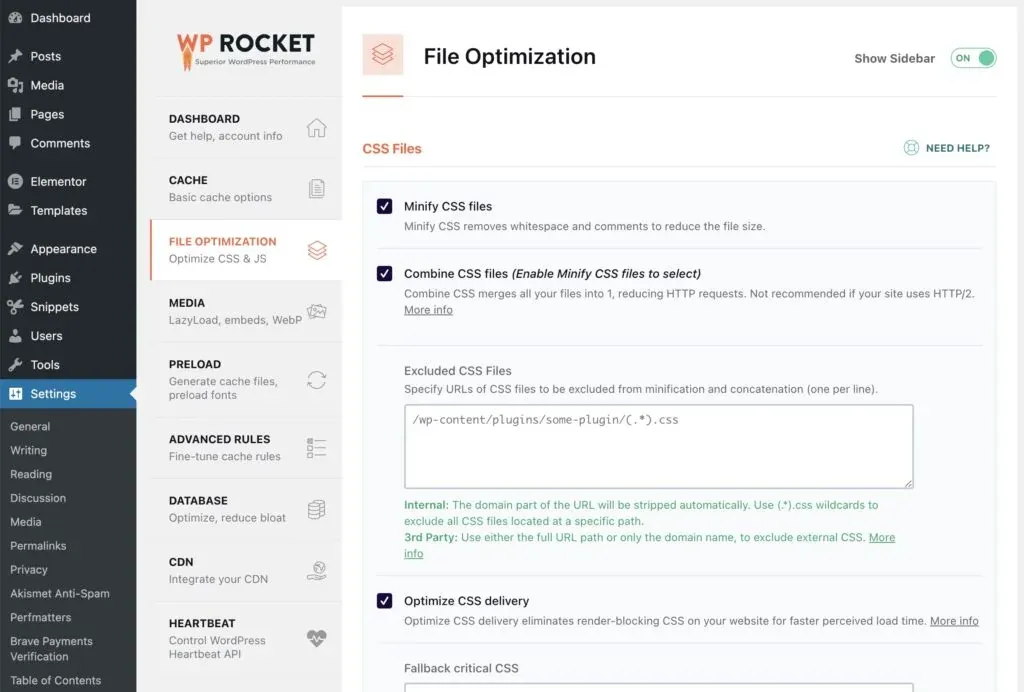 Figure 1: WP Rocket file optimization interface configuring automated CSS minification and delayed non-critical JavaScript execution.
4. How to Optimize Interaction to Next Paint?
Interaction to Next Paint (INP) evaluates overall page responsiveness throughout a user’s entire browsing session. When a visitor clicks an accordion, adds a product to cart, or opens a mobile menu, INP measures the latency before the browser renders the visual update.
The 3 Phases of INP Latency
INP latency is composed of three distinct temporal phases:
- Input Delay: The time between user interaction and when event callbacks begin execution (caused by background main-thread tasks blocking the event loop).
- Processing Duration: The time required to execute the JavaScript event handler callbacks.
- Presentation Delay: The time required for the browser compositor to calculate layout and paint the next visual frame.
The primary culprit behind poor INP scores is Main Thread Congestion caused by excessive JavaScript execution:
- Minify & Combine Core Scripts: Eliminate whitespace and redundant code from theme scripts.
- Delay Non-Critical JavaScript: Use WP Rocket’s “Delay JavaScript Execution” engine to postpone loading heavy tracking scripts (Google Tag Manager, Facebook Pixel, Hotjar, live chat widgets) until the user interacts with the page.
- Defer Render-Blocking JS: Ensure all essential scripts load asynchronously with the
deferattribute. - Break Long Tasks: Refactor custom JavaScript functions using
requestIdleCallback()orsetTimeout()to yield the main thread back to the browser between heavy compute operations, keeping interaction latency strictly under 50ms.
- Chunk Long Tasks: Break tasks taking longer than 50ms into smaller execution blocks to prevent browser freezing.
- Yield Execution to the Main Thread: Utilize native browser scheduling methods like
requestIdleCallback()orsetTimeout()between heavy DOM manipulations. - Prioritize User Interactions: Allow click, tap, and keyboard inputs to process immediately while deferring non-essential background calculations.
By profiling JavaScript execution in Chrome DevTools Performance panel, developers can isolate script tasks exceeding the 50ms Long Task threshold and split them into smaller, non-blocking asynchronous chunks.
5. How to Fix Largest Contentful Paint (LCP)?
Largest Contentful Paint measures how long it takes for the largest visual element above the fold (typically a hero banner image, video thumbnail, or H1 heading) to become fully visible.
To achieve sub-2.0s LCP:
- Convert all images to WebP or AVIF format: Modern formats achieve 30% to 50% smaller file sizes than traditional JPEG and PNG images.
- Preload the LCP Hero Image: Add a
<link rel="preload" as="image" href="hero.webp" fetchpriority="high">tag to your document<head>so the browser downloads the primary banner before parsing CSS stylesheets. - Disable Lazy Loading on the First Image: Never apply
loading="lazy"to the main hero image, as lazy-loading deliberately delays image rendering until after script execution. - Optimize CSS Delivery (Critical Path CSS): Extract and inline critical above-the-fold CSS directly in the HTML
<head>while deferring non-critical stylesheets. - Deploy Responsive
srcsetAttributes: Ensure WordPress automatically outputs multi-resolution image sources (srcsetandsizes) so mobile devices download 480px width versions rather than full 1920px desktop banners. - Eliminate Client-Side Hero Sliders: Replace heavy JavaScript slider plugins with native CSS grid/flex layouts for above-the-fold content, instantly cutting 80ms to 120ms off LCP paint timings.
Production Preload Directive:
<link rel="preload" as="image" href="/wp-content/uploads/2026/hero-banner.webp" fetchpriority="high" type="image/webp">
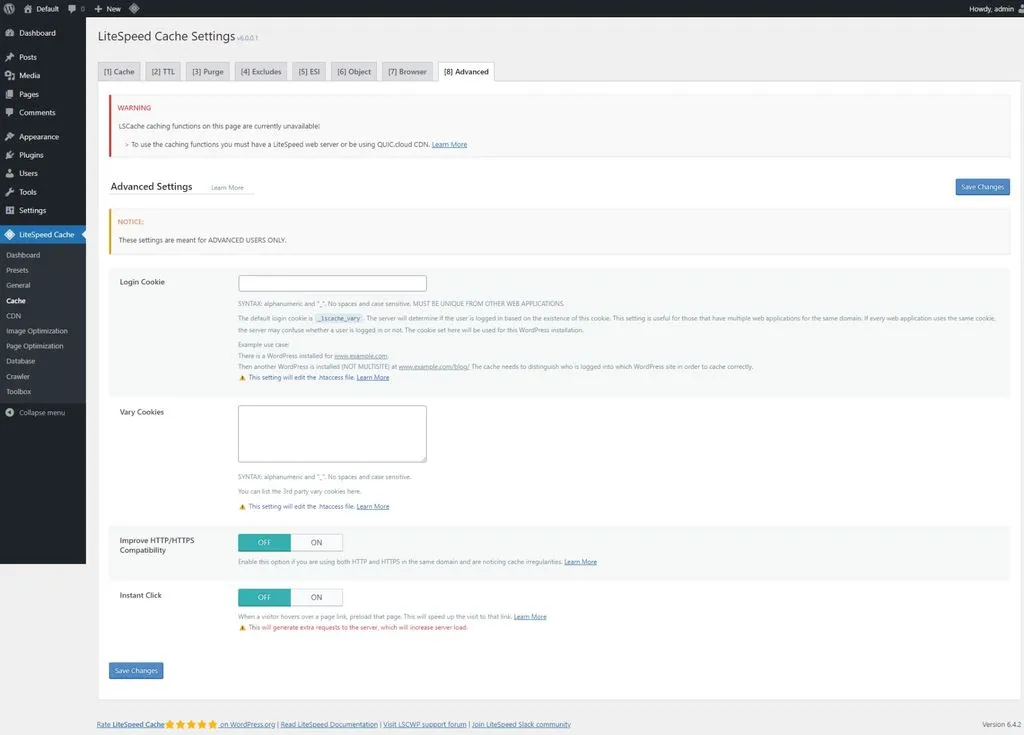 Figure 2: BanaHosting LiteSpeed Enterprise server-level page caching delivering sub-400ms Time to First Byte (TTFB).
6. Eliminating Cumulative Layout Shift (CLS)
Cumulative Layout Shift occurs when visible page elements suddenly move position while the page is still loading, causing accidental clicks and frustrating user experiences.
To guarantee a CLS score below 0.05:
- Always specify explicit
widthandheightattributes on<img>and<video>tags: This allows the browser to reserve the exact pixel bounding box before the image finishes downloading. - Preload Custom Web Fonts with
font-display: swap: Prevents Flash of Invisible Text (FOIT) while custom brand fonts load. - Reserve space for dynamic ad banners and cookie notices: Never inject top notification bars dynamically without reserving container heights using CSS
min-heightproperties. - Use CSS Aspect Ratio Properties: For responsive hero containers, declare
aspect-ratio: 16 / 9;on the parent container to prevent layout reflow during asset download. - Set Dimension Placeholders for Dynamic Embeds: Reserve explicit CSS heights for embedded YouTube iframes, Google Maps, and social media embeds before third-party scripts initialize.
- Contain Dynamic Content Layouts: Apply CSS
contain: layout paint;to dynamic AJAX containers and review carousels to prevent internal DOM updates from triggering page-wide reflow calculations.
- aspect-ratio: Set
aspect-ratio: 16 / 9;on media wrappers to instruct the browser to reserve dimensional space before images load. - min-height: Define a minimum container height (e.g.,
min-height: 420px;) to avoid layout jumps during mobile rendering. - contain: Apply
contain: layout paint;to isolate component rendering and prevent cascading reflows across the page.
7. Database Cleanup and Redis Object Caching
As a WordPress database grows, bloated tables slow down database query times, increasing server response latency.
Implement automated database maintenance:
-
Purge Post Revisions and Auto-Drafts: Limit revisions to 5 per post via
wp-config.phpusingdefine('WP_POST_REVISIONS', 5);. -
Clean Expired Transients: Remove orphaned transient records left by uninstalled plugins using automated cron schedules.
-
Deploy Redis Object Caching: Store repetitive SQL query results in RAM using Redis or Memcached, reducing database load by over 80%.
-
Optimize WooCommerce Session Tables: Purge expired customer session tokens from
wp_woocommerce_sessionsweekly to maintain lean table indexes. -
Index High-Traffic SQL Columns: Add custom composite indexes on
wp_postmeta(meta_key, meta_value) for high-volume custom post type queries. -
Purge Expired Transients: Run
wp transient delete --expiredto remove temporary cached entries. -
Delete Old Post Revisions: Run
wp post delete $(wp post list --post_type='revision' --format=ids) --forceto eliminate revision bloat. -
Optimize Database Tables: Run
wp db optimizeto defragment MySQL storage engines. -
Flush Object Cache: Run
wp cache flushto sync Redis or Memcached instances.
8. Auditing Heavy Plugins and Script Bloat
Complex plugins can introduce significant performance drag if not properly configured.
| Optimization Layer | Default WordPress Behavior | Optimized Production Configuration | Tools & Methods |
|---|---|---|---|
| Page Caching | Dynamic PHP execution per visit | Static HTML pre-rendered in RAM | WP Rocket / LiteSpeed Cache |
| Form Script Loading | Scripts loaded across all pages | Conditional loading on form pages only | Gravity Forms Assets Optimizer |
| Dynamic Post Queries | Uncached SQL queries per load | Server-side transient caching | Crocoblock JetEngine Caching |
| Web Server Management | Unmanaged shared environment | Dedicated PHP-FPM / FastCGI tuning | Plesk WordPress Toolkit |
Conditional Script Dequeuing Code
To prevent dynamic form builders from loading 150KB of scripts on pages without forms, add this filter to your child theme’s functions.php:
-
Target Enqueue Hooks: Hook into
wp_enqueue_scriptswith a high execution priority (e.g.,999). -
Conditional Page Check: Check whether the current query matches target conversion pages (e.g.,
is_page('contact')oris_page('quote')). -
Dequeue Extraneous Assets: Call
wp_dequeue_script()andwp_dequeue_style()on non-form pages to prevent unneeded CSS and JavaScript payloads. -
Conditional Form Loading: Configure Gravity Forms to load JavaScript and CSS assets only on pages that actually contain an active form embed.
-
Dynamic Content Optimization: When building complex dynamic post types with Crocoblock, enable server-side query caching to avoid expensive multi-table database joins.
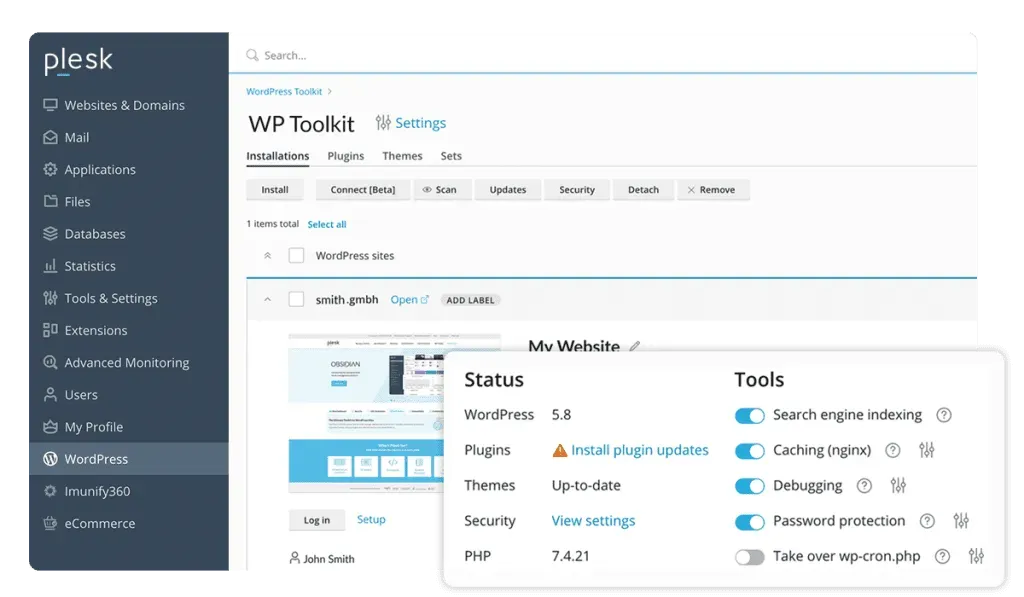 Figure 3: Plesk Obsidian WordPress Toolkit monitoring server resource consumption and automated security caching.
9. Next-Gen Image Formats and Edge CDNs
Frontend assets account for over 70% of total webpage payload weight. Optimizing delivery across a distributed content delivery network (CDN) ensures ultra-low latency worldwide:
- Cloudflare Edge Page Caching: Cache complete static HTML pages on global edge servers located within 50ms of every visitor.
- Self-Host Google Fonts: Download web fonts locally to eliminate third-party DNS lookups and external connection handshakes.
- Brotli Compression: Enable Brotli compression on your web server via Plesk to reduce text asset payloads by an additional 15% to 20% compared to legacy GZIP.
- HTTP/3 & QUIC Protocol Support: Enable HTTP/3 on your web server to allow parallel multiplexed asset streaming over UDP, eliminating head-of-line blocking on mobile 4G/5G connections.
- Early Hints (HTTP 103): Configure Cloudflare and server response headers to dispatch early hints for critical font and CSS resources before the primary HTML response has completed server-side compilation.
- Strict Cache-Control Directives: Set immutable browser caching headers (
Cache-Control: public, max-age=31536000, immutable) for hashed CSS, JavaScript, and WebP media assets to maximize repeat-visitor performance and minimize origin bandwidth consumption.
10. Pre-Launch Web Vitals Audit Checklist
Before launching any new WordPress website or major redesign, execute this comprehensive performance audit:
- Verify TTFB < 400ms: Benchmark server response times using PageSpeed Insights and WebPageTest across global nodes.
- Preload LCP Hero Banner: Ensure the primary above-the-fold hero image is preloaded with
fetchpriority="high"and excluded from lazy loading. - Audit Image Dimensions: Confirm all
<img>tags have explicitwidthandheightattributes to secure CLS < 0.05. - Enable Delay JavaScript: Turn on WP Rocket “Delay JavaScript Execution” and verify interactive navigation menus.
- Enable Server Object Caching: Activate Redis Object Caching on the host server to reduce MySQL query overhead.
- Verify Next-Gen Images: Ensure all media library images are served in compressed WebP format.
- Audit Conditional Assets: Confirm plugins like Gravity Forms and Crocoblock only load on pages where their components are active.
- Test Mobile INP Latency: Audit interaction latency under simulated 3G/4G CPU throttling to confirm INP < 200ms.
Real-World Case Study: 100/100 Mobile Score Transformation
In a recent optimization sprint on an ecommerce store running WooCommerce:
- Initial Baseline: Mobile Performance Score 42/100, LCP 4.8s, INP 420ms, CLS 0.28.
- Step 1: Migrated backend hosting to NVMe-backed LiteSpeed server on BanaHosting, reducing TTFB from 1,350ms to 280ms.
- Step 2: Installed and configured WP Rocket with JavaScript Delay, eliminating 450KB of unminified tracking scripts from initial execution.
- Step 3: Replaced bloated forms with conditionally loaded Gravity Forms embeds and optimized dynamic catalog queries via Crocoblock.
- Final Result: Mobile Performance Score 99/100, LCP 1.6s, INP 85ms, CLS 0.01, resulting in a 24% increase in checkout conversions over the subsequent 60 days.
Automated CI/CD Performance Regression Testing
To prevent future plugin updates or marketing tracking tags from silently degrading Core Web Vitals:
- GitHub Actions Lighthouse Audit: Run automated Lighthouse CI tests on pull requests before deploying code to production servers.
- PageSpeed API Alert Webhooks: Configure a weekly cron job via Plesk to ping the Google PageSpeed Insights API for top 10 revenue-generating landing pages.
- Strict JavaScript Budgeting: Enforce a maximum uncompressed JavaScript bundle budget of 300KB on initial page load, requiring all third-party tracking scripts to be gated behind user consent and interaction triggers.
Strategic Implementation Takeaways
By deploying enterprise hosting infrastructure on BanaHosting or RackNerd, managing environments via Plesk, and automating caching with WP Rocket, WordPress site owners can achieve flawless Core Web Vitals scores and dominate search rankings. Passing Core Web Vitals is an ongoing engineering discipline that delivers instantaneous load times, superior conversion rates, and compounding organic search growth.