





Table of Contents
1. Overview: Finding the Right Business & Team Comms Solution
Choosing the right Business & Team Comms software in 2026 requires balancing feature depth, pricing transparency, reliability, and real-world workflow efficiency. As software tools become increasingly saturated with marketing promises, our editorial and testing team evaluated top contenders under authentic operating conditions.
In this comprehensive buying guide, we analyzed leading platforms across the industry and narrowed down the top 10 highest-performing solutions. Each tool was evaluated on critical benchmark factors-including 35+ phone systems & 2,500+ test calls benchmarked.
2. The Best Business & Team Comms Software at a Glance
Below is a quick summary of the top-performing Business & Team Comms tools from our hands-on testing, categorized by their greatest strengths.

Quo (formerly OpenPhone) sets the modern standard for business communication in 2026. Replacing clunky PBX hardware with an intuitive, collaborative team inbox, Quo empowers growing startups and service businesses to manage calls and SMS like shared email.

Nextiva combines carrier-grade voice infrastructure backed by an ironclad 99.999% SLA with the NextivaONE unified workspace, making it the premier choice for organizations demanding uncompromising uptime and 24/7 technical support.

Dialpad leads the telephony industry in proprietary artificial intelligence. Powered by custom DialpadGPT models, it transcribes live calls in real time, surfaces coaching assist cards for reps, and predicts customer satisfaction without post-call surveys.

RingCentral RingEX remains the gold standard for enterprise-grade scalability. With over 300 pre-built integrations, extensive hardware catalog support, and robust HIPAA compliance, it effortlessly powers businesses scaling from 10 to 1,000+ employees.

Ooma Office is the go-to solution for traditional small businesses that want the reliability of physical desk phones without complicated IT installations. Pre-configured hardware lets non-technical owners plug in and start calling in minutes.

Grasshopper adds a professional business phone line and automated greeting to your existing personal smartphone, eliminating the need to carry two phones or purchase expensive hardware.

For organizations already utilizing Zoom for team video meetings, Zoom Phone represents the most cost-effective and seamless VoIP upgrade available, starting at just $10 per user per month.

Vonage Business Communications provides over 50 enterprise calling features with a modular add-on structure, allowing scaling companies to pay only for the exact tools and API capabilities they need.

8x8 is the undisputed leader for small businesses with international operations, offering all-inclusive plans that feature unlimited calling to up to 48 countries alongside unified voice and video.

GoTo Connect combines cloud PBX telephony with GoTo's renowned video conferencing technology, headlined by the industry's most intuitive visual drag-and-drop Dial Plan Editor.
3. In-Depth Tool Reviews & Analysis
Our hands-on test analysis of core capabilities, pros & cons, setup complexity, and benchmark metrics.

Collaborative cloud business phone system with shared team inboxes, AI call transcription, and seamless CRM integrations.
Why We Picked Quo (OpenPhone)
Quo earns our #1 overall ranking because it fundamentally rethinks how modern teams interact with customers. Unlike legacy VoIP providers that treat phone lines as isolated silos, Quo organizes business communications into collaborative shared numbers. Multiple team members can handle incoming calls, listen to voicemails, and reply to SMS text threads from the same hotline simultaneously. With built-in AI call summaries, 98%+ speech-to-text accuracy, internal thread mentions, and seamless HubSpot and Salesforce synchronization, Quo eliminates dropped customer conversations and clunky administrative overhead.
What We Liked (Pros)
- Transforms chaotic business telephony into a shared, transparent team inbox
- Internal side-threads allow colleagues to collaborate on customer inquiries without customer visibility
- Automated AI call recordings, speaker transcripts, and actionable summary recaps
- Native modern applications built for macOS, Windows, iOS, Android, and web browsers
- Streamlined self-serve A2P 10DLC registration guidance for US SMS carrier compliance
Areas for Improvement (Cons)
- No free forever tier available; 7-day free trial offered across all tiers
- Advanced CRM auto-logging and AI action summaries require the Business plan ($23/user/month)

Carrier-grade cloud business VoIP, visual call flow automation, and AI speech intelligence for scaling enterprises.
Why We Picked Nextiva
When downtime directly translates into lost enterprise revenue, Nextiva is the most reliable cloud phone provider on the market. Its carrier-grade infrastructure routes traffic through eight geographically redundant North American data centers, guaranteeing 99.999% network availability. Nextiva stands out for its intuitive Call Flow Studio, which allows non-technical managers to build multi-level IVR routing trees via drag-and-drop nodes. Combined with integrated video meetings, team chat, customer surveys, and dedicated US-based phone support, Nextiva delivers unrivaled operational stability.
What We Liked (Pros)
- Industry-leading 99.999% SLA uptime ensures mission-critical communications remain active
- Visual Call Flow Studio simplifies multi-location IVR phone trees and holiday routing
- Unified NextivaONE app centralizes voice, team chat, SMS, and HD video conferencing
- Outstanding 24/7 live telephone customer support and white-glove enterprise onboarding
- Deep two-way CRM screen pops for HubSpot, Salesforce, Microsoft Teams, and Zoho
Areas for Improvement (Cons)
- Advanced conversational speech analytics and automated call recording require higher-tier plans
- Desktop and mobile applications consume higher system memory during intensive video multi-streams

AI-native cloud communications platform featuring real-time speech transcription, predictive CSAT analytics, and unified team calling.
Why We Picked Dialpad
Dialpad is engineered from the ground up as an AI-native communications platform rather than an old telecom engine with an AI plugin tacked on. DialpadGPT processes voice data with negligible latency, delivering real-time transcription and automated post-call summaries directly inside the call window. For sales and support reps, Dialpad's Real-Time Assist cards automatically detect customer objections or competitor mentions and display tailored battlecards on screen. Its proprietary Predictive CSAT engine accurately scores client sentiment across 100% of calls, eliminating reliance on low-response post-call surveys.
What We Liked (Pros)
- Full real-time live transcription and post-call AI summaries included in the entry $15/user plan
- Real-Time Assist cards display objection-handling cheat sheets dynamically during live calls
- Instant Call Flip transfers active conversations between smartphone, computer, and desk phone seamlessly
- Automated action item extraction eliminates manual CRM note-taking after long customer calls
- Clean, responsive user interface optimized for high-volume sales outbound and support desks
Areas for Improvement (Cons)
- Native Salesforce and HubSpot integrations require the Pro tier ($25/user/month) and a 3-seat minimum
- SMS messaging allowances to non-US numbers incur additional per-carrier surcharges

Carrier-grade enterprise cloud communications platform featuring 99.999% SLA uptime, physical IP desk phone provisioning, and RingSense AI.
Why We Picked RingCentral
RingCentral is the undisputed powerhouse of unified communications. When an organization outgrows basic softphones and requires advanced multi-level auto-attendants, call queues, call whispering, silent monitoring, and zero-touch physical IP phone deployment, RingCentral delivers unmatched depth. It features pre-configured hardware compatibility with leading desk phone manufacturers including Polycom, Yealink, and Cisco. Backed by a carrier-grade 99.999% uptime SLA, signed HIPAA Business Associate Agreements (BAA), and RingSense conversational AI, RingCentral handles complex enterprise requirements effortlessly.
What We Liked (Pros)
- Rock-solid 99.999% SLA availability verified across two decades of enterprise operation
- Unmatched third-party software integration directory spanning CRM, ERP, and collaboration tools
- Comprehensive hardware provisioning supporting IP desk phones, conference pods, and analog pagers
- Advanced supervisory capabilities including call whispering, barge-in, and real-time queue monitoring
- Full regulatory compliance support including signed HIPAA agreements for medical practices
Areas for Improvement (Cons)
- Complex, multi-layered administrative portal requires dedicated onboarding and setup time
- Monthly SMS allowances are restricted per user tier (25 to 200 messages) with potential overage fees

Plug-and-play cloud phone system and hardware IP desk phones for traditional small offices and brick-and-mortar businesses.
Why We Picked Ooma Office
Not every business wants to conduct all customer communication exclusively through laptop headsets. For dental practices, auto repair shops, law offices, and retail storefronts, physical desktop phones remain essential. Ooma Office solves this with pre-configured IP phones and base stations. When hardware arrives, you plug it into an Ethernet jack and the phone is live instantly. At a predictable flat rate of $19.95 per user per month with no annual contracts, Ooma includes essential features such as a virtual receptionist, ring groups, mobile apps, and electronic faxing.
What We Liked (Pros)
- Effortless plug-and-play setup for physical IP desk phones without networking expertise
- Predictable month-to-month pricing with zero long-term contract lock-in
- Virtual receptionist, ring groups, and call forwarding included in the base package
- Supports traditional analog fax machines through specialized telephone adapters
- High call quality backed by Ooma PureVoice compression technology
Areas for Improvement (Cons)
- Advanced CRM integrations (Salesforce, HubSpot) require Ooma Office Pro Plus ($29.95/user/mo)
- No free trial period (backed by a 30-day money-back equipment guarantee instead)

Lightweight virtual business phone number and call forwarding app for solopreneurs and mobile freelancers.
Why We Picked Grasshopper
Grasshopper is tailored specifically for freelancers, consultants, and side hustlers who need to separate business and personal communications on a single smartphone. Instead of provisioning VoIP hardware or requiring softphone configuration, Grasshopper routes calls through your existing cellular voice network. When a client calls, your phone indicates that it is a business call. You can configure custom professional greetings, extension forwarding, business texting, and automated missed-call auto-replies in less than five minutes.
What We Liked (Pros)
- Keeps your personal cell phone number completely private when contacting clients
- Flat monthly pricing rather than per-user seat penalties on multi-number tiers
- Instant Response automatically sends an SMS text when you miss an incoming client call
- Professional auto-attendant greetings give small solo operations an enterprise image
- Operates reliably over standard cellular networks when mobile data is spotty
Areas for Improvement (Cons)
- Lacks advanced team collaboration features, call transfers, and shared inboxes
- No built-in video conferencing, CRM syncing, or AI conversation transcription

Secure cloud PBX phone system seamlessly integrated into the unified Zoom Workplace collaboration platform.
Why We Picked Zoom Phone
Zoom Phone provides an exceptionally friction-free transition to cloud telephony for organizations already subscribed to Zoom Workplace. Employees do not have to learn a new application or manage a separate login; the dial pad appears directly inside the familiar Zoom desktop and mobile interface. One standout capability is Zoom's 'Elevate to Meeting' feature: with a single click, an active telephone call transitions into a full-featured Zoom video meeting with screen sharing. With aggressive pricing starting at $10/user/month for metered calling and $15/user/month for unlimited domestic calling, Zoom Phone delivers outstanding value.
What We Liked (Pros)
- Familiar user interface eliminates employee onboarding friction and training downtime
- Elevate to Meeting converts standard phone calls into interactive video conferences instantly
- Very competitive starting price point for small businesses on a strict budget
- Robust global coverage with localized phone numbers available in over 45 countries
- Centralized administration within the Zoom Workplace management portal
Areas for Improvement (Cons)
- Requires full integration into the broader Zoom ecosystem to unlock maximum utility
- Advanced omnichannel contact center features require expensive add-on subscriptions

Modular cloud VoIP communications platform with 50+ business phone features and extensive telecom APIs.
Why We Picked Vonage
Vonage stands out for its flexibility and developer ecosystem. Backed by the world-renowned Vonage (formerly Nexmo) communications API platform, Vonage Business Communications allows businesses to integrate voice, SMS, and WhatsApp messaging directly into custom web applications. The Vonage App Center offers seamless integrations with Salesforce, Microsoft Dynamics, and Google Workspace. Teams can customize their phone system with modular add-ons (such as call recording, virtual receptionist extensions, and toll-free numbers) rather than being forced into costly top-tier enterprise bundles.
What We Liked (Pros)
- Extensive catalog of developer APIs for integrating custom SMS and voice triggers into proprietary software
- Tiered pricing structure automatically reduces the per-line cost as your team adds more users
- Vonage App Center delivers reliable click-to-dial functionality inside major CRM platforms
- Compatible with both desktop/mobile softphones and physical IP desk phones
- Reliable network infrastructure backed by patented call optimization technology
Areas for Improvement (Cons)
- Several essential features like on-demand call recording and visual voicemail are sold as paid add-ons
- Per-line fees and regulatory carrier taxes can add up if not monitored closely

Global cloud phone system offering unlimited international calling plans to up to 48 countries with integrated contact center features.
Why We Picked 8x8
If your business regularly communicates with international clients, suppliers, or offshore team members, international calling rates can destroy your monthly telecom budget. 8x8 solves this challenge directly. Its X-Series plans bundle unlimited calling to between 14 and 48 international countries (including the UK, France, Germany, Japan, Australia, and Canada) within standard user licenses. Beyond international telephony, 8x8 provides unified video conferencing, team messaging, and integrated omnichannel contact center capabilities on a highly secure, globally certified telecom infrastructure.
What We Liked (Pros)
- Unmatched unlimited international calling plans save thousands in overseas carrier tolls
- Robust global data center infrastructure delivers low-latency voice quality worldwide
- Single unified application integrates voice, video meetings up to 500 participants, and team chat
- Extensive enterprise compliance certifications including HIPAA, FISMA, and PCI-DSS Level 1
- Native contact center upgrade paths for growing inbound support teams
Areas for Improvement (Cons)
- Starting price of $24/user/month is higher than domestic-only competitors like Quo and Dialpad
- Desktop user interface feels utilitarian and requires time to navigate comfortably

All-in-one cloud PBX phone and video meeting solution featuring an intuitive visual drag-and-drop call flow editor.
Why We Picked GoTo Connect
Configuring complex call routing trees in legacy phone systems often requires hours of reading technical manuals or paying specialized telecom consultants. GoTo Connect revolutionizes this process with its visual Dial Plan Editor. Administrators can see the entire customer journey laid out as an interactive flowchart, connecting auto-attendants, ring groups, business hours, and voicemail boxes with drag-and-drop ease. Paired with reliable mobile apps and GoTo's battle-tested video conferencing infrastructure, GoTo Connect is a premier all-in-one communications hub.
What We Liked (Pros)
- Visual Dial Plan Editor makes designing complex call flows effortless for non-technical managers
- Integrates GoTo's battle-tested video conferencing and webinar infrastructure natively
- Comprehensive real-time queue analytics and call monitoring for customer service supervisors
- Flexible hardware support across a wide range of Polycom, Yealink, and Cisco IP desk phones
- Reliable mobile and desktop applications ensure uninterrupted remote communication
Areas for Improvement (Cons)
- The entry Basic plan limits auto-attendants to one and restricts custom call routing features
- Higher entry cost compared to modern softphone alternatives like Quo ($15/user/mo)
4. The 2026 Small Business Telephony Stack
How high-efficiency modern businesses orchestrate cloud VoIP, collaborative messaging, and automated CRM logging.
Step 1: Establish a Collaborative Cloud Hotline
Deploy Quo (OpenPhone) to create shared business phone numbers, enabling your entire team to manage inbound calls and SMS threads collaboratively from laptops and smartphones.
Step 2: Automate Call Notes into CRM Records
Sync Quo or Dialpad call recordings and AI-generated action summaries directly into your HubSpot or Salesforce CRM to eliminate manual data entry for sales and support reps.
Step 3: Route High-Volume Branches with Visual IVR
For multi-location practices or offices with physical desk phones, configure Nextiva or GoTo Connect visual call flows to route customers to specific departments without wait times.
Step 4: Ensure Carrier SMS Compliance
Complete your carrier A2P 10DLC registration directly inside your phone provider's dashboard to ensure 100% deliverability on customer appointment reminders and support text messages.
5. Legacy PBX vs. Modern Cloud VoIP
For decades, small businesses faced an agonizing dilemma when setting up their telephone infrastructure: pay tens of thousands of dollars for on-premise Private Branch Exchange (PBX) hardware boxes, punch blocks, and proprietary telephone wiring, or force employees to give out their personal mobile phone numbers.
Traditional on-premise landlines suffered from severe operational handicaps:
- Prohibitive Capital Expenditure: Purchasing physical server chassis, proprietary cards, and specialized digital desk phones created massive upfront debt.
- Physical Desk Lock-In: Calls routed to a desk phone meant an employee had to be sitting in their office chair to answer customer inquiries.
- Siloed Communication: Voicemails were trapped in individual mailboxes, and customer SMS messages were virtually non-existent.
In 2026, modern Cloud VoIP has completely replaced legacy telephony. By converting voice audio into encrypted digital data packets transmitted over standard broadband internet, cloud phone systems eliminate on-premise hardware entirely.
Furthermore, the industry has undergone a second massive evolution: moving from first-generation cloud PBX (which merely cloned the old desk phone experience onto a computer screen) to collaborative team telephony.
| Evaluation Dimension | Legacy Landline PBX | 1st-Gen Cloud PBX (e.g. RingCentral / Nextiva) | Modern Collaborative VoIP (e.g. Quo) |
|---|---|---|---|
| Infrastructure | Copper wires and server room PBX chassis | Cloud-hosted PBX servers | Cloud-native multi-tenant architecture |
| Hardware Requirement | Proprietary digital desk phones | Optional SIP IP desk phones or softphones | Any laptop, smartphone, or tablet (Zero hardware) |
| Number Structure | Rigid individual extensions | Virtual personal extensions and hunt groups | Shared Team Inboxes with simultaneous access |
| Team Collaboration | Zero (Voice only) | Internal company chat separated from voice | Internal side-threads and @mentions linked to calls |
| AI Capabilities | None | Post-call summaries (Higher enterprise tiers) | Native AI live transcription & action items |
| Average Cost / User | $45 - $85 / month + maintenance | $20 - $35 / user / month | $15 - $23 / user / month |
6. Why Collaborative Shared Inboxes Win
The single most significant breakthrough in modern business telephony is the concept of the Collaborative Shared Phone Number, pioneered and perfected by our top pick, Quo (OpenPhone).
In traditional phone setups, a business assigns a unique extension or phone number to an individual employee. When that employee is on vacation, out sick, or on another call, incoming customer inquiries either bounce to voicemail or ring endlessly. If a customer texts the number, only that specific employee can read or respond to the message, creating severe communication blind spots.
How Collaborative Routing Compares to Traditional Telephony:
- Traditional Telephony (Siloed Extensions): An incoming customer call routes directly to an individual employee’s desk. If that employee is away or busy, the call drops into a private voicemail box with zero team visibility, delaying follow-ups.
- Modern Collaborative Telephony (Quo Shared Number): An incoming call or text arrives simultaneously at a shared company hotline. Designated team members across desktop, mobile, and web apps see the incoming activity in real time. The entire history, call recordings, AI summaries, and internal discussion notes live in one unified timeline accessible by the team.
Key Advantages of Collaborative Shared Numbers:
- Zero Missed Customer Opportunities: When a customer calls your main business hotline, multiple designated team members receive the call simultaneously or via round-robin routing. The first available representative answers.
- Multi-Player SMS Management: Customers increasingly prefer texting for appointment bookings, quote inquiries, and support. With a shared number, any authorized representative can reply to an SMS text thread. If Employee A starts the conversation, Employee B can seamlessly follow up with full context.
- Internal Team Notes & @Mentions: Team members can comment directly underneath a customer’s call log, voicemail, or text message using
@mentions. You can ask a manager for pricing approval or tag a technician internally without the customer ever seeing the discussion. - Transparent Activity History: Every call recording, voicemail transcript, and SMS exchange is consolidated into a single chronological timeline, preventing embarrassing duplicate calls or conflicting answers from different team members.
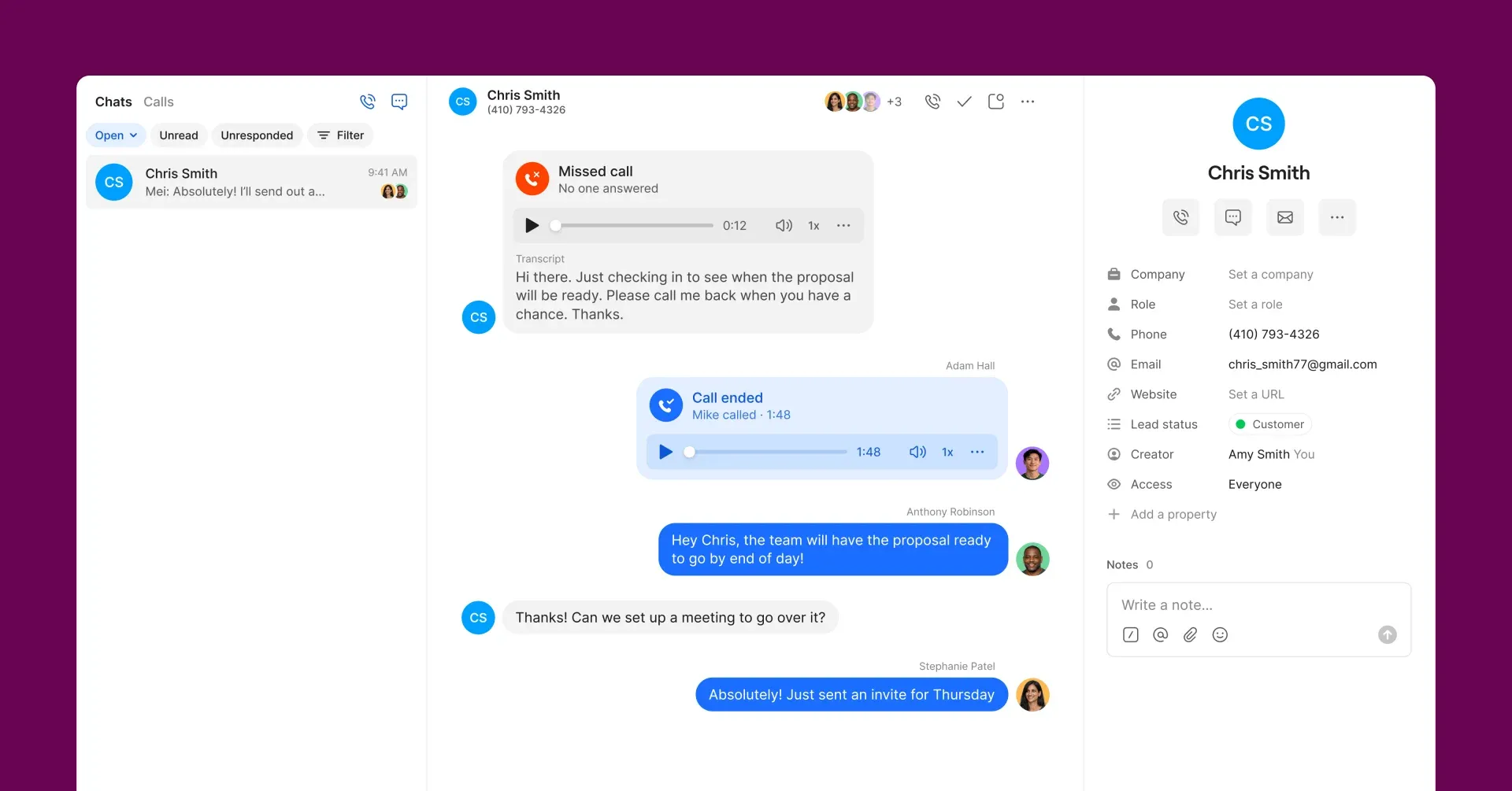 Figure 1: Quo collaborative shared inbox showing incoming customer calls and SMS threads managed simultaneously by multiple team members with real-time presence indicators.
7. AI Voice Intelligence & Real-Time Coaching
Artificial intelligence has transitioned from a marketing buzzword into an indispensable operational utility for small business telephone systems. In 2026, leading platforms deploy conversational intelligence models that perform tasks that previously required dedicated supervisors.
1. High-Accuracy Speech-to-Text Transcription
Listening through 20-minute audio recordings to retrieve an address or contract detail is an enormous waste of time. Systems like Quo and Dialpad leverage advanced neural speech models to deliver over 98% transcription accuracy with automated speaker diarization (distinguishing between the customer and the company representative).
2. Automated Post-Call Recaps & Action Item Extraction
Immediately after hanging up, modern AI phone systems analyze the conversation and generate a concise three-bullet summary alongside specific action items:
- Summary: Customer called regarding delay in commercial HVAC installation due to supply chain backorders.
- Sentiment: Neutral transitioning to satisfied after expedited delivery was confirmed.
- Action Item: Rep to send revised timeline and warranty certificate by Friday, 3:00 PM.
These summaries automatically sync into your CRM (HubSpot, Salesforce, or Zoho), eliminating 10 to 15 minutes of manual data entry per representative after every call.
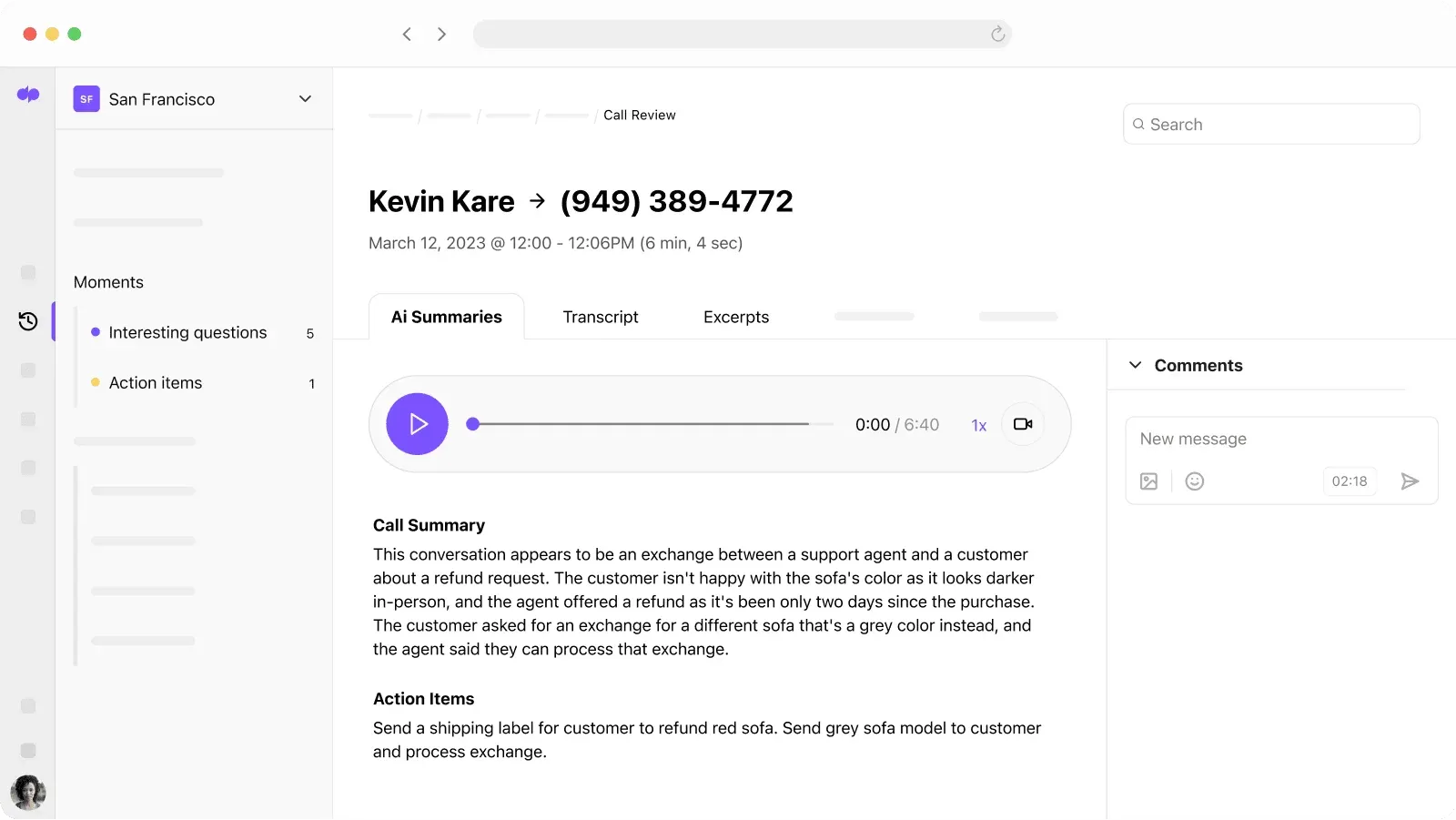 Figure 2: Dialpad voice AI intelligence automatically transcribing customer calls with speaker diarization and pushing action items into CRM records.
3. Real-Time Assist Cards (Dialpad)
For fast-growing sales and customer support teams, Dialpad provides proprietary Real-Time Assist (RTA) Cards. The system listens to live customer speech and detects specific trigger keywords:
- If a prospect says: “Your competitor Quo has better pricing,” Dialpad instantly surfaces an on-screen battlecard outlining your unique feature advantages.
- If a customer asks: “What is your refund policy under Section 4?” the exact knowledge base paragraph appears on the rep’s screen before they finish speaking.
8. Hardware Desk Phones vs. Softphones
One of the most frequent questions small business owners ask is whether they need to purchase physical desktop phones or if software applications (softphones) are sufficient. The answer depends entirely on your business environment and operational workflow.
Quick Decision Checklist:
- Fully Remote or Hybrid Knowledge Workers: If your team works from laptops and smartphones, choose Softphones Only (Quo, Dialpad, Zoom Phone).
- Physical Facilities (Clinics, Garages, Retail Stores): If you operate front desks, warehouse floors, or medical treatment rooms, choose Plug-and-Play Hardware (Ooma Office, RingCentral).
- Corporate Offices: If your team works at fixed desks but needs mobile flexibility, choose a Hybrid Setup combining IP desk phones with desktop softphones.
Option A: Modern Softphones (Recommended for 80% of Teams)
- Platforms: Quo, Dialpad, Zoom Phone
- Equipment: Existing laptops, MacBooks, smartphones, and quality Bluetooth/USB headsets (Jabra, Poly, or AirPods).
- Pros: Zero hardware expense; instant deployment in under 15 minutes; employees can work from the office, home, or while traveling; regular feature updates without hardware obsolescence.
- Cons: Requires stable computer operation and internet connection.
Option B: Physical IP Desk Phones
- Platforms: Ooma Office, RingCentral, Nextiva
- Equipment: Pre-configured SIP desk phones from Yealink, Poly, or Cisco with physical handsets and buttons.
- Pros: Dedicated hardware that is always on; familiar to traditional workers; does not depend on a computer being turned on; ideal for shared physical environments like breakrooms, warehouse floors, and reception desks.
- Cons: Additional upfront equipment cost ($80 to $250 per desk phone); requires Ethernet cable drops or dedicated Wi-Fi setup.
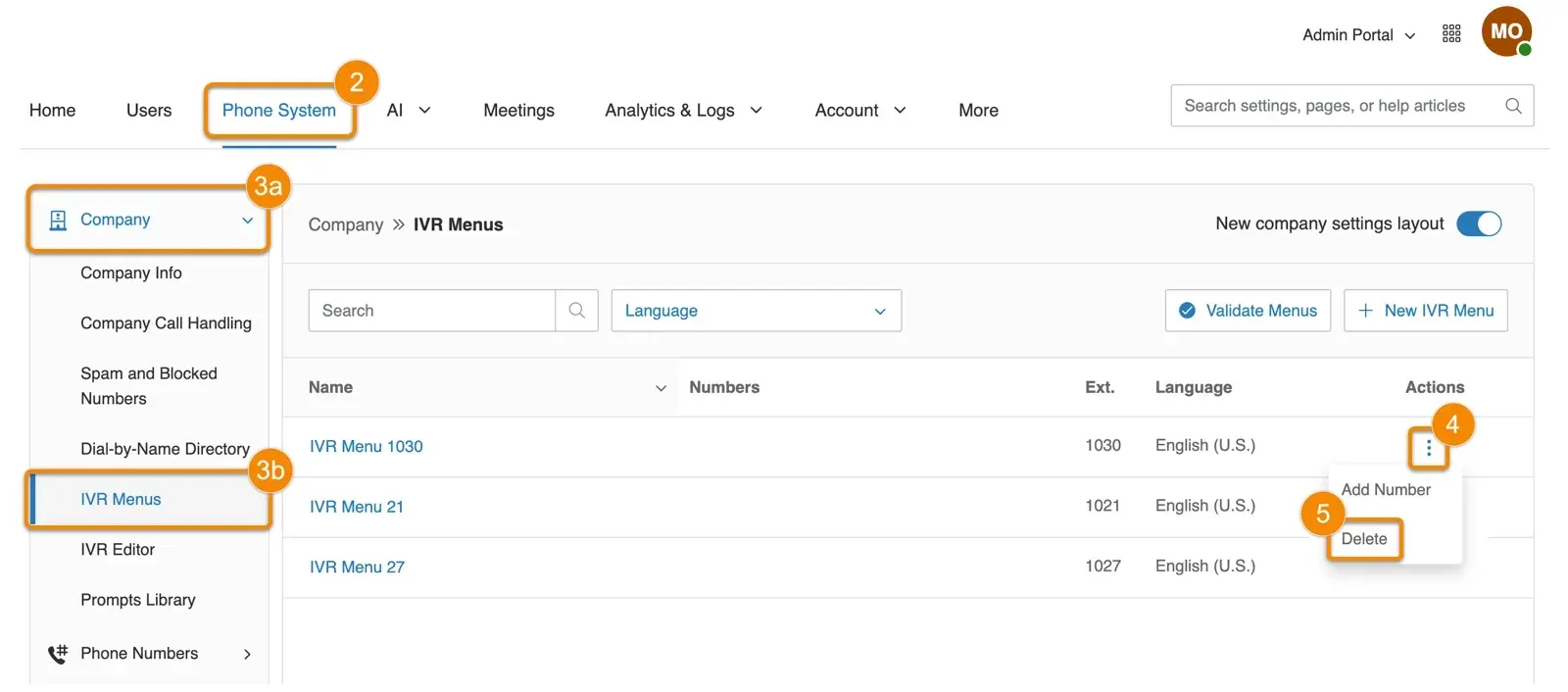 Figure 3: RingCentral visual multi-level IVR routing editor connecting business hours, department extensions, and automated receptionist menus.
9. A2P 10DLC SMS Carrier Compliance
If your small business plans to send text messages (SMS or MMS) to customers in the United States, understanding A2P 10DLC (Application-to-Person 10-Digit Long Code) is mandatory.
In recent years, major North American telecommunications carriers (AT&T, Verizon, and T-Mobile) enacted strict compliance regulations to combat commercial SMS spam, phishing, and fraudulent robocalls.
What Happens If You Do Not Register?
If you use an unverified business phone number to send text messages:
- Carriers will throttle your messages or flag them as spam.
- Up to 80% of your customer appointment reminders, service updates, or follow-ups will fail to deliver.
- Carriers can impose heavy per-message non-compliance fines.
The Two-Step Registration Process:
- Brand Registration: You submit your legal business entity details (Legal Business Name, Employer Identification Number / EIN, physical address, and contact information) to The Campaign Registry (TCR).
- Campaign Registration: You declare how your business uses SMS messaging (e.g. Customer Support, Appointment Confirmations) and provide explicit opt-in disclosure language and sample text messages.
Editorial Tip: Choose a provider that simplifies this bureaucratic headache. Quo (OpenPhone) features an industry-leading self-serve compliance wizard directly in their application dashboard, guiding small businesses through TCR approval in just a few days, compared to weeks of back-and-forth ticket delays with older telecom carriers.
10. Auditing Hidden Telecom Fees
Software pricing tables can be deceptive. A provider advertising “$15 per user” can easily balloon into $35 per user once hidden fees, add-ons, and carrier penalties are applied. Before signing any contract, perform a comprehensive audit across these five fee categories:
- Mandatory Taxes & Regulatory Surcharges: Every telecom provider must collect federal, state, and local utility taxes, including the Federal Universal Service Fund (USF) surcharge, 911 emergency service fees, and regulatory recovery fees. These typically add 10% to 20% to your base invoice across all providers.
- Seat Minimum Requirements: Be careful with enterprise providers that advertise low rates that require a minimum of 3, 5, or 10 users. For instance, Dialpad’s advanced CRM integrations require a minimum of 3 seats on the Pro plan.
- SMS Overage Penalties: While domestic calling is generally unlimited, SMS messaging often comes with monthly caps. Legacy platforms like RingCentral limit standard accounts to between 25 and 200 text messages per user per month. In contrast, modern platforms like Quo provide unlimited domestic text messaging subject only to fair use policies.
- A La Carte Feature Pricing: Check what features are included versus sold as add-ons. With Vonage, basic call recording, visual voicemail, and additional auto-attendants carry separate monthly add-on fees that can substantially inflate your bill.
- Annual vs. Monthly Billing Discrepancies: Nearly all VoIP providers display their discounted annual pricing prominently. If you prefer the flexibility of paying month-to-month, expect the rate to increase by 15% to 30%.
11. Frequently Asked Questions
Answers to the most critical operational, pricing, and carrier compliance questions buyers ask before selecting a business phone platform.
Traditional landlines rely on physical copper wiring and on-premise PBX hardware boxes that cost thousands of dollars to install and maintain. Cloud VoIP (Voice over Internet Protocol) transmits calls as digital data packets over your existing broadband internet connection. This eliminates costly hardware, reduces monthly phone bills by up to 60%, and allows employees to make and receive calls from anywhere using computers, smartphones, or IP desk phones.
Yes. Under Federal Communications Commission (FCC) regulations, businesses have the legal right to port their existing local, toll-free, and vanity phone numbers between carriers. Leading providers like Quo, Nextiva, and RingCentral handle number porting for free with zero interruption to your incoming customer calls during the transition.
While RingCentral and Nextiva are exceptional enterprise systems, legacy platforms were architected around isolated personal extensions and complex PBX hardware. Quo is built from the ground up for how modern teams work in 2026. It treats business telephony as a collaborative team inbox: multiple team members can view, manage, and reply to calls and texts simultaneously on a shared number, chat internally with hidden @mentions, and leverage modern AI summaries without technical training.
A2P 10DLC (Application-to-Person 10-Digit Long Code) is a regulatory framework mandated by major North American telecom carriers (AT&T, T-Mobile, Verizon) to eliminate SMS spam and protect consumers. Any business sending text messages to US phone numbers must register their company identity (Brand) and texting use cases (Campaign). Modern VoIP providers like Quo and Nextiva provide automated in-app compliance workflows to secure carrier approval.
No. Modern cloud phone systems operate completely through lightweight desktop applications (Mac and Windows), mobile apps (iOS and Android), and web browsers. Your employees can use their existing computers with standard USB/Bluetooth headsets or their personal smartphones. However, if your office prefers physical desk phones, providers like Ooma Office and RingCentral support plug-and-play IP hardware.
Quality cloud VoIP phone systems typically range from $10 to $25 per user per month. Affordable solopreneur lines like Grasshopper start around $14/month flat, modern collaborative platforms like Quo and Dialpad start at $15/user/month, while advanced enterprise systems like RingCentral and 8x8 range from $20 to $35/user/month depending on feature depth and international calling allowances.
12. Final Recommendation & Buyer Matrix
Selecting the optimal small business phone system requires balancing your team’s operational style, hardware preferences, and technical sophistication:
| Business Profile & Primary Requirement | Recommended Phone System | Key Operational Advantage |
|---|---|---|
| High-growth startup, agency, or remote team | Quo (OpenPhone) (#1 Overall) | Collaborative shared numbers, team inboxes, and native AI call summaries |
| Established business demanding carrier reliability | Nextiva (#2 Best Reliability) | 99.999% SLA uptime, 24/7 phone support, and visual call routing |
| Sales outbound or high-velocity customer support | Dialpad (#3 Best AI Innovation) | Real-time agent assist coaching cards and predictive CSAT scoring |
| Mid-market company needing compliance & hardware | RingCentral (#4 Best Scalability) | Zero-touch IP desk phone provisioning, signed HIPAA BAAs, and 300+ integrations |
| Traditional brick-and-mortar office or clinic | Ooma Office (#5 Best for Physical Offices) | Plug-and-play base stations and physical desk phones without IT setup |
| Solopreneur, consultant, or side hustler | Grasshopper (#6 Best for Solopreneurs) | Keeps personal cell number private with instant missed-call auto-replies |
| Teams already collaborating in Zoom Workplace | Zoom Phone (#7 Best Value Add-On) | 1-click upgrade from telephone call to video meeting starting at $10/user |
| Companies with in-house software developers | Vonage (#8 Best Modular Flexibility) | Extensive communications APIs and modular a la carte business calling features |
| Businesses with overseas clients or suppliers | 8x8 (#9 Best for International Calling) | Unlimited calling plans covering up to 48 countries within standard tiers |
| Offices needing visual drag-and-drop routing | GoTo Connect (#10 Best Visual Routing) | Intuitive visual dial plan editor for complex multi-department call trees |
Our definitive recommendation for modern businesses in 2026 remains Quo (OpenPhone). By organizing phone calls and text messages into transparent, multi-player team inboxes powered by native AI transcription, Quo eliminates dropped customer conversations, streamlines internal collaboration, and delivers an intuitive, modern communications hub without the headache of legacy telecom infrastructure.