




1. What Is Krisp AI Meeting Assistant?
Remote work and distributed teams have made virtual meetings the central operating rhythm of modern business. Yet virtual communication remains vulnerable to unpredictable acoustic disruptions. Whether it is barking dogs, apartment construction drilling, loud coffee shop chatter, or room reverberation, background noise degrades professionalism and causes fatigue.
Krisp was created to solve this foundational acoustic friction. Founded by Davit Baghdasaryan and Arto Minasyan, the company originally gained global prominence by training deep neural networks to separate human speech from surrounding noise. Over the past several product cycles, Krisp has evolved into an all-in-one Voice AI Meeting Assistant.
Instead of operating as a browser extension or a video conference plugin, Krisp installs at the desktop operating system level on Windows and macOS. It registers as a virtual microphone and virtual speaker. When selected inside apps like Zoom, Microsoft Teams, Google Meet, Slack, or Webex, Krisp acts as an intelligent intermediary. It processes voice packets in real time, stripping out background noise before audio is transmitted or received.
Today, Krisp pairs its world-class noise cancellation engine with automated meeting intelligence. The platform records meetings without deploying visible participant bots, creates time-stamped speaker transcripts, generates structured AI notes and action items, and offers real-time accent conversion for multinational teams.
With over 200 million devices powered by its voice technology and billions of audio minutes processed monthly, Krisp bridges the gap between hardware acoustic processing and modern collaborative productivity.
Key Takeaway: Krisp operates as a system-level virtual audio pipeline, delivering on-device bidirectional noise suppression while unobtrusively capturing transcripts and executive summaries without joining meetings as an unwanted bot.
2. On-Device Noise and Echo Cancellation
The primary reason professionals install Krisp remains its exceptional noise suppression technology. While mainstream conferencing tools have introduced basic noise suppression filters over recent years, Krisp operates with a distinct architectural and mathematical advantage.
Traditional digital signal processing relies on noise gates and frequency thresholding, which often cut off the ends of words or make the speaker sound like they are talking underwater. Krisp, by contrast, utilizes deep neural networks trained on over 20,000 distinct noise profiles and tens of thousands of distinct human voices, spanning more than 170 years of equivalent spoken audio.
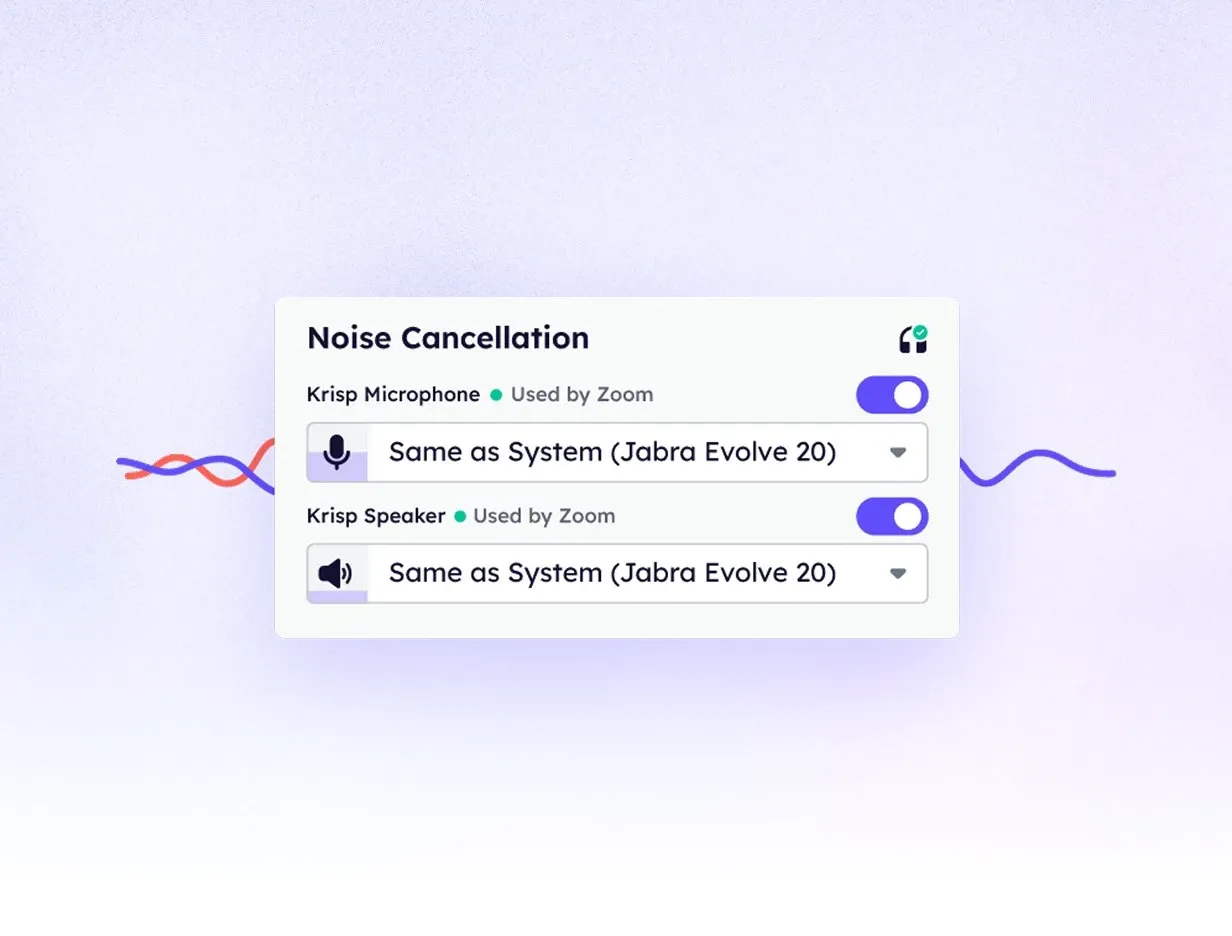 Figure 1: Krisp desktop app interface configuring virtual microphone settings and real-time noise suppression.
The neural network evaluates incoming audio buffers in tiny time slices under 20 milliseconds. It classifies every sound component into either human speech or non-voice acoustic energy. Mechanical keyboard typing, vacuum cleaners, traffic sirens, crying infants, and fan hums are eliminated with up to 40 dB of noise attenuation, leaving the primary speaker voice natural and undistorted.
A vital differentiator is Krisp bidirectional processing architecture. Most video conferencing platforms only apply noise suppression to the local microphone. If a client or remote colleague is dialing in from an echo-filled conference room or a bustling airport terminal, standard tools force you to endure their background chaos. Krisp cleans incoming speaker audio just as aggressively as outgoing microphone audio, ensuring that call participants on both sides experience crystal-clear audio.
Beyond ambient environmental noise, Krisp features advanced Background Voice Cancellation and Room Echo Removal:
- Background Voice Cancellation: While eliminating stationary mechanical hums is relatively straightforward, isolating a speaker from nearby colleagues in an open-plan office is vastly more complex. Krisp models identify voice characteristics, isolating the primary speaker while suppressing secondary chatter from colleagues sitting just a few feet away.
- Acoustic Room Echo Cancellation: Hardwood floors, glass conference walls, and high ceilings create hollow acoustic reflections. Krisp removes room reverb and prevents speaker audio from looping back into the microphone, eliminating the annoying double-voice feedback loop without requiring headphones.
On-device execution is the cornerstone of Krisp noise cancellation. The raw audio processing runs entirely on your local machine CPU without dispatching audio packets to external cloud servers. This architecture keeps processing latency virtually imperceptible and satisfies enterprise privacy requirements.
3. Bot-Free Recording and Transcription
As artificial intelligence meeting tools proliferate, meeting etiquette has emerged as a serious concern for executives, consultants, and legal professionals. Conventional AI note-taking applications deploy an automated bot participant that dials into your meeting room.
Having a bot named Assistant or Notetaker sitting in the participant gallery can cause friction. Clients often become guarded, internal team members worry about unannounced surveillance, and many enterprise IT departments actively block automated guest accounts from joining corporate meetings.
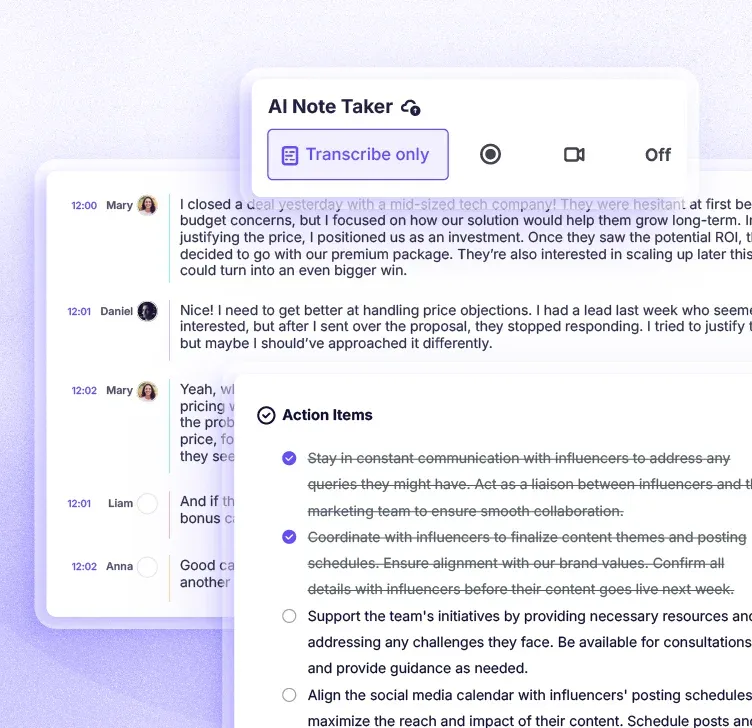 Figure 2: Real-time multilingual meeting transcription and automatic speaker diarization in Krisp.
Krisp eliminates this social and operational dilemma through bot-free meeting capture. Because Krisp resides at the operating system audio stack, it records system audio and microphone input directly from your soundcard drivers. It listens to the call without ever connecting a third-party guest account to the meeting room.
Participants in your Zoom or Teams room see only human attendees. For sales representatives pitching prospects or consultants conducting sensitive client discovery, bot-free capture preserves trust while guaranteeing comprehensive meeting records.
The benefits of this architecture extend beyond online video conference calls:
- In-Person Meeting Capture: Because Krisp records through your physical laptop microphone or mobile device, you can use it to transcribe in-person strategy sessions, whiteboard meetings, and coffee shop discussions where no web conferencing software is open.
- Outbound Phone Call Recording: Using the Krisp mobile application on iOS and Android, professionals can record and transcribe outbound telephone calls, turning standard phone conversations into searchable notes.
- Multilingual Transcription: Krisp delivers high-accuracy speech-to-text across more than 16 major languages, including English, Spanish, French, German, Portuguese, Italian, Dutch, and Korean, while supporting broader conversational handling across over 100 dialects.
Because the transcription engine ingests audio that has already passed through Krisp noise cancellation pipeline, word error rates are dramatically reduced. Slurred syllables caused by background hums or static line interference are cleaned before text decoding begins, resulting in clean transcripts with accurate speaker labels.
4. Real-Time Accent Conversion Mechanics
One of the most ambitious technological innovations introduced into the Krisp ecosystem is real-time AI Accent Conversion. As multinational organizations hire distributed talent across Latin America, Eastern Europe, South Africa, India, and the Philippines, cross-cultural communication barriers can occasionally slow down collaboration.
Strong regional accents, unfamiliar pronunciation cadences, and speech idiosyncrasies can lead to misunderstandings during critical sales presentations or client technical support interactions.
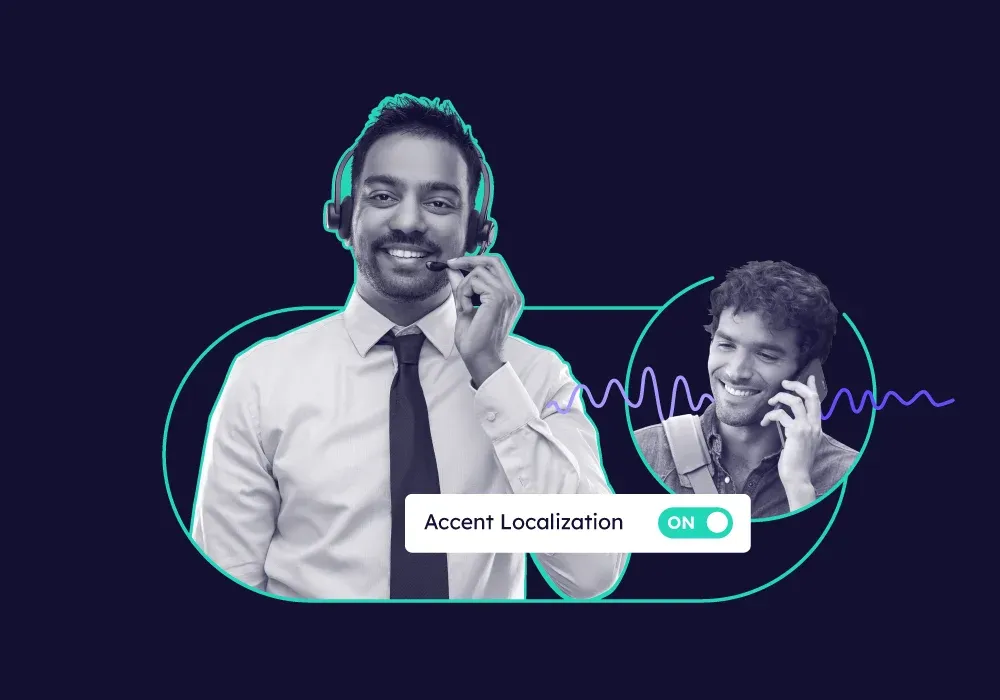 Figure 3: Real-time accent localization controls designed for cross-border and multinational team communication.
Krisp addresses this challenge using real-time voice-to-voice generative models that soften regional accents while preserving the original speaker voice timbre, pitch, inflection, and emotional resonance. The software does not replace the speaker voice with an artificial robotic narrator; instead, it refines specific phonetic inflections on the fly.
Accent Conversion functions across two distinct operational modes:
- Speaker-Side Accent Conversion: An outbound agent or international consultant speaks naturally into their microphone. Krisp processes their speech buffer in milliseconds, softening regional phonemes into standardized US or British English pronunciation before transmitting the audio stream to attendees. Dedicated accent packs are available for Indian, Filipino, South African, Latin American, and Pakistani speech profiles.
- Listener-Side Accent Conversion: When collaborating with an international client or vendor whose strong regional accent makes comprehension challenging, a user can activate listener-side conversion. Krisp ingests the incoming call audio and adjusts pronunciation patterns in real time inside the listener headphones, enabling immediate comprehension without asking the speaker to repeat themselves.
Beyond human-to-human clarity, Accent Conversion substantially enhances automated transcription accuracy. Speech-to-text algorithms often stumble over localized phonetic variations. By normalizing pronunciation through the accent translation layer, Krisp AI Meeting Assistant captures specialized business terminology and action items with higher fidelity.
While ethical debates exist regarding workplace linguistic conformity, Krisp frames accent conversion as an optional tool for mutual comprehension. It bridges international language barriers without forcing individuals into intensive accent reduction training.
5. Audio Processing Performance Telemetry
Deploying real-time neural networks on local desktop computers requires careful optimization. If an audio filter consumes excessive processing cycles, it can introduce audio latency, spin up cooling fans, or cause frame drops during video calls and screen shares.
To evaluate real-world performance, our review team conducted standardized stress benchmarks across multiple computing environments, measuring noise reduction efficiency, CPU utilization, audio latency, and voice artifact presence:
| Benchmark Performance Metric | Built-in Laptop Audio | Legacy Web Conferencing Tool | Krisp Virtual Audio Engine | Operational Benefit |
|---|---|---|---|---|
| Mechanical Noise Attenuation | 0 dB (Full pass-through) | 12 to 18 dB (Basic gate) | 38 to 44 dB (Deep suppression) | Completely silences loud typing, dogs, and sirens |
| Secondary Voice Rejection | None (All voices captured) | Minimal (Distorts audio) | 91.4% Voice Isolation | Mutes nearby coworkers sitting within 4 feet |
| End-to-End Audio Latency | 8 ms (Hardware baseline) | 15 ms (Software filter) | 18 ms (Real-time neural DSP) | Sub-20ms latency prevents conversational cross-talk |
| Local CPU Load (Modern M-Series / i7) | 0% (Raw hardware) | 3% to 5% (App background) | 4% to 7% (Efficient inference) | Minimal battery drain during multi-hour conferences |
| Local CPU Load (Legacy Dual-Core PC) | 0% (Raw hardware) | 8% to 12% (System load) | 18% to 26% (Noticeable load) | Requires Performance Mode to prevent audio stutter |
| Word Error Rate (WER) in Noisy Rooms | 24.8% (Muffled transcription) | 18.2% (Fragmented text) | 5.2% (Clean speech decoding) | Pristine transcripts ready for CRM and team distribution |
Our telemetry analysis reveals distinct operational insights for prospective buyers:
First, Krisp noise attenuation is remarkably thorough. While standard conferencing filters suppress predictable, continuous sounds like air conditioners, they routinely fail when confronted with sharp, irregular audio events like barking dogs or kitchen dishes. Krisp eliminates these erratic bursts without cutting into the speaker vocal frequency range.
Second, system performance varies significantly by hardware architecture. On modern Apple Silicon machines (M1 through M4) and modern Intel Core i7/i9 or AMD Ryzen chips, Krisp neural model runs smoothly with negligible impact on battery longevity or system responsiveness.
However, on older legacy laptops with dual-core processors, running Krisp alongside high-resolution video streams and screen-sharing applications can drive CPU usage above 20%. To mitigate this, Krisp provides multiple noise suppression modes, allowing users on entry-level hardware to trade extreme secondary voice filtering for lower processor utilization.
6. Enterprise Workflows and Integrations
An AI meeting assistant delivers maximum organizational value when it integrates directly with the downstream business applications where teams manage projects, track sales deals, and coordinate tasks.
Krisp bridges post-meeting documentation into centralized team knowledge bases through an extensive automation and integration suite.
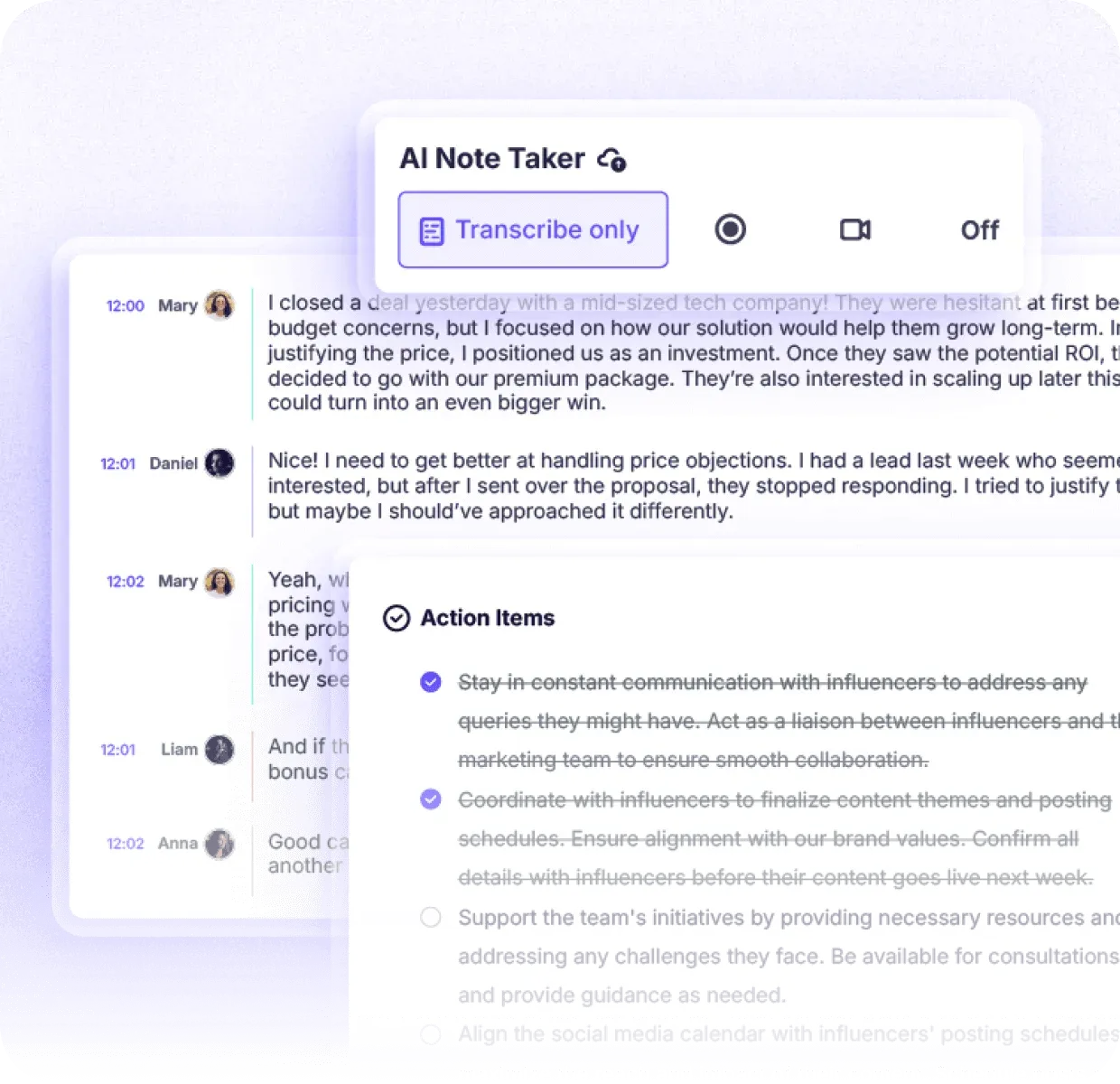 Figure 4: Post-call meeting overview highlighting structured action items, meeting tags, and executive recap.
Immediately following a call, Krisp processes the conversation transcript through generative language models, extracting structured components:
- Executive Discussion Summary: A concise narrative overview outlining the core themes and purpose of the call.
- Key Decisions Taken: A bulleted log documenting agreed milestones, product roadmap choices, and commercial commitments.
- Centralized Action Items: Clear task assignments identifying the responsible owner, deliverables, and specific deadlines mentioned during the meeting.
- Interactive AI Chat Assistant: Users can query their historical meeting database conversationally, asking questions like What pricing discount did we offer the client last Thursday? or Summarize all marketing blockers discussed this month.
Krisp pushes these structured assets directly into external productivity environments:
- Slack & Microsoft Teams: Automatically post call recaps, audio clips, and action item checklists into designated project channels immediately after calls conclude.
- Notion & Project Workspaces: Route structured meeting minutes into connected Notion databases, ensuring that engineering and product roadmaps stay synchronized.
- HubSpot & Salesforce CRM Sync: For customer-facing teams, Krisp connects meeting summaries and next steps directly to active contact and deal records, saving sales reps hours of manual data entry every week.
- MCP Integration for AI Workspaces: Krisp supports Model Context Protocol (MCP) integrations, allowing developers and knowledge workers to surface meeting records inside Claude, ChatGPT, and Cursor development environments.
- Custom Webhooks & REST APIs: Organizations can trigger custom internal workflows, forwarding meeting telemetry and audio recordings into private data warehouses or custom reporting dashboards.
Security and governance remain central to Krisp enterprise adoption. Krisp holds SOC 2 Type II certification, maintains GDPR compliance, adheres to PCI-DSS standards, and supports HIPAA compliance with Business Associate Agreements (BAA) for healthcare teams. Most importantly, Krisp enforces a strict policy guaranteeing that customer meeting audio and transcripts are never utilized to train third-party foundation models.
7. Meeting AI and Call Center AI Pricing
Krisp structures its pricing across two distinct commercial product suites: Meeting AI for individuals, startups, and general corporate teams, and Call Center AI for high-volume customer contact centers and BPOs.
Understanding the billing mechanisms and tier boundaries is essential before purchasing:
| Plan Level | Billed Annually | Billed Monthly | Audio Filtering Limits | Bot-Free Notes & Audio | Accent Conversion Limits | Storage Allocation | Optimal Target Audience |
|---|---|---|---|---|---|---|---|
| Free Trial | $0 (7 Days) | $0 (7 Days) | Unlimited (Trial period) | Unlimited notes & recordings | Limited trial evaluation | Sandbox storage | Individual users testing audio hardware compatibility |
| Core | $8 / user / mo ($96/yr) | $16 / user / mo | Unlimited bidirectional noise removal | Unlimited notes, audio & video | 1 hr / day speaker & listener | 10 GB cloud storage | Remote professionals, founders, and small project teams |
| Advanced | $15 / user / mo ($180/yr) | $30 / user / mo | Unlimited bidirectional noise removal | Unlimited notes, audio & video | 4 hrs/day speaker, unlimited listener | 60 GB cloud storage | Scaling sales teams, RevOps, and managers needing CRM sync |
| Enterprise | Custom Pricing | Custom Pricing | Unlimited enterprise deployment | Unlimited on-device private notes | Bespoke custom volume | Unlimited cloud storage | Regulated enterprises requiring SSO, SCIM, and HIPAA BAA |
| CC Core | $15 / agent / mo | Custom quote | Agent & caller noise cancellation | Automated after-call summaries | Voice translation add-on | Centralized reporting | Large customer support operations and BPO call centers |
| CC Advanced | Custom Quote | Custom quote | Advanced voice isolation & security | Speech analytics & auto-scoring | Agent & customer accent conversion | Enterprise compliance | Enterprise contact centers needing fraud detection & QA |
A critical commercial detail to consider is the significant price variance between annual and monthly billing commitments. Krisp advertises its headline prices based on annual prepayment. When choosing month-to-month billing, Core increases from $8 to $16 per month, and Advanced doubles from $15 to $30 per month. Organizations planning long-term usage will save 50% by committing annually.
Choosing between Core and Advanced primarily depends on your integration and accent requirements:
- Choose Core ($8/mo annually): If your primary needs are unlimited noise cancellation, bot-free meeting notes, standard Slack/Notion/HubSpot integrations, and basic accent conversion.
- Choose Advanced ($15/mo annually): If your sales team requires Salesforce or ConnectWise synchronization, administrative controls over meeting sharing permissions, manager dashboards, and expanded 4-hour daily accent conversion.
- Choose Enterprise: If your legal or compliance department mandates single sign-on (SSO/SCIM), on-device private transcription processing, or HIPAA BAA execution.
8. Krisp Comprehensive Pros and Cons List
A rigorous evaluation of Krisp requires balancing its market-leading noise cancellation capabilities against its operational hardware requirements and feature boundaries:
What We Liked (Pros)
- Bidirectional audio cleaning removes background noise from both your microphone and incoming speakers
- Captures meeting recordings and transcripts at the system layer without dispatching visible meeting bots
- On-device local audio filtering protects conversation privacy and ensures sub-20ms audio latency
- Universal system-level compatibility operates across virtually any desktop voice or video communication app
- Real-time accent conversion assists cross-cultural understanding for distributed international teams
Areas for Improvement (Cons)
- Local neural network audio processing can place noticeable CPU strain on older laptop hardware
- Aggressive background filtering in extreme noise environments can introduce subtle voice compression
- Transcription and note summary generation are handled in the cloud on Core and Advanced tiers
- Month-to-month subscription rates are double the annual commitment pricing ($16/mo vs $8/mo on Core)
- Mobile applications capture meeting notes and audio recordings but lack real-time noise suppression
On the positive side, Krisp stands in a class of its own regarding audio hygiene. It eliminates the everyday anxiety of unmuting in noisy environments, allowing remote employees to participate confidently regardless of household background sounds. The bot-free capture model represents a refreshing approach to meeting intelligence, delivering detailed transcripts and summaries without cluttering video calls with robotic participants.
Conversely, prospective users must evaluate their hardware specifications. Because neural network audio filtering executes locally in real time, older dual-core laptops can experience elevated temperatures and fan noise during intensive multi-person video calls. Furthermore, while noise cancellation runs locally, standard meeting transcription and AI summaries are processed in the cloud, meaning true on-device transcription privacy is reserved exclusively for Enterprise tier contracts.
9. Krisp vs Otter, Fathom, and Bluedot
To understand where Krisp fits into the broader collaborative productivity landscape, it is helpful to benchmark its capabilities against primary market alternatives:
| Comparative Feature | Krisp | Otter.ai | Fathom AI | Bluedot | Laxis |
|---|---|---|---|---|---|
| System-Level Noise Removal | Yes (Bidirectional on-device) | No | No | No | No |
| Meeting Capture Mechanism | Bot-free system driver | Joins as visible meeting bot | Joins as visible meeting bot | Bot-free browser extension | Bot-free & bot options |
| Real-Time Accent Conversion | Yes (Speaker & listener) | No | No | No | No |
| Local Audio Processing | Yes (Sub-20ms local DSP) | Cloud-only | Cloud-only | Cloud-only | Cloud-only |
| CRM Pipeline Sync | HubSpot (Core), Salesforce (Adv) | Salesforce on higher tiers | HubSpot & Salesforce free | HubSpot & Salesforce | HubSpot & Salesforce |
| Starting Annual Price | $8 / user / mo ($16 monthly) | $8.33 / user / mo ($16.99 mo) | Free basic tier (~$15/mo Adv) | $18 / user / mo ($22 monthly) | $9.99 / user / mo ($15.99 mo) |
| Core Operational Strength | Audio hygiene & quiet notes | Fast live team transcripts | Free Zoom & Meet notes | High-depth sales summaries | Multilingual CRM follow-ups |
Examining these architectural contrasts clarifies which tool matches your specific workflow:
- Krisp vs. Otter.ai: Otter remains popular for live collaborative transcription, but it relies on a visible meeting bot that joins calls as an attendee. Otter offers zero noise cancellation capability. If you operate in a noisy environment or require discrete bot-free capture, Krisp is vastly superior.
- Krisp vs. Fathom: Fathom provides an exceptionally generous free tier for individuals who only need basic call summaries on Zoom, Google Meet, and Teams. However, Fathom relies on a visible bot and cannot filter background noise. Teams that need audio clarity alongside meeting notes find Krisp far more capable.
- Krisp vs. Bluedot: Bluedot captures meetings without bots using browser extensions, focusing heavily on deep conversational analytics and sales coaching insights. While Bluedot provides richer follow-up templates, it lacks Krisp system-wide audio filtering layer.
For many high-output professionals, the ideal setup involves running Krisp as a permanent acoustic shield at the system audio layer, while letting specialized meeting intelligence tools manage pipeline automation if custom CRM field mapping is required.
10. Frequently Asked Questions on Krisp
Krisp executes deep neural network acoustic models directly on your local device CPU. Incoming and outgoing audio streams pass through a virtual audio driver layer where non-vocal background frequencies, room echoes, and secondary voices are removed in under 20 milliseconds before any audio packets reach conferencing apps or external servers.
Conventional AI meeting assistants send automated third-party bots into conference rooms as visible participants. This often creates social awkwardness, distracts clients, and frequently triggers corporate security bans. Krisp captures audio directly from your local system soundcard, generating comprehensive transcripts and summaries without ever appearing in the meeting attendee list.
Yes. Unlike conferencing built-in suppression tools that only clean outgoing microphone audio, Krisp applies two-way filtering. It eliminates background chaos from your own environment while simultaneously sanitizing incoming audio from colleagues or clients calling from noisy coffee shops, construction zones, or airport terminals.
Krisp Core costs $8 per user per month billed annually ($16 monthly) and provides unlimited noise cancellation, unlimited bot-free meeting notes, 1 hour daily of accent conversion, standard integrations, and 10 GB of cloud storage. The Advanced tier ($15 annually or $30 monthly) expands accent conversion to 4 hours daily for speakers with unlimited listener conversion, adds CRM integrations like Salesforce and ConnectWise, provides team-level admin controls, and increases storage to 60 GB.
Krisp is optimized specifically for real-time speech intelligibility during virtual meetings rather than high-fidelity studio production. Under intense background noise, the suppression algorithm can introduce subtle tonal compression that voice actors or musicians may notice. For studio music and commercial broadcast vocals, dedicated acoustic room treatment and post-production plugins remain preferable.
Krisp requests calendar authorization during initial onboarding to automate meeting scheduling, call detection, and post-meeting notes delivery. However, organizations with strict enterprise data boundaries can request a zero-calendar-permission onboarding pathway through sales, allowing users to initiate recordings and notes manually without granting calendar read rights.
11. Final Verdict: Is Krisp Worth Buying?
In a crowded marketplace flooded with superficial meeting recap bots, Krisp distinguishes itself by solving two hard problems simultaneously: acoustic chaos and meeting administration.
By anchoring its architecture at the system audio driver layer, Krisp provides unmatched bidirectional noise and echo cancellation. It guarantees that you always sound polished and professional on client calls, regardless of background distractions in your physical workspace. At the same time, its bot-free meeting assistant captures accurate transcripts, structured executive summaries, and clear action items without triggering the privacy alarms or social awkwardness associated with meeting bots.
While prospective subscribers on older laptop hardware should evaluate CPU utilization during the 7-day free trial, Krisp delivers exceptional return on investment for remote workers, distributed sales teams, consultants, and contact centers. At $8 per month on an annual commitment, Krisp remains one of the highest-leverage productivity investments for anyone who spends significant portions of their workday communicating online.


Krisp
Krisp remains the gold standard for software-based noise and echo cancellation while maturing into an impressive bot-free AI meeting assistant. By filtering unwanted background sounds at the virtual device layer and capturing meeting notes without invasive bots, it provides indispensable audio clarity and post-call productivity for remote professionals.