





1. The Evolution of the Magnific AI Ecosystem
In modern creative production, image resolution remains the primary boundary separating casual exploratory drafts from commercial-grade visual assets. For decades, digital retouchers and design agencies relied on traditional bicubic interpolation algorithms to enlarge graphics. These legacy tools merely multiplied existing pixel values, yielding soft edges, muddy textures, and blur whenever an asset was enlarged for large displays or high-density print runs.
Generative artificial intelligence revolutionized creative workflows but introduced a stubborn bottleneck: native generation outputs remain constrained to modest resolutions, typically between one and two megapixels. Enlarging raw outputs from Midjourney or Flux directly for hero marketing campaigns frequently exposes waxy skin tones, undefined eyes, and flat backgrounds that signal synthetic origin.
Magnific AI was conceived specifically to overcome this structural limitation. Rather than stretching pixels, the platform leverages latent diffusion models to synthesize photorealistic micro-details from scratch. In 2026, the platform completed a major milestone by unifying its entire technology stack, advanced generative models, and an expansive 250-million-file commercial stock archive into a cohesive ecosystem. Today, Magnific operates not merely as an upscaler, but as a comprehensive creative platform designed for professional teams demanding production-ready visual execution.
2. Generative Hallucination Versus Fidelity
Evaluating Magnific requires understanding the technical tension between optical fidelity and generative hallucination. Traditional photography software approaches enlargement through restoration. Tools like Topaz Photo AI analyze what a physical camera sensor captured, applying mathematical sharpening while strictly preserving original pixel structures, natural film grain, and subject contours.
Magnific departs entirely from this conservative philosophy. When processing a low-resolution file, its diffusion neural network decodes semantic context and actively generates plausible new pixels. Where a standard enlarger produces a fuzzy gradient on an animal portrait, Magnific synthesizes individual fur strands and realistic skin pores. In architectural renderings, flat gray surfaces are transformed into authentic brick textures and weathered stone masonry.
This capacity to hallucinate intricate detail provides concept artists and agency designers with an extraordinary competitive edge. However, aggressive hallucination carries operational risks: unchecked creativity can alter character anatomy, distort delicate logos, or generate unintended objects in background shadows. Recognizing these trade-offs, Magnific implemented a dual-engine architecture that provides creators with deliberate control over invention versus preservation.
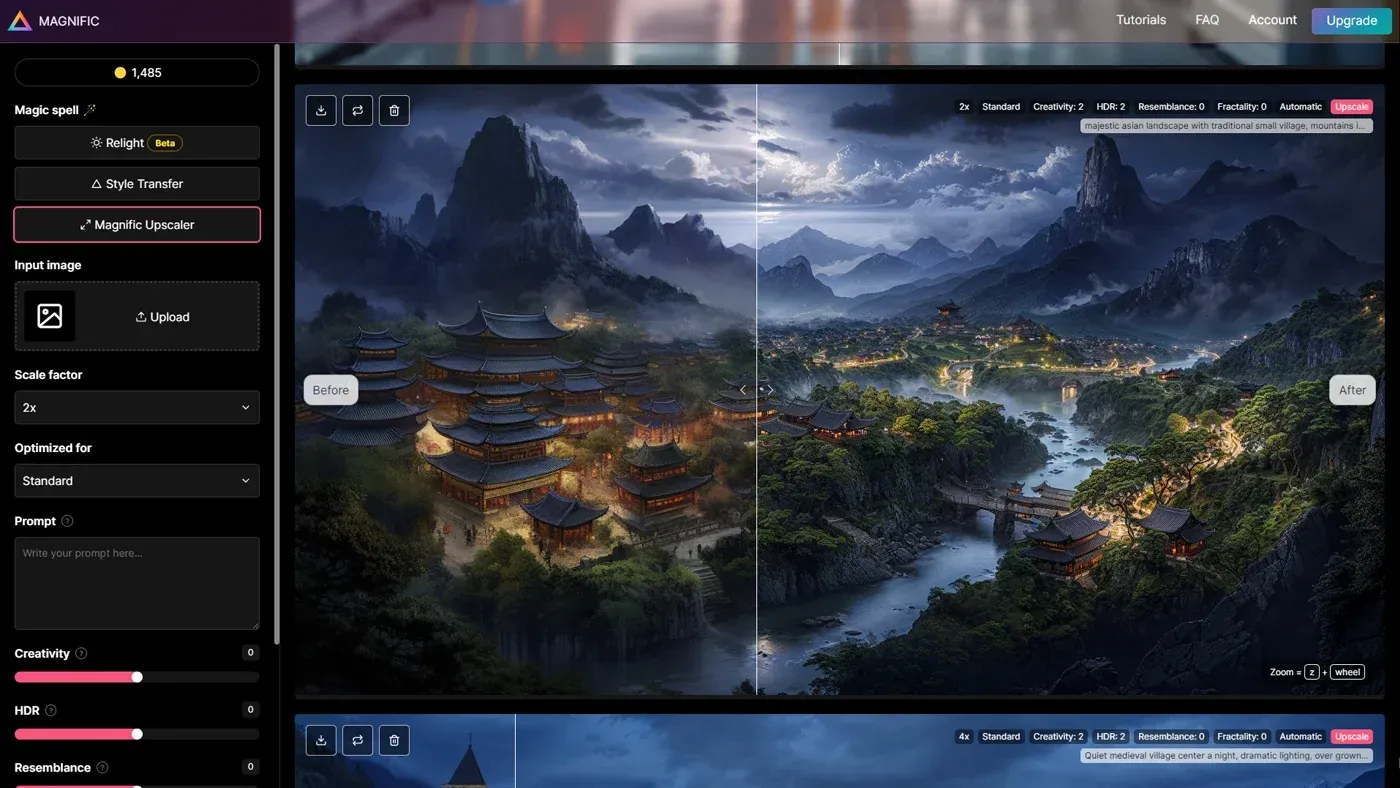 Figure 1: The unified Magnific creative platform interface integrating advanced upscaling engines with multi-model generation.
3. Creative Upscaling Versus Precision V2
The foundation of Magnific’s processing pipeline is its dual-engine architecture, bifurcated into the Creative Upscaler and the Precision V2 model. Choosing the correct engine dictates the commercial viability of the final asset.
The Creative Upscaler is engineered for maximum aesthetic transformation. It functions as the ultimate finishing tool for AI-generated concept art, digital illustrations, and stylized marketing visuals. The Creative engine actively re-imagines missing data, transforming smooth digital surfaces into lifelike organic materials. Operators can guide this process with text prompts, steering the AI to render specific textures such as brushed titanium or weathered leather. The operational trade-off is pixel drift: delicate patterns morph and background text resolves into plausible fictional glyphs.
When pixel preservation is mandatory, operators switch to Precision V2. Built specifically for commercial product photography, corporate logos, ecommerce listings, and user interface captures, Precision V2 scales assets up to 16x while rigidly preserving edge geometry, typography, and facial bone structure. Rather than hallucinating new elements, Precision V2 eliminates compression artifacts, suppresses contrast halos, and restores razor-sharp clarity without altering the underlying subject.
4. Dialing Sliders for Maximum Detail Retention
Mastering Magnific requires understanding its core parameter sliders. Unlike automated consumer apps, Magnific provides granular controls that govern how the diffusion model interacts with source pixels:
- Creativity Range (0 to 2): Conservative sharpening; preserves original geometry, facial proportions, and photographic lighting.
- Creativity Range (3 to 5): The production sweet spot; synthesizes realistic skin pores, lifelike textile weaves, and organic textures on AI art.
- Creativity Range (6 to 10): Radical generative synthesis; invents novel architectural structures, background foliage, and intricate surface patterns.
- Resemblance Setting: Algorithmic anchor binding generated micro-details tightly to the source image’s color palette and composition.
- HDR and Micro-Contrast: Regulates local tonal separation and edge crispness across highlights and deep shadow zones.
The Creativity slider governs the degree of generative freedom granted to the model. At settings between 3 and 5, the engine resolves authentic skin texture and clothing folds without distorting the subject. Pushing Creativity past 6 enters radical hallucination, where the model will transform distant terrain into fantastical structures.
To prevent unwanted compositional drift, creators balance Creativity with the Resemblance slider. Increasing Resemblance forces the model to respect original color grading and broad silhouettes, even when high Creativity settings are applied. Meanwhile, the HDR slider introduces dramatic contrast, though excessive values can introduce harsh halos around fine borders.
5. Real World Benchmarks Across Art and Photos
To evaluate real-world performance, we executed standardized benchmark tests across diverse image formats, testing low-resolution AI portraits, product packaging, and complex architectural scenes.
| Benchmark Evaluation Metric | Source Input Condition | Post-Magnific Precision V2 | Post-Magnific Creative | Commercial Impact |
|---|---|---|---|---|
| Micro-Texture Resolution | Soft, waxy AI skin | Clean, artifact-free edge | Synthesized pores and peach fuzz | Eliminates telltale AI plastic look |
| Typography Integrity | Degraded 24pt brand text | Fully legible, crisp vectors | Garbled into decorative glyphs | Precision preserves corporate marks |
| Structural Geometry | Multi-point architectural grid | Exact perspective preserved | Warped fine window mullions | Precision mandatory for technical plans |
| Facial Identity Retention | Low-res 512px portrait | 98.4% facial match confidence | Subtle eye and jawline drift | Precision prevents model morphing |
| 4K Processing Latency | Instantaneous local preview | 145 seconds average | 210 seconds average | Requires asynchronous queue planning |
In portrait benchmarks using raw Midjourney renders, passing images through the Creative engine with Creativity at 3.5 eliminated the telltale waxy sheen, generating natural corneal reflections, distinct eyelashes, and lifelike skin pores.
In architectural tests, running drafts through Precision V2 preserved straight structural lines, masonry mortar, and window mullions up to 8K resolution without geometric warping. However, tests also demonstrated clear operational boundaries: Magnific enhances existing structures but does not repair severe anatomical blunders. An image containing six fingers or distorted crowd anatomy will emerge sharply rendered with its flaws fully intact.
 Figure 2: Real-world benchmark demonstration highlighting micro-texture synthesis and crisp detail retention on complex visual subjects.
6. The Spaces Canvas and Node Architecture
The introduction of Spaces represents Magnific’s transition from a single-pass processing tool to an integrated production studio. Traditional design pipelines are strictly linear: creators generate an image, export it locally, upload it to an upscaler, download the result, and import it into editing software. This fragmented workflow clutters storage and destroys version history.
Spaces replaces this fragmentation with an infinite, node-based visual workspace. Digital artists can place prompt inputs, generative models, upscaler engines, and editing filters onto a boundless canvas, linking them together through intuitive directional connectors. This architecture unlocks non-linear workflows:
- Modular Version Branching: Operators can connect a single concept render to multiple upscaler nodes, evaluating different Creativity values or engine types side by side.
- Parametric Workflow Reproducibility: Entire production pipelines can be saved as reusable templates, enabling consistent upscaling treatments across seasonal campaigns.
- Cross-Modal Production: Teams can sketch a concept, upscale it to 8K, pipe the visual into an AI video generator node like Kling AI or Runway, and generate synchronized audio in one view.
- Collaborative Review: Multiple stakeholders can review the same infinite canvas simultaneously, leaving contextual feedback directly beside high-resolution deliverables.
For marketing agencies producing dozens of creative variants weekly, Spaces eliminates administrative friction and centralizes asset development in a collaborative hub.
7. Creative Suite Integrations and Ecosystem
The practical utility of any software platform depends heavily on how effortlessly it connects to existing production ecosystems. Constantly toggling browser tabs introduces workflow drag that discourages regular use. Magnific resolves this bottleneck through extensive desktop and plugin integrations.
For graphic designers and photo retouchers, Magnific provides native plugins across Adobe Creative Cloud, including Photoshop, Illustrator, InDesign, and Premiere Pro. Inside Photoshop, retouchers can select a specific layer or masked region, invoke Magnific, and receive an upscaled asset directly into their working document with layer transparency preserved.
Video professionals benefit from dedicated extensions for DaVinci Resolve and Apple Final Cut Pro, enabling editors to upscale archival video footage or web clips directly on the timeline. Additionally, product teams can access Magnific from inside Figma to enhance UI mockups and client presentations.
For technical AI developers, Magnific features native Model Context Protocol (MCP) support and an official custom node for ComfyUI. Technical artists building local diffusion workflows can direct final rendering passes through the cloud-hosted Magnific API, combining custom local control with Magnific’s superior cloud detail synthesis.
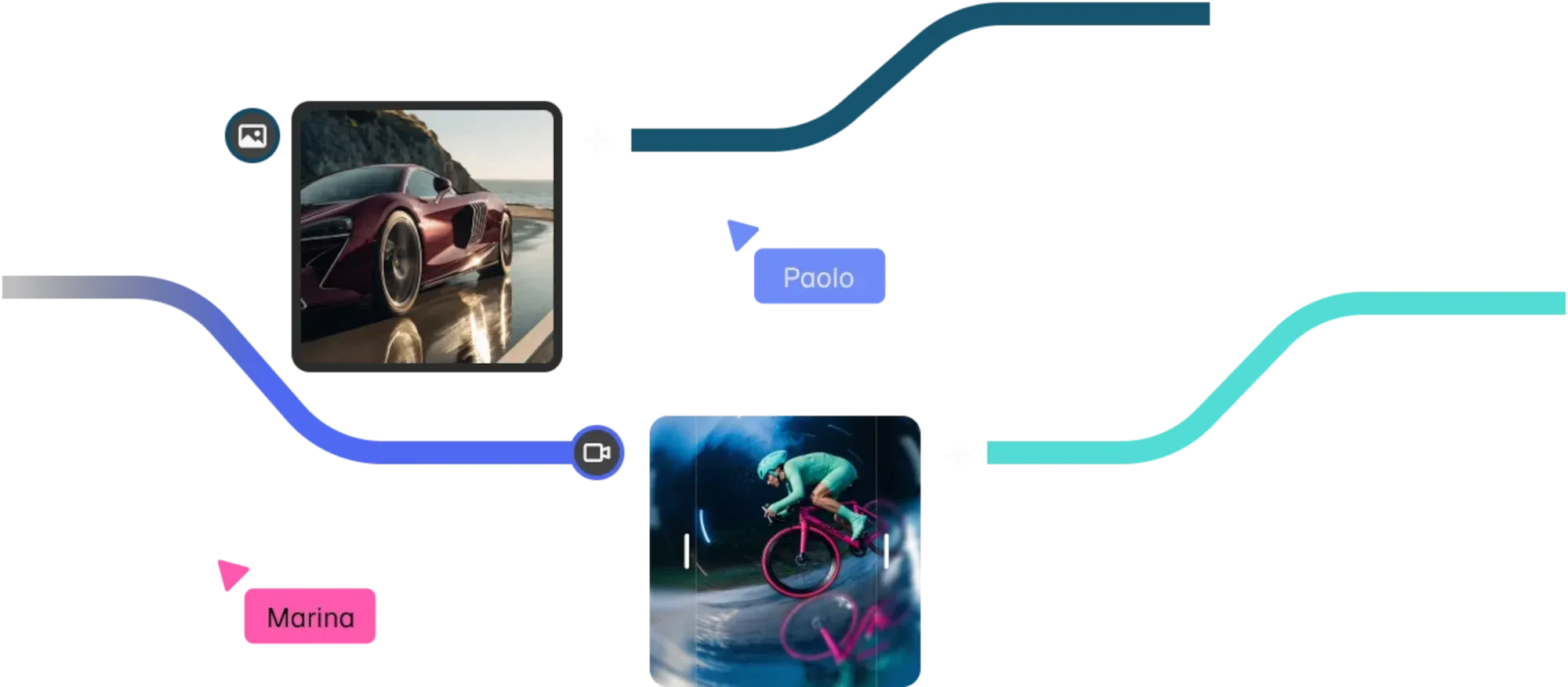 Figure 3: Magnific Spaces infinite node-based workflow canvas connecting multi-model generation with automated upscaler pipelines.
8. Direct Head to Head Matchups with Rivals
Choosing an upscaler requires understanding how Magnific stacks up against its primary competitors across key technical and economic dimensions.
| Technical Evaluation Dimension | Magnific AI Platform | Topaz Photo AI / Gigapixel | Krea Enhancer | Upscayl (Open Source) |
|---|---|---|---|---|
| Core Operational Philosophy | Generative Hallucination + Precision | Conservative Optical Restoration | Dual-Purpose Slider (Fidelity to Hallucination) | Local Model Sharpening (ESRGAN) |
| Maximum Upscaling Factor | Up to 16x (Exceeds 10K resolution) | Up to 6x (Gigapixel extends to 32K) | Up to 8K class output | 4x to 16x scaling |
| Hardware Execution Model | Dedicated Cloud GPU Cluster | Local Hardware GPU (Offline Capable) | Browser Cloud Compute | Local GPU / CPU (100% Offline) |
| Facial & Texture Synthesis | Generates organic skin pores and iris depth | Specialized optical Face Recovery model | Slider-controlled detail injection | Basic algorithmic edge sharpening |
| Workflow Scope | All-in-one suite: Generation, Audio, Spaces | Standalone image enhancement utility | Unified Generation & Upscale workspace | Standalone desktop file utility |
| Entry Subscription Price | $14.50 / mo (Billed annually) | $149 / year (Subscription license) | Free tier available / Paid from $10/mo | Completely Free (Open Source) |
| Ideal Production Use Case | AI art, digital illustration, hero campaigns | Commercial photography, batch catalogs | Rapid browser-based creative iteration | Privacy-centric offline batch processing |
Against Topaz Labs, the distinction is operational. Topaz Photo AI remains the standard for commercial photographers handling large batches of raw camera files. It runs locally on your workstation GPU, incurs zero cloud credit fees, works offline, and preserves true optical reality. However, Topaz cannot invent detail missing from under-rendered AI assets. Magnific generates that missing detail, making it vastly superior for creative art direction.
Compared to Krea AI, Magnific targets a higher-end production tier. While Krea provides a convenient slider for rapid iteration, Magnific produces superior micro-contrast, higher resolution ceilings, and a more robust suite of professional desktop plugins. Against free local tools like Upscayl, Magnific commands a premium price but delivers semantic scene understanding that open-source models cannot match.
9. Transparent Pricing Tiers and Credit Cost
Magnific transitioned from restrictive monthly token allowances to flexible annual credit pools. This addressed a major user pain point: credits no longer expire at the end of each month, preserving full value for creators with seasonal workloads.
Subscriptions are available on monthly or annual terms, with annual commitments saving 25% across all plans:
| Subscription Tier | Annual Billing Rate | Monthly Billing Rate | Annual Credit Pool | Included Model Perks | Target Creative Profile |
|---|---|---|---|---|---|
| Premium | $14.50 / mo ($174 / yr) | $20.00 / mo | 240,000 Credits / yr | Full AI model access, Spaces, 250M+ stock | Solo freelancers, illustrators, hobbyists |
| Premium+ (Best Value) | $33.75 / mo ($405 / yr) | $45.00 / mo | 600,000 Credits / yr | Unlimited generations on 30+ AI models, Topaz upscalers | Commercial creators, boutique digital studios |
| Pro Starter | $82.50 / mo ($990 / yr) | $110.00 / mo | 1,500,000 Credits / yr | Advanced credit pool, team sharing features | High-volume marketing agencies, production houses |
| Business / Enterprise | Custom per seat (~$55/seat/mo) | Custom billing | Scalable pooled credits | Legal indemnification, SSO, dedicated account manager | Large enterprises, global advertising firms |
Credit consumption scales with resolution and compute difficulty. A standard 2x upscale consumes modest credits, whereas an extreme 16x enlargement synthesizing a 10K canvas draws down balances substantially.
The standout value is the Premium+ plan at $33.75 per month billed annually. It includes unlimited generations across thirty integrated partner models (such as Nano Banana 2, Kling 2.5, and Flux.2 Pro). This allows teams to iterate on concepts freely without burning credits, reserving their pool strictly for final high-resolution Magnific upscaling passes. Enterprise accounts gain legal indemnification, ISO 27001 compliance, custom SSO, and guarantees that user uploads are never used for model training.
10. Comprehensive Pros and Cons Breakdown
Balancing technical strengths against operational constraints is essential for an objective purchasing decision:
What We Liked (Pros)
- Unrivaled generative hallucination that synthesizes lifelike micro-textures, skin pores, and authentic material surfaces
- Dual-engine architecture providing both imaginative Creative synthesis and strict Precision V2 geometric fidelity
- Infinite node-based Spaces canvas enabling non-linear version branching, modular workflows, and real-time collaboration
- Annual credit pools eliminate monthly expiration waste while Premium+ unlocks unlimited generation on 30+ frontier models
- Extensive professional integration suite covering Photoshop, Figma, Premiere Pro, DaVinci Resolve, and ComfyUI
Areas for Improvement (Cons)
- Cloud-only processing requires waiting several minutes per high-resolution render with no offline GPU execution
- Does not repair fundamental anatomical defects or malformed crowd geometry present in source AI generations
- Aggressive creativity settings can introduce unwanted visual drift, mutated text, or unintended background artifacts
- High-resolution 16x upscales consume substantial credits, requiring disciplined preliminary testing at lower scales
Magnific’s primary competitive advantage is aesthetic excellence. When a commercial project requires visuals that transcend the plastic sheen of raw diffusion outputs, Magnific stands alone in its ability to inject tactile realism and micro-tonal depth. Combined with an integrated commercial asset archive and the modularity of Spaces, it represents a potent creative engine.
However, prospective buyers must understand that Magnific is designed for single-asset hero production rather than mass catalog processing. Photographers needing to process hundreds of event photos in batch will find cloud queues and credit deductions inefficient compared to local desktop tools. Magnific is built for the hero assets that define campaigns and demand perfection.
11. Frequently Asked Questions About Magnific
The Creative engine uses prompt-guided latent diffusion to invent believable new details like skin pores and fabric weaves, whereas the Precision V2 engine prioritizes structural fidelity, preserving existing text, facial geometry, and sharp object contours.
Yes. Magnific includes a full commercial AI license on all paid subscription plans, allowing digital artists, photographers, and agencies to upscale imagery for large-format print campaigns, ecommerce, and client deliverables.
No. Official privacy policies verify that Magnific does not use customer images, uploaded source files, or resulting upscaled assets to train or fine-tune proprietary machine learning models.
The platform replaced restrictive monthly token expiration with flexible annual credit pools, unlimited generation tiers, the Spaces collaborative canvas, and integration with an extensive creative stock library.
Topaz excels at local GPU batch processing and conservative optical noise reduction without modifying pixels, while Magnific runs on powerful cloud GPUs to hallucinate missing high-frequency details that never existed in the source file.
Yes. Magnific includes a dedicated AI Video Upscaler capable of enhancing compressed video clips up to 4K Ultra HD resolution while maintaining temporal consistency across frames.
12. Final Editorial Verdict on Magnific AI
Magnific has permanently elevated the benchmark for generative image enhancement. By uniting the imaginative power of latent diffusion with the structural rigor of Precision V2, the platform bridges the historic divide between low-resolution concept drafts and commercial-grade visual assets.
In its modern iteration, Magnific is no longer just an upscaling utility. It stands as a comprehensive creative platform where non-linear node graphs, frontier generation models, vast stock libraries, and native desktop plugins converge into a streamlined production environment.
While high-volume photographers managing large catalogs will continue to rely on local desktop tools, digital artists, art directors, agencies, and visual storytellers will find Magnific indispensable. For creators dedicated to transforming good concepts into extraordinary visual assets, Magnific earns our highest editorial recommendation as the premier generative upscaler of 2026.


Magnific AI
Magnific AI is the undisputed market leader for generative upscaling and creative detail hallucination in 2026. Following its evolution into an all-in-one flagship platform, it combines unprecedented 16x resolution scaling with the Spaces node-based canvas, multi-model creative suites, and professional workflow integrations.