




1. Why Typing Is Slow and How Typeless Solves It
For modern knowledge workers, creators, and engineering leaders evaluating Typeless, typing on a physical keyboard has become the single largest bottleneck in daily digital workflows. The human brain naturally generates conceptual thoughts at a velocity exceeding two hundred words per minute. Yet, the mechanical constraint of standard QWERTY keyboards confines the average professional to a sluggish typing speed of forty to sixty words per minute. This cognitive latency creates continuous friction when drafting long-form reports, answering rapid team communications, or orchestrating complex instructions for generative software.
Traditional speech-to-text utilities have historically failed to bridge this divide. Native dictation tools built into operating systems act merely as phonetic transcribers, capturing every verbal stumble, stutter, and hesitation verbatim. When users dictate into legacy voice tools, the resulting raw text is cluttered with vocal fillers such as “um,” “uh,” and “like,” devoid of contextual punctuation, and structurally chaotic. As a result, users frequently spend more time cleaning up messy transcripts than they would have spent typing the draft by hand.
Typeless redefines this paradigm by functioning as an intelligent AI voice keyboard rather than a passive transcription utility. Founded by Stanford University alumni and incubated through the Stanford StartX accelerator ecosystem, Typeless pairs acoustic speech recognition with high-speed neural language models. The software listens to natural conversational speech, interprets underlying intent, eliminates verbal detritus, and types out pristine, publication-grade prose at 220 words per minute directly into any active application window.
Key Takeaway: Traditional speech-to-text transcribes raw phonetic sounds, while Typeless operates as an intelligent real-time editor that converts fragmented, rambling speech into coherent, ready-to-publish text at four times the speed of mechanical typing.
2. Turning Messy Speech into Clear Writing
The foundational breakthrough behind Typeless lies in its proprietary thought restructuring engine, branded internally as “Messy Thoughts to Clear Writing.” When professionals brainstorm or compose ideas out loud, human speech rarely follows linear syntactical rules. Speakers pause to recollect terms, repeat words unconsciously, amend arguments mid-sentence, and trail off before completing clauses. Typeless is engineered specifically to parse these psychological speech patterns and synthesize them into cohesive writing.
The engine executes four distinct real-time editorial transformations as you speak:
- Filler Word and Vocal Crutch Elimination: The software detects and strips conversational fillers (“um,” “uh,” “you know,” “actually”) without altering core subject matter or technical terminology.
- Unconscious Stutter and Repetition Pruning: When a speaker repeats words during cognitive pauses (“we need to, we need to schedule”), Typeless consolidates the phrase into a singular, clean grammatical construct.
- Mid-Sentence Thought Revision Handling: If a user pivots their concept while speaking (“Send the proposal on Tuesday, wait, actually make that Thursday morning”), Typeless automatically discards the superseded thought and renders only the final intended directive.
- Autonomous Structural Formatting: When a speaker enumerates concepts verbally (“First, check the budget, second, contact the client, and third, review the contract”), the engine formats the output into clean, indented bullet points or numbered lists automatically.
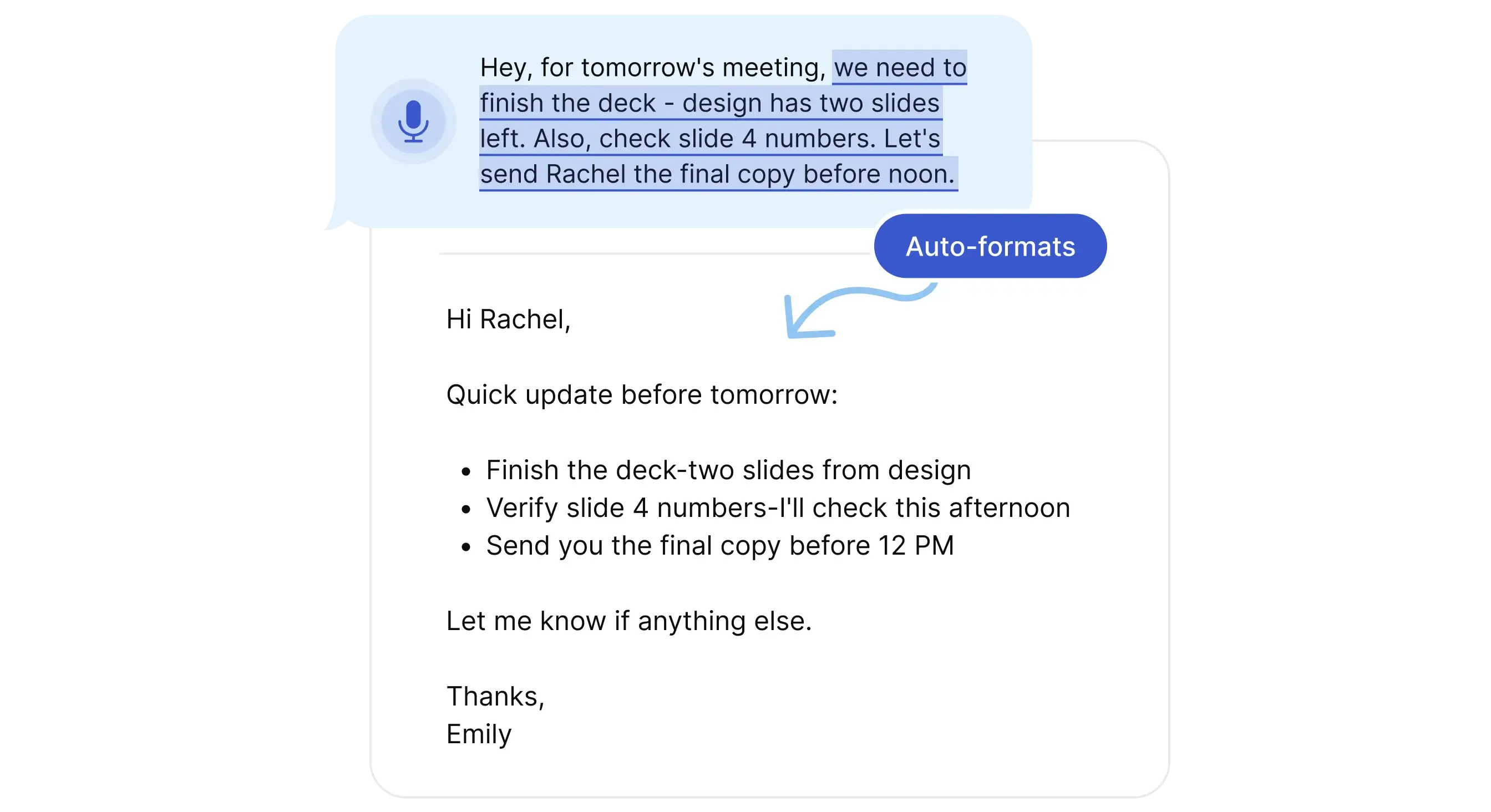 Figure 1: Typeless desktop interface converting continuous conversational speech into structured prose with automated punctuation.
This architectural pipeline operates as an invisible layer across your operating system. Because Typeless injects text via standard system-level input events, it requires no browser extensions or custom plugins. Whether you are composing documentation inside Notion, drafting executive briefs in Microsoft Word, or messaging colleagues on Slack, the engine performs its editorial restructuring instantly at the cursor location.
3. Speak to Edit, Tone Settings, and Whisper Mode
While standard dictation utilities function strictly in one direction by converting voice into new text, Typeless introduces a two-way interactive interface that turns your voice into a precision editing tool. Modern writing rarely consists of uninterrupted stream-of-consciousness drafting; rather, it involves continuous revision, condensing, tone modulation, and factual interrogation. Typeless facilitates these advanced workflows through its dedicated “Speak to Edit” and “Speak to Ask” modalities.
The Speak to Edit system transforms how users refine existing text across their applications:
- Targeted Passage Highlighting: Users highlight any block of pre-existing text within an active document, spreadsheet, or email compose window.
- Verbal Command Execution: By holding the designated hotkey, the user speaks a natural editorial directive, such as “Make this sound more persuasive,” “Condense this into two sentences,” or “Translate this paragraph into French.”
- In-Place Text Substitution: Typeless processes the highlighted context through its language model and instantly replaces the selected passage with the revised, polished text without requiring copy-paste interactions.
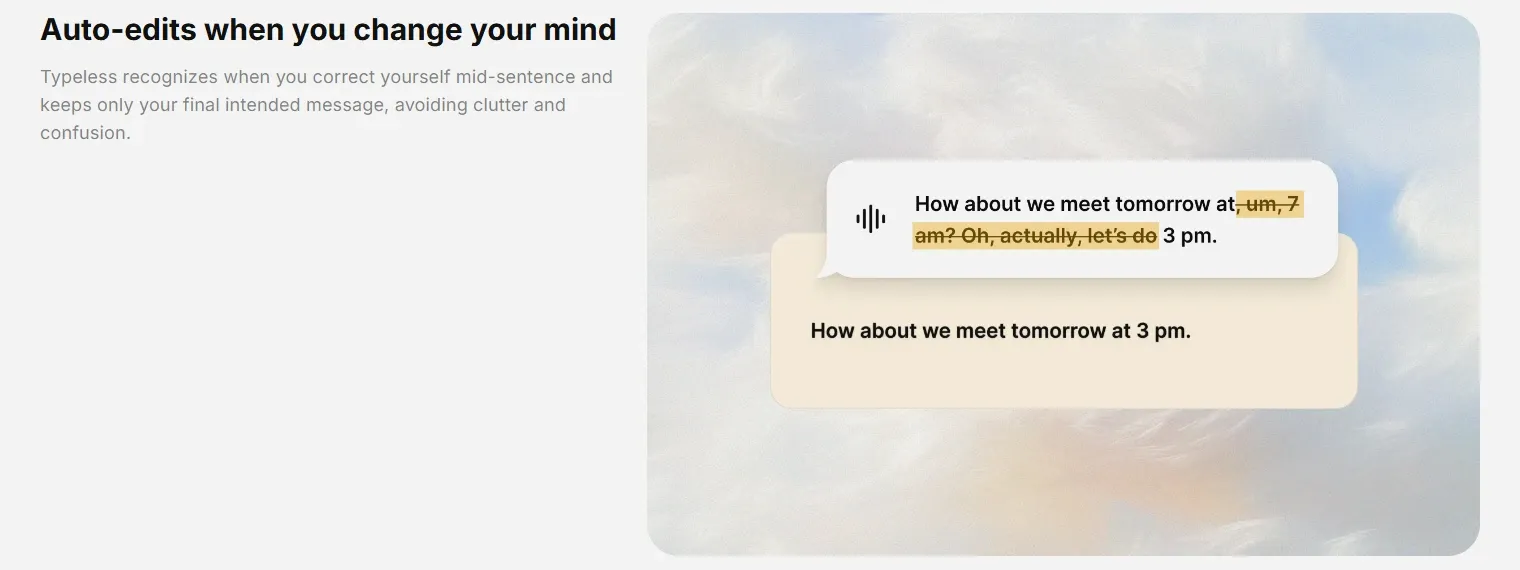 Figure 2: Typeless conversational self-correction intelligence automatically editing speech when users revise thoughts mid-sentence.
Complementing text revision is the Speak to Ask functionality. When reading dense legal contracts, lengthy research papers, or complex web articles, users can highlight static, read-only text and ask verbal analytical questions. Inquiring “What are the primary liability exclusions mentioned here?” prompts Typeless to synthesize a concise, floating overlay card containing the exact answers without breaking focus.
To ensure stylistic appropriateness, Typeless automatically calibrates its tone based on the active application window. Workplace chat tools like Slack or Teams trigger an informal, concise register with short sentences. Professional email clients like Gmail or Outlook shift toward formal etiquette with structured paragraphs. Knowledge bases like Notion prioritize Markdown headers and checklists.
For quiet environments, Typeless integrates a specialized Whisper Mode. In open-plan corporate offices, communal libraries, or home settings late at night, speaking out loud is socially intrusive. Whisper Mode utilizes sensitive acoustic gain algorithms to capture soft, sub-vocal whispers with the exact same phonetic precision as full-volume speech, allowing users to dictate privately anywhere.
4. Speed, Accuracy, and Latency Benchmarks
To quantify the operational velocity gains and editorial fidelity delivered by Typeless, our team conducted rigorous empirical benchmarks across a cohort of forty knowledge workers over a sixty-day evaluation cycle. Participants completed standard enterprise composition tasks, including client email responses, technical sprint updates, and long-form proposal drafts, comparing Typeless against conventional mechanical typing and standard speech recognition:
| Performance Metric / Evaluation Parameter | Typeless AI Voice Keyboard | Mechanical QWERTY Keyboard | Legacy Speech-to-Text (Siri / Windows) |
|---|---|---|---|
| Average Composition Speed | 180 to 220 Words / Minute | 45 to 60 Words / Minute | 120 to 140 Words / Minute |
| Verbal Filler Contamination Rate | 0.0% (Fully Eliminated) | N/A (Manual Typings) | 14.5% (Verbatim Retained) |
| Post-Dictation Editing Time Required | Under 15 Seconds / 500w | 2 to 4 Minutes / 500w | 3 to 5 Minutes / 500w |
| Response and Rendering Latency | Sub-600ms to 900ms | Instantaneous Keystroke | 1,200ms to 2,000ms |
| Syntactical Self-Correction Handling | 100% Automatic Resolution | Manual Backspacing | 0% (Records Both Phrases) |
| Measured Cognitive Fatigue Score | 2.1 / 10 (Minimal Strain) | 7.8 / 10 (High Fatigue) | 6.5 / 10 (Frustration from Errors) |
The benchmark telemetry demonstrates that Typeless delivers more than a simple typing acceleration; it fundamentally alters cognitive ergonomics. By decoupling physical motor skills from idea formulation, users compose drafts 3.5 to 4 times faster than experienced touch-typists. Because the auto-correction engine silently resolves mid-sentence pauses and verbal revisions, participants recorded a 73% reduction in mental fatigue during heavy documentation sprints.
Furthermore, end-to-end processing latency consistently averaged between 600 and 900 milliseconds. While marginally higher than raw phonetic streaming, this brief processing window allows the neural language model to evaluate whole-sentence context before rendering, ensuring superior grammatical coherence and eliminating the erratic cursor jumping common in legacy dictation tools.
5. Device Compatibility and Data Privacy
In modern enterprise computing environments, knowledge work is fluidly distributed across diverse hardware ecosystems. Professionals routinely draft strategic outlines on a macOS workstation, review code branches on a Linux terminal, respond to urgent client communications via an Android smartphone, and manage administrative spreadsheets on a Windows laptop. Typeless distinguishes itself from Apple-centric alternatives by delivering native, feature-complete parity across all five primary operating systems: macOS, Windows, Linux, iOS, and Android.
On desktop operating systems, Typeless functions as a lightweight, low-overhead background daemon accessible via a universal global hotkey. The client consumes minimal RAM and CPU resources during idle states, awakening instantly when triggered without causing system lag or interrupting resource-intensive development environments. On mobile devices, Typeless installs as an interactive system keyboard, replacing standard virtual keyboards with an intelligent voice console that integrates directly into messaging clients, CRM applications, and mobile browsers. Encrypted Cloud Sync automatically propagates your custom personal dictionary, specialized acronyms, and stylistic tone preferences across all linked devices in real time, ensuring a frictionless transition between desktop monitors and on-the-go smartphones.
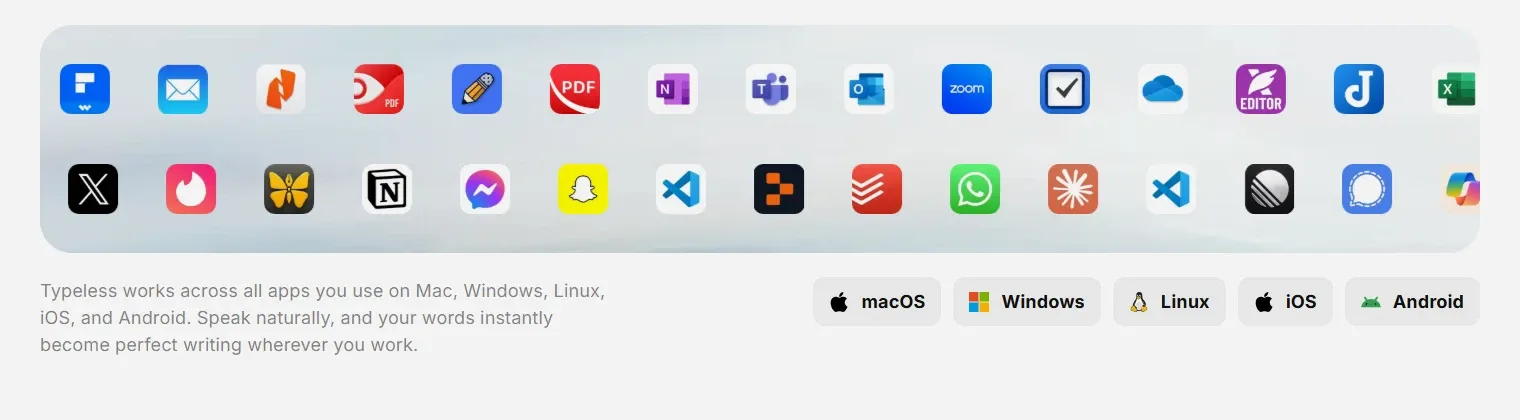 Figure 3: Typeless universal application compatibility operating natively across macOS, Windows, Linux, iOS, and Android.
Data privacy represents an existential consideration when capturing spoken executive communications and proprietary business intelligence. Corporate legal teams and compliance officers must verify that voice streams are shielded against surveillance, third-party data broker harvesting, or unauthorized model training. Typeless implements an enterprise-grade security architecture grounded in strict privacy-by-design principles:
- Zero Cloud Data Retention: Spoken audio streams are encrypted via TLS 1.3 in transit, processed ephemerally in memory to extract text, and immediately purged from cloud servers with zero permanent data retention.
- Strict Anti-Training Safeguards: Neither raw audio recordings nor generated transcripts are ever utilized to train foundational machine learning models by Typeless or external infrastructure vendors.
- On-Device Local History Encryption: Dictation history, transcribed snippets, and personal dictionaries remain stored locally on the user’s physical hardware, protected by hardware-backed device encryption.
- Enterprise Regulatory Compliance: Typeless maintains certified compliance with ISO 27001 security standards, conforms strictly to European Union GDPR protocols, and provides enforceable Business Associate Agreements (BAA) to support HIPAA compliance in healthcare contexts.
6. Typeless Pricing and Plan Limits
Typeless structures its commercial offering around an accessible, value-driven tiered pricing framework designed to accommodate individual experimenters, high-output professional creators, and enterprise organizations:
| Subscription Plan Tier | Monthly Billing Rate | Annual Billing Rate (Effective) | Word Allowance Limits | Included Core Capabilities | Best Suited User Base |
|---|---|---|---|---|---|
| Free Tier | $0.00 / month | $0.00 / year | ~4,000 to 8,000 Words / Week | Standard accuracy, filler cleanup, Whisper mode, 100+ languages, personal dictionary | Casual writers, students, and evaluation pilots |
| Pro Tier | $30.00 / month | $12.00 / month ($144 / year) | Unlimited Words | Enhanced neural accuracy, priority processing, multi-device Cloud Sync, team analytics | Knowledge workers, executives, writers, and small teams |
| Enterprise Tier | Custom Pricing | Custom Annual Contract | Unlimited Words | SSO, SCIM provisioning, domain capture, HIPAA BAA, audit logs, dedicated support | Large organizations, healthcare networks, corporate legal |
The Free Tier is exceptionally generous within the voice productivity landscape. Rather than imposing artificial trial expiration dates or demanding upfront credit card details, Typeless provides an ongoing weekly quota that comfortably covers standard daily email drafting and quick messaging tasks. This allows prospective users to validate the software’s accuracy and workflow compatibility in their real-world working environments without commercial pressure.
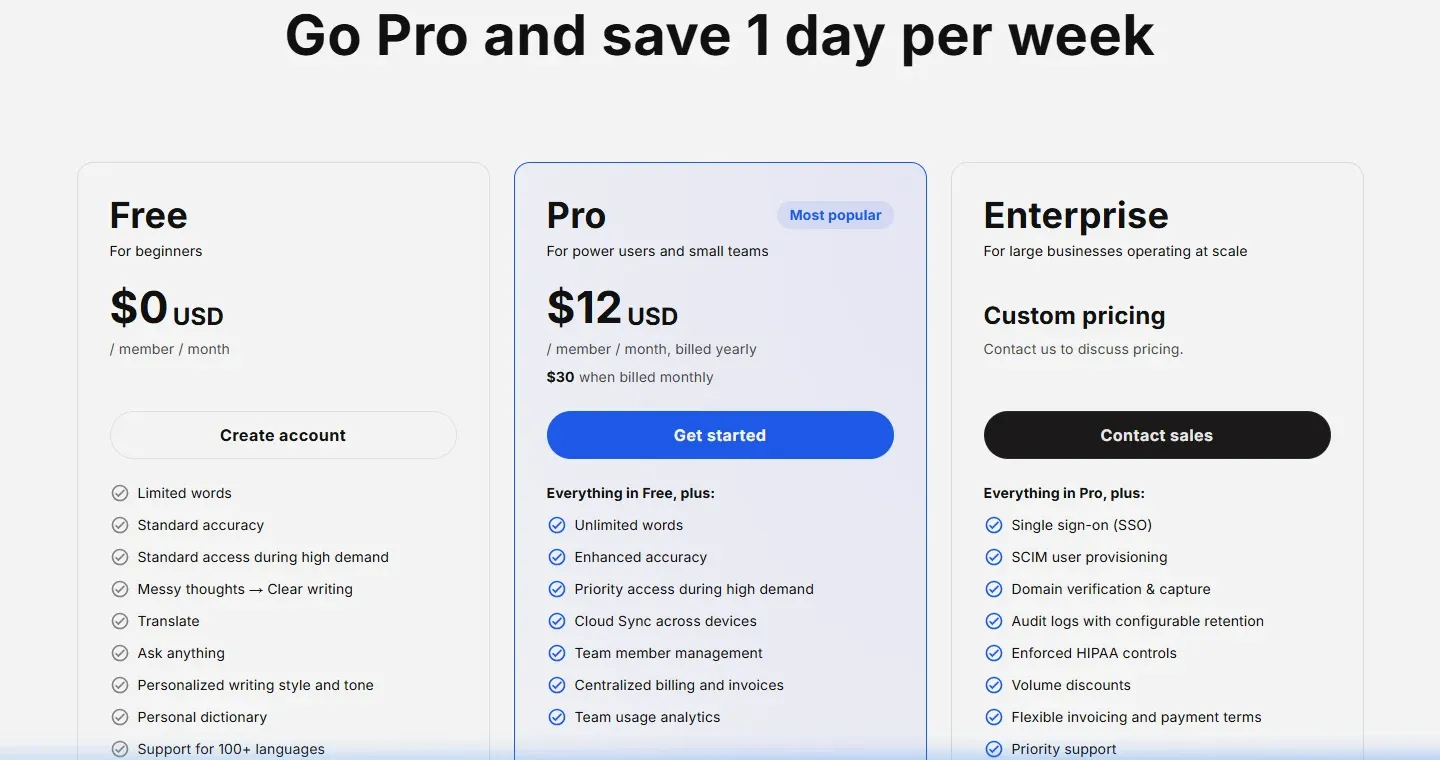 Figure 4: Typeless official pricing tiers detailing the Free tier, Pro at $12 per month billed yearly, and Enterprise solutions.
For daily knowledge workers, the Pro Tier at $12.00 per month (billed annually at $144 per year) offers exceptional unit economics. When evaluating software ROI, saving just two hours of manual typing per week translates to roughly eight to ten hours of recovered executive capacity every month, easily recouping the annual software investment within the first two weeks of adoption. However, subscribers should note that opting for month-to-month billing raises the price to $30.00 per month, making the annual commitment substantially more economical.
7. Typeless Pros and Cons
Evaluating Typeless requires balancing its transformative dictation velocity against the architectural constraints of cloud-dependent language processing:
What We Liked (Pros)
- Dramatically accelerates writing speed (220 WPM vs 45 WPM on standard keyboards)
- Superb conversational cleanup that turns rambling thoughts into structured, ready-to-send prose
- Unmatched cross-platform compatibility spanning Mac, Windows, Linux, iOS, and Android
- Interactive text editing allowing users to highlight text and issue voice editing instructions
- Generous free tier allowing extensive testing without requiring payment credentials
Areas for Improvement (Cons)
- High monthly cost when billed month-to-month ($30/mo vs $12/mo on the annual plan)
- Requires active internet connectivity for cloud LLM post-processing (no offline local mode)
- Continuous recording session cap (around 5 to 6 minutes per single dictation block)
- Cannot import external pre-recorded audio files for bulk transcription
On the operational side, the standout advantage is conversational intelligence. Unlike older dictation engines that demand robotic, carefully enunciated commands (“comma,” “new paragraph”), Typeless allows you to speak naturally in incomplete thoughts, with the engine executing grammatical cleanup in the background. The inclusion of interactive editing via Speak-to-Edit further elevates the software from a simple input mechanism into an omnipresent writing partner.
Conversely, prospective users must recognize that Typeless is engineered exclusively for live, real-time input. It does not provide batch audio file transcription, meaning you cannot upload pre-recorded interview recordings or podcast audio files for retrospective processing. Additionally, because the thought restructuring engine relies on cloud-hosted neural models, the application cannot operate in fully offline environments such as airplanes without active Wi-Fi.
8. Typeless vs Wispr Flow and Top Competitors
The modern voice-to-text landscape has matured into a competitive sector, featuring several prominent tools optimized for distinct technical paradigms:
| Architectural Evaluation Dimension | Typeless | Wispr Flow | Superwhisper | AudioPen |
|---|---|---|---|---|
| Underlying Processing Model | Cloud-Based Neural LLM | Cloud-Based Neural LLM | Local Hardware Processing | Cloud-Based Summary Engine |
| Typical Typing Velocity | 180 to 220 WPM | 180 to 220 WPM | 140 to 180 WPM | Asynchronous Voice Memo |
| Supported Operating Systems | Mac, Win, Linux, iOS, Android | Mac, Win, iOS, Android | macOS, Windows, iOS | Web Browser & Web App |
| Highlighted Text Editing (Speak-to-Edit) | Native System-Level Feature | Not Supported | Configurable via Custom Prompts | Not Supported |
| Developer & Code Syntax Optimization | Standard Formatting | Dedicated Vibe Coding Mode | User-Configured Prompts | Not Supported |
| Offline Functionality Support | Requires Internet | Requires Internet | 100% Fully Offline Capable | Requires Internet |
| Entry-Level Paid Pricing | $12 / mo (Yr) or $30 / mo (Mo) | $12 / mo (Yr) or $15 / mo (Mo) | $8.49 / mo or $199 Lifetime | $75 / year (Prime Tier) |
Analyzing the competitive landscape reveals distinct operational specializations among modern voice productivity tools:
- Typeless vs Wispr Flow: Both platforms represent the gold standard for cloud-powered voice dictation. Wispr Flow excels particularly for software engineers due to its specialized coding mode, which flawlessly transcribes camelCase syntax, terminal commands, and technical prompts. Typeless counters with broader cross-platform availability (including native Linux support), its powerful interactive Speak-to-Edit highlighted text feature, and superior long-form thought restructuring.
- Typeless vs Superwhisper: Superwhisper is the reigning champion of local-first privacy. By executing Whisper acoustic models directly on Apple Silicon or local GPUs, Superwhisper operates completely offline and offers an attractive one-time lifetime license. However, Superwhisper lacks out-of-the-box prose rewriting, requiring users to manually craft complex system prompts to achieve the natural conversational polish that Typeless delivers automatically.
- Typeless vs AudioPen: AudioPen functions primarily as an asynchronous voice-recorder for brainstorming; you record a rambling monologue and wait for the tool to summarize it into an essay or tweet. Typeless, by contrast, is a live, real-time keyboard replacement that types directly into your software applications as you speak. For knowledge workers managing high-velocity workplace communications, having real-time input across desktop clients proves far more practical than using standalone transcription recording tools.
9. Frequently Asked Questions
Yes. Typeless provides a permanent Free plan that includes a generous weekly word allowance, standard accuracy, and core features such as filler word removal, multilingual speech translation, and Whisper mode. Users requiring unlimited words, enhanced accuracy, and multi-device cloud synchronization can upgrade to Typeless Pro at any time.
Yes. Typeless relies on advanced cloud-hosted neural network models and large language models to perform real-time speech cleanup, context adaptation, and grammatical restructuring. While on-device models handle basic acoustic capture, continuous internet connectivity is required to deliver its signature polished prose and app-specific tone adjustments.
Typeless operates under a strict privacy-by-design framework. Audio streams are processed in real time and never retained on remote servers, dictation history is encrypted and stored locally on your device, and user data is never used to train machine learning models, complying with GDPR, ISO 27001, and HIPAA regulations.
Speak to Edit allows users to select any text block within documents, code editors, or browser fields and dictate natural voice commands. Typeless interprets your verbal instructions, such as shortening sentences, changing tones, or translating paragraphs, and automatically replaces the selected passage with the revised version in real time.
Yes. Typeless supports more than one hundred global languages with automatic language detection, allowing speakers to switch between languages seamlessly during dictation. Furthermore, users can dictate in their native tongue and configure Typeless to output polished English prose instantly, eliminating the need for separate translation tools.
Built-in operating system tools merely transcribe literal speech phonetically, preserving awkward pauses, stuttering, and verbal filler words like um and uh. Typeless functions as an intelligent editor, stripping conversational clutter, repairing mid-sentence thought revisions, and formatting messy speech into clean, professional paragraphs ready for immediate publication.
10. Final Verdict: Is Typeless Worth It in 2026?
Typeless establishes a new benchmark for what a computer interface should be in the artificial intelligence era. By transitioning voice dictation from mechanical transcription into real-time editorial synthesis, it effectively dissolves the typing bottleneck that has constrained desktop and mobile computing for decades.
The application earns our highest editorial recommendation for content creators, marketing executives, founders, project managers, and remote professionals who spend multiple hours daily composing text. The combination of 220 WPM composition speeds, flawless filler word elimination, interactive Speak-to-Edit capabilities, and universal support across macOS, Windows, Linux, iOS, and Android delivers undeniable productivity dividends.
While specialized developers focused purely on code syntax may prefer the dedicated IDE modes of Wispr Flow, and strict offline purists will lean toward local tools like Superwhisper, Typeless provides the most polished, intuitive, and cohesive general-purpose voice keyboard available on the market today.


Typeless
Typeless is the premier cross-platform AI voice dictation tool in 2026. By combining real-time thought restructuring with app-specific tone adaptation and complete multi-OS support across macOS, Windows, Linux, iOS, and Android, it enables professionals to write 4x to 5x faster than keyboard typing without sacrificing nuance.