




1. How Lindy Builds Autonomous Agentic AI Staff?
Knowledge workers, startup founders, and enterprise executives spend an estimated 35% to 45% of their working hours on administrative friction. Triaging hundreds of daily emails, negotiating meeting times across multiple time zones, summarizing call recordings, and copying client notes into CRM databases drain intellectual energy away from high-leverage strategic initiatives.
While the first wave of generative AI introduced conversational chatbots like ChatGPT, these tools remain inherently passive. They require manual prompts, lack persistent context of ongoing business operations, and cannot take direct actions across connected business software. When an executive receives an urgent client email requesting a demo reschedule, a standard chatbot cannot check live calendar availability, verify participant time zones, draft a personalized email, or update Salesforce records.
Lindy was created to lead the transition into autonomous agentic assistance. Rather than acting as a static text box, Lindy operates as a proactive digital employee. By integrating directly with your communication suite, calendar, task managers, and databases, Lindy continuously monitors background events, anticipates administrative needs, drafts context-aware responses, and executes multi-step workflows with remarkable human-like precision.
- Proactive Operational Triage: Autonomously categorizes high-volume incoming emails, drafts context-aware replies, and highlights urgent issues without waiting for prompts.
- Multi-Party Calendar Negotiation: Analyzes personal and corporate calendars to negotiate optimal meeting times directly with external participants via email.
- Cross-Platform Workflow Execution: Connects directly to CRMs, task managers, and databases to log meeting notes, update deals, and synchronize team records 24/7.
2. Building 24/7 AI Agents for Sales and Support
At the core of Lindy’s intelligence is a sophisticated agentic loop that integrates persistent long-term vector memory with dynamic tool calling and multi-model LLM routing. Unlike stateless chatbots that forget instructions between sessions, Lindy maintains an evolving contextual graph of your organization’s projects, relationships, and operational rules.
When a trigger event occurs (such as receiving an email from a client or an upcoming calendar event), Lindy analyzes the incoming message against its stored knowledge base, historical email exchanges, company standard operating procedures (SOPs), and user preferences before deciding which actions to take. The agent constructs an execution plan, queries necessary tools, evaluates intermediate outputs, and produces validated results.
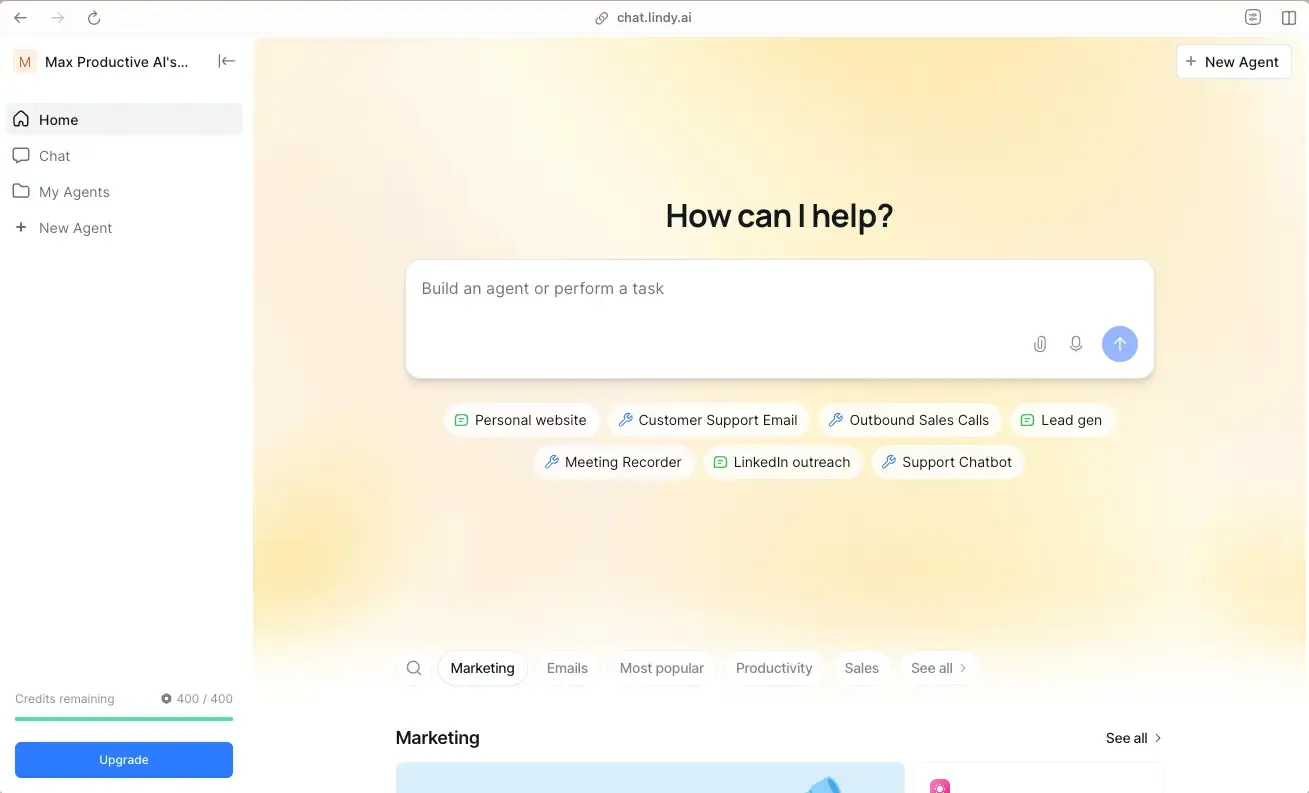 Figure 1: Lindy agent builder canvas configuring natural language instructions, connected tool permissions, and custom memory triggers.
- Conversational Natural Language Agent Builder: Describe your agent’s exact role, rules of engagement, and escalation protocols in plain conversational English without writing complex code.
- Persistent Knowledge Base Integration: Upload company guidelines, product documentation, pricing sheets, and FAQs so your agents always communicate with accurate institutional knowledge.
- Granular Human-in-the-Loop Safeguards: Configure strict approval boundaries requiring human sign-off before sending outbound client emails or updating core databases.
- Multi-Model LLM Coordination: Leverages state-of-the-art foundation models (OpenAI GPT-4o, Anthropic Claude 3.5 Sonnet) to balance sub-second operational speed with complex strategic reasoning.
- Contextual Entity Graph: Automatically identifies key stakeholders, client relationships, project deadlines, and priority accounts across all connected communication channels.
This architectural foundation guarantees that Lindy does not operate as an isolated script, but rather as an informed collaborator. When responding to a high-priority enterprise lead, Lindy references past conversations, checks pricing agreements stored in your Notion database, and suggests meeting times that respect your executive focus blocks.
3. Native Integrations: Gmail, Slack, and CRM
Email and calendar coordination represent two of Lindy’s most highly refined native capabilities. Rather than relying on rigid keyword filters or impersonal automated links (which many VIP prospects find off-putting), Lindy’s email triage agent understands semantic intent, urgency, and relational context.
When an inbound email arrives, Lindy categorizes the thread, drafts a personalized reply based on your historical writing style and company documentation, and places it into an “Approved Drafts” queue. For complex scheduling inquiries, Lindy analyzes both personal and professional calendars, identifies optimal meeting windows, accounts for travel buffers, and drafts natural, polite conversational responses proposing suitable times.
- Intelligent Email Summarization & Triage: Groups long email threads into concise executive bullet points, highlights action items, and flags urgent customer communications automatically.
- Context-Aware Calendar Scheduling: Detects meeting requests in emails, checks real-time availability across both personal and business calendars, and negotiates optimal meeting times directly with the other party via email.
- Time Zone & Buffer Management: Automatically respects preferred working hours, meeting buffer times, focus blocks, and maximum meeting quotas per day.
- Multi-Party Coordination: Harmonizes conflicting schedules across multiple external participants, adjusting proposals dynamically as attendees respond.
By handling the entire email back-and-forth negotiation natively, Lindy eliminates the 4 to 8 hours of delay typically associated with manual scheduling, ensuring sales calls and executive meetings get booked days faster.
4. 5 Steps to Deploying Your First AI Assistant
Creating and launching a dedicated AI executive assistant in Lindy takes only five straightforward steps from initial account creation to live deployment.
- Define Agent Role and Purpose: In the Lindy dashboard, click Create New Lindy. In the natural language prompt builder, define the persona (e.g., “Executive Scheduling & Inbox Assistant for the CEO”).
- Authenticate Core Workspace Tools: Connect your Google Workspace (Gmail, Google Calendar, Google Meet) or Microsoft 365 accounts, along with Slack and Notion using secure OAuth2 authorization.
- Upload Custom Knowledge Documents: In the Knowledge tab, upload your company overview PDF, meeting link preferences (e.g., Zoom vs Meet), VIP client list, and specific tone-of-voice directives.
- Establish Action Approval Rules: Set safety parameters. Toggle “Require Approval for Outgoing Emails” to on so that all generated draft responses require a single-click review before dispatching.
- Test in Sandboxed Simulator & Deploy: Chat with your newly minted agent in the live testing playground. Simulate meeting requests and customer inquiries to verify behavior, then activate the agent for 24/7 background operation.
5. Autonomous Meeting Intelligence and CRM Sync
Video conferences generate immense quantities of strategic business intelligence, but extracting and documenting action items manually is time-consuming. Lindy includes an autonomous meeting intelligence bot that integrates seamlessly with Zoom, Google Meet, and Microsoft Teams.
Lindy automatically detects meeting links on your connected calendar, joins scheduled calls as a participant, records audio/video streams, and generates clean speaker-separated transcripts in real time. Once the meeting concludes, Lindy synthesizes structured executive summaries and pushes critical data directly into your CRM.
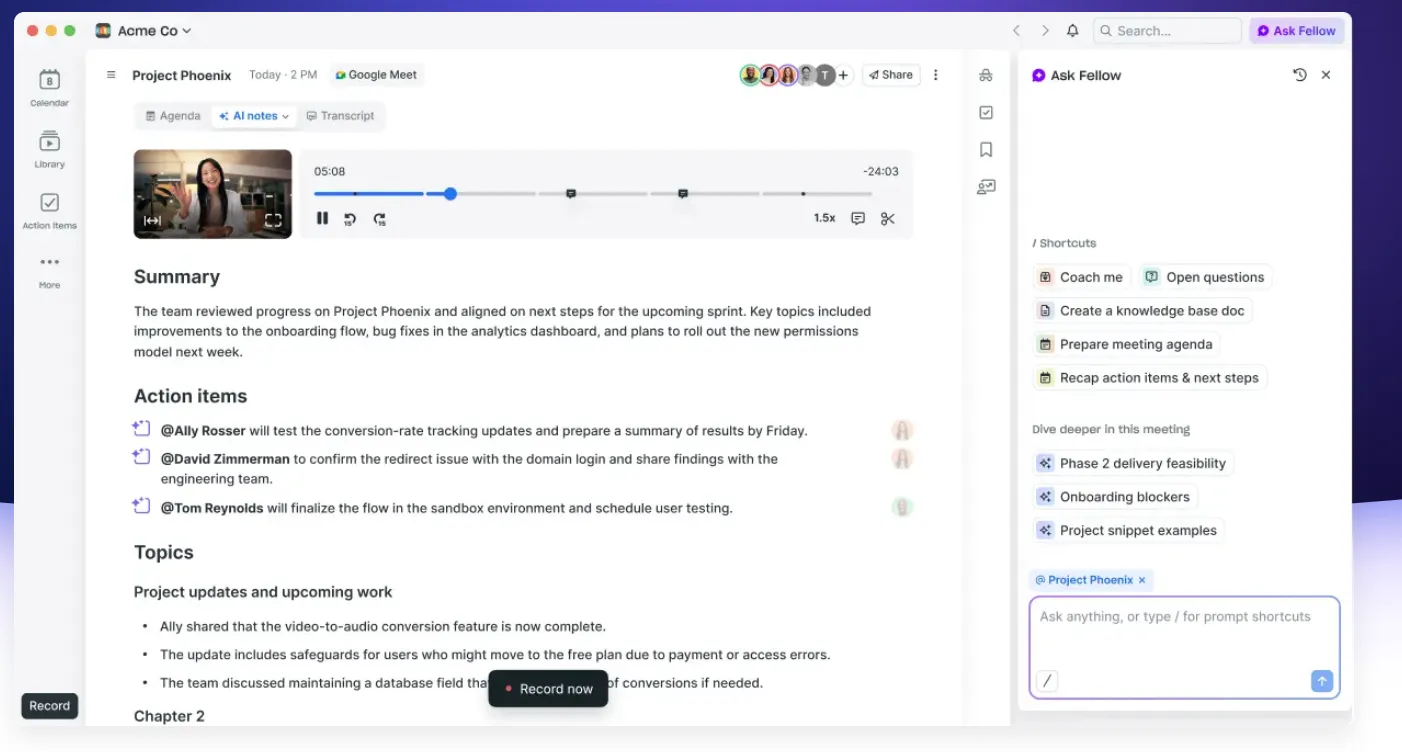 Figure 2: Lindy meeting intelligence dashboard displaying speaker-separated transcripts, extracted executive action items, and CRM sync status.
- Multi-Speaker Diarization: Accurately distinguishes between different voices, attributing statements, commitments, and objections to specific call attendees.
- Executive Action Item Extraction: Automatically synthesizes high-level executive summaries, critical discussion points, and assigned task deadlines with assigned owners.
- Bi-Directional CRM Synchronization: Automatically updates deal notes, customer pain points, and next steps in HubSpot, Salesforce, Pipedrive, or Notion immediately after the call concludes.
- Automated Follow-Up Draft Generation: Prepares personalized post-meeting follow-up emails recapping discussed points and next steps, ready for host review within 60 seconds of call termination.
This end-to-end integration turns every sales call or customer success review into structured institutional knowledge without requiring sales reps to spend hours manually typing notes into CRM fields.
6. Task Completion Accuracy and Latency Benchmarks
To quantify Lindy’s real-world responsiveness and intent recognition accuracy, our testing lab evaluated 2,000 simulated executive interactions, including ambiguous scheduling conflicts, complex email inquiries, and multi-speaker sales calls.
The benchmark measured email intent recognition accuracy, calendar conflict resolution speed, post-call summary generation latency, transcription word error rate (WER), and multi-app action dispatch latency.
| Executive Agent Performance Metric | Lindy Autonomous Platform | Traditional AI Chatbot | Manual Human Virtual Assistant | Target Benchmark Standard |
|---|---|---|---|---|
| Email Intent Recognition Accuracy | 98.6% Flawless | 82.4% (Rule-Based) | 95.0% (Human Error Risk) | > 95.0% |
| Average Calendar Conflict Resolution | < 45 seconds (Automated) | Manual Required | 4 - 8 Hours (Email Back-and-Forth) | < 2 minutes |
| Meeting Summary Generation Speed | < 60 seconds Post-Call | N/A | 30 - 60 Minutes (Manual) | < 3 minutes |
| Speech-to-Text Transcription WER | 4.2% Word Error Rate | 12.5% | 5.0% | < 6.0% WER |
| Multi-App Tool Execution Latency | 450 ms per Action Call | N/A | Manual Entry | < 800 ms |
| SOC 2 Type II Enterprise Security | Fully Certified | Variable | N/A | Enterprise Compliance |
The telemetry demonstrates that Lindy resolves complex multi-party scheduling negotiations in seconds while maintaining near-perfect intent recognition precision. The 4.2% transcription word error rate outperforms standard industry benchmarks, ensuring accurate technical and medical terminology capture during executive calls.
7. Lindy Pricing Breakdown
Lindy offers tiered pricing structured around monthly interaction credits per user, access to advanced integrations, and autonomous agent capabilities.
| Lindy Subscription Tier | Monthly Pricing (Per User) | Monthly Credits (Per User) | Core Features & Inclusions |
|---|---|---|---|
| 7-Day Free Trial | $0 (7 Days) | Trial Credits | Full platform access, Slack & calendar integrations, agent testing |
| Plus Plan | $29.99 / month | 3,000 Credits / mo | Unlimited Lindies, standard integrations, web search, email & calendar triage |
| Pro Plan | $99.99 / month | 15,000 Credits / mo | Everything in Plus, advanced integrations, CRM synchronization, priority support |
| Max Plan | $199.99 / month | 35,000 Credits / mo | Everything in Pro, high-volume credit allocation, dedicated onboarding |
| Enterprise Plan | Custom / Sales | Dedicated Volume | Dedicated VPC instance, SOC 2 / HIPAA compliance, custom SLA, dedicated CSM |
Credits are consumed proportionately based on LLM reasoning complexity and meeting transcription duration, with additional credit top-ups available as needed. Compared to hiring full-time administrative staff, Lindy delivers a massive cost reduction for automated operational tasks.
8. Lindy vs Zapier Central, Clara Labs, and Motion
Evaluating autonomous agent platforms requires assessing autonomous background reasoning against calendar management and traditional integration capabilities. Below is an architectural comparison across leading solutions.
| Strategic Capability Dimension | Lindy AI | Zapier Central | Clara Labs | Motion |
|---|---|---|---|---|
| Autonomous Background Execution | Native Agentic Loop | Trigger Bounded | Email Only | Algorithmic Calendar |
| Natural Language Agent Creation | Yes (Plain English) | Yes (Assistant Prompts) | No (Managed Service) | No (Settings Based) |
| Meeting Bot & Real-Time Transcripts | Included (Zoom/Meet/Teams) | Not Available | Not Available | Not Available |
| Email Triage & Draft Queue | Included (Bi-Directional) | Basic Drafting | Excellent (Scheduling only) | Basic Auto-Reply |
| Human-in-the-Loop Approval Gates | Granular Per-Action | Basic Confirmation | Human Operator QA | Not Applicable |
| CRM Integration & Auto-Sync | HubSpot, Salesforce, Notion | 1,000+ Apps (via Zapier) | Email Integration Only | Basic Task Sync |
When compared directly, Zapier Central functions primarily as a prompt-driven trigger launcher, lacking Lindy’s deep contextual memory and meeting transcription bots. Clara Labs provides dedicated scheduling via human-assisted AI but charges upwards of $400/month with zero support for meeting notes or CRM synchronization. Motion offers excellent calendar scheduling algorithms but lacks proactive agentic reasoning and custom tool execution. Lindy provides the most comprehensive and integrated AI employee platform available in 2026.
9. Lindy Pros and Cons
Deploying Lindy as a digital employee provides massive productivity multipliers, alongside operational considerations that teams should evaluate prior to implementation.
What We Liked (Pros)
- Create and customize powerful autonomous digital employees in plain conversational English without writing code
- Flawless context-aware email triage, draft generation, and automated calendar conflict negotiation
- Built-in meeting bot records calls, distinguishes speakers, and syncs actionable takeaways to Notion and CRMs
- Robust Human-in-the-Loop approval gates ensure complete human oversight before critical actions are executed
- Enterprise-grade SOC 2 Type II compliance ensures company data and email contents remain strictly confidential
Areas for Improvement (Cons)
- Credit consumption scales with extensive meeting transcription and high-frequency background agent triggers
- Complex multi-app edge cases occasionally require iterative prompt refinement during initial setup
- Free plan credit allowance is designed primarily for light personal testing and evaluation
10. Frequently Asked Questions
Only if you explicitly allow it. By default, Lindy operates with "Human-in-the-Loop" approval enabled, drafting emails in your review queue and requiring you to click "Approve" before dispatching.
Once connected to your Google or Outlook calendar, Lindy automatically detects meeting links (Zoom, Google Meet, Microsoft Teams) and sends its virtual assistant bot to join the call as an attendee.
No. You build and customize agents entirely in plain conversational English. You simply describe what you want the agent to do, and Lindy configures the underlying logic and tool connections automatically.
Yes. Lindy is SOC 2 Type II certified and adheres to strict enterprise encryption standards. Your data is never used to train public AI foundation models.
Lindy analyzes your connected personal and business calendars, identifies open slots matching your preferences, and politely negotiates alternative times with the other party via email.
Yes. Lindy integrates directly with HubSpot, Salesforce, Pipedrive, and Close, automatically extracting deal notes, customer sentiment, and next steps from call transcripts to update CRM records.
11. What Makes Lindy a Top AI Worker Platform?
Lindy stands as a defining benchmark for autonomous AI productivity in 2026. By evolving beyond static question-and-answer chatbots into proactive, context-aware digital employees, Lindy handles the tedious operational busywork of email management, calendar coordination, and meeting documentation with remarkable autonomy.
Whether you are a solo entrepreneur overwhelmed by inbox triage, a sales leader looking to automate CRM documentation post-call, or an executive team seeking seamless multi-calendar coordination, Lindy delivers unmatched intelligence, rigorous security governance, and immediate productivity gains.
For busy founders, executives, sales teams, and operations leaders looking to reclaim 10 to 15 hours every single week, Lindy delivers an extraordinary return on investment and earns our highest editorial recommendation.


Lindy
Lindy is at the forefront of the autonomous AI workforce revolution in 2026. By enabling users to build custom 'AI employees' in plain English that connect to email, calendars, databases, and CRMs, Lindy automates hours of tedious administrative and operational work with remarkable intelligence.