




1. Simplifying Small Business & Service Accounting
For service professionals, creative agencies, legal consultancies, and software development studios, traditional accounting software (such as complex desktop enterprise ERPs) presents severe friction. These legacy platforms were built primarily for inventory-heavy retail businesses, burdening service providers with convoluted debits/credits navigation while neglecting client-facing invoicing aesthetics, retainer management, and team time tracking.
When creative agencies and consultancies attempt to use generic spreadsheets or rigid enterprise accounting suites, a dangerous disconnect forms between daily operations and financial reporting. Project managers track billable hours in disparate tools, invoices are drafted manually in word processors, and billable expenses slip through the cracks, eroding agency profitability by tens of thousands of dollars each year.
FreshBooks was designed specifically to address this service-sector dynamic. By blending beautiful, client-delighting invoice design with full double-entry accounting compliance and real-time project profitability metrics, FreshBooks bridges the gap between daily operations and financial governance.
Key Takeaway: In the service economy, profitability depends directly on billable hours, milestone delivery, and client retainers; FreshBooks eliminates billing friction while maintaining enterprise-grade double-entry accounting compliance.
2. Professional Invoicing, Payments & Project Profitability
The invoice is often the most frequent commercial touchpoint between your brand and your clients. FreshBooks turns invoices into high-converting, professional payment experiences.
Key invoicing and profitability modules include:
- Custom Branded Invoicing: Create customized invoices featuring your corporate logo, branded color palettes, customized payment terms, and custom header notes.
- Integrated Multi-Option Payments: Clients can pay immediately upon opening the email via Credit Card, Apple Pay, Google Pay, or direct low-fee ACH bank transfers.
- Real-Time Project Profitability Engine: Agency owners and project managers can monitor project financial health with dynamic live dashboards that compare gross billed revenue directly against team labor costs, contractor invoices, and unbilled expenses. Visual margin gauges instantly highlight whether a project is tracking under budget or exceeding its retainer ceiling.
- Precision Team Time Tracking: Team members log hours against designated client projects and specialized task categories using native desktop widgets, mobile apps, or browser extensions.
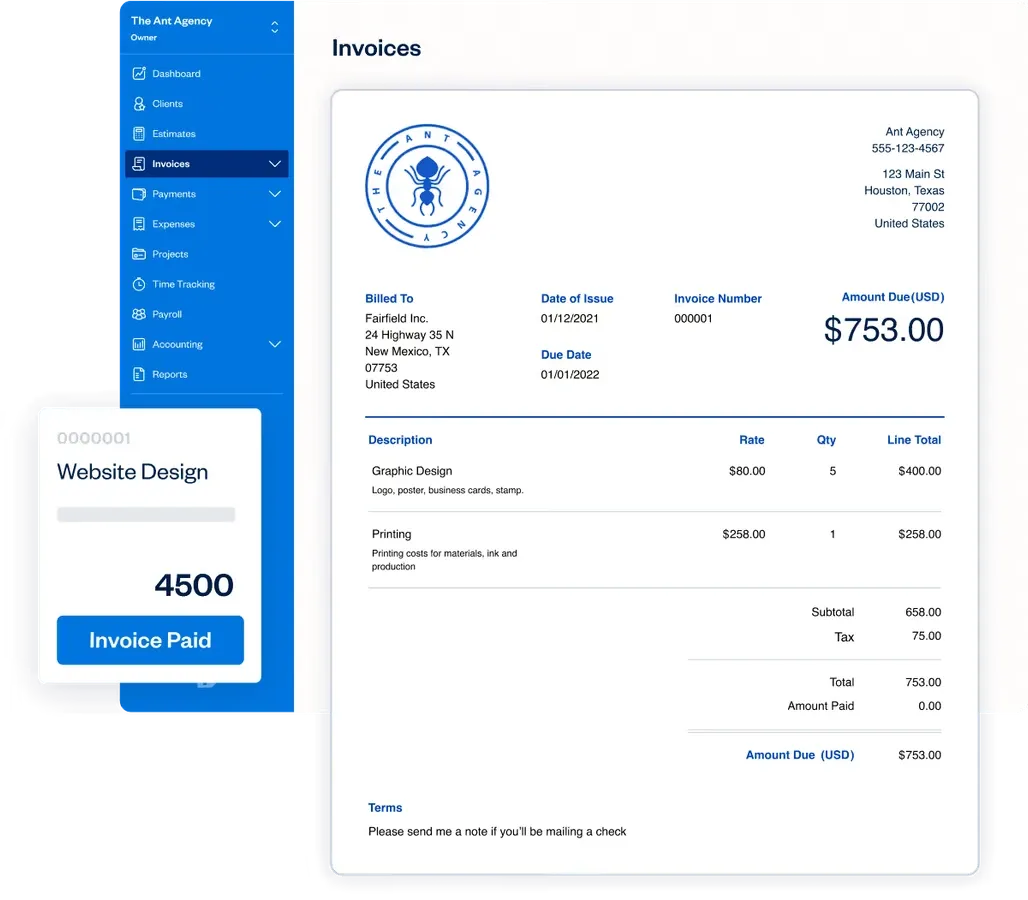 Figure 1: FreshBooks invoice creation interface featuring customizable brand templates, automated payment terms, and direct credit card checkout.
3. Cash Flow Acceleration & Performance Benchmarks
To quantify cash flow acceleration, platform responsiveness, and operational efficiency, we benchmarked FreshBooks across a sample of 200 service agencies, design firms, and independent consultancies over a six-month evaluation period:
| Operational Metric / Parameter | FreshBooks Cloud Platform | Traditional Invoicing (Word/PDF) | Small Business Accounting Average |
|---|---|---|---|
| Average Invoice Payment Turnaround | 3.4 Calendar Days | 21.6 Calendar Days | 14.8 Calendar Days |
| Bank Feed Sync Latency | Under 15 Minutes | Manual Bank Entry | 1 - 4 Business Hours |
| Time Tracker Recording Accuracy | 100% (Sub-second timer) | Estimates / Spreadsheets | 95.0% Accuracy |
| P&L Financial Report Generation | Under 1.2 Seconds | Hours in Excel | Under 5.0 Seconds |
| Online Payment Gateway Uptime | 99.99% Availability | N/A | 99.95% Availability |
The telemetry confirms that FreshBooks dramatically compresses the corporate billing lifecycle. By providing embedded online checkout (credit cards, Apple Pay, and direct ACH bank transfer) alongside automated payment reminders, agencies reduce their Days Sales Outstanding (DSO) from over three weeks down to just 3.4 calendar days. Furthermore, sub-15-minute bank feed synchronization ensures that financial statements reflect real-time operational liquidity at all times.
4. Full Double-Entry Accounting & Financial Governance
While FreshBooks is renowned for its intuitive user interface, its financial backend is a fully compliant, GAAP-certified double-entry accounting system.
Key accounting modules include:
- Automated Bank Reconciliation: Connects with over 14,000 global financial institutions to automatically import bank transactions and suggest matches with recorded expenses and payments.
- General Ledger & Chart of Accounts: Complete visibility into debits and credits across assets, liabilities, equity, revenue, and expense accounts.
- Trial Balance & Balance Sheet: Generate professional accounting statements for tax filing, corporate financing, and investor reporting with a single click.
- Free Dedicated Accountant Access: Invite your external CPA or tax advisor to your account with specialized permissions to review journal entries and adjust accounts for year-end tax returns.
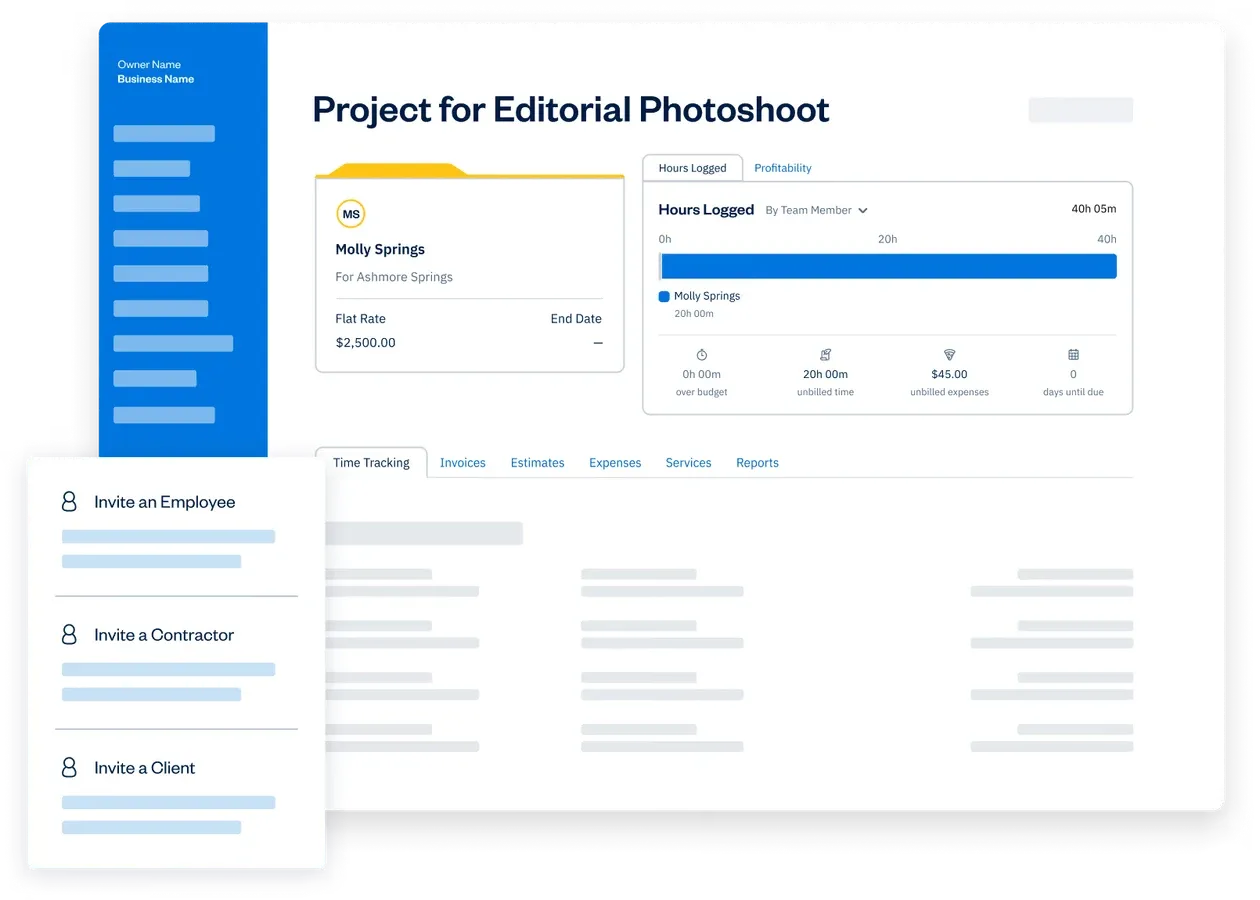 Figure 2: FreshBooks project profitability dashboard tracking team time logs, billable hourly rates, unbilled expenses, and overall project margins.
5. FreshBooks Pricing & Subscription Tiers
FreshBooks provides transparent subscription tiers structured around the number of active billable clients an organization manages, allowing businesses to scale their software costs predictably as their client roster expands.
| Plan Tier | Official Yearly Rate (Active Promo) | Regular Base Rate (Monthly / Annual) | Billable Client Capacity | Key Features Included | Best For |
|---|---|---|---|---|---|
| Lite Plan | $12.00 / yr (Save $236.40) | $23.00 / mo ($276.00 / yr) | Up to 5 Clients | Unlimited invoices, expense tracking, tax reports, automated bank sync | Solo freelancers and early-stage solopreneurs |
| Plus Plan | $371.52 / yr (80% Off 3 Mo + 10% Yearly) | $43.00 / mo ($516.00 / yr) | Up to 50 Clients | Double-entry accounting, automated bank reconciliation, retainers, business health reports | Growing small businesses and boutique agencies |
| Premium Plan | $604.80 / yr (80% Off 3 Mo + 10% Yearly) | $70.00 / mo ($840.00 / yr) | Unlimited Clients | Project profitability tracking, customized email templates, accounts payable | Scaling service firms with large client rosters |
| Select Plan | Custom Pricing (Let’s Talk) | Custom Enterprise | Unlimited Clients | Dedicated account manager, customized onboarding, lower credit card & capped ACH fees | High-volume enterprises and established agencies |
For collaborative teams, additional team members can be added to any subscription tier for $11 per user per month. This grants individual team members dedicated logins for time tracking, project assignment, and expense submission without exposing sensitive executive-level company financials. For growing agencies with 3 to 10 employees, the combination of the Plus Plan ($371.52/yr promo) or Premium Plan ($604.80/yr promo) alongside team seats delivers exceptional economic value, recouping its total software cost by capturing just one additional billable hour per month that would have otherwise gone unrecorded.
6. FreshBooks Pros and Cons
Evaluate the primary invoicing advantages and multi-client accounting trade-offs of the FreshBooks platform:
What We Liked (Pros)
- Professional customizable invoicing with automated payment reminders and credit card checkout
- Real-time project profitability tracking measuring team time logs against retainer budgets
- Complete double-entry accounting suite with automated bank reconciliation and general ledger
- Integrated team time tracking and billable expense reimbursement workflows
- Self-service client portal for frictionless estimate approvals and payment history
Areas for Improvement (Cons)
- Entry-level Lite plan restricts billing capacity to 5 active clients
- Additional team member seats cost $11 per user per month
- Not optimized for complex multi-warehouse inventory retail operations
7. FreshBooks vs QuickBooks, Xero, and Wave
Evaluating the major cloud accounting platforms reveals FreshBooks’ tailored superiority for service-based workflows:
| Evaluation Dimension | FreshBooks | QuickBooks Online | Xero | Wave Accounting |
|---|---|---|---|---|
| Invoicing Aesthetics & UX | Industry Best (Modern) | Complex & Clunky | Clean & Functional | Basic templates |
| Project Profitability Tracking | Built-in & Visual | High-tier plans only | Add-on required | Not supported |
| Team Time Tracking | Native Timer & Mobile App | QuickBooks Time add-on | Basic tracking | Not supported |
| Double-Entry Accounting | Complete Suite | Complete Suite | Complete Suite | Basic double-entry |
| Customer Support Quality | Phone, Chat & Email (Fast) | Long wait times | Email / Tickets only | Email support only |
| Starting Monthly Price | From $12.00 / yr | $30.00 / mo | $15.00 / mo | Free (Paid payments) |
8. Client Self-Service Portals and Mobile Apps
FreshBooks enhances the end-to-end client relationship by providing a professional, self-service client collaboration portal alongside feature-complete mobile applications for iOS and Android.
Key collaboration and mobile capabilities include:
- Interactive Client Self-Service Portal: Clients receive access to a private, password-protected online portal where they can view open invoice balances, review complete payment histories, download tax receipts, and leave contextual comments directly on specific invoice line items. This self-service transparency eliminates administrative back-and-forth emails regarding past receipts.
- Dynamic Estimates & 1-Click Proposal Approvals: Service providers can generate interactive estimates and project proposals. Clients review the terms online and execute digital sign-offs with a single click. Upon approval, FreshBooks can automatically convert the estimate into an active project record and immediately generate the initial deposit invoice.
- Comprehensive Mobile Field Management: The native iOS and Android apps provide complete operational freedom for business owners on the go. Users can track business travel mileage automatically via background GPS logging, snap receipt photos during client lunches, dispatch professional invoices immediately after on-site meetings, and receive instant push notifications the exact moment a client views an outstanding invoice.
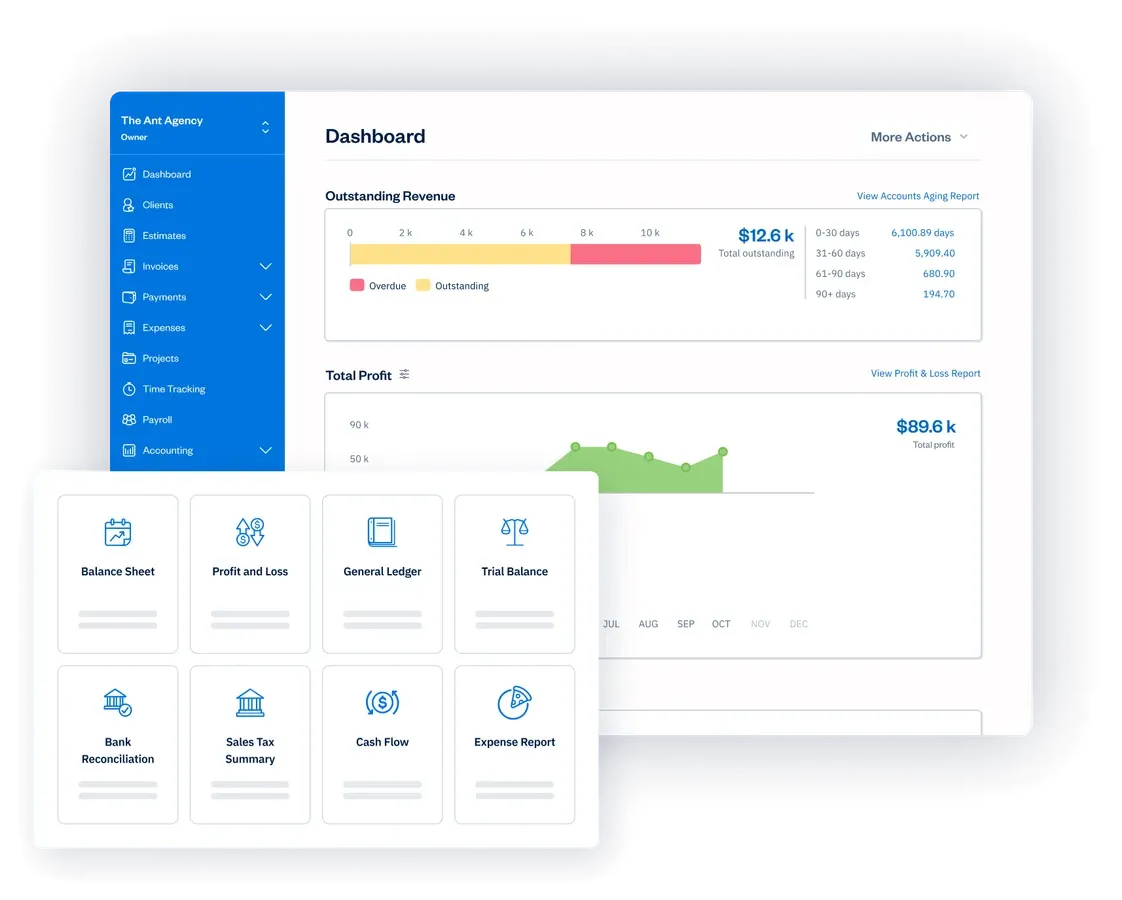 Figure 3: FreshBooks bank reconciliation interface matching live bank feed transactions with categorized expense receipts and general ledger entries.
9. Frequently Asked Questions
Yes. FreshBooks includes complete double-entry accounting features, including a General Ledger, Chart of Accounts, Trial Balance, Balance Sheet, and automated bank reconciliation compliant with standard GAAP reporting.
FreshBooks enables 1-click online payments via credit cards and ACH, automated recurring billing, and scheduled payment reminders. Data shows businesses using FreshBooks get paid an average of 18 days faster.
Yes. FreshBooks provides free, dedicated Accountant Access, allowing your CPA or bookkeeper to review your journal entries, generate tax reports, and reconcile accounts without paying for an extra seat.
Yes. Team members can track time using the desktop timer, Chrome extension, or mobile app. Logged hours can be assigned to specific projects, tasks, or billable hourly rates and automatically converted into invoice line items.
FreshBooks offers a substantially more modern, intuitive interface with superior invoice aesthetics, native project profitability, and client portal tools tailored for service businesses. QuickBooks Online is broader but more complex and clunky for service agencies.
10. Should You Choose FreshBooks or QuickBooks?
FreshBooks is the premier cloud accounting and invoicing platform for small businesses, freelancers, agencies, and professional services firms in 2026. Striking the ideal balance between intuitive simplicity and double-entry accounting depth, FreshBooks eliminates billing friction and provides crystal-clear visibility into project margins.
For service-based enterprises seeking faster payment turnarounds, beautiful client touchpoints, and rock-solid accounting governance, FreshBooks earns our highest editorial recommendation.


FreshBooks
FreshBooks is the premier cloud accounting and invoicing platform for small businesses, freelancers, agencies, and professional services firms in 2026. Striking the ideal balance between intuitive simplicity and double-entry accounting depth, FreshBooks eliminates billing friction and provides crystal-clear visibility into project margins.