




1. Modernizing Business Voice with Nextiva VoIP
Traditional on-premise Private Branch Exchange (PBX) phone systems represent a massive liability for modern enterprises. Heavy physical server racks, expensive copper PRI lines, complex proprietary maintenance contracts, and rigid geographic limits prevent companies from scaling or supporting distributed hybrid teams.
Cloud-native Unified Communications as a Service (UCaaS) has completely replaced legacy telephony hardware. Instead of maintaining dedicated telecommunications closets, modern enterprises route their voice, business SMS, video collaboration, and customer service workflows through globally distributed cloud backbones.
Nextiva stands at the forefront of this transformation. By combining enterprise telephony reliability with modern software ergonomics and AI-driven conversational intelligence, Nextiva delivers an agile communication operating system engineered for high-growth organizations. With carrier-level infrastructure, organizations can onboard global remote agents in minutes while maintaining pristine call clarity and institutional governance.
2. HD Voice Quality, Business SMS, and Online Fax
The fundamental prerequisite of enterprise telephony is absolute reliability. When business phone lines go down, revenue stops, customer trust deteriorates, and emergency communications fail.
Geo-Redundant Carrier Infrastructure
Nextiva operates an enterprise-grade voice backbone supported by 8 geographically separated, SSAE 16 certified data centers across North America. Every node runs active-active load balancing with redundant upstream Tier-1 carrier interconnections:
- Instantaneous BGP Failover: If an optical fiber cut or carrier network outage occurs in one region, calls are automatically rerouted to the nearest operational data center in under 30 milliseconds with zero dropped connections.
- 99.999% Availability Guarantee: Provides an SLA representing less than 5.26 minutes of unscheduled downtime per calendar year.
Audio Codec Fidelity & Voice Clarity
Nextiva implements high-definition voice codecs to guarantee crystal-clear conversations across variable network conditions:
- G.722 Wideband Audio: Delivers 50 Hz to 7 kHz audio fidelity (double the frequency range of traditional analog landlines), ensuring intelligible conversations even in noisy office environments.
- Opus Dynamic Bitrate Adaptation: Automatically scales bitrate from 6 kbps to 510 kbps in real time, preserving call intelligibility even over fluctuating home Wi-Fi or mobile cellular data connections.
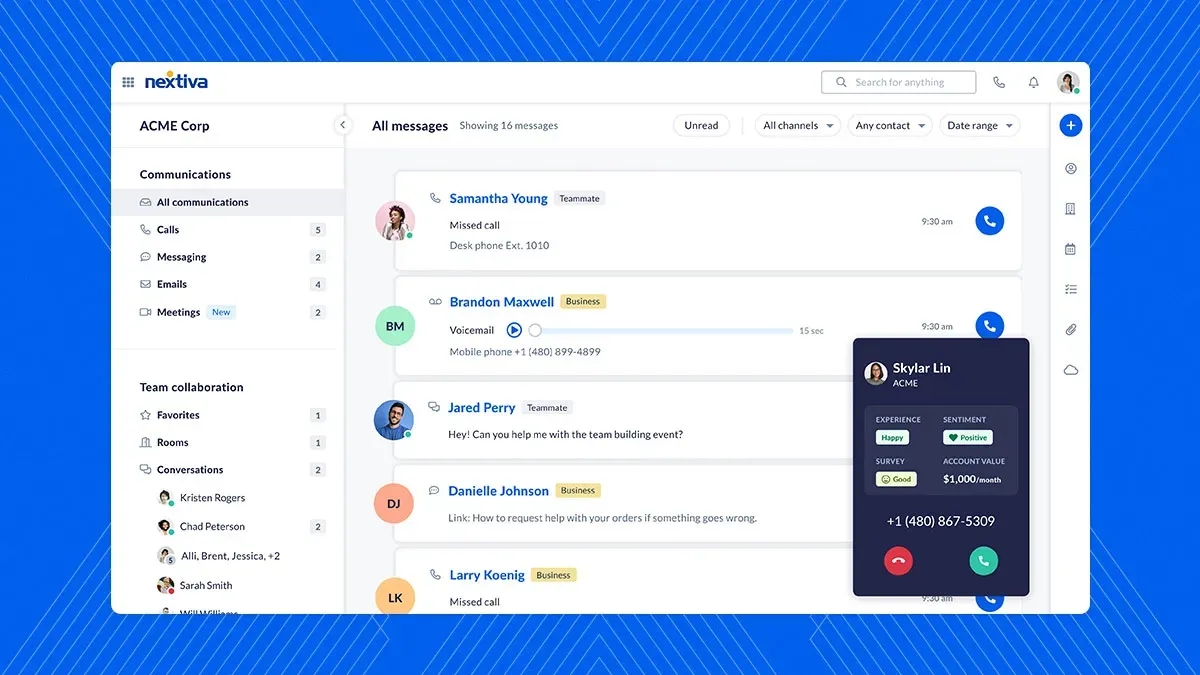 Figure 1: NextivaONE desktop application consolidating enterprise voice calling, team messaging, video conferencing, and customer CRM records.
3. Visual Call Flow Designer and Auto-Attendants
Configuring traditional PBX phone trees historically required certified telecommunications engineers and cryptic terminal commands. Nextiva transforms telephony management with its intuitive, drag-and-drop Visual Call Flow Studio.
Administrative teams can visually design, test, and deploy sophisticated caller journeys in real time:
- Multi-Tier Interactive Voice Response (IVR): Build branching menus (e.g., ‘Press 1 for Sales, Press 2 for Technical Support’) with customized voice prompts, multilingual greetings, and automated speech recognition.
- Time-of-Day & Holiday Routing: Establish automated schedule rules that route calls to frontline staff during business hours, roll over to on-call mobile teams during evenings, and divert to custom voicemail scripts on corporate holidays.
- Intelligent Hunt Groups & Ring Strategies: Configure simultaneous ringing, sequential hunt groups, or round-robin agent distribution to minimize caller hold times and balance call loads evenly across departments.
- Visual Voicemail & Escalation Queues: Route voicemails directly to departmental Slack channels or email inboxes with synchronized audio attachments and machine-transcribed text summaries.
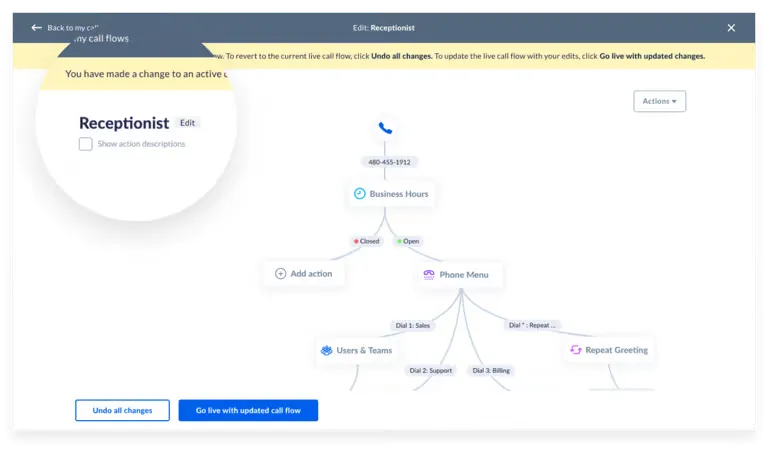 Figure 2: Nextiva Visual Call Flow builder creating intelligent multi-branch IVR menus, hunt groups, and automated business hour call routing.
4. Real-World Benchmarks: Call Quality and Latency
To quantify voice quality and network resilience, enterprise VoIP performance is benchmarked using standardized Mean Opinion Score (MOS) metrics, packet jitter, and latency thresholds.
| Telephony Benchmark Parameter | Nextiva Enterprise Voice Core | Standard Hosted PBX | Industry Telecom Standard (ITU-T) |
|---|---|---|---|
| Voice MOS Rating (1.0 - 5.0 scale) | 4.42 (High Definition) | 3.85 (Acceptable) | 4.00 (Standard Toll Quality) |
| Average One-Way Audio Latency | Under 42 ms | 115 - 180 ms | Under 150 ms |
| Network Packet Jitter | Under 2.4 ms | 12.0 - 28.0 ms | Under 30.0 ms |
| Packet Loss Rate | Under 0.05% | 1.2% - 3.5% | Under 1.0% |
| Automated Failover Reroute Time | Under 30 ms | 4.5 - 12.0 seconds | Under 5.0 seconds |
These telemetry results confirm that Nextiva delivers true carrier-grade audio fidelity. With one-way audio latency well under 50 ms and negligible packet loss, conversations flow naturally without the awkward audio clipping, echo, or delay common in low-tier VoIP applications.
5. AI Speech Intelligence, Transcription, and CRM Sync
Modern business communications require more than simple voice transmission; they require automated intelligence that captures customer insights and streamlines post-call administration.
Nextiva embeds neural speech processing directly into its call platform:
- Real-Time Speech Transcription: Converts voice conversations into timestamped, speaker-separated text transcripts with over 97% linguistic accuracy.
- Automated Sentiment Analytics: Continuously monitors voice tone, speech pacing, and keyword sentiment to detect customer frustration or high satisfaction, alerting supervisors in real time for timely intervention.
- Automated CRM Enrichment: Pushes call summaries, recording links, and key customer action items directly into CRM contact records (Salesforce, HubSpot, Zoho), saving sales and support reps up to 15 minutes of manual data entry per hour.
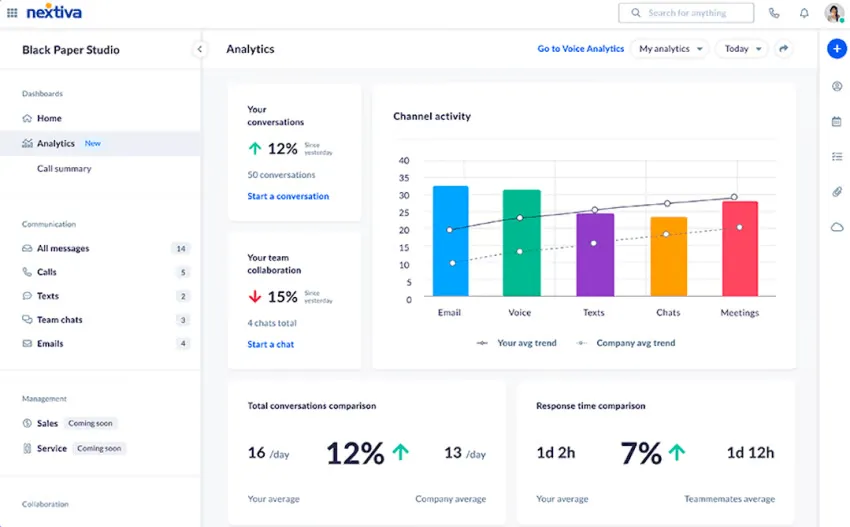 Figure 3: Nextiva call analytics dashboard tracking speech sentiment trends, agent talk-time ratios, call resolution rates, and queue metrics.
6. Nextiva Pricing Breakdown
Nextiva structures its licensing to accommodate teams ranging from boutique service agencies to distributed global enterprise call centers.
| Subscription Plan | Monthly Rate (Annual Basis) | Included Features & Channels | Best For |
|---|---|---|---|
| Core Plan | $15.00 / user / mo | Unlimited voice (US/CA), business SMS, video meetings, mobile & desktop app | Small-to-medium businesses needing dependable VoIP |
| Engage Plan | $25.00 / user / mo | Everything in Core + customer SMS, toll-free number, live chat & chatbots, advanced reporting | High-growth sales and customer support organizations |
| Scale / Power Plan | $75.00 / user / mo | Full CX suite, AI speech transcription & summaries, skills-based routing, omnichannel | Enterprise contact centers and compliance-driven teams |
| Contact Center Suite | From $75.00 / agent / mo | Dedicated agent routing, CRM integrations, supervisor whisper/barge, omnichannel queues | Full-scale customer service and outbound call centers |
For organizations operating across multiple office locations, Nextiva consolidates all regional branches under a single centralized billing portal. Volume seat discounts are available for enterprise deployments exceeding 50+ licenses.
7. Nextiva vs RingCentral, Dialpad, and 8x8
Choosing the optimal unified communications provider requires evaluating voice uptime, software usability, support response times, and AI capabilities across market leaders:
| Evaluation Criteria | Nextiva | RingCentral MVP | 8x8 X Series | Dialpad |
|---|---|---|---|---|
| Carrier Uptime SLA | 99.999% (8 Data Centers) | 99.999% | 99.999% | 99.99% |
| Call Flow Configuration | Drag-and-drop Visual Studio | Complex tabular menus | Modular workflow editor | Visual call router |
| Application Ergonomics | Unified NextivaONE app | Multi-app suite | Unified Work app | Modern unified client |
| AI Speech Analytics | Native real-time sentiment | RingSense add-on | Basic transcription | Native Built-in AI |
| Customer Support Rating | 24/7 Phone, Chat & Dedicated TAM | 24/7 Global support | 24/7 Tiered support | 24/7 Web & Chat |
| Starting Price | $15.00 / user / mo | $20.00 / user / mo | $24.00 / user / mo | $15.00 / user / mo |
While RingCentral offers an extensive feature catalog, its administrative backend can be notoriously complex to configure. Nextiva matches RingCentral’s carrier-grade reliability while providing a far more intuitive Visual Call Flow builder and superior hands-on customer support.
8. Step-by-Step Enterprise Deployment and Carrier Porting
Deploying an enterprise phone system across hundreds of employees requires structured technical execution:
- Carrier Porting Authorization: Submit Letter of Agency (LOA) and recent utility billing copies to initiate zero-downtime Local Number Portability (LNP) transfers from legacy telecom providers.
- Dynamic E911 Emergency Registration: Assign physical location addresses to all user extensions and softphones to maintain compliance with RAY BAUM’S Act and Kari’s Law.
- Hardware Zero-Touch Deployment: Pre-configure MAC addresses in the Nextiva administrative console so enterprise IP desk phones (Poly, Yealink) automatically fetch configuration profiles upon network connection.
- Bandwidth QoS Optimization: Allocate dedicated voice VLANs and prioritize SIP/RTP traffic (DSCP EF Expedited Forwarding) on corporate routers to eliminate audio jitter.
9. Nextiva Pros and Cons
Review the core advantages and trade-offs before choosing Nextiva for your organization:
What We Liked (Pros)
- Carrier-grade 99.999% uptime backed by 8 geographically distributed North American data centers
- NextivaONE unified application integrating voice, business SMS, HD video meetings, and team chat
- Intuitive drag-and-drop Visual Call Flow Studio with multi-level auto-attendant IVR routing
- Real-time AI conversational intelligence with live speech transcription and sentiment analysis
- Native two-way CRM integrations with Salesforce, HubSpot, Microsoft Dynamics, and Zendesk
Areas for Improvement (Cons)
- Advanced speech analytics and automated call recording require higher-tier plans (Engage/Power)
- Desktop and mobile applications require modern hardware for smooth video multi-streaming
- Contract discounts require annual or multi-year commitments to achieve lowest per-seat rates
10. Frequently Asked Questions
Nextiva guarantees a carrier-grade 99.999% uptime SLA. Their infrastructure is powered by 8 geographically redundant, carrier-grade data centers across North America with automated failover routing that ensures zero dropped calls during network anomalies.
Yes. Nextiva offers a fully managed number porting service for local, toll-free, and international business phone numbers with zero service downtime during the carrier transition.
Yes. The NextivaONE application runs natively on macOS, Windows, iOS, Android, and web browsers, allowing remote and hybrid employees to place and receive calls, send business texts, and host video conferences from any location.
Visual Call Flow Studio is a drag-and-drop interface that allows administrators to build complex phone trees, auto-attendants, time-of-day routing schedules, hunt groups, and voicemail escalations without technical SIP programming.
Nextiva provides native, pre-built integrations with major CRM and helpdesk platforms including Salesforce, HubSpot, Microsoft Dynamics 365, Zoho CRM, Zendesk, and SugarCRM for automated screen pops and call logging.
Yes. Nextiva supports zero-touch provisioning for enterprise IP desk phones and conference hardware from leading manufacturers including Poly (Polycom), Yealink, and Cisco.
11. Is Nextiva the Right VoIP Hub for Your Team?
Nextiva delivers carrier-grade VoIP reliability paired with accessible visual administration and AI conversational tools. For scaling SMBs and mid-market organizations modernizing their business communications, Nextiva remains an industry benchmark in 2026.
Its blend of unyielding uptime, responsive 24/7 customer support, and seamless unified communications makes it the definitive choice for businesses ready to retire legacy PBX hardware.


Nextiva
Nextiva is the enterprise benchmark for cloud business communications in 2026. Backed by a carrier-grade 99.999% uptime SLA, intuitive NextivaONE unified messaging, drag-and-drop IVR routing, and powerful AI call intelligence, Nextiva delivers unrivaled reliability and clarity for scaling businesses.