




1. Modern Business Calling with Dialpad AI Telephony
Traditional business phone systems treated voice communication as an isolated, hardware-bound utility. Legacy on-premise PBX racks and early cloud VoIP softphones simply mirrored physical desk phones without capturing conversational intelligence. Dialpad redefines this dynamic by embedding artificial intelligence directly into the voice stream, transforming standard phone calls into structured, searchable data.
Founded by Craig Walker, the telecommunications pioneer behind GrandCentral and Google Voice, the platform was designed from inception as an AI-first cloud communications suite. It consolidates four core communication channels into a single interface:
- Business VoIP Telephony: High-definition voice calling with dynamic call routing, visual voicemail, and automated recording.
- Unified Team Messaging: Direct SMS, MMS, and internal departmental chat channels with contact sync.
- HD Video Conferencing: Browser-friendly video meetings featuring live closed captioning and agenda tracking.
- Digital Contact Center: Omnichannel customer engagement queues with real-time agent assist tools.
By eliminating the operational gap between external telephony and internal collaboration, the platform enables modern teams to maintain enterprise-grade communication standards across any device.
When evaluating cloud telephony in 2026, organizations frequently benchmark this platform against collaborative tools like Quo and carrier-grade systems like Nextiva. Assessing its true commercial value requires exploring its network architecture, proprietary AI models, and real-world team workflows.
Key takeaway: Modern business conversations should not disappear once a call ends. Dialpad captures every spoken interaction as structured business intelligence, automatically generating searchable transcripts, action items, and CRM updates in real time.
2. Global Voice Infrastructure, WebRTC Codecs, and Call Flip
The foundational requirement of any business phone system is unyielding audio reliability. When customer calls suffer from jitter, robotic distortion, or dropped packets, sophisticated software features lose their value.
The platform solves this through a dual-cloud global architecture deployed across Google Cloud Platform and Amazon Web Services, directly interconnected with Tier-1 telecommunications carriers worldwide.
Dual-Cloud Geo-Redundancy and Voice Pipeline
The provider operates dedicated Points of Presence (PoPs) in major financial hubs across North America, Europe, Asia, and Australasia. Audio streams utilize WebRTC protocols coupled with dynamic Opus audio codecs that scale between 6 kbps and 510 kbps in real time.
This adaptive bandwidth management preserves high-definition voice intelligibility even over fluctuating cellular networks or crowded office Wi-Fi. Furthermore, automated BGP routing shifts active media sessions to alternate transit paths in under 50 milliseconds during upstream carrier anomalies.
| Telemetry Benchmark Parameter | Dialpad Cloud Engine | Legacy Enterprise On-Premise PBX | Standard Telecom Acceptable Threshold |
|---|---|---|---|
| SIP and WebRTC Connection Handshake | Under 40 ms | 220 to 550 ms | Under 150 ms |
| End-to-End Voice Round-Trip Latency | Under 65 ms | 120 to 240 ms | Under 150 ms (ITU-T G.114 Standard) |
| Mean Opinion Score (MOS Audio Quality) | 4.42 / 5.0 (HD Opus) | 3.60 / 5.0 (G.711u) | 4.00 or higher (Toll Quality) |
| Device Call Flip Transfer Speed | Under 180 ms (Zero Dropout) | Manual transfer required | Under 1,000 ms |
| AI Transcription Processing Latency | Under 800 ms (Near Real-Time) | Not Available | Under 2,500 ms |
Call Flip Technology: Frictionless Device Mobility
Modern professionals frequently start calls on desktop computers, step away to travel, and resume work on mobile devices. Traditional VoIP systems require redialing or executing clumsy conference transfers that disrupt conversations.
Call Flip solves this by transferring active calls between desktop, mobile, and IP desk phones with a single tap. The audio stream migrates in under 180 milliseconds without muting microphones or dropping connections. During this transition, the media layer continuously negotiates Opus bitrate parameters to prevent audible clicks or stream renegotiation delays.
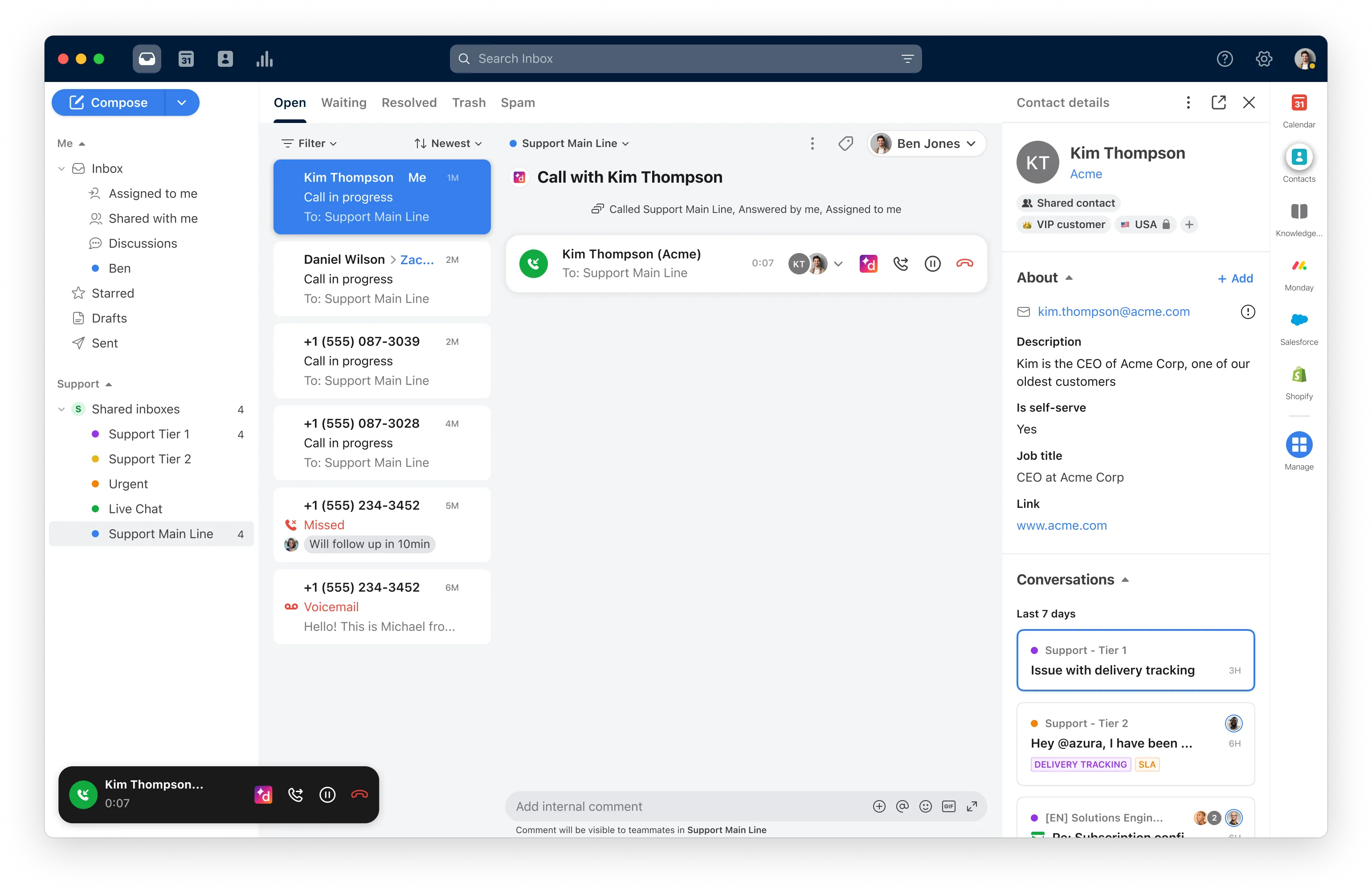 Figure 1: Dialpad unified desktop application consolidating business voice calling, team messaging, video meetings, and real-time contact history.
Zero-Touch Hardware Provisioning
While software apps drive daily usage, organizations often deploy physical hardware for front desks, warehouses, or executive offices. The platform supports zero-touch provisioning for certified enterprise IP desk phones from Poly, Yealink, and Cisco:
- MAC Address Binding: Administrators assign the hardware MAC address to an employee profile in the admin console.
- Network Bootstrapping: Connected via Power over Ethernet, the phone automatically fetches configuration profiles from cloud servers.
- Profile Synchronization: The device flashes secure firmware, registers local extensions, and connects to encrypted gateways without manual technician programming.
3. DialpadGPT Engine: Live Transcription and Automated Recaps
The defining technological differentiator of Dialpad is DialpadGPT. While competing VoIP platforms rely on generic public APIs like OpenAI Whisper or Google Cloud Speech-to-Text, this platform invested years building its own proprietary Large Language Model (LLM) tailored specifically for conversational enterprise audio.
The Mechanics of DialpadGPT
DialpadGPT was trained on more than six billion minutes of real-world business telephone conversations across sales negotiations, technical support triage, executive interviews, and customer billing inquiries. Generic language models frequently struggle with telephony audio due to background ambient noise, variable microphone frequencies, industry jargon, and multi-speaker overlapping dialogue.
Because DialpadGPT runs directly inside the telecom infrastructure, audio processing occurs with ultra-low latency:
- Live Speech-to-Text Transcription: Spoken words appear as written text on the agent’s screen in under 800 milliseconds, attributing statements to specific speakers with over 97% linguistic accuracy.
- Specialized Vocabulary and Custom Dictionaries: Administrators can train the recognition engine on proprietary product names, competitor brands, medical acronyms, or internal corporate terminology to eliminate transcription misinterpretations.
- Automated PII Redaction: The engine automatically detects and masks Sensitive Personally Identifiable Information (PII), such as credit card numbers, social security digits, and banking credentials, ensuring strict PCI-DSS and HIPAA compliance.
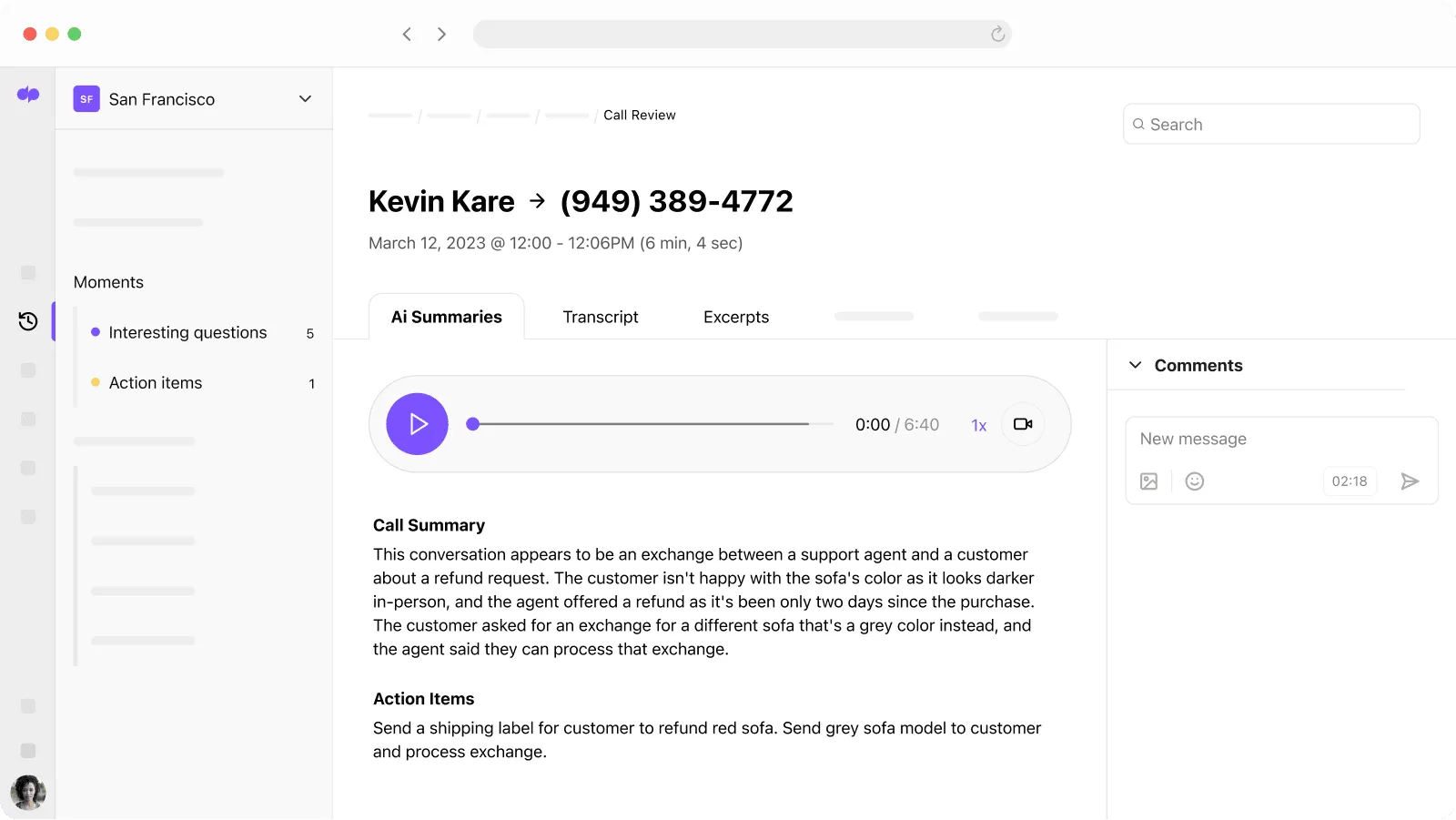 Figure 2: DialpadGPT conversational engine generating real-time speech-to-text transcription, automated executive summaries, and action item checklists.
Automated Post-Call Recaps and Action Items
Post-call administrative overhead represents one of the largest drains on sales and support productivity. Customer representatives spend an estimated 10 to 15 minutes following every comprehensive call typing notes into CRM databases, drafting follow-up emails, and organizing action items.
The platform completely automates this workflow:
- Executive Call Summary: DialpadGPT generates a succinct, two-to-three sentence paragraph summarizing the central theme, agreed conclusions, and emotional tone of the discussion.
- Extracted Action Item Checklists: The system isolates specific commitments made during the call (for example, “Sarah will send the revised enterprise proposal by Thursday at 3 PM” or “Customer agreed to schedule a security review next Tuesday”).
- Automated CRM Timeline Synchronization: The transcript, call recording audio, executive recap, and extracted action items push automatically into Salesforce, HubSpot, or Zendesk contact records without requiring rep manual data entry.
4. Real-Time Assist Cards and Predictive AI CSAT Analytics
Beyond passive transcription and post-call summaries, the conversational engine actively guides frontline customer representatives during live phone calls. Frontline agents frequently encounter complex product questions, shifting pricing tiers, and aggressive competitor claims.
Expecting staff to memorize extensive wikis or pause calls to search documentation creates awkward pauses and damages caller trust. The platform addresses this through dynamic in-call coaching and continuous sentiment monitoring.
Real-Time Assist (RTA) Coaching Cards
Dynamic Real-Time Assist (RTA) cards deliver contextual answers directly to agent screens during live conversations:
- Keyword Trigger Detection: Administrators define rule triggers based on spoken keywords, such as refund policies, technical integrations, or competitor comparisons.
- Sub-Second Card Delivery: When the voice engine detects trigger words spoken by either party, a compact guidance card appears on screen in under one second.
- Actionable Call Guidance: Each card provides bulleted objection scripts, approved discount authorizations, or troubleshooting steps to accelerate first-call resolution.
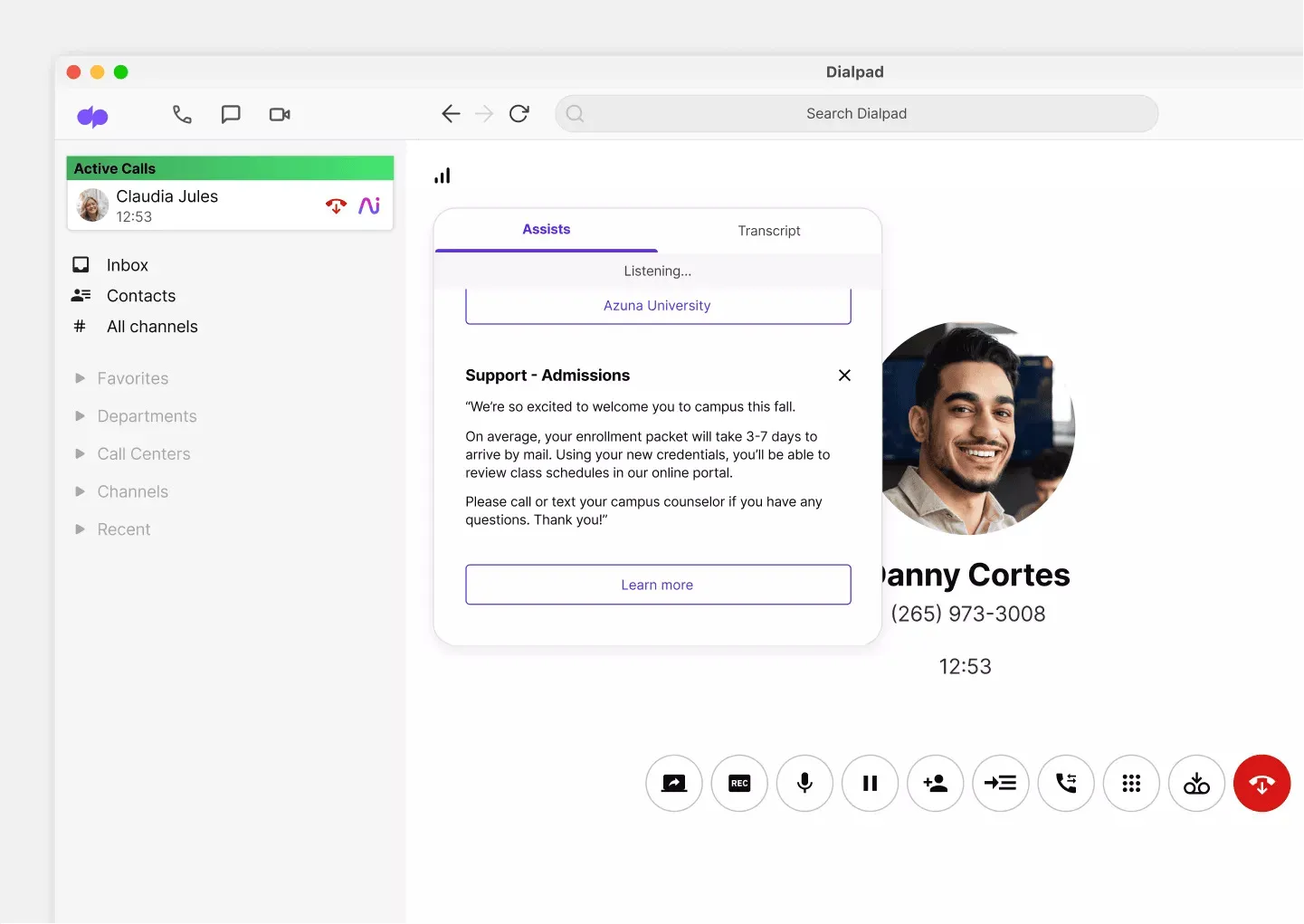 Figure 3: Dialpad Real-Time Assist (RTA) cards popping up during a live conversation alongside supervisor sentiment tracking.
Live Sentiment Analysis and Supervisor Interventions
The platform continuously evaluates call sentiment using acoustic tone metrics, speech cadence, and semantic vocabulary cues. Live sentiment indicators update in real time on central supervisor dashboards. When a conversation trends negative, team managers can intervene instantly using three supervisor modes:
- Silent Monitor: Supervisors listen to the live audio stream without alerting either participant.
- Private Whisper: Managers speak directly into the agent headset to provide coaching without caller awareness.
- Active Barge: Leaders join the conversation directly to de-escalate high-stakes customer complaints.
Predictive AI CSAT Scoring
Traditional Customer Satisfaction (CSAT) surveys suffer from low response rates, capturing only 2% to 5% of completed interactions. This creates biased datasets skewed toward extreme customer experiences. Predictive AI CSAT solves this limitation by evaluating linguistic indicators, vocal stress markers, and resolution phrasing across 100% of completed calls, scoring satisfaction on a 1-to-5 scale without survey fatigue. By aggregating these predictive ratings, supervisors can pinpoint coaching opportunities, detect systemic product issues early, and recognize top-performing representatives without relying on incomplete customer surveys.
Operational insight: Relying on traditional post-call survey response rates gives executive leadership a distorted view of customer satisfaction. Predictive AI CSAT scores 100% of customer calls automatically, providing statistically valid quality metrics across the entire organization.
5. Visual Auto-Attendant IVR and Intelligent Call Routing
An enterprise phone system must project a polished, highly organized corporate image to outside callers while routing inbound inquiries to the appropriate internal specialists with minimal hold friction. The administrative console delivers an intuitive, visual environment for orchestrating complex caller journeys.
Multi-Level Interactive Voice Response (IVR)
Administrators can design structured multi-tier phone trees without writing SIP scripts or engaging third-party telecom consultants:
- Branching Call Menus: Configure clean numeric menus (for example, “Press 1 for Sales Inquiries, Press 2 for Technical Billing Support, Press 0 for the Operator”).
- Flexible Voice Prompts: Upload studio-recorded MP3 audio files, record custom greetings through a smartphone or headset, or generate crystal-clear synthetic voice prompts using neural text-to-speech engines.
- Dynamic Dial-by-Name Directories: Allow callers to find specific staff members by spelling the first or last letters of an employee’s name on their telephone keypad.
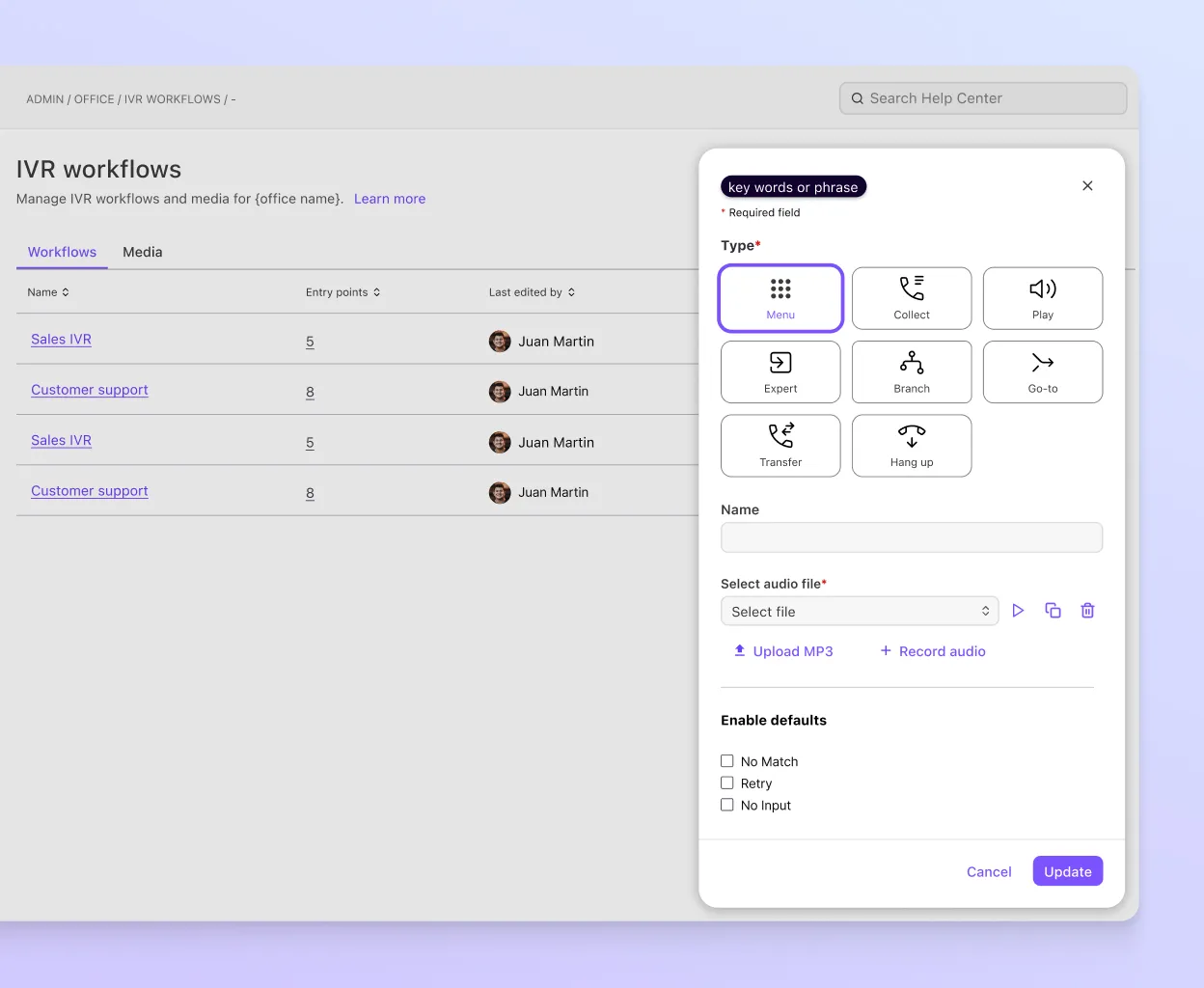 Figure 4: Dialpad visual call routing interface for configuring multi-branch IVR phone trees, ring groups, and custom business hours.
Business Hours, Holiday Schedules, and Overflow Routing
Commercial organizations require distinct routing behaviors based on operational availability. The platform provides comprehensive scheduling rules:
- Standard Working Hours: Inbound calls route directly to department ring groups or front-desk receptionists.
- After-Hours and Weekend Schedules: Calls route automatically to on-call mobile rotations, emergency answering services, or dedicated voicemail boxes with automated SMS notifications sent to department managers.
- Holiday Override Calendars: Pre-program annual corporate holidays months in advance with custom informational greetings (such as holiday operating schedules or emergency contact numbers).
- Queue Overflow Protection: When call wait times exceed a predefined threshold (such as 90 seconds) or queue depth surpasses 10 callers, the system automatically rolls excess callers to backup overflow groups or offers automated virtual queue callbacks.
6. Dialpad Pricing Breakdown and Hidden Cost Analysis
Selecting a cloud communications platform requires evaluating both base license fees and operational add-ons. Dialpad structures its pricing across its core phone system (Dialpad Connect), specialized contact center software, and conversational AI credits. Understanding these tiers helps organizations balance software expenditure with communication requirements.
Dialpad Connect Subscription Plans
Dialpad Connect serves as the primary unified communications suite for corporate users:
| Subscription Tier | Annual Rate (Billed Annually) | Monthly Rate (Billed Monthly) | Minimum Seat Requirement | Included Features and Service Capabilities |
|---|---|---|---|---|
| 14-Day Free Trial | $0.00 | $0.00 | 1 User | Complete platform evaluation, voice calls, SMS, video, and DialpadGPT transcription |
| Standard Plan | $15.00 / user / mo | $27.00 / user / mo | 1 User (No minimum) | Unlimited domestic calling (US/CA), SMS/MMS, DialpadGPT recaps, Google/M365 sync, web support |
| Pro Plan | $25.00 / user / mo | $35.00 / user / mo | 3 Users Minimum | Everything in Standard, 24/7 phone support, Salesforce/HubSpot sync, international SMS, multi-office |
| Enterprise Plan | Custom Pricing | Custom Pricing | 100 Users Minimum | Everything in Pro, 100% uptime SLA, dedicated technical account manager, custom integrations, SAML SSO |
Specialized Products: Dialpad Support, Sell, and AI Agents
For customer support hubs and outbound sales teams, the vendor provides dedicated application tiers:
- Dialpad Support (AI Contact Center): Essentials tier starts at $80 per user monthly, Advanced is $115, and Premium is $150. It provides omnichannel routing, automated call distribution, supervisor coaching, and predictive CSAT.
- Dialpad Sell (Outbound Sales Dialer): Essentials begins at $39 per user monthly, Advanced is $95, and Premium is $150. Features include automated power dialers, voicemail drop, and objection handling cards.
- Dialpad AI Agents: Billed through conversation-based credits consumed only when autonomous agents resolve customer inquiries or trigger database workflows.
Critical Cost Considerations and Feature Gates
Buyers should consider three structural pricing factors before committing:
- Annual Contract Savings: Monthly billing adds a 40% to 80% surcharge, increasing the Standard plan from $15 to $27 per seat. Annual commitments offer significant software cost savings.
- Seat Minimum Constraints: The Pro plan requires a minimum of three user licenses. Solo founders or pairs needing Salesforce sync or phone support must fund three seats.
- Carrier A2P 10DLC Registration: Telecommunications carriers require registration fees for business SMS and MMS traffic to prevent spam filtering. The vendor passes these mandatory carrier pass-through charges directly to customers alongside monthly invoicing. In addition, organizations must submit brand verification details to maintain optimal messaging throughput across major US mobile networks.
7. Dialpad vs Quo, Nextiva, and RingCentral
Understanding where this platform fits within the broader business communications landscape requires evaluating it directly against its primary commercial alternatives: Quo, Nextiva, and RingCentral.
For teams specifically weighing collaborative shared phone lines against AI-native transcription, our comprehensive Quo vs Dialpad comparison provides a granular head-to-head analysis of feature workflows and team economics.
| Evaluation Criterion | Dialpad Connect | Quo (OpenPhone) | Nextiva | RingCentral MVP |
|---|---|---|---|---|
| Primary Architectural Focus | AI-Native Telephony & UCaaS | Collaborative Shared Team Inboxes | Carrier-Grade Enterprise VoIP | Traditional PBX Cloud Migration |
| Proprietary Voice AI Engine | DialpadGPT (In-House LLM) | Proprietary Speech Models | Conversational Speech Analytics | RingSense AI (Add-On Tier) |
| Real-Time Agent Guidance | Dynamic RTA Battlecards | Not Available | Basic Supervisor Whisper | Basic Script Guidance |
| Predictive Satisfaction (CSAT) | Automated 100% Call Scoring | Not Available | Post-Call Survey Routing | Survey-Based Add-On |
| Multiplayer Team Inboxes | Call groups and shared lines | Threaded internal @mentions | Department hunt queues | Shared line appearances |
| Uptime Availability SLA | 99.99% (100% on Enterprise) | 99.9% Standard | 99.999% (Five Nines) | 99.999% (Five Nines) |
| Customer Support Access | Web/Chat on Standard; 24/7 on Pro | Email & Chat Support | 24/7 Phone & Chat on all plans | 24/7 Phone & Chat on all plans |
| Starting Price (Annual Basis) | $15.00 / user / mo | $15.00 / user / mo | $15.00 / user / mo | $20.00 / user / mo |
Comparative Analysis: Choosing the Right Platform
Each communication platform serves a distinct operational profile:
- Dialpad vs Quo: Quo is tailored specifically for high-velocity startups, boutique agencies, and distributed remote teams that prioritize transparent collaboration. Quo treats phone numbers like collaborative Slack channels where multiple team members can view SMS threads, leave internal private comments with @mentions, and share visibility. In contrast, Dialpad is far more powerful for teams requiring deep artificial intelligence, live speech transcription, supervisor coaching cards, and scalable contact center queues.
- Dialpad vs Nextiva: Nextiva remains the undisputed industry leader for carrier-grade telephony reliability, backed by eight redundant North American data centers and a guaranteed 99.999% uptime SLA. Nextiva also provides superior live telephone customer support across every plan tier. However, Dialpad provides a more modern software interface and superior built-in artificial intelligence transcription without requiring expensive enterprise add-on tiers.
- Dialpad vs RingCentral: RingCentral is the legacy titan of cloud UCaaS, boasting more than 300 pre-built integrations and thousands of complex PBX configuration settings. However, RingCentral’s administrative interface is notoriously cluttered and complex to manage. Dialpad delivers a much cleaner, more accessible software experience that can be deployed across hundreds of users in hours rather than weeks.
8. Ecosystem Integrations: CRM Workflows and Developer APIs
A modern business phone system cannot function as an isolated communication silo. Spoken conversations and customer text exchanges must synchronize seamlessly with an organization’s central customer database, ticketing system, and productivity software stack.
Native Enterprise CRM Synchronization
The application provides native, two-way integrations with leading enterprise Customer Relationship Management (CRM) platforms:
- Salesforce Integration: Operates directly inside the Salesforce Lightning interface via an integrated Computer Telephony Integration (CTI) softphone dialer. Features include single-click click-to-dial, automatic contact record screen pops upon inbound calls, automated call duration logging, and automatic transcript and AI recap synchronization into Salesforce Activity Histories.
- HubSpot Integration: Automatically logs incoming and outgoing calls, voicemail audio recordings, and SMS message histories into HubSpot contact and company timelines. Reps can trigger automated HubSpot workflow sequences when specific call outcomes or sentiment triggers occur.
- Zendesk Support Integration: Automatically generates support tickets upon incoming caller connection, matches existing customer ticket histories based on caller ID, and embeds call recordings and DialpadGPT transcripts directly into internal ticket comments.
Productivity Suite Integration: Google Workspace and Microsoft 365
The softphone connects directly with standard enterprise workplace suites:
- Google Workspace: Synchronizes corporate contacts from Google People API, displays upcoming Google Calendar meetings directly inside the desktop interface, and enables click-to-call functionality from Gmail.
- Microsoft 365 and Microsoft Teams: The service offers direct routing integrations for Microsoft Teams, enabling enterprise employees to place and receive external PSTN voice calls using reliable carrier routing directly inside the Microsoft Teams desktop and mobile interface.
Developer APIs and Webhooks
For organizations with bespoke software environments or proprietary internal dashboards, the architecture exposes a comprehensive suite of RESTful APIs and real-time Webhooks:
- Call Event Webhooks: Trigger automated downstream webhooks when calls initiate, answer, transfer, or terminate, transmitting metadata payloads containing duration, caller identifiers, and call disposition tags.
- Transcript and Analytics APIs: Programmatically export structured JSON transcripts, sentiment scores, and audio recording files into enterprise data lakes (such as Snowflake, Amazon S3, or Google BigQuery) for advanced business intelligence modeling.
9. Dialpad Pros and Cons
Review the primary operational strengths and structural limitations before adopting Dialpad for your organization:
What We Liked (Pros)
- Proprietary DialpadGPT architecture processes conversational voice data with ultra-low latency and zero third-party API lag
- Dynamic Real-Time Assist cards significantly reduce agent onboarding time and improve call resolution rates
- Automated post-call recaps and action item summaries eliminate manual CRM note-taking for sales and support reps
- Call Flip capability transitions live conversations between computer, smartphone, and desk phone without interruption
- Affordable entry-level pricing of $15 per user per month includes unlimited domestic calling and full AI transcription
Areas for Improvement (Cons)
- Essential CRM integrations with Salesforce and HubSpot require the Pro plan alongside a three-seat minimum commitment
- Round-the-clock telephone customer support is gated behind higher pricing tiers, leaving entry users with digital support
- Steep pricing increase for month-to-month contracts compared to annual commitments penalizes short-term deployments
10. Frequently Asked Questions
Dialpad uses a proprietary speech recognition model called DialpadGPT that processes audio streams directly within the telecom pipeline. During any live conversation, the system transcribes speech in real time with speaker attribution, generates automated post-call summaries, and extracts action items without requiring third-party cloud services or causing audio delay.
Yes. Dialpad provides a guided number porting process for local, toll-free, and international business phone numbers with zero service disruption. Administrators submit a Letter of Agency through the admin portal, and Dialpad coordinates carrier transfers while your existing phone numbers remain active until the porting cutover completes.
Dialpad Connect is the unified business phone system providing voice, video, and messaging. Dialpad Support is a specialized inbound contact center platform with queue management, live supervisor coaching, and predictive CSAT. Dialpad Sell adds automated power dialers, CRM integrations, and real-time objection handling cards for outbound sales teams.
No. Dialpad operates primarily as a cloud application on macOS, Windows, iOS, Android, and modern web browsers. However, organizations requiring physical hardware can provision certified SIP desk phones and conference devices from Poly, Yealink, and Cisco using Dialpad's zero-touch administrative provisioning portal with standard network connectivity.
The Standard plan has no minimum user requirement, making it accessible for single-seat entrepreneurs and small businesses. However, the Pro plan requires a minimum of three user licenses, while the Enterprise plan typically requires a minimum commitment of one hundred seats alongside annual contract terms and custom enterprise onboarding.
Dialpad provides an automated compliance wizard inside the administrative console to register your brand and messaging campaigns with The Campaign Registry. This registration ensures your business text messages comply with major US telecommunications carriers, prevent carrier spam filtering, and maintain high delivery rates for customer-facing communication campaigns.
11. Final Verdict: Is Dialpad Worth It in 2026?
Dialpad represents a generational leap forward in business telephony by successfully embedding artificial intelligence into the core telecommunications pipeline. Rather than treating telephone calls as disposable audio sessions, the platform transforms every customer interaction into searchable, structured organizational intelligence.
For modern sales organizations, customer service teams, and distributed remote companies that depend heavily on phone communications, the software delivers measurable productivity gains. The combination of DialpadGPT live transcription, automated action item extraction, dynamic Real-Time Assist cards, and frictionless Call Flip hardware transitions eliminates hours of administrative friction every week.
While small businesses must navigate the three-seat minimum requirement on the Pro plan to unlock advanced CRM integrations and 24/7 phone support, the platform’s core Standard plan remains one of the highest-value unified communications offerings available. Dialpad earns our definitive recommendation as the premier AI-powered cloud business phone platform in 2026.


Dialpad
Dialpad sets the modern benchmark for AI-driven enterprise communications in 2026. Powered by proprietary DialpadGPT voice models, real-time coaching cards, automated sentiment scoring, and seamless device handoffs, it delivers exceptional operational productivity for customer-facing teams.