





1. Why Unraid Outperforms Traditional RAID for Home Servers
Building a Network Attached Storage server often forces homelabbers into the rigid economics of traditional RAID. Conventional architectures like hardware RAID 5 or ZFS RAIDZ demand identical drive capacities upfront, locking disks into permanent multi-drive stripes.
For residential media collectors, this creates an expensive obstacle. Users often accumulate mismatched 4TB, 8TB, and 14TB drives that cannot be merged into standard arrays without wasting capacity.
Unraid eliminates striping in favor of independent file systems united under a single user share, protected by dedicated parity drives.
The Core Philosophy: Unraid treats storage as an evolving collection of individual disks. You can mix arbitrary drive sizes, expand one disk at a time, and protect data without risking pool-wide collapse.
2. Core Architecture: Parity Protection and Independent Disks
Traditional RAID arrays stripe file fragments across all member disks. If hardware failures exceed parity limits, every file is lost because no single disk holds complete data.
Unraid preserves intact files on individual physical disks formatted with XFS, Btrfs, or ZFS.
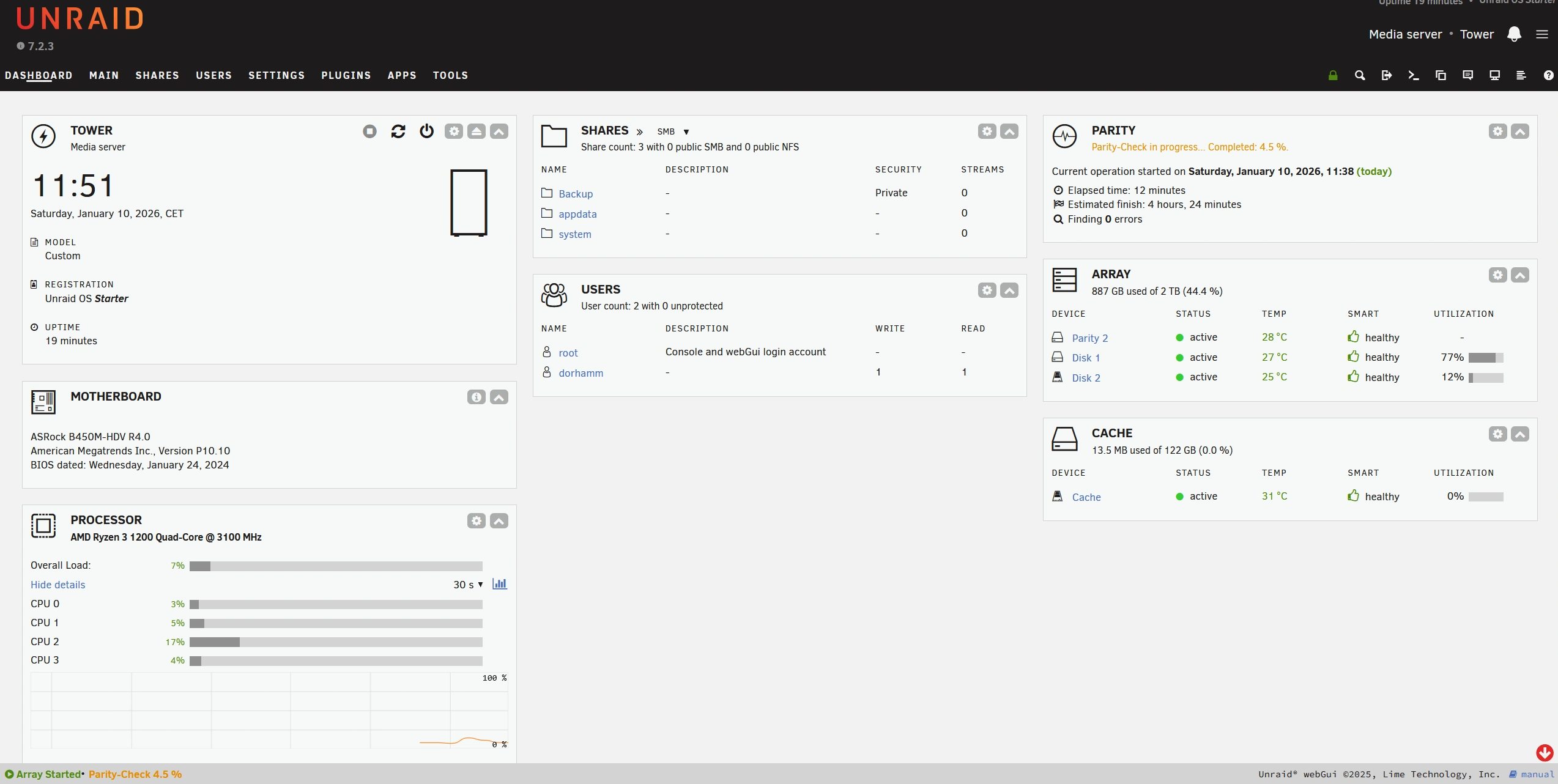
Parity Math and Physical Disk Independence
Unraid dedicates one or two drives to parity. In single-parity mode, real-time XOR calculations generate the parity bit. If a data drive fails, Unraid reconstructs its contents on the fly by comparing surviving disks against the parity drive.
The parity disk must equal or exceed your largest data drive, with an optional second drive adding Reed-Solomon protection. Exceeding parity limits only affects the failed physical disks; surviving disks remain readable on any Linux system.
3. Tiered Storage: Cache Pools and the Mover Utility
Because independent disk architecture calculates real-time parity without striping, direct mechanical array writes require a read-modify-write cycle, limiting speeds to roughly 40MB/s to 60MB/s.
Lime Technology overcomes this through tiered caching powered by SSDs and the Mover utility.
High-Speed Ingestion Pools and the Mover
Unraid routes incoming network traffic to dedicated Cache Pools constructed with NVMe or SATA SSDs, absorbing files at multi-gigabit wire speed.
The Mover utility coordinates background data transfers based on user share rules:
- Cache to Array: New files land on fast flash storage; the scheduled Mover migrates aging data to mechanical disks during off-peak hours.
- Array to Cache: Application directories, VM disks, and Docker containers stay permanently on NVMe for maximum responsiveness.
- Cache Only: Transient downloads and scratch directories remain strictly on solid-state media.
4. Modern Upgrades in Unraid 7: Native ZFS and Hybrid Storage Pools
Historically, Unraid lacked built-in support for enterprise ZFS pools and required an active parity array even for all-flash setups. Unraid 7 modernized the platform by introducing native ZFS pool integration, foreign pool importation, and array-less configurations.
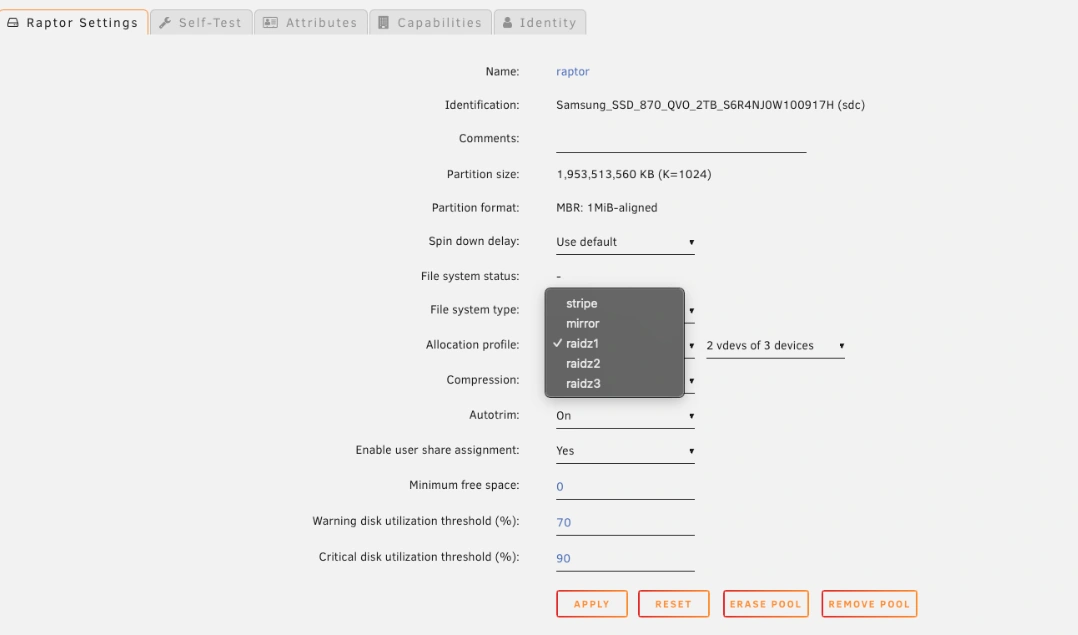
Native ZFS Pools and All-Flash Configurations
Unraid treats ZFS as a first-class file system alongside XFS and Btrfs. Users can configure multi-disk ZFS pools directly from the WebGUI, unlocking block-level checksums, transparent compression, and snapshot replication. Existing ZFS pools from TrueNAS or Proxmox import seamlessly.
Unraid 7 also eliminates the mandatory array requirement. Builders can assemble ultra-compact, silent all-flash servers running entirely on NVMe ZFS pools without installing mechanical hard drives.
5. Docker Deployment and Community Applications
While flexible storage forms the foundation of Unraid, containerization makes it an exceptional all-in-one home server. Standard Linux Docker management requires terminal sessions and complex compose syntax. Unraid simplifies this through its Community Applications store.
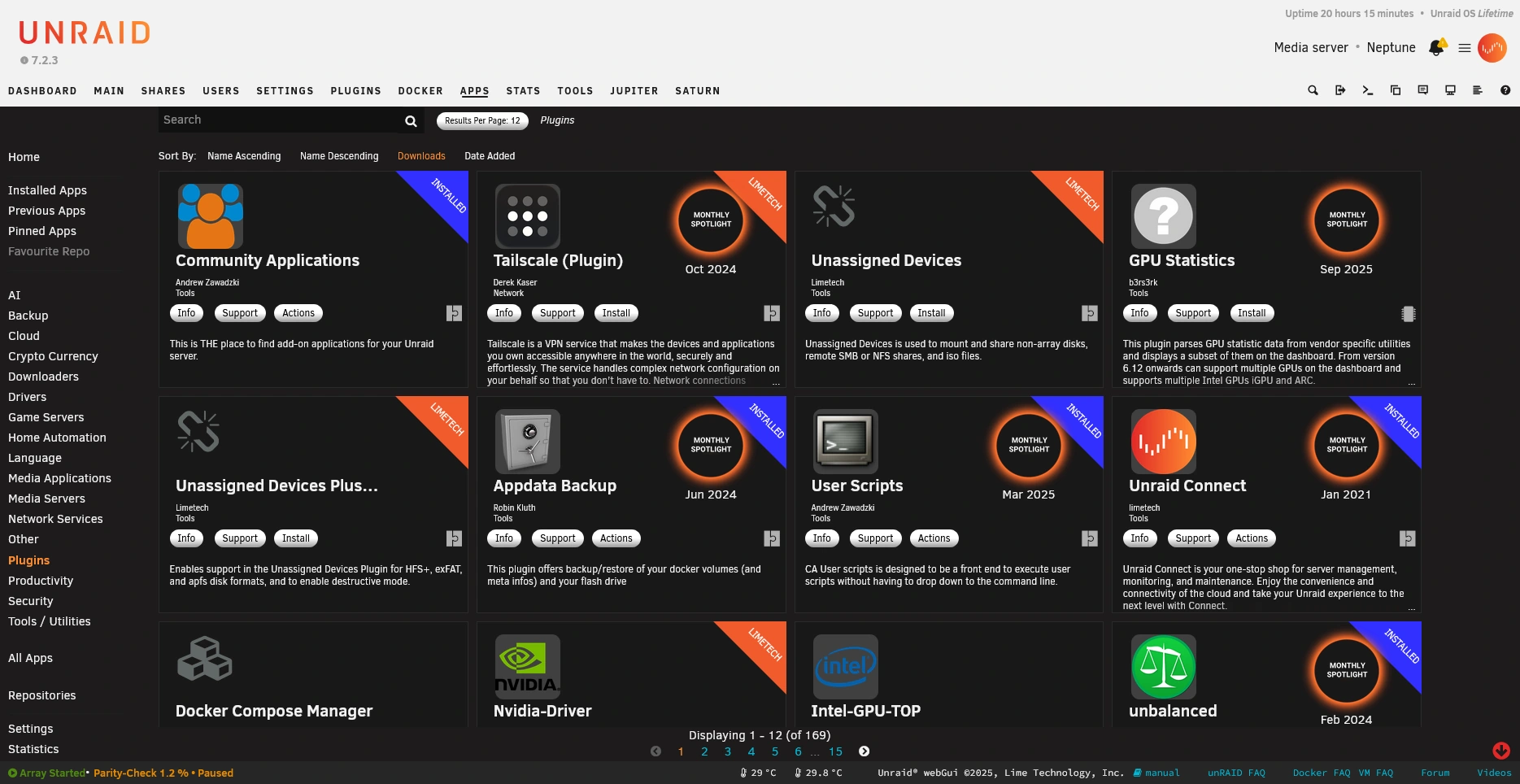
The Community Applications Store and App Management
Community Applications provides a searchable catalog of over 1,500 pre-configured Docker templates. Deploying applications like Plex, Jellyfin, Nextcloud, or Home Assistant takes just one click.
Key advantages include dedicated appdata paths on NVMe storage, custom network routing with macvlan or ipvlan drivers, and automated update schedules.
Enabling GPU transcoding is equally seamless. Intel QuickSync works out of the box, while the official NVIDIA Driver plugin passes GPU identifiers directly into Plex or Jellyfin without complex terminal flags.
6. KVM Virtualization and Hardware Passthrough
Beyond containerization, Unraid features a virtual machine hypervisor powered by Linux KVM and QEMU. While not intended for multi-node enterprise clusters, it excels at hosting desktop environments on consumer hardware.
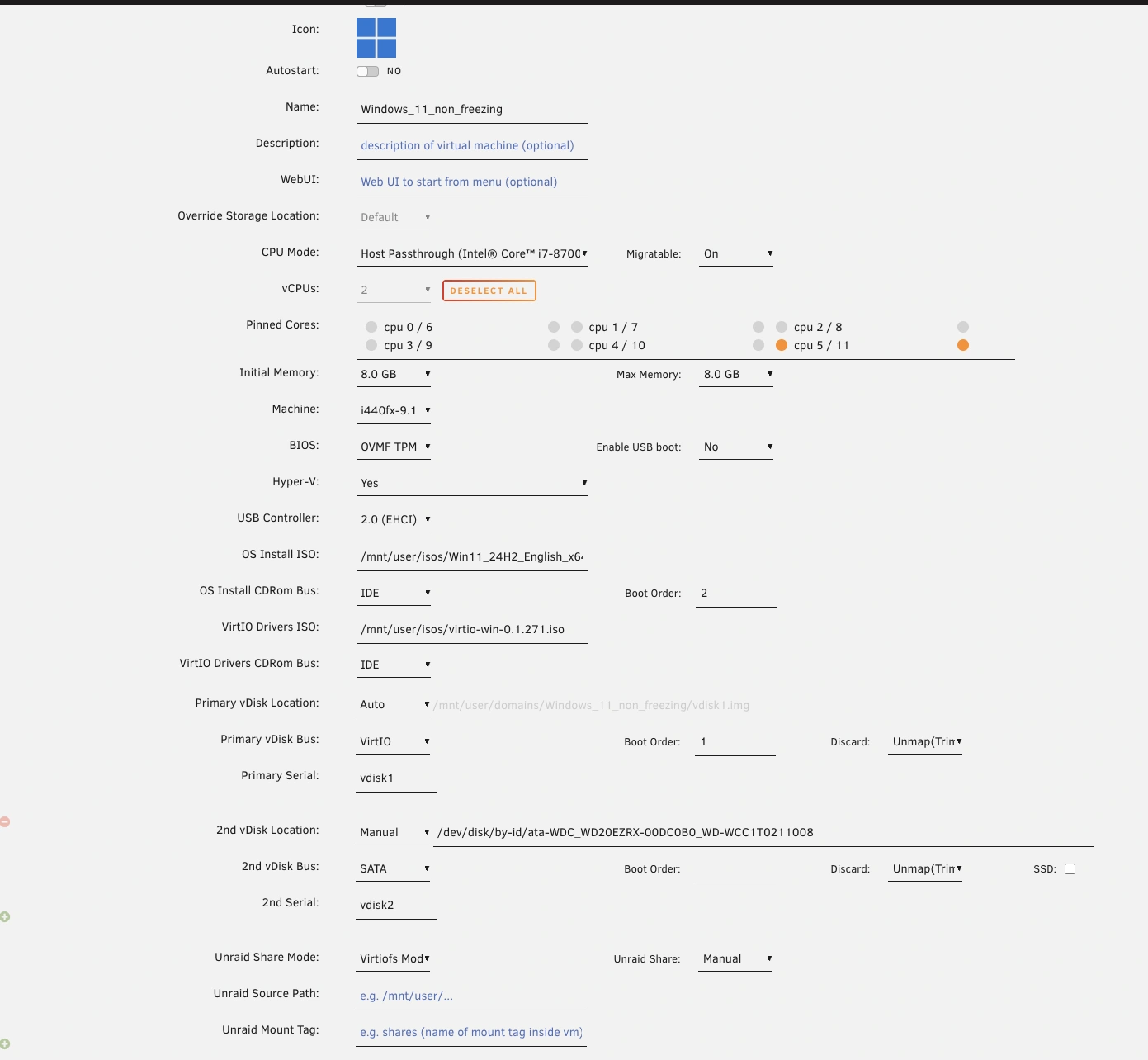
Graphical VM Management and Direct Hardware Passthrough
The VM Manager supports Windows 11, Linux, macOS, and Home Assistant OS. It handles virtual disk creation in raw, qcow2, or ZFS zvol formats, bundles virtio drivers, and provides a browser VNC console.
Unraid excels at direct PCIe hardware passthrough using Linux IOMMU grouping:
- Dedicated Gaming Rig: Pass a graphics card and USB controller to a Windows 11 VM for bare-metal gaming performance.
- CPU Pinning and Isolation: Assign dedicated CPU cores exclusively to VMs, preventing container tasks from causing latency spikes.
7. Storage Performance, Power Draw, and Acoustic Benchmarks
For residential servers running in living areas, electrical efficiency and acoustics matter as much as transfer speeds.
The Physics of Per-Disk Spin-Down
Traditional RAID and ZFS pools spin every disk during read or write operations. Unraid avoids this through per-disk spin-down. Because intact files live on discrete drives, Unraid only wakes the drive containing requested data. All other drives remain asleep in standby mode, drawing under 0.5 watts each.
| Metric | 8-Drive ZFS RAIDZ2 | Unraid 8-Drive Array + Cache | Practical Impact |
|---|---|---|---|
| Idle Power | 60W to 80W (Drives spin) | 15W to 25W (Drives spun down) | Major electrical savings on 24/7 servers |
| Idle Acoustics | Continuous motor hum | Whisper quiet; zero drive noise | Ideal for living areas and home offices |
| Read Speed | Striped multi-disk speed | Single-disk speed (180-260MB/s) | Plenty for concurrent 4K media streams |
| Write Speed | Fast multi-disk writes | Wire-speed to NVMe cache pool | High burst speed backed by off-peak mover |
| Expansion | Matching multi-disk vdev | Any single drive anytime | Budget-friendly incremental scaling |
Direct writes route to the NVMe cache pool at wire speeds. Reads from mechanical disks deliver 180MB/s to 260MB/s, feeding multiple 4K streams while idle drives remain silent.
8. License Tiers and Pricing Economics
On March 27, 2024, Lime Technology updated Unraid commercial licensing to a sustainable model with Starter, Unleashed, and Lifetime tiers. All tiers remain perpetual purchases rather than recurring subscriptions.
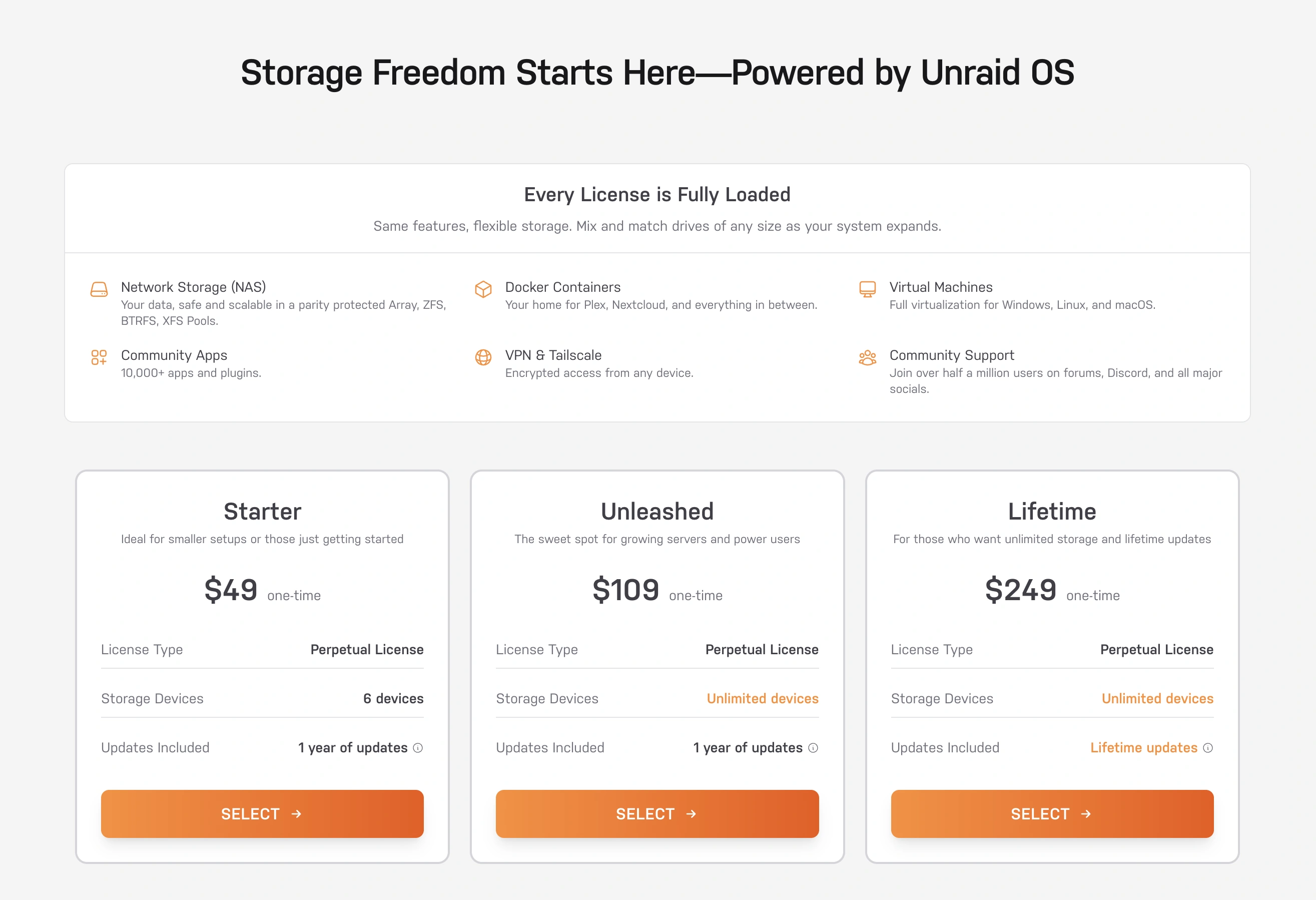
Current License Tiers and Upgrade Economics
| Tier | Price | Drive Limit | Software Updates | Post-Year 1 | Best Operational Fit |
|---|---|---|---|---|---|
| Trial | Free | Unlimited devices | Full features | Inactive | Hardware validation |
| Starter | $49 | Up to 6 devices | 1 year included | Perpetual | SFF NAS, mini PCs, 2-4 bays |
| Unleashed | $109 | Unlimited devices | 1 year included | Perpetual | Multi-bay towers and media servers |
| Lifetime | $249 | Unlimited devices | Lifetime included | Perpetual | Set-and-forget homelabs |
Purchasing Starter ($49) or Unleashed ($109) grants perpetual ownership. When included updates conclude, your server operates indefinitely without mandatory renewals.
Users can optionally purchase annual update extensions for roughly $36/year. Upgrade paths include Starter to Unleashed ($69), Starter to Lifetime ($209), and Unleashed to Lifetime ($149). Legacy keys retain grandfathered lifetime updates.
9. Unraid Pros and Cons
What We Liked (Pros)
- Unmatched flexibility to combine hard drives of different capacities, speeds, and manufacturers into one pool
- Significant electricity savings because idle drives spin down independently while only the active disk reads
- Fault tolerance prevents catastrophic data loss; exceeding parity limits only impacts the damaged physical drives
- World-class Docker ecosystem backed by Community Applications for effortless one-click service deployment
- Modern Unraid 7 enhancements add native ZFS storage pools, array-less operation, and native file management
Areas for Improvement (Cons)
- Direct write throughput to the parity-protected array is slow without an NVMe or SSD cache pool buffer
- Commercial operating system requiring a paid perpetual license compared to free alternatives like TrueNAS
- Operating system still primarily boots from a registered USB flash drive rather than internal NVMe storage
Defining Strengths and Market Moats
Unraid maintains its leadership through human-centered engineering:
- Effortless Scalability: Add any drive into an empty bay and expand storage in three clicks.
- Power Efficiency: Per-disk spin-down and cache tiering make Unraid remarkably energy-conscious.
- Active Community: Extensive documentation and guides from Spaceinvader One ensure smooth troubleshooting.
Operational Tradeoffs and Limitations
Prospective builders should keep several tradeoffs in mind:
- Array Write Latency: Parity calculations throttle direct array writes, requiring an SSD or NVMe cache pool.
- USB Boot Dependency: The OS boots into RAM from a registered USB flash drive tied to a hardware GUID.
- Standalone Focus: Unraid is a standalone server appliance, not an enterprise cluster with failover.
10. Head-to-Head Comparison: Unraid vs TrueNAS, Proxmox, and Synology
Builders choosing a home server platform often compare Unraid with TrueNAS SCALE, Proxmox VE, and Synology DSM.
| Dimension | Unraid | TrueNAS SCALE | Proxmox VE | Synology DSM |
|---|---|---|---|---|
| Role | Consumer NAS & Docker | Enterprise Storage | Type-1 Hypervisor | Turnkey NAS |
| Storage | Disks + ZFS Pools | Pure ZFS Storage | ZFS, LVM, Ceph | Proprietary SHR |
| Expansion | Any single drive | Matching vdevs | Manual CLI config | Matching / larger drives |
| Spin-Down | Per-disk sleep | None (all spin) | Manual standby | Global hibernation |
| App Store | 1,500+ Templates | TrueNAS Catalog | LXC & Docker VMs | Package Center |
| Pricing | Perpetual ($49-$249) | Free Open Source | Free Edition | Included with box |
| Hardware | Any x86 PC | x86 (Prefers ECC) | Virtualization rig | Proprietary NAS |
Direct Competitor Breakdowns
- Unraid vs. TrueNAS SCALE: TrueNAS SCALE provides enterprise ZFS integrity and striped throughput. However, pool expansion requires matched vdevs, and all disks spin constantly. Unraid offers single-drive expansion and notable idle power savings.
- Unraid vs. Proxmox VE: Proxmox is an enterprise hypervisor for LXC containers and clustered VMs, lacking a consumer NAS interface. Many builders virtualize Unraid under Proxmox by passing through a storage controller.
- Unraid vs. Synology DSM: Synology offers a polished plug-and-play appliance, but charges steep hardware premiums for modest processors. Unraid delivers superior computing power and unlimited drive flexibility on custom hardware.
11. Frequently Asked Questions
Standard RAID stripes data across drives, risking total loss if failures exceed parity. Unraid stores intact files on individual drives, isolating loss strictly to failed disks.
No. All Unraid licenses are perpetual purchases. Starter and Unleashed include one year of updates, after which your server continues running permanently without recurring fees.
Because Unraid calculates real-time parity without striping, direct mechanical array writes reach 40 to 60 MB/s. SSD cache pools absorb network writes at multi-gigabit speeds.
Unraid runs entirely from RAM after booting, avoiding immediate service disruption. Free Unraid Connect cloud backups allow restoring configurations and replacing the registered key in minutes.
Yes. Unraid 7 introduces array-less configurations, allowing builders to run high-speed all-flash systems powered entirely by native ZFS or Btrfs pools.
No. Unraid is engineered as a standalone server appliance. It does not offer multi-node clustering, quorum voting, or live virtual machine migrations.
12. Long-Term Value and Buying Advice for Homelabs
Selecting an OS for your 24/7 home server is a foundational infrastructure decision. Migrating tens of terabytes and reconfiguring container stacks later is painful and time-consuming.
In 2026, Unraid occupies a unique niche for residential homelabs. While enterprise teams choose TrueNAS or Proxmox, Unraid tackles home user realities: adding single drives whenever capacity is needed, slashing electricity bills with per-disk spin-down, and deploying containers via Community Applications. For home media servers and application hosts, Unraid easily justifies its perpetual license.
Who Should Buy Unraid:
- Media Curators: Builders running Plex or Jellyfin who value quiet operation, low heat, and per-disk spin-down.
- Budget Upgraders: Anyone combining mismatched drives without sacrificing capacity or data protection.
- Homelab Beginners: Users seeking to deploy self-hosted containers without troubleshooting complex terminal commands.
Who Should Look Beyond Unraid:
- Open-Source Purists: Builders who prefer free stacks like Debian, TrueNAS SCALE, or OpenMediaVault.
- High-Throughput Studios: Production teams requiring simultaneous multi-user 10GbE video editing across striped arrays.
- Clustered Environments: Systems administrators requiring high-availability failover nodes and synchronized VM migrations.


Unraid
Unraid remains the undisputed champion of flexible, power-efficient home server storage in 2026. Its ability to mix-and-match arbitrary drive sizes, spin down idle disks, and host a world-class Docker ecosystem through Community Applications makes it the premier operating system for media servers and homelabs.