




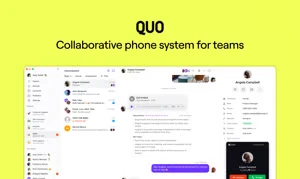
1. Collaborative Team Calling with Quo Phone
For decades, business telephony treated phone numbers as single, isolated physical endpoints locked to a desk phone or a specific SIM card. If an employee was out of the office or on another call, customers encountered frustrating busy signals, unmonitored voicemail boxes, or disjointed text message threads.
Quo (formerly OpenPhone) reimagined business calling from the ground up as a collaborative, multi-player workspace. Instead of isolating phone lines, Quo turns business phone numbers into transparent, shared team inboxes where entire departments can answer calls, respond to customer SMS threads, assign follow-ups, and review conversational context together in real time.
Built specifically for modern startups, fast-growing agencies, and distributed remote teams, Quo eliminates the archaic hardware bloat of legacy VoIP and delivers a delightful, consumer-grade software experience powered by cutting-edge voice AI.
2. Shared Phone Numbers and Team Inboxes
The centerpiece of the Quo platform is its collaborative shared phone number architecture. Multiple colleagues can share access to a single corporate or departmental phone number (e.g., Sales, Support, or Billing) simultaneously.
Key collaboration features include:
- Real-Time Collision Detection: When a team member begins replying to an incoming customer SMS or answers an inbound call, live presence indicators display their avatar to prevent duplicated responses.
- Internal Private Mentions: Team members can tag colleagues directly inside a customer conversation thread using internal mentions (e.g., ‘@sarah can you verify this order ID before I confirm?’). Internal notes remain completely invisible to the customer.
- Shared Contact Properties & Context: Add custom metadata tags, company affiliations, and internal notes to any contact record, ensuring any team member answering a call has full historical context.
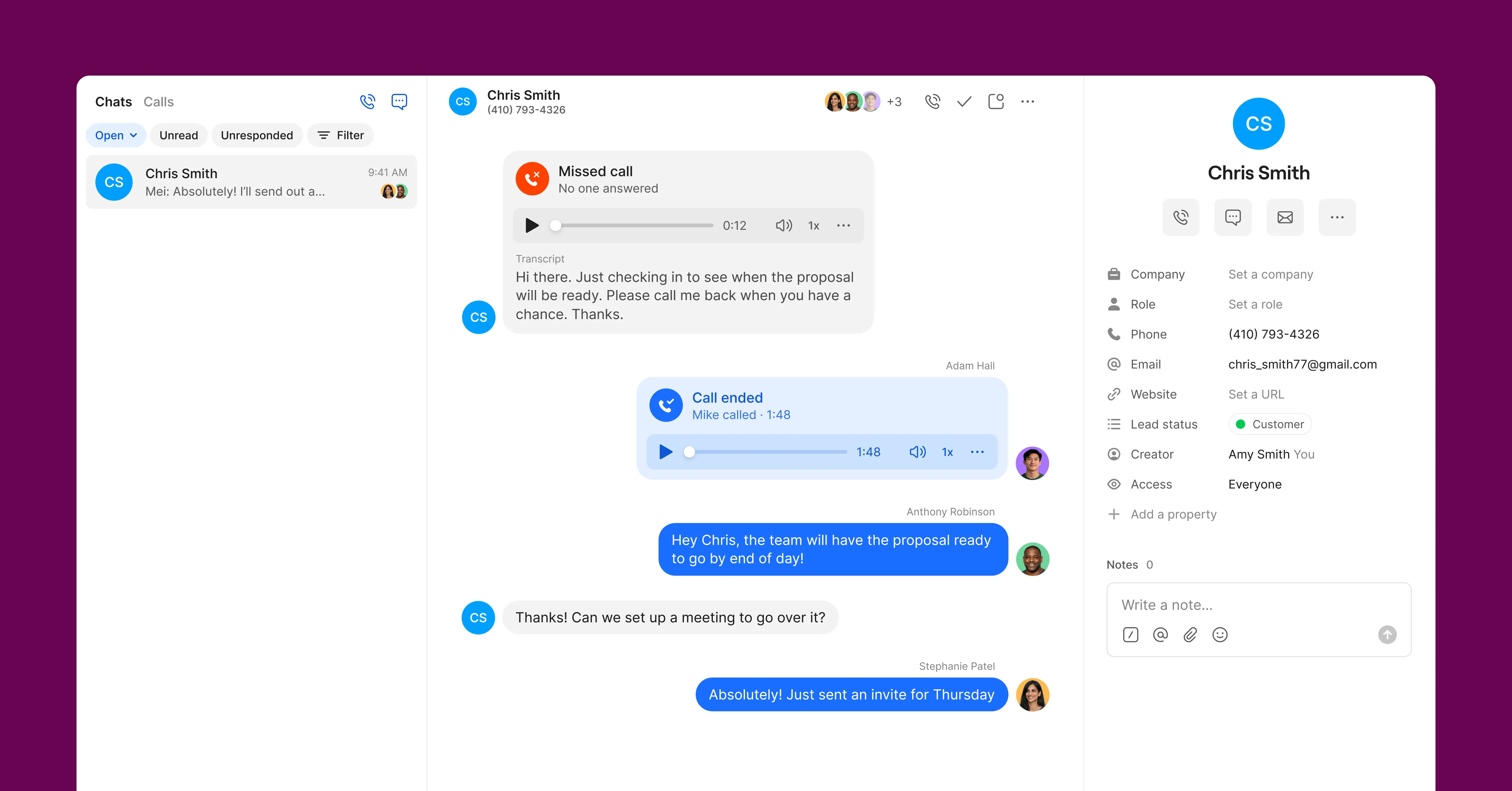 Figure 1: Quo collaborative shared inbox showing incoming customer SMS threads, team member activity indicators, and internal comment threads.
3. WebRTC Audio Architecture and Telemetry Benchmarks
Unlike traditional VoIP softphones that rely on clunky SIP plugins, Quo is built entirely on modern WebRTC infrastructure with WebSocket state synchronization, delivering high-fidelity audio and ultra-low latency across desktop, mobile, and web clients.
| Network Telemetry Parameter | Quo WebRTC Voice Core | Legacy SIP Softphone App | Standard Telecom Threshold |
|---|---|---|---|
| SIP/WebRTC Audio Handshake | Under 35 ms | 180 - 420 ms | Under 150 ms |
| Call Setup & Ring Time | Under 450 ms | 1,800 - 3,500 ms | Under 2,000 ms |
| Mobile Push Notification Sync | Instantaneous (Under 120 ms) | 800 - 2,400 ms | Under 1,000 ms |
| AI Summary Generation Speed | Under 12 Seconds Post-Call | Not Supported | Under 30 Seconds |
| Audio Voice MOS Rating | 4.45 / 5.0 (Opus HD Voice) | 3.75 / 5.0 | Above 4.0 (Toll Quality) |
The WebRTC audio pipeline dynamically negotiates Opus audio streams, ensuring that voice clarity remains crisp and resilient even when team members move between office Wi-Fi and 5G cellular networks on mobile devices.
4. AI Call Recording, Transcripts, and Action Summaries
Post-call administrative work is one of the biggest productivity drains for customer-facing teams. Quo solves this with integrated Quo AI Intelligence, which runs automatically on recorded calls.
Neural Speech-to-Text Transcription
Quo leverages advanced neural speech models to transcribe incoming and outgoing calls with over 98% linguistic accuracy, automatically distinguishing between multiple speakers and generating synchronized timestamped transcripts.
AI Call Summaries & Action Items
Within seconds of hanging up, Quo generates:
- Executive Call Summaries: A concise, 2-to-3 sentence overview capturing the primary purpose and outcome of the conversation.
- Extracted Action Items: Bulleted checklists of commitments made by either party (e.g., ‘Send updated contract by Thursday’, ‘Schedule product demo for Tuesday’).
- Automated CRM Push: Syncs the call recording, transcript, and AI summary directly into Salesforce or HubSpot contact timelines without requiring manual rep data entry.
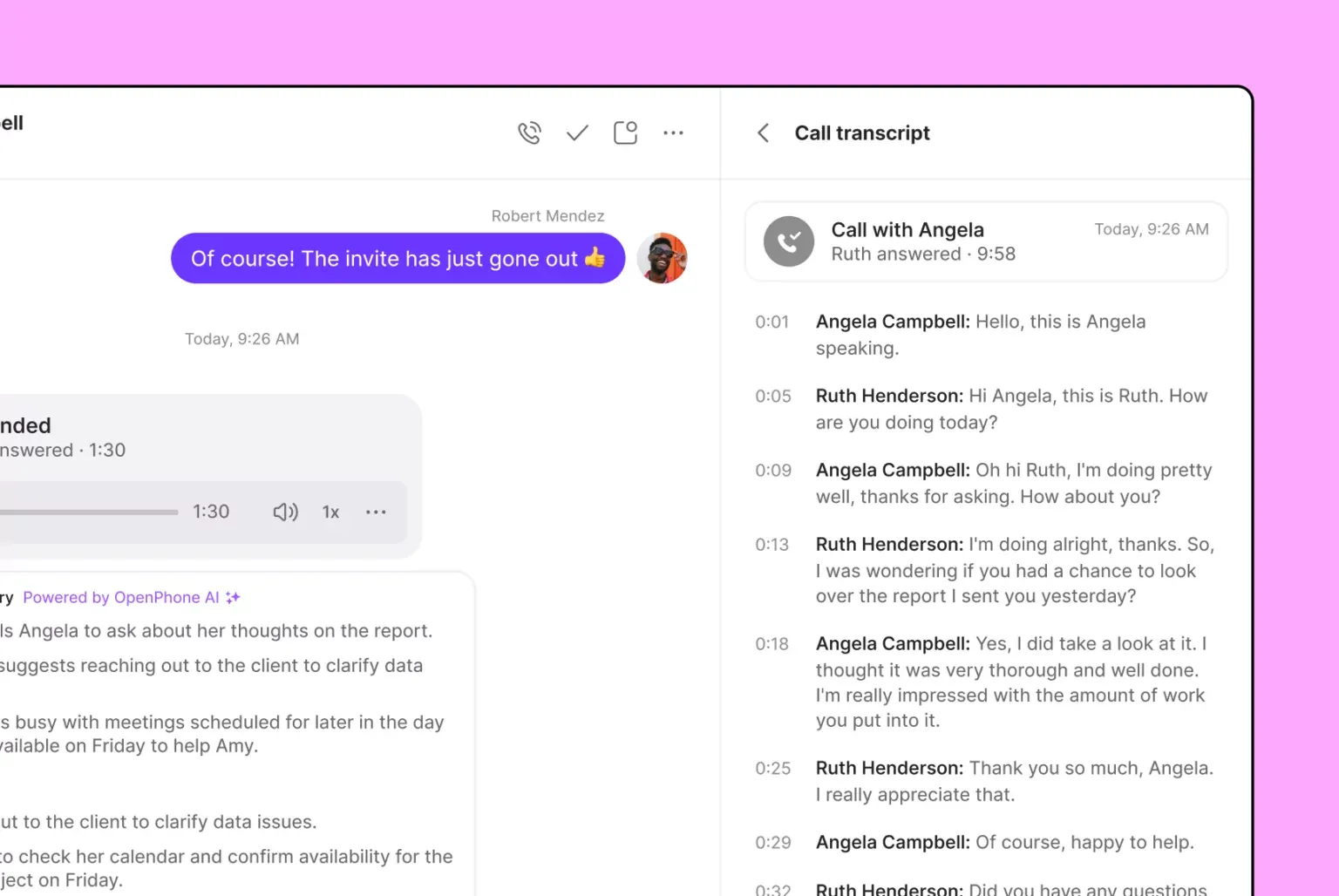 Figure 2: Quo AI call intelligence automatically generating high-accuracy call transcription, key takeaways, and extracted action items.
5. Visual Auto-Attendant IVR and Call Routing
Quo makes routing incoming calls effortless through an intuitive visual configuration engine.
Administrators can design structured caller experiences in minutes:
- Multi-Branch Auto-Attendant IVR: Set up custom call menus (‘Press 1 for Sales, Press 2 for Support’) with text-to-speech or studio-recorded voice greetings.
- Custom Business Hours & Auto-Replies: Define operating schedules for each phone number. When calls or texts arrive after hours, Quo automatically responds with customized SMS text replies (e.g., ‘Thanks for reaching out! We are currently closed, but you can book an appointment here…’).
- Ring Order Strategies: Choose between simultaneous ringing (all agents alerted at once) or sequential ring groups to optimize team coverage.
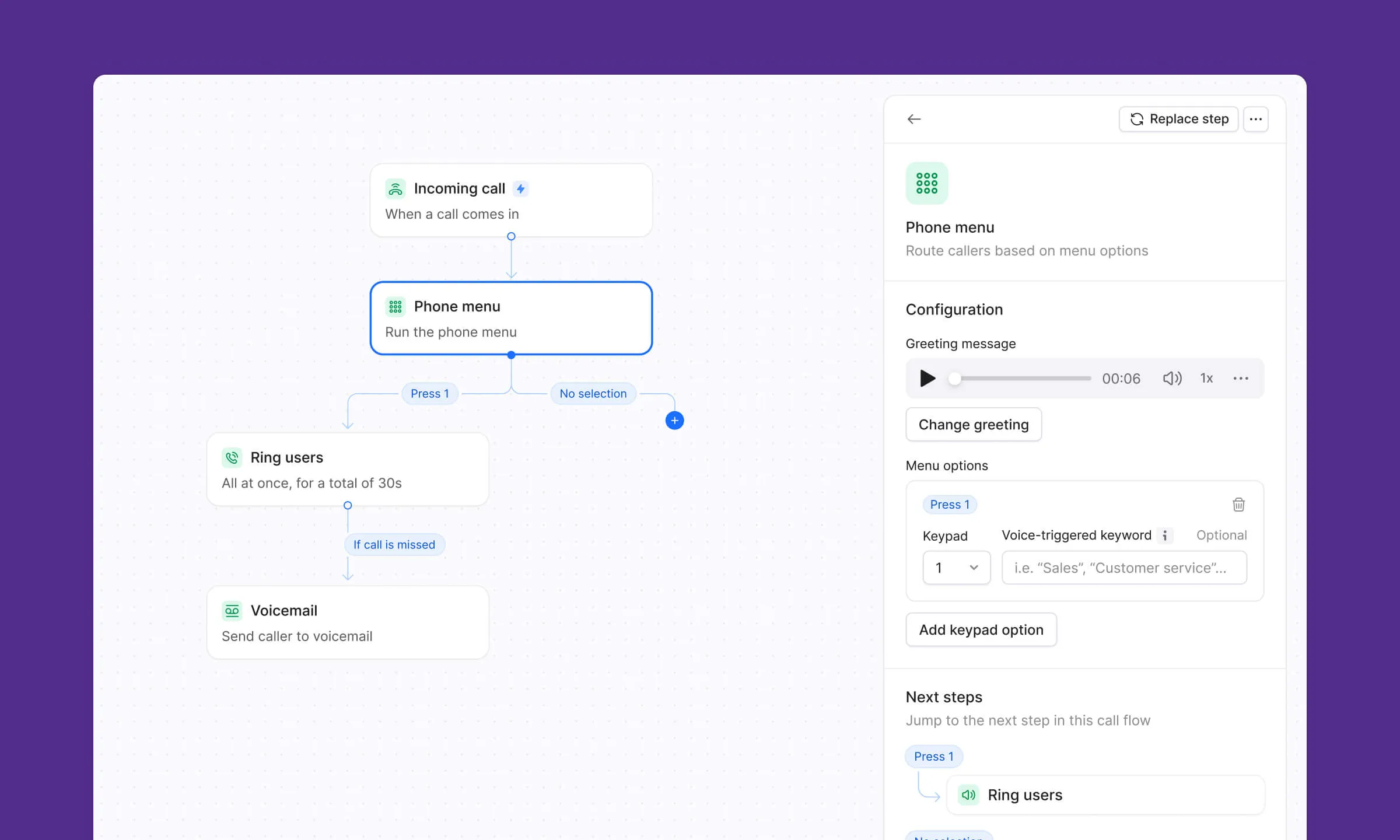 Figure 3: Quo interactive IVR call menu configuration interface setting up multi-branch auto-attendants, business hour rules, and rollover forwarding.
6. Quo Pricing Breakdown
Quo offers transparent per-user subscription plans with no hidden carrier surcharges or long-term hardware contracts.
| Subscription Tier | Monthly Rate (Annual / Monthly) | Included Features & Inclusions | Best For |
|---|---|---|---|
| 7-Day Free Trial | $0 (7 Days) | Full platform test, US/Canada calling, team inbox | Startups evaluating modern business VoIP |
| Starter Plan | $15 / mo ($19/mo monthly) | Unlimited US/Canada calls & SMS, 1 local/toll-free number per user, IVR menus, auto-replies | Early-stage startups, solo founders, small agencies |
| Business Plan | $23 / mo ($33/mo monthly) | AI call summaries & transcripts, HubSpot & Salesforce sync, call transfers, advanced analytics | Growing sales, support teams, and scaling SMBs |
| Scale Plan | $33 / mo ($47/mo monthly) | Dedicated account manager, custom onboarding, advanced audit logs, enterprise SLA | Scaling organizations requiring tailored support |
| Additional Numbers | +$5.00 / number / mo | Connect extra local or toll-free numbers to any shared inbox | Multi-departmental and multi-location setups |
All plans include unlimited domestic calling and SMS/MMS messaging within the United States and Canada, with affordable international pay-as-you-go rates.
7. Quo vs Dialpad, Grasshopper, and Aircall
Comparing modern business telephony platforms highlights the distinct advantages of Quo’s collaborative architecture:
| Evaluation Dimension | Quo (OpenPhone) | Dialpad | Grasshopper | Aircall |
|---|---|---|---|---|
| Collaborative Shared Inboxes | Native Multi-Player Feed | Basic call sharing | Forwarding only | Call center queues |
| Internal Team Mentions | Included in all threads | Not available | Not available | Basic internal notes |
| AI Summaries & Transcripts | Built-in AI Intelligence | Dialpad Ai | Not supported | AI add-on fee |
| Software Design Ergonomics | Modern, Clean, Intuitive | Feature-dense enterprise UI | Dated legacy interface | Call center focused |
| A2P 10DLC Registration | Guided self-serve wizard | Managed process | Basic registration | Assisted onboarding |
| Starting Price | $15.00 / user / mo | $15.00 / user / mo | $14.00 / mo (flat) | $30.00 / user / mo |
While Grasshopper remains stuck in the era of basic call forwarding and Aircall focuses primarily on enterprise call center seat costs, Quo delivers the ultimate collaborative phone experience tailored for modern startups and scaling businesses.
8. Ecosystem Integrations: CRM, Slack, and Webhooks
Quo connects seamlessly into your existing modern SaaS tech stack:
- HubSpot & Salesforce: Automatically logs all incoming/outgoing calls, call recordings, voicemails, SMS text threads, and AI summaries directly into contact and deal records.
- Slack Integration: Streams incoming call notifications, missed calls, and new voicemails into dedicated Slack channels for company-wide visibility.
- Gong Integration: Automatically routes recorded calls to Gong for conversational revenue intelligence and sales coaching analysis.
- Zapier & Make Webhooks: Trigger automated workflows whenever an SMS is received, a call finishes, or a new voicemail is left.
9. Quo Pros and Cons
Review the core strengths and limitations before adopting Quo for your team:
What We Liked (Pros)
- Multi-player shared business phone numbers with internal team comments and call assignment
- AI-powered call intelligence: automated call recording, transcription, and executive summaries
- Visual auto-attendant IVR routing and custom scheduled business hour rules
- Deep native integrations with HubSpot, Salesforce, Slack, Gong, and Zapier
- Beautiful, modern interface available across Mac, Windows, iOS, Android, and web
Areas for Improvement (Cons)
- No free forever tier available (7-day free trial provided), reflecting premium cloud focus
- A2P 10DLC carrier registration required for US business SMS messaging
- Advanced CRM auto-sync and AI summaries require the Business tier ($23/user/mo)
10. Frequently Asked Questions
OpenPhone evolved into Quo as part of its platform expansion into AI-native voice intelligence and multi-channel customer communication workflows, while preserving its beloved collaborative phone architecture.
A shared number allows multiple team members to manage incoming calls, listen to voicemails, and reply to SMS text threads from the same phone number simultaneously. Team members can tag colleagues internally with @mentions without the customer seeing.
Yes. Quo supports unlimited calling and SMS/MMS messaging to the US and Canada on all plans, with built-in compliance workflows for carrier A2P 10DLC registration.
Yes. Quo provides free, seamless number porting for local, toll-free, and Canadian phone numbers with zero service disruption during the transfer.
Quo uses state-of-the-art speech-to-text models that achieve over 98% transcription accuracy, automatically identifying multiple speakers, generating concise call summaries, and extracting action items.
No. Quo runs as a modern, lightweight application on Mac, Windows, iOS, Android, and web browsers. You can use any standard computer headset or mobile phone.
11. Why Quo Is the Premier Team Phone for Startups?
Quo successfully modernizes business telephony by transforming phone numbers into shared collaborative workspaces backed by AI call intelligence. For high-growth startups, remote organizations, and customer-centric businesses, Quo is our top recommendation for modern business calling in 2026.
Its responsive WebRTC audio backbone, beautiful cross-platform apps, and automated post-call CRM logging empower scaling teams to deliver white-glove customer experiences without telecom friction.


Quo (OpenPhone)
Quo (OpenPhone) is the modern benchmark for collaborative business telephony in 2026. Designed from the ground up for high-velocity startups, remote teams, and growing service businesses, it transforms standard business calling and SMS into a transparent, multi-player team inbox powered by cutting-edge AI.