





1. What Is Plus AI and Target Users
Plus AI is a specialized presentation co-pilot engineered to eliminate the most universal friction in corporate communication: the blank slide syndrome.
While standalone presentation apps attempt to reinvent the slide deck with proprietary web canvases, Plus AI takes the opposite approach. It embeds generative artificial intelligence directly into the presentation tools that global enterprises already rely on: Google Slides and Microsoft PowerPoint.
Plus AI focuses on practical business execution across three primary pillars:
- Native Ecosystem Integration: Works directly within Google Workspace and Microsoft Office 365, preserving familiar shortcut keys, file sharing permissions, and collaborative commenting workflows.
- Deep Document Synthesis: Transforms multi-page PDF documents, research whitepapers, meeting transcripts, and raw notes into structured, executive-ready presentations.
- Granular Layout Remixing: Provides slide-by-slide formatting tools that restructure text paragraphs into balanced visual layouts, comparative matrices, and metric callouts.
The platform is designed specifically for management consultants, enterprise sales development representatives, corporate marketing strategists, startup founders assembling investor updates, and university educators who need professional slide decks without wasting hours on manual alignment.
2. Google Slides and PowerPoint Native Integration
The foundational advantage of Plus AI over standalone presentation software lies in its architectural delivery. Tools like Gamma, Pitch, and Tome force teams to build presentations inside proprietary web environments. When users inevitably must export those decks to PowerPoint for corporate clients, the resulting .pptx files frequently suffer from broken line wraps, misaligned icons, font substitutions, and static graphic flattening.
Plus AI avoids this friction entirely by operating as a native add-on:
- Google Workspace Add-on: Installs directly from the Google Workspace Marketplace. Once enabled, Plus AI opens as a contextual sidebar within any existing or new Google Slides presentation.
- Microsoft Office Add-in: Installs via Microsoft AppSource or the Office Add-in store. It integrates smoothly into PowerPoint on Windows, macOS, and PowerPoint for the Web.
- Universal Single Sign-On (SSO): A single Plus AI subscription grants synchronized access across both Google Slides and PowerPoint, accommodating hybrid organizations that operate across both cloud ecosystems.
 Figure 1: Plus AI sidebar extension active inside Google Slides displaying slide generation modes, prompt input, and template selection controls.
Because the AI constructs slides using native shapes, text boxes, tables, and system theme colors, every single element remains 100% editable. If a colleague opens your generated deck without having Plus AI installed, they can edit text, recolor shapes, or present the file without encountering missing font errors or locked image blocks.
3. Prompt-to-Deck and Document Conversion Workflows
Plus AI provides two primary pathways for generating initial presentation drafts: natural language prompting and source document ingestion.
The Prompt-to-Presentation workflow follows a deliberate, human-guided three-step pipeline designed to prevent hallucinated narrative structures:
- Prompt Ingestion: Users input a topic, target audience, presentation goal, and desired slide count. For example, a marketer might prompt: “Create an 8-slide go-to-market plan for a B2B SaaS analytics tool targeting enterprise retail operations leaders.”
- Interactive Outline Approval: Before rendering a single visual slide, Plus AI generates an editable outline. Marketers can reorder topics, delete unwanted slides, insert missing points, or refine key arguments. This step ensures narrative alignment before burning cloud generation credits.
- Slide Generation: Once the outline is confirmed, Plus AI applies the selected visual theme, generates tailored slide headlines, structures bulleted insights, and lays out individual slides in 60 to 90 seconds.
For enterprise teams dealing with information overload, the Document-to-Presentation engine represents Plus AI most powerful capability.
Available on Pro tiers and above, this feature allows users to upload unstructured source material, including PDF whitepapers, Microsoft Word briefs (.docx), text notes, or raw meeting transcripts. The parser can ingest prompts and source documents exceeding 100,000 characters.
Instead of merely copying and pasting text into slide text boxes, the engine synthesizes the core findings, extracts key metrics, and arranges the takeaways into logical presentation chapters. A 40-page quarterly earnings analysis can thus be condensed into an eight-slide executive summary in less than two minutes.
4. In-Slide Editing: Rewrite, Remix, and Single Slides
The true test of any presentation tool is not just how well it creates a new deck from scratch, but how effortlessly it handles ongoing edits. Most AI slide makers fail once a presentation is created, offering no mechanism to adjust individual slides without re-generating the entire file.
Plus AI solves this operational bottleneck with granular in-slide refinement utilities:
- Insert Single Slide: Rather than generating an entire presentation, users can insert a single slide tailored to a specific rhetorical need. The extension provides pre-configured slide archetypes, including Case Studies, Timeline Roadmaps, Executive Bios, Comparison Tables, Metrics Dashboards, and SWOT Analyses.
- The Remix Engine: When a slide contains a wall of unformatted text, the Remix tool restructures the information visually with one click. Users can transform a dense paragraph into a three-column card layout, a horizontal process flow, a pros-and-cons grid, or a highlighted metric callout.
- Rewrite and Tone Calibration: Marketers can highlight specific text blocks and instruct the AI to condense verbose explanations, adopt a formal corporate tone, clarify technical jargon, or adjust copy to fit strict box boundaries.
- Multilingual Translation: Slides can be translated directly within the editor into more than 30 languages, including Spanish, German, French, Japanese, and Mandarin, making it an essential asset for international marketing and sales teams.
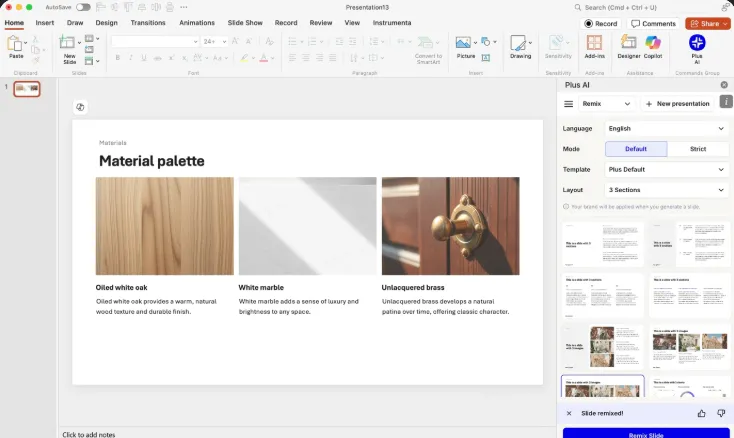 Figure 2: In-slide Remix editor transforming unstructured bullet text into three-column cards and matrix layouts directly within the presentation canvas.
These micro-editing capabilities ensure that slide iteration remains fluid. Instead of wrestling with manual alignment guides and box resizing, users let the Remix engine balance slide whitespace automatically.
5. Custom Branding, Enterprise Templates, and MCP Server
Maintaining brand consistency is non-negotiable for enterprise organizations. Decks assembled with mismatched fonts, off-brand color palettes, or distorted logos look amateurish and fail executive reviews.
Plus AI addresses brand governance through a tiered customization model:
- Custom Brand Kits (Team Plan): Organizations can configure a unified brand profile by defining primary and secondary color hex codes, choosing custom typography pairings, and uploading official logo marks. Any slide generated by any team member automatically inherits these brand guardrails.
- Enterprise Slide Master Integration: For enterprises with rigid slide guidelines, the Enterprise plan enables custom template mapping. Plus AI reads the organization master slide templates, recognizing pre-built headers, footers, disclaimer boxes, and icon placements, ensuring generated slides look indistinguishable from handcrafted agency deliverables.
Beyond traditional template controls, Plus AI introduced a transformative technical innovation in 2025 and 2026: native support for the Model Context Protocol (MCP).
The Plus AI MCP Server (https://mcp.plusai.com/) establishes a direct, bidirectional communication bridge between advanced AI reasoning agents and the presentation canvas.
Using standard OAuth authentication with Google or Microsoft SSO, developers and power users can connect their Plus AI account to MCP-compatible clients such as Claude Desktop, Claude Code, Cursor, and custom ChatGPT workflows.
This end-to-end autonomous pipeline operates across five interconnected stages:
- Conversational Request: A user prompts Claude or Cursor to construct a presentation from existing documents, data tables, or text briefs.
- MCP Protocol Routing: The client dispatches the structured task to the secure Plus AI remote MCP server at
mcp.plusai.com. - Presentation Agent Processing: The backend engine parses narrative requirements, outlines presentation chapters, and assigns slide archetypes.
- Native Deck Compilation: Renders native vector shapes, typography, and brand theme styling directly into slide layers.
- Direct Asset Delivery: Returns a direct download link and preview for an editable PowerPoint (
.pptx) or Google Slides file. Through this protocol, a user working in Claude can issue a conversational prompt: “Analyze the quarterly financial data in this spreadsheet, identify three growth bottlenecks, and generate a 6-slide PowerPoint presentation in our corporate theme.”
The AI agent interacts directly with Plus AI backend, plans the deck, writes the copy, applies the master theme, and returns a download link for an editable .pptx file without the user ever opening a browser tab.
Complementing the MCP server is the Presentation Agent API, a RESTful endpoint allowing development teams to programmatically generate presentations from CRM events, scheduled cron reporting jobs, and automated customer onboarding pipelines.
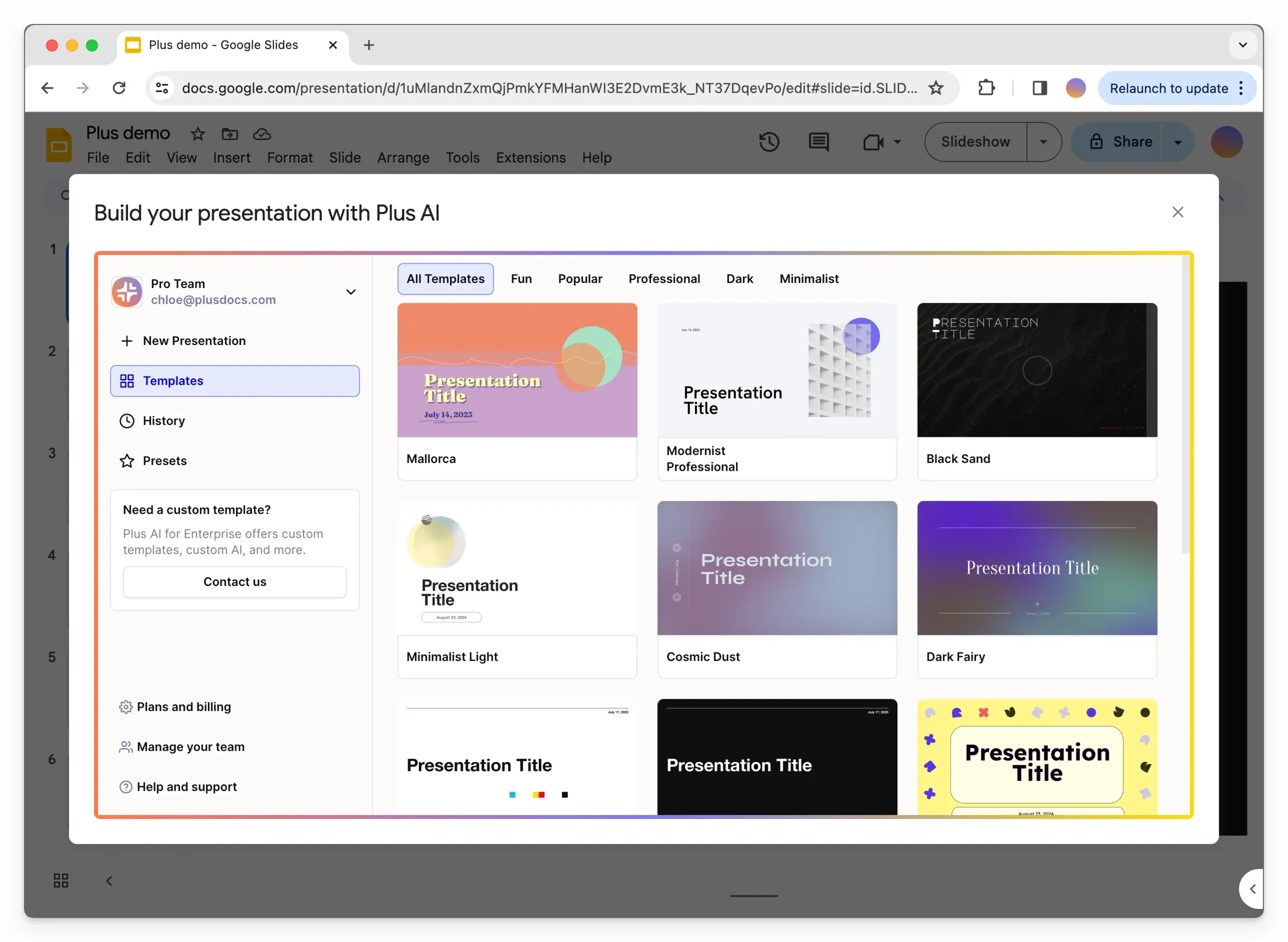 Figure 3: Plus AI presentation template gallery and brand kit customization interface for defining corporate typography, color palettes, and slide masters.
6. Pricing Structure, AI Credits, and Plan Value
Plus AI uses a tiered subscription structure based on feature access and monthly AI credit allocations. Understanding the credit burn rate is essential for budgeting team deployments.
Tasks within Plus AI consume credits dynamically based on computational complexity:
- Inserting a single slide or remixing a layout typically consumes between 40 and 60 credits.
- Generating a comprehensive 10-slide presentation from a text prompt uses approximately 100 to 140 credits.
- Parsing and converting a multi-page PDF document into a deck uses roughly 150 to 170 credits.
All paid plans include a 7-day free trial with 1,000 trial credits. However, users must provide a valid credit card to initiate the trial, and the account converts to a paid subscription automatically unless cancelled beforehand.
| Subscription Tier | Monthly Price (Annual Billing) | Monthly Price (Monthly Billing) | Monthly AI Credits | Maximum Prompt Length | Key Features Included | Best For |
|---|---|---|---|---|---|---|
| Basic Plan | $10 / user / mo | $15 / user / mo | 1,500 Credits | Standard (~2,000 chars) | Full deck generation, single slide insertion, rewrite & remix | Individual students & light corporate presenters |
| Pro Plan | $20 / user / mo | $25 / user / mo | 3,000 Credits | 100K+ Characters | Document/PDF uploads, AI image generator, MCP Server & API access | Consultants, sales pros, power presenters, and AI developers |
| Team Plan | $30 / user / mo | $40 / user / mo | 6,000 Credits | 100K+ Characters | Custom branding (logo, colors, fonts), shared team presets & templates | Marketing teams, boutique agencies, and corporate departments |
| Max Plan | $200 / user / mo | $240 / user / mo | Unlimited Credits | 100K+ Characters | Unlimited generation, priority email support, high-frequency agent use | Heavy agency operators and automated workflow developers |
| Enterprise Plan | Custom Quote | Custom Quote | Custom Scale | Unlimited | Custom slide master mapping, asset libraries, SSO, SOC2 audit report | Global enterprises requiring dedicated security and compliance |
For most individual professionals, the Pro Plan at $20 per month represents the sweet spot, providing document ingestion, extended prompt length, and full access to the MCP server. Teams requiring strict brand consistency should opt for the Team Plan at $30 per month to enforce custom typography and color schemes across all users.
7. Plus AI vs Gamma, Copilot, and Beautiful.ai
To understand where Plus AI delivers the highest return on investment, it must be evaluated directly against its primary commercial alternatives: Gamma App, Microsoft Copilot for M365, and Beautiful.ai.
- Plus AI vs Gamma App: Gamma is a visually stunning, web-native document and presentation maker built on an infinite card canvas. It excels at modern, interactive presentations displayed in web browsers. However, Gamma struggles when exporting to PowerPoint, frequently misaligning text blocks and breaking complex styling. Plus AI is purpose-built for traditional slide formats, delivering 100% native compatibility inside Google Slides and PowerPoint from the start.
- Plus AI vs Microsoft Copilot for M365: Microsoft Copilot is deeply integrated into the Office suite but carries significant trade-offs. Copilot costs $30 per user per month on top of an existing Microsoft 365 business subscription, is restricted solely to the Microsoft ecosystem, and lacks granular slide-remixing layouts. Plus AI works cross-platform across both Google Workspace and Microsoft 365 at a lower entry price point ($10 to $20/mo) and offers superior document-to-deck synthesis.
- Plus AI vs Beautiful.ai: Beautiful.ai relies on rigid “Smart Slides” that enforce clean layouts by locking elements into predefined spatial rules. While this prevents ugly slides, it frustrates users who need to customize box positions manually. Plus AI creates standard, unlocked native objects, allowing total design freedom.
| Evaluation Criterion | Plus AI | Gamma App | Microsoft Copilot (M365) | Beautiful.ai |
|---|---|---|---|---|
| Primary Deployment | Google Slides & PowerPoint Add-on | Standalone Web Application | Microsoft 365 Native Ribbon | Standalone Web App / Add-in |
| Export Fidelity | 100% Native (No export needed) | Moderate (Export formatting issues) | 100% Native (.pptx) | Moderate (Requires PPTX export) |
| Document to Slide Parsing | Yes (PDF, Word, Text, 100K+ chars) | Yes (Web pages, docs) | Limited (Word integration) | Limited (Basic text import) |
| In-Slide Layout Remixing | Yes (Cards, columns, matrices) | Limited to card presets | Minimal (Text regeneration) | Yes (Smart template adjustments) |
| Custom Brand Kit Support | Yes (Colors, fonts, logos, masters) | Yes (Custom themes) | Inherits corporate M365 template | Yes (Custom brand rules) |
| Model Context Protocol (MCP) | Yes (Dedicated remote MCP server) | No | No (Proprietary Graph API) | No |
| Starting Price (Annual) | $10 / user / mo | $8 / user / mo | $30 / user / mo (Requires M365) | $12 / user / mo |
| Free Trial Policy | 7-day trial (1,000 credits, CC needed) | Free tier available (Credit limit) | No free trial (Paid enterprise) | 14-day trial (Credit card required) |
For users whose deliverables must live inside Google Slides or PowerPoint, Plus AI remains the most frictionless and reliable productivity accelerator on the market.
8. Real Limitations and Workflow Best Practices
Despite its impressive speed, Plus AI is a productivity amplifier rather than an autonomous design agency. Understanding its technical boundaries ensures realistic expectations and polished final deliverables.
First, Plus AI prioritizes clean, structured business communication over avant-garde graphic design. The slides it generates are neat, readable, and appropriately balanced, but they will not look like bespoke decks crafted by high-end design agencies. Users expecting 3D animations, custom hand-drawn illustrations, or radical typographic styling will need to apply those aesthetic touches manually.
Second, while the Document-to-Presentation engine extracts insights accurately, generative language models occasionally hallucinate quantitative relationships if provided with ambiguous source notes. Users must verify all revenue statistics, dates, and percentage figures before presenting decks to stakeholders.
To achieve optimal results, elite strategy teams implement a Hybrid 3-Step Presentation Workflow:
- Phase 1: Generative Scaffolding (5 Minutes): Upload raw meeting notes, project briefs, or PDF reports into Plus AI. Review the generated outline, prune redundant points, and render the initial eight-to-ten-slide draft. This eliminates 80% of formatting and structuring labor.
- Phase 2: Factual Verification and Content Polish (15 Minutes): Review the generated slides for narrative coherence. Insert verified company data, replace generic placeholders with exact figures, and utilize the Remix tool to convert dense bullet lists into clean visual cards.
- Phase 3: Visual Elevation and Master Alignment (10 Minutes): Swap generic AI-generated images with authentic product screenshots, brand iconography, or real team photography. Apply final slide master styling to ensure complete brand fidelity.
By treating Plus AI as an executive assistant that builds the first draft rather than a final author, professionals can compress a four-hour slide creation task into less than thirty minutes.
9. Pros and Cons: A Balanced Assessment
What We Liked (Pros)
- Operates natively inside Google Slides and Microsoft PowerPoint
- Outputs 100% editable native shapes, text, and layouts
- Converts dense PDFs and Word documents into decks
- Enforces enterprise brand guidelines, fonts, and corporate colors
- Remixes walls of text into clean visual cards
- Connects to Claude and Cursor via native MCP
- Offers 7-day free trial with 1,000 test credits
Areas for Improvement (Cons)
- Requires credit card upfront to activate 7-day trial
- Visual designs remain corporate rather than flashy or cinematic
- Document uploads restricted to Pro tier and above
- Heavy document parsing can consume monthly credits rapidly
10. Frequently Asked Questions About Plus AI
Plus AI does not offer a permanent free plan. It provides a 7-day free trial that includes 1,000 AI credits, allowing users to test all features of their selected plan. A credit card is required to initiate the trial, and the subscription bills automatically unless cancelled before the 7-day period expires.
Yes. Your Plus AI account credentials work universally across both Google Slides (via the Google Workspace Marketplace Add-on) and Microsoft PowerPoint (via Microsoft AppSource / Office Add-ins) without requiring separate licenses.
No. Plus AI never watermarks your exported presentations. Furthermore, all generated elements are native Google Slides and PowerPoint objects, meaning you can share, present, and edit files normally even with colleagues who do not have Plus AI installed.
The Pro plan allows you to generate slides using Plus AI built-in themes and color palettes. The Team plan ($30/user/mo) unlocks Custom Branding, allowing organizations to upload corporate logos, define exact brand hex colors, specify typography, and share synchronized template presets across team members.
Plus AI is SOC2 Type II certified. Data transmitted between your browser and Plus AI servers is encrypted in transit using TLS and encrypted at rest. Furthermore, Plus AI states that customer presentation content and uploaded documents are not used to train foundational AI models.
The Plus AI MCP Server is a remote Model Context Protocol endpoint (mcp.plusai.com). Users on Pro, Team, or Max plans can authenticate via Google or Microsoft SSO inside MCP-compatible desktop clients like Claude Desktop or Cursor to generate and modify PowerPoint presentations using natural language prompts.
11. Final Verdict: Is Plus AI Worth It?
Plus AI delivers immense, tangible value for corporate professionals, strategy consultants, sales leaders, and growth operators who live inside Google Slides and Microsoft PowerPoint.
By rejecting the walled-garden approach of standalone web apps and embedding directly into standard office workflows, Plus AI solves the fundamental problem of AI presentations: export friction. You never have to worry about broken alignments, missing typography, or awkward client file transfers.
To determine if Plus AI matches your specific workflow:
- Who Should Buy Plus AI: Management consultants building client deliverables, sales teams personalizing pitch decks at scale, marketing professionals summarizing campaign reports, and organizations with strict Google Workspace or Microsoft 365 governance.
- Who Should Pass: Freelancers seeking highly animated, website-like interactive presentations (who should choose Gamma App), or casual users looking for a 100% free tool without credit card trial requirements.
At $20 per user per month on the Pro plan, saving just one hour of slide formatting per week delivers an immediate and overwhelming return on investment.


Plus AI
Plus AI is the premier native AI presentation co-pilot in 2026. By working directly inside Google Slides and PowerPoint, transforming dense PDF reports into structured decks, and restructuring slide layouts with one-click Remixing, Plus AI eliminates blank-page paralysis while maintaining 100% editable corporate slide fidelity.