




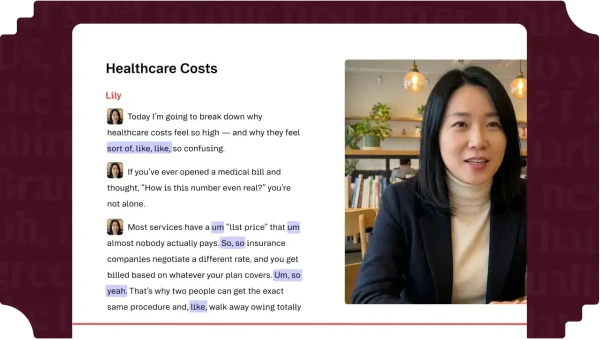
1. Editing Video Through Text Without Traditional Timeline Friction
Treating a video timeline like a word processor document made Descript famous among over 6 million creators and marketing teams. Yet that same document abstraction introduces noticeable timeline stutter and strict AI credit burn once projects grow past two hours.
Traditional Non-Linear Editors (NLEs), meaning timeline-driven tools like Adobe Premiere Pro and DaVinci Resolve, force editors to scrub waveforms frame by frame. Finding a single verbal stumble inside a 90-minute interview can take minutes of manual listening. Descript flips that workflow by indexing every spoken syllable through Automatic Speech Recognition (ASR), which converts speech into timestamped text tokens before you make a single cut.
This Descript review examines how the platform’s 2026 architecture handles real production workloads, from Underlord AI automation to Studio Sound audio cleanup. Operations leads and solo creators will see where text-first editing saves hours and where software bloat forces a return to dedicated NLEs.
| Production Dimension | Traditional NLEs (Premiere / Resolve) | Dedicated Podcast Recorders | Descript Unified Workspace |
|---|---|---|---|
| Primary Editing Paradigm | Frame-level timeline blade cuts | Basic waveform trimmers | Synchronized transcript and multitrack timeline |
| Audio Cleanup | Manual VST plugin chains | Basic noise gate presets | One-click Studio Sound neural restoration |
| AI Co-Editor Automation | Limited clip or caption assistants | Transcript summaries only | Underlord agent with reusable slash Skills |
| Remote Guest Recording | Requires external capture tools | Built-in local track recording | Descript Rooms up to 10 participants |
| Heavy 4K Multicam Stability | High local GPU acceleration | Audio-only or light 1080p | Prone to memory lag on multi-hour files |
Teams producing high-volume B2B webinars, tutorials, and video podcasts benefit most from this unified pipeline. Those teams care about publishing speed, clean vocal tracks, and rapid social clipping over complex frame effects. By contrast, commercial colorists and motion designers who rarely cut dialogue will find the timeline controls restrictive.
For content leads comparing editorial tools, the central question is whether text-based automation holds up under daily production pressure. Looking closely at the underlying engine, credit economics, and user failure reports reveals exactly where Descript excels and where it breaks.
2. Synchronizing Transcript Edits Across Multitrack Video Timelines
Under the hood, Descript binds every word in your script pane to a precise millisecond offset on a multitrack sequence. Highlighting a paragraph and pressing Backspace does not erase the source media; instead, it writes a non-destructive edit decision that skips that range during playback and export.
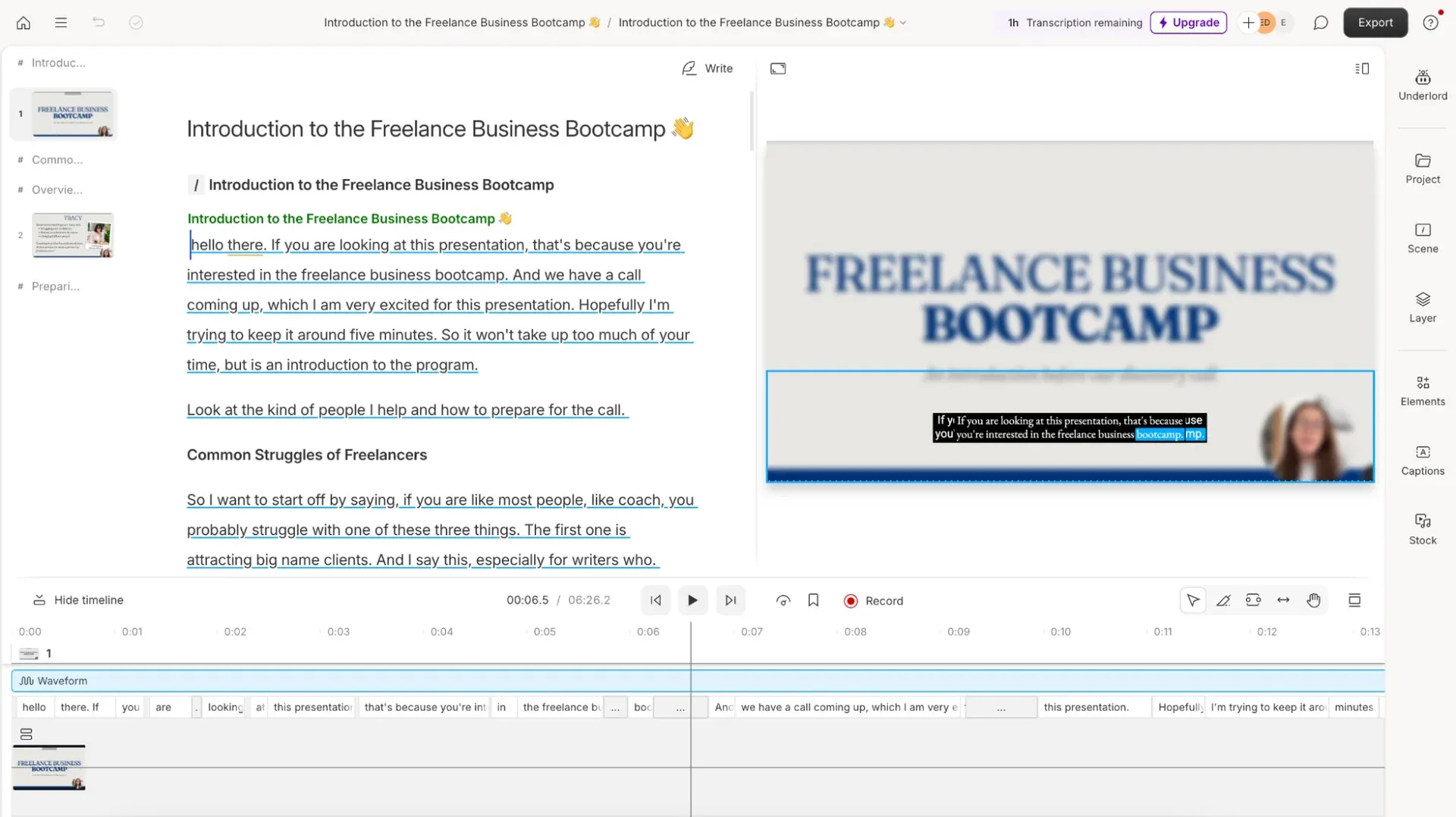 Transcript edits automatically ripple across the linked video timeline without manual blade cuts
Because edits remain non-destructive, you can highlight crossed-out text later and restore deleted sentences without digging through bin folders. Automatic transcription covers 25 languages out of the box, including English, Spanish, French, German, Japanese-adjacent European sets, and Portuguese.
For multi-guest shows, Speaker Detective plays short audio snippets so you can label 8 or more speakers across separate synchronized tracks. Four architectural layers keep visual pacing intact when you cut dialogue:
- Wordbar Timing Controls: Beneath the script, a compact timeline displays individual word blocks, letting you drag pauses wider or tighter without switching to a classic NLE view.
- Scene Boundaries with Forward Slashes: Typing
/anywhere in the transcript inserts a new visual scene, allowing you to drop B-roll, screen captures, or title cards directly onto spoken cues. - Automatic Multicam Switching: For multi-speaker podcasts, the editor automatically swaps camera angles based on which participant’s audio track crosses the active speech threshold.
- Non-Destructive Track Exports: Editors who finish rough cuts in Descript can export session timelines with separate speaker tracks preserved for downstream mixing.
This text-to-timeline binding removes the manual scrubbing that slows down interview-heavy shoots. Instead of hunting through waveforms for a two-second stumble, producers scan keywords with Ctrl+F and trim entire tangents in seconds. Visual timing still requires checking the bottom timeline whenever B-roll overlaps sentence boundaries, because script cuts automatically shorten any attached overlay layers.
Beyond basic cuts, Descript includes AI visual corrections directly inside the scene canvas. Eye Contact subtly adjusts a speaker’s gaze toward the lens so presenters can read scripts or teleprompters without looking shifty. Green Screen isolates foreground subjects from messy office backgrounds without requiring physical chroma key lighting, while Center Active Speaker automatically reframes wide shots for vertical social feeds.
Dynamic captions also tie directly into the transcript database rather than functioning as a separate subtitle track. Creators can apply animated word highlighting, customize brand fonts on paid tiers, and adjust vertical safe zones across every scene simultaneously. When you delete a sentence from the script, the burned-in caption keyframes update automatically without leaving orphaned text overlays behind.
3. Automating Rough Cuts With Underlord and Custom Skills
Introduced as an agentic sidebar assistant, Underlord moves Descript beyond manual transcript deletions into prompt-driven post-production. Rather than hunting through nested menus for caption presets or aspect-ratio crops, editors type natural-language instructions directly into the Underlord chat panel.
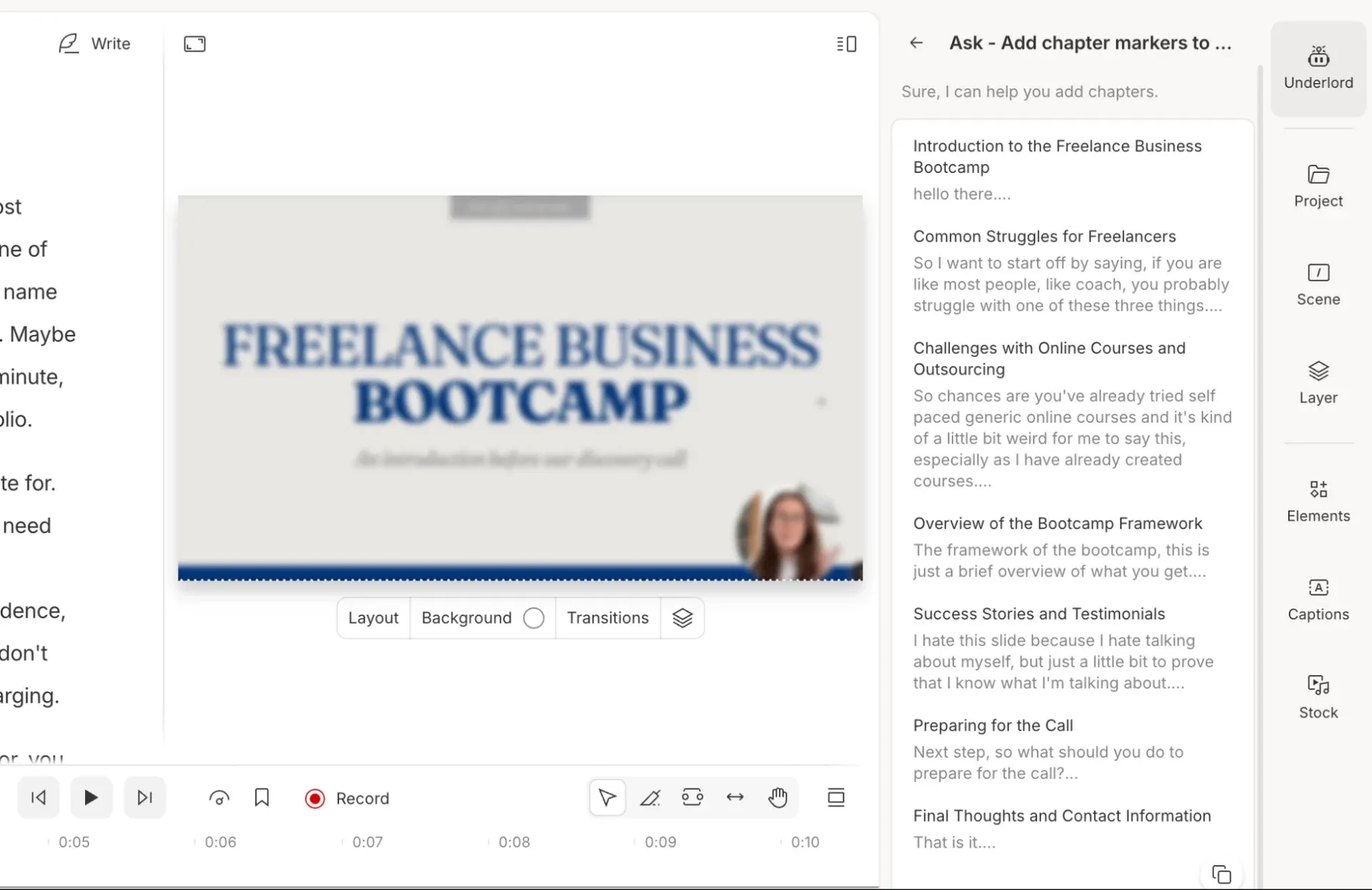 Underlord executes multi-step editing prompts and reusable slash-command Skills from the right sidebar
In November 2026, Descript replaced static prompt templates with Underlord Skills, letting editors save any successful multi-step chat workflow and trigger it later by typing /. Alongside Skills, Underlord can ingest brand guidelines (colors, logos, fonts, and style rules) to generate four editable layout packs across an entire drive.
Mid-2026 updates also added persistent Custom Instructions, so Underlord remembers your preferred cut pacing and caption styling across projects without repeated prompting. Key automated operations inside Underlord include:
- Edit for Clarity: Strips filler words (“um”, “ah”, “like”), verbal digressions, and repeated retakes in a single pass.
- Repurpose Media and Clips: Scans long interviews for high-retention moments, crops subjects to 9:16 vertical framing, and applies animated dynamic captions.
- AI Music and SFX Generation: Synthesizes custom background tracks or transition sound effects matched to exact timeline lengths, added in September 2026.
- In-Canvas Image Painting: Lets editors brush over an unwanted object on a frame and prompt Underlord to remove or replace that region.
Underlord v2 also introduced model flexibility inside the assistant sidebar, allowing creators to swap underlying reasoning models depending on whether a task involves script drafting or multi-step timeline formatting. That versatility speeds up repetitive packaging tasks like generating YouTube descriptions, podcast show notes with timestamps, and social summaries from a finished composition.
Creative teams can also combine multiple saved Skills inside a single chat prompt, chaining a rough-cut cleanup pass with a vertical social clip layout in one sequence. That modularity turns Underlord into a repeatable production macro for weekly shows that follow identical formatting rules.
“After reaching the specified limit, you will hear ‘jibber’ ‘jabber’ in your generated speech.” (Descript Pricing Documentation on Regenerate Overage Limits)
That warning highlights a real operational constraint. When Underlord misinterprets a complex framing prompt or generates awkward B-roll, fixing the mistake costs another round of AI credits. Teams building repeatable content repurposing pipelines often pair Underlord with specialized tools like Castmagic when they need dedicated show-note and newsletter generation without burning video editing credits.
4. Restoring Dialogue Clarity Through Studio Sound Processing
Bad room acoustics ruin more B2B videos than low-resolution cameras. Descript addresses that bottleneck with Studio Sound, a neural Digital Signal Processing (DSP) filter trained to isolate human vocal frequencies from HVAC hum, traffic noise, and untreated room echo.
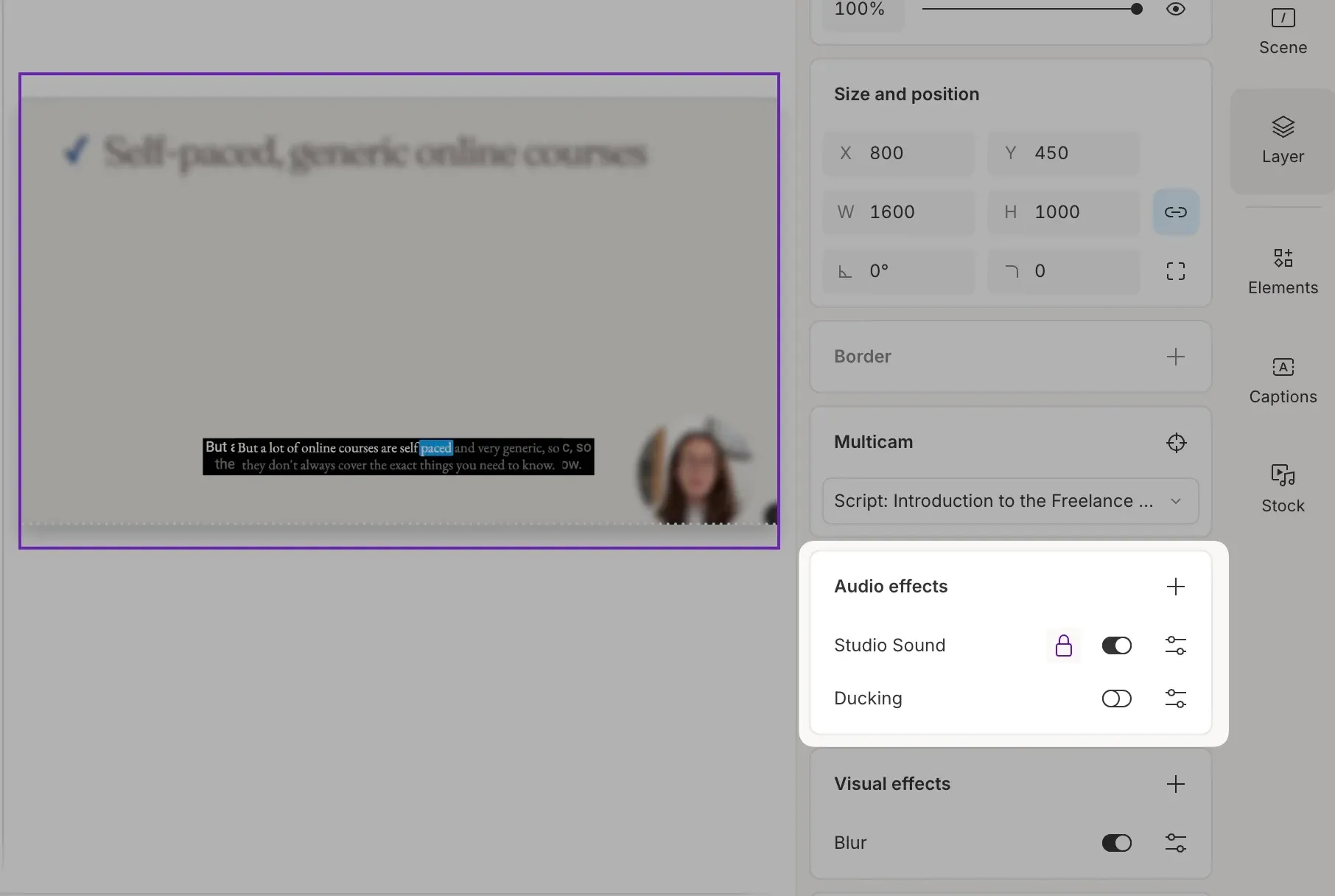 Studio Sound isolates spoken dialogue and strips room echo with a single intensity slider
Unlike traditional high-pass filters or aggressive noise gates that chop off breath tails, Studio Sound reconstructs vocal warmth while suppressing ambient hiss. Activating the effect takes one toggle in the audio inspector, followed by an intensity slider ranging from 0% to 100%. Setting the slider to 100% can make thin laptop microphones sound overly synthetic, whereas dialing it back to 65%–80% preserves natural room air while removing distracting background chatter.
Studio Sound also works alongside Descript’s AI Speech and Regenerate engines. If a speaker mispronounces a brand name, editors type the corrected word directly into the transcript. Regenerate then synthesizes a matching vocal patch using a custom voice clone or one of 25+ to 60+ stock AI speakers.
For teams whose primary goal is standalone studio-grade voiceovers rather than video assembly, a dedicated speech platform like ElevenLabs still offers finer emotional inflection control and broader voice design. Descript’s speech synthesis excels at seamless two-second fixes inside an existing recording, whereas full-length narration projects benefit from dedicated voice studios.
Custom avatars round out the synthetic media suite for teams that need talking-head explainers without camera setups. Descript includes over 35 stock avatars in its Avatar Gallery, alongside text-prompt avatar creation and custom avatar generation from uploaded photos on Business plans. Those avatars work well for quick internal onboarding clips, though subtle mouth-shape artifacts remain noticeable in close-up 4K frames.
Avatar stylization controls let editors adjust framing and visual presentation so synthetic presenters match slide decks or product walkthroughs. Even so, viewer trust drops quickly if customer-facing tutorials rely too heavily on synthetic faces instead of real team members. Reserve generated avatars for internal training updates or localized placeholder slides, and keep human presenters on flagship sales pages.
5. Translating Captions and Dubbing Across Thirty Languages
Global marketing teams routinely face steep localization bills when adapting product demos for regional buyers. Descript embeds caption translation across 61 languages directly into the editor, allowing creators to export localized SRT subtitle files or burned-in dynamic captions without hiring external transcription vendors. Captions support custom font uploads, word-by-word highlight colors, and automated positioning so text never collides with lower-third graphics.
Audio dubbing pushes localization further on higher tiers, translating spoken dialogue across 30 languages while preserving the original speaker’s vocal timbre. Native-sounding AI speakers cover 14 core languages, including English, Spanish, French, Italian, German, Brazilian Portuguese, Polish, Dutch, Swedish, Hindi, Turkish, Chinese, Japanese, and Korean.
Crucially, Descript pairs dubbing with a side-by-side Translation Proofread view. Bilingual reviewers can inspect and tweak translated script lines against the original transcript before re-rendering audio, which prevents embarrassing idiom errors that fully automated dubbing pipelines ship. Still, lip-sync alignment on dubbed video remains approximate rather than frame-perfect, making it better suited for tutorials and corporate training than flagship brand commercials.
6. Recording Remote Guests Inside Descript Rooms
Rather than forcing podcasters to record in Zoom or Riverside and re-upload massive files, Descript bundles remote capture directly inside Descript Rooms. Hosts send a browser link that supports up to 10 simultaneous room participants plus 3 to 10 Control Room producers who use push-to-talk cues without appearing on the final recording.
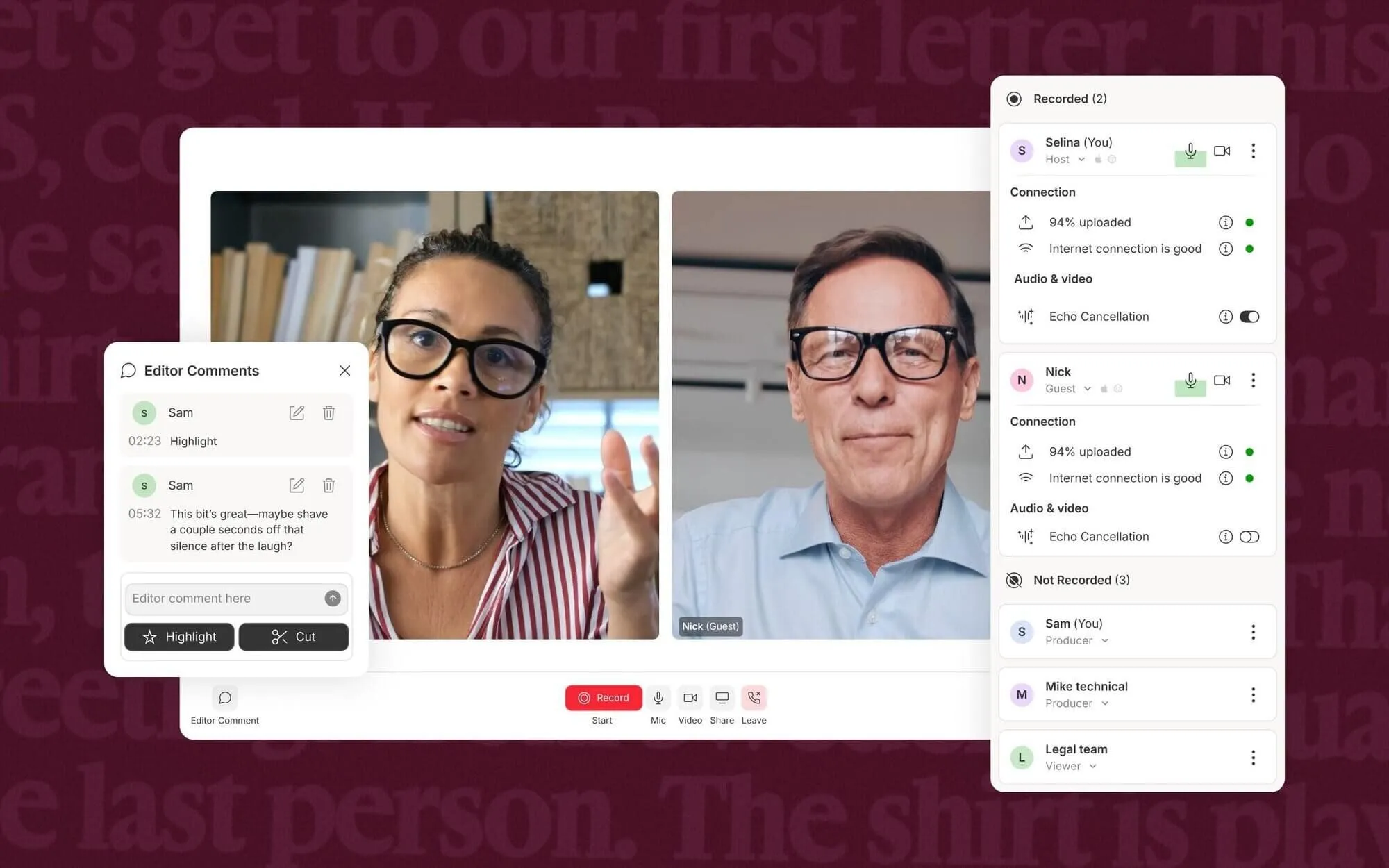 Descript Rooms captures separate local tracks for up to ten participants with seven-day cloud recovery
Each guest’s audio and video are captured locally on their own machine and uploaded progressively to cloud backup storage, protecting sessions against Wi-Fi drops. If a guest closes their browser prematurely, Descript retains a 7-day recovery window to resume uploading the primary local file. Rooms also supports sharing up to 2 screens simultaneously and automatically imports finished sessions into a transcribed sequence without deducting from your monthly transcription media hours.
That zero-deduction import rule is a welcome detail for weekly podcast hosts. Monthly Rooms recording caps still apply per drive: 2 hours on Free, 5 hours on Hobbyist, 15 hours on Creator, and 25 hours on Business. Teams that transitioned from SquadCast after Descript’s integration shifts have noted occasional guest connection hiccups on older Safari builds, making Chrome or Edge the safest browser baseline for guests.
Editor comments recorded during live Rooms sessions also sync with timestamps straight into the editing project. Producers can mark great soundbites or flag technical stumbles in real time, giving post-production editors an instant roadmap when the call wraps.
Unlike standalone meeting recorders that flatten all participants into a single mixed stereo file, Rooms preserves isolated tracks for every speaker. That separation lets editors mute a guest’s accidental cough or apply Studio Sound selectively to a weak USB microphone without altering the host’s studio condenser track. For remote interview shows with uneven home setups, isolated track capture makes the difference between salvageable audio and an unusable episode.
7. Managing Media Hours and AI Credit Burn Rates
Descript bills per editor seat and meters usage across two separate buckets: media hours (imported or recorded footage) and AI credits (Underlord prompts, Studio Sound, Regenerate, avatars, and dubbing). Annual billing cuts subscription prices by up to 35% compared to month-to-month plans.
| Plan Tier | Annual Price (Per Seat) | Monthly Price (Per Seat) | Media Hours / Month | AI Credits / Month | Export & Storage Ceiling |
|---|---|---|---|---|---|
| Free | $0 | $0 | 1 hour (60 min) | 100 (one-time) | 720p watermarked, 5 GB |
| Hobbyist | $16/mo | $24/mo | 10 hours (600 min) | 400 / month | 1080p clean, 100 GB |
| Creator | $24/mo | $35/mo | 30 hours (1,800 min) | 800 / month | 4K clean, 1 TB, up to 3 seats |
| Business | $50/mo | $65/mo | 40 hours (2,400 min) | 1,500 / month | 4K clean, 2 TB, up to 5 seats |
| Enterprise | Custom | Custom | Custom pool | Custom pool | SOC 2 Type II, SSO, SCIM |
Neither media hours nor AI credits roll over when your billing cycle resets. On Creator and Business plans, hours and credits pool across editors sharing a drive, and teams can purchase mid-cycle top-ups instead of upgrading seats. Note that scaling a Creator drive up to 3 editors or a Business drive up to 5 editors still bills per editor seat separately.
The hidden cost trap sits in AI credit consumption during trial-and-error editing. Underlord charges credits whenever it runs a complex B-roll pass, generates video clips, or applies generative visual edits.
Two or three failed prompt attempts can exhaust a 400-credit Hobbyist allowance in a single afternoon. Editors who stick to manual transcript cuts and one-click Studio Sound stretch credits easily, whereas heavy generative AI users hit paywalls fast.
Accountants should also watch how seat expansion interacts with pooled resources. Adding a second editor on Creator ($24/month annual) or Business ($50/month annual) multiplies the seat fee while expanding the shared drive pool.
Agencies with occasional reviewers should assign free comment-only viewer links instead of buying full editor seats. Over-provisioning full seats for stakeholders who only leave timestamped feedback is the fastest way to double annual software spend unnecessarily. Reviewing role permissions quarterly prevents idle seats from quietly draining departmental video budgets.
For regulated organizations, Enterprise contracts unlock security governance absent from self-serve plans. Enterprise includes SOC 2 Type II compliance, Single Sign-On (SSO) for centralized login control, System for Cross-domain Identity Management (SCIM) for automated user provisioning, and detailed audit logs. Larger teams also gain contractual opt-outs from AI model training, custom data retention windows, and a dedicated Customer Success Manager.
8. Diagnosing Timeline Lag and Export Failures
User sentiment across review platforms exposes a sharp split between casual marketers and daily long-form editors. On G2, Descript holds roughly a 4.6 out of 5 rating across more than 930 reviews, driven by praise for rapid transcript cuts and social clip creation. On Trustpilot, however, its score drops to roughly 3.1 out of 5 across nearly 294 reviews, mirroring recurring complaints on r/Descript and r/podcasting.
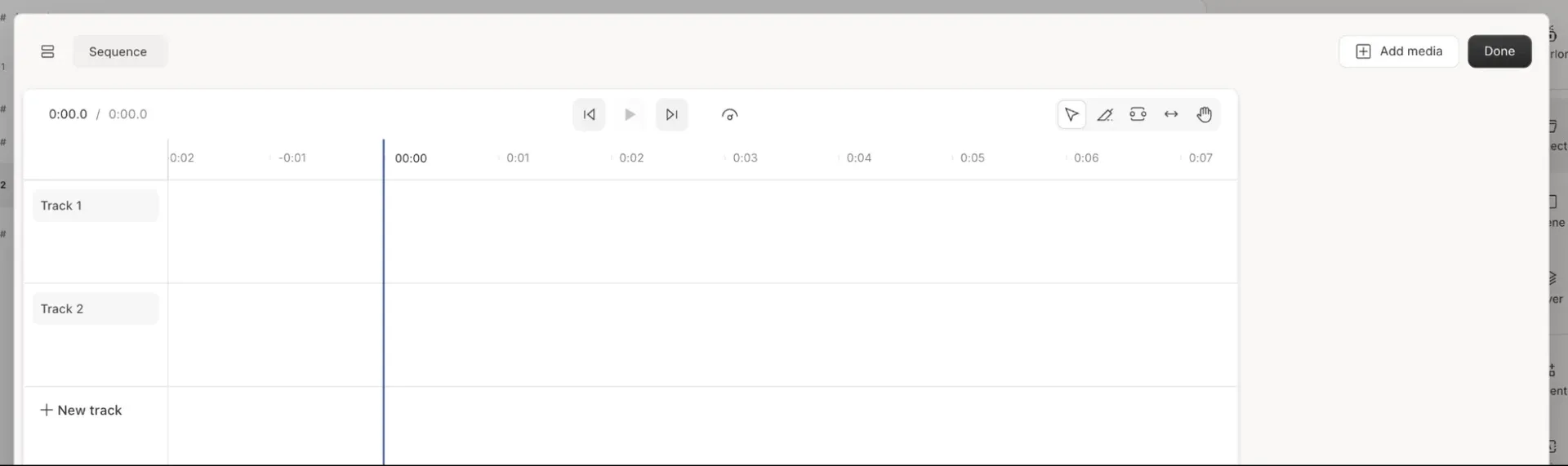 Complex multi-layer timelines expose Descript’s performance ceiling compared to dedicated NLEs
Five operational pain points surface repeatedly in verified 2025 and 2026 user feedback:
- Multi-Hour Timeline Stutter: Projects exceeding 90 minutes with multiple video tracks frequently suffer playback lag, delayed cursor response, and memory spikes.
- Unexpected Export Crashes: Editors report long 4K renders failing mid-export, forcing project restarts or splitting episodes into smaller sub-compositions.
- AI Credit Drain on Retries: When Underlord misinterprets 9:16 framing or inserts irrelevant B-roll, re-running prompts consumes monthly credits with no automatic refund.
- Frequent UI Navigation Churn: Major layout updates move familiar modes and inspector buttons, leaving returning editors feeling like involuntary beta testers.
- Clipped Filler-Word Transitions: Running bulk “Remove All” passes on filler words and silences occasionally slices into adjacent consonants, requiring manual wordbar repair.
Keeping compositions under 45 minutes and disabling heavy visual layers until dialogue cuts are locked reduces most crash risks. Clearing local cache files before initiating 4K cloud or local exports also lowers the odds of mid-render stalls. Still, agencies delivering strict broadcast deadlines should maintain a local NLE backup for final assembly.
9. Weighing Descript Strengths Against Production Trade-Offs
Evaluating Descript requires balancing rapid spoken-word editing speed against desktop stability and credit predictability. Beginners gain an immediate productivity boost, while seasoned video editors encounter clear architectural ceilings on complex timelines.
What We Liked (Pros)
- Text-based editing cuts spoken-word assembly time drastically for creators
- Underlord Skills save repeatable multi-step editing workflows via slash commands
- Studio Sound salvages noisy microphone recordings without manual EQ chains
- Built-in Rooms captures separate local tracks for ten remote participants
- Supports caption translation in 61 languages and dubbing in 30 languages
Areas for Improvement (Cons)
- Multi-hour timelines frequently trigger application stutter, lag, and export crashes
- Failed Underlord AI generations burn monthly credits without automatic refunds
- Frequent interface layout changes disrupt established editor muscle memory
- Aggressive filler-word removal occasionally clips adjacent spoken syllables
- Lacks frame-accurate color grading and complex motion graphics controls
The trade-off comes down to workflow complexity. Whenever dialogue drives the cut, Descript’s text interface outperforms traditional scrubbing by a wide margin. Once projects demand layered motion graphics, multi-node color grading, or three-hour multi-camera timelines, those same abstractions become bottlenecks.
Teams that treat Descript as a dialogue-assembly and repurposing engine (rather than a universal replacement for finishing suites) extract the highest return on their subscription. Separating rough transcript assembly from final visual polish keeps desktop memory overhead low and prevents last-minute export surprises.
10. Comparing Descript Against Premiere Pro and Riverside
Choosing between Descript, Adobe Premiere Pro, and Riverside depends on whether your team prioritizes text-first editing, deep post-production control, or remote capture reliability.
| Evaluation Criteria | Descript (Creator) | Adobe Premiere Pro | Riverside (Pro) |
|---|---|---|---|
| Starting Paid Price | $24/mo (annual) | $22.99/mo (annual) | $24/mo (annual) |
| Core Editing Model | Document transcript + timeline | Frame-accurate NLE timeline | Text-based clip trimmer + editor |
| Audio Restoration | Built-in Studio Sound DSP | Essential Sound + third-party VSTs | Magic Audio cleanup |
| Remote Guest Recording | Descript Rooms (10 guests) | None (requires external capture) | Native 4K local recording (up to 9 guests) |
| Color & Motion Graphics | Basic presets and animations | Full Lumetri Color + After Effects | Basic brand overlays |
| Long-Timeline Stability | Prone to lag over 90 minutes | High with local GPU proxies | Best for capture, lighter editing |
Adobe Premiere Pro costs $22.99/month on an annual single-app plan and remains undefeated for commercial color grading, custom keyframing, and stable multi-hour 4K rendering. Local GPU hardware acceleration lets Premiere scrub multi-camera 4K ProRes feeds smoothly without cloud sync delays. However, Premiere Pro lacks native remote guest capture and requires far steeper training for non-editors who only publish weekly talking-head updates.
Riverside starts at $15/month (Standard) and $24/month (Pro, billed annually), delivering reliable uncompressed local 4K video capture for remote interviews. Its browser studio handles fluctuating guest bandwidth gracefully, saving separate WAV and MP4 tracks straight to cloud storage.
Choose Descript over Riverside when you need deep multitrack editing, Underlord Skills, and 30-language dubbing in one workspace. Choose Riverside if dependable 4K remote guest capture matters more than post-production flexibility. Both tools charge $24/month annually on their Pro and Creator tiers, so the decision hinges on whether capture reliability or editing speed bottlenecks your team today.
Many mature podcast networks actually combine tools rather than forcing one app to do everything. They record high-bitrate remote interviews, assemble dialogue cuts in Descript, and pass XML timelines to Premiere Pro when client deliverables require custom motion branding or broadcast loudness mastering. Splitting capture, rough assembly, and final color grading plays to each platform’s engineering strengths while avoiding Descript’s multi-hour memory ceiling.
11. Frequently Asked Questions About Descript
The answers below address common billing, technical, and workflow edge cases raised by podcasters and video teams evaluating Descript before committing to an annual seat. Each response reflects 2026 plan documentation and verified user feedback across production drives.
Descript runs Automatic Speech Recognition across uploaded media to map every spoken word to its exact millisecond timestamp. Deleting a sentence in the transcript removes the corresponding video and audio segment on the underlying timeline automatically.
No, monthly media hours and AI credits reset at the end of each billing cycle without rollover. On multi-seat Creator and Business plans, media hours and AI credits are pooled across editors on the same drive, and teams can buy top-ups mid-cycle.
Once an account exceeds its included speech regeneration allowance, Descript inserts audible jibber and jabber placeholder words into newly generated audio. Upgrading tiers or purchasing credit top-ups restores clean synthesis output.
Descript synchronizes live transcript tokens, waveform previews, and cloud project metadata inside an Electron-style desktop wrapper. Multi-hour podcasts or multi-track 4K timelines strain local memory, leading to playback stutter and occasional export failures.
Descript replaces Premiere Pro for talking-head YouTube videos, tutorials, and interview podcasts where dialogue pacing matters most. Commercial editors who need deep color grading, multicam LUTs, or custom keyframed VFX still export timelines to Premiere Pro.
Yes, Descript Enterprise plans include SOC 2 Type II compliance, Single Sign-On, SCIM provisioning, audit logs, and contractual AI training opt-outs. Smaller self-serve tiers lack dedicated SSO and custom data retention guarantees.
12. Final Verdict on Descript for Content Teams
Descript earns a clear recommendation for podcasters, B2B marketing teams, and solo YouTube educators whose content revolves around spoken dialogue. Pairing transcript-driven cutting with Studio Sound cleanup and Underlord Skills compresses multi-hour rough cuts into minutes. At $24/month on the Creator tier, the time savings justify the seat cost for regular publishers.
Skip Descript as a standalone NLE if your team produces feature-length documentaries, VFX-heavy commercials, or multi-hour 4K multicam livestreams. Those heavy timelines expose its memory bottlenecks fast. Keep compositions modular under 45 minutes, and export multitrack timelines to Premiere Pro or DaVinci Resolve whenever strict finishing is required.
Recommended Rollout and Audience Fit
Teams adopting Descript should start with a single Hobbyist or Creator seat on a pilot show before migrating an entire agency drive. Validate export stability on your longest typical recording first, and monitor how quickly your editors burn AI credits during Underlord experiments. Establishing a strict rule for when to split long timelines keeps weekly publishing schedules predictable and prevents late-night render retries before client deadlines.
- Solo Podcasters and YouTube Educators: Choose Hobbyist ($16/mo annual) or Creator ($24/mo annual) to edit spoken episodes in text, clean room echo with Studio Sound, and export 4K clips fast.
- B2B Content and Enablement Teams: Choose Business ($50/mo annual) when multiple editors need Brand Studio layout packs, 30-language dubbing, and pooled media hours.
- Commercial Post-Production Houses: Stick with Premiere Pro or DaVinci Resolve for heavy color grading, complex motion graphics, and multi-hour 4K timeline stability, using Descript only for initial rough transcripts.
Ultimately, Descript delivers its highest return when treated as a rapid spoken-word assembly engine rather than a monolithic finishing studio. Pair it with disciplined project sizing, and your editorial throughput will climb immediately without blowing up monthly credit budgets.


Descript
Descript excels for podcasters, marketers, and talking-head creators who edit dialogue faster in text than on frame timelines, though multi-hour lag and AI credit caps limit heavy post-production.