




1. How Teachable Structures Modern Creator Schools
For over a decade, launching an online course required stitching together disparate software: video hosting servers, membership plugins, payment gateways, and accounting spreadsheets. When Fedora became Teachable in 2015, its mission was to eliminate this friction through a unified hosted platform. Today, as part of Hotmart Company, Teachable supports hundreds of thousands of creators who have collectively processed billions in digital learning commerce.
Yet the educational landscape of 2026 presents fresh operational demands. Generative AI has made raw information easily accessible, shifting learner demand toward structured accountability, human mentorship, and seamless mobile learning. Simultaneously, international tax authorities have tightened digital marketplace regulations, making cross-border VAT compliance a severe legal hazard for solo creators.
Teachable addresses these realities by focusing on delivery, payments, and compliance rather than complex marketing funnels. Inside a single administrative school, creators can deploy four educational product formats:
- Structured Video Courses: Modular curriculums with video lectures, audio, slide decks, PDF guides, and quizzes.
- Dedicated 1-on-1 Coaching: Consultative programs featuring intake questionnaires, milestone tracking, and calendar scheduling.
- Standalone Digital Downloads: Direct-access files such as templates, workbooks, presets, and spreadsheets.
- Recurring Memberships: Subscription tiers that bundle courses and downloadable resource libraries into ongoing revenue.
By unifying these models under one roof, Teachable frees educators from self-hosted technical headaches like caching conflicts or database crashes, allowing them to focus entirely on curriculum design and student acquisition. You can also explore our growth marketing guide for complementary audience-building strategies.
Operational Insight: Teachable is built for operational simplicity. It leaves advanced email marketing funnels and social discussion feeds to external tools, focusing its power on reliable media delivery, high-converting checkouts, and hands-off tax compliance.
2. Course Builder Mechanics and Student UX Design
The centerpiece of any learning platform is its curriculum editor. Teachable relies on an intuitive drag-and-drop structure organized into sections and lectures. Building courses is straightforward, supporting batch uploads of video files, audio tracks, and PDF documents without lag.
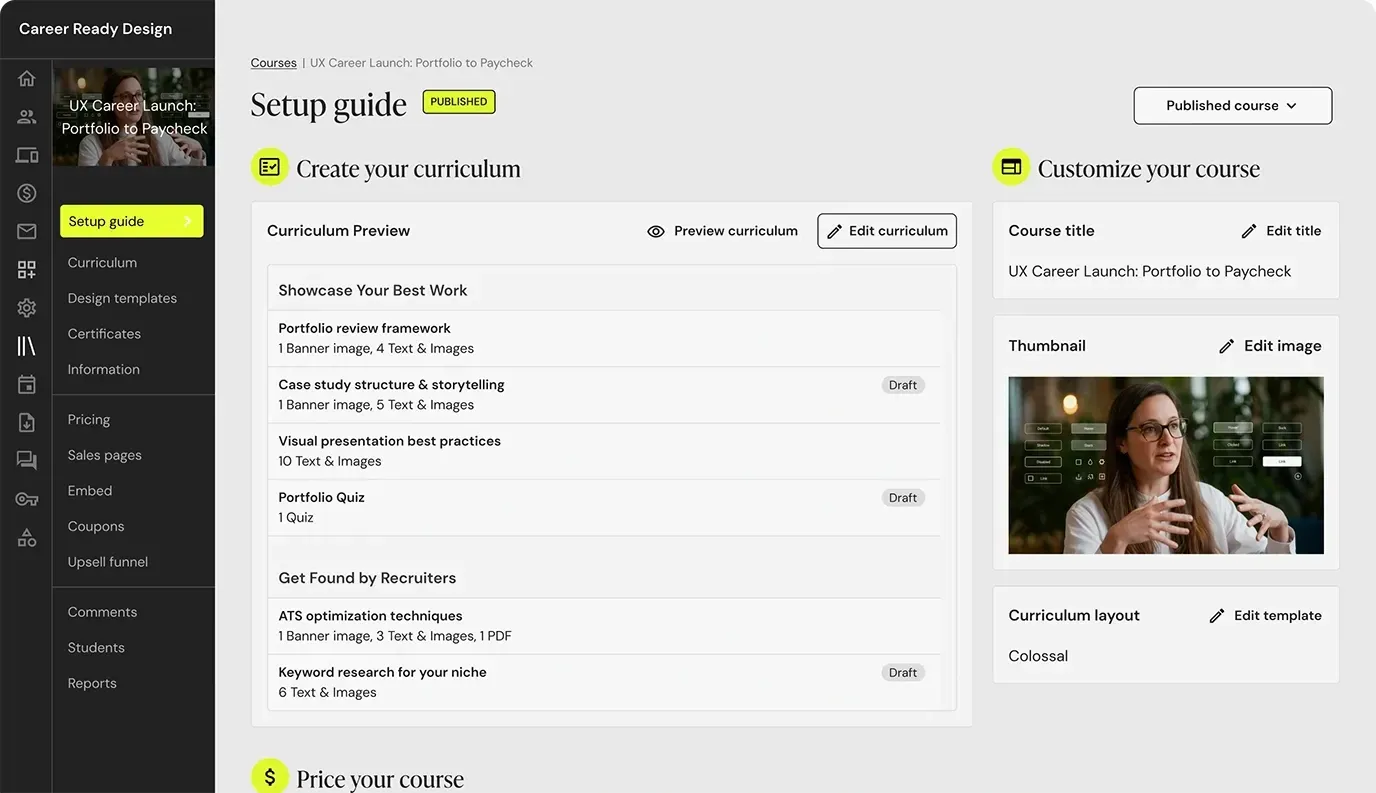 Figure 1: Teachable course builder interface displaying modular curriculum organization, lesson navigation, and media asset settings.
The student learning environment is clean, responsive, and distraction-free. Learners see a clear progress bar, a collapsible lesson menu, and an integrated media player that syncs playback across devices.
To ensure genuine comprehension, Teachable provides practical course compliance settings:
- Enforced Video Progression: Requires students to watch at least 80% to 100% of a video lesson before progressing.
- Prerequisite Lesson Sequencing: Locks advanced modules until foundational coursework is completed.
- Mandatory Assessment Pass Rates: Restricts subsequent content until students pass graded multiple-choice quizzes.
- Automated Drip Scheduling: Releases lessons gradually, either on fixed calendar dates or at designated intervals following enrollment.
This desktop experience is paired with free native iOS and Android apps across all plans, enabling learners to stream lectures and access offline downloads. Note that apps carry Teachable branding; custom white-label app store listings are not available on public tiers.
3. Evaluating AI Generation and Curriculum Tools
To speed up course production, Teachable integrates an AI Hub designed around practical instructional workflows rather than generic chatbots.
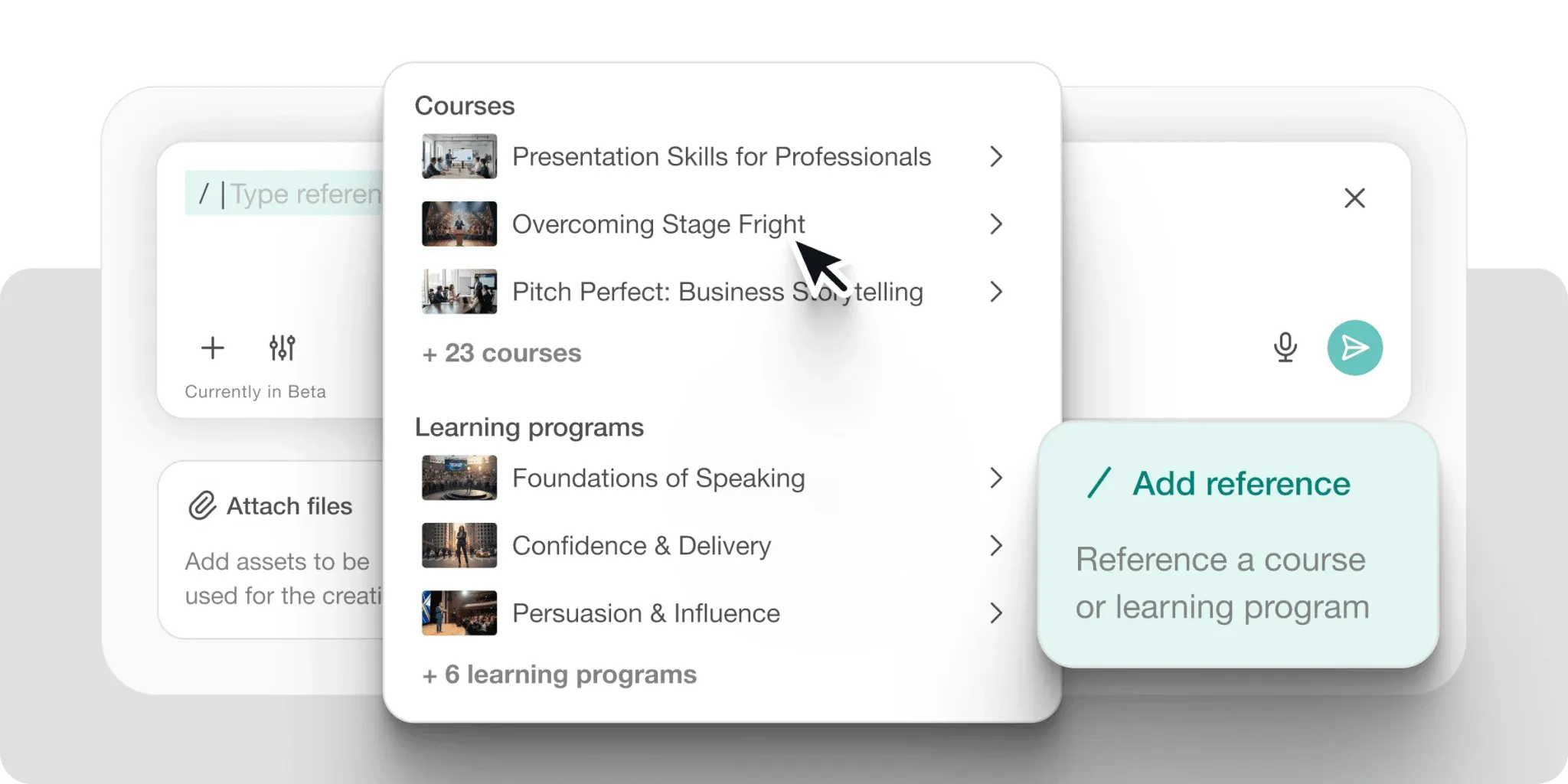 Figure 2: Teachable AI Course Starter generating a structured course outline and lesson summaries from initial prompt criteria.
The AI Hub operates across four essential stages:
- AI Course Outline Generator: Transforms a subject prompt into a multi-tier curriculum outline with logical module groupings.
- Lesson Draft and Summary Generator: Generates initial lesson overviews, learning objectives, and action checklists for fast first drafts.
- Automated Quiz Creation Engine: Analyzes lesson copy to formulate relevant multiple-choice questions with answer keys.
- Multilingual Subtitles and Translations: Transcribes video audio and generates translated captions across 70+ languages to broaden international reach.
In real-world use, the AI does not replace domain expertise, but it eliminates blank-page paralysis by turning broad topics into structured lesson scaffolding in minutes.
4. Monetization via 1-on-1 Coaching and Downloads
A major structural differentiator for Teachable is its native coaching workflow. On most competing platforms, selling coaching requires integrating external booking apps, separate payment forms, and cloud folders. Teachable treats coaching as a built-in product category.
Within the coaching dashboard, instructors can manage complete client engagements:
- Client Intake Funnel: Embed custom questionnaires to qualify prospects before confirming bookings.
- Integrated Calendar Scheduling: Connect calendar triggers so clients reserve sessions directly through checkout.
- Milestone-Based Roadmaps: Establish checklists, meeting agendas, and file dropboxes to track client progress.
- Direct Messaging Channel: Maintain a unified communication record with clients without sharing personal messaging apps.
The digital download format similarly enables quick monetization. Instructors can sell standalone workbooks, presets, or spreadsheets without building a course shell.
| Educational Product Type | Primary Delivery Mechanism | Included Native Capabilities | Strategic Business Value |
|---|---|---|---|
| On-Demand Video Courses | Hosted video player, text, quizzes | Drip schedules, compliance gating, video subtitles | Scalable one-to-many recurring or one-off revenue |
| 1-on-1 Executive Coaching | Integrated calendar, video links | Intake forms, milestone roadmaps, file messaging | High-ticket consultative revenue |
| Digital Download Assets | Instant secure file fulfillment | PDF, ZIP, audio, spreadsheet, template delivery | Low-friction impulse purchases & tripwire offers |
| Curated Memberships | Bundled content library access | Recurring billing schedules, member dashboard | Predictable monthly or annual recurring revenue |
5. The Community Freeze and Member Alternatives
The most notable strategic shift in Teachable’s roadmap is its move away from native community tools. While rivals invested in social feeds, chat channels, and gamification to counter Skool and Circle, Teachable chose to freeze development on its native Community feature.
The native Community tool is in permanent maintenance mode and closed to all newly created schools. While legacy accounts retain their existing discussion boards, no further feature upgrades or mobile improvements are planned.
For new creators, student interactions are organized through two alternative mechanisms:
- Threaded Lesson Comments: Students post questions directly under specific video lectures. Instructors can require comment pre-moderation, keeping discussions focused and directly tied to course material.
- External Third-Party Communities: Teachable officially recommends linking out to dedicated platforms like Circle, Discord, or Slack from your student dashboard.
If your business model depends on daily peer discussions, live voice rooms, and gamified interaction, Teachable alone will not suffice. However, if your program emphasizes asynchronous video mastery where questions are strictly lesson-specific, threaded comments provide a clean environment free from feed distractions.
6. Automated Global Tax Handling and Payouts
The standout operational advantage Teachable holds over competitors is Teachable Payments, an integrated financial engine powered by Stripe that functions as a full Merchant of Record.
Cross-border sales of digital educational products involve significant legal complexity. The European Union mandates collecting and remitting VAT according to the customer’s resident country under One Stop Shop rules. US economic nexus laws enforce state-by-state thresholds, while Canada, the UK, and Australia enforce strict digital sales tax regulations. Managing these filings independently requires dedicated accounting software and substantial administrative hours.
Teachable Payments manages this entire compliance workload automatically:
- Automatic Location Detection: Calculates and applies precise local sales tax, VAT, or GST at checkout based on buyer IP and billing details.
- Autonomous Sovereign Remittance: Automatically remits collected taxes to governing authorities across 45+ countries.
- Compliant Invoicing: Issues compliant PDF receipts and tax documentation to corporate and international buyers.
- Daily Net Payouts: Deposits cleared earnings directly into your bank account on a daily schedule without holding back reserve percentages.
Creators who bypass Teachable Payments to connect custom Stripe gateways lose this automated tax remittance. Furthermore, US schools using custom Stripe gateways pay an additional 2% fee, making Teachable Payments the clear operational choice.
7. Pricing Breakdown, Transaction Fees, and TCO
Evaluating Teachable’s true cost requires examining subscription tiers alongside transaction fees. Following recent plan overhauls, Teachable eliminated its free plan, establishing three self-serve tiers alongside custom enterprise plans.
| Subscription Tier | Annual Billing (Save 22%) | Monthly Billing | Platform Transaction Fee | Published Product Allowance | Included Admin Accounts | Core Platform Entitlements |
|---|---|---|---|---|---|---|
| Starter | $29 / mo ($348/yr) | $39 / mo | 7.5% | 5 Products | 1 User | Course builder, student iOS/Android apps, AI hub, order bumps |
| Builder | $69 / mo ($828/yr) | $89 / mo | 0% | 10 Products | 1 User | Custom domain, affiliate management, real-time live chat |
| Growth | $139 / mo ($1,668/yr) | $189 / mo | 0% | 50 Products | 5 Users | Certificates, branding removal, Zapier/API, free AI translations |
| Custom | Custom Quote | Custom Quote | 0% | Flexible / Unlimited | Flexible | Dedicated account manager, sandbox testing, priority SLA |
Standard payment processing fees apply on all tiers: 2.9% + $0.30 for US credit cards, and 3.9% + $0.30 for international cards.
The primary financial hazard for new creators is remaining on the Starter plan once sales gain momentum. Starter takes a 7.5% platform transaction fee on every sale. On annual billing, the $40 monthly gap between Starter ($29/mo) and Builder ($69/mo) divided by 0.075 creates an exact break-even threshold of $533.33 in monthly sales.
The moment your school generates more than $533.33 per month, the Builder plan is mathematically cheaper than Starter. At $2,000 in monthly sales, Starter extracts $150 in platform fees plus the $29 subscription ($179 total), whereas Builder costs a flat $69 per month with zero platform fees.
8. The Hidden $0.50 Fee on Inactive Free Leads
In late 2026, Teachable updated its usage terms, introducing a policy that impacts creators who use free mini-courses as top-of-funnel lead magnets.
Under the updated policy, Teachable draws a firm financial boundary between paying and non-paying students:
- Paying Learners Are Unlimited: Any student who completes a purchase of more than $0 through Teachable checkout incurs no ongoing student fees.
- The 100 Free Student Baseline: Each school receives an allowance of 100 active non-paying students, encompassing free course registrations, 100% coupon enrollments, and manually imported users.
- The $0.50 Monthly Overage: Any active free learner beyond the initial 100-student cap costs $0.50 per month, billed against peak non-paying enrollments.
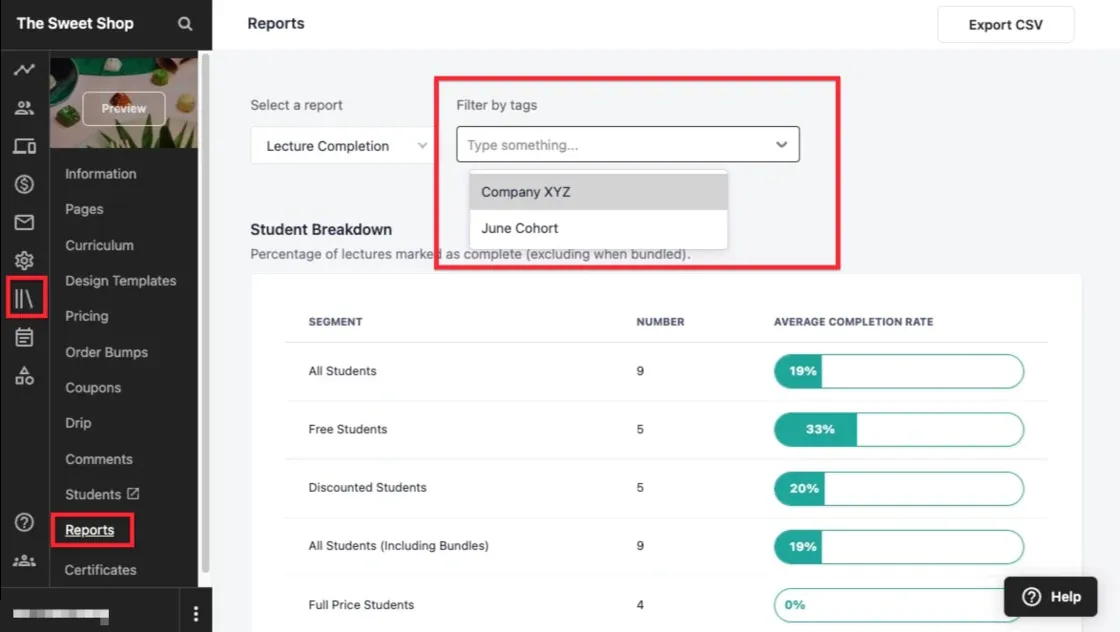 Figure 3: Teachable course reporting dashboard breaking down lecture completion rates across free, discounted, and full-price student segments.
For creators enrolling 1,500 students in a free introductory course, the 1,400 overage accounts create an unexpected $700 monthly surcharge ($8,400 annually).
To manage this fee, creators should adopt three simple strategies:
- Implement Tripwire Pricing: Charge a nominal $1 or $7 entry fee, which classifies the registrant as a paying customer and avoids the fee entirely.
- Automate Access Expiration: Configure free course access to expire after 14 or 30 days, dropping inactive learners from the billable count.
- Host Free Content Externally: Deliver free video lead magnets through landing pages connected to your email marketing tool, keeping Teachable dedicated to commercial sales.
9. Comprehensive Teachable Platform Pros and Cons
Like any specialized software, Teachable balances clear strengths against specific architectural boundaries.
What We Liked (Pros)
- Automated global sales tax, VAT, and GST collection and remittance removes immense accounting liability
- Clean, intuitive drag-and-drop curriculum builder requires zero coding or technical maintenance
- Dedicated coaching pipeline integrates 1-on-1 scheduling, milestone tracking, and intake questionnaires natively
- Free iOS and Android student mobile apps included across every paid tier without add-on charges
- Direct checkout features order bumps, 1-click upsells, and flexible Buy Now Pay Later payment gateways
Areas for Improvement (Cons)
- Entry-level Starter plan imposes a hefty 7.5% platform transaction fee on top of standard payment processing
- Strict published product caps (5 on Starter, 10 on Builder, 50 on Growth) count coaching offers and downloads
- New usage fee policy bills $0.50/month per active free student once a school exceeds 100 free enrollments
- Native community development is officially frozen in maintenance mode and closed to newly created schools
- Course completion certificates, custom user roles, and full Zapier/API access require the $139/mo Growth plan
Key Operational Strengths
- Merchant of Record Protection: Automated tax remittance across 45+ countries saves independent creators substantial accounting and legal overhead.
- Integrated Coaching Structure: Built-in client intake, milestone scheduling, and private messaging eliminate the need for disconnected booking tools.
- High-Converting Checkout: Support for mobile wallets, order bumps, and Buy Now Pay Later drives higher checkout completion rates out of the box.
Primary Limitations
- Product Cap Constraints: Published product limits apply across courses, coaching packages, and digital downloads combined, requiring high-volume sellers to upgrade to Growth.
- Rigid Site Customization: The website builder provides basic layout blocks without freeform visual controls or native blogging features.
- Feature Tier Gating: Desirable capabilities like completion certificates, Zapier webhooks, and the public API are restricted to the Growth plan.
10. Head-to-Head Comparison with Top Market Rivals
To clarify Teachable’s place in the market, we evaluated how it compares against four prominent course and community alternatives.
| Evaluation Metric | Teachable | Thinkific | Kajabi | Skool | LearnDash (WordPress) |
|---|---|---|---|---|---|
| Starting Annual Price | $29 / mo ($348/yr) | $82 / mo ($984/yr) | $143 / mo ($1,716/yr) | $9 / mo or $99 / mo | $350 / yr (Plugin only) |
| Entry Transaction Fee | 7.5% | 0% (Thinkific Pay) | 0% (Kajabi Payments) | 10% (Hobby) or 2.9% | Gateway fees only |
| Automated Tax Handling | Yes (Merchant of Record) | No (Creator files) | No (Creator files) | No (Creator files) | No (Creator files) |
| Published Course Limit | 5 to 50 Products | Unlimited courses | 5 to 100+ Products | Unlimited | Unlimited |
| Native Community Hub | Frozen (Closed to new) | Yes (Native spaces) | Yes (Vibely feeds) | Outstanding (Core moat) | Requires BuddyBoss |
| Built-in Funnel Engine | Basic (Upsells/Bumps) | Moderate | Advanced visual pipelines | None | Requires FunnelKit |
| Ideal Operational Fit | Global tax compliance & coaching | Dedicated course academies | All-in-one marketing hubs | Gamified community models | WordPress data purists |
Key Competitive Takeaways
- Teachable vs. Thinkific: Thinkific offers unlimited courses and an active native community on paid plans, but leaves global tax filing to the creator. If your customer base is international, Teachable’s automated tax handling saves dozens of accounting hours quarterly.
- Teachable vs. Kajabi: Kajabi combines sales pipelines, email automation, CRM, and website hosting starting at $143/month. Teachable is far simpler and more affordable for creators who already maintain their own email marketing tools.
- Teachable vs. Skool: Skool emphasizes community interaction, member leaderboards, and social feeds, with courses serving as an auxiliary resource. If your revenue model centers on group interaction, Skool excels; for structured compliance-driven video learning, Teachable is superior.
11. Frequently Asked Questions About Teachable
No. Teachable retired its legacy free plan in 2025. Every tier now operates as a paid subscription starting with a 7-day free trial and an unconditional 30-day money-back guarantee.
Teachable operates as a Merchant of Record through Teachable Payments. It automatically calculates, collects, and remits local sales taxes, EU/UK VAT, and GST across more than 45 countries, issuing compliant invoices directly to buyers.
Every live, publicly purchasable online course, coaching package, and digital download file consumes one slot from your plan limit. Bundles and memberships do not count toward this cap, and unpublished drafts remain unlimited.
No. Native course completion certificates are restricted to the Growth ($139/mo annual) and Custom enterprise tiers. Senders on Builder must integrate third-party tools via webhooks.
Teachable updated its usage fees in late 2026. Schools receive an allowance of 100 free or manually imported students. Any active free learner beyond this 100-student cap incurs an infrastructure fee of $0.50 per month.
No. Teachable placed its native Community tool into permanent maintenance mode and closed it to new accounts. Teachable recommends using threaded lesson comments or integrating dedicated external platforms.
12. Final Editorial Verdict: Who Should Buy It?
Teachable occupies a focused, well-defined position in the creator software market. It avoids the complexity of sprawling marketing suites like Kajabi and does not attempt to replicate the social mechanics of community-first platforms like Skool. Instead, it provides a clean, dependable course and coaching delivery system protected by automated Merchant of Record tax compliance.
For consultants, authors, professional educators, and subject-matter experts, Teachable offers the fastest route to monetizing knowledge without technical overhead. It manages video hosting, student mobile app delivery, and global checkout compliance, letting solo operators sell smoothly across 180 countries.
To maximize profitability, choose your plan based on sales volume. The Starter plan works well for testing a first concept, but creators should upgrade to the Builder tier ($69/mo annual) as soon as monthly sales surpass $533 to eliminate the 7.5% platform fee. For top-of-funnel lead generation, use tripwire pricing or external landing pages to avoid unexpected free-student surcharges.
If your priority is delivering structured courses, selling high-value coaching, and avoiding international tax headaches, Teachable provides an exceptional blend of simplicity, stability, and operational peace of mind. Creators can get started with a Teachable free trial to test the platform before committing to an annual tier.
Who Should Choose Teachable
- Independent Consultants and Experts: Instructors selling high-ticket 1-on-1 coaching alongside self-paced curriculum.
- Global Knowledge Sellers: Educators transacting with buyers across the EU, UK, Canada, and the US who need automated VAT and sales tax filing.
- Focused Course Publishers: Creators who maintain their own email lists and marketing funnels externally and want a reliable, hosted checkout and delivery hub.
Who Should Consider Other Platforms
- Community-First Educators: Businesses where daily member networking and social feeds drive customer retention (consider Skool or Circle).
- All-In-One Marketers: Creators who require integrated sales pipelines, complex email automation, and a native blog within one tool (consider Kajabi).
- Mass Free Lead Magnet Operators: Publishers offering free courses to tens of thousands of cold subscribers who want to avoid per-student overage fees.


Teachable
Teachable is a premier hosted course and coaching platform that sets the industry standard for automated international tax compliance. By taking custody of sales tax, EU VAT, and global checkout processing through Teachable Payments, it provides invaluable operational peace of mind for educators selling worldwide. While product caps, the 7.5% Starter fee, and a frozen community tool require strategic planning, its clean course player and native coaching workflows make it a top-tier choice for professional knowledge businesses.