





Table of Contents
Modern business voice communications have split into two distinct architectural directions. On one side, teams require lightweight, collaborative phone systems that function like shared email or messaging inboxes. On the other side, growing organizations demand artificial intelligence engines that analyze live calls and coach agents in real time.
In 2026, Quo (formerly OpenPhone) and Dialpad represent the leading innovators across these respective philosophies. Quo reimagines business calling as a transparent team inbox, where multiple colleagues manage shared phone numbers, coordinate replies with internal mentions, and automate post-call recaps.
Conversely, Dialpad is an AI-first cloud communications platform powered by its proprietary DialpadGPT language model, offering real-time agent coaching cards, live sentiment analysis, and enterprise SIP desk phone provisioning.
Choosing between them requires understanding where your team’s primary friction lies: internal team collaboration or live conversational intelligence.
1. Quick Overview: Quo vs Dialpad

- Collaborative shared numbers with internal mentions, team threads, and collision detection
- Native automated AI call transcription, concise summaries, and action item extraction
- Modern consumer-grade desktop and mobile applications with 5-minute self-serve setup

- Proprietary DialpadGPT engine delivering sub-second live speech transcription
- Dynamic Real-Time Assist cards that guide agents with in-call battlecards and scripts
- Seamless Call Flip technology and zero-touch provisioning for physical IP desk phones
Key Specifications & Architecture Breakdown
| Feature / Metric | Quo (OpenPhone) | Dialpad Connect | Direct Advantage |
|---|---|---|---|
| Primary System Type | Collaborative Software Phone System | AI-Native UCaaS & Contact Center | Architectural Scope |
| Shared Team Inboxes | Native multi-player feeds with @mentions | Standard ring groups & queues | Quo |
| Typing Collision Detection | Real-time typing indicator & avatars | Not supported | Quo |
| Conversational AI Engine | Post-call transcription & summaries | Proprietary DialpadGPT LLM | Dialpad |
| Live In-Call Agent Coaching | Not supported | Dynamic Real-Time Assist (RTA) cards | Dialpad |
| Supervisor Monitoring | Basic call logs & recordings | Live Sentiment, Whisper & Barge-in | Dialpad |
| Physical Desk Phone Hardware | Softphone only (Mac, Windows, iOS, Android) | Full SIP/IP phone zero-touch provisioning | Dialpad |
| Device Handoff Speed | Standard app reconnection | Call Flip in under 180 ms (Zero Dropout) | Dialpad |
| Unified Video Conferencing | Integrates with Zoom | Built-in HD video meetings with AI recaps | Dialpad |
| Setup & Onboarding Time | Self-serve in under 5 minutes | Guided administrative setup | Quo |
2. Core Architecture: Shared Team Inboxes vs Enterprise Telephony
Quo (OpenPhone): The Multiplayer Communication Hub
Quo treats business phone numbers like shared email inboxes or Slack channels. Instead of tying an extension to a single person, multiple team members share access to departmental phone lines (such as Sales, Support, or Operations).
Inside each shared conversation thread, colleagues can view the entire communication history with a customer across phone calls, voicemails, and SMS messages. When a team member types a response, real-time collision detection displays their avatar, preventing duplicate answers to the same customer inquiry.
Furthermore, team members can leave internal private notes and tag colleagues using @mentions directly inside customer message threads. These internal comments remain completely invisible to the customer, allowing staff to collaborate on complex inquiries without switching to external chat tools.
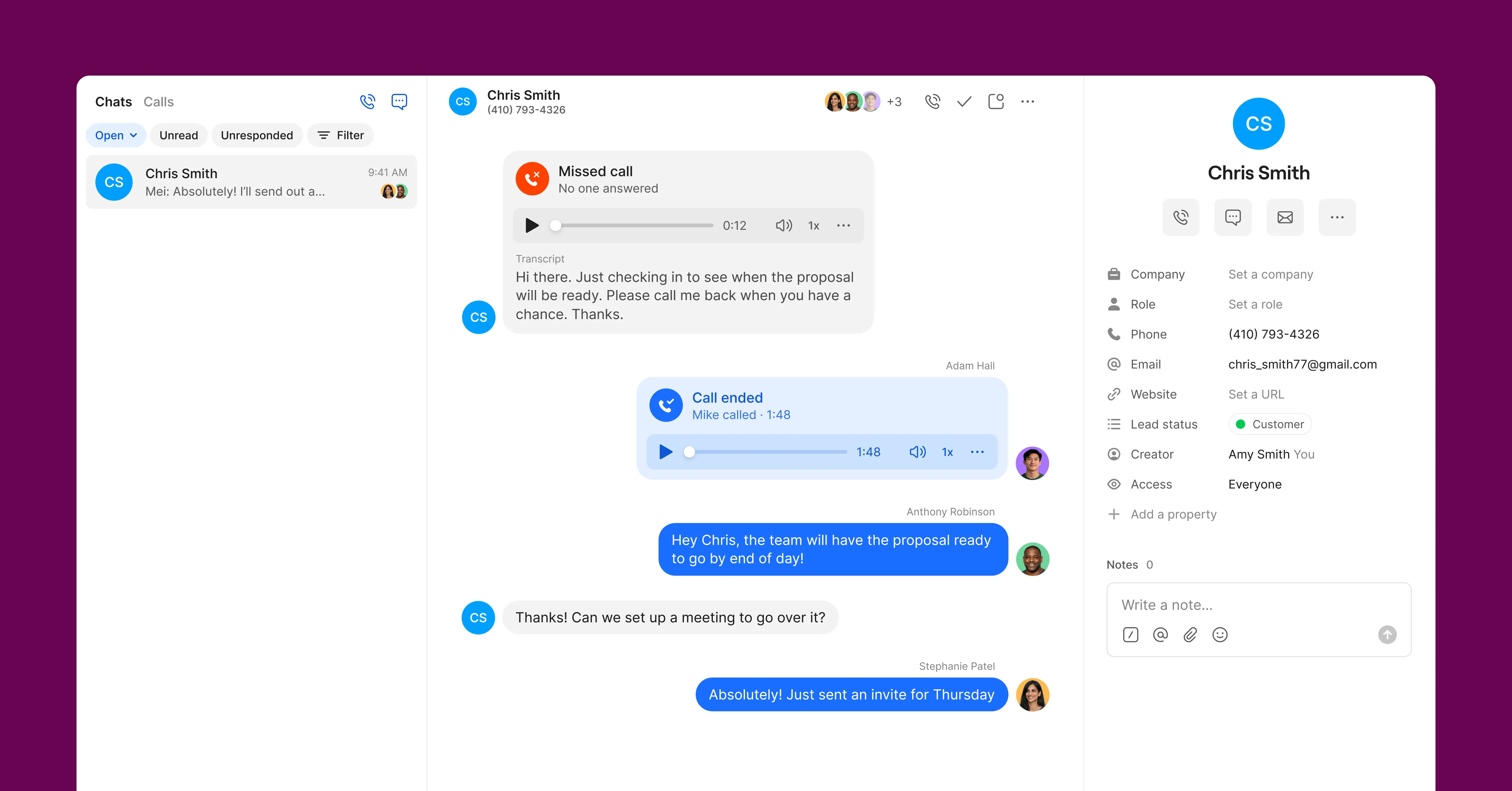 Figure 1: Quo collaborative shared inbox showing team members coordinating customer communications with internal mentions and collision detection.
Dialpad: Enterprise Telephony and Distributed Cloud Voice
Dialpad is built on an enterprise-grade Unified Communications as a Service (UCaaS) foundation. Rather than focusing strictly on shared text feeds, the platform delivers high-availability carrier infrastructure distributed across Google Cloud Platform and Amazon Web Services.
Inbound calls route through sophisticated multi-tier auto-attendants (IVR), skill-based ring groups, and automated call distribution (ACD) queues. While Dialpad supports shared lines and departmental groups, it handles calls as individual agent assignments rather than collaborative message threads.
This architecture is specifically optimized for high-volume call environments where supervisors must oversee queue depths, monitor service level agreements (SLAs), and manage multi-office routing schedules.
3. Artificial Intelligence: Shared Recaps vs Real-Time Coaching & DialpadGPT
Artificial intelligence is central to both platforms, but each vendor deploys machine learning at different stages of the conversation.
Quo: Automated Post-Call Intelligence
Quo concentrates its AI capabilities on post-call productivity. Following every recorded conversation, the system automatically processes the audio stream to deliver three primary assets:
- Speaker-Separated Transcripts: High-accuracy written records distinguishing between team members and customers.
- Executive Summaries: Concise, three-bullet overviews capturing key discussion points and sentiment.
- Extracted Action Items: Actionable checklists isolating commitments made by either party during the conversation.
These AI recaps automatically synchronize into CRM platforms like HubSpot and Salesforce, eliminating manual data entry for account representatives.
Dialpad: DialpadGPT and Real-Time In-Call Guidance
Dialpad operates an in-house Large Language Model called DialpadGPT, trained on more than six billion minutes of enterprise voice data. Because this model runs directly within Dialpad’s telecom infrastructure, it delivers actionable insights while conversations are still active.
During live calls, the platform provides:
- Real-Time Assist (RTA) Cards: When the system detects specific spoken keywords (such as pricing objections or competitor mentions), contextual guidance cards appear on the agent’s screen in under one second.
- Live Sentiment Tracking: Color-coded sentiment indicators alert supervisors in real time if a customer becomes agitated, allowing managers to whisper advice or barge into the call.
- Predictive AI CSAT: Analyzes tone, speech patterns, and resolution phrasing across 100% of calls to generate customer satisfaction scores without post-call survey fatigue.
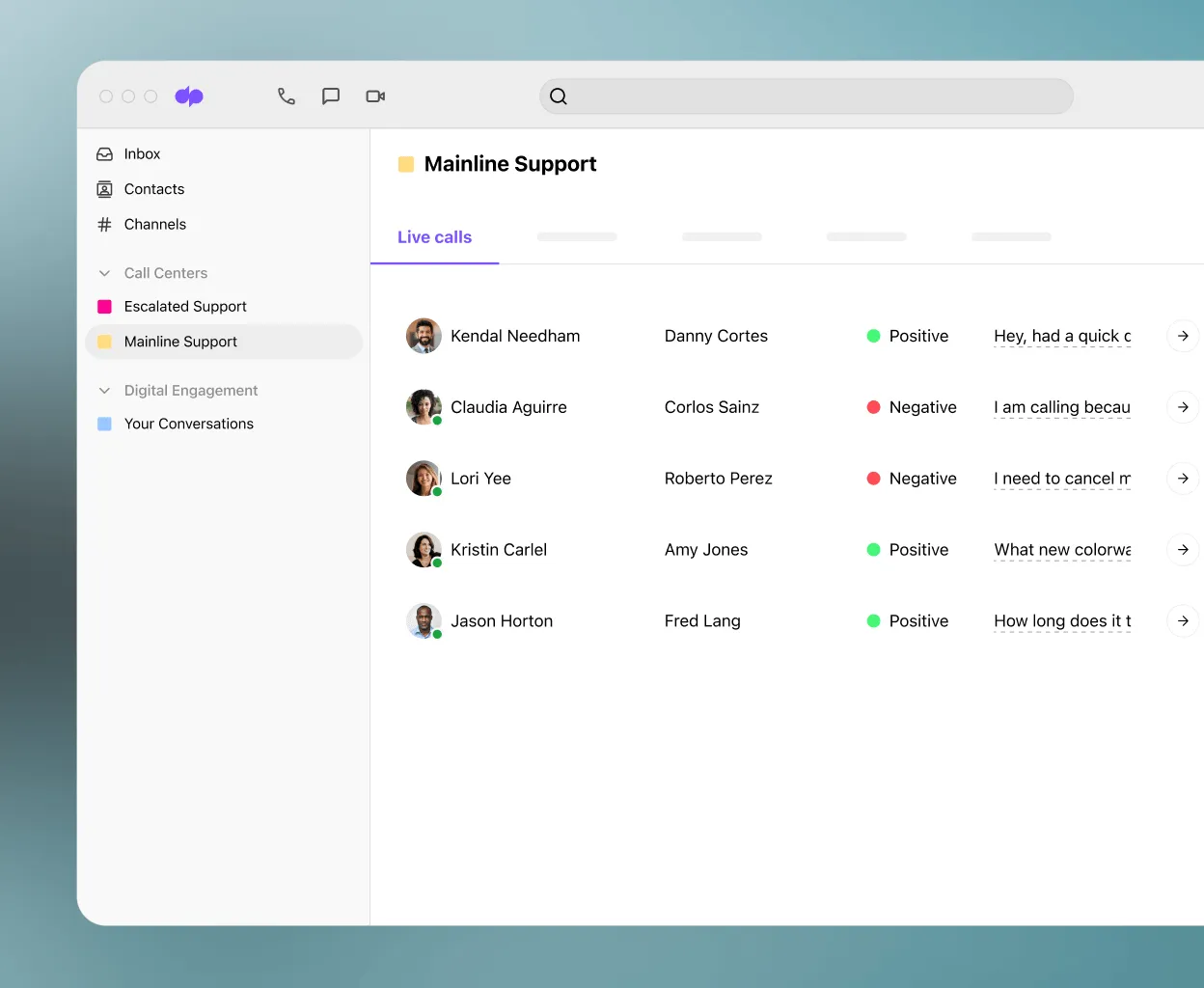 Figure 2: Dialpad AI workspace displaying real-time speech transcription, dynamic Real-Time Assist cards, and live sentiment tracking.
4. Hardware Support, Mobility, and Call Flip Capabilities
Device flexibility often dictates which telephone platform best fits an organization’s physical work environment.
Quo: Pure Cloud Softphone for Modern Distributed Work
Quo operates entirely as a software solution. It provides dedicated, lightweight applications for macOS, Windows, iOS, Android, and web browsers.
By abandoning physical desk phones, Quo eliminates hardware leasing expenses, Ethernet cabling installations, and firmware patching cycles. Remote employees can initiate professional business calls from their personal laptops or smartphones while keeping their private phone numbers completely concealed.
However, organizations that require physical desk phones for warehouse loading docks, medical clinics, or corporate receptionists cannot use Quo with standard SIP hardware.
Dialpad: Hardware Provisioning and Frictionless Call Flip
Dialpad bridges the gap between modern cloud software and traditional office hardware. It provides native zero-touch provisioning for certified enterprise IP desk phones from Poly, Yealink, and Cisco.
Additionally, Dialpad offers Call Flip, allowing users to transition an active phone call between devices with a single tap. A representative can start a customer conversation on an office desk phone, transfer it to their smartphone while walking out the door, and resume on a laptop at home in under 180 milliseconds without call drops or audio distortion.
5. Real-World Team Workflows and Operational Scenarios
Comparing how each platform behaves in real operational settings highlights their functional trade-offs.
Scenario A: Remote Tech Agency with Quo
A 15-person design and development agency uses Quo to manage client accounts:
- The agency maintains a single client support phone number shared across four account managers.
- When an urgent client SMS arrives, all four managers see the notification instantly on their desktop softphones.
- One manager types an internal note: “@alex do we have the updated Figma link ready before I confirm this timeline?”
- Alex responds internally, and the manager replies to the client. Real-time collision indicators prevent other colleagues from accidentally sending conflicting messages.
Scenario B: Outbound Sales and Support Center with Dialpad
A 60-person financial services company operates with Dialpad Connect and Dialpad Support:
- Inbound inquiries route through a visual multi-branch IVR menu to specialized advisory queues.
- As an agent handles a complex compliance query, a Real-Time Assist card pops up displaying the exact disclosure script.
- The supervisor notices a red sentiment warning on the live dashboard. The manager listens silently, whispers coaching advice into the agent’s headset, and helps resolve the customer inquiry smoothly.
- After the call, DialpadGPT logs the transcript, action items, and an automated 4.8 CSAT rating directly into Salesforce.
6. Cost of Ownership and 2026 Pricing Breakdown
Software pricing structures influence long-term software budgets, particularly when minimum seat rules and contract commitments apply.
| Metric / Cost Consideration | Quo (OpenPhone) | Dialpad Connect | Direct Advantage |
|---|---|---|---|
| Starter / Standard Rate (Annual) | $15.00 / user / mo | $15.00 / user / mo | Tie ($15/mo) |
| Starter / Standard Rate (Monthly) | $19.00 / user / mo | $27.00 / user / mo | Quo (Lower monthly markup) |
| Minimum Seat Requirements | 1 User on all standard plans | 1 User on Standard; 3 Users on Pro | Quo (No minimums) |
| Mid-Tier with CRM & AI (Annual) | $23.00 / user / mo (Business) | $25.00 / user / mo (Pro) | Quo ($23 vs $25) |
| Minimum Entry for Salesforce Sync | $23.00 / mo (1 User) | $75.00 / mo (3 Users Minimum) | Quo for Small Teams |
| Additional Phone Numbers | +$5.00 / number / mo | Varies by line type | Quo |
| Hardware Investment Needed | $0 (Software Only) | $0 for apps; optional SIP phones | Tie |
Understanding the Pricing Fine Print
Both platforms offer an entry-level $15 per user monthly rate when billed annually. However, their pricing philosophies diverge on higher tiers:
- Quo: The Business plan costs $23 per user monthly and includes full AI call summaries, Salesforce and HubSpot integrations, and advanced ring groups without enforcing seat minimums. Solo operators and two-person partnerships can access enterprise CRM integrations for just $23 per month.
- Dialpad: The Pro tier costs $25 per user monthly on annual contracts, but requires a mandatory minimum of three licenses. Small teams needing Salesforce synchronization or 24/7 phone support must commit to at least $75 per month ($105 monthly on month-to-month contracts).
7. CRM Integrations and Workflow Automation Stack
Both platforms connect directly into modern revenue and productivity software ecosystems.
Quo Integrations
Quo is optimized for fast, modern SaaS stacks:
- HubSpot & Salesforce: Automatically logs inbound and outbound calls, voicemail recordings, and full SMS/MMS conversation histories into contact records.
- Slack: Broadcasts missed calls, voicemails, and incoming text messages to dedicated team channels.
- Gong Integration: Routes recorded customer conversations directly into Gong for revenue intelligence modeling.
- Zapier & Make Webhooks: Triggers custom automation recipes when texts are received or calls finish.
Dialpad Integrations
Dialpad provides enterprise-grade CTI softphones and data pipelines:
- Salesforce Lightning CTI: Embeds an interactive dialer directly within Salesforce, featuring automated contact screen pops, call duration logging, and transcript storage.
- Google Workspace & Microsoft 365: Synchronizes contact directories, logs calendar events, and provides click-to-dial links directly inside Gmail and Outlook.
- Microsoft Teams Direct Routing: Enables enterprise users to make PSTN telephone calls using Dialpad’s global voice network inside the Microsoft Teams client.
- Telephony REST APIs: Programmatically exports conversational data, audio recordings, and sentiment scores to enterprise data warehouses.
8. Detailed Pros and Cons Breakdown
 Quo Pros & Cons
Why Choose Quo (Pros)
- Collaborative shared phone numbers with internal @mentions and team discussion threads
- Real-time typing collision indicators prevent duplicate responses to customer inquiries
- Automated post-call AI summaries and action items save hours of manual CRM note-taking
- Transparent pricing with no minimum seat requirements on Starter or Business tiers
- Intuitive, consumer-grade softphone applications with 5-minute self-serve onboarding
Where Quo Falls Short (Cons)
- No support for physical SIP/IP hardware desk phones or zero-touch hardware provisioning
- Lacks in-call real-time agent coaching cards and live supervisor whisper or barge-in
- Video conferencing requires integration with third-party tools like Zoom
 Dialpad Pros & Cons
Why Choose Dialpad (Pros)
- Proprietary DialpadGPT engine provides sub-second speech transcription with custom vocabularies
- Dynamic Real-Time Assist cards deliver in-call objection handling and battlecard prompts
- Live sentiment analysis and supervisor intervention tools (Monitor, Whisper, Barge)
- Frictionless Call Flip transfers active calls between mobile, desktop, and desk phones in under 180 ms
- Full zero-touch provisioning support for enterprise IP desk phones from Poly, Yealink, and Cisco
Where Dialpad Falls Short (Cons)
- Pro plan enforces a mandatory minimum of three licenses ($75/month minimum commitment)
- Lacks collaborative multiplayer message threads and internal @mentions inside customer SMS feeds
- Steep 40% to 80% price surcharge on month-to-month contracts compared to annual plans
9. When Should You Choose Quo or Dialpad?
- ✓Your team operates remotely on laptops and smartphones without physical desk phones.
- ✓Multiple staff members need to view, share, and reply to customer calls and SMS threads from a single number.
- ✓You want team members to collaborate on customer inquiries using internal private @mentions.
- ✓You need Salesforce or HubSpot CRM integration without being forced into a three-seat minimum plan.
- ✓Your team requires live, in-call coaching battlecards to handle complex objections and questions.
- ✓Supervisors need to monitor live call sentiment and intervene via whisper coaching or call barging.
- ✓Your office, clinic, or reception desk requires physical SIP/IP hardware desk phones.
- ✓You want a unified UCaaS platform with built-in HD video conferencing and enterprise directory sync.
10. Phone System Migration and Deployment Playbook
Switching telephone providers requires methodical technical coordination to prevent service downtime.
Deploying Quo (Self-Serve Onboarding in 5 Minutes)
- Number Selection: Choose new local US/Canada or toll-free numbers, or initiate a free Local Number Portability (LNP) transfer for existing numbers.
- Configure Shared Inboxes: Create departmental inboxes (such as Sales or Support) and assign team members with custom ring schedules.
- Submit A2P 10DLC Verification: Complete brand and messaging campaign registration directly within the Quo admin portal for carrier-compliant SMS delivery.
- Distribute Softphones: Team members download the Mac, Windows, iOS, or Android app to begin placing calls and answering customer texts immediately.
Deploying Dialpad (Enterprise Deployment Workflow)
- Carrier Porting Coordination: Submit a Letter of Authorization (LOA) and recent phone bills to coordinate zero-downtime porting cutovers.
- Network QoS Optimization: Configure router voice VLANs and prioritize SIP/RTP media traffic using DSCP Expedited Forwarding to eliminate audio jitter.
- Provision Hardware Desk Phones: Enter MAC addresses in the Dialpad admin console to auto-provision Poly, Yealink, or Cisco IP phones via Power over Ethernet.
- Build Visual IVR Trees and RTA Cards: Configure auto-attendant menus, business hour routing rules, and Real-Time Assist trigger phrases for frontline agents.
11. Which Business Phone Wins Our Final Verdict?

 VS
VS
Final Verdict: Quo vs Dialpad (2026)
Choose Quo if you run an agile startup, agency, or remote business that prioritizes collaborative shared phone numbers, internal team mentions, and simple per-user pricing without seat minimums. Choose Dialpad if you require an enterprise-grade AI communications suite featuring in-call agent coaching cards, live sentiment analysis, physical desk phone hardware provisioning, and scalable contact center queues.


For deeper individual platform evaluations, read our comprehensive Quo review and our detailed Dialpad review. Teams also exploring carrier-grade multi-location telephony can compare Nextiva vs Quo to evaluate enterprise PBX alternatives.
12. Frequently Asked Questions
Yes, both platforms support shared phone numbers. However, Quo provides a true collaborative inbox where multiple colleagues can see real-time typing indicators, read customer SMS threads, and tag teammates with private @mentions. Dialpad supports shared lines through ring groups and department queues, but treats conversations as individual agent interactions rather than a collaborative team inbox.
Dialpad fully supports certified SIP/IP desk phones and conference hardware from manufacturers like Poly, Yealink, and Cisco with zero-touch cloud provisioning. Quo is a 100% software-based solution designed exclusively for computers, smartphones, and web browsers, and does not support traditional physical IP desk phones.
Quo focuses primarily on post-call productivity, automatically generating concise call transcripts, executive summaries, and action item checklists that sync into your CRM. Dialpad operates during the active call itself through DialpadGPT, providing dynamic Real-Time Assist battlecards, live customer sentiment tracking, and predictive CSAT scoring on every conversation.
Quo includes Salesforce and HubSpot integrations on its Business plan at $23 per user per month with no minimum user requirement, meaning a single user pays $23 monthly. Dialpad requires its Pro plan for CRM integrations, which costs $25 per user per month but enforces a strict three-seat minimum, requiring an entry budget of at least $75 per month.
Yes. Both Quo and Dialpad support standard Local Number Portability (LNP) across local, toll-free, and Canadian phone numbers. Transferring a number between carriers takes approximately one to two weeks, during which your existing carrier service remains fully operational with zero downtime until the porting cutover completes.