





1. Excel-Native FP&A Without Leaving Spreadsheets
Most mid-market finance teams dread two monthly bottlenecks: spending days copying CSV exports into spreadsheets, and facing pressure to abandon Excel completely. Datarails built its entire reputation on rejecting that false choice. Instead of forcing controllers into an unfamiliar web grid, Datarails FinanceOS layers automated database consolidation, version control, and AI agents directly underneath your existing Excel models.
That Excel-native philosophy explains why Datarails earns a 4.9 rating on G2 and 4.7 on Capterra across growing CFO offices. Yet custom enterprise quotes, integration limits on lower plans, and a $24,000 to $150,000+ annual price range mean finance leaders must look closely past the polished demo. This review audits Datarails’ live 2026 platform architecture, official Professional, Premium, and Expert tiers, implementation realities, and r/FPandA buyer warnings.
| Evaluation Dimension | Datarails FinanceOS | Traditional Web CPM (Anaplan / Planful) | Manual Excel + CSV Exports |
|---|---|---|---|
| Modeling Interface | Native Excel + cloud database | Proprietary web grid | Local Excel files |
| Typical Go-Live Speed | 2 to 4 weeks (no consultant fees) | 3 to 6+ months | Immediate (manual upkeep) |
| Native Integrations | 600+ (capped 1–3 by tier) | Enterprise connectors (custom) | None (manual exports) |
| Maintenance Ownership | In-house Excel controllers | IT / certified consultants | Manual analyst upkeep |
| Primary Risk / Trade-Off | Tiered integration & module gating | Steep retraining curve for staff | Broken formulas & version chaos |
Small teams still handling basic bookkeeping or expense receipts should pair core accounting software like FreshBooks cloud accounting or Dext receipt automation before graduating to dedicated FP&A software. Once multi-entity reporting, headcount planning, and board decks overwhelm manual spreadsheets, Datarails becomes a serious contender.
Who Benefits Most From Spreadsheet-Layered FP&A
Finance teams supporting ten to two hundred fifty million dollars in annual revenue rarely fit neatly into rigid enterprise templates. Rapid hiring shifts, seasonal inventory swings, or new SaaS pricing tiers force controllers to iterate financial models every single quarter. Wrapping automated ERP sync around familiar Excel workbooks lets senior analysts adapt assumptions in hours rather than waiting weeks for external system-integrator change orders.
Conversely, companies without dedicated FP&A staff or teams running completely inside Google Sheets gain less from Datarails’ Microsoft Excel ribbon architecture. Confirming which spreadsheet ecosystem your controllers rely on daily prevents paying enterprise license fees for tools your analysts resist adopting.
2. Datarails FinanceOS Architecture and Core Modules
Datarails has evolved well beyond simple spreadsheet consolidation into a modular FinanceOS built for the Office of the CFO. Rather than treating reporting, cash forecasting, and month-end close as disconnected tools, Datarails pulls live general ledger, CRM, and payroll tables into one governed cloud repository.
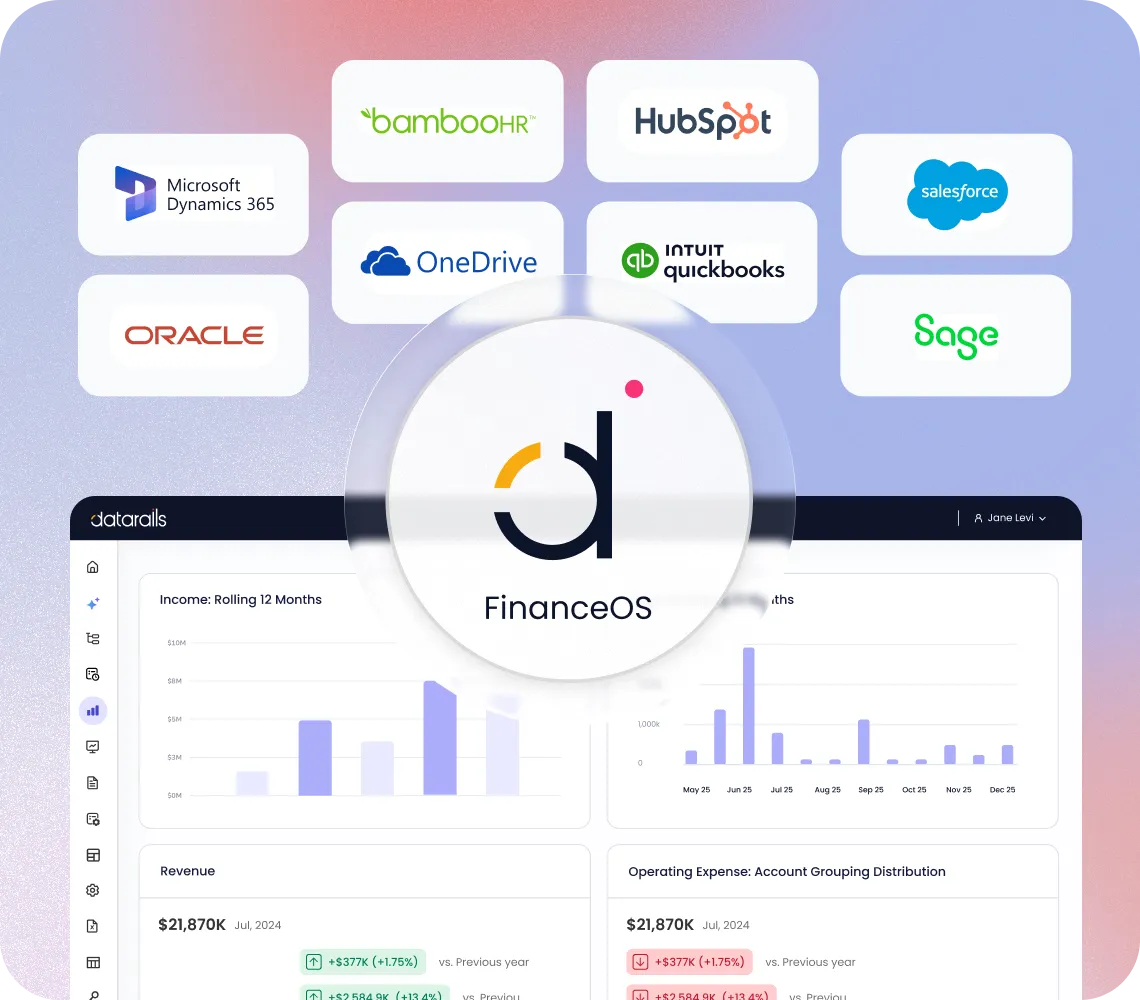 Datarails FinanceOS unifies ERP, CRM, HRIS, and spreadsheet feeds into live rolling revenue and expense dashboards
Six core modules sit inside the 2026 product suite, though access depends heavily on which pricing tier you license. Understanding what ships in the base FP&A tier versus upper packages prevents unexpected upgrade quotes later:
- Datarails FP&A: Real-time financial planning, budgeting, rolling forecasts, and executive P&L or KPI reporting packs.
- Datarails Month-End Close: Checklist orchestration, task ownership tracking, and standardized close-pack sign-offs across entities.
- Datarails Cash: Automated 13-week direct-method cash flow forecasting and liquidity scenario modeling.
- Datarails Spend: Corporate cards, bill pay approvals, and vendor contract controls before spend occurs.
- Datarails Desk: Receivables Desk workflows using connected data and AI-drafted stakeholder responses.
- FinanceOS AI Connector: Governed AI access linking Datarails Agents and
FP&A Geniusdirectly to audited financial tables.
Keeping those modules under one roof eliminates the patchwork of standalone close checklists and separate cash-flow spreadsheets. However, as the pricing breakdown below reveals, Spend, Cash, and Month-End Close are gated behind higher Premium and Expert contracts rather than bundled into entry plans.
How FinanceOS Separates Storage From Presentation
Legacy spreadsheet consolidation breaks because raw transaction rows live inside the same workbook tabs where executives read summary P&L charts. Datarails separates storage from presentation cleanly by syncing raw trial balances, vendor bills, and CRM snapshots into a central cloud database. Meanwhile, Excel workbooks act strictly as live reporting and modeling views connected via dynamic formulas.
When an executive requests a last-minute regional breakdown before a board meeting, analysts do not rebuild fragile SUMIFS tabs from scratch. They adjust a pivot filter or Lookup dimension inside Excel, refresh against the governed FinanceOS database, and publish updated dashboard tiles to stakeholders in minutes.
3. Excel-Native Sync, Data Mapper, and File Boxes
Finance analysts adopt Datarails faster than legacy CPM (Corporate Performance Management) platforms because nothing forces them to discard years of custom Excel logic. Inside Microsoft Excel, a lightweight Datarails ribbon adds Submit, Refresh, Sync, Account, and Help controls directly beside standard spreadsheet tabs.
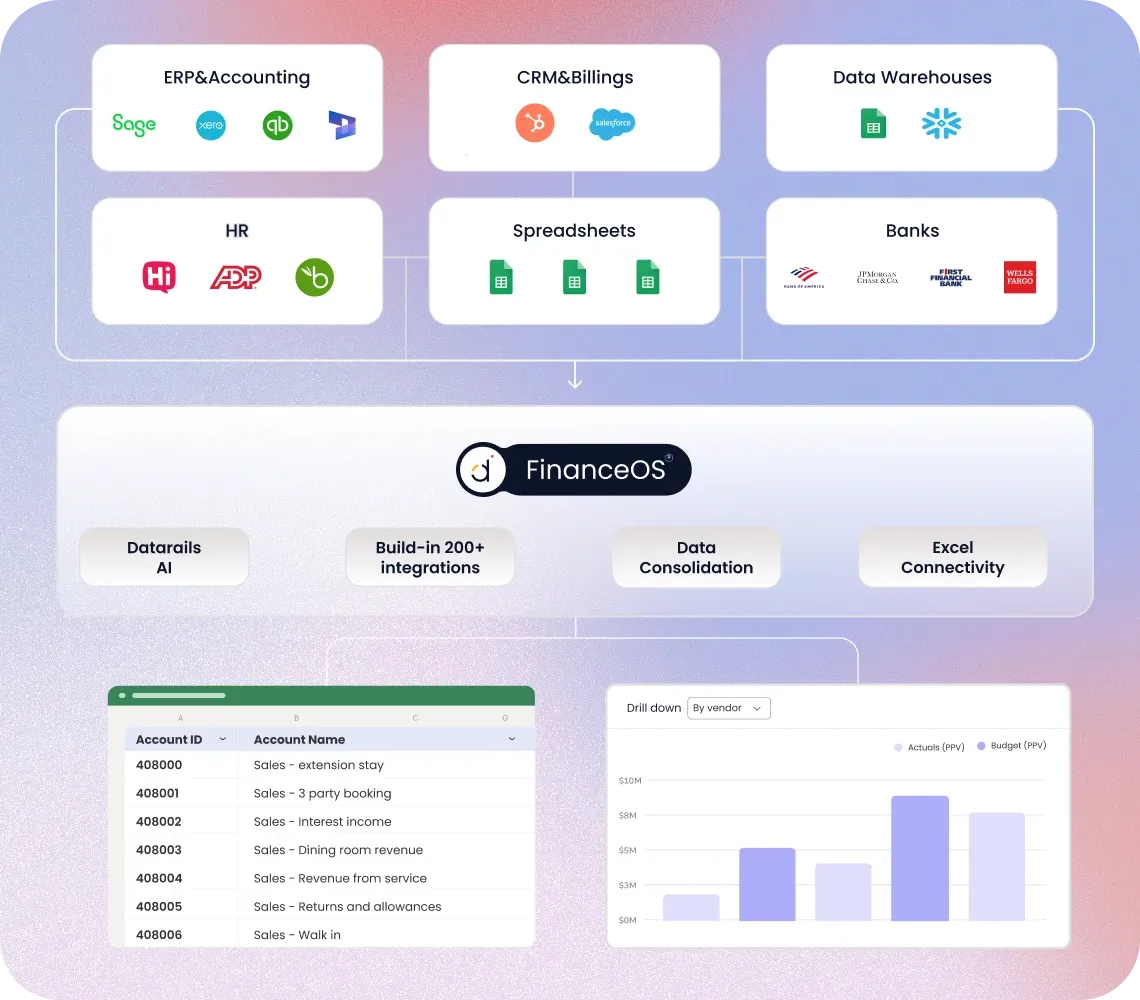 Datarails FinanceOS ingests accounting, CRM, HR, banking, and spreadsheet data into standardized tables and drill-down charts
Two proprietary mechanisms keep Excel models accurate without turning into broken link spaghetti. Pairing structured mapping rules with versioned file storage eliminates manual copy-paste errors across departments:
- Data Mapper: Maps raw chart-of-accounts codes, departments, and cost centers from messy ERP exports or Excel inputs into one standardized reporting hierarchy.
- File Boxes and Lookups: Stores versioned Excel workbooks inside a central governed repository, letting
Lookupspull live numbers from any period or entity withoutVLOOKUPbreakage.
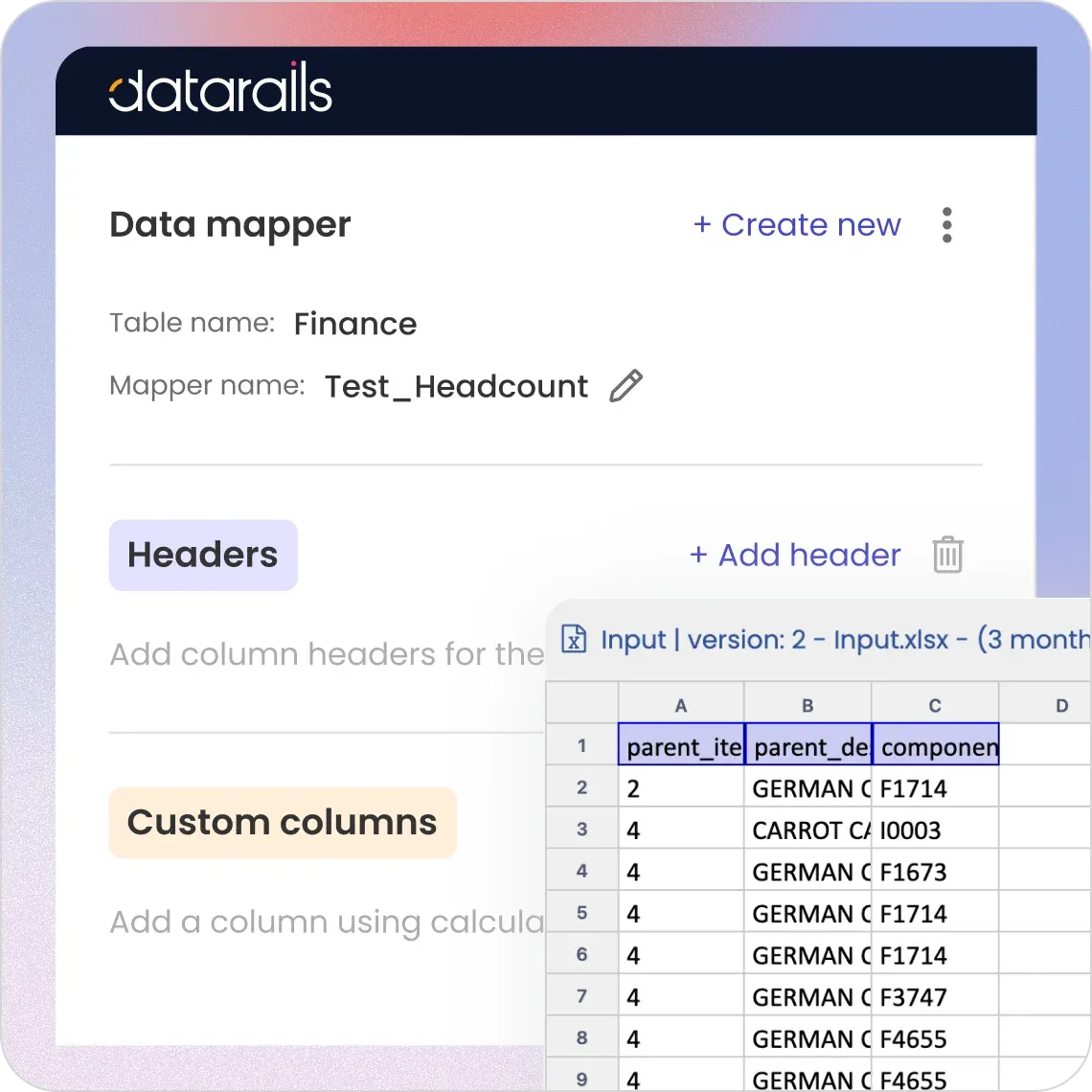 Datarails Data Mapper aligns incoming Excel table headers and custom columns directly to your standardized chart of accounts
Instead of emailing Budget_FY26_v4_FINAL.xlsx back and forth across department heads, budget owners click the Submit Button inside their workbook. Datarails snapshots that exact version, logs the timestamp and user identity, and routes approvals automatically through predefined Workflows.
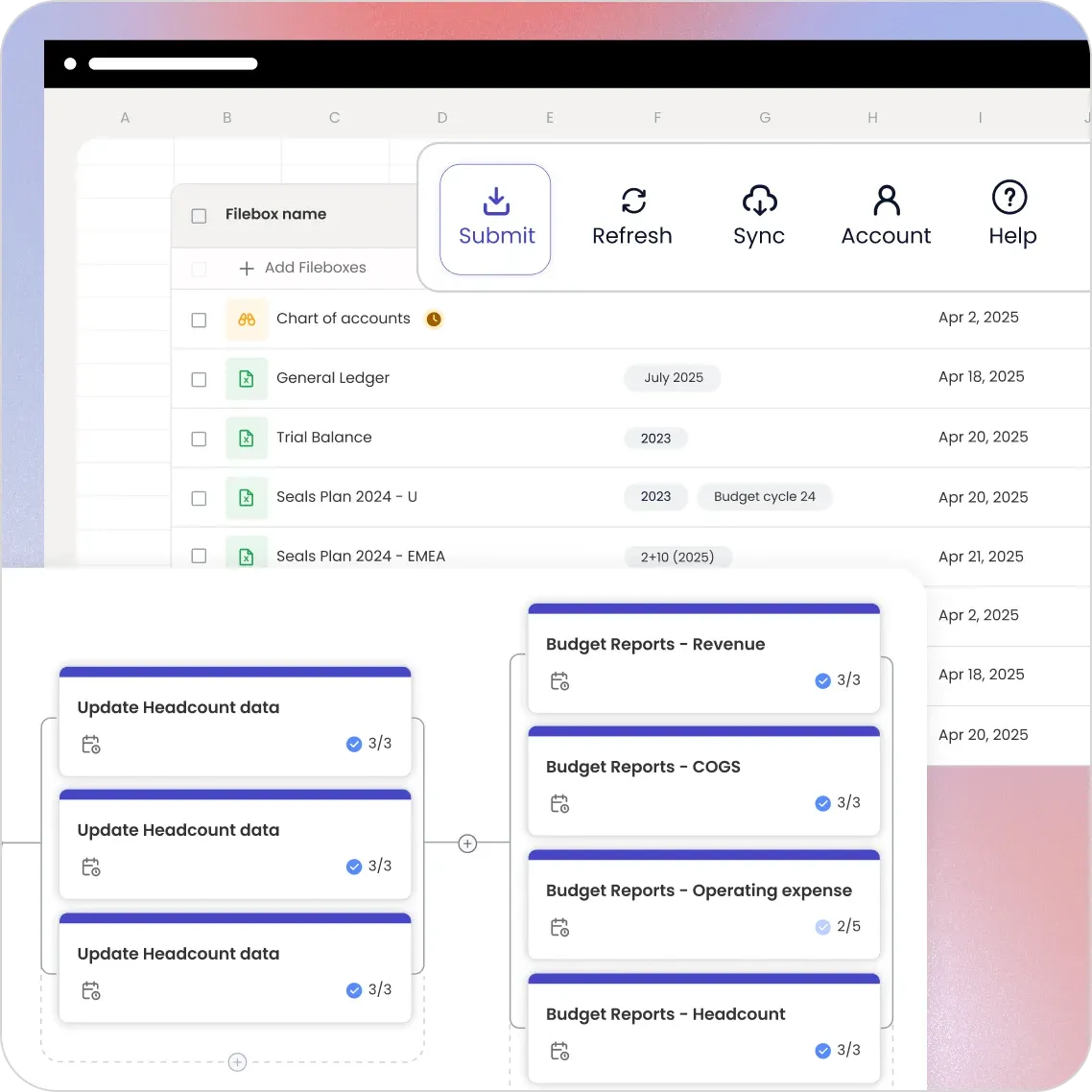 Datarails Fileboxes and Workflows track General Ledger files, Trial Balances, and department budget approvals inside Excel
For controllers surviving audit season, that automated audit trail alone removes hours of manual reconciliation. Clicking any variance figure on a web dashboard lets executives drill straight down to transaction-level invoice rows or underlying Excel assumptions without pinging an analyst for another export.
Designing Clean Consolidation Workflows Across Entities
Multi-entity finance teams often struggle when subsidiaries run different accounting software or inconsistent account numbering. Datarails Data Mapper bridges those structural gaps without forcing every regional bookkeeper to rename local GL (General Ledger) codes. Controllers map each subsidiary’s raw account numbers once into a unified parent chart of accounts, and subsequent monthly closes pull clean consolidated figures automatically.
Setting up File Boxes per department also enforces strict accountability during annual operating plan cycles. Marketing, engineering, and operations leads submit their hiring and vendor schedules inside dedicated Excel templates. Finance reviewers then track completion percentages (3/3 or 2/5) visually inside the Workflow board rather than chasing late attachments over email.
Managing Version Control and Executive Drill-Downs
Once actuals close each month, controllers often field dozens of ad-hoc questions from department heads asking why travel or contractor expenses jumped above plan. Inside Datarails, hovering over any dashboard metric reveals the underlying ERP journal entry or vendor invoice without opening separate accounting tabs. That self-service visibility cuts routine follow-up emails sharply across leadership meetings.
At the same time, File Boxes keep every historical budget snapshot immutable for audit compliance. External auditors verifying quarterly revenue adjustments or headcount accruals can inspect exact timestamped workbook submissions alongside approval logs, turning stressful year-end evidence requests into quick read-only exports.
4. Integrations, Setup Speed, and AI Capabilities
Datarails advertises 600+ native integrations spanning ERPs (NetSuite, QuickBooks, Sage, Xero, Oracle, Microsoft Dynamics 365), CRMs (Salesforce, HubSpot), HRIS platforms (ADP, BambooHR, HiBob), banks, and data warehouses like Snowflake. Connecting an accounting ledger and CRM maps live actuals into your reporting database automatically on a scheduled cadence.
Equally notable is Datarails’ 2 to 4 week implementation promise backed by internal finance engineers and zero external consultant fees. Heavy enterprise tools like Anaplan or OneStream routinely require six-month system-integrator engagements costing tens of thousands extra. Datarails includes onboarding configuration inside its team workflow, dramatically accelerating time to first board pack.
| Implementation Phase | Typical Timeline | Primary Milestones | Owner Responsibility |
|---|---|---|---|
| Week 1: Data & Connector Setup | Days 1–7 | Connect ERP/CRM, audit historical Excel tabs | IT/Finance + Datarails engineer |
| Week 2: Data Mapper & COA | Days 8–14 | Map GL accounts, departments, and custom columns | Controller + Datarails engineer |
| Week 3: Dashboards & File Boxes | Days 15–21 | Build P&L, cash, and variance dashboards | FP&A lead + Datarails engineer |
| Week 4: User Training & Go-Live | Days 22–28 | Train budget owners on Submit Button & AI tools | Entire finance team |
On the artificial intelligence front, Datarails AI Agents (FP&A Genius) draft automated variance commentary, answer natural-language questions like “Show Q3 revenue by entity in USD,” and flag anomalous expense spikes. Crucially, the FinanceOS AI Connector limits responses to governed, auditable financial tables rather than letting generic chatbots hallucinate unverified numbers.
Still, implementation speed depends heavily on the hygiene of your legacy spreadsheets. If historical workbooks rely on inconsistent tab layouts and hardcoded manual overrides, cleaning those root structures during weeks one and two remains unavoidable.
Managing Spend, Cash, and Month-End Close Extensions
Companies that license upper FinanceOS tiers extend automation well past variance reporting. Datarails Cash pulls daily bank balances alongside accounts receivable and payable schedules to generate a rolling 13-week direct-method cash flow forecast, flagging projected liquidity dips weeks before covenants tighten. Datarails Month-End Close replaces scattered Excel checklists with dependency-driven close tasks, preparer-reviewer sign-offs, and automated close-pack exports.
Meanwhile, Datarails Spend brings corporate cards, bill pay approvals, and vendor contract tracking directly into the same environment. Having procurement requests and contract renewals feed straight into budget-versus-actual dashboards helps CFOs catch SaaS or vendor creep before invoices hit the general ledger.
5. Evaluating Datarails Pricing Tiers and Market Costs
Datarails does not publish fixed dollar prices on its website, requiring every buyer to request a custom sales quote across three structured tiers: Professional, Premium, and Expert. While Datarails guarantees zero consultant fees, the feature and integration gates between tiers deserve careful scrutiny.
| Plan Tier | Included Users | Included Integrations | Core Modules Unlocked | Support Level |
|---|---|---|---|---|
| Professional (Popular) | 2 Users | 1 Integration | Unlimited Dashboards, Reporting, Planning, AI Agents, AI Connector | Standard Support |
| Premium | 5 Users | 2 Integrations | Everything in Professional + Spend (Cards, Bill Pay, Contracts) | Premium Support |
| Expert | 15 Users + 50 Viewers | 3 Integrations | Everything in Premium + Cash, Month-End Close, Receivables Desk | Premium Support |
Because public list prices are withheld, FP&A procurement benchmarks on r/FPandA and Concourse provide vital budgeting guardrails. Annual Datarails subscriptions typically run between $24,000 and $150,000+ per year, scaling upward with entity count, user seats, and add-on modules.
Notice the tight integration caps on every plan: Professional includes only 1 integration, Premium includes 2, and Expert includes 3. A mid-market company syncing NetSuite, Salesforce, and ADP simultaneously immediately hits the 3-integration ceiling on Expert, requiring paid add-on negotiations. Similarly, teams wanting automated 13-week cash forecasting or Month-End Close tracking must step all the way up to the Expert tier rather than accessing them on Professional.
Before signing an annual order form, CFOs should negotiate explicit multi-year price-cap protections and confirm exact per-connector fees for any ERP, HRIS, or CRM source beyond the base allowance. Requesting a clear breakdown of viewer-seat pricing for department heads also prevents surprise seat-expansion invoices during annual budgeting cycles.
6. Why Finance Teams Stay Loyal to Excel During Scale
To understand why Datarails commands high satisfaction scores despite premium pricing, it helps to examine how mid-market finance departments actually operate between $10 million and $250 million in annual revenue. At that stage, business models evolve too quickly for rigid database-first planning software. A SaaS company launches usage-based pricing, a manufacturing firm adds a new warehouse entity, or a services team restructures sales commissions mid-quarter.
In rigid web-based CPM systems, adapting a model to reflect those real-world shifts often requires submitting tickets to IT or hiring certified implementation consultants to rewrite dimensional formulas. By contrast, a senior FP&A manager fluent in Excel can prototype a new commission waterfall or unit-economics tab in two hours and push it straight through Datarails File Boxes.
That agility preserves institutional knowledge. New finance hires already know Excel syntax on day one, cutting training friction to a fraction of traditional CPM rollouts. As long as an administrator enforces clean Data Mapper templates and locks master workbook structures, teams capture database reliability without sacrificing spreadsheet speed.
7. Auditing r/FPandA Complaints and Operational Limits
While G2 (4.9) and Capterra (4.7) ratings highlight responsive implementation engineers and fast reporting wins, candid buyer threads on r/FPandA surface four recurring drawbacks worth weighing before procurement. Reviewing these limitations carefully during vendor demos protects finance teams from expensive scope surprises:
- Aggressive Tier Creep: Procurement leads note that Datarails pricing has climbed steadily toward heavier enterprise competitors like Vena and Planful, causing sticker shock when budgeting or cash modules require upgrading tiers.
- Strict Integration Caps: Limiting Professional to 1 integration and Premium to 2 forces growing companies with separate ERP, CRM, and payroll tools to pay extra sooner than expected.
- Master Template Fragility: Because analysts still edit native Excel files, accidentally altering linked sheet structures or header names can disrupt downstream dashboard refreshes until fixed.
- Multi-Dimensional Scaling Ceiling: Power users managing complex global allocations across hundreds of SKUs and dozens of currencies sometimes find database-first CPMs like Anaplan more scalable than spreadsheet-layered tools.
Validating your exact integration count and testing messy legacy workbooks during a structured proof-of-concept call prevents surprise scope expansions after contract signature. Asking sales engineers to map one real multi-tab consolidation file live reveals immediately how smoothly your historical spreadsheets ingest into Data Mapper.
8. Weighing Datarails Speed Against Custom Pricing Risk
Evaluating Datarails comes down to balancing deep Excel familiarity and rapid 2 to 4 week deployment against opaque custom contracts and per-tier integration caps. Trade-offs define every tier.
What We Liked (Pros)
- Preserves familiar Excel formulas and workbook layouts while automating ERP data pulls
- Rapid 2 to 4 week implementation with zero external consultant fees
- Strong G2 (4.9) and Capterra (4.7) user satisfaction for consolidation and variance reporting
- 600+ connectors unify ERP, CRM, HRIS, banking, and spreadsheet inputs cleanly
- File Boxes and Workflows eliminate chaotic email chains of Budget_v4_FINAL.xlsx files
Areas for Improvement (Cons)
- No public pricing; custom annual contracts typically run $24,000 to $150,000+ per year
- Professional and Premium plans limit native integrations to 1 or 2 connections
- Messy historical Excel templates require upfront cleanup before smooth data mapping
- Less suited for massive multi-dimensional enterprise modeling than Anaplan or Vena
For controllers and VPs of Finance drowning in multi-entity manual consolidations, preserving native Excel workflows while automating NetSuite or QuickBooks sync delivers immediate ROI. For hyper-frugal startups or massive multi-national conglomerates, alternative pricing models deserve a side-by-side look before signing multi-year commitments.
9. Comparing Datarails Against Cube and Vena
Selecting the right FP&A platform depends on whether your team prioritizes lightweight spreadsheet sync, modular FinanceOS automation, or heavy enterprise workflow governance. Software fit varies sharply by team size.
| Comparison Factor | Datarails FinanceOS | Cube | Vena Solutions |
|---|---|---|---|
| Core Approach | Excel-native FinanceOS + AI | Bi-directional Excel & Google Sheets sync | Excel-front-end with enterprise OLAP cube |
| Implementation Time | 2 to 4 weeks (no consultant fees) | 2 to 6 weeks | 6 to 16+ weeks |
| Typical Annual Cost | $24,000–$150,000+ custom | Lower mid-market entry tiers | Enterprise CPM pricing |
| Cash & Close Modules | Built-in on Expert tier | Focused strictly on FP&A | Close & planning suites |
| Best Fit Profile | SMB & mid-market Excel teams | Lean teams using Excel + Google Sheets | Larger mid-market & enterprise finance |
Cube appeals to lean teams split between Microsoft Excel and Google Sheets who want simpler bi-directional planning without paying for Spend or Receivables Desk modules. Vena shares Datarails’ love for Excel while leaning into deeper OLAP (Online Analytical Processing) database modeling for larger enterprises willing to tolerate longer setup cycles. Datarails hits the sweet spot when you want fast 2 to 4 week onboarding, executive web dashboards, and optional Cash and Month-End Close expansion inside one vendor.
10. Frequently Asked Questions About Datarails
The answers below clarify Datarails’ custom pricing structure, Excel workflow, integration limits, and implementation timelines before you book a sales demo. Reading these commercial boundaries upfront keeps procurement negotiations focused on total three-year cost.
Datarails uses custom quote pricing across Professional (2 users, 1 integration), Premium (5 users, 2 integrations), and Expert (15 users + 50 viewers, 3 integrations) tiers. Industry benchmarks on r/FPandA and Concourse place annual contracts between $24,000 and $150,000+ depending on entity count and modules.
No. Datarails wraps an automated cloud database and FinanceOS layer around your existing Excel workbooks, allowing finance teams to keep native formulas, layouts, and models while eliminating manual CSV exports.
Datarails advertises go-live timelines of 2 to 4 weeks with no external consultant fees, though messy legacy spreadsheets with hardcoded values can extend initial Data Mapper setup.
Professional includes core FP&A reporting, planning, dashboards, and AI agents for 2 users and 1 integration. Premium adds Spend management (Cards, Bill Pay, Contracts) for 5 users and 2 integrations, while Expert adds Cash Management, Month-End Close, and Receivables Desk for 15 users.
Yes. Datarails FinanceOS supports 600+ integrations across ERPs (NetSuite, QuickBooks, Sage, Xero, Dynamics 365), CRMs (Salesforce, HubSpot), HRIS tools (ADP, BambooHR, HiBob), and data warehouses like Snowflake.
Datarails excels at Excel-native consolidation, executive dashboards, and fast 2 to 4 week onboarding for SMB and mid-market teams. Cube offers lighter spreadsheet sync, while Vena and Anaplan target heavier multi-dimensional enterprise planning.
11. Final Verdict on Datarails FinanceOS
Datarails delivers one of the fastest, least disruptive upgrades for Excel-reliant finance departments outgrowing manual ERP exports. Keeping native spreadsheet formulas intact while automating Data Mapper consolidation, File Boxes, and AI variance commentary lets CFO offices go live in 2 to 4 weeks without external consultant bills.
Skip Datarails if you operate on a tight under-$15,000 annual software budget, rely primarily on Google Sheets rather than Microsoft Excel, or require massive multi-dimensional modeling better suited to Anaplan. Before requesting a quote, map every ERP, CRM, and payroll connector you need so integration limits on Professional or Premium plans do not trigger unexpected renewal surcharges.
Buyer Evaluation Checklist
- Scope Integration Count First: List every accounting, CRM, and HRIS source upfront because Professional (1), Premium (2), and Expert (3) cap included integrations.
- Audit Legacy Workbooks: Standardize tab layouts and strip hardcoded overrides before week-one Data Mapper setup.
- Lock Renewal Protections: Request transparent annual price-cap terms and clarify exact costs for adding Cash or Month-End Close later.
Treating Datarails as an automated backbone for disciplined Excel governance ensures fast executive reporting without sacrificing analytical flexibility. When scoped carefully around user seats and connector needs, FinanceOS turns chaotic monthly close cycles into auditable, board-ready insights.
Establishing clear workbook ownership rules early also protects your investment as team headcount grows. Designate one FP&A administrator to govern master Data Mapper hierarchies, lock sensitive lookup ranges, and review new department templates before rolling them into File Boxes. With that lightweight governance in place, Datarails scales smoothly from initial close automation to multi-entity board reporting without forcing finance teams off Excel.
Before signing any multi-year order form, schedule a technical working session using one messy historical consolidation file from your own accounting team. Watching Datarails finance engineers map your live chart of accounts, test drill-down speed, and confirm exact integration counts ensures your CFO office captures full automation ROI from month one. Paired with disciplined annual renewal caps, FinanceOS delivers dependable reporting speed for growing mid-market finance organizations.
Finance teams that pair automated ERP sync with clear internal workbook ownership consistently close monthly books faster without sacrificing analytical flexibility. Auditing viewer seat needs, connector limits, and cash-module requirements upfront ensures your annual contract scales cleanly alongside revenue growth. Choosing Datarails with realistic expectations around Excel governance turns routine reporting cycles into fast, auditable executive decision support.
In short, controllers who want automated NetSuite or QuickBooks consolidation while keeping native Excel models gain strong operational leverage from Datarails FinanceOS. Taking time during procurement to verify connector counts and standardize legacy tabs protects both your budget and implementation timeline.
When you pair clear internal template standards with negotiated multi-year renewal caps, Datarails replaces manual CSV chaos with dependable, board-ready financial reporting. Finance leaders who validate integration counts before signing avoid surprise tier upgrades across departments. Empowering FP&A analysts to build rolling models faster inside Microsoft Excel keeps executive financial reporting accurate, auditable, and agile every quarter across growing multi-entity teams.


Datarails
Datarails is a standout FP&A platform for finance teams that want automated ERP consolidation and AI reporting without abandoning Excel. Custom pricing ($24,000 to $150,000+/yr) and strict per-tier integration caps require careful scoping before signing.