




1. The Real Cost of LinkedIn Automation in 2026
Modern B2B outbound prospecting presents sales teams with an ongoing dilemma. LinkedIn provides the world’s most accurate directory of commercial decision-makers, yet manual prospecting cannot scale. A sales rep manually viewing profiles, researching target accounts, and writing customized connection notes can realistically engage only twenty prospects daily.
To accelerate pipeline generation, growth teams deploy automation software. However, LinkedIn continuously updates bot-detection systems that monitor request velocity, Document Object Model (DOM) scripts, and erratic shifts in client IP geographic coordinates. For B2B agencies and growth-stage companies, an account ban is catastrophic: losing an executive profile with thousands of established connections wipes out digital reputation and stalls deals overnight.
This reality defines Expandi’s market position. Founded by outbound expert Stefan Smulders, Expandi was engineered specifically to address the vulnerabilities of legacy outreach tools. Instead of competing on cheap volume, Expandi treats social selling as an enterprise discipline centered on profile longevity, dedicated residential proxies, and human behavioral simulation.
The Core Concept: Budget automation tools push invite volumes until LinkedIn restricts your account. Expandi operates in reverse, using isolated cloud containers, dedicated local residential proxies, and human-like pacing to generate qualified meetings safely.
2. Cloud Architecture and Dedicated Residential Proxies
The most critical technical division in LinkedIn automation separates browser extensions from cloud-native architectures. First-generation prospecting tools operate as Google Chrome extensions, injecting third-party JavaScript directly into the DOM of the user’s active browser window.
This model exposes sales profiles to immediate risk. LinkedIn deploys automated fingerprinting scripts that inspect browser tabs for DOM modifications and automated click patterns. Furthermore, browser extensions only function when your computer is awake and connected. If an SDR opens tabs at a coffee shop, closes their laptop, and resumes outreach from an office network across town, the extension fires requests from changing IP addresses, triggering security checkpoints.
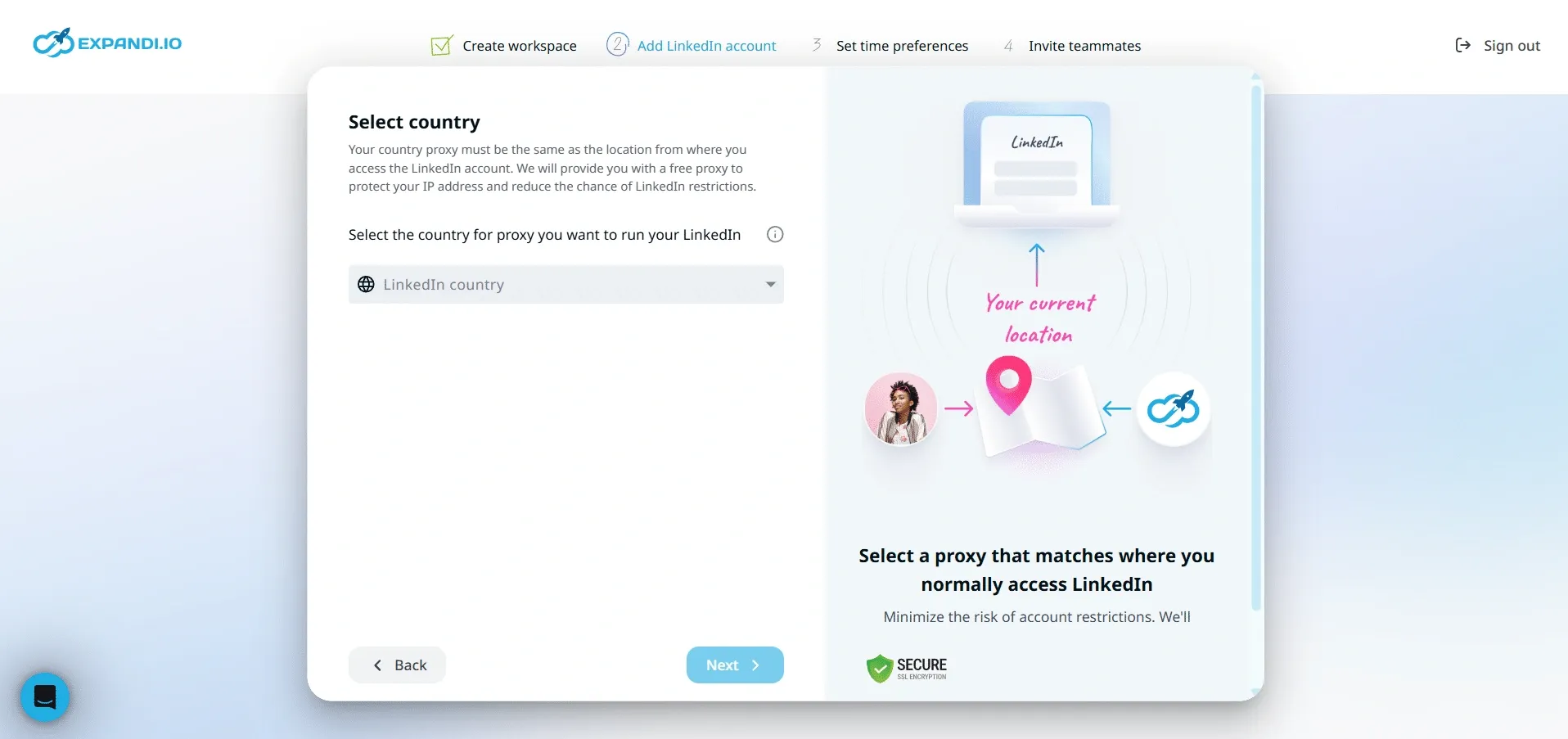 Figure 1: Expandi dedicated country-matched proxy configuration and cloud session management.
Isolated Cloud Container Infrastructure
Expandi eliminates client-side vulnerabilities by running all operations inside isolated cloud containers. Once you connect your LinkedIn account, Expandi manages your outreach from secure remote servers that run continuously, requiring no open browser windows or active laptops. Controlled session cookies ensure background tasks execute safely.
Dedicated Country-Matched Static IP Proxies
Shared IP pools represent another major vulnerability in budget cloud tools. When dozens of unrelated companies route outreach through the same cloud server, a single aggressive user blasting spam can flag that entire IP block, damaging all connected accounts. Expandi avoids this liability by assigning a private, dedicated static proxy to every user account, ensuring automated outreach always broadcasts from a consistent local residential signature.
3. Smart Builder: Visual Conditional Sequences That Mimic Human SDRs
Linear outreach campaigns that blast a connection request followed by three identical follow-ups fail in modern B2B markets. Decision-makers spot rigid automated templates immediately, leading to low acceptance rates and ignored inboxes. High-performing outbound teams require adaptive workflows that respond to how prospects interact with their profiles.
Expandi solves this challenge with its Smart Builder, an interactive visual flowchart canvas that lets revenue teams construct multi-touch conditional outreach campaigns using if-then decision logic.
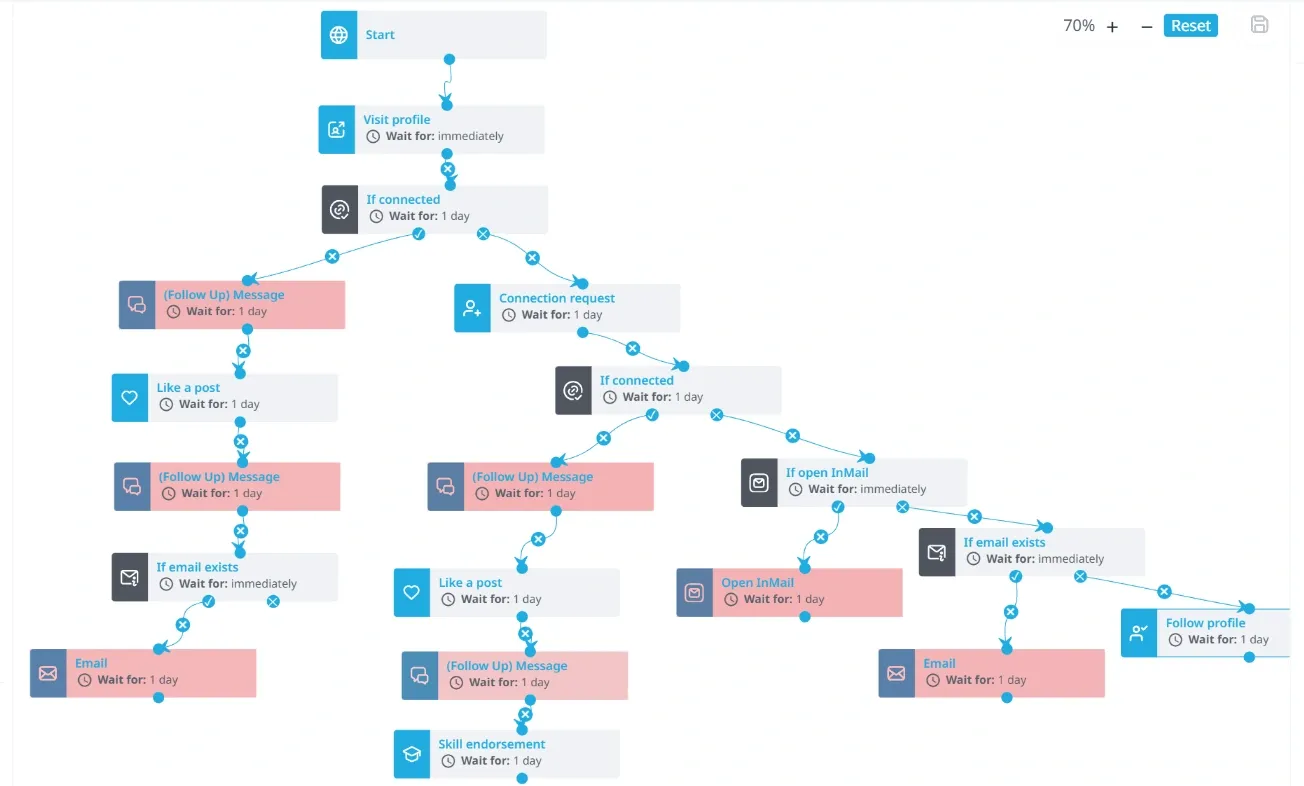 Figure 2: Expandi Smart Builder interface configuring multi-branch conditional outreach sequences.
Constructing Adaptive Decision Trees
In standard sequence builders, messages dispatch on a rigid timeline regardless of prospect behavior. Smart Builder evaluates engagement signals at each step:
- Initial Profile View: The campaign visits the target prospect’s profile to trigger a natural viewer notification.
- Social Warmup Touch: After an eighteen-hour pause, the workflow likes the prospect’s recent post or endorses a skill.
- Connection Request: One day later, Expandi delivers a targeted invitation tailored to the prospect’s role.
- Conditional Branching Gate: If the prospect accepts within five days, Expandi pauses for forty-eight hours before delivering a conversational message. If unanswered after seven days, Expandi automatically withdraws the invite and routes the lead toward an email step.
Smart Builder also incorporates randomized delay intervals between touchpoints and enforces operating hours matching the prospect’s local time zone, mirroring a real human sales professional’s working day.
4. Specialized Campaign Types for Modern B2B Prospecting
While Smart Builder handles complex multi-channel sequences, Expandi provides dedicated campaign modules designed for targeted social selling tactics across different segments of LinkedIn’s network.
Connector and Messenger Workflows
- Connector Campaigns: Built specifically for second and third-degree connections. Sales teams upload a targeted search, attach an optional invitation note, and schedule automated follow-ups triggered upon acceptance.
- Messenger Campaigns: Designed exclusively for first-degree connections to broadcast personalized direct messages to your existing network without sending connection invites, ideal for webinar promotions or client re-engagement.
Open InMail Campaigns
Sending LinkedIn InMail messages typically requires paid InMail credits through Sales Navigator. However, LinkedIn members holding Premium or Sales Navigator subscriptions can activate an Open Profile setting, allowing other users to message them for free. Expandi automatically identifies prospects with active Open Profiles and dispatches direct InMail messages without consuming monthly credits or requiring a prior connection request.
Event, Group, and Mobile Workflows
- Event Attendee Campaigns: Expandi lets you extract attendee lists from relevant LinkedIn events, driving connection acceptance rates above forty percent through shared event context.
- Group Member Campaigns: Engage professionals belonging to targeted industry groups to establish immediate common ground.
- Mobile Simulator Campaigns: By simulating mobile API requests, Expandi routes invitations through mobile communication protocols to maintain steady prospecting activity within safe boundaries.
5. Post Engagement Scraping and High-Intent Outreach Workflows
Traditional outbound prospecting relies heavily on static firmographic filters such as company size, job title, and geographic region. While these criteria identify qualified accounts, they offer no insight into whether a prospect is active on LinkedIn or interested in your solution.
Expandi’s post engagement scraper bridges this gap by capturing high-intent prospects directly from the likes and comments on relevant LinkedIn posts.
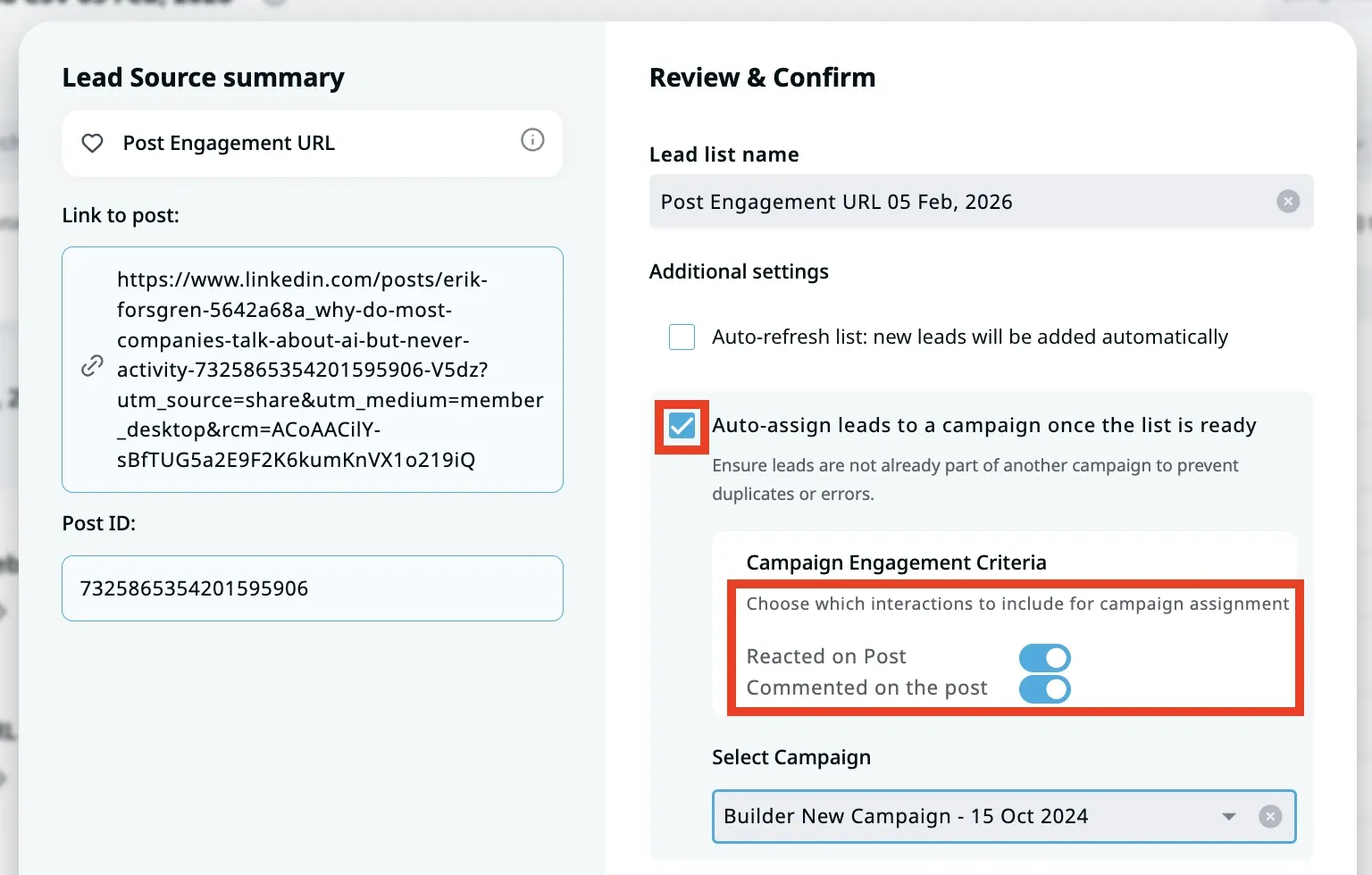 Figure 3: Scraped LinkedIn post engagement setup targeting active commentators and industry professionals.
The Post Engagement Prospecting Workflow
Setting up a post engagement campaign requires only four steps:
- Locate High-Relevance Posts: Find a trending post published by an industry influencer, competitor, or company leader addressing a key business pain point.
- Import Post URL: Paste the public link of the LinkedIn post into Expandi’s Search module.
- Automate Attendee Scraping: Expandi scans the post, capturing names, profile links, and job titles of engaging users.
- Deploy Contextual Outreach: Launch a Smart Builder sequence referencing the prospect’s comment or reaction on that specific post.
Because the outreach references an action the prospect took recently, the introductory note feels timely and relevant, driving significantly higher reply rates.
6. Smart Unified Inbox and Multi-Account Agency Operations
Managing outreach across multiple LinkedIn profiles creates severe operational friction for outbound agencies and multi-rep sales teams. Constantly logging in and out of different accounts leads to missed leads and delayed follow-ups.
Expandi resolves this issue through its Smart Unified Inbox, which consolidates all inbound conversations across every connected profile into a single dashboard.
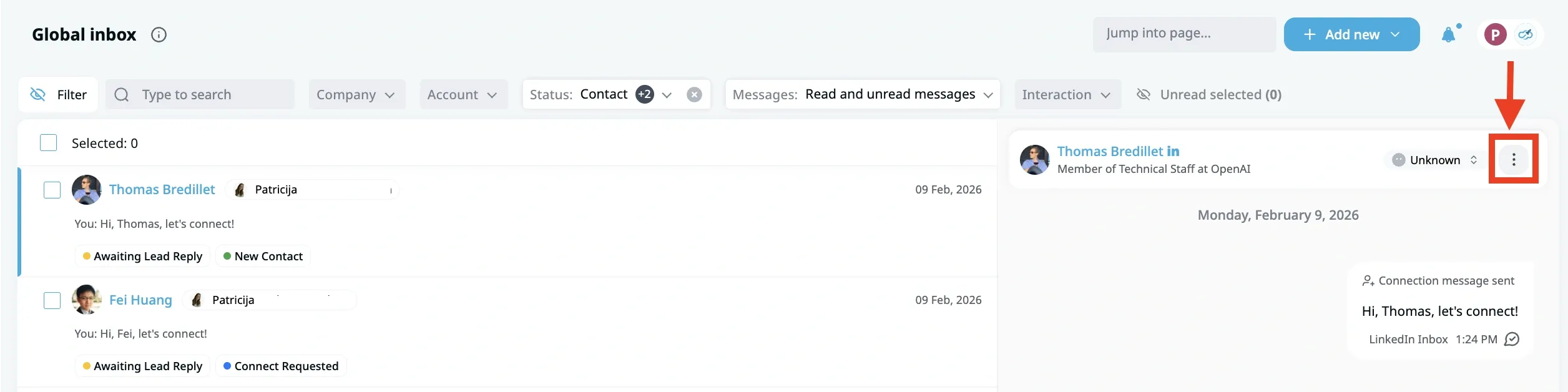 Figure 4: Expandi unified inbox triaging replies across multiple client profiles with automatic campaign pauses.
Centralized Conversation Management
The Smart Inbox provides sales representatives with complete conversational control:
- Automatic Campaign Pause on Reply: When a prospect replies, Expandi immediately pauses their sequence, preventing awkward automated follow-ups from firing after a lead has engaged.
- Custom Lead Tagging: Reps can categorize conversations using custom labels like Interested, Meeting Booked, or Follow Up.
- Conversation Snoozing: Representatives can snooze conversations to resurface automatically at a future date.
- Template Snippets: Pre-saved response templates help SDRs answer common objections and share booking links quickly.
For agencies, Expandi provides isolated workspaces to keep client data and campaign lists separate, alongside role-based access control and optional white-label client portals.
7. Account Safety Protocols, Daily Limits, and Warming Curves
Account security represents the primary requirement for sustained LinkedIn prospecting. Expandi incorporates automated safeguards to keep profile activity within LinkedIn’s tolerance thresholds.
Profile Warming and Daily Limits
When connecting a new LinkedIn profile or an account that has been dormant, launching full-volume campaigns immediately triggers security reviews. Expandi prevents this through an automated warming schedule that starts with three to five daily requests, scaling gradually over three to four weeks.
Daily activity caps maintain safe operational boundaries:
- Connection Requests: Typically capped between 15 and 25 per business day (80 to 120 weekly).
- Direct Messages: Managed between 20 and 40 follow-ups daily to existing connections.
- Profile Visits: Capped at 30 to 60 visits daily to build brand awareness safely.
- Automated Pending Cleanup: Expandi automatically withdraws pending invitations older than 14, 21, or 30 days to avoid triggering invitation backlog penalties.
8. Subscription Pricing Plans and Total Stack Economics
Expandi operates on a straightforward per-seat pricing model. Unlike competitors that lock critical safety features behind premium tiers, Expandi includes its entire core feature suite in its primary subscription tier.
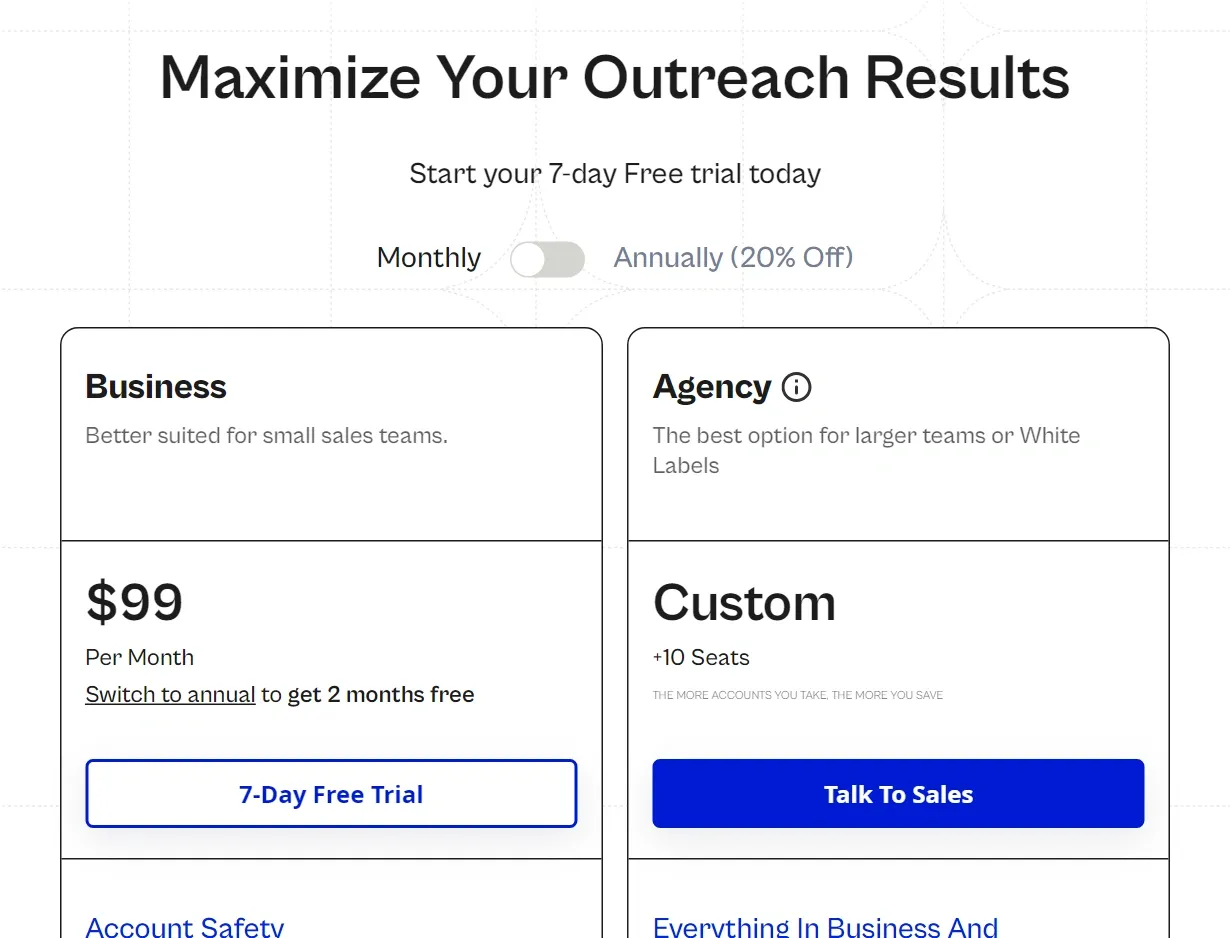 Figure 5: Expandi official pricing structure displaying the $99 monthly Business tier, 20% annual discount toggle, and custom Agency options.
| Plan Tier | Monthly Billing | Annual Billing (20% Savings) | Accounts Included | Core Feature Access | Ideal Use Case |
|---|---|---|---|---|---|
| 7-Day Free Trial | $0 | $0 | 1 LinkedIn Profile | Full access to Smart Builder, scrapers, and unified inbox | Testing campaign workflows and evaluating platform usability |
| Business Plan | $99 / seat / mo | $79 / seat / mo ($948 / yr) | 1 Profile per Seat | Dedicated static IP proxy, Smart Builder, post scraper, mobile simulator | Solo founders, sales reps, and in-house SDR teams |
| Agency Plan | Custom Quote | Custom Quote | 10+ Profiles | All Business features plus client workspaces, account switcher, white labeling | Lead gen agencies, recruiting teams, and scaling sales departments |
The Business Plan unlocks Expandi’s complete toolkit at $99 per seat monthly or $79 per seat monthly on annual billing. For agencies managing ten or more accounts, the custom Agency Plan provides multi-workspace architecture, account switching, white-label reporting, and centralized billing.
Revenue leaders must also budget for companion tools in the outbound tech stack: LinkedIn Sales Navigator ($79 to $130 per user monthly), dynamic image personalization tools like Hyperise ($69 monthly), and external data enrichment platforms to source verified work emails for multichannel campaigns.
9. Expandi Pros and Cons
What We Liked (Pros)
- Industry-leading account safety with dedicated static country-matched IP proxies and human behavior simulation
- Unmatched conditional branching in Smart Builder based on prospect behavior and profile interactions
- High-intent lead scraping from LinkedIn post engagements, event attendees, and group members
- Scalable agency infrastructure featuring unified multi-account inboxes, workspace isolation, and white labeling
- Native integrations with major CRMs alongside Hyperise for dynamic image and GIF personalization
Areas for Improvement (Cons)
- Premium entry price of $99 per seat per month with no permanent freemium plan
- Steeper learning curve and more complex initial configuration compared to template-only tools
- Email outreach functionality is secondary to LinkedIn and lacks dedicated deliverability warming pools
- Dynamic image and video personalization requires separate external subscriptions to Hyperise or Sendspark
Key Architectural Strengths
Expandi’s primary advantage lies in its rigorous approach to account protection. Combining dedicated residential proxies with cloud-native execution insulates sales profiles from the ban waves that frequently impact browser-based extensions. Furthermore, Smart Builder provides sophisticated sequence flexibility, allowing teams to construct conditional decision paths that outperform generic outbound blasts.
Tradeoffs and Operational Limitations
Expandi’s most apparent limitation is its premium $99 monthly entry price. Without a budget tier or permanent free plan, early-stage founders face higher upfront costs than with entry-level alternatives like Waalaxy. Additionally, while Expandi supports email touches within Smart Builder, its cold email functionality is basic and lacks the deliverability optimization and inbox warming networks offered by dedicated email platforms.
10. Expandi vs Dripify, Waalaxy, and HeyReach
Comparing Expandi against its key competitors highlights distinct tradeoffs across user experience, safety infrastructure, and workflow capabilities.
| Platform Name | Architecture | Dedicated IP | Workflow Canvas | Email Features | Entry Pricing | Best Operational Fit |
|---|---|---|---|---|---|---|
| Expandi | Cloud-Native | Yes (Dedicated static proxy per seat) | Advanced visual flowchart with if-then conditional logic | Secondary fallback channel via custom SMTP | $79 / mo (annual) or $99 / mo | Agencies and B2B teams prioritizing account safety and sequence depth |
| Dripify | Cloud-Native | Yes (Shared cloud proxy servers) | Intuitive visual drag-and-drop sequence builder | Built-in email finder and basic messaging | $39 to $79 / user / mo | Small sales teams and founders wanting an intuitive interface |
| Waalaxy | Cloud & Chrome Hybrid | No (Shared cloud infrastructure) | Pre-configured sequence templates | Native Dropcontact email enrichment credits | Free or €19 to €112 / mo | Solo entrepreneurs and beginners needing simple template setups |
| HeyReach | Cloud-Native | Yes (Dedicated proxies per profile) | Multi-account sender rotation canvas | Focused strictly on LinkedIn multi-profile pooling | $79 to $1,000+ / mo | High-volume SDR teams rotating dozens of sender accounts |
Expandi provides unmatched sequence depth and dedicated residential proxy isolation on every seat, offering stronger protection than Dripify’s shared cloud infrastructure. Waalaxy is cheaper and simpler with pre-built templates, but lacks custom branching and dedicated proxy control. HeyReach excels at multi-account sender pooling across large SDR departments, whereas Expandi remains superior for deep single-account social selling, post engagement scraping, and event attendee extraction.
11. Frequently Asked Questions
While no tool can promise zero risk against LinkedIn terms, Expandi is substantially safer than browser extensions. Running in the cloud with dedicated residential IP proxies, randomized delays, automated warmups, and auto-withdrawing pending invites eliminates the core triggers of account penalties.
No, Expandi functions with free accounts, Premium, Sales Navigator, and Recruiter. However, Sales Navigator is strongly recommended for B2B teams because it unlocks advanced search filters, higher search quotas, and Open InMail outreach.
Expandi provisions a private static proxy server located in your registered country for every connected account. Every background task, profile visit, and message dispatches from this single IP, preventing multi-location login alerts.
Most active B2B accounts can safely send between 100 and 200 connection requests per week, depending on account age and Social Selling Index. Expandi enforces daily limits and mobile simulator routines to keep activity within safe boundaries.
No. Expandi prices on a single-seat per profile model. Each $99 monthly seat (or $79 monthly on annual billing) connects to exactly one profile with its own dedicated IP. Agencies with 10 or more accounts can access custom Agency plans.
Expandi supports email sequences if contact emails are present, but it is not a contact data directory like Apollo or FullEnrich. You must import emails via CSV or sync them through Zapier, Make, or webhooks.
12. Does Expandi Justify Its Premium Price Tag?
In a competitive market filled with low-cost prospecting extensions and simple automation tools, Expandi remains the benchmark for enterprise LinkedIn outreach. It is not built for casual hobbyists or bootstrapped founders seeking budget marketing software. Rather, Expandi serves as an enterprise sales operating system designed for revenue teams and agencies that treat LinkedIn as a primary revenue channel.
By isolating every profile in a dedicated cloud container, assigning static country-matched proxies, and offering granular conditional sequences through Smart Builder, Expandi solves the fundamental challenge of modern social selling: driving predictable B2B sales pipeline without endangering your company’s executive profiles.
Who Should Buy Expandi:
- Lead Generation Agencies: Outbound agencies managing multiple client LinkedIn accounts that require isolated workspaces, unified message inboxes, and white-label client reporting.
- Enterprise Sales Teams: B2B sales development organizations with high average deal sizes where generating two to five additional qualified pipeline opportunities easily covers annual software costs.
- Growth Marketers: Outbound practitioners who leverage behavioral social selling tactics like scraping post engagers, event attendee communities, and Open InMail profiles.
Who Should Consider Alternatives:
- Early-Stage Solopreneurs: Independent consultants seeking entry-level outreach tools who are better served by Waalaxy’s free plan or Dripify’s lower pricing tiers.
- Cold Email-First Operations: Revenue teams focused primarily on mass cold email volume, who should invest in specialized cold email platforms like Smartlead or Instantly.


Expandi
Expandi remains the gold standard for enterprise LinkedIn prospecting and agency outreach. By pairing isolated cloud execution with dedicated country-matched IP addresses and granular if-then conditional sequences, it delivers high-volume B2B pipeline without exposing client profiles to algorithmic bans.