




1. What Is Coddy? Gamified Code Learning
For decades, learning to program has been fraught with intimidating friction. Aspiring developers are routinely instructed to install complex terminal emulators, configure Python virtual environments, debug environment variable paths, and resolve package manager conflicts before writing their first line of functional logic. For self-taught learners, career switchers, and busy professionals, this initial technical barrier produces staggering drop-off rates. Video courses on platforms like Coursera or YouTube often exacerbate the problem by encouraging passive watching rather than hands-on creation, creating an illusion of competence that evaporates the moment an empty code editor is opened.
Coddy represents a fundamental shift in instructional design, explicitly built to dismantle this friction. Founded on the premise of turning coding into an accessible daily hobby, Coddy operates as an interactive, practice-driven education platform available across web browsers, iOS, and Android. Widely recognized in the developer community as the Duolingo for coding, the platform replaces marathon lecture videos with bite-sized, gamified programming challenges that require immediate keystroke execution from lesson one.
With over 5.8 million registered learners spanning 202 countries and more than 88 million code submissions processed to date, Coddy has evolved far beyond a novelty mobile app. The platform unites structured career roadmaps, cloud compilation across 20+ programming languages, an intelligent AI tutor named Bugsy, and social habit mechanics into a unified ecosystem. Whether your objective is understanding Python fundamentals for data automation, mastering JavaScript and React for frontend engineering, exploring systems development in Rust, or scripting games in Roblox and Godot, Coddy transforms dense syntax into engaging daily progression.
Within the broader landscape of Automation & Productivity, Coddy occupies a distinctive space. It avoids the intense theoretical rigor and server-side complexity of infrastructure-heavy bootcamps, focusing instead on rapid habit formation, pattern recognition, and syntax fluency.
Key Takeaway: Coddy dismantles the intimidating setup barriers of traditional software engineering education, combining zero-setup browser execution with gamified daily progression to help beginners establish consistent programming habits.
2. In-Browser Interactive Execution Engine
The central technical engine powering Coddy is its zero-configuration browser code execution environment. In traditional learning setups, writing a basic program requires configuring local runtime interpreters, opening a text editor, saving files with correct extensions, and triggering shell commands. When an inevitable syntax error occurs, beginners frequently struggle to determine whether their programming logic failed or their environment was improperly configured.
Coddy eliminates this ambiguity entirely through a streamlined, multi-panel interactive workspace. The interface cleanly presents instructional concepts, runnable code editors, input test vectors, and terminal outputs within a single viewport:
- Instant Multi-Language Runtime Sandbox: The platform compiles and evaluates code in real time across dozens of languages directly within the browser tab, requiring zero local software downloads or terminal configurations.
- Automated Unit Testing & Assertions: Every coding challenge is accompanied by multiple concrete test cases. When learners click Run Code, the engine tests their logic against expected inputs and outputs, visually confirming passed conditions and pinpointing exact failure lines.
- Integrated Interactive Terminal & Console: Execution returns live standard output (stdout) and standard error (stderr), allowing students to observe print statements, trace variable states, and debug logic in an authentic runtime environment.
- Dynamic Socratic AI Assistance: When assertions fail, learners can immediately activate Bugsy, Coddy’s built-in AI assistant, to inspect the failing call stack and receive contextual guidance without leaving the editor pane.
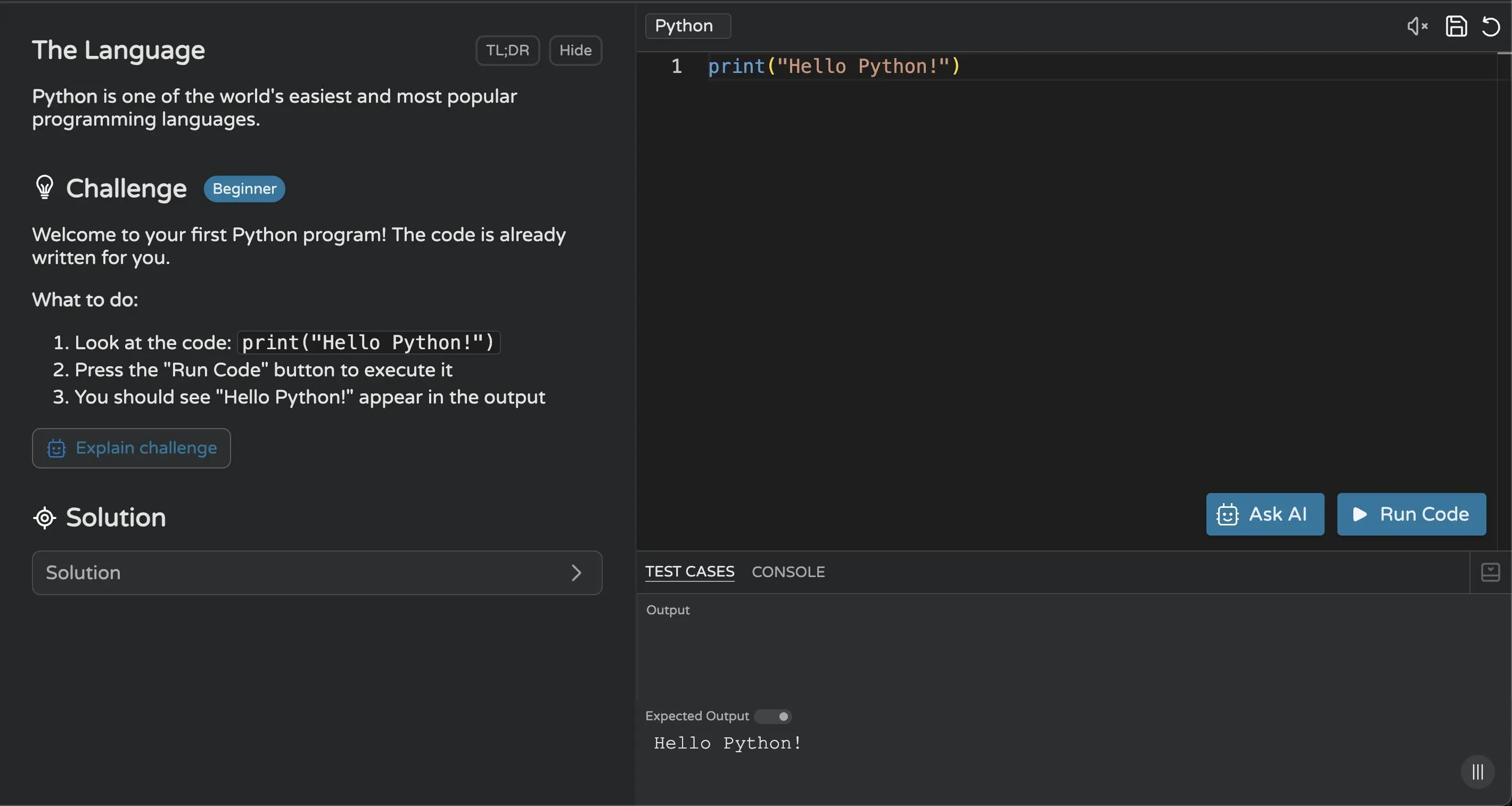 Figure 1: Coddy in-browser interactive code editor with built-in test case validation and instant console output.
This rapid feedback loop changes the cognitive dynamics of learning. Instead of reading theoretical documentation for thirty minutes before attempting an exercise, students absorb one atomic concept—such as variable assignment or loop syntax—and immediately write the corresponding code. The tactile sensation of passing automated unit tests generates instant positive reinforcement, reinforcing muscle memory and preventing the passive skimming that undermines video courses.
3. The Gamification Loop: Streaks & Leagues
The greatest challenge in self-directed education is rarely cognitive capacity; it is behavioral consistency. Most people who abandon coding do so within their first three weeks, overwhelmed by perceived complexity or derailed by irregular study schedules. Coddy addresses this retention dilemma by borrowing proven behavioral mechanics from gamified habit-building applications.
The platform structures every course as an exploratory journey mapped onto interactive hexagonal nodes. Progress is visualized through tangible milestones, keeping learners intrinsically and extrinsically motivated:
- Daily Streaks and Commitment Bets: Coddy tracks consecutive practice days with high-visibility flame counters. To heighten personal accountability, learners can activate features like Double or Nothing, staking earned tokens on their ability to maintain a seven-day study streak, or purchase Streak Freezes to protect progress during busy travel days.
- Competitive Global Leagues: Learners are grouped into weekly competitive cohorts, such as the Challenger League. Completing lessons and passing challenges yields experience points (XP); the top seven performers in each cohort advance to higher leagues at the end of the week, while inactive accounts risk relegation.
- Energy Hearts Economy: Free accounts operate on a five-heart energy model. Incorrect test submissions deduct an energy heart, which gradually regenerates over several hours. This mechanism discourages mindless trial-and-error guessing, encouraging students to carefully review instructional notes before running code.
- Achievement Badges & Avatar Progression: Completing course milestones unlocks custom titles, visual themes, and profile cosmetic items featuring Bit, the platform mascot, celebrating incremental milestones that traditional textbooks ignore.
While hardcore computer science purists sometimes dismiss gamification as superficial, behavioral research consistently demonstrates that small, daily habit loops outperform sporadic weekend cram sessions. Spending fifteen focused minutes every morning maintaining a coding streak ensures continuous syntax retention, keeping concepts active in working memory.
4. Multi-Language Catalog and Career Paths
One of Coddy’s most surprising competitive strengths is the sheer breadth of its course catalog. Many mobile-first coding apps confine their curriculum strictly to introductory Python, basic JavaScript, and simple HTML tags. In contrast, Coddy supports more than twenty programming languages, ranging from high-level modern scripting to low-level hardware specification.
Furthermore, Coddy groups individual language modules into coherent, job-oriented Learning Paths. Instead of wondering which technology to study next, learners can enroll in structured career tracks designed to mirror mentor-guided roadmaps:
| Learning Path / Language Category | Primary Technologies Covered | Pedagogical Focus & Target Audience | Practical Real-World Output |
|---|---|---|---|
| Software Engineer Roadmap | Python, Linux, Bash, Git, SQL, Data Structures & Algorithms | Foundational computer science and algorithmic problem-solving for aspiring developers | Command-line scripts, database queries, and clean, readable algorithmic code |
| Full Stack & Frontend Developer | HTML5, CSS3, JavaScript (ES6+), TypeScript, React, Next.js | Modern web development from foundational document structure to reactive cloud web applications | Responsive web pages, interactive dynamic user interfaces, and server-side components |
| Backend Engineering Track | Python, Go (Golang), SQL, Docker, Linux, Terminal utilities | Server-side architectures, database query optimization, containerization, and backend workflows | Containerized REST APIs, structured database schemas, and microservice backends |
| Mobile App Development | Dart, Flutter, Swift, SwiftUI | Cross-platform and native iOS/Android application development | Multi-screen mobile applications with native UI components and local device state |
| Game Development Tracks | Lua, Luau, C#, GDScript, Roblox Scripting, Unity, Godot | Game mechanics, object physics, 3D coordinate mathematics, and interactive gameplay scripting | Complete playable 2D/3D games across Roblox, Unity engines, and Godot frameworks |
| Data Science & AI Roadmaps | Python, SQL, Pandas, NumPy, Machine Learning, AI Prompts | Data extraction, statistical modeling, exploratory analysis, and prompt engineering | Relational data dashboards, statistical data models, and prompt optimization chains |
| Systems, Hardware & Web3 | C, C++, Rust, Assembly, Verilog, Arduino, Solidity | Low-level memory management, embedded electronics, chip synthesis, and smart contracts | Memory-safe systems programs, Arduino microcontroller routines, and Ethereum contracts |
Beyond traditional computer programming, Coddy expands into complementary analytical disciplines. The platform offers dedicated interactive modules in Mathematics (spanning Pre-Algebra, Algebra 2, Geometry, and Trigonometry), Physics (Mechanics and force equations), and Chess (tactics, checkmate patterns, and endgame play against six coaching bots). This multidisciplinary scope makes Coddy a comprehensive mental gym for analytical thinkers.
5. Bugsy AI Tutor and Contextual Debugging
A persistent shortcoming of online coding courses is the dreaded dead-end: encountering a cryptic compiler error message and having nobody to ask for help. When beginners spend forty-five minutes unable to identify an unclosed parenthesis or an off-by-one loop index, frustration mounts, frequently leading to platform abandonment.
Coddy resolves this pedagogical roadblock through Bugsy, an integrated AI tutor and code companion. Unlike general-purpose conversational models that simply vomit the full working code solution when asked, Bugsy is engineered specifically to function as a patient, Socratic mentor:
- Context-Aware Error Inspection: Bugsy automatically reads the learner’s active code editor, the specific challenge requirements, and the failing automated unit test output, diagnosing the exact conceptual misunderstanding.
- Socratic Hinting Philosophy: Bugsy explains why the logic failed rather than supplying the completed code. It provides guided questions and conceptual analogies, encouraging the learner to spot and rectify their own mistake.
- Line-by-Line Code Walkthroughs: For complex exercises involving recursion or nested loops, Bugsy can break down execution order step by step, illustrating how variables mutate across each iteration.
- Integrated Text-to-Speech Explanations: Coddy includes native text-to-speech audio for lesson text and Bugsy explanations, accommodating auditory learners and making on-the-go study sessions effortless.
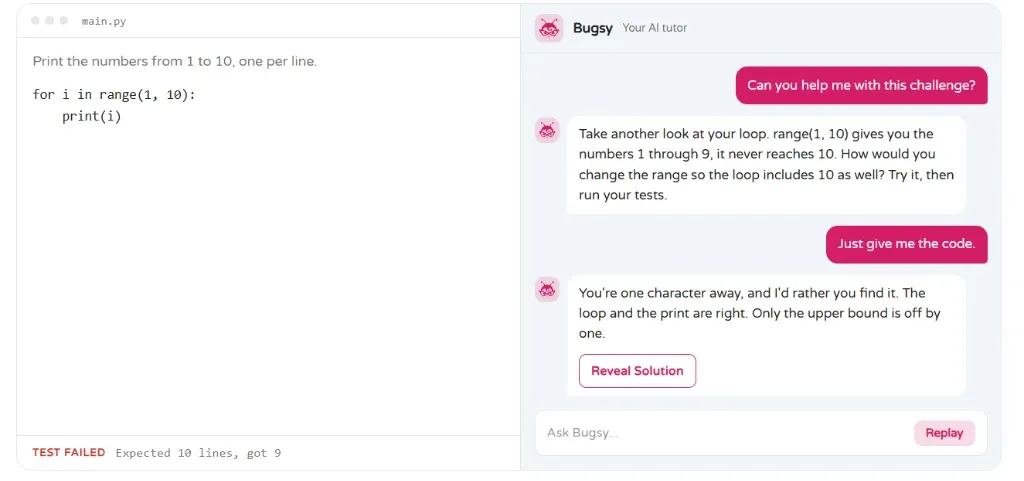 Figure 2: Bugsy, the personal AI coding tutor providing contextual hints and error explanations without revealing direct answers.
By preserving the cognitive effort of debugging while eliminating total helplessness, Bugsy strikes an ideal balance. Learners experience the genuine psychological victory of fixing broken code without suffering the demoralizing isolation that typically accompanies syntax roadblocks.
6. Coddy Build: Full-Stack AI Prototyping
As generative artificial intelligence transforms modern software engineering, developers are increasingly expected to work alongside AI code generators. Coddy acknowledges this paradigm shift through its newest flagship capability: Coddy Build.
Coddy Build is an integrated generative development environment that enables users to design, preview, and deploy full-stack web applications using natural language prompts:
- Conversational Application Generation: Learners describe what they wish to create—such as a personal task manager, an interactive quiz dashboard, or a markdown portfolio—and Coddy Build generates the underlying React, HTML, and backend logic.
- Live In-Browser Web Previews: The generated application renders instantly inside a side-by-side browser sandbox. Users can test button interactions, verify mobile responsiveness, and inspect state transitions in real time.
- Iterative Prompt Refinement: Rather than starting over when revisions are needed, learners can converse with the AI engine to add features, adjust color schemes, incorporate database persistence, or optimize component layouts.
- Instant Cloud Deployment: Once an application is finalized, Coddy Build allows users to publish the project live with a shareable public URL, creating instant web demonstrations for personal portfolios.
This feature bridges the critical gap between understanding micro-syntax in isolated coding puzzles and grasping how entire software architectures cohere into functional products. It also trains learners in the essential modern skill of prompt engineering and AI-assisted pair programming.
7. Verifiable Certificates and Credentials
Demonstrating acquired skills is a vital milestone for career changers and aspiring interns. While self-study is commendable, employers and hiring managers seek tangible evidence of dedication, syllabus completion, and practical competence.
Upon completing all interactive modules and passing the culminating assessments of a course, Coddy awards a digital Certificate of Completion:
- Cryptographically Verifiable Credential Pages: Each certificate is linked to a permanent, secure verification URL on coddy.tech, allowing recruiters and admissions officers to validate credential authenticity.
- One-Click LinkedIn Profile Integration: Certificates feature native LinkedIn credential sharing, automatically populating the issuing organization, issue date, credential ID, and course title onto the user’s professional profile.
- Downloadable High-Resolution PDFs: Learners can download formal, print-ready PDF certificates suitable for attaching to technical resumes, portfolio websites, or academic applications.
- Skill Competency Badges: In addition to course certificates, Coddy provides modular skill badges reflecting mastery of specific technologies, such as SQL Querying, React Component State, or Data Structures.
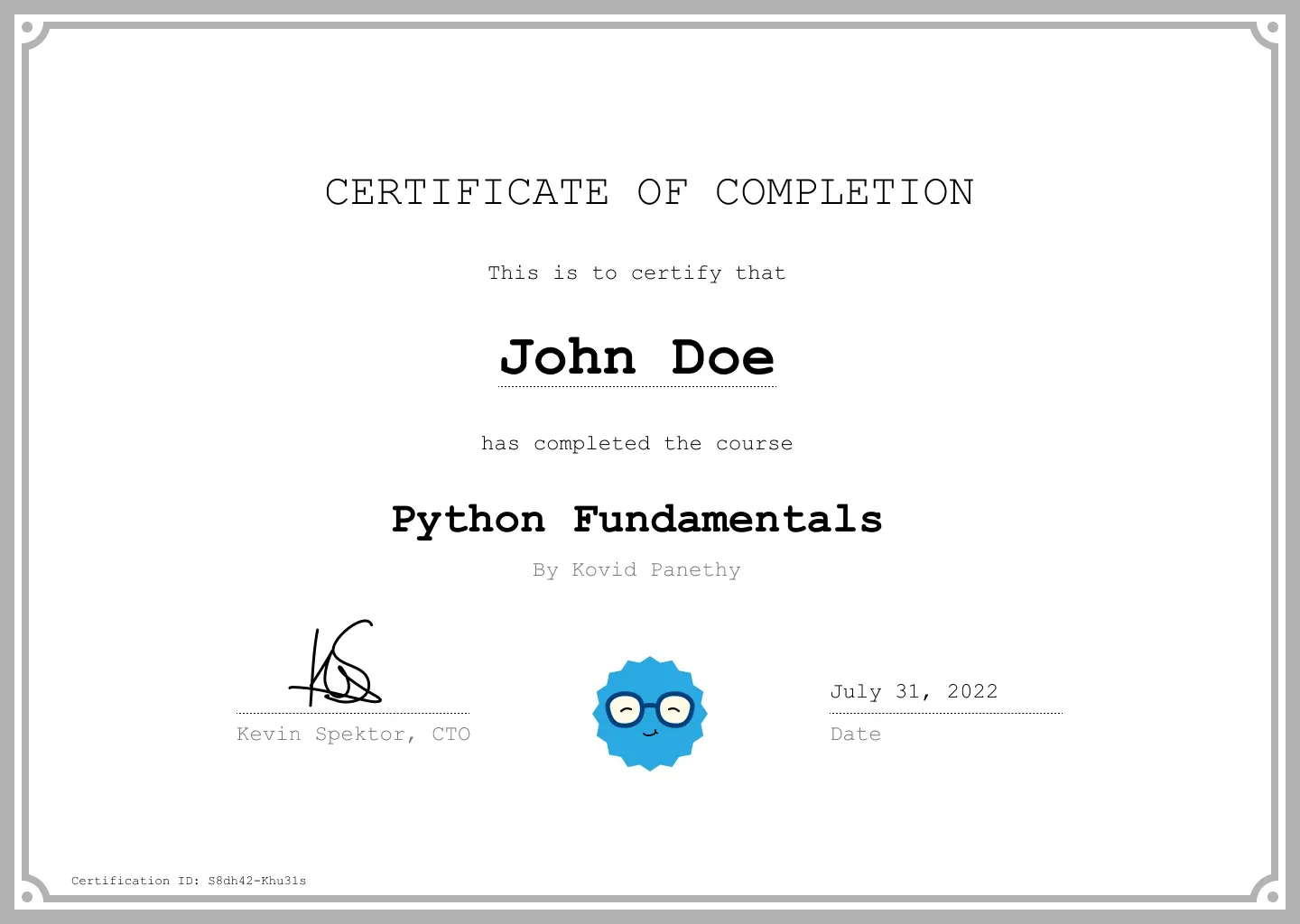 Figure 3: Shareable and verifiable certificate of completion with LinkedIn integration upon course mastery.
While a certificate from an online learning app should not be confused with a four-year accredited computer science degree, it provides undeniable proof of curiosity, persistence, and continuous self-education. In junior developer interviews, showing an active hundred-day streak and a suite of completed programming certificates demonstrates genuine passion that sets candidates apart from passive applicants.
8. Coddy Free vs Plus vs Pro Pricing Plans
Coddy implements a tiered freemium pricing structure designed to balance unrestricted accessibility with premium capabilities. The platform does not paywall fundamental learning; anyone can open the app and begin writing real code without providing a credit card.
However, serious students who wish to study without artificial interruptions or access advanced AI tooling can choose between two subscription tiers: Plus and Pro. Both tiers are available as monthly recurring subscriptions or deeply discounted annual commitments:
| Platform Dimension & Feature | Free Community Tier | Coddy Plus Plan | Coddy Pro Plan |
|---|---|---|---|
| Monthly Subscription Price | $0 / month (Completely free) | $9.99 / month | $14.99 / month |
| Annual Billing Equivalent | $0 / year | $47.99 / year (~$4.00/mo) | $71.99 - $119.99 / year (~$6.00-$10.00/mo) |
| Energy & Practice Limitations | 5 hearts (recharge over time) | Unlimited energy (infinite practice) | Unlimited energy (infinite practice) |
| Advertising Experience | Standard banner & full-page ads | 100% Ad-free experience | 100% Ad-free experience |
| Language & Course Access | Core introductory modules | Full catalog access across 20+ tracks | Full catalog access across 20+ tracks |
| Bugsy AI Tutor Assistance | Limited daily hint allowance | Standard AI explanations | Unlimited Socratic AI guidance |
| Adaptive Personalized Challenges | Standard static challenges | Standard static challenges | 1M+ dynamic adaptive practice blocks |
| Verifiable Certificates of Completion | Not included | Included for completed tracks | Included with priority verification |
| Coddy Build AI App Prototyping | Basic preview mode | Standard generation limits | Full generative development & hosting |
| Mobile Offline Mode | Requires active internet | Download lessons for offline study | Download lessons for offline study |
For casual learners dedicating ten to fifteen minutes per day to explore Python or JavaScript, the Free tier is fully functional. You can complete lessons, build streaks, participate in leaderboards, and pass automated unit tests without spending a dime. The primary constraint is the energy heart system, which penalizes repeated errors and requires waiting periods before hearts replenish.
For committed students, the Plus tier ($9.99/mo or $47.99/yr) removes this barrier entirely. Unlimited hearts allow for unrestricted experimentation, while the removal of ads and the inclusion of offline mobile learning make commuting practice seamless. The Pro tier ($14.99/mo or $71.99/yr) is tailored for learners actively preparing for technical interviews or building personal portfolios, unlocking unrestricted Bugsy AI debugging, advanced algorithmic challenges, and the Coddy Build prototyping engine.
9. Coddy Compared With Competing Platforms
To determine whether Coddy is the right educational investment, it is helpful to benchmark its capabilities against prominent competitors in the coding and developer training ecosystem. We evaluated Coddy alongside Mimo, KodeKloud, Codecademy, Boot.dev, and the open-source stalwart freeCodeCamp:
| Operational Feature | Coddy | Mimo | Boot.dev | Codecademy Pro | freeCodeCamp |
|---|---|---|---|---|---|
| Primary Pedagogical Focus | Gamified bite-sized multi-language practice | Gamified mobile-first web & Python basics | Rigorous backend engineering & computer science | Comprehensive career pivots & full-stack paths | Thorough free open-source curriculum & projects |
| Catalog Breadth | 20+ languages (Rust, Go, Lua, GDScript, Math, Chess) | Limited (Python, JS, HTML, SQL) | Focused (Go, Python, SQL, Docker, Linux) | Broad (Python, Web, Java, C++, Data) | Comprehensive Web, Data, and Cloud tracks |
| Zero-Setup In-Browser Editor | Yes (Instant execution & unit tests) | Yes (Mobile & browser-based) | Yes (Interactive terminal & browser editor) | Yes (In-browser workspace & quizzes) | Yes (Browser editor with automated test suites) |
| AI Mentorship Integration | Bugsy AI (Contextual Socratic hints) | AI explanations on select tracks | Boots AI tutor & discord community | Codecademy AI code hints & explanations | None (Community forums & Discord) |
| Full Project Complexity | Micro-challenges & Coddy Build AI prototypes | Micro-projects in web sandboxes | Deep multi-file production CLI & HTTP servers | Medium-scale guided and independent projects | Extensive full-stack capstone projects |
| Entry Subscription Price | Free tier (Paid from $9.99/mo or $47.99/yr) | Free tier (Paid from $9.99/mo or $59.99/yr) | Paid only ($39/mo or $299/yr) | Paid ($29.99/mo or $179.88/yr) | 100% Free forever (Donation-supported) |
| Best Target Learner | Beginners & daily habit builders | Mobile-only casual beginners | Serious aspiring backend engineers | Structured career switchers | Budget learners seeking deep project portfolios |
When contrasted with Mimo, Coddy stands out for its dramatically broader technological catalog. While Mimo is largely restricted to basic frontend web technologies and elementary Python, Coddy empowers learners to explore systems programming in Rust, game development in Godot, and low-level hardware in Verilog.
When compared with Boot.dev or Codecademy Pro, Coddy is noticeably more accessible and substantially less expensive. However, that accessibility comes with a deliberate trade-off in architectural depth. Boot.dev requires students to build complex, multi-file HTTP servers from scratch and master memory allocation, preparing them directly for rigorous backend engineering roles. Coddy, by contrast, excels at building foundational syntax familiarity and consistent study habits, making it the ideal stepping stone before tackling heavier project-based platforms.
10. Core Strengths and Platform Limitations
An objective evaluation of any educational platform requires balancing its user-friendly innovations against its practical architectural limitations. Coddy achieves exceptional results within its intended scope, yet it is not a universal panacea for every software engineering aspiration.
What We Liked (Pros)
- Near-zero barrier to entry eliminates local environment installation and terminal configuration
- Highly engaging gamification loop drives consistent daily practice for beginners and busy adults
- Impressive catalog breadth spans Python, Rust, SQL, Go, Lua, GDScript, and AI prompt engineering
- Bugsy AI tutor delivers intelligent hints without spoiling exact answers or robbing learning moments
- Generous free tier with functional automated test cases allows thorough platform evaluation
- Built-in multidisciplinary modules in Math, Physics mechanics, and Chess broaden analytical reasoning
Areas for Improvement (Cons)
- Micro-exercises do not replicate complex multi-file architectural development in local IDEs
- Energy hearts system on the free tier restricts extended weekend cram sessions unless upgraded
- Advanced language modules occasionally lack the depth required for senior engineering roles
- Strict automated string matching in test cases can occasionally reject semantically valid variations
- Coddy Build AI generations require manual scrutiny to ensure adherence to clean coding standards
Coddy’s primary triumph is psychological: it takes an intimidating, abstract discipline and transforms it into an inviting, daily habit. Beginners who might otherwise abandon coding out of frustration with terminal configurations find themselves eagerly maintaining fifty-day streaks and mastering core syntax loops.
Its primary trade-off is the natural ceiling of bite-sized learning. Writing twenty lines of code inside a clean browser sandbox does not prepare you for debugging git merge conflicts, managing Docker container networking, configuring continuous integration pipelines, or architecting enterprise microservices. Learners must recognize Coddy as a high-velocity springboard rather than an exhaustive computer science university.
11. Frequently Asked Questions and Answers
Unlike passive video platforms where learners watch instructors type code for hours, Coddy enforces immediate active learning. Every concept is broken into five-minute micro-lessons where you type real syntax into an in-browser editor and pass automated test cases before advancing.
No single gamified app can turn a beginner into a job-ready engineer. Coddy is an exceptional launching pad to build fundamental syntax intuition, algorithmic reasoning, and daily consistency. However, landing a software engineering role requires supplementing Coddy with multi-file local Git projects, system design, and deployment pipelines.
Bugsy analyzes your submitted code against the target test suite and provides Socratic hints explaining where logic broke down. It points out syntax errors, edge cases, or misunderstood variables without printing the final code answer, preserving the problem-solving journey.
The Free plan provides access to introductory tracks governed by an energy hearts system. Plus ($9.99/mo or $47.99/yr) removes ads, unlocks infinite energy, and provides offline mobile access. Pro ($14.99/mo or $71.99-$119.99/yr) adds unlimited Bugsy AI guidance, adaptive personalized challenges, verified certificates, and Coddy Build.
Yes. In addition to mainstream industry languages like Python, JavaScript, TypeScript, and SQL, Coddy features curated beginner tracks for systems languages like Rust, gaming scripting with Lua and Luau, Godot game development with GDScript, and hardware design with Verilog and Arduino.
Coddy issues verifiable digital certificates featuring unique authentication links that can be displayed on LinkedIn profiles and technical resumes. While not accredited university diplomas, they serve as tangible proof of completion and self-directed discipline during job interviews.
12. Final Editorial Verdict: Is Coddy Worth It?
Learning to code is one of the most empowering investments an individual can make in the modern digital economy. Yet the traditional path to software literacy has long been obstructed by steep initial learning curves, frustrating software configurations, and dry, passive video tutorials that stifle natural curiosity.
Coddy succeeds precisely where traditional instructional models falter. By breaking complex programming concepts into bite-sized, interactive puzzles, embedding real-time compiler feedback into the browser, and infusing the journey with motivating gamification loops, Coddy makes programming accessible, intuitive, and genuinely enjoyable. The addition of Bugsy, an intelligent AI tutor that guides without spoiling answers, provides learners with a 24/7 personal mentor that dismantles frustrating dead-ends.
For absolute beginners, busy working professionals, high school or university students, and curious hobbyists who want to discover whether programming resonates with them, Coddy represents an outstanding educational investment. It transforms the daunting mountain of software engineering into manageable, daily footholds.
Who Should Choose Coddy:
- Absolute Beginners & Tech Novices: Anyone with zero programming background who wants to learn fundamentals without wrestling with command-line installations and IDE setups.
- Busy Working Professionals: Learners who have only fifteen to thirty minutes per day and need a mobile-friendly, bite-sized platform to maintain consistent study habits.
- Multi-Language Explorers: Developers who want to quickly understand the syntax and idioms of a new language—such as Rust, Go, or GDScript—without buying dedicated textbooks.
- Visual and Hands-On Learners: Students who find video lectures tedious and learn significantly faster by typing real code and observing automated test results.
Who Should Explore Alternative Solutions:
- Advanced Developers Seeking Enterprise Architecture: Engineers who already know syntax and want deep, multi-file systems design or distributed microservices should look toward platforms like Boot.dev.
- Students Requiring Formal Academic Degrees: Individuals seeking accredited university credits or formal postgraduate certifications should consider academic degree programs on Coursera.


Coddy
Coddy is an exceptional, habit-forming launchpad for modern programming education. By pairing zero-setup in-browser code execution with motivating gamification mechanics and intelligent AI tutoring via Bugsy, it demystifies software development and turns daily coding practice into a rewarding personal routine.