





Table of Contents
Cloud backup has fundamentally evolved from a reactive secondary safeguard into an essential component of digital resilience. Between volatile local hardware cycles, aggressive ransomware threats, and expanding personal data footprints across creative and professional workstations, relying strictly on physical external drives leaves catastrophic single points of failure. In 2026, the marketplace for off-site data protection is dominated by two established platforms: Backblaze and IDrive.
While both platforms have safeguarded exabytes of consumer and commercial data for over two decades, they approach endpoint protection from incompatible architectural philosophies. Backblaze champions radical operational simplicity: one computer, one predictable flat subscription, and infinite cloud storage running silently in the background with zero quota limits. Conversely, IDrive operates as a comprehensive data management suite: a fixed, pooled storage allowance that spans an unlimited number of computers, mobile smartphones, external hard drives, and network-attached storage appliances under a single unified dashboard.
Choosing between Backblaze and IDrive is not a superficial choice between competing brands. It is an economic and architectural evaluation of how your data is distributed across physical devices, whether you require bare-metal system imaging alongside file archives, and how strictly your security policies govern private encryption keys during disaster recovery.
1. Quick Overview: Backblaze vs IDrive
To help evaluate whether an unlimited single-machine license or a multi-device storage pool best aligns with your infrastructure, the comparative matrix below breaks down the foundational specifications of both platforms.

- True unlimited cloud backup per computer with zero file size caps and zero overage penalties
- Automated continuous background ingestion covering all user documents and connected external USB drives
- Modernized standalone desktop Restore App supporting direct file recovery without web browser zip archives

- Pooled storage covering unlimited PCs, Macs, Linux machines, iPhones, Androids, and NAS devices
- Complete bare-metal disk imaging and clone capabilities alongside local and cloud hybrid backups
- Strict client-side zero-knowledge AES 256-bit encryption with perpetual True Archiving data retention
Key Specifications & Architecture Breakdown
| Architectural Dimension | Backblaze Computer Backup | IDrive Online Backup | Strategic Advantage |
|---|---|---|---|
| Storage Allocation Model | Unlimited Data on 1 Computer | Fixed Storage Pool (5TB to 100TB) | Distinct Operational Focus |
| Device Licensing Scope | 1 License per Workstation (PC/Mac) | Unlimited Devices (PC, Mac, Mobile, NAS) | IDrive (Device Flexibility) |
| Mobile Endpoint Backup | Read-only file access and restore | Full backup of photos, videos, contacts | IDrive (Complete Mobile Sync) |
| Local & Hybrid Backup | Cloud-only destination | Simultaneous Cloud and Local Drive Backup | IDrive (Air-Gapped Redundancy) |
| System State & Disk Imaging | File-level user data only | Full OS Disk Clone & Bare-Metal Imaging | IDrive (Complete System Restore) |
| NAS & Server Ingestion | Not supported on Personal (Requires B2) | Native Synology, QNAP, Linux, SQL, Exchange | IDrive (Enterprise-Grade Reach) |
| Data Archiving Policy | 30-day default (Free 1-yr extension available) | True Archiving (Deleted files kept forever) | IDrive (Accidental Deletion Safety) |
| Encryption Standard | AES 128-bit | AES 256-bit | IDrive (Cryptographic Depth) |
| Zero-Knowledge Architecture | Private key submitted during web restore | Strict client-side key generation & handling | IDrive (Complete Privacy) |
| Courier Physical Recovery | Refundable 8TB USB Drive ($0 Net Cost) | IDrive Express (1 free backup/yr, restores $99.50) | Backblaze (Cost-Free Courier) |
| Entry Annual Pricing | $99.00 / year (Flat rate, no promos) | $69.65 / year (First year, then $99.50/yr) | IDrive (First-Year Value) |
| Overage Fee Penalty | $0.00 (Zero overage risk) | $0.25 / GB / month over quota | Backblaze (Zero Cost Traps) |
2. Core Architecture: Single-PC vs Multi-Device
How a backup engine interacts with local endpoints dictates whether protection happens silently in the background or turns into an administrative chore that drains system bandwidth.
Backblaze: Automated Continuous Ingestion & Single-PC Sync
- Zero-Decision Installation: Upon setup on Windows or macOS, Backblaze indexes internal hard drives automatically and begins continuous file transmission.
- Exclusion-First Philosophy: Automatically backs up all user files, documents, and creative media by default while filtering out temporary caches, system kernels, and applications.
- Connected External Storage: USB, Thunderbolt, and FireWire drives are backed up at no additional cost, provided they are reconnected to the host PC at least once every 30 days.
- Lightweight System Footprint: The native desktop client operates silently in the system tray with negligible background RAM and CPU utilization.
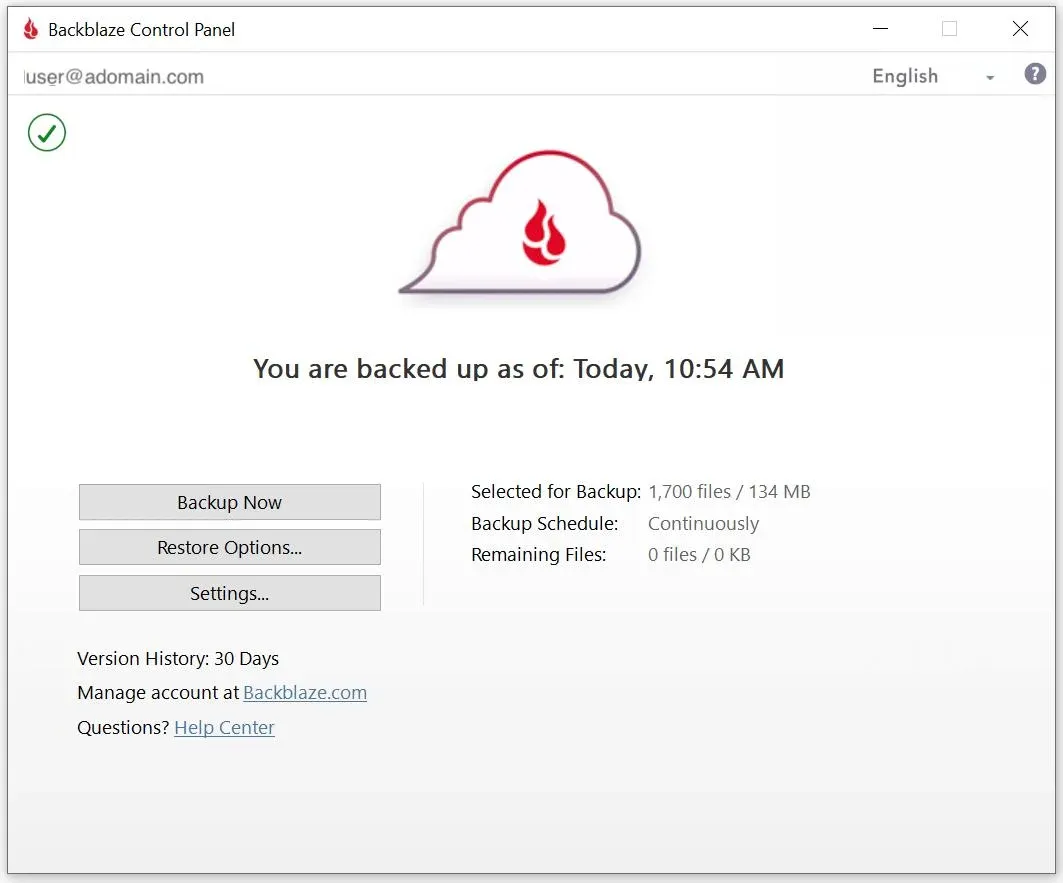 Figure 1: Backblaze minimalist desktop client running automated continuous background backup.
IDrive: Granular Selection, NAS, & Multi-Platform Fleet
- Inclusion-First Configuration: Users construct tailored backup sets by selecting specific folders, volumes, or network-mapped partitions with customized schedule rules.
- Heterogeneous OS Ecosystem: Native clients engineered across Windows 11/10, macOS (Apple Silicon & Intel), and Linux command-line distributions (Ubuntu, Fedora, CentOS, Debian).
- Turnkey NAS Support: Pre-compiled installable packages designed specifically for Synology DSM, QNAP QTS, Asustor, and Netgear ReadyNAS arrays.
- Mobile Device Protection: Full-featured iOS and Android apps backing up camera rolls, SMS message logs, contacts, and calendar records into the central storage pool.
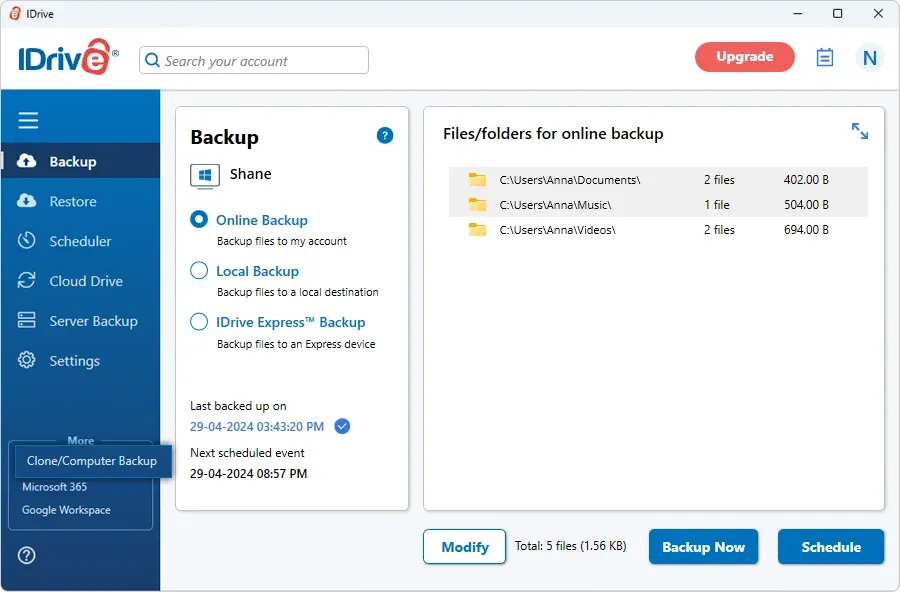 Figure 2: IDrive comprehensive desktop interface featuring granular folder selection, disk clone, and backup scheduler.
3. Storage Economics: Flat Rate vs Pooled TCO
Evaluating the financial investment of cloud backup requires moving past promotional marketing banners and calculating the real three-year Total Cost of Ownership (TCO) based on how many endpoints your team operates.
Backblaze: Flat-Rate Predictability for Solo Workstations
- Predictable Subscription: Backblaze charges a flat $99 per year per computer ($9/month or $189 for 2 years) with zero data storage caps.
- Infinite Ingestion Capacity: A creative professional storing 14TB of raw footage pays the exact same $99 annual fee as an administrative laptop backing up 150GB.
- No Bandwidth Surcharges: Backblaze never bills overage fees or network egress penalties regardless of your monthly upload volume.
- Linear Scaling Penalty: Multi-machine environments require purchasing separate licenses ($99 multiplied by the number of machines), driving household costs to $297/year for 3 computers.
IDrive: Shared Multi-Device Pools with Overage Risks
- Pooled Storage Envelope: The entry Personal plan provides 5TB of pooled cloud storage for $69.65 for the first year (renews at $99.50/year thereafter).
- Unlimited Endpoint Coverage: A single account covers unlimited Windows PCs, Macs, Linux workstations, iPhones, Androids, and attached NAS appliances.
- Introductory Renewal Hike: Promotional rates jump by up to 42% upon annual renewal (e.g., scaling to $149.99/year for the 10TB tier).
- Punitive Overage Metering: Backups exceeding your plan’s storage limit incur overage penalties of roughly $0.25 per gigabyte per month ($250 per terabyte per month).
Official Subscription Tiers & Billing Matrix
| Subscription Tier | Billing Cadence | Promotional Price | Standard Renewal | Storage Quota | Covered Endpoints | Overage Risk |
|---|---|---|---|---|---|---|
| Backblaze Personal (1-Yr) | Annual | $99.00 / year | $99.00 / year | Unlimited | 1 Computer (PC or Mac) | $0.00 (No caps) |
| Backblaze Personal (2-Yr) | Biennial | $189.00 / 2 years | $189.00 / 2 years | Unlimited | 1 Computer (PC or Mac) | $0.00 (No caps) |
| Backblaze Monthly | Monthly | $9.00 / month | $9.00 / month | Unlimited | 1 Computer (PC or Mac) | $0.00 (No caps) |
| IDrive Personal 5TB | Annual | $69.65 / first yr | $99.50 / year | 5,000 GB | Unlimited Devices + NAS | $0.25 / GB / month |
| IDrive Personal 10TB | Annual | $104.99 / first yr | $149.99 / year | 10,000 GB | Unlimited Devices + NAS | $0.25 / GB / month |
| IDrive Personal 20TB | Annual | $174.99 / first yr | $249.99 / year | 20,000 GB | Unlimited Devices + NAS | $0.25 / GB / month |
| IDrive Basic (Free) | Lifetime | $0.00 (Free forever) | $0.00 | 10 GB | Unlimited Devices | None (Hard stop) |
Three-Year Total Cost of Ownership (TCO) Projections
| Infrastructure Scenario | Backblaze (3-Year Total) | IDrive (3-Year Total) | Economic Winner |
|---|---|---|---|
| 1 Desktop with 1.5TB Data | $288 ($99/yr or $189 2-yr + $99) | $268.65 ($69.65 yr 1 + $99.50 yrs 2-3) | IDrive (Slight Price Edge) |
| 1 Desktop with 12TB Creative Media | $288 (Zero additional storage fees) | $750+ (Requires 20TB Tier @ $249.99/yr) | Backblaze (Massive Savings) |
| 3 Laptops with 3TB Combined Data | $864 (3 licenses @ $288 each) | $268.65 (All 3 devices covered under 5TB) | IDrive ($595 Cost Advantage) |
| 2 PCs + 2 iPhones + 1 Synology NAS | Incompatible on Personal tier | $404.97 (10TB Plan covers entire fleet) | IDrive (Turnkey Fleet Coverage) |
When protecting a solitary computer containing multiple terabytes of high-density creative assets, Backblaze provides the highest price-to-capacity ratio in the cloud storage industry. Conversely, as soon as a household or small business distributes moderate data volumes across multiple devices, IDrive’s pooled model yields dramatic financial savings.
4. Disk Imaging and Disaster Recovery Ops
The technical distinction between restoring an accidental document deletion and recovering from a physical drive meltdown highlights the functional divide between these platforms.
Backblaze: Pure File-Level Ingestion Without System Clones
- Strict File-Level Safeguard: Focuses solely on user data, personal files, and creative projects; it does not construct bootable drive clones or system state images.
- Manual Hardware Rebuilds: Catastrophic drive failure requires manually reinstalling the operating system, downloading third-party applications, re-entering license keys, and then pulling files down from Backblaze.
- Optimal Target Workflow: Highly effective for creative professionals who maintain lean system SSDs and store massive active project media on secondary volumes.
IDrive: Full Sector Disk Imaging, Bare-Metal & Hybrid Storage
- Sector-by-Sector Disk Cloning: Creates an exact clone of your system drive, encompassing operating system kernels, boot partitions, installed programs, and system registry configurations.
- Simultaneous Hybrid Targets: Write full system images to a fast local external hard drive or local NAS appliance for rapid recovery, while synchronizing a secondary copy to the off-site IDrive cloud.
- Dissimilar Hardware Restoration: Includes a bootable WinRE recovery wizard allowing administrators to inject drivers and restore entire system state snapshots to completely replacement hardware.
5. Performance, Deduplication, and Speeds
Initial cloud backups frequently involve hundreds of gigabytes or multiple terabytes of data. Consequently, network efficiency, multi-threading architectures, and client-side data deduplication dictate the practical usability of the service.
Backblaze: Multi-Threaded Saturation & Hardware Deduplication
- Multi-Threaded Concurrency: Allows scaling from 1 to 30 simultaneous upload threads, effortlessly saturating high-bandwidth gigabit fiber connections.
- GPU-Accelerated Deduplication: Generates cryptographic hashes of local data chunks before transmission, mapping duplicate blocks across drives without resending payloads.
- Whole-Container Processing: Modifying a massive 40GB virtual machine container or video timeline file frequently triggers a complete re-upload of the entire file.
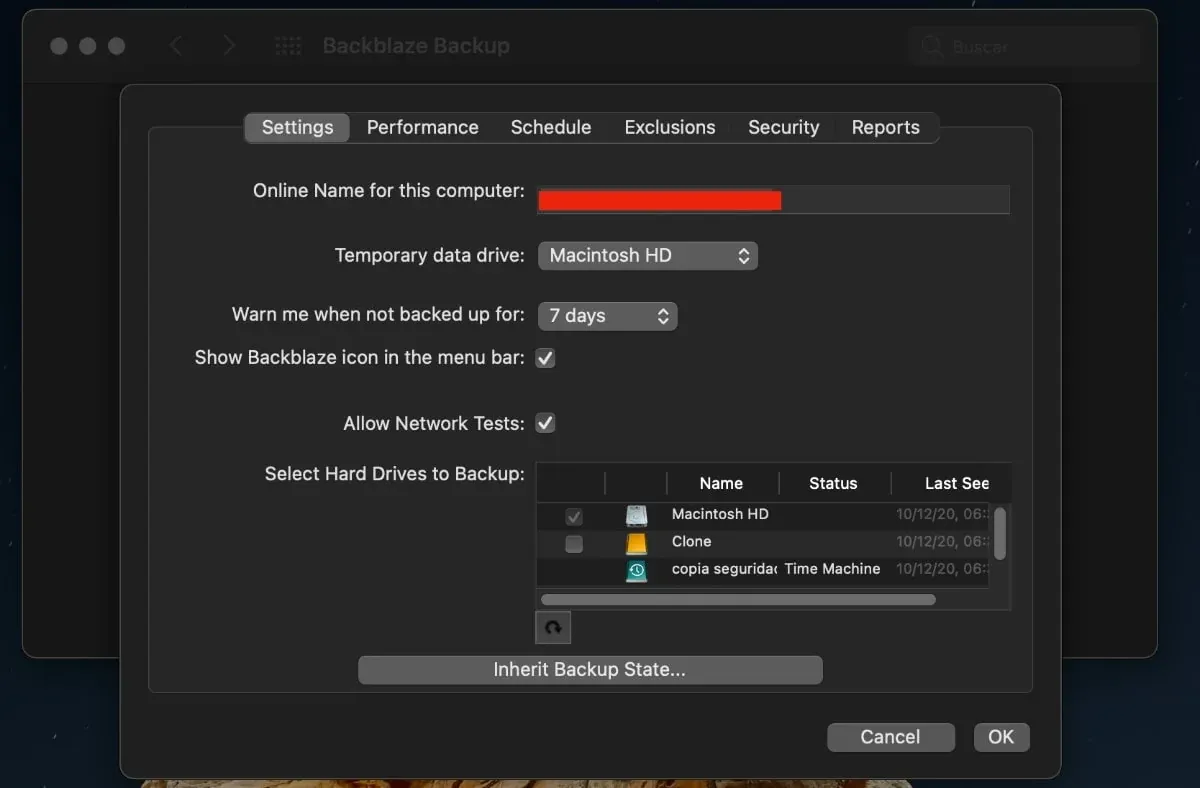 Figure 3: Backblaze performance settings panel allowing users to adjust concurrent threads and throttle network bandwidth.
IDrive: Variable Block-Level Delta Ingestion Engine
- Block-Level Delta Tracking: Identifies only the modified byte fragments inside large files (such as Outlook PSTs or database files) and uploads strictly the delta changes.
- Bandwidth Preservation: Reduces ongoing backup durations and local network congestion by up to 70% during routine daily modifications.
- Resource Overhead: Requires moderate additional RAM caching and CPU cycles during initial indexing compared to Backblaze’s lightweight background daemon.
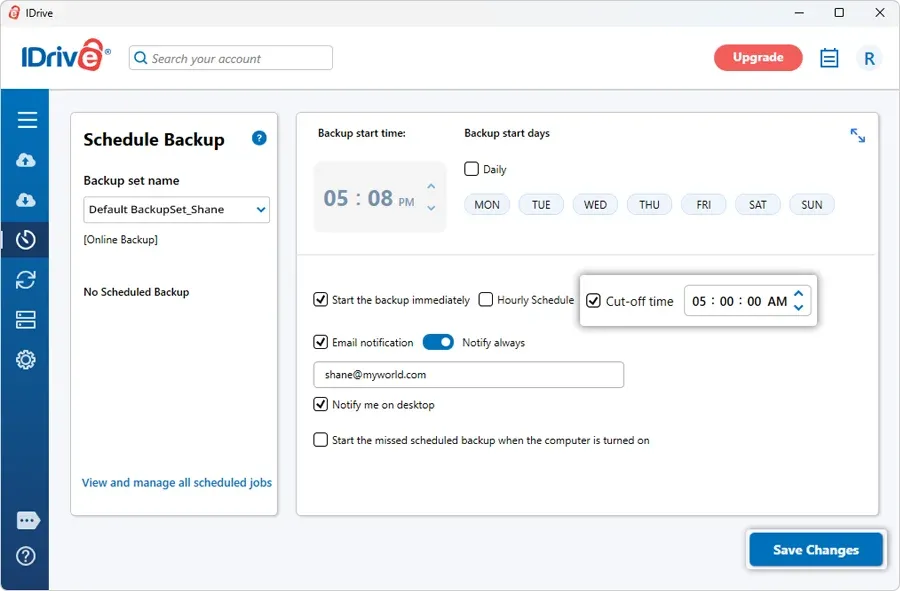 Figure 4: IDrive backup scheduling and bandwidth throttle settings panel allowing users to configure cutoff times and upload limits.
Independent Performance Benchmarks
Data compiled across independent testing labs, including rigorous evaluations by Cloudwards and ITPro, illustrates real-world upload throughput and file restoration turnaround times:
| Performance Test Dimension | Backblaze Performance | IDrive Performance | Operational Impact |
|---|---|---|---|
| 5GB Folder Upload (100 Mbps Throttled) | 47 Minutes, 55 Seconds | 07 Minutes, 52 Seconds | IDrive (Faster Small File Ingestion) |
| 5GB Folder Download (100 Mbps Throttled) | 08 Minutes, 07 Seconds | 07 Minutes, 25 Seconds | Virtual Parity (42s Difference) |
| 7.2GB Mixed Archive Upload (15 Mbps Up) | 53 Minutes, 00 Seconds | 103 Minutes, 00 Seconds | Backblaze (Better on Constrained Uplinks) |
| 7.2GB Archive Restore (100 Mbps Down) | 11 Minutes, 00 Seconds | 16 Minutes, 00 Seconds | Backblaze (Faster Raw Download Pacing) |
| Large File Modification Handling | Whole-file container re-upload | Block-level delta chunking | IDrive (Significantly Less Bandwidth) |
| CPU / Resource Utilization Under Load | Lightweight (GPU-assisted hash) | Moderate (Higher RAM caching) | Backblaze (Minimal System Impact) |
While IDrive demonstrates superior agility when handling modified databases and incremental deltas via block-level chunking, Backblaze’s multi-threaded pipeline provides raw, sustained throughput when initial baseline backups span across multiple terabytes.
6. Private Encryption Keys and Compliance
When entrusting the entirety of your digital life, financial records, and intellectual property to an external cloud data repository, encryption architecture and key governance cannot be an afterthought.
Backblaze: AES 128-Bit & The Web Restore Passphrase Risk
- Cryptographic Encryption: Uses AES 128-bit encryption for stored data blocks, wrapped in TLS 1.3 transit tunnels to secure data traveling across networks.
- Private Key Configuration: Users can configure a custom Private Encryption Key (PEK), ensuring Backblaze does not retain your passphrase on their permanent storage servers.
- The Decryption Dilemma: Executing standard web-based restores requires sending your private passphrase to Backblaze servers so their infrastructure can assemble an encrypted zip file. While purged from RAM upon download completion, the passphrase briefly resides on third-party hardware.
IDrive: True Client-Side Zero-Knowledge AES 256-Bit Protocol
- Military-Grade Cryptography: Enforces AES 256-bit encryption for all stored blocks across local hard drives, transit channels, and remote cloud vaults.
- Strict Zero-Knowledge Isolation: When opting for a private key during account setup, your passphrase is generated strictly on your local endpoint and is never transmitted to IDrive servers under any circumstances.
- Local Client Decryption: Decryption of downloaded files occurs 100% on your local machine using local client compute resources, ensuring not even IDrive technicians or subpoenas can unlock your vault.
Regulatory and Commercial Compliance Standings
- HIPAA Business Associate Agreements: IDrive signs formal BAAs with medical, clinic, and healthcare operations to safeguard electronic Protected Health Information (ePHI).
- Financial and Legal Mandates: IDrive supports compliance frameworks for Sarbanes-Oxley (SOX), GLBA, and SEC/FINRA immutable storage retention rules.
- Active Ransomware Defense: IDrive integrates anomaly detection algorithms that monitor endpoints for sudden bulk encryption spikes, triggering immediate administrative alerts.
7. Versioning Retention and True Archiving
Cloud backup is not merely protection against catastrophic hard drive crashes; it is an active defense against silent file corruption, accidental overwrites, and malicious ransomware payloads that quietly encrypt local libraries.
Backblaze: 30-Day Base Retention with Free 1-Year Extension
- Default 30-Day Retention: Retains historical file versions and deleted assets for 30 days by default to manage storage cycles.
- Free 1-Year Version Extension: Included at zero extra cost; users can toggle version retention to 365 days directly in their account settings.
- Forever Version Retention: Keeps deleted file versions indefinitely; versions older than 365 days are billed at Backblaze B2 object rates ($0.006 per gigabyte per month).
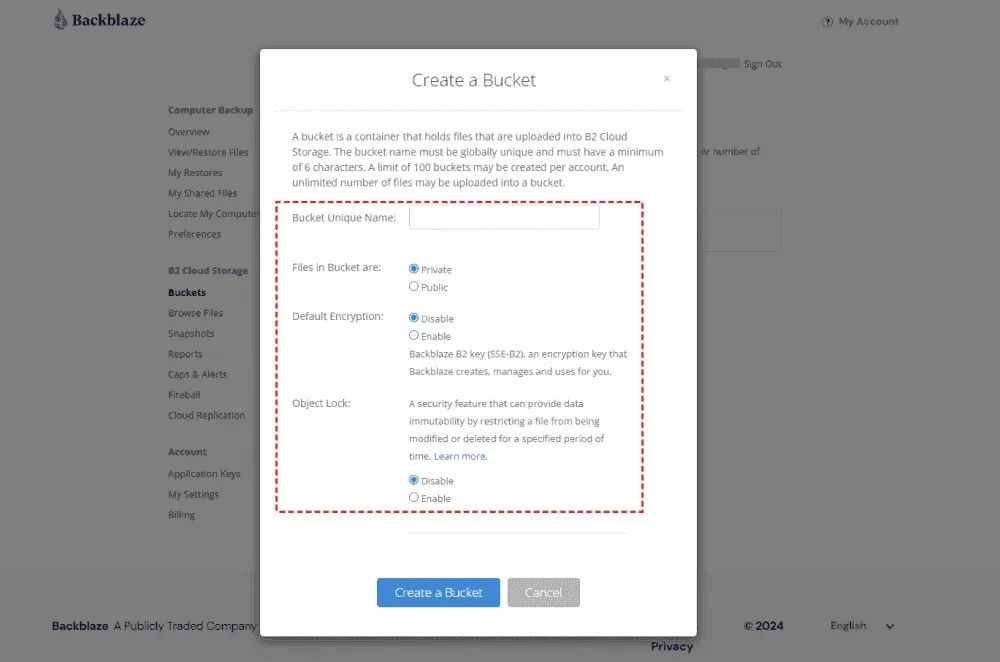 Figure 5: Backblaze B2 lifecycle rules and extended version history storage settings for preserving historical snapshots.
IDrive: True Archiving & 30 Perpetual File Version Snapshots
- True Archiving Guarantee: When you delete a file or project from your local computer, IDrive never removes it from your cloud backup until you manually trigger an explicit “Archive Cleanup”.
- 30 Perpetual File Versions: Preserves up to 30 past versions of every backed-up file perpetually without counting historical versions against your billable storage limit.
- Point-in-Time Snapshot Rollback: Maintains date-stamped snapshots of your complete file hierarchy, enabling 1-click system rollbacks to minutes before a ransomware attack executed.
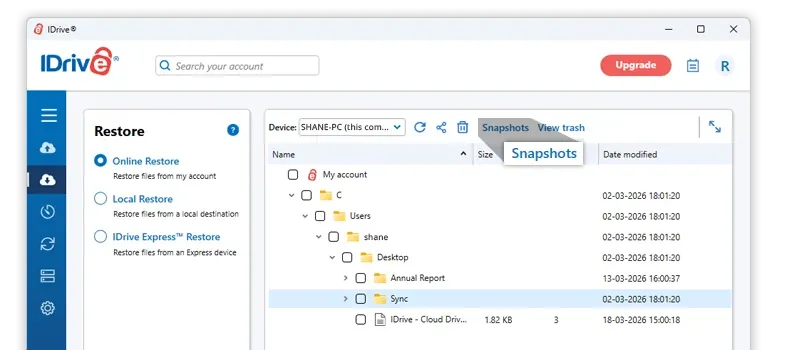 Figure 6: IDrive Snapshots interface displaying historical point-in-time recovery to safeguard against ransomware corruption.
8. Physical Courier Recovery and Shipping
When dealing with catastrophic data loss involving multiple terabytes of data, residential internet download speeds become the primary operational bottleneck. Re-downloading an 8TB media library over a standard residential connection can require days or weeks of uninterrupted bandwidth, frequently triggering ISP data caps and severe network throttling.
Both Backblaze and IDrive solve this bottleneck by maintaining rapid physical courier data recovery programs, yet their billing and hardware logistics differ markedly.
Backblaze: Refundable USB Restore by Mail (Up to 8TB Free)
- Refundable Courier Program: Ships an encrypted external USB hard drive holding up to 8TB of restored data via expedited FedEx directly to your door.
- 100% Refundable Security Deposit: Backblaze charges a $279 refundable deposit upon shipment; return the drive within 30 days to receive a complete 100% refund.
- Annual Courier Allowance: Subscribers can utilize courier restores up to 5 times per calendar year, effectively providing free multi-terabyte physical recovery.
- Turnaround Speed: Drives are formatted, encrypted, and dispatched within one to two business days of receiving the restoration request.
IDrive: IDrive Express Bi-Directional Physical Data Courier
- Bi-Directional Courier Capability: IDrive Express handles both initial data seeding (bulk uploading terabytes without burning internet bandwidth) and emergency file restoration.
- Annual Shipment Allowance & Pricing: Personal plan subscribers receive one free physical courier backup (data seeding) per calendar year; subsequent backup shipments cost $59.95 each. However, Express Restores (disaster data recovery) are never free and cost $99.50 per request.
- Strict Return Timeline: Users must complete local data ingestion and ship the physical hard drive back using the provided prepaid label within 14 days of receipt.
9. Comprehensive Pros and Cons Breakdown
 Backblaze Pros & Cons
Why Choose Backblaze (Pros)
- True unlimited cloud backup per machine with zero storage quotas and zero overage penalties
- Seamless set-and-forget automation that backs up all user files and connected external USB drives
- Refundable USB courier restore program providing up to 8TB physical data recovery at zero net cost
- Lightweight, native desktop applications engineered with GPU-accelerated hashing for minimal CPU drag
- Transparent flat-rate annual pricing ($99/year) without deceptive first-year promotional price hikes
Where Backblaze Falls Short (Cons)
- Licensing is strictly restricted to one single computer per subscription (no pooled devices)
- Lacks full disk imaging, bare-metal operating system cloning, and hybrid local backup options
- Private encryption keys must be transmitted to Backblaze servers during standard web file restores
 IDrive Pros & Cons
Why Choose IDrive (Pros)
- Pooled storage allows backing up unlimited PCs, Macs, Linux machines, smartphones, and NAS arrays
- Comprehensive disaster recovery featuring full operating system disk cloning and bare-metal restore
- True client-side zero-knowledge AES 256-bit encryption with local-only private passphrase handling
- True Archiving ensures deleted local files are never removed from cloud vaults unless manually purged
- Versatile cross-platform support covering native Synology, QNAP, Linux CLI, and mobile camera backups
Where IDrive Falls Short (Cons)
- Aggressive renewal price increases (up to 42% jump) following the initial first-year promotional rate
- Expensive overage penalties ($0.25/GB/month) if backup volume quietly exceeds selected storage caps
- Feature-dense desktop client presents a steeper configuration learning curve for novice users
10. When to Choose Backblaze vs IDrive
Selecting the winning platform requires auditing your physical device count, your total stored data footprint, and how much hands-on administrative control you prefer to exercise over daily backup routines.
- ✓You operate a solitary primary workstation (Mac or Windows PC) holding 4TB to 20TB+ of raw creative media, video footage, or 3D assets.
- ✓You connect multiple large external USB/Thunderbolt desktop drives and want them backed up under a single flat subscription.
- ✓You demand an effortless set-and-forget utility that runs silently in the background without requiring manual folder selections or task schedules.
- ✓You want complete financial predictability with zero risk of unexpected storage overage charges or renewal price doubling.
- ✓You value free physical data restoration via shipped courier hard drives with 100% refundable security deposits.
- ✓You need to protect an entire household or small team consisting of multiple laptops, desktops, iPhones, and Android devices under one account.
- ✓You maintain a home lab or office infrastructure running Synology DSM, QNAP QTS, or headless Linux servers requiring native automated backup.
- ✓You demand full bare-metal disaster recovery, disk cloning, and local hybrid backup to restore completely crashed hardware in minutes.
- ✓You require uncompromising zero-knowledge AES 256-bit encryption where private passphrases never touch third-party servers.
- ✓You need formal HIPAA Business Associate Agreements or enterprise regulatory compliance frameworks for commercial data handling.
11. Frequently Asked Questions and Answers
No. Backblaze Computer Backup explicitly excludes network-attached storage (NAS) devices, mapped network drives, and shared volumes from its personal subscription. To back up a NAS appliance to Backblaze, you must use their enterprise object storage platform, Backblaze B2, utilizing third-party tools like CloudSync or Duplicati, which bills per gigabyte of storage and egress. In contrast, IDrive includes native pre-compiled backup applications for Synology, QNAP, Asustor, and Netgear NAS devices directly within its standard Personal and Business subscriptions.
If your aggregate backup data surpasses the storage allocation of your selected plan (for example, exceeding 5TB on a 5TB Personal plan), IDrive does not halt your backups. Instead, it continues backing up files and automatically applies an overage charge of approximately $0.25 per gigabyte per month on Personal tiers ($0.50 per gigabyte on Team and Business tiers). To prevent unexpected overage fees, users can monitor storage gauges within the dashboard and proactively upgrade to higher tiers such as 10TB or 20TB.
Backblaze successfully backs up external hard drives connected directly via USB or Thunderbolt, but those drives must be reconnected to the host computer at least once every 30 days. If an external drive remains disconnected beyond 30 days, Backblaze flags those files as deleted and initiates a 30-day retention countdown. If the drive is not reconnected before that countdown expires, the files are permanently purged from the cloud backup unless you have enabled the free 1-Year extension or purchased Forever Extended Version History.
No. The highly advertised promotional rates (such as $69.65 for the 5TB Personal plan) apply strictly to the initial one-year or two-year billing term for new accounts. Upon expiration of the promotional term, subscriptions renew automatically at standard retail pricing, which is currently $99.50 per year for the 5TB plan and $149.99 per year for the 10TB plan. Subscribers should budget based on standard renewal rates rather than introductory teaser pricing.
IDrive provides superior native defenses against ransomware attacks. It combines active anomaly detection algorithms that alert users to bulk encryption events with point-in-time snapshot recovery, allowing administrators to restore an entire file system back to a clean state captured minutes before an infection occurred. Furthermore, IDrive's True Archiving ensures that files encrypted and deleted locally are not automatically removed from cloud archives. Backblaze protects against ransomware via historical file versioning, but its standard 30-day window requires users to notice the infection promptly unless they subscribe to extended retention.
Neither service is designed to serve as a complete replacement for cloud collaboration suites like Dropbox, Google Drive, or OneDrive. While IDrive includes a supplementary Cloud Drive sync folder that syncs files across connected devices and supports password-protected public share links, cloud backup platforms are engineered fundamentally for disaster recovery, historical versioning, and massive data preservation rather than real-time simultaneous document co-authoring or office workflow integration.
12. Final Verdict: Which Backup Tool Wins?
The head-to-head evaluation between Backblaze and IDrive proves that there is no singular universal winner in cloud data protection. Both services maintain exceptional track records of reliability, yet their core architectures serve fundamentally divergent user archetypes.
Backblaze wins on simplicity, unlimited capacity, and single-workstation value. If your digital life revolves around a single high-powered Mac or Windows computer containing multiple terabytes of creative media, Backblaze has no legitimate rival. For a flat $99 per year, you eliminate all storage quotas, eliminate overage anxiety, and gain a dependable background safeguard backed by a 100% refundable courier hard drive recovery program. It is the definitive set-and-forget solution for solo creators, photographers, and video editors who want bulletproof protection without managing file exclusion rules or tracking megabytes.
IDrive wins on features, multi-device ecosystem coverage, and cryptographic security. If you manage an entire household of computers, need to back up mobile smartphones, operate a Synology or QNAP network-attached storage unit, or require bare-metal operating system disk cloning, IDrive is vastly superior. Its pooled storage model yields dramatic cost savings across multi-device fleets, while its native True Archiving and strict client-side zero-knowledge AES 256-bit encryption deliver enterprise-grade data governance that technical users and compliance-conscious professionals demand.

 VS

Final Editorial Verdict: Backblaze vs IDrive (2026)
Choose Backblaze if you need true unlimited cloud storage for a single data-heavy workstation with zero maintenance and flat-rate pricing. Choose IDrive if you want to protect multiple computers, mobile phones, and NAS devices under one account with bare-metal disk imaging, local hybrid backups, and true zero-knowledge privacy.
 Backblaze
Unlimited Single-PC Storage, Zero-Maintenance Backup & Creative Desktops
 IDrive
Multi-Device Ecosystems, Disk Image Cloning, NAS & Zero-Knowledge Security