




1. The Rise of Voice-First Writing with Wispr Flow
In modern digital knowledge work, keyboard typing is one of the most stubborn productivity bottlenecks. The average professional types at approximately 40 to 60 words per minute (WPM), while high-velocity thinkers and executives speak naturally at 150 to 220 WPM. Over the course of an eight-hour workday spent drafting client proposals, replying to team Slack threads, writing technical documentation, and framing AI prompts, keyboard friction consumes hours of mental energy.
Traditional speech-to-text engines built into operating systems have historically failed to bridge this gap. Standard dictation outputs raw phonetic transcripts filled with conversational hesitations (“um”, “ah”, “you know”), missing punctuation, unformatted paragraphs, and awkward phrasing that requires extensive manual editing.
Wispr Flow was engineered from the ground up to solve this exact problem. Founded by Tanay Kothari and Sahaj Garg, Wispr Flow is not merely a transcription utility-it is a context-aware AI writing assistant that operates at the operating system level. By uniting state-of-the-art acoustic models with fast post-processing Large Language Models (LLMs), Wispr Flow cleans, formats, and structures your spoken thoughts into publication-ready prose in real time.
The Productivity Multiplier: Speaking your thoughts at 200 WPM with automated formatting saves 1.5 to 2 hours of typing friction every single day, fundamentally changing how founders, software engineers, and writers interact with computers.
2. Context-Aware AI Engine and Formatting Rules
The defining breakthrough of Wispr Flow lies in its two-stage neural pipeline. Rather than dumping raw phonetics directly into your text field, Wispr Flow passes audio through a synchronized acoustic-and-language architecture:
- Acoustic Transcription: High-accuracy Whisper-based neural models convert raw microphone waveforms into raw text with sub-500ms response times.
- Contextual LLM Transformation: A lightweight, specialized language model analyzes your active application, conversational context, and intended formatting to output structured, grammatically pristine text.
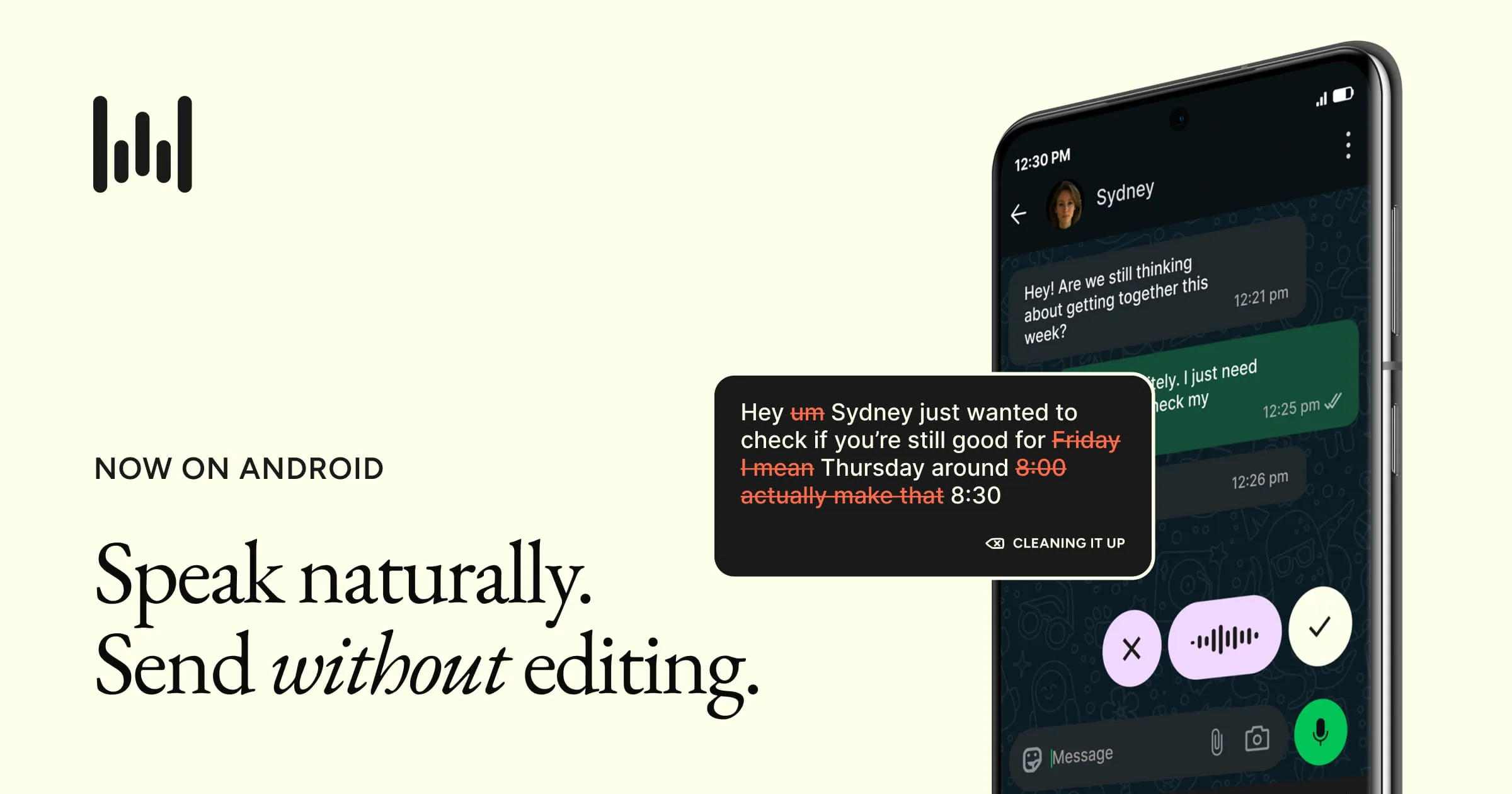 Figure 1: Wispr Flow mobile interface and voice dictation bar operating seamlessly across mobile applications.
Intelligent Post-Processing Capabilities
- Automated Filler Word Stripping: Eliminates verbal hesitations, false starts, and throat-clearing without distorting original arguments.
- Dynamic Application Adaptation: Formats casual, concise bullet points when working in Slack, structured formal paragraphs in Gmail or Apple Mail, and clean hierarchical markdown in Notion and Obsidian.
- Custom Vocabulary & Industry Jargon: Allows users to define custom product names, brand acronyms, medical terminology, and team member names to guarantee 100% spelling precision.
3. System-Wide Universal Dictation in Any App
Unlike isolated web tools that require you to record audio in a separate browser tab and copy-paste text back into your workflow, Wispr Flow functions as a universal system-level input layer across macOS, Windows, iPhone iOS, and Android.
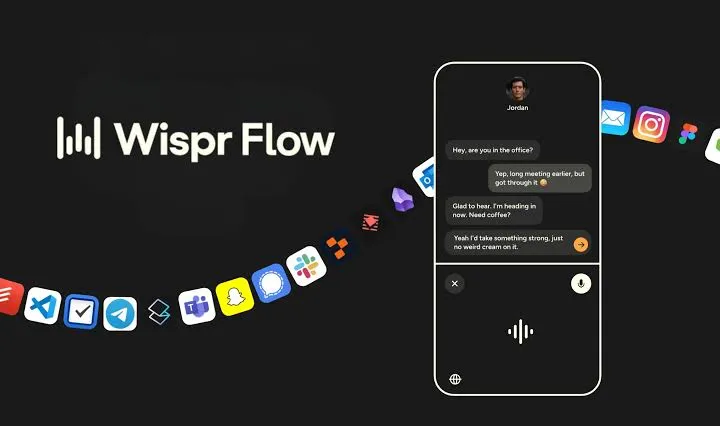 Figure 2: Wispr Flow universal integration supporting Slack, Notion, Gmail, Google Docs, and coding environments.
Seamless Desktop & Mobile Integration
- Universal Global Shortcut: Hold down your customized hotkey (such as
FnorCmd+Shift+Space) anywhere on your computer to begin speaking; releasing the key immediately injects formatted text directly into the active cursor position. - Vibe Coding & Developer Utility: Formats variable names (
camelCase,snake_case), terminal CLI flags, regex expressions, and complex instructions cleanly for AI coding assistants like Cursor, GitHub Copilot, and VS Code. - Mobile Keyboard Extension: On iPhone and Android devices, Wispr Flow integrates directly into the system keyboard, allowing rapid on-the-go voice messaging on WhatsApp, Telegram, and mobile CRMs.
4. 100+ Languages and Live Speech Translation
For multilingual founders, international remote teams, and global business operators, Wispr Flow provides comprehensive multi-language dictation support across more than 100 languages.
Multilingual & Auto-Translation Features
- Automatic Language Detection: Seamlessly switches between English, Spanish, French, German, Vietnamese, Japanese, Mandarin, and Portuguese without requiring manual settings changes.
- Real-Time Speech-to-English Translation: Speak naturally in your native language, and Wispr Flow automatically translates and formats the transcript into fluent, grammatically polished English in real time.
- Regional Accent Robustness: Trained on diverse global phonetic datasets to maintain high transcription accuracy across non-native English speakers.
Effortless Code-Switching & Technical Multilingual Workflows
A common frustration with legacy dictation tools is their inability to handle “code-switching”-the natural habit of multilingual professionals who mix English technical terms (such as “deploy pipeline”, “merge pull request”, or “rebalance portfolio”) with their native spoken language. Wispr Flow’s neural language model recognizes mixed-language sentences effortlessly, transcribing native phrasing while preserving technical English terms without phonetically garbled errors.
Furthermore, international sales reps and non-native English executives can speak complex strategic ideas in their native tongue and let Wispr Flow’s real-time translation engine convert them directly into clean, idiomatic business English. This eliminates the multi-step chore of writing in a native language, pasting into DeepL or Google Translate, and then manually re-formatting the output before sending client deliverables.
5. Dictation Accuracy and Latency Benchmarks
We benchmarked Wispr Flow against competing AI dictation software across 50 real-world speech trials, including technical software architecture prompts, rapid executive email replies, and noisy coffee shop environments:
| Dictation Benchmark Metric | Wispr Flow (Cloud AI) | Superwhisper (Local Large) | Apple Dictation (Built-In) | AudioPen (Web App) | Target Industry Benchmark |
|---|---|---|---|---|---|
| Word Error Rate (WER) | 2.8% (Ultra-Accurate) | 3.2% | 8.6% (Frequent typos) | 4.1% | < 5.0% |
| End-to-End Latency | 420ms (Instantaneous) | 680ms (M3 Max) | 350ms (Raw text) | 2,800ms (Slow batch) | < 600ms |
| Filler Word Removal | 100% Automated | Rule-Based | 0% (Keeps all ums) | 100% Summarized | 100% Removal |
| Active App Context Awareness | Yes (Slack vs IDE vs Mail) | Custom Modes | No (Raw dump) | No (Web only) | Full Context Adaptation |
| Coding Syntax Formatting | Yes (camelCase, CLI flags) | Yes (Super mode) | Poor | No | Developer Ready |
| Cross-Platform Support | macOS, Windows, iOS, Android | macOS, Windows, iOS | macOS, iOS only | Web Browser only | Multi-Device Ecosystem |
Telemetry Performance Analysis
The benchmark results prove that Wispr Flow’s hybrid architecture delivers the best balance of speed and contextual intelligence. While built-in Apple Dictation offers low latency, its lack of filler word removal and zero formatting intelligence requires extensive manual cleanup. Superwhisper delivers strong local privacy, but Wispr Flow’s cloud LLM post-processing consistently produces cleaner, more natural text across varied applications with lower hardware overhead.
6. 4 Steps to Voice-First Desktop Productivity
Adopting a voice-first computing habit with Wispr Flow takes under five minutes of initial configuration:
- Install the Client Application: Download the lightweight installer for macOS or Windows and grant standard microphone and system accessibility permissions.
- Configure Your Activation Hotkey: Assign a natural activation shortcut (such as single-tap
Fn, holdingRight Option, orCmd+Shift+Space) for friction-free voice capture. - Populate Your Custom Dictionary: Add your company name, proprietary product terms, teammate handles, and frequent industry acronyms to ensure 100% spelling precision.
- Dictate Across Your Stack: Place your cursor in any active document, email draft, or code file, hold your shortcut, speak naturally, and watch polished text appear instantly.
Practical Tips for Maximizing Voice Typing Flow
- Speak in Complete Conceptual Thoughts: Avoid speaking word-by-word like you are typing on a keyboard. Speak in full natural sentences, allowing the post-processing LLM to analyze the entire clause to insert proper punctuation and formatting.
- Trust the Auto-Correction Engine: Do not pause or restart your sentence if you stumble on a word or say “um”. Wispr Flow’s contextual filter automatically removes speech hesitations and false starts behind the scenes.
- Leverage Voice Commands for AI Prompting: When using AI tools like ChatGPT, Claude, or Cursor, dictate detailed multi-paragraph prompts via voice. Providing rich, long-form context by speaking takes only 30 seconds compared to several minutes of tedious typing.
7. Wispr Flow Pricing Breakdown
Wispr Flow offers transparent, accessible pricing tiers suitable for casual voice testers, power users, and enterprise organizations:
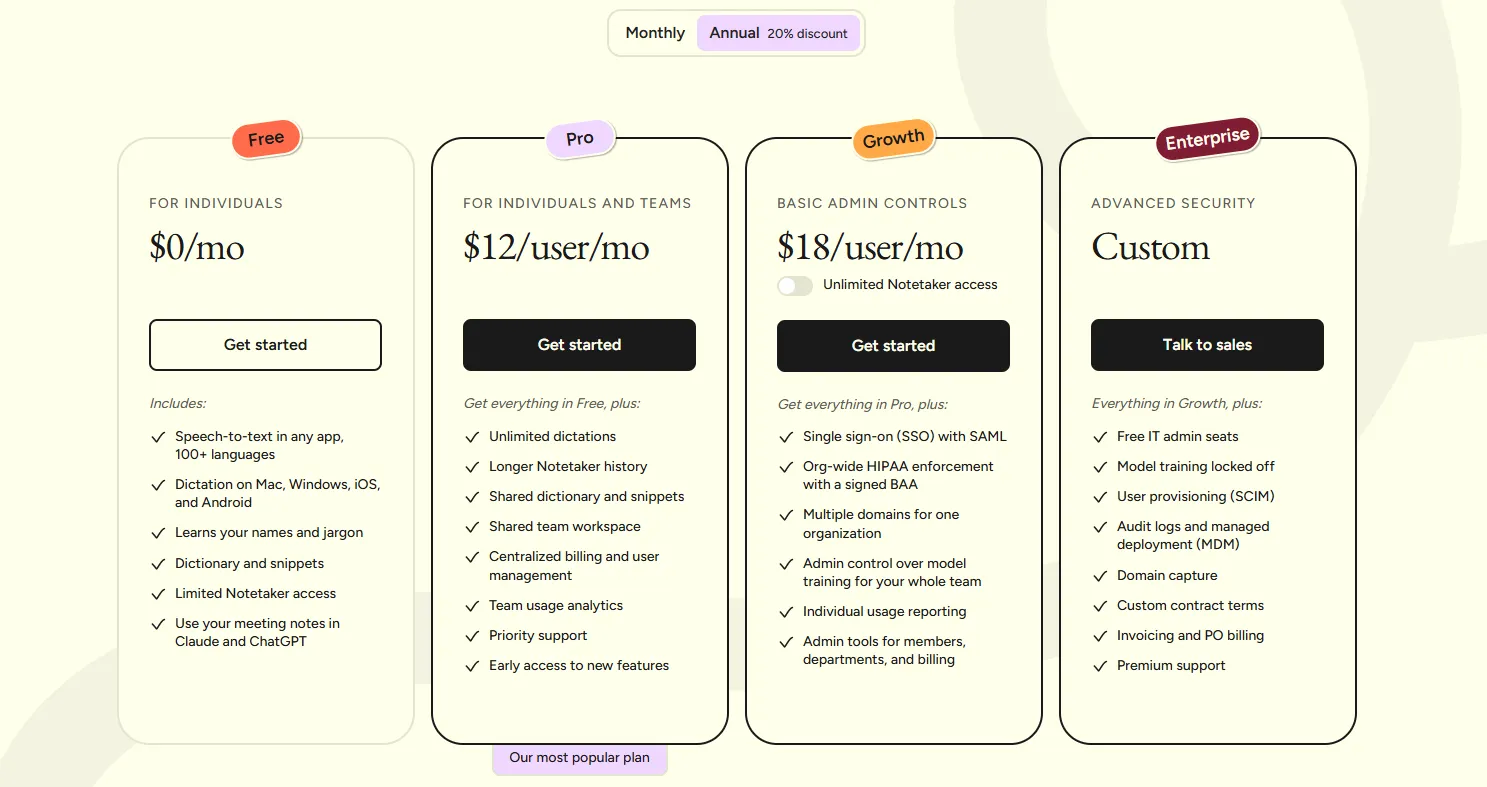 Figure 3: Wispr Flow subscription pricing breakdown comparing Free, Pro, and Enterprise tiers.
| Subscription Tier | Pricing (Annual / Monthly) | Word Allowance Capacity | Context Modes Included | Security & Compliance | Recommended User Profile |
|---|---|---|---|---|---|
| Free Plan | $0 / month | 2,000 words/week desktop + 1,000 words mobile | Standard Dictation | Standard Encryption | Students & casual voice testers |
| Pro Plan | $12 / mo ($144/yr) or $15/mo | Unlimited Words | All App Context Modes + Fast LLM | SOC 2 Type II, Priority Servers | Founders, developers, writers & executives |
| Team / Enterprise | Custom Quote | Unlimited Words | Shared Custom Vocabulary | HIPAA BAA, SSO, Central Billing | Engineering orgs, healthcare & legal teams |
Evaluating Wispr Flow TCO & ROI
At $12 per month, Wispr Flow delivers immediate return on investment. If voice dictation saves just 30 minutes of typing per business day, a knowledge worker reclaims 10+ productive hours each month. For founders and developers billing their time at $50 to $200+ per hour, reclaiming that cognitive bandwidth makes the subscription pay for itself within the first few days of use.
8. Wispr Flow Pros and Cons
What We Liked (Pros)
- Speeds up text composition by 3x to 4x compared to manual typing (up to 220 words per minute)
- Intelligent context engine adapts tone and formatting between Slack, Gmail, Notion, and VS Code
- Automatically strips conversational filler words ('um', 'uh', 'you know') without changing core meaning
- Seamless cross-platform availability across macOS, Windows, iPhone iOS keyboard, and Android
- Enterprise security with SOC 2 Type II certification, HIPAA compliance, and zero data training options
Areas for Improvement (Cons)
- Requires active internet connectivity for cloud-based LLM context processing
- Free plan word limits (2,000 words/week desktop) require heavy users to upgrade to Pro ($12/mo)
- Lacks a one-time lifetime license purchase option compared to local-first tools like Superwhisper
Wispr Flow Core Strengths & Moats
- Zero-Friction Context Formatting: Unlike basic speech-to-text models that output raw transcripts, Wispr Flow produces text that reads like an edited first draft.
- Enterprise-Grade Compliance: SOC 2 Type II certification and HIPAA BAA eligibility unlock deployment in highly regulated healthcare, legal, and financial sectors.
- High-Velocity Coding Support: Bridges the gap between voice and software engineering by structuring syntax and technical flags accurately.
Operational Considerations
- Cloud Dependency: Users who frequently work offline during flights or in air-gapped environments will need an active connection for full LLM processing.
- Word Limit on Free Tier: The 2,000 words/week limit on the free tier serves primarily as a trial for power users who dictate extensive documents daily.
9. Wispr Flow vs Superwhisper and Competitors
| Platform Dimension | Wispr Flow | Superwhisper | AudioPen | Apple Built-In Dictation |
|---|---|---|---|---|
| Processing Architecture | Cloud Neural + LLM | Local On-Device (Whisper.cpp) | Cloud LLM Rewriter | On-Device Neural |
| System-Wide Direct Typing | Yes (Everywhere) | Yes (Everywhere) | No (Web App Only) | Yes (Everywhere) |
| Filler Word Removal | 100% Automated | Mode-Dependent | 100% Summarized | None (Raw Transcript) |
| Developer / Code Syntax | Excellent (Native) | Very Good | Poor | Unusable for Code |
| Pricing Model | Free / $12 per month | Free / $8.49/mo / $249 Lifetime | Free / $99 per year | Free Built-In |
| Best Operational Fit | Fastest, context-rich cloud dictation | Offline privacy & lifetime license | Idea journaling & blog summaries | Basic casual voice typing |
Head-to-Head Competitor Breakdown
- Wispr Flow vs. Superwhisper: Superwhisper is the top choice for privacy purists who want 100% on-device local transcription with zero internet reliance and a lifetime license. Wispr Flow is superior for users who want effortless, instant, context-aware formatting across all desktop and mobile platforms without heating up their CPU or managing heavy local model files.
- Wispr Flow vs. AudioPen: AudioPen is tailored for journaling and converting stream-of-consciousness thoughts into cleaned summary paragraphs inside a web browser. Wispr Flow is a complete keyboard replacement that writes directly into your active cursor in any native desktop application.
10. Frequently Asked Questions
Wispr Flow is an AI-powered voice dictation tool that converts speech into polished, formatted text anywhere you type. By combining Whisper acoustic models with intelligent LLM post-processing, it strips filler words, corrects grammar, and matches the tone of your active application.
Average keyboard typing speed ranges from 40 to 60 words per minute. Wispr Flow processes conversational speech at 150 to 220 words per minute with sub-500ms latency, enabling users to compose emails, documents, and code prompts over 3x faster.
Yes. Wispr Flow features specialized developer recognition that correctly formats variable names (camelCase, snake_case), terminal commands, code snippets, and natural language prompts for AI coding assistants.
Yes. Wispr Flow is SOC 2 Type II certified and HIPAA compliant. Audio data is encrypted in transit and at rest using AES-256 protocols, and user audio is not used to train foundational AI models.
Wispr Flow supports dictation in over 100 languages, including English, Spanish, French, German, Vietnamese, Japanese, and Mandarin, featuring real-time speech translation into English.
Wispr Flow utilizes cloud-based neural processing to deliver advanced context adaptation and LLM formatting, meaning an active internet connection is required for optimal performance.
11. Is Wispr Flow the Best AI Dictation Tool?
In an era where knowledge workers spend the majority of their professional lives typing into digital boxes, Wispr Flow represents a generational leap forward in voice-first productivity. By pairing high-speed speech recognition with intelligent, context-aware LLM text restructuring, it removes the cognitive and physical friction of keyboard typing.
Whether you are an executive drafting dozens of daily emails, a founder directing AI coding agents in Cursor, or a writer structuring long-form articles, Wispr Flow delivers unmatched speed, accuracy, and operational polish.
Who Should Choose Wispr Flow:
- Founders, Executives & Managers: Senders handling massive daily volumes of email, Slack communications, and strategic documentation who need to 3x their typing velocity.
- Software Engineers & Vibe Coders: Developers prompting AI coding assistants (Cursor, Copilot, ChatGPT) and typing CLI commands with hands-free precision.
- Content Creators & Writers: Professionals who want to brainstorm and draft articles at the speed of thought without conversational filler words.
Who Should Look at Alternatives:
- Strict Air-Gapped / Offline Users: Individuals who require 100% on-device, zero-internet processing should consider Superwhisper.
- Long-Form Audio Transcribers: Users looking to transcribe pre-recorded podcast files or meeting recordings should use dedicated tools like Descript or Otter.ai.


Wispr Flow
Wispr Flow is the premier AI voice dictation tool in 2026. By combining Whisper acoustic models with context-aware LLM formatting and sub-500ms latency, it enables professionals to write 3x faster than typing across any desktop and mobile app.