





1. Transforming Business Spreadsheets into Secure Enterprise Software
In the mid-2010s, former Microsoft engineers David Siegel and Jason Smith recognized a fundamental paradox in enterprise computing. Spreadsheets represented the most ubiquitous database software in human history, powering trillions of dollars in daily corporate operations across every global industry.
Yet despite their widespread computational utility, spreadsheets remained terrible user interfaces for operational workflows. Sharing a raw Google Sheet or Excel workbook with twenty warehouse managers or field technicians created severe data corruption risks, broken formulas, and accidental cell overwrites.
David Siegel and Jason Smith founded Glide to resolve this friction. Their core insight centered on treating spreadsheets as foundational database backends while decoupling data entry through modern visual software interfaces.
This technical Glide review examines how the modern platform bridges the gap between spreadsheet simplicity and enterprise software governance. Direct integration with Google Sheets, Airtable, and enterprise SQL databases allows Glide to transform static rows into dynamic internal business portals.
Enterprise computing often traps non-technical operational leaders between rigid legacy systems and overburdened IT backlogs. Simple departmental adjustments like adding an approval status column often languish for weeks waiting on front-end engineering sprints. Glide eliminates that bottleneck by providing immediate visual parity with underlying table columns.
Instead of writing custom React frontends or managing complex mobile deployment pipelines, operational leaders assemble complete business applications visually. Field technicians, inventory auditors, and project managers interact with polished mobile screens while underlying database tables synchronize in real time.
Internal operations teams face escalating security scrutiny from corporate compliance officers. Uncontrolled spreadsheets floating across employee inboxes expose confidential payroll figures, customer addresses, and proprietary pricing calculations to accidental data leaks.
Glide provides the architectural guardrails necessary to operationalize spreadsheet data safely. Granular permissions and automated audit logging ensure that corporate data remains protected without sacrificing operational agility:
| Internal Tooling Approach | Development Lead Time | Maintenance Overhead | Data Security Posture |
|---|---|---|---|
| Shared Raw Spreadsheets | Zero initial setup | High risk of manual cell corruption | Unprotected, exposes all rows to all users |
| Custom Internal React Apps | 8 to 12 weeks of engineering | Heavy developer payroll and library updates | Strong security requiring manual auth code |
| Glide No-Code Platform | 1 to 2 days of visual assembly | Fully managed hosting with zero DevOps | Turnkey server-side Row-Level Security |
Operational managers frequently discover that internal software projects stall in central IT backlogs for months. Empowering department heads to build their own tools removes friction, allowing companies to respond to operational bottlenecks in days rather than quarters.
2. Synchronizing Data Tables Across Google Sheets and Airtable
The technological foundation of Glide begins at the data layer. Rather than forcing organizations to migrate their operational records into a proprietary locked database, Glide establishes continuous two-way synchronization with existing enterprise repositories.
Connecting a Google Sheet takes less than two minutes. The Glide engine reads column headers, infers appropriate data types, and generates initial list views automatically.
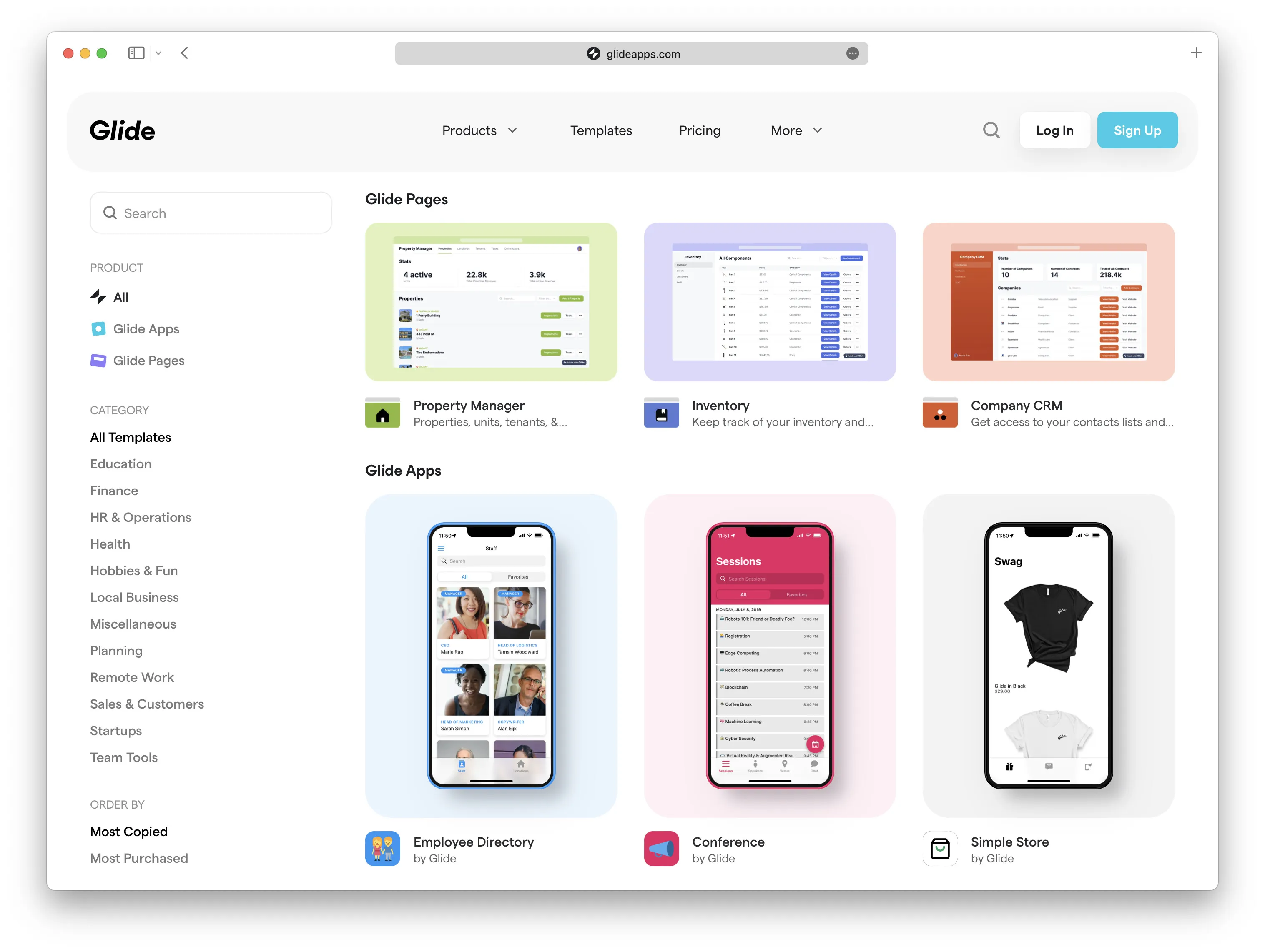 Glide templates ecosystem showing diverse internal business tools and data collection interfaces
Enterprise software teams configure data integrations across multiple storage backends depending on organizational scale. Glide coordinates synchronization across 4 primary operational spreadsheet formats:
- Google Sheets & Excel: Best for collaborative internal reporting up to 25,000 rows with familiar spreadsheet formulas.
- Airtable Relational Bases: Ideal for creative workflows, rich media management, and complex multi-table linked records.
- Native Glide Tables: Optimized high-speed cloud tables supporting up to 25,000 rows with zero third-party Application Programming Interface (API) sync latency.
- Offline Device Storage: Caches mutations locally on mobile hardware, syncing queued edits within seconds of re-establishing connectivity.
When a field technician updates an inventory quantity inside the Glide mobile interface, that mutation synchronizes back to the underlying Google Sheet row instantly. Conversely, when an accountant updates pricing formulas inside the master spreadsheet, Glide updates all connected application screens in real time.
Organizations utilizing relational database modeling in Airtable can build client-facing customer portals that surface underlying data without exposing raw base access. This architecture shields sensitive corporate workflows from unauthorized external edits.
Data synchronization handles network disconnects gracefully. When field workers lose internet connectivity inside underground warehouses, Glide caches edits locally on the mobile device and transmits mutations automatically once connectivity restores.
Calculated columns execute directly inside Glide cloud servers without polluting underlying spreadsheets. Developers build complex rollup calculations, conditional lookup tags, and template strings that compute instantly across thousands of records.
Relation columns create relational database links between separate tables without writing SQL join statements. Linking an employee table with an equipment assignment table allows managers to inspect assigned hardware with a single tap.
3. Scaling Enterprise Datasets with Glide Big Tables and SQL Backends
Standard spreadsheets degrade rapidly when tables exceed several thousand rows. Google Sheets throttles external Application Programming Interface (API) calls when concurrent users trigger simultaneous cell updates, creating sync delays during peak business hours.
Glide overcomes spreadsheet scaling barriers through its proprietary Big Tables infrastructure. Big Tables support up to 10,000,000 rows (10M rows) within a single workspace, delivering sub-second search speeds across massive enterprise inventories.
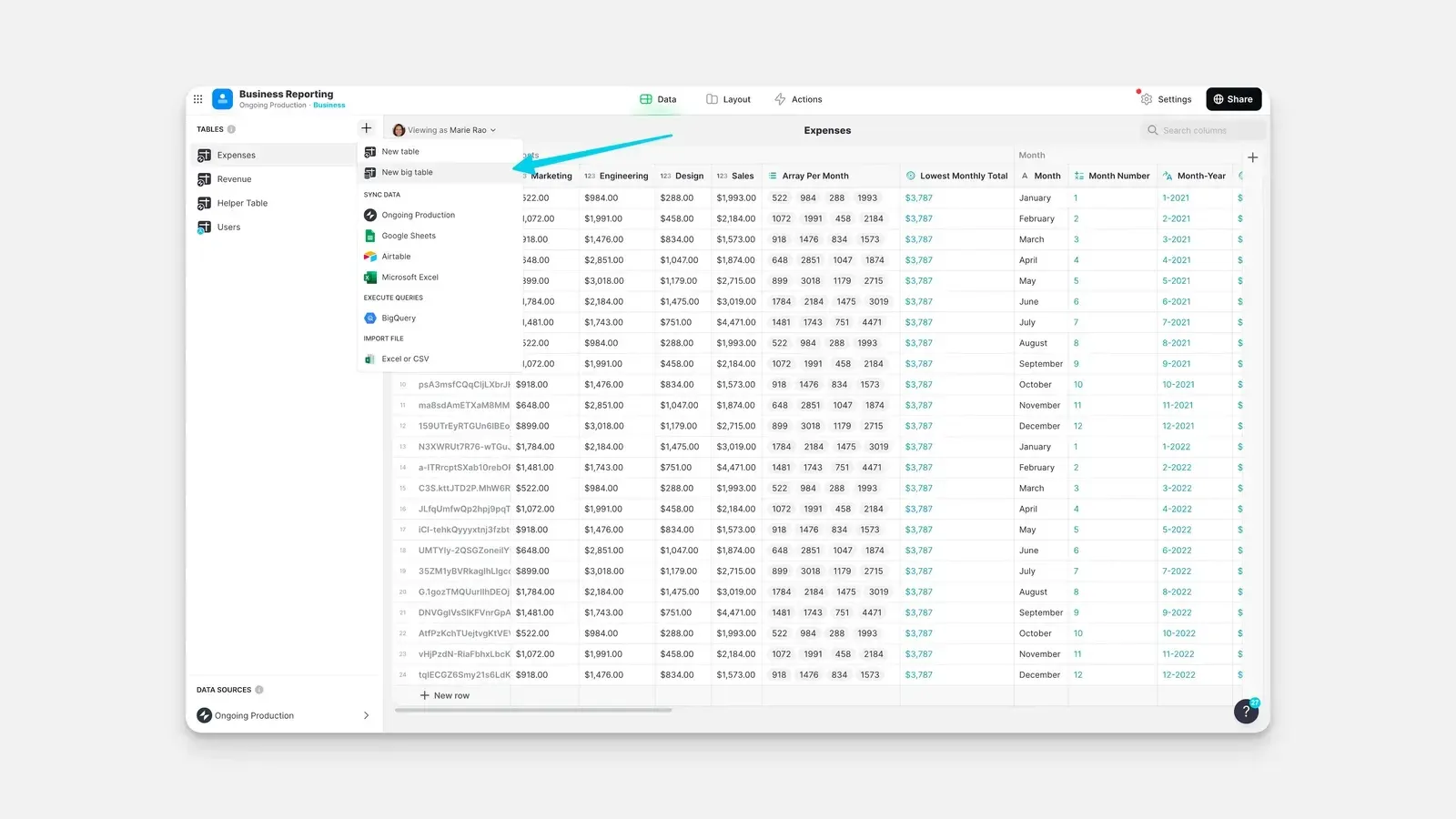 Glide Data Editor showing Big Tables provisioning alongside Google Sheets, Airtable, and BigQuery connections
High-volume operations connect directly to external Structured Query Language (SQL) repositories. Glide integrates natively with four primary enterprise database engines:
- PostgreSQL: Reliable relational transactions for complex operational ledgers and multi-table accounting systems.
- MySQL: High-speed transactional storage for e-commerce inventories and customer support ticket repositories.
- Microsoft SQL Server: Seamless corporate data connectivity for enterprise IT environments running on Microsoft Azure infrastructure.
- Google BigQuery: Analytical data warehouse queries supporting petabyte-scale historical reporting and executive operational dashboards.
Server-side query pushdown ensures mobile clients receive only requested data records. Rather than downloading millions of rows to employee phones, Glide executes sorting and filtering directly inside high-performance cloud databases. Data loads smoothly.
Direct SQL connections bypass third-party connector rate limits entirely. Enterprise teams maintain uninterrupted real-time access to production records without paying intermediate middleware sync fees.
4. Constructing Modern User Interfaces with Prebuilt Components
Traditional frontend software development requires writing thousands of lines of CSS styling, managing mobile viewport breakpoints, and testing cross-browser rendering quirks. Glide eliminates manual UI styling by providing a cohesive design system composed of adaptive prebuilt components.
Developers construct interfaces using a visual canvas that mirrors both desktop browser views and handheld mobile screens. Layouts adapt responsively based on the user display, expanding into multi-column table dashboards on desktop monitors while collapsing into touch-friendly cards on smartphones.
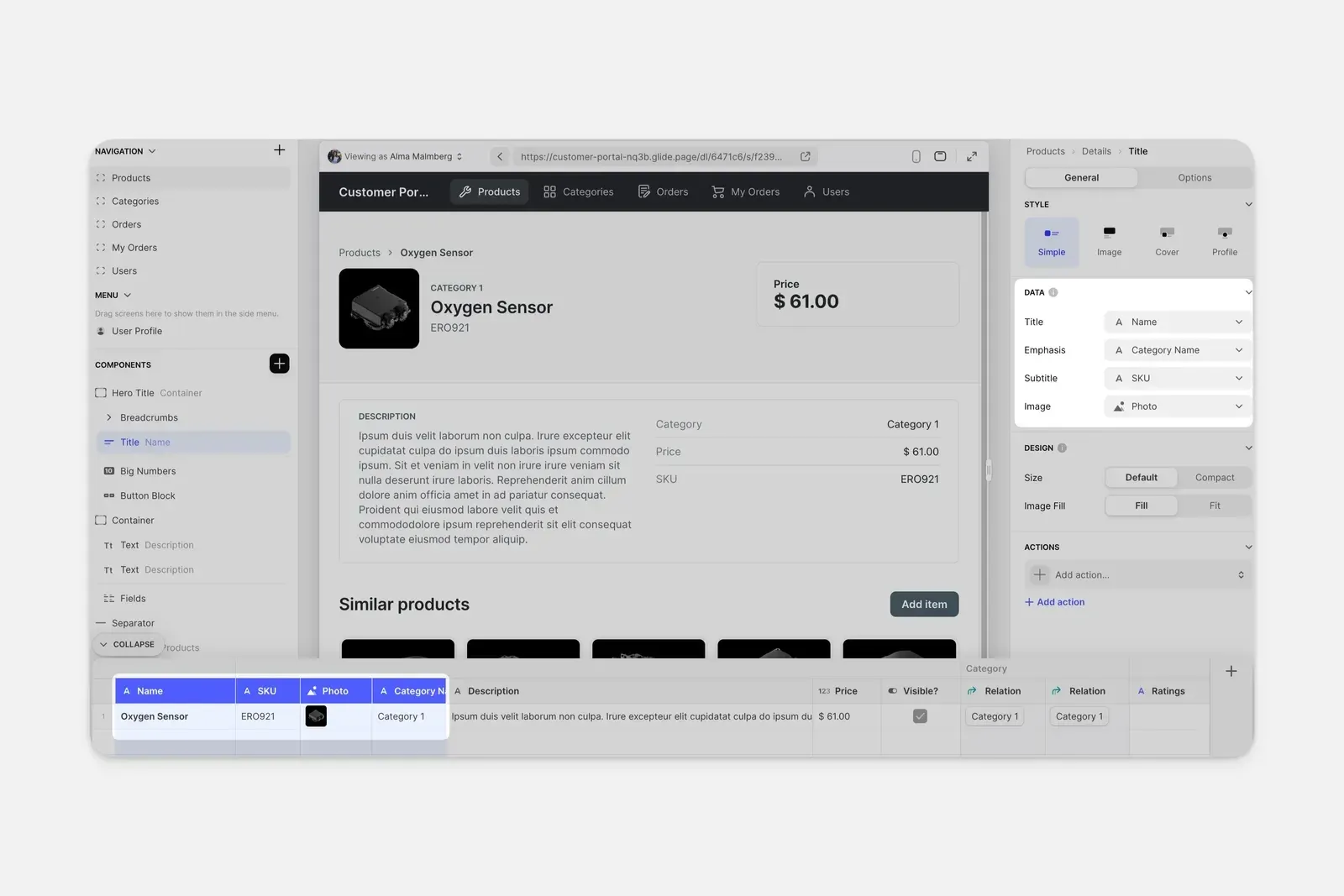 Glide visual layout editor showcasing component hierarchy, data bindings, and live device preview
The component library covers standard operational requirements out of the box across 4 functional categories:
| UI Component Class | Primary Functional Elements | Common Operational Use Cases |
|---|---|---|
| Collection Views | Grid cards, Kanban boards, interactive calendars, interactive maps | Inventory browsing, job dispatching, employee directories |
| Form Controls | Image uploaders, barcode scanners, signature pads, date pickers | Field inspection audits, equipment sign-outs, incident logs |
| Detail Screens | Key-value pairs, rich text blocks, progress rings, image carousels | Customer profile reviews, machinery maintenance logs |
| Interactive Actions | Single-click call buttons, SMS triggers, automated webhook dispatches | Driver dispatching, emergency alerts, manager approvals |
Hardware sensor integration delivers practical field utility. Warehouse workers tap camera scanner components to read standard UPC and QR barcodes, populating inventory stock forms without manual keystroke errors.
Signature capture components allow delivery drivers to collect signed customer acknowledgments on glass. The captured signature stores securely as an image file linked to the specific delivery record row in the master database.
Design consistency remains strictly maintained throughout the application lifecycle. Because Glide enforces structured typography and spacing rules, non-technical operational managers cannot accidentally create visually broken or illegible application screens.
Teams comparing visual builders with prompt-driven custom code generators like Emergent find that visual builders offer faster layout adjustments for non-developers. While prompt code generation creates raw code, Glide allows operational managers to drag and rearrange components with zero coding background.
Custom branding options allow organizations to apply corporate identity standards. Companies configure custom accent colors, upload corporate logos, and select light or dark interface themes that align with corporate brand guidelines.
Design tokens automatically govern component spacing and contrast levels across all viewports. When warehouse personnel transition between high-glare outdoor loading docks and indoor control rooms, high-contrast typography maintains legibility without manual styling adjustments.
Responsive breakpoints adapt seamlessly across tablets, smartphones, and desktop monitors. Operational teams configure single interface views that intelligently expand into multi-column table layouts on widescreen monitors while collapsing into thumb-friendly stacked lists on mobile devices.
5. Enforcing Row-Level Security for Enterprise Data Governance
The single most dangerous error when building internal tools on spreadsheets is accidental data exposure. When an organization builds a client portal, displaying customer financial data or competitor pricing quotes represents an immediate legal and commercial disaster.
Glide eliminates data leakage through server-side Row-Level Security (RLS). Unlike superficial client-side CSS visibility rules that merely hide HTML elements in the browser, RLS filters data on Glide cloud servers before transmitting records over the network.
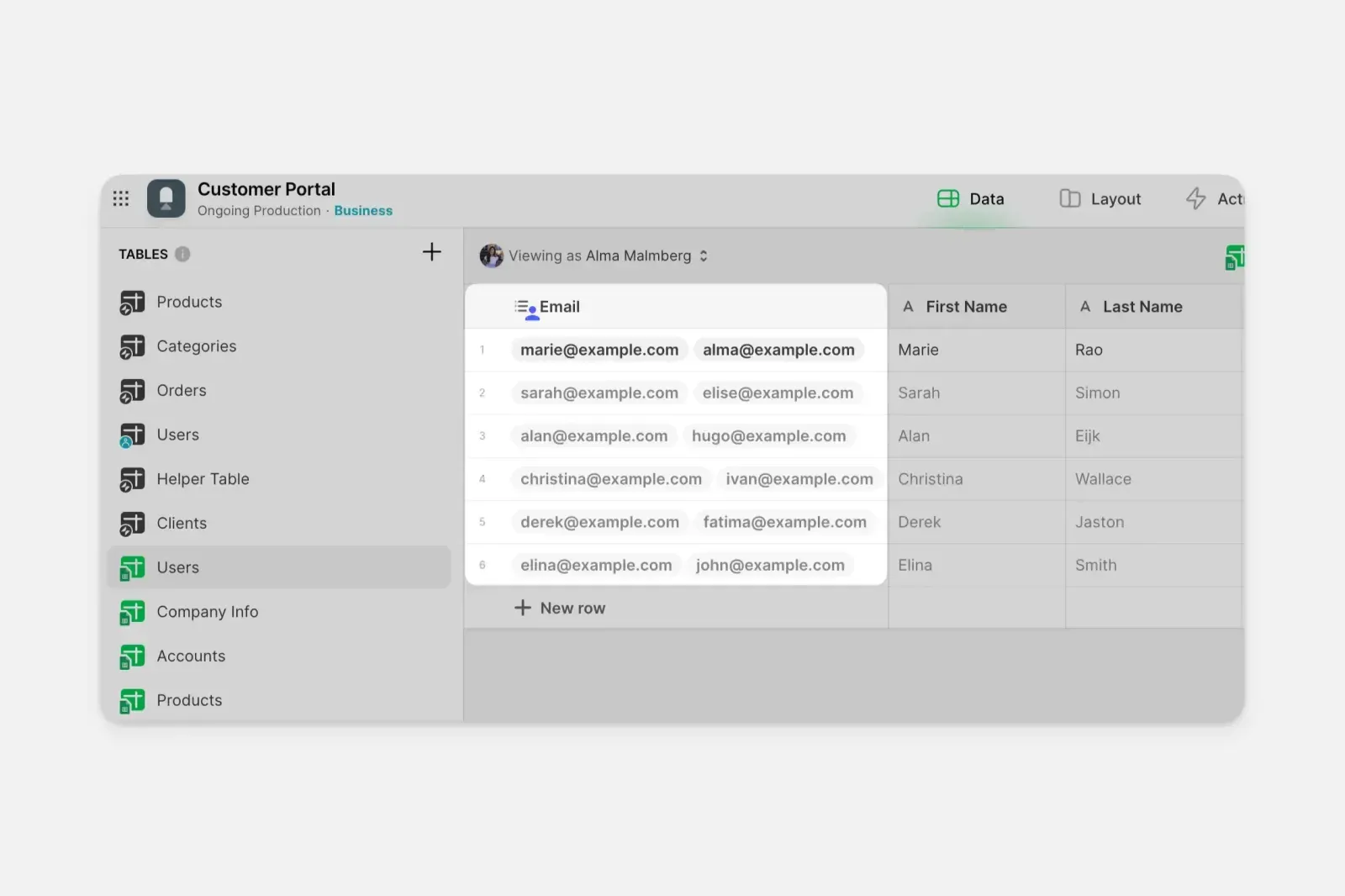 Glide Row Owners configuration interface showing server-side email filtering and role permissions
When a user logs in, Glide inspects their authenticated email address and assigned organizational role. The server applies strict conditional filters, transmitting only the rows where the user email matches the assigned owner column.
Malicious users inspecting browser network packets cannot uncover unauthorized records. The server never delivers unauthorized rows to the client device, fulfilling strict corporate data isolation standards.
Role-Based Access Control (RBAC) layers on top of Row-Level Security to govern functional capabilities across 4 operational roles:
- Admin Role: Full administrative privileges to edit application layouts, modify database structures, and reassign user access permissions.
- Manager Role: Operational oversight to review team submissions, reassign open job tickets, and approve purchase orders.
- Field Technician Role: Restricted read and write access strictly limited to assigned service appointments and customer notes.
- External Client Role: Sandboxed read-only access displaying project milestones and downloadable invoice records.
Enterprise compliance standards govern high-tier deployments. Glide maintains verified Service Organization Control 2 (SOC 2) Type II certification and supports Health Insurance Portability and Accountability Act (HIPAA) compliance for healthcare workflows.
Single Sign-On (SSO) integrates with corporate identity providers including Google Workspace, Microsoft Azure Active Directory, and Okta. IT directors enforce multi-factor authentication policies globally without managing separate application credentials.
Public applications can also utilize pin authentication and temporary email codes. External contractors log into specific job tickets without creating permanent corporate domain accounts, preserving security hygiene across vendor networks.
6. Automating Internal Operations via Multi-Step Visual Actions
Collecting business data serves little purpose if that data remains static. Modern operations demand automated workflows that notify managers, trigger external logistics webhooks, and update downstream billing systems instantaneously.
Glide Actions provide a visual automation engine that executes sequential logic branches upon user interaction. A single button tap can update three table rows, send a customized confirmation email, log an audit timestamp, and navigate the user to a summary dashboard.
The action builder supports conditional branching logic. Restock orders totaling under five hundred dollars trigger automatic approvals, while larger expenditures route immediately to department directors for review.
External integrations link Glide applications directly with popular cloud services across 4 core operational channels:
- Slack & Microsoft Teams: Dispatches real-time operational alerts when field workers report equipment malfunctions or hazardous conditions.
- Gmail & Outlook: Generates templated transactional notifications and PDF delivery receipts sent directly to customers.
- Zapier & Make: Connects internal application mutations with thousands of external SaaS platforms and cloud marketing tools.
- Glide AI Integration: Extracts structured text from photographed receipts, summarizes audio field notes, and classifies customer support ticket sentiment automatically.
Connecting operational portals with internal team wikis in Notion allows companies to link standard operating procedure documentation directly into task detail screens. Workers access step-by-step training guides without switching away from active job tickets.
Webhooks allow developers to trigger serverless cloud functions on AWS or Google Cloud. When an inspection report completes, Glide sends a secure JSON payload to external Application Programming Interface (API) endpoints to initiate inventory reordering routines automatically.
Idempotency tokens embedded in webhook headers protect backend data pipelines from duplicate submissions. When poor field connectivity causes a mobile device to retry an HTTP request, target accounting systems safely discard duplicate payloads without double-billing clients.
Multi-step workflows also support scheduled background runs. Glide can scan employee certification expiration dates daily, sending automated reminder notifications thirty days before required safety licenses lapse.
Event audit histories preserve detailed execution logs across all triggered automations. System administrators inspect payload responses, diagnostic status codes, and execution timestamps to troubleshoot broken third-party integration pipes quickly.
7. Scaling Desktop and Mobile Performance for Distributed Teams
Modern distributed enterprises require operational software that executes reliably across diverse hardware form factors. Field technicians manage daily service routes on ruggedized handheld smartphones, while central dispatchers monitor fleet logistics across high-resolution multi-monitor desktop workstations.
Glide satisfies these conflicting demands by compiling applications into responsive Progressive Web Apps (PWAs). Rather than maintaining separate native binaries for iOS and Android, engineering teams deploy a single unified codebase that runs in modern mobile and desktop web browsers.
Users install Glide applications onto mobile home screens directly from web browsers without navigating commercial app store approval queues. This distribution model eliminates the multi-week review delays common with Apple and Google app stores, allowing operational leaders to push critical workflow updates instantly.
Client-side caching architectures ensure rapid screen transitions during heavy operational usage. When field workers navigate between asset inspection tabs, Glide retrieves pre-cached component trees from local device memory in under 200 milliseconds, eliminating blank loading screens during intermittent network dips.
Touch-driven interface components render at a consistent 60 frames per second on modern mobile hardware. Smooth scroll physics and instant button feedback create an ergonomic user experience indistinguishable from native operating system software.
Performance optimization algorithms compress uploaded image attachments before transmission. High-resolution photographic evidence captured on mobile cameras scales down intelligently, preserving bandwidth quotas while maintaining visual clarity for diagnostic inspections.
Centralized fleet administrators monitor application performance metrics through real-time telemetry dashboards. System health indicators surface sync latency figures and offline cache states, ensuring distributed field teams maintain uninterrupted operational continuity around the clock.
8. Workspace Tiers and Subscription Credit Economics
Glide structures its commercial pricing around workspace tiers that balance team member seats, published application limits, enabled workflows, and monthly AI credits. Understanding how Glide meters credits and features across its 5 plans is essential for forecasting operational expenses accurately.
In the modern Glide billing model, credits power autonomous agent executions, automated backend workflows, and integrated artificial intelligence features across connected applications. Viewing records, applying client-side search filters, and standard user navigation consume zero credits.
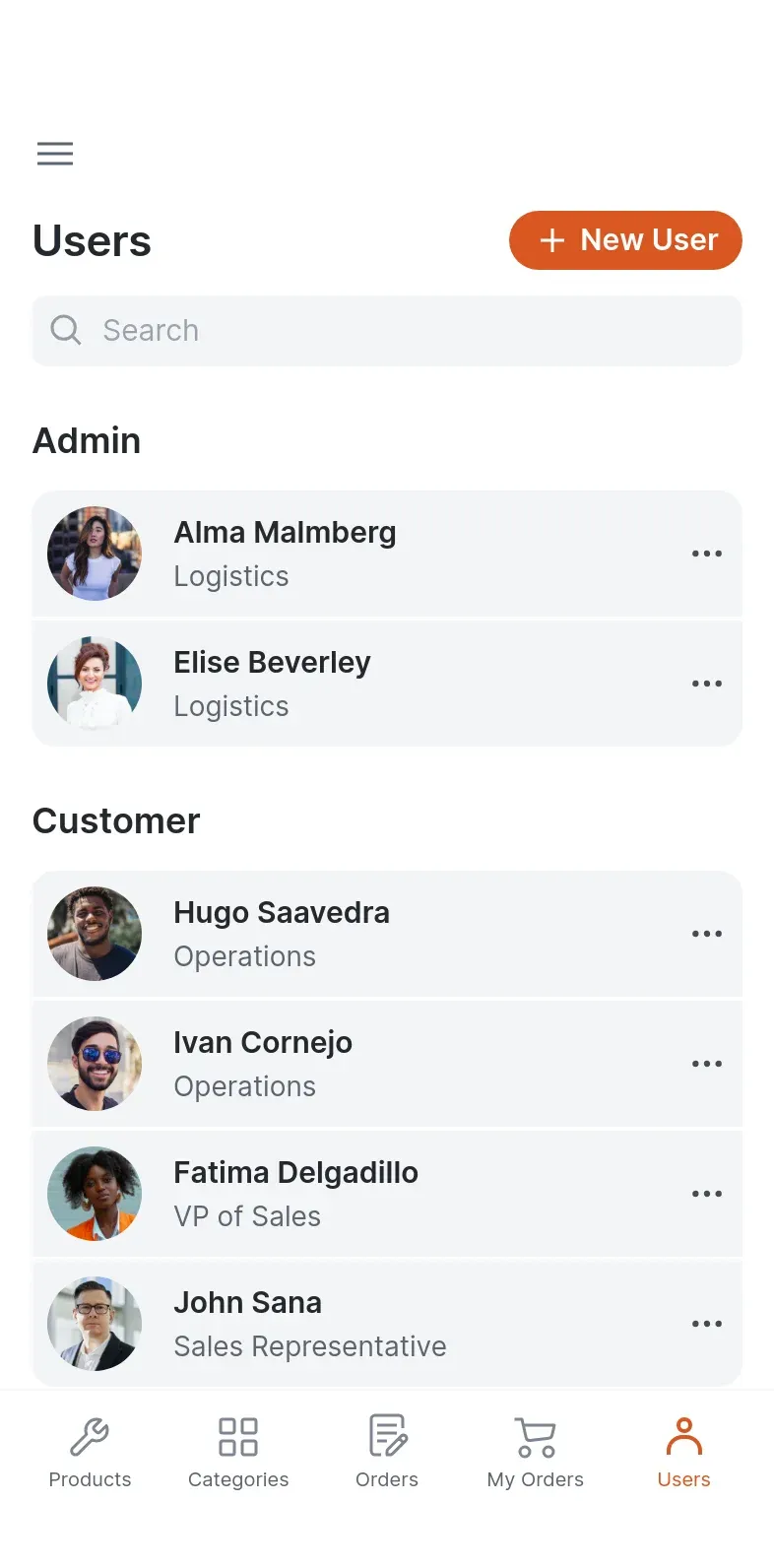 Glide mobile application preview interface illustrating responsive touch-first navigation layouts
The platform provides a Free tier designed for initial learning, prototyping, and personal exploration. This plan includes 2 team members, up to 10 projects, basic integrations, and limited credits to evaluate AI features in sandbox environments before publishing.
| Glide Subscription Tier | Monthly Price | Included Credits & Members | Projects & Published Apps | Target Organizational Use Case |
|---|---|---|---|---|
| Free | $0 per month | Limited credits, 2 members | 10 projects, 0 published apps | Individual builders exploring component layouts and testing AI capabilities |
| Basic | $25 per month | 100 credits, 2 members | 2 published apps, 1 workflow | Solitary creators building personal and team apps with flexible agent modes |
| Plus | $50 per month | 250 credits, 3 members | 20 projects, 5 published apps, 5 workflows | Small teams building and publishing public-facing business web applications |
| Pro (Recommended) | $125 per month | 500 credits, 5 members | Unlimited published apps and workflows | Teams deploying complete internal tools with MCP agents and org permissions |
| Enterprise | Custom contract quote | Custom team size and credits | Unlimited enterprise apps and workflows | Large corporations requiring SSO, custom LLM selection, and dedicated SLAs |
For individuals and early-stage founders building dedicated internal tools, the Basic plan costs $25 monthly. It provides 100 credits, 2 team member seats, unlimited guests, up to 2 published apps, and 1 enabled workflow. Builders can select specialized agent execution modes (light, medium, or heavy) to match the computational complexity of background tasks.
Growing organizations needing multi-app delivery utilize the Plus tier at $50 monthly. This plan expands capacity to 250 credits, 3 team members, 20 projects, 5 published apps, and 5 enabled workflows, alongside support for public web application publishing.
The Pro plan ($125 monthly, highlighted as the recommended tier) serves teams requiring unrestricted operational breadth. It includes 500 credits across a baseline of 5 team members, with 50 credits automatically included per member. Pro unlocks unlimited published apps, automated workflows, organizational permissions, and custom agent development through the Model Context Protocol (MCP).
Large enterprises requiring custom governance negotiate custom agreements. The Enterprise plan provides custom team sizing, single sign-on (SSO), enterprise integrations, custom LLM provider selection, 30-day automated data backups, a dedicated success manager, and priority technical support.
9. Glide Core Strengths and Advantages
No-code platforms frequently promise infinite flexibility but stumble on complex relational databases and strict security permissions. Over 450 verified operations managers on G2 score Glide at 4.7 out of 5, praising its rapid component canvas while highlighting its reliable data synchronization.
Operational Advantages
- Rapid Development Velocity: Transforms existing business spreadsheets into functional web and mobile applications in minutes.
- Server-Side Security Enforcement: Row-Level Security filters sensitive records before network transmission, preventing unauthorized data access.
- Broad Data Source Support: Connects smoothly with Google Sheets, Airtable, Excel, native Big Tables, and enterprise SQL databases.
- Zero Local Infrastructure: Managed cloud hosting, automatic SSL provisioning, and turnkey responsive styling eliminate maintenance overhead.
Comparing Glide against competing development approaches highlights distinct operational tradeoffs across 4 evaluation categories:
| Evaluation Dimension | Glide No-Code Platform | Custom React & Node.js Code | Form Builders (Typeform, Jotform) |
|---|---|---|---|
| Deployment Velocity | Functional apps in hours | 6 to 12 weeks of engineering | Fast form creation in minutes |
| Two-Way Data Sync | Real-time bidirectional database sync | Requires custom API endpoints | One-way data submission only |
| Security Architecture | Turnkey Row-Level Security and RBAC | Custom authentication engineering | Basic form password protection |
| App Store Distribution | Progressive Web App in browser | Native App Store binaries | Web browser forms only |
Custom code development grants complete architectural freedom and pixel-level styling control. However, software teams must budget substantial ongoing engineering hours for server maintenance, library updates, and security patch management.
Glide replaces that engineering overhead with structured visual assembly. Operations leaders who prioritize rapid tool deployment, high data security, and low ongoing maintenance find that Glide delivers exceptional operational leverage.
Internal hackathons frequently demonstrate the speed of Glide development. Cross-functional teams assemble functional asset tracking portals during a single afternoon, solving departmental pain points that sat in IT backlogs for months.
Equipment maintenance teams leverage mobile barcode scanning to log pump calibrations directly on plant floors. The instant synchronization eliminates handwritten clipboards and ensures compliance documentation updates without human data entry delays.
Field service companies report significant reductions in administrative paperwork. When technicians log repair details directly into mobile Glide interfaces, back-office dispatchers generate customer invoices hours faster, accelerating cash collection cycles.
10. Glide Operational Limitations and Practical Constraints
While Glide delivers outstanding ergonomics for internal software development, specific architectural boundaries and commercial policies introduce operational friction for growing teams. Evaluating these constraints helps operations directors select the right deployment strategy before migrating critical workflows.
Operational Constraints
- Credit Quota Sensitivity: Workflows involving complex recursive AI agents or frequent background tasks can exhaust monthly credit allocations rapidly.
- Progressive Web App Architecture: Does not compile into native iOS or Android app store binaries for consumer app store distribution.
- Pro Tier Minimum Seats: Unlocking unlimited applications and organization permissions requires adopting the Pro plan ($125 monthly) with a 5-member baseline commitment.
Credit quota consumption represents the most immediate operational constraint for data-intensive teams. When automated workflows execute frequent AI classifications or background agent tasks, each run consumes allocated credits. Operations architects must select appropriate agent modes (light, medium, or heavy) to prevent unexpected mid-billing quota exhaustion.
Distribution architecture introduces another fundamental platform boundary. Because Glide compiles applications into Progressive Web Apps rather than native iOS or Android binaries, public consumer distribution through Apple App Store or Google Play remains unsupported. Organizations seeking consumer-facing mobile products require native mobile frameworks instead.
Collaborative seat commitments on higher tiers require careful department forecasting. Basic accommodates 2 members at $25 monthly, whereas Pro starts at $125 monthly for 5 members with unlimited applications. Teams adding extra personnel must account for member seat expansions and credit utilization as collaborative projects multiply.
What We Liked (Pros)
- Converts existing business spreadsheets into functional web and mobile applications in minutes
- Server-side Row-Level Security prevents data exposure on shared multi-tenant client portals
- High-scale Big Tables support massive data inventories up to 10M rows smoothly
- Polished adaptive user interface renders responsively across desktop browsers and mobile devices
Areas for Improvement (Cons)
- Monthly credit quotas can deplete rapidly during recursive background AI agent workflows
- Applications deploy as Progressive Web Apps rather than native App Store downloadable binaries
- Pro tier adoption requires a 5-member minimum baseline commitment starting at $125 monthly
11. Frequently Asked Questions About Glide
Glide is a visual no-code development platform that connects to spreadsheets or SQL databases and automatically generates responsive web applications without writing manual code.
No. Glide applications deploy as Progressive Web Apps that run in modern web browsers and install onto mobile home screens without going through app store submission processes.
Row-Level Security evaluates user access conditions on Glide cloud servers before transmitting records to client browsers, ensuring users never receive unauthorized company data.
Monthly credits power artificial intelligence features, automated workflows, and autonomous background agent runs across your connected applications, while standard data viewing and navigation consume zero credits.
Glide supports Google Sheets, Microsoft Excel, Airtable, native Glide Tables, Big Tables, PostgreSQL, MySQL, SQL Server, and Google BigQuery.
While code generators produce raw repository files that require infrastructure hosting, Glide provides a fully managed visual runtime that non-technical teams can build and maintain visually.
12. Final Editorial Verdict on Glide
Glide fundamentally redefines how distributed teams construct internal software from existing business data. Empowering operations managers to transform Google Sheets, Airtable bases, and SQL repositories into responsive web applications removes long-standing engineering backlogs across enterprise departments.
The platform provides exceptional value for operational managers who need to replace fragile shared spreadsheets with secure, role-restricted portals. Server-side Row-Level Security ensures that sensitive payroll data, customer records, and inventory valuations remain completely protected without requiring custom authentication engineering.
While the Progressive Web App distribution model is unsuitable for consumer app store products and update limits require disciplined workflow planning, the operational efficiency gains are undeniable. For organizations seeking to eliminate manual data entry, streamline field operations, and deploy internal tools at lightspeed, Glide earns our highest editorial recommendation.


Glide
Glide stands as a leading no-code solution for turning Google Sheets, Airtable, and SQL databases into polished, secure internal applications without maintaining dedicated frontend codebases.